The law of figure-ground is a visual perception law or Gestalt principle. It describes how humans perceive an image as they separate it into the figure—foreground—and ground—background. Designers use it to create a clear visual hierarchy between the front “figure” and surrounding “ground,” and so guide users’ attention to important design elements.
Why is the Law of Figure-Ground Important?
The Gestalt law or principle of figure-ground (sometimes called “figure/ground” or “figure and ground”) is an essential principle of cognitive psychology. It’s valuable for designers who work in user experience (UX)—and particularly user interface (UI) design. This law is also called figure/ground—or figure and ground—and it’s a long-used staple in graphic design. When designers have a clear division between the foreground and background, it helps them to offer users the guidance they need to help them in performing tasks and get to and through the goals they want to on a website or app.
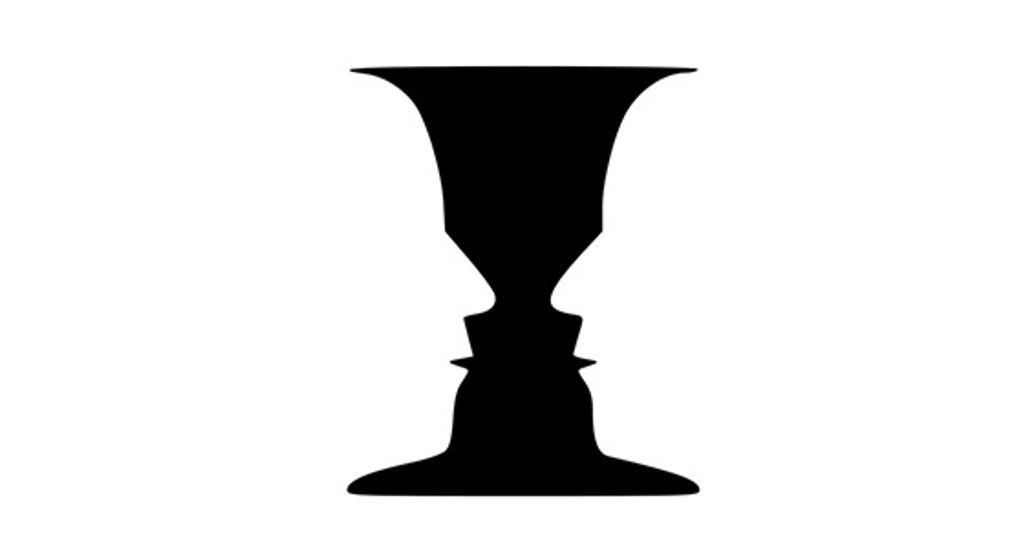
The Gestalt principles of perception describe how the human eye finds and the brain organizes visual elements into groups to find patterns. What is important to bear in mind is that this happens naturally for viewers—and users. Humans do it with very little information to cue from the individual elements we encounter. People see what they see because their minds automatically strive to find order and meaning in the world around them. For example, the Rubin vase—in the picture below—shows the figure-ground principle at work. A viewer sees either a black vase or two white faces looking at one another. They interpret one or the other—but not both images at the same time.

The phenomenon of perspective: the famous Rubin vase compels viewers to see one thing or another.
© Nicholas Amendolare, Fair Use
To be more precise, the principles of Gestalt psychology—also called Gestalt laws—are psychological principles that describe how human minds perceive visual elements their eyes show them. They suggest how human brains perceive objects and visual information—and that includes lines or curves and focal points—in certain ways. These principles include how an image is more than the sum of its parts—and how human minds typically group items into meaningful patterns. Because of this simple fact—which some may call a universal truth—the Gestalt laws are vital parts of a designer’s toolkit in visual design. That’s especially the case when it comes to optimizing user interfaces in a way to welcome users and assure them that, indeed, they can enjoy a good experience.
The roots of Gestalt theory are well-founded; they go back to Germany in the 1920s. The Gestalt school of psychology consisted of psychologists Max Wertheimer, Kurt Koffka, and Wolfgang Köhler. The Gestalt psychologists’ approach involved the development of some theories. These theories include: the law of Prägnanz—or good figure—common region, closed region, principle of similarity, principle of uniform connectedness, principle of proximity, principle of continuity, principle of closure, and figure-ground.
The figure is the object that appears to be in the front. Meanwhile, the ground is the area that surrounds the figure. This remarkably simple phenomenon explains why the figure-ground relationship is one of the fundamental concepts in visual perception. Designers use it to create meaningful—and often very striking—compositions in art and design. The foreground and background are tools that create contrast and balance and deliver a great sense of organization. This fact makes it easier for users to understand the content—and navigate the interface.
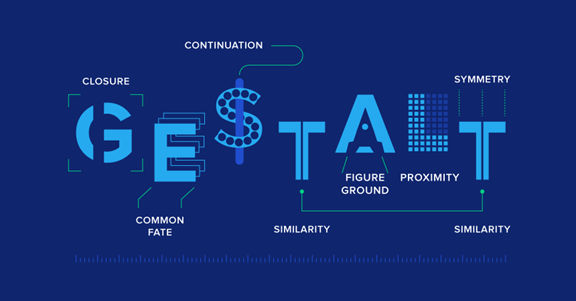
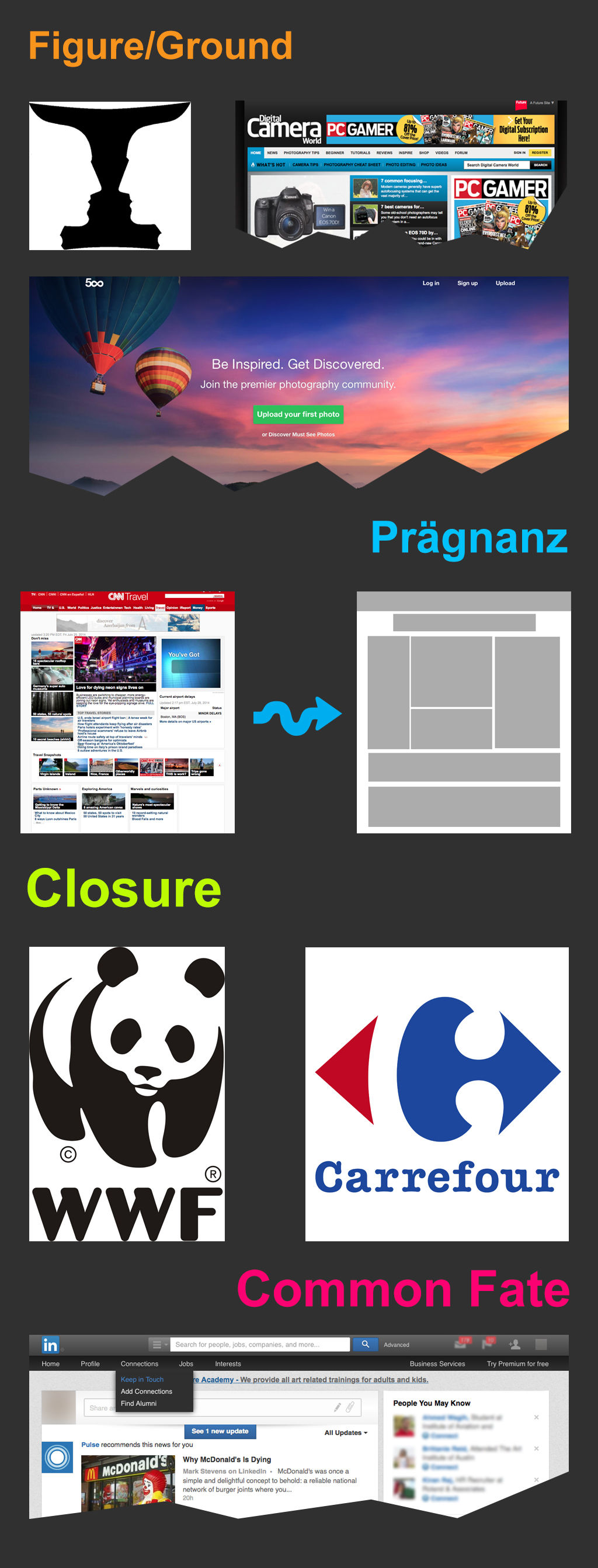
Figure-ground is a fundamental Gestalt principle, among others.
© Cameron Chapman, Fair use
How to Apply the Figure-Ground Principle in UX Design
Designers can apply the figure-ground principle—or law—in a variety of ways and with it make interfaces that are both visually appealing and functional. More specifically, designers can use the law of figure-ground in their designs to:
Create contrast: When designers use contrasting colors, shapes and textures, they can make a clear distinction between the figure and the ground. This makes it much easier for users to spot the most important elements on the screen and navigate the interface.

The contrast of eBay’s blue Search button on the white background is an example of figure-ground at work.
© eBay, Fair use
Balance elements: Use the figure-ground principle to balance the elements on the screen. Here, it’s especially important to make sure that the foreground and the background are visually appealing and in a state of harmony. This creates a sense of stability and order, something that makes the interface more user-friendly.

Seriously Unsweetened showcases tasteful, and tasty, balance using figure-ground.
© Smashing Magazine, Fair use
Organize content: Use the figure-ground principle to organize content in a way that’s both logical and intuitive. When designers separate the foreground and background, they can create a really clear visual hierarchy. That will guide the users’ attention to the most important content showing on the screen. Sometimes, designers can do this directly over the background with text—but they can also include boxed content to show users even more noticeable content.

Ocean Health Index’s homepage exemplifies the use of figure-ground to organize content so users can easily see what they can do.
© Ocean Health Index, Fair use
Enhance the user experience: Above all, it’s important to use the figure-ground principle to create a truly visually appealing and easy-to-use interface. This will make it easier for users to understand the content and navigate the interface, resulting in a more positive user experience.

Trellis’s homepage shows how figure-ground enhances the content, with well laid-out and contrasted “figure” elements—the text—set against an appealing and appropriately fertile-looking “ground.”
© Trellis, Fair use
Some tips to use the figure-ground principle include these:
Use a limited number of colors to create contrast and focus the user’s attention on the most important elements.
Use shapes and sizes to create a good visual hierarchy. It’s important to make sure that the foreground elements are larger than the background elements.
Use shadows or outlines to separate foreground elements from background elements—this will create a sense of depth in the design.
Make sure that the figure and ground have enough contrast so they’re easily distinguishable. However, don’t have so much contrast that it becomes too distracting for users. Too much contrast can be garish and strain their eyes. If there’s any doubt about contrast, use a contrast checker—such as WebAIM—to make sure there’s enough to make the work both accessible and effective.
Take advantage of negative space—leave some areas blank or with minimal content in them. This helps keep the interface organized and clutter-free. What’s more, the calm, unbusy space will keep the background from competing with the foreground. It will also give users a fast track to interpret the message the designer’s presenting to them.
Be careful not to make the design ambiguous. Remember, the Rubin vase is an example of ambiguity—and in that sense is a kind of optical illusion. However, in a design for an interface, it’s important to give users a clear understanding of what’s going on. Any hesitation from users—for instance, because they’re uncertain where the focal point is—will almost certainly work against the brand message.
Remember the user’s culture. Users from some parts of the world may interpret figure-ground relationships entirely differently from—say—an American consumer context. So, it’s essential to be sure to accommodate these if designing for a global market.
More Examples of Good Figure-Ground Designs by Brands
Apple is known for its minimalist design—and the figure-ground principle is a key element of its design philosophy. In the Apple Music app—for instance—the foreground and background are clearly separated. The album cover is the figure, and the background is a solid color. This creates a clear visual hierarchy, something that makes it easy for users to identify the most important elements on the screen.

Apple Music offers clear selections by using a cleanly separated foreground and background.
© Apple Music, Fair use
Naya’s homepage exemplifies a really effective use of figure-ground for its water products. The contrast of the logo over the outdoor picture is one such example. Also note the image. With the athletic woman in the foreground and the misty backdrop, viewers have connotations of healthy exercise and fresh, dew-soaked nature.

Naya’s figure-ground use echoes the natural and health-oriented essence of the company.
© Naya, Fair use
Amazon’s iconic “Add to Cart” and “Buy Now” buttons show how to leverage figure-ground on a website. They’re virtually unmissable and entirely self-explanatory to users who want to buy desired items.

Amazon’s two buttons here are calls to action that stand out well against a background that includes white space.
© Amazon, Fair use
Remember to take full advantage of the Gestalt principle of figure-ground. It’s a fundamental concept in visual perception—and it plays a vital role in UI design, and for good reason. So, it’s vital for designers to use contrasting colors, balance elements, organize content—and enhance the user experience. That way, they can make interfaces that are visually appealing and functional—and ones that are easy to use and understand. And these can be ones that will be both visually appealing and user-friendly—digital interfaces that users will “get” and take to quickly.