No-UI Design

Your constantly-updated definition of No-UI Design and collection of videos and articles.
Be a conversation starter: Share this page and inspire others!

98 Shares

What is No-UI Design?

No-UI (no-user interface) design is an approach where you design digital experiences that don’t rely on traditional screens or visual interfaces. Instead of tapping, swiping, or clicking, users interact through voice, sensors, automation, or context-aware systems. You can use no-UI principles to create seamless, invisible interactions that help people achieve goals with less effort and distraction.

In this video, Alan Dix, Author of the bestselling book “Human-Computer Interaction” and Director of the Computational Foundry at Swansea University, helps you recognize the many computers surrounding you to show why no-UI design relies on invisible, embedded technology.

Transcript

How to Design No-UI Experiences, Step by Step & Best Practices

To design no-UI interactions effectively, you need to shift from visual control to contextual assistance. This doesn’t mean removing all interfaces; it means removing unnecessary interfaces. Here’s how to do it.

1. Identify the User’s Intent behind the Task

Start by defining what the user wants to achieve, not just what they’ll do.

It’s essential that you understand the context of use and what’s going on around the user as they want to get something done, too. In “traditional” UI design, there’s often a focus on micro-interactions with buttons, sliders, and menus. However, in no-UI design, the need to focus on outcomes becomes all the more important.

For example, instead of designing an app to adjust a thermostat, design a system that keeps the room comfortable automatically based on presence, preferences, and environmental conditions.

Ask questions like:

  • What does the user want to accomplish?

  • Can the system anticipate this need based on behavior, location, time, or environment?

  • Can the task be triggered passively or contextually?

In this video, Alan Dix shows you how understanding the user’s full context helps you design no-UI systems that anticipate needs rather than rely on screen-based interactions.

Transcript

2. Minimize the Need for Active Input

Smart design with no-UI design is at its best when users don’t need to do much. So, use sensors, ambient data, and intelligent defaults to reduce or eliminate input. If the system can infer what the user needs without a direct command, then do it.

Speaking of smart, consider staying a step ahead of your user’s needs. For instance, instead of requiring users to open an app to turn on smart lights, let lights activate when the user enters a room, using motion detection, geofencing, or time-based routines.

Use passive triggers like location awareness (via GPS or beacons), environmental sensing (light, sound, temperature), and behavioral patterns (time of day, routine).

3. Shift from Interface to Interaction

No-UI design doesn’t mean no interaction, and it certainly doesn’t signal that no UI designers are needed. It means the interaction happens through more natural means: voice, gesture, proximity, or automation.

So, design these interactions to feel like part of the environment:

  • Wearables that respond to motion or biometric data.

  • Cars that adjust seat settings based on the driver’s profile.

Build interactions that feel invisible, contextual, and human, not button-driven. Your goal is to reduce friction, not functionality; keep users feeling calmly empowered.

4. Keep Interactions Human & Intuitive

Users need clarity, and maybe the need for clarity is greater when there’s no screen to tell them things. Users need to know what’s happening, what caused it, and how to change it. So, use:

  • Audio cues (a chime or spoken feedback)

  • Haptic feedback (vibrations or physical response)

  • Simple verbal confirmations (“Lights off” after a voice command)

  • Clear status signals (a light ring, an animation, or a short tone: whatever’s appropriate)

Feedback is essential, so always confirm when actions happen, and give users control to override or correct the system. Transparency builds trust and helps take angst and fear out of the relationship between human and system. Consider, for example, going on vacation and wondering briefly if you did, indeed, turn off the closet light. For a moment, you’re unsure, and then feel a surge of relief from remembering the friendly “Closet light off” voice.

In this video, Alan Dix shows you how haptic and tactile cues can give users clear, reassuring feedback when no screens are available.

Copyright
Transcript

5. Automate Where Appropriate, but Always Give Control

Automation is powerful, but it’s risky if overdone. Remember the purpose is to enhance lives, never to do harm. Don’t take away user agency. Instead, give users the ability to opt in, override, or customize. So:

  • Let users set preferences and boundaries.

  • Offer fallback options, such as voice + app + physical switch.

  • Allow learning systems to adjust gradually, with feedback.

For example, consider a fridge that auto-orders groceries. Now consider a user who decides to try a vegan diet. Or how about a user who just lost their job and needs to economize more? To be a truly “smart” fridge under those circumstances, it should first confirm user preferences and budget constraints and then provide easy ways to cancel or adjust.

6. Prototype the Invisible & Simulate Context, Not Just Screens

As no-UI designs aren’t things you can test with mockups alone, you’ll need to simulate context: the physical environment, user behavior, and sensor data. So, use:

  • Role-playing scenarios in realistic environments.

  • Prototyping tools that simulate voice or sensor input.

Test how users react when there’s no screen. Can they understand what’s happening? Can they get what they need quickly?

Watch and find out how paper prototypes and simple Wizard-of-Oz methods help you test no-UI ideas quickly and realistically.

Transcript

7. Respect Privacy, Consent & Social Norms

Many no-UI systems rely on data collection, ambient monitoring, or AI (artificial intelligence) decision-making. For all the empowerment and convenience modern devices offer, consider how sensitive an issue like AI decision-making can be. Dystopian ideas of environments in which walls have “ears” and all-seeing electric eyes relay information to interested watchers who track people’s every move may sound like science fiction. However, think about where those fears might come from. Fear lies in the unknown murk of illicit acts like hacking, of not knowing what’s going on, or even of unethical design to begin with. Trust and transparency are, therefore, vital, and you must build for privacy, transparency, and dignity. So:

  • Always inform users what data is collected and why.

  • Provide opt-in choices, not just opt-outs.

  • Respect context; don’t use microphones or cameras without clear purpose and consent. This is especially important, as fears of being recorded can cause significant anxiety and distress, particularly when users don’t know who might access their words or images, or where that data could end up. If you wouldn’t want it done to you, don’t do it to others.

  • Avoid interactions that feel invasive or creepy (like talking ads or always-listening devices without user control).

Why No-UI Design Matters: Benefits When You Get it Right

To a “traditional” design mindset, a lack of user interface might at first seem daunting, like something that seems to work against the idea of empowering users. For a rough analogy, imagine climbing into a car’s driver’s seat and finding no steering wheel or visible controls whatsoever. Fortunately, the state of the art of UX design has already made great strides away from the confines of having to use just one means of interaction.

Visual-only UIs still abound, but design has expanded to VUIs (voice user interfaces) and beyond, such as gesture-based designs. For example, consider the convenience Amazon’s Alexa introduced and how the Google Nest helped bring sophisticated user experiences home to users in the 2010s. As people possess more and more devices with computers in their homes, and ubiquitous computing and calm computing become more prevalent, the potential and need for no-UI design has risen, and will continue to.

Designing no-UI experiences offers transformative advantages. Done well, it removes friction, respects attention, and brings technology closer to human behavior. More precisely, the benefits of no-UI design include how it:

Enables Seamless, Intuitive Interaction

No-UI designs feel natural when designed well. Instead of navigating menus or apps, users interact through voice, motion, proximity, or passive context, which makes everyday tasks faster and smoother.

Think about how it feels when your smart assistant plays your favorite music when you walk in, or your coffee maker starts brewing when your alarm goes off. Magic? Not really; it’s just good no-UI design.

Reduces Cognitive Load & Screen Fatigue

You don’t need to step into a time machine to compare life from 20 or 30 years ago to now to understand how overwhelmed people are by screens and constant inputs. No-UI lets you design experiences that give users back their attention and a sacred slice of “quiet” that seems, for many of us, to have been cut out by modern living much of the time. It offloads decision-making, reduces the need to focus on interfaces, and blends into the background.

That leads to better focus, less stress, and more satisfying interactions with technology, and with your brand.

Improves Accessibility & Inclusivity

Not everyone can, or wants to, interact through screens. No-UI opens up possibilities for users who have vision disabilities, have limited dexterity, or are busy doing other things. Accessible design is serious business for a reason, but it’s a good idea not just for the potentially legal dimensions of not designing for accessibility. For example, consider how:

  • Voice interfaces help users with visual disabilities.

  • Automation helps older adults or people with cognitive disabilities.

  • Multi-modal interaction lets people choose how they engage.

Designing to accommodate these helps all users; when you remove the visual barrier, you make room for everyone.

Pick up valuable insights as this video explains how accessibility principles ensure that every user, including those with disabilities, can interact smoothly and confidently with your designs.

Transcript

Delivers Speed & Efficiency

No-UI systems often skip steps entirely. Instead of launching an app, logging in, choosing a menu, and adjusting a setting, a single phrase or motion can complete the task. That makes everyday routines simpler and faster; plus, it can enhance safety in hands-busy or time-sensitive environments. For example, when was the last time you wished you had an extra hand while cooking, or realized that you dare not risk taking your eyes off the road for even a split second or a hand off the steering wheel while driving?

Supports Ubiquitous Computing & Ambient Intelligence

As devices become further embedded in our homes, cars, clothing, and cities, traditional GUIs (graphical user interfaces) don’t scale. No-UI principles allow interaction to extend beyond screens, to the world itself.

This supports Mark Weiser’s vision of ubiquitous computing: technology that fades into the background, helping quietly when needed. And that’s the essence of ambient, adaptive interaction.

No-UI design challenges the old idea that screens and buttons are always the best way to interact with technology. Overall, it’s a life-enhancing convenience that represents both an advancement in technology and a triumph in closing the gap between, in several instances, what had once been science fiction and everyday fact in our present-day, very real world. However, the challenge remains for you to be careful and empathetic in how you bring no-UI design to your users, in their homes, in their contexts, in their lives.

When you design without visible interfaces, you unlock new possibilities for accessibility, speed, simplicity, and calm. Remember, no-UI isn’t about removing design; it’s about designing differently. You create experiences that anticipate needs, respond naturally, and respect users’ time and attention. Do it well, and wisely, and you’ll bring technology closer to users, more like a helpful friend, less like a demanding machine. You stop asking users to learn your interface, and instead let the interaction feel like part of their world. Imagine how secure a user in a smart home can feel when they know the brands that serve them do it ethically and with a genuine spirit of customer care. That takes calm computing to a level where a no-UI design can win, hands down.

Questions About No-UI Design?
We've Got Answers!

How is no-UI design different from traditional UI design?

No-UI design removes screens and buttons entirely, and it relies on environmental triggers, automation, and natural inputs like voice, motion, or biometrics to help users achieve their goals without interacting with a visible interface. Traditional UI design, by contrast, builds on visuals, menus, icons, and screens that users navigate.

No-UI excels in scenarios where screen-based interactions feel unnecessary or distracting, such as smart homes, voice assistants, or wearables. It minimizes friction, shortens task flows, and aims to feel effortless. Instead of focusing on the “how,” no-UI focuses on the “what”: delivering outcomes, not steps.

Get a deeper dive into UI design to take away some key insights about how different interface types call for different design approaches.

Is no-UI design the same as invisible design?

No-UI and invisible design are closely related but not identical. Both aim to reduce visible interface elements and minimize user effort. No-UI refers specifically to removing screens and visual controls, designing experiences that occur through sensors, automation, or natural input like voice. Invisible design is broader: it can involve minimal UIs, subtle cues, and interactions that users barely notice but still interact with, things like haptic feedback or contextual popups.

Understand more about ubiquitous computing for important insights into technology that surrounds yet “melts” into the background to help users.

What are the main benefits of no-UI design?

Effective no-UI design reduces cognitive load, removes friction, and speeds up user interactions by eliminating the need to navigate screens or menus. It works especially well in hands-busy or eyes-busy situations, such as driving, cooking, or exercising.

By using sensors, context, and automation, no-UI systems act without requiring deliberate input, freeing users to focus on the task, not the technology. Plus, it supports accessibility by relying on natural behaviors like speaking, moving, or location-based triggers.

No-UI encourages habit formation and deeper product integration into users’ lives, too. When done well, it creates intuitive, seamless experiences that feel more like a helpful assistant than a tool users must operate.

Explore the realm of accessibility for insights into how to design better experiences for users with disabilities as well as all other users.

What are the key principles behind no-UI design?

No-UI design follows four core principles: anticipation, context-awareness, automation, and feedback. The system should predict user needs based on behavior, location, or time. It must act appropriately without explicit commands, but offer enough control and clarity to build trust.

Context-awareness ensures the system reacts intelligently to real-world variables, like light levels or proximity. Automation simplifies tasks by removing steps, but it must be reversible or adjustable. Feedback, though not visual, is essential: through sound, haptics, or physical change, the system must let users know something happened. No-UI isn’t about removing design; it’s about designing for the right kind of invisible interaction that feels natural, respectful, and effortless.

Harvest insights about haptic design and haptic interfaces to help design appropriate experiences users can feel are helpful.

How do I start designing a no-UI experience?

Begin by identifying where traditional UIs create friction, such as repetitive tasks or interruptions. Then, ask: What user goals could be achieved without screens?

Use context, such as time and location, sensors (motion, sound), or behaviors (habits, routines) to inform actions. Sketch flows where technology responds to user intent passively or with minimal input.

Prototype using simple triggers, like voice or presence detection, and test how users react. Prioritize clarity: even invisible interactions need feedback. Ensure accessibility, too, and that error recovery is possible.

Check out some fascinating and helpful points to help with your designs, in our article How to manage the users’ expectations when designing smart products.

Should I design fallback UI options in a no-UI experience?

Yes, always design fallback UI options. Not all users will trust or understand invisible systems, and no-UI interactions may fail due to sensor errors, ambient noise, or unusual user behavior.

Fallbacks offer clarity and control, and are essential “safety ledges” especially for onboarding, troubleshooting, or accessibility. They can be minimal, like a companion app, a voice prompt, or a manual switch, but you’ll need to include them in your design solution. Remember, users should feel empowered, not trapped.

Fallbacks let users verify system actions and adjust preferences, too. A good no-UI experience feels effortless but never confusing. So, when you offer a visible alternative, you’ll give users confidence and ensure the system remains usable across diverse contexts and scenarios.

Pick up a treasure trove of helpful insights to help with your design endeavors, in our article How Can Designers Adapt to New Technologies? The Future of Technology in Design.

What kinds of products work best with no-UI design?

Products that perform routine, context-aware, or hands-free tasks work best with no-UI design. They include smart home devices (lights, thermostats), wearable fitness trackers, voice assistants, and automotive systems.

No-UI works well in environments where users benefit from reduced screen time, too, such as in kitchens, gyms, or healthcare. The key is predictability: if a product’s primary function is simple, repeated, or tied to external signals like time, motion, or location, no-UI can streamline it significantly. For example, smart locks that open when an authorized user approaches remove unnecessary steps.

Speaking of healthcare, explore valuable insights to help design for this industry, with our article Healthcare UX—Design that Saves Lives.

Can I use no-UI design in apps or only in physical products?

Yes, you can indeed apply no-UI design in digital apps. Many apps already use no-UI principles through background automation, predictive behavior, and minimal interruptions. For example, a fitness app that automatically tracks workouts using motion data or a calendar app that offers smart suggestions is practicing no-UI design.

It’s not about the absence of screens; it’s about minimizing direct interaction when it isn’t needed. Physical products often use hardware triggers (sensors, buttons), but apps can respond to passive input like user routines, location, or activity data. The goal is the same: anticipate needs, simplify flows, and make the interaction feel like it “just happens.”

Get a greater grasp of the “core ingredients” users need and want from products, with our article The 7 Factors that Influence User Experience.

How is no-UI design applied in AI or voice-based systems?

AI (artificial intelligence) and voice systems bring no-UI design to life by interpreting natural language, behavior, and context. Voice assistants like Alexa or Siri let users complete tasks, like setting reminders or controlling smart devices, without visual interaction. AI analyzes patterns and adapts to user habits, enabling proactive recommendations or actions. For instance, Google Assistant may suggest leaving early for a meeting based on traffic, without prompting. These systems must offer strong feedback through voice or sound to maintain trust. It’s also important to address ambiguity in language and ensure privacy. When done well, AI and voice create fluid, human-like interactions that reduce cognitive load and improve accessibility.

Venture into the world of Voice User Interfaces (VUIs) for a wealth of helpful insights to design exceptional voice-controlled experiences with.

How can I make no-UI interactions feel intuitive and natural?

Start by anchoring interactions in real-world logic. Use metaphors which users already understand, like speaking, walking, or gestures, to design intuitive triggers. Provide clear, immediate feedback through audio, haptics, or environmental changes (like lights dimming).

Keep interactions simple and predictable to prevent confusion. Let users interrupt, confirm, or undo actions easily. And ensure context matches the system’s response; users should feel the system “gets” their intent. Avoid over-automation; too much can feel intrusive and erode trust.

Test in realistic conditions and include users from diverse backgrounds to spot edge cases. Your goal is to create interactions that feel like second nature, ones that are subtle, responsive, and always respectful of the user’s control.

Find essential insights about the most powerful force between brand and user, in our article Trust: Building the Bridge to Our Users.

What are the limitations or risks of using no-UI design?

No-UI design can frustrate users if the system misinterprets intent, offers unclear feedback, or lacks control. Here are some main areas of potential concern:

  • Invisible interactions may confuse new users or those with accessibility needs.

  • Users might not realize an action occurred, or worse, that the system acted incorrectly.

  • Over-automation can feel intrusive or even creepy if users don’t understand why something happened.

  • There are technical risks: sensors fail, contexts change, and AI makes mistakes.

  • Privacy concerns rise when data collection becomes invisible, and many users can worry about what’s being recorded or monitored and where the recorded data may go, be stored, and be examined.

So, it’s vital to provide transparency, fallback options, test extensively across edge cases, and design ethically and act in the user’s best interests. No-UI should empower users, not remove their agency or create uncertainty, and certainly never compromise their privacy unethically by spying or the like.

Dig deeper for essential design insights to understand AI and the world of designing with it, with our article AI Challenges and How You Can Overcome Them: How to Design for Trust.

Hui, T. K. L., & Sherratt, R. S. (2017). Towards disappearing user interfaces for ubiquitous computing: Human enhancement from sixth sense to super senses. Journal of Ambient Intelligence and Humanized Computing, 8, 449–465.

This open-access article explicitly addresses “disappearing user interfaces” (DUIs): interfaces that move away from traditional screen-based interaction toward ambient, sensor-driven, content-centric design. The authors propose a taxonomy of DUIs that leverage multisensory engagement, data fusion, and contextual awareness to support intuitive interaction for non-technical users. Use cases include wearables and IoT systems, framed within the concept of human enhancement toward a “sixth sense” or “super senses.” This paper provides a foundational scholarly account of “no-UI” design within ubiquitous computing and is particularly useful for understanding how ambient and invisible interfaces support seamless user experiences.

Deshmukh, A. M., & Chalmeta, R. (2024). User experience and usability of voice user interfaces: A systematic literature review. Information, 15(9), 579.

This systematic literature review classifies and synthesizes academic research on Voice User Interfaces (VUIs), focusing on user experience and usability. The authors reviewed 61 publications and organized them into six thematic research categories, ranging from VUI interaction principles to evaluation methods. They highlight the fragmented state of VUI research and call for more consistent evaluation frameworks. Notably, while VUIs offer hands-free, natural interaction and growing applicability, they still face usability limitations, such as recognition errors, limited feedback, and poor learnability, that restrict their potential as full GUI alternatives. The study provides a clear overview of current challenges and directions for future work.

Earn a Gift Earn a Gift, Answer a Short Quiz!

1
2
3
4
1
2
3
4
Question 1
Question 2
Question 3
Get Your Gift
Interaction Design Foundation logo

Question 1

What does No‑UI design primarily aim to achieve in human–technology interaction?

1 point towards your gift

  • To create more complex and detailed graphical interfaces
  • To design interactions that feel natural and seamless without relying on a traditional UI
  • To replace all physical products with digital screens
Interaction Design Foundation logo

Question 2

Which of the following technologies is often used to support No‑UI interactions?

1 point towards your gift

  • Voice recognition and contextual sensors
  • Pixel‑perfect icons and menus
  • Static text blocks
Interaction Design Foundation logo

Question 3

A key principle behind No‑UI design is that the best interface is:

1 point towards your gift

  • Full of menus, buttons, and icons
  • Invisible or transparent to the user
  • Always focused on animations

Learn More About No-UI Design

Make learning as easy as watching Netflix: Learn more about No-UI Design by taking the online IxDF Course AI for Designers.

Why? Because design skills make you valuable. In any job. Any industry.

In This Course, You'll

  • Get excited about how quickly you can create meaningful results when you turn AI into your new superpower and combine it with timeless human-centered design skills. As an AI-powered designer, you’ll increase your efficiency and salary potential, and as a human-centered leader, you'll create ethical AI-powered products people love. When these abilities come together, you’ll solve real-world problems faster and make the world a better place. Studies show that AI-driven productivity accelerates growth and helps busy professionals like you achieve in months what once took decades. Now's the time to master the powerful combination that keeps you in demand.

  • Make yourself invaluable when you use AI to accelerate repetitive tasks while applying your irreplaceable human strengths like empathy, critical thinking, and ethical decision-making to guide every solution toward what users truly need. Leaders seek professionals with AI fluency because the people who thrive combine AI efficiency with deep human insight that machines can't replicate. You'll learn to automate and streamline repetitive tasks, make data-driven decisions, and optimize your workflow for innovation and cost savings. No matter your background, you'll easily master AI for Designers. With clear guidance and real-world examples, you'll apply your skills immediately.

  • Gain confidence and credibility as you master the art of text prompts for design. You'll learn how to deal with bias in AI and how to use AI tools to create intuitive user experiences that drive business success. You can fast-track your portfolio of AI-enhanced case studies with step-by-step guidance, practical tips for real-life projects, and downloadable templates. This course gives you the hands-on knowledge to guide AI with timeless human-centered design skills, and that's how you stay in demand in any industry!

It's Easy to Fast-Track Your Career with the World's Best Experts

Master complex skills effortlessly with proven best practices and toolkits directly from the world's top design experts. Meet your experts for this course:

  • Ioana Teleanu: Founder of UX Goodies and former Lead Product Designer (AI) at Miro.

  • Rafael Hernandez: Lead Product Designer at T. Rowe Price.

  • Jarvis Moore: Senior Design Lead, Design Systems at Microsoft.

  • Niwal Sheikh: Product Design Lead at Netflix.

  • Vitaly Friedman: Senior UX Consultant for the European Parliament, and Creative Lead, Smashing Magazine.

  • Pablo Stanley: Designer and CEO of Musho and Lummi.

Get an Industry-Recognized IxDF Course Certificate

Increase your credibility, salary potential and job opportunities by showing credible evidence of your skills.

IxDF Course Certificates set the industry gold standard. Add them to your LinkedIn profile, resumé, and job applications.

Course Certificate Example

Be in distinguished company, alongside industry leaders who train their teams with the IxDF and trust IxDF Course Certificates.

Our clients: IBM, HP, Adobe, GE, Accenture, Allianz, Phillips, Deezer, Capgemin, Mcafee, SAP, Telenor, Cigna, British Parliament, State of New York

All Free IxDF Articles on No-UI Design

Read full article
No-UI: How to Build Transparent Interaction - Article hero image
Interaction Design Foundation logo

No-UI: How to Build Transparent Interaction

Here, we will explore and teach you about the incredible user experience opportunities which you can take advantage of when designing for interaction beyond the classical Graphical User Interface (GUI). Non-visual User Interaction (no-UI) is pioneered by the ground-breaking work of researchers who h

Social shares
875
Published
Read Article

No-UI: How to Build Transparent Interaction

No-UI: How to Build Transparent Interaction

Here, we will explore and teach you about the incredible user experience opportunities which you can take advantage of when designing for interaction beyond the classical Graphical User Interface (GUI). Non-visual User Interaction (no-UI) is pioneered by the ground-breaking work of researchers who have realized that, in today’s world, we are surrounded by computers and applications that constantly require our attention: smartphones, tablets, laptops and smart-TVs competing for brief moments of our time to notify us about an event or to request our action. Staying abreast of developments will turbo-charge your skill set, so you can access users in more ingenious ways.

The bulk of these attention requests and actions take place through interaction with Graphical User Interfaces, peppered with a short audio or vibration cue here and there. However, rich user experiences are not only dependent on good visual design: they can take advantage of the context awareness, sensors and multimodal output capabilities of modern computing devices. So as to take advantage of non-visual interaction options, we need to design these carefully, considering the modern advances in software and hardware sensing, paired with Artificial Intelligence (AI), which continue to transform the way we interact with our computing devices. We’re gradually moving away from designing GUIs, which require the user’s full attention, and moving towards designing calmer, less obtrusive interaction, bringing human-computer interaction without graphics to the core of the User Experience: Welcome to the world of no UIs.

In a world where we are surrounded by information and digital events, Mark Weiser, a visionary former researcher at Xerox PARC and widely considered the father of Ubiquitous Computing, believed that technology should empower the user in a calm and unobtrusive manner, by operating in the periphery of the user’s attention.

“The result of calm technology is to put us at home, in a familiar place. When our periphery is functioning well we are tuned into what is happening around us, and so also to what is going to happen, and what has just happened. This is a key property of information visualization techniques, like the cone tree, that are filled with detail yet engage our pre-attentive periphery so we are never surprised.”
– Mark Weiser & John Seely Brown, Xerox PARC

A Definition by Example

For many decades, Graphical User Interfaces (GUIs) have dominated the way we interact with computers, and continue to be the primary way of interacting with our computing devices even though they are continuously evolving into radically different forms and becoming wildly more ubiquitous. Advances such as multi-touch, gestural input and capacitative screens have moved interaction far beyond early examples of the ‘90s, especially in mobile, although many of the interaction design elements remain the same (e.g., icon-driven interfaces, long, short and double taps, etc.).


The very first GUI-driven ubiquitous computing devices by Xerox PARC (the PARCPad) and Apple (Newton), and GUIs in everyday modern devices, were the smart fridge and smart remote control, seen here. Visually, not much has changed!

The primary goal of GUIs was to present information in such a way so as to be easily understandable and accessible to users, as well as to provide the visual controls and direct manipulation mechanisms through which a user could interact with this information and instruct the computer to carry out tasks. We are so accustomed to using GUIs that perhaps we take for granted the underlying principle by which GUIs are developed: It’s the computer’s job to present the data, interpret the user’s instructions and process the data. However it’s still our job as humans to understand the information, invent sequences of commands through which it can be transformed or processed, and—finally—make sense of the end results of computation by matching these with their intended goals or the surrounding environment.

Let’s take an everyday scenario to illustrate this. Imagine you are on holiday in a new place and want to find a good restaurant to eat in whilst walking down the main street of the city you’re visiting. You bring up the TripAdvisor app on your mobile. You provide it with your location (or allow it to be discovered by GPS) and instruct the app that you are looking for restaurants. The app presents a list of results matching your criteria, together with some basic information about each result (e.g., their name, type, rating and distance from you). By scrolling through the list, you are able to find a restaurant that sounds good (e.g., “La Pasteria” might appeal to a lover of Italian food), isn’t too far to get to (this might depend on how much you like it and are willing or are able to walk) and which has a decent rating (#1 out of 20 is very good, but #50 out of 500 is still also pretty good if it’s not too far and is Italian).

A good GUI design will help you achieve your goals by facilitating (and minimizing) the entering of text and commands provided by you and by laying out the results in a way which you can easily understand on seeing them. However, the hard part—i.e., deciding which one is ultimately a good candidate—is a processing task performed exclusively by you. Only you know your individual preferences, mood, and abilities as a human, and also, to perhaps a lesser extent, those of your companions. Ever noticed how much time it usually takes to make such a choice (especially if it’s not only yourself who will be going – and if you’re all hungry)?
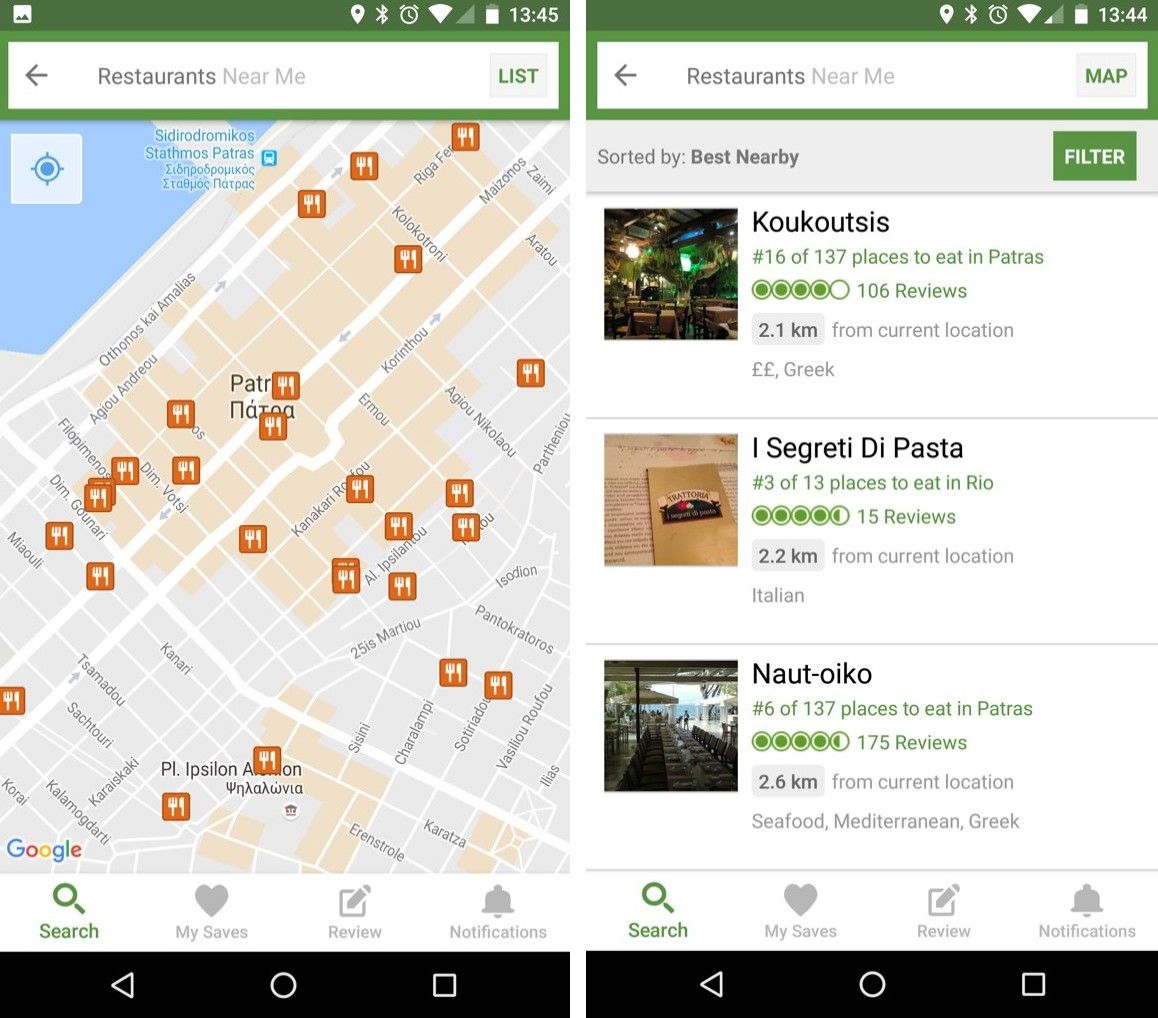
Are you hungry? How much time do you need to spend using an app to find a restaurant that sounds good? And how much more time will you spend if you get there and the restaurant is not what you expected?

Now imagine the same scenario without using a mobile app – instead, you’re walking down that street with a friend who lives in that city. As you walk along, dozens of options arise, but your friend will only initiate a conversation when you’re passing near a place she thinks you may like. So, she might proactively tell you the names of two or three restaurants only, but her advice is based on many more factors: places she has been to herself and has found to be good, experience from providing advice to other guests in the past and from taking their feedback, knowledge of how easy a restaurant is to get to, how busy it might get at the current time, how suited it might be for couples or large groups, etc. Effectively, your local friend has made a large number of observations and assumptions about you, added her own experience and knowledge and has narrowed the results down to just a few, thus doing the hard work for you. She has provided you with a “no-UI” experience: proactively initiating conversation about your goals, limiting interaction to a few natural questions and responses, factoring in a large number of observations and assumptions and presenting you with the results of hard and intensive computation. Now, the question is—can we replicate this experience when we design our applications and services? What technologies do we need so as to accomplish such a task?

The no-UI experience: curated knowledge at our periphery.

Three No-UI Interaction Building Blocks

You will have noticed from the previous example that no-UI interaction is heavily based on three basic building blocks:

  • Observations: the local friend has factored in a number of facts about yourself: whether you are dining alone or with a partner, your age and fitness level, the time of day and the distance of the hotel to other restaurants. These are facts that our mobile devices can “sense”. As a designer, you can leverage information provided via hardware sensors, data repositories internal or external to a device, or user profiling: for example, companionship via Bluetooth, location via GPS/networks and venue locations via databases, age and fitness via apps (e.g., Google Fit), time of the day via the clock. Don’t ask the user for information unless you can’t get it otherwise!

  • External knowledge: your friend also knows a lot of things: many tourists have given her feedback about some of the places she recommended, how much you might like a place depending on whether you are dining with a partner or group, how busy a place is likely to be, the quality of their food against their prices, her knowledge of the area and how complicated a route to a venue is, etc. As a designer, keep abreast of technological developments and be aware of techniques for extracting knowledge from external sources—e.g., semantically and emotionally analyzing comments and tips left at venues, knowing the daily spread of check-ins at venues, knowing the profiles of users who have visited a venue, etc. Various APIs from services such as FourSquare or Google+ are able to give us such knowledge, and there are ways of organizing it in a meaningful manner (e.g., ontologies).

  • Intelligence: Based on her observations and external knowledge, your friend has made a number of assumptions about you. Matching the observation to knowledge requires intelligence (and some creative thinking). This is the hardest part indeed – while the capture and organization of observation and knowledge is relatively easy, it needs prioritizing: for example, it’s no good recommending lunch at the most popular restaurant—which also happens to be very close to your location—if it’s closed at lunchtime. At other times, seemingly unimportant information might become crucial – it’s your partner’s birthday and her favourite food is Chinese; so, on that particular day—and only then—this becomes the number one criterion. Notice here that the criterion is not even about the user as an individual: We live in a world of complex relations with other humans and social rules, and capturing that context is not always easy, even for us as a species.

The critical element binding everything together here is intelligence. Without this step, a no-UI application is impossible. Intelligence determines not only what result you as a designer should present to the user, but also how you should present it.

“[…] deep learning [is], a process where the computer is taught to understand and solve a problem by itself, rather than having engineers code the solution. Deep learning is a complete game changer. It allowed AI to reach new heights previously thought to be decades away. Nowadays, computers can hear, see, read and understand humans better than ever before. This is opening a world of opportunities for AI-powered apps, toward which entrepreneurs are rushing.”
– Tony Aube, lead designer at OSMO

In the beginning of this, we spoke about moving away from the GUI – this means progressively attempting to interact with our users via multimodal interfaces. Sounds, speech synthesis, vibrations and even text, as in the case of chatbots, are ways with which we can convey information in varying degrees of granularity. You should not assume that you know how best to deliver multimodal interaction just because you are accustomed to the beeps and buzzes from the apps you use every day. Instead, multimodal interactions are things you must carefully design with the app’s purpose in mind and by accounting for the user’s abilities and context. For instance, in our previous example on tourism, an intense vibration on your phone might mean you’ve walked past the restaurant you wanted to visit, so you should turn back. Shaking the phone or pressing a hardware volume button while it’s vibrating might signal the device to give spoken instructions (e.g., “It’s behind you and to the right.”). Are these interaction examples good or bad? This is something you have to find out for yourself, through experimentation and human-centred design.

We also need a level of intelligence in order to interpret users’ physical and gestural interactions with the device (e.g., did the user shake the device with an intention to stop the current guidance, or was it an inadvertent action?). Additionally, we need intelligence to be able to determine an optimal way of presenting information (e.g., show a visual message instead of synthetic speech—if the user is in a very noisy environment). Also, finally, once we get the interaction during real-world use right (or wrong!), we should feed the outcomes back into our interaction models, helping the computer learn from the process of being used. This is the true meaning of intelligence – to be able to sense the world around us and learn from our interactions with it.

If it’s so Hard, Why Even Bother?

Humans have evolved primarily in using their vision to perceive and understand the world around them (whether physical or digital). So, GUIs are not going to disappear anytime soon, particularly when the use case calls for significant amounts of information to be presented to the user. In the world of ubiquitous computing, the need for information is constant; even so, we should not forget that much of the information required by users is succinct: a recommendation for a good restaurant, somebody’s phone number, the weather forecast for this afternoon, for instance. Snippets of information like these can require complex systems to generate them; however, this complexity should not mean that the means to obtain it must also be complex. The balance of interaction needed to obtain a bit of information versus the amount of information should be—at the very least—neutral and optimally leaning towards less interaction, while at the same time driving information towards our periphery and not the centre of our attention. Mark Weiser (1997) called this concept “Calm Computing”. Uwe Hansmann et al. (2003) and Stefan Poslad (2009), authors of two key texts on Ubiquitous Computing, both insist: Human Computer Interaction must be “transparent” or “hidden”. Minimizing interaction through no-UI techniques prevents the danger of the user experience being more about the device or app, rather than navigating the complexities of everyday life.

For example, researchers Antonio Krüger et al. (2004) at Saarland University and Katharine Willis et al. (2009) at Weimar University show that constant interaction with mobile maps results in a number of cognitive difficulties for users, such as a diminished ability to build detailed mental models of their surroundings, a failure to notice important landmarks and a detraction from the pleasure of the experience of visiting a new place
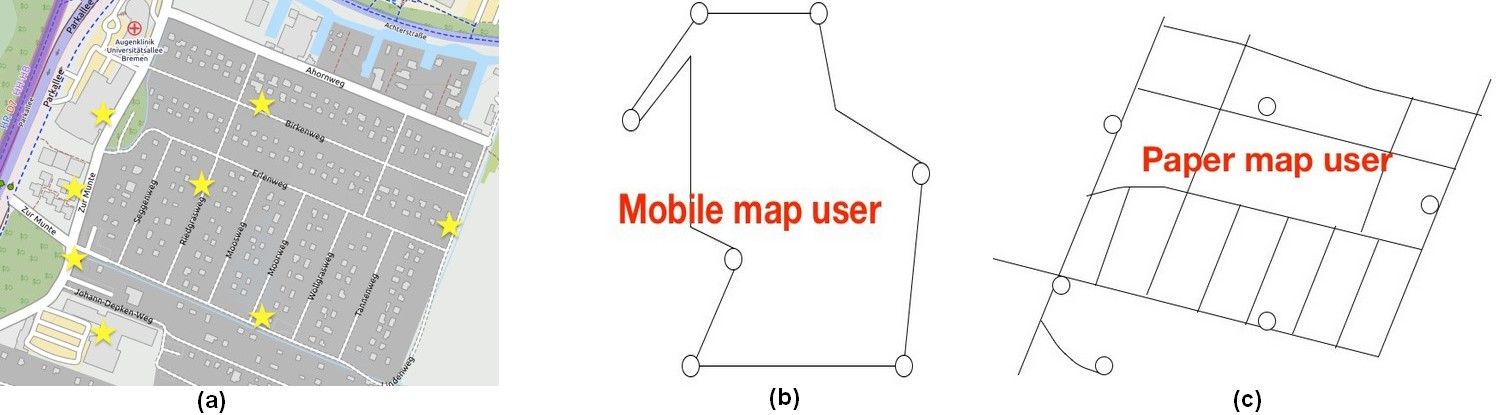
These are the dangers of UI-interaction in mobile maps, as shown by Katharine Willis et al. (2008). Learning an area and its landmarks (a) using a mobile map (b), vs. using a paper map (c): Mobile users tend to focus on the routes between landmarks, while using a paper map gives a better understanding of the whole area.

Examples of No-UI Interaction

For the reasons stated above, considerable research has gone into reducing the interaction to multimodal, no-UI methods on mobile devices, but there are also some examples of commercially available services which have been gaining popularity since 2015. An example of the latter is chatbots, which attempt to provide a virtual assistant type of experience (though, arguably, a text interface is still a GUI). AI-driven chatbots became a trend in 2016 with the emergence of new companies such as Pana (formerly Native, a travel booking agency) and the integration of bots in existing services, such as Facebook’s messenger (using Facebook’s own engine or third-party AI engines such as ChatFuel). Other companies have jumped on the bandwagon, too, for their own services—e.g., in 2016, FourSquare introduced a conversational bot that would replace its traditional search interface and provide recommendations by responding to users’ questions. The FourSquare app also proactively issues notifications based on your location, time of day and profile (e.g., “Are you near Trafalgar Square? You might like to try John’s Coffee for coffee.”).
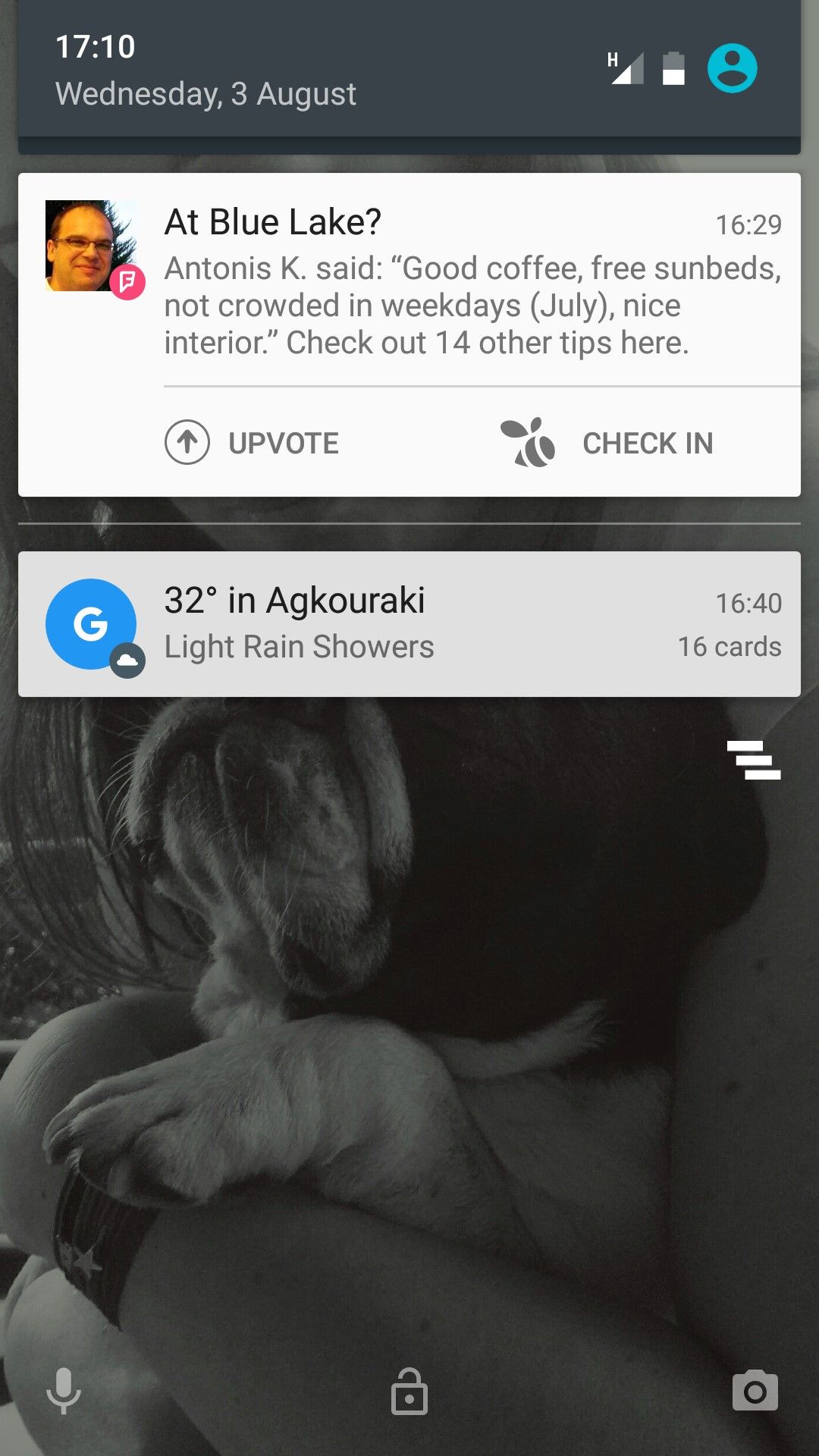
FourSquare’s proactive notifications provide information relevant to the user’s location, without the user needing to interact with the mobile application.
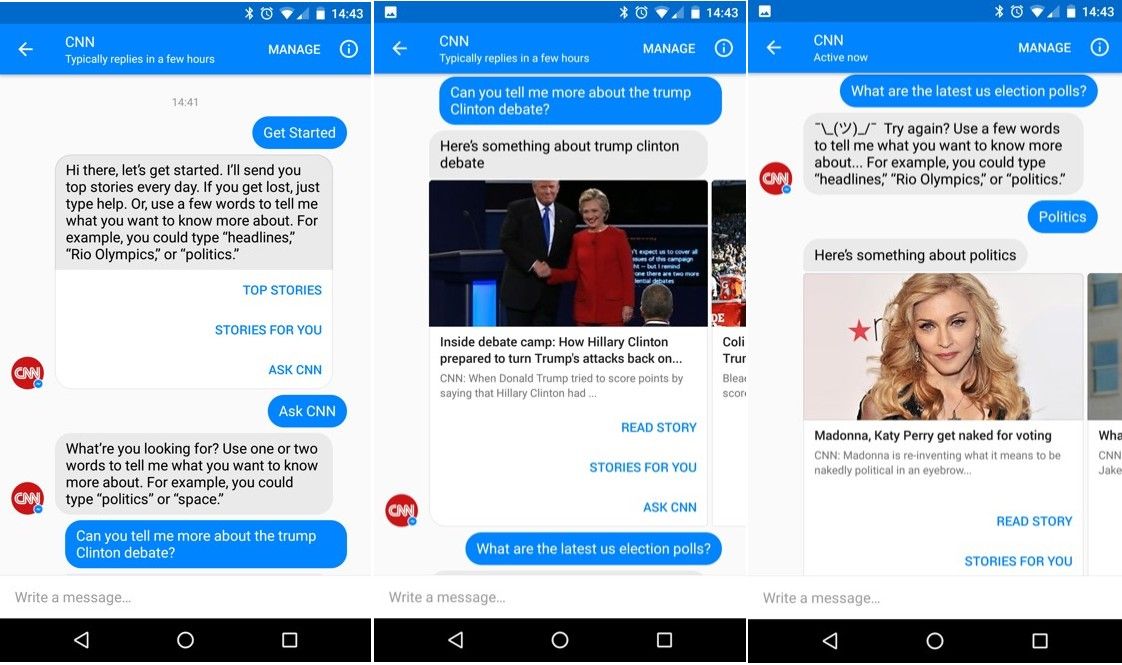
Above is an example of interaction with the CNN chatbot via Facebook Messenger. Although it’s still a UI-based interaction method, the interface resembles (but isn’t truly) natural language, without traditional widgets, menus and options. Notice how ambiguity is handled in the third picture!

Other interesting no-UI examples are found in research. Steven Strachan et al., at the Hamilton Institute, demonstrated a concept in 2005 where navigation instructions were provided to users listening to music on their headphones—by altering the volume of music (lower means further away) and its direction using 3D audio to indicate the target bearing.

In another research study related to non-visual navigation, Andreas Komninos and some colleagues at Glasgow Caledonian University (Komninos et al. 2012) used 3D audio to provide a constant audio stream of a person’s footsteps (in contrast to music, this example uses audio that is natural to the urban environment) – the direction of the sound indicates the bearing to the nearest segment of the calculated route to the target, and its volume shows how far away from that segment a user is.
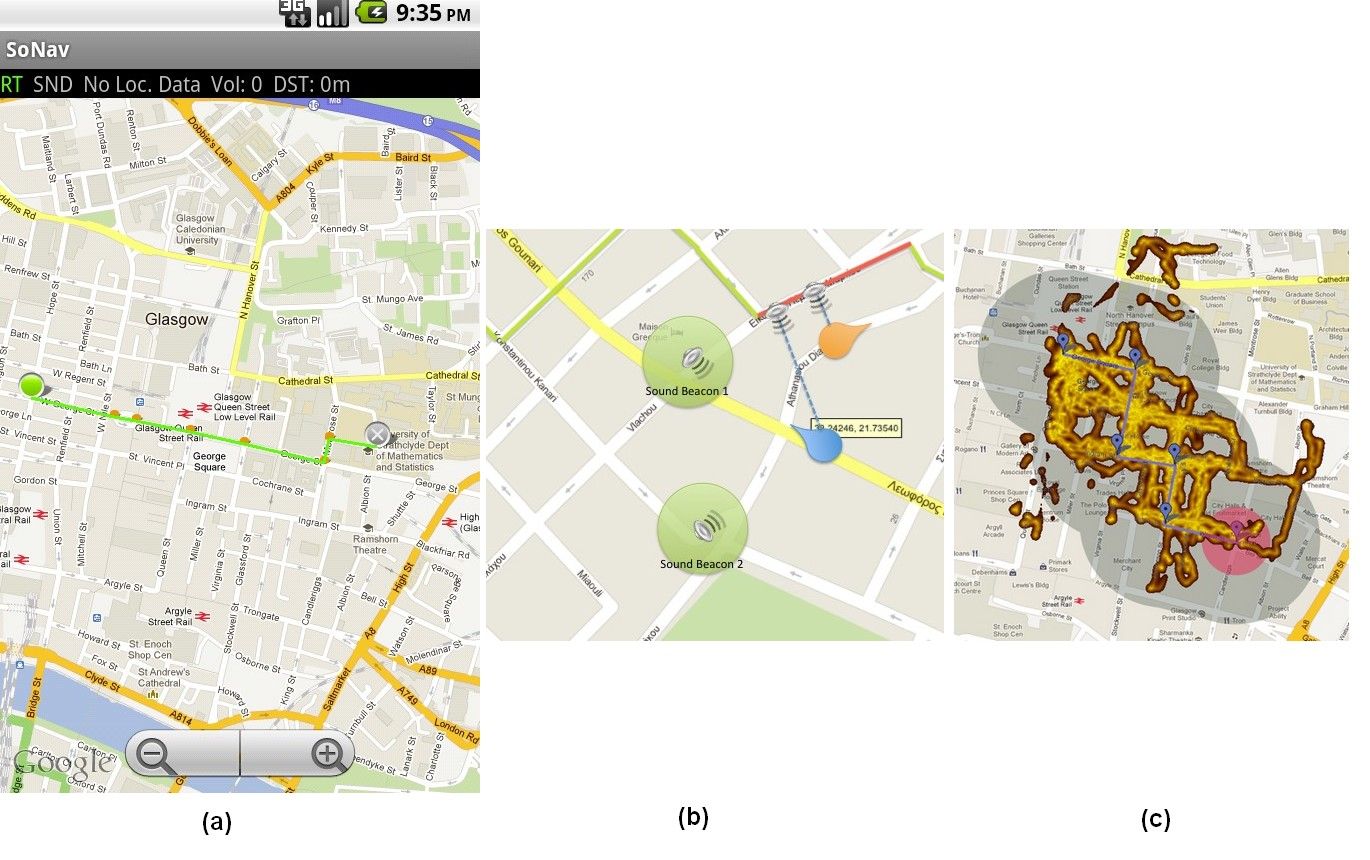
The SoNav prototype for navigation via 3D audio was created by Andreas Komninos et al. in 2012: The user simply selects a start and end point, while a route is automatically computed (a) – this is the only visual interaction element. From there on, the user hears a continuous sound from the direction of the nearest route segment, or audio beacons positioned at important landmarks (b). In an experiment, users started from the top left of the map and explored almost all of the area (GPS trace heatmap) covered by the route’s audio signal (grey-shaded area) to reach the target audio beacon (red-shaded area), each user taking a different route and freely exploring the city (c).

David McGookin and Stephen Brewster (2012), from the University of Glasgow, also demonstrated a 3D-audio based system, using the sound of flowing water and the splashes of stones being thrown in it, to show how heavily users have been tweeting in an urban area (thus indicating the social “pulse” of the area). The water stream’s sound volume shows the temporal density of tweets, while individual stone splashes are rendered in 3D‑audio and show the actual tweets being made near the user’s location (which fit a number of criteria). Other modalities such as haptic feedback, which are advanced vibration patterns and waveforms to convey information to a user, feature in this—allowing users to monitor the “state” of their device without looking at it. For example, Fabian Hemmert (2008), a researcher at Deutsche Telekom, developed a system where a constant vibration presents the number of missed calls or incoming messages to the user—the vibration is almost imperceptible at first, but it rises in intensity and frequency as more “events” accumulate on the device. As a designer, you have to think twice before applying haptic feedback as the user may not be interested in being disturbed by constant vibrations. It may be fine if a person has one app which is using rising intensity and frequency of vibration as feedback for missed calls. On the other hand, try to imagine a user who has five apps which are all using vibration as feedback for each time, for example, a new email message, “breaking news” or a new online message come through. Would you be interested in using those apps yourself?

More exotic ideas include the use of thermal interfaces for mobile devices: Graham Wilson et al. (2012), at the University of Glasgow, have shown how the use of heat-transmitting pads on a device can do the job of showing users the source (work or personal) and the importance of incoming messages.

In all the above examples, the no-UI approach is incomplete. Conversational bots have access to external knowledge and also use rather sophisticated AI (mostly to interpret your questions) but do not make direct observations about the user, using device sensors. It’s also the user who initiates the interaction, instead of the app taking a proactive approach. Users are also still faced with the burdensome task of providing information about their goals and desired tasks. In the research examples, sensors have the role of obtaining information about the user and also obtaining external knowledge, but the use of AI is rather limited. In our research examples, the use of a GUI is also part of the experience, as users need this in order to input some basic information (e.g., their navigation target) or to initiate the service, thus implicitly stating a current goal. Nevertheless, in these examples, we see how the no-UI approach works well in allowing users to shift their attention easily to monitoring the state or progress of an ongoing task, without really needing to interact with the GUI physically (as you would, for example, when using a simple map application, where you might occasionally bring the device out from your pocket so as to see where you are).

The Take Away

An effective no-UI approach is heavily based on the concept of context awareness, which includes the user’s goals and preferences, knowledge of the surrounding environment, social rules and device abilities for knowing how and when to deliver information in an non-visual way to users. The level of context awareness required for a complete no-UI service is difficult to obtain, but the examples above show where no-UI approaches are likely to work best: Allow the user to monitor the progress of ongoing tasks or get updates on important information as it emerges.

The key advantage of no-UI design here is that it eliminates the need for constant visual interaction with the device. You take the device from your pocket, causing it to exit stand-by mode, unlocking itself, and bringing the desired application to the foreground or expanding notifications for you so you can assess all the information displayed and make a decision.

In a world where we are surrounded by information and digital events, Mark Weiser foresaw the necessity for calm technology. As a designer, your task remains to harness and influence the developments in technology, deploying its capabilities with one thing in mind: to allow the user to keep calm and carry on (with the tasks at hand)!

References & Where to Learn More

Weiser, M., & Brown, J. S. (1997). “The coming age of calm technology”. In Beyond calculation (pp. 75-85). Springer New York.

Hansmann, U., Merk, L., Nicklous, M. S., & Stober, T. (2003). Pervasive computing: The mobile world. Springer Science & Business Media.

Krüger, A., Aslan, I., & Zimmer, H. (2004). “The effects of mobile pedestrian navigation systems on the concurrent acquisition of route and survey knowledge”. In International Conference on Mobile Human-Computer Interaction (pp. 446-450). Springer Berlin Heidelberg.

Strachan, S., Eslambolchilar, P., Murray-Smith, R., Hughes, S., & O'Modhrain, S. (2005, September). “GpsTunes: controlling navigation via audio feedback”. In Proceedings of the 7th international conference on Human computer interaction with mobile devices & services (pp. 275-278). ACM.

Hemmert, F. (2008). “Ambient Life: Permanent Tactile Life-like Actuation as a Status Display in Mobile Phones”. In Adjunct Proc. of the 21st annual ACM symposium on User Interface Software and Technology (UIST) Monterey, California, USA.

Poslad, S. (2009). Ubiquitous computing: smart devices, environments and interactions. John Wiley & Sons.

Willis, K. S., Hölscher, C., Wilbertz, G., & Li, C. (2009). “A comparison of spatial knowledge acquisition with maps and mobile maps”. Computers, Environment and Urban Systems, 33(2), 100-110.

McGookin, D., & Brewster, S. (2012, May). “PULSE: the design and evaluation of an auditory display to provide a social vibe”. In Proceedings of the SIGCHI Conference on Human Factors in Computing Systems (pp. 1263-1272). ACM.

Komninos, A., Barrie, P., Stefanis, V., & Plessas, A. (2012, September). “Urban exploration using audio scents”. In Proceedings of the 14th international conference on Human-computer interaction with mobile devices and services (pp. 349-358). ACM.

Wilson, G., Brewster, S., Halvey, M., & Hughes, S. (2012, September). “Thermal icons: evaluating structured thermal feedback for mobile interaction”. In Proceedings of the 14th international conference on Human-computer interaction with mobile devices and services (pp. 309-312). ACM.

Pana, the virtual chatbot travel agent: https://pana.com/

Seth Rosenberg, How to build bots for Messenger, 2016: https://developers.facebook.com/blog/post/2016/04/12/bots-for-messenger/

ChatFuel, an AI engine for ChatBots: https://chatfuel.com/

Vindu Goel, With New App, Foursquare Strives to Be ‘Magic’ in Your Pocket, 2013: http://bits.blogs.nytimes.com/2013/08/29/with-new-app-foursquare-strives-to-be-magic-in-your-pocket/?_r=1

Images

Copyright holder: Roy Want, Copyright terms and license: Fair use.

Copyright terms and license: Public Domain.

Copyright holder: David Berkowitz, Copyright terms and license: CC-BY-2.0.

Copyright holder: © William Hook Copyright terms and license: CC-BY-SA-2.0.

Copyright holder: The Author, Copyright terms and license: CC-BY-2.0

Copyright Holder: Kaique Rocha, Copyright terms and licence: CC0 (http://pexels.com)

Copyright holder: The Author, Copyright terms and license: CC-BY-2.0

Copyright holder: The Author and OpenStreetMap. Copyright terms and license: CC BY-NC 2.0

Copyright holder: The Author. Copyright terms and license: CC BY-NC 2.0

Copyright holder: The Author. Copyright terms and license: CC BY-NC 2.0

Copyright holder: The Author. Copyright terms and license: CC BY-NC 2.0

Hero Image: Copyright holder: DNA Films, Ex Machina (2015). Copyright terms and license: All rights reserved.

Feel Stuck?
Want Better Job Options?

AI is replacing jobs everywhere, yet design jobs are booming with a projected 45% job growth. With design skills, you can create products and services people love. More love means more impact and greater salary potential.

At IxDF, we help you from your first course to your next job, all in one place.

See How Design Skills Turn Into Job Options
Privacy Settings
By using this site, you accept our Cookie Policy and Terms of Use.
Customize
Accept all

Be the One Who Inspires

People remember who shares great ideas.

Share on:

Academic Credibility — On Autopilot

Don't waste time googling citation formats. Just copy, paste and look legit in seconds.