The Design Funnel

Your constantly-updated definition of The Design Funnel and collection of videos and articles.
Be a conversation starter: Share this page and inspire others!

197 Shares

What is The Design Funnel?

The design funnel in UX (user experience) design is a structured process that guides how you move from broad ideas and user research, through narrowing choices and prototyping, to a final design solution that supports conversion and usability. It helps you organize discovery, selection, validation, and delivery of well-developed user-centered experiences to delight users with.

Explore how UX design grew from early human-computer interaction into a field that helps you craft intuitive, meaningful experiences across products and services.

Transcript

Why Design Funneling Helps You as a UX Designer

It’s an ideal metaphor, since the concept of a “design funnel” refers to a framework that helps you manage how ideas, users, tasks, and products progress from wide exploration to a well-focused solution at the narrow end. Instead of trying to tackle everything at once, you begin broadly, by gathering user research and exploring many concepts, and then gradually narrow your focus to the design that best meets your user needs, business goals, and technical constraints. The funnel metaphor helps emphasize that you start with many possibilities and gradually refine towards a targeted outcome. As such, it mirrors a UX design process such as design thinking, which you can use alongside the design funnel.

Discover how design thinking helps you move from broad exploration to focused solutions that truly meet user needs, in this video.

Transcript

For example, you might start with broad user interviews, survey many use cases, and then generate dozens of sketches and features to visualize suitable design ideas. Over time, you’d funnel that work into fewer, but more refined prototypes, validate them with users, and then deliver one solution you’re sure of. This process aligns with good UX practice because it encourages iteration, validation, and user-centered refinement, instead of taking an assumption and using it to jump straight into a final design.

In this video, William Hudson, User Experience Strategist and Founder of Syntagm Ltd., shows you how use cases outline system interactions from the outside world, helping you turn broad requirements into clearer design directions.

Transcript

The design funnel concept helps you allocate time and effort effectively. You direct your efforts from “what could be” to “what will be,” while continuously checking with users, testing, refining assumptions, and reducing risk. More specifically, you’ve got several important benefits of using the design funnel in your UX practice:

Better Alignment with User Needs & Business Goals

When you explore broadly and narrow things down based on real user data, you reduce the chance of building something irrelevant. Instead, you’ll help ensure that your UX design work is efficient, evidence-based, and responsive to real user behavior.

Efficient Use of Resources

Early exploration helps safeguard you and your team from wasted effort on the detailed design of ideas that just won’t work in reality. Refinement later means you invest deeper only in what shows promise and get to enjoy significantly reduced risk and higher-quality (and higher-impact) outcomes.

Improved Decision-Making

The funnel provides a clear structure for when and how to decide which ideas to drop, which to keep, and how to validate them.

Better Stakeholder & Team Coordination

The funnel gives you and your design team a shared roadmap to align around; everyone knows when you are exploring, narrowing, validating, and implementing.

The Stages of the UX Design Funnel

While definitions vary, a typical design funnel for UX includes the following stages:

1. Discovery / Exploration

At this first stage, you cast a wide net where you collect user research, market context, behavioral data, competitive audits, and stakeholder input. You aim to understand who your users are, what problems they face, what tasks they attempt, and what needs or desires they’ve got. You generate many ideas, sketch rough concepts, and allow divergent thinking. The goal isn’t to lock in a solution; it’s to explore possibilities in the problem space.

For example, you might run user interviews, contextual inquiries, field studies, and workshops. You might map user journeys, build personas (research-based representations of real users), and identify pain-points or opportunity areas. The output is a rich set of insights and many possible directions for your design to take on its way to reflecting the best idea.

In this video, William Hudson explains how personas help you keep real user needs at the center of your early exploratory research.

Transcript

2. Definition and Selection

In this stage, you begin narrowing and review the insights and ideas from discovery, prioritize which user problems to solve first, refine your design criteria, and choose the most viable concepts. It’s where you may find ideas that don’t align with business or technical requirements, or that don’t resonate with users, and drop them.

For you, that means you take the large set of ideas and apply filters, such as user value, business impact, feasibility, and technical complexity. Here’s where you’ll define which problems your design will address, and you’ll pick one or a small number of design directions to prototype.

In this video, William Hudson shows you how identifying constraints such as compliance, platform support, and data security helps you filter ideas and choose realistic design directions.

Transcript

3. Development and Prototyping

With the concept refined, you build prototypes, first low, then (perhaps) medium, and then high fidelity, and test them with users. You iterate, capture feedback, refine interaction flows, visuals, details of usability, and technical integration. The funnel narrows further as you fix on one design approach and enhance its fidelity to fine-tune the likely design solution that will work best.

So, you might create clickable prototypes, perform usability tests, record metrics (like time on task, error rate), and refine things until you reach acceptable usability. You test interactions and adjust the UI’s (user interface’s) layout, content, navigational structure, and visual design as need be.

In this video, Alan Dix: Author of the bestselling book “Human-Computer Interaction” and Director of the Computational Foundry at Swansea University, explains how iterative prototyping helps you refine a chosen concept into a usable, effective design.

Transcript

4. Delivery and Validation

At this last section, the bottom of the funnel, you implement the final design, launch it, monitor user behavior, measure success via KPIs (key performance indicators) such as conversion rate, task completion rate, and satisfaction, and then iterate further if needed. This is where the funnel might give you the impression that you “pour” your product through it and are suddenly done, but it doesn’t end at launch. Instead, you keep validating and refining post-launch.

For you, this means working with developers to build the solution, conducting post-release usability tests, monitoring analytics (drop-off points, user flows, and error rates), and refining your solution based on real-world user data. The narrowing funnel ends in a validated, usable, valuable solution that resonates well with users and (hopefully) makes your brand a household name.

In this snippet from a 1-hour Master Class, Vitaly Friedman, Senior UX Consultant, European Parliament, and Creative Lead, Smashing Magazine explains how tying your final design to business-focused KPIs helps you validate your solution after launch and continue improving it.

Transcript

How to Apply the Design Funnel in Your UX Workflow

Use these practical guidelines to apply the design funnel in your UX practice. They’ll help you keep best practices in mind as you proceed.

Set Up Your Process

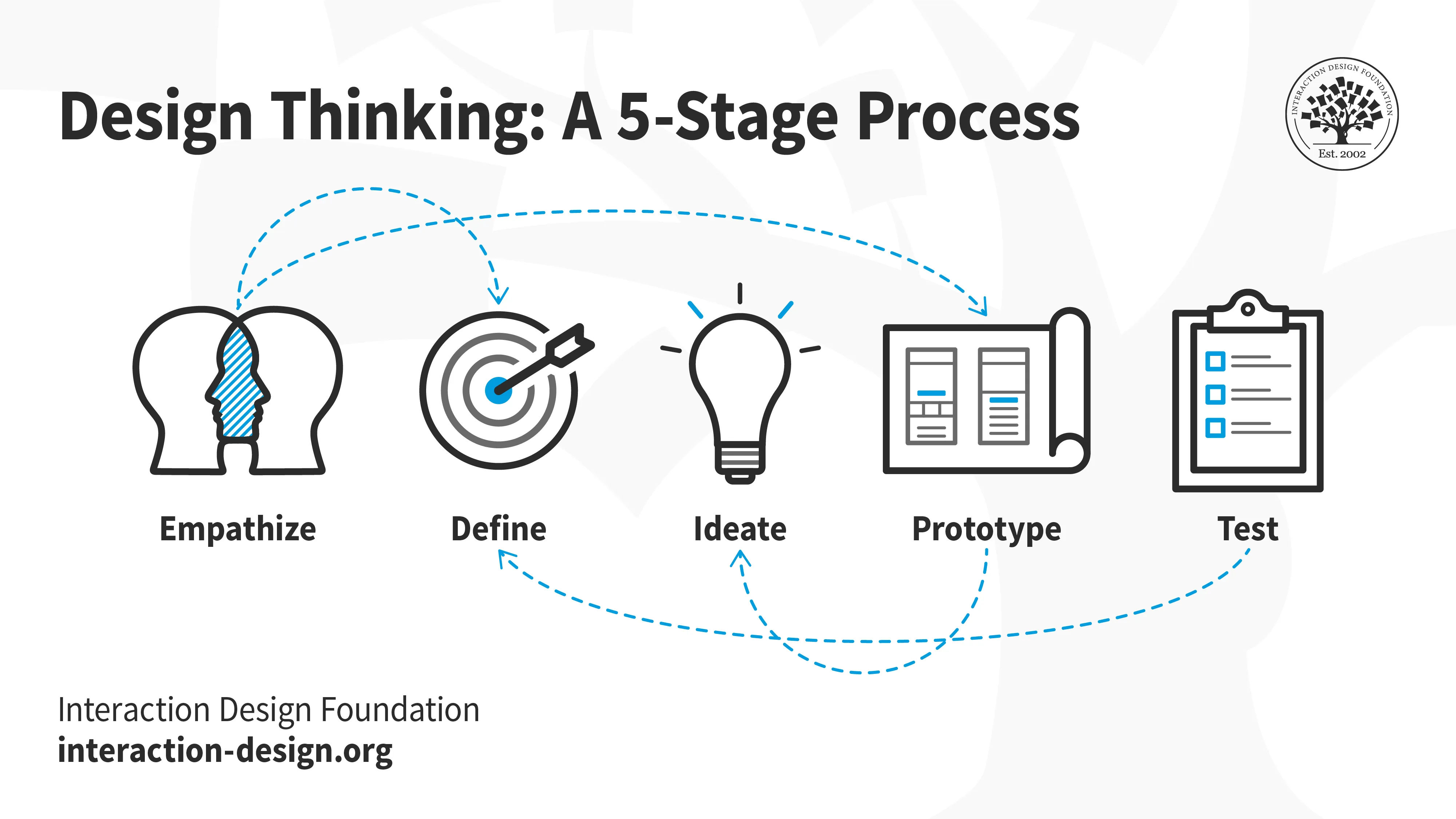
Before you begin, align your team on funnel stages, deliverables, timelines, and decision-points and see how they mirror your existing design process (such as design thinking). Clarify when you move from exploration to narrowing, when you decide which direction to prototype in, and how you’ll validate. That way, your project avoids endless exploration and moves forward with clarity, and the funnel can remain in step with your design process of, for example, empathize, define, ideate, prototype, and test stages (which make up the design thinking process).

Use The Right Methods at Each Stage

  • In Discovery, use generative methods such as user interviews, ethnographic research, journey-mapping, and workshops.

  • When you get to Definition, use analytic methods like affinity-mapping, prioritization matrices, concept sketches, and user flows.

  • Then, in Development, use evaluative and iterative methods; here, you’ll tend to use prototypes, usability testing, heuristic reviews, and A/B testing.

  • Last, but not least, in Delivery, use measure and improve methods such as analytics monitoring, feedback loops, and continuous iteration.

In this video, William Hudson explains how A/B testing helps you measure behavioral changes to refine a nearly finished solution.

Transcript

Apply Feedback Loops & Narrowing Logic

After each stage ask, “Which ideas will I drop? Which will I keep? Why?” Use criteria such as user value, feasibility, and business impact to guide you and your team’s decisions. For example, you might test three prototypes and choose the one with best usability metrics to move forward.

Maintain User-Centered Decision-Making

The funnel stands for prioritizing user needs, not just business or technical convenience. Ultimately, the users will decide on what your digital product’s success will look like. So, at each narrowing step, make sure you refer back to user research. Ask yourself and your team: “Are we solving a real pain point? Are users able to complete the flow? Do they feel satisfied?” Use metrics and qualitative data to inform your decisions so you can design on solid ground.

Measure Success Through the Funnel as You Proceed

Align your metrics accordingly so that:

  • In the Discovery stage you measure, for example, the number of user interviews, number of insights generated, and volume of concept sketches.

  • In the Definition stage, it might be the number of ideas filtered, user flows defined, and prototypes selected.

  • In the Development stage, you move on to usability metrics (task completion rates, error rates, time on task), user satisfaction scores, and revision count.

  • Lastly, in the Delivery stage, it’s about conversion rate, retention rate, Net Promoter Score (NPS), drop-off rate, and satisfaction after launch.

Tracking metrics helps you identify bottlenecks in your funnel: Are too many ideas getting dropped? Are users failing during prototype tests? Are conversion rates lagging after launch? These insights help you spot where to refine both the product and your process.

Keep Stakeholders Aligned

Use the funnel as a communication tool and show stakeholders where you are in the funnel, what possibilities were explored, why you selected a design direction, and how you will validate. This transparency fosters trust and avoids misunderstandings about why you dropped certain ideas. Remember, business stakeholders particularly won’t always tend to see eye-to-eye with designers (due to the former’s “bottom-line” thinking), and if they had a favorite feature (for example) that didn’t resonate with users, the funnel can help back up that evidence for you.

Monitor & Iterate Post-Launch

Once the product goes live, keep your funnel mindset going and monitor usage, collect feedback, identify drop-offs in user flows, and test enhancements you make. You may open a micro-funnel, for instance, where you iterate a component, refine it, and then roll out. In any case, the funnel becomes a continuous improvement cycle, not just a one-time process.

Overall, the design funnel offers a powerful way to structure your UX design efforts and keep on track towards identifying what works, what needs work, and which solution you can fine-tune your way to becoming the best product possible for your users.

It’s a fitting shape to use as a metaphor for two reasons. For one thing, the funnel reflects the power and reach of divergent thinking and exploration before you and your team filter smartly, test thoroughly, and deliver confidently. Another fitting point about the funnel is how it might resemble a “horn” to blow, too, so you can communicate loud and clear to other stakeholders that you’re doing things for good reason.

Just remember that it’s not all over once you’ve launched your product. Keep on iterating and using the finer end of the funnel to make sure that what comes out as the finished product is one that users adopt, enjoy, praise in reviews, and return to time and time again.

Questions About Design Funnel?
We've Got Answers!

Why do UX designers use the design funnel?

UX (user experience) designers use the design funnel to structure the process of defining, validating, and delivering solutions. The funnel helps you start with broad user problems, narrow down to a prioritized solution, and focus on building the right features with confidence. It supports making design decisions based on evidence rather than assumptions.

Structured flows reduce wasted effort and increase alignment across teams. If you follow a funnel, you can see clearer justification for choices, which makes stakeholder communication smoother and keeps the team aligned.

Explore what assumptions can do to design and how to handle them, with our article Learn How to Use the Challenge Assumptions Method.

How does the design funnel differ from the double diamond model?

The design funnel and the Double Diamond (Discover → Define → Develop → Deliver) both guide the design process, but they differ in emphasis. The Double Diamond uses two diamonds to illustrate diverging and converging thinking (“explore widely then focus”).

Meanwhile, the design funnel emphasizes a continuous narrowing from many ideas to a single solution, highlighting prioritization and filtering. While the Double Diamond is more phase-oriented and broad, the funnel puts more emphasis on prioritization, validation, and reduction of ideas into high-impact outcomes.

Find out how to shine with the double diamond model, in our article 10 Insightful Design Thinking Frameworks: A Quick Overview.

Where does user research fit into the design funnel?

User research sits at the top (widest part) of the funnel. At this stage, you explore user needs, behaviors, pain points, and contexts through methods like interviews, surveys, usability testing, and analytics. That research informs problem definition, which then allows you to funnel down into solution generation, validation, and production of a (hopefully) exceptional design solution. Without robust user research early on, you risk building something nobody needs (and nobody will care about, only you).

Understand why user research forms the runway for you to take off with fantastic design ideas.

How do you move from one stage of the funnel to the next?

You move from stage to stage by evidence and decision gates. At each stage, you gather insights (research data, prototypes, metrics) and evaluate whether you’re ready to narrow your focus. For example, after user research, you synthesize findings and decide whether the problem is well-understood; if so, you’ll enter ideation.

After creating low-fidelity prototypes, you test them; if the results meet success criteria, then you can advance to build further, and test further. Use checklists, metrics or hypotheses to approve the transition rather than moving forward based on gut alone.

Dig deeper to find golden nuggets of insights, with our article Design Iteration Brings Powerful Results. So, Do It Again Designer!.

How do designers use the funnel to prioritize features?

You use the funnel to prioritize features by focusing on user value and evidence as you narrow down. At the wide end, you list all potential features derived from research. Then, you filter based on criteria like impact, feasibility, user effort, and business value. That filtering happens in the narrowing stages, and each iteration reduces the list until you prioritize the highest-value features to build.

Techniques like an impact/effort matrix, MoSCoW (Must/Should/Could/Won’t), and user story mapping tie neatly into this funnel process.

Explore how to use the MoSCoW method to help you design better, with our article Making Your UX Life Easier with the MoSCoW.

Can you skip stages in the design funnel?

You should avoid skipping stages because each stage adds critical validation, insight, and alignment. If you skip early research or ideation and jump straight to build, you risk building the wrong thing, thanks to assumptions rather than evidence. In practice, you might overlap or repeat stages, such as quick user tests mid-development, but skipping entirely undermines the funnel’s purpose: narrowing ideas based on evidence.

Still, in tight time/budget constraints you might compress stages, but you still retain the funnel mindset to minimize risk.

Discover important insights about testing designs, with our article 4 Common Pitfalls in Usability Testing and How to Avoid Them to Get More Honest Feedback.

What kind of deliverables come out of each stage in the funnel?

Typical deliverables by stage are:

  • Research stage: user personas, empathy maps, journey maps, research reports.

  • Problem-definition stage: problem statements, design brief, opportunity map, prioritized user needs.

  • Ideation stage: feature backlog, sketch sets, concept boards, user flows.

  • Validation/prototyping stage: clickable wireframes, high-fidelity prototypes, usability test reports.

  • Delivery stage: design system assets, UI specs, production-ready UI, handoff documentation, analytics dashboard.

On the subject of stages, check out our article The 5 Stages in the Design Thinking Process for essential insights into this valuable UX design process and where you can take your designs using it.

Who should be involved in each stage of the funnel?

By stages, consider having the following personnel on board:

  • Research: UX researchers/designers, product manager, sometimes engineers or stakeholders for context

  • Problem definition: UX designer, product manager, stakeholder leadership, perhaps marketing/sales for business input

  • Ideation: Cross-functional team (designers, developers, product, UX, maybe QA) to bring perspectives

  • Validation/prototyping: Designers, QA, user-testing participants, developers for technical feasibility

  • Delivery: Designers, developers, QA/testing team, product owner, maybe ops/analytics for launch.

Discover how to harness the power of more minds on a project using cross-functional teams.

What are common mistakes designers make with the design funnel?

Even with a design funnel in place, you can run into issues. Here are some common pitfalls and how you can avoid them.

  • Staying too long in exploration. If you never narrow, you waste time and budget. Set criteria and decide when to move on.

  • Dropping ideas prematurely. If you narrow too early without enough validation, you risk missing a good solution. Ensure you collect enough user data to inform decision-making.

  • Skipping stages altogether. For example, going straight from sketch to build without testing prototypes increases risk of usability issues.

  • Ignoring real-user metrics post launch. If you launch and assume you’re done, you’ll miss the opportunity to refine based on actual behavior.

  • Poor stakeholder communication. If your team doesn’t know which stage you are in and why, they may misunderstand decisions or criticize trimming of ideas.

By being aware of these pitfalls and structuring your work around funnel logic, you increase your chances of delivering usable, valuable experiences.

Harvest some helpful insights into securing stakeholders’ involvement on a project, with our article How to Involve Stakeholders in Your User Research.

What are some recent or highly cited articles about the design funnel?

Lee, S.-H., Zhu, Z., Rudnik, J., Lee, C., Coughlin, J. F., de Weck, O. L., & Chapman, J. (2020). Apply Funnel Model to Design Thinking Process. 22nd DMI: Academic Design Management Conference – Impact the Future by Design, Toronto, Canada.

This conference paper presents a “Funnel Model” integrated into the design thinking process to enhance participatory design and cocreation. The authors outline four key steps: (i) recruit the right participants; (ii) select suitable participatory research tools; (iii) conduct qualitative interpretation; and (iv) distill research insights to integrate the voice of users. The study includes an in-home IoT product design case. This is important because it explicitly uses the “funnel” metaphor in UX/design research, not just marketing analytics, and shows how narrowing from broad participation to distilled insights can augment design processes.

Earn a Gift Earn a Gift, Answer a Short Quiz!

1
2
3
4
1
2
3
4
Question 1
Question 2
Question 3
Get Your Gift
Interaction Design Foundation logo

Question 1

What is the main purpose of the design funnel in design thinking?

1 point towards your gift

  • To eliminate creativity by narrowing down options from the start
  • To structure the design process from exploration to focused implementation
  • To ensure teams only generate one idea before testing
Interaction Design Foundation logo

Question 2

How does the design funnel support both divergent and convergent thinking?

1 point towards your gift

  • It skips divergent thinking entirely and goes straight to conclusions
  • It mixes both approaches at random stages of the design process
  • It begins with idea generation (divergence) and narrows toward decisions (convergence)
Interaction Design Foundation logo

Question 3

Which of the following best describes how the design funnel differs from a traditional linear design process?

1 point towards your gift

  • The design funnel involves going backward and forward between stages
  • The design funnel avoids any kind of testing
  • The design funnel prevents teams from changing direction

Learn More About The Design Funnel

Make learning as easy as watching Netflix: Learn more about Design Funnel by taking the online IxDF Course Design Thinking: The Ultimate Guide.

Why? Because design skills make you valuable. In any job. Any industry.

In This Course, You'll

  • Get excited when you discover that you don't need to start from scratch to use the secret recipes that empower companies like Apple and Google to shape the future. You just need a structure and proven methods to optimize what you already do. As AI becomes part of your day-to-day workflows, your ability to guide it with timeless human-centered skills such as strategic thinking, creativity, and empathy for real users is what turns AI into your superpower and delivers meaningful results.

  • Build on your existing creativity, problem-solving, and people skills to learn the powerful 5-stage method called Design Thinking. It's one of the key drivers behind Apple and Google's continuous innovation and provides a clear, structured way to solve real-world problems. You've already got the instincts, so it's easy to learn the method. 

  • Make yourself invaluable with hands-on skills in Design Thinking. Design Thinking can help you break into User Experience Design, product design, and tech. It's widely applicable, impactful, and fun! Use your skills to improve customer support processes, create new products, and even tackle big challenges like climate change. This human-centered approach is a key driver of business success because it guides you to systematically understand and address what your users really need and want. That's why Design Thinking skills can help you increase sales, keep customers loyal, and turn them into powerful advocates for your company.

  • Gain confidence and credibility as you effortlessly apply methods from all five stages of the Design Thinking process. You'll be guided to build empathy and gather insights into people's habits through user interviews. 

  • Use our downloadable templates to create affinity diagrams, empathy maps, and actionable "How Might We" questions. Develop solutions as you apply ideation and innovation methods. Create a paper prototype early and fast, then test and optimize your prototype to ensure that your users love it. More love, more impact, greater salary potential. 

  • Apply your new skills in an optional project where you'll design and test a user-centered experience that's perfect for your portfolio and career growth. Master Design Thinking to amplify your uniquely human strengths like empathy, intuition, and creativity, and confidently stay in demand as AI reshapes how teams work.

It's Easy to Fast-Track Your Career with the World's Best Experts

Master complex skills effortlessly with proven best practices and toolkits directly from the world's top design experts. Meet your experts for this course:

  • Don Norman: Father of User Experience (UX) Design, author of the legendary book “The Design of Everyday Things,” and co-founder of the Nielsen Norman Group.

  • Alan Dix: Author of the bestselling book “Human-Computer Interaction” and Director of the Computational Foundry at Swansea University.

  • Mike Rohde: Experience and Interface Designer, author of the bestselling “The Sketchnote Handbook.”

Get an Industry-Recognized IxDF Course Certificate

Increase your credibility, salary potential and job opportunities by showing credible evidence of your skills.

IxDF Course Certificates set the industry gold standard. Add them to your LinkedIn profile, resumé, and job applications.

Course Certificate Example

Be in distinguished company, alongside industry leaders who train their teams with the IxDF and trust IxDF Course Certificates.

Our clients: IBM, HP, Adobe, GE, Accenture, Allianz, Phillips, Deezer, Capgemin, Mcafee, SAP, Telenor, Cigna, British Parliament, State of New York

All Free IxDF Articles on The Design Funnel

Read full article
Learn How to Use Sketching as an Ideation Method - Article hero image
Interaction Design Foundation logo

Learn How to Use Sketching as an Ideation Method

Have you tried communicating your designs to your colleagues and stakeholders, only to realize later they’ve misunderstood what you meant? Have you found yourself stuck in a design, unable to see alternative approaches? Are you sure you’re working on the most optimal solution, or are you working wit

Social shares
1k
Published
Read Article
Read full article
What is the UX Design Process?  5 Steps to Success - Article hero image
Interaction Design Foundation logo

What is the UX Design Process? 5 Steps to Success

UX designers design every interface to be as intuitive and easy to use as possible, and to do this, and they rely on “design thinking,” a step-by-step guide to the UX design process. Let's explore the UX design process and look at common tasks in each UX design phase and which roles are responsible

Social shares
939
Published
Read Article

What is the UX Design Process? 5 Steps to Success

What is the UX Design Process?  5 Steps to Success

UX designers design every interface to be as intuitive and easy to use as possible, and to do this, and they rely on “design thinking,” a step-by-step guide to the UX design process. Let's explore the UX design process and look at common tasks in each UX design phase and which roles are responsible for them.

The user experience design cycle can be unpredictable. Every project will have different user needs and business goals. Each problem has a different context and scope. Most of all, design teams must learn to recognize the right problem to solve.

The Five stages of Design Thinking: Empathize, Define, Ideate, Prototype and Test

© Interaction Design Foundation, CC BY-SA 4.0

The five steps of Design Thinking are:

  • Empathize: Explore the problem, and find out who your users are

  • Define: Learn what the users want and need and how the problem affects them

  • Ideate: Brainstorm solutions that make sense based on test findings

  • Prototype: create many designs based on the ideas from ideation

  • Test: Test the prototypes and find the best solution.

But first, let’s talk a bit about UX itself.

What is UX Design?

Interaction Designer Don Norman coined the term “User Experience Design” or “UX design.” The term refers to the relationship between products and services and the users interacting with them. UX has roots in psychology, cognitive science and human-computer interaction. Good UX designs create a positive experience for the user. Bad user interfaces leave users unsure, unhappy and unable to complete a task they want to do.

The ultimate goal of UX is to make interfaces efficient, accessible, and delightful.

What roles are involved in the  UX design process?

Collaboration is the cornerstone of UX. UX teams include specialized roles to ensure the seamless handoff from one phase to the next:

  • UX Researchers conduct user testing, analyze data, and communicate their findings. They craft user personas, journey maps and affinity diagrams. They test prototypes and live products that need improvement.

  • UX Designers create low and high-fidelity prototypes, wireframes, and mockups. They are responsible for the layout and user flows of the final product.

  • Content Writers (or UX writers) ensure the interface is saying the right things in the right way. They write button text, menu names, tooltips and error messages, called “microcopy.”

  • UI Designers and Web Developers turn prototypes into final products. They are responsible for maintaining a live product. They usually have strong technical expertise.

What are the 5 steps in the UX design process?

Let’s understand the five steps in the UX design process in this video.

Transcript

Step 1: Empathize

Empathize: the first phase of UX design process.

© Interaction Design Foundation, CC BY-SA 4.0

Empathy is the secret ingredient for good user experiences. Products must be more than just functional; users must enjoy interacting with the product.

To achieve this, the first thing designers need to understand is the real needs of their users. Otherwise, they could create an unnecessary or irrelevant product. Empathizing with the user is how UX teams learn a product's or service's true purpose. This is where User Researchers come in.

User researchers learn what users do, what they are saying, and why they do the things they do. Instead of jumping to solutions, they develop a deep understanding of the practical and emotional needs of the user. User researchers learn to fall in love with the problem, not the solution.

Examples:

  1. Apple: Perhaps the biggest success story in UX. They pioneered the idea of intuitive and hassle-free interfaces catered to people who were not computer scientists. Apple was instrumental in the spread of smartphones and mobile interfaces.

  2. Turbotax: Intuit understood the frustration, or "pain points," customers felt when paying taxes in the United States and created software to file tax returns quickly. Much of their success came from translating complicated legal language into simple yes or no questions that most people could understand.

  3. Uber: Despite having a nearly identical service to taxi companies, Uber identified the sources of friction in the process and automated them. Instead of struggling to get a taxi’s attention, users could call an Uber to their exact location with the destination already input into the driver's navigation device.

User researchers consider these questions when first approaching a problem:

  • What precisely is the problem?

  • When does the problem occur?

  • Who is having this problem, and who does it affect?

  • Where does the problem occur?

  • Why does it matter?

Don’t expect all the answers at this stage; it’s about knowing where to start looking.

This stage also includes understanding the needs of your stakeholders. “Stakeholders” are developers, management, marketing, and anyone with a vested interest in a solution to the problem. 

If you are a freelancer, this might be a client. Stakeholders have business goals to consider, including financial goals and brand promotion. A stakeholder could be a collaborating nonprofit organization, or NGO, with social goals.

Stakeholders are a valuable resource. They might already know what their target audience wants from them.

While a UX designer’s first responsibility is to the user, a shared understanding with stakeholders is essential for the "define" stage.

Step 2: Define

Define: the second phase of the design process.

© Interaction Design Foundation, CC BY-SA 4.0

The first task of the defining stage is to distill the information from the empathize stage into a research plan. The research plan includes specific questions about the problem and which research methods to use to find answers. One of the most critical tasks is defining the criteria for potential testing participants. This way, the findings will be relevant and valuable.

You will want to understand some key elements of your users:

  • Goals

  • Wants

  • Needs

  • What specific problems do they have? (also known as “pain points”)

  • Their relationship to the problem.

  • What tools do they currently use?

  • What are some key behaviors or attitudes?

In the real world, user researchers rarely start with nothing. They might have user demographics (age, location, gender, etc.), psychographics (behaviors and attitudes) or other user data. This information guides them toward a better sense of the users and their goals.

Once a research plan has settled, research begins. There is a range of research methods, each with particular strengths.

Quantitative research methods: The what and who

  • Demographic data analysis: looking at characteristics to discover more about the users.

  • User data: Clicks, Time on Task, Web visits, and others metrics can give you a broad overview of what users are doing.

Qualitative research methods:  The why and how

  • Semi-structured Interview: An interview with participants without sticking to a script. This approach can help learn attitudes and what the user already knows about the problem.

  • Contextual Inquiry: An interview combined with observation in the space where the problem occurs.

  • Moderated Usability Tests: Have the participant complete common tasks using a prototype or live product. 

After the user researcher has conducted their tests and collected the data, they analyze their data and present it to the team.

The analysis might consist of a group activity where the team groups similar user quotes (called thematic analysis.) Or making data visualizations and graphs for quantitative data.

Designers use this analysis to create tools for the next phase. These tools should be “actionable,” meaning they are practical and valuable resources for the product designers. 

These tools, or “deliverables,” include:

  • Journey maps: An outline of the stages a user goes through with a product. A journey map can be for an existing product's current experience or an imagined journey for a new or revamped experience.

  • Personas: A fictional stand-in for each type of typical user. It should represent people who use the product or may use a new product you are developing. Personas should be heavily inspired by user data, often using real user images to humanize them further. You may need many personas to represent the different groups identified among the product users.

  • Affinity Diagrams: A collection of user quotes from interviews grouped by similarity into groups and themes. This method is an excellent method of understanding common themes.

  • “How might we?” statements: “How might we”s are a way of defining the project's goals based on the user's goals identified in the research. “How might we provide an easy way to track spending while traveling?” “How can we reduce stress when making online payments?” are examples.

 These resources will guide the designers in creating the first prototypes.

Step 3: Ideate

Ideate: the third phase of the design process, where you identify innovative solutions to the problem statement you’ve created.

© Interaction Design Foundation, CC BY-SA 4.0

The ideation stage is when the whole team comes together. It marks the shift from understanding the problem to creating a solution. It’s an excellent time to check in with the other members of the team and the stakeholders. Things may have changed during research, so be on the same page before ideation starts.

User researchers present their findings in the ideation phase, and the team brainstorms solutions. When brainstorming, ignore practical constraints to allow for the free flow of ideas. The goal is not to develop "good" ideas but many ideas. They should be wild, out of the box and often impractical. Later the team can apply a more critical and practical eye to those ideas to see what is possible and most effective.

This stage may be the most sticky note-intensive stage and also the most exciting.

To help with ideation, designers might sketch a rough layout or diagrams to present ideas visually. Tools like Miro or Mural help to conduct a brainstorming session remotely or for teams with less physical space.

Each team member should communicate what is or isn’t possible or why an idea may not work, but do so in the most constructive way possible to avoid negativity.

The value of healthy and effective communication during ideation is essential. 

Over time, the ideas which make the most sense will move onto prototyping. This decision may involve team members voting for their favorite ideas. The team may also combine ideas to create new potential solutions.

Step 4: Prototype

Prototype: the fourth phase of the design process, where you identify the best possible solution.

© Interaction Design Foundation, CC BY-SA 4.0

In this stage, the UX designers lead the creation of prototypes from the most promising ideas developed in the ideation phase. They also rely on personas, journey maps and other deliverables to ensure the product meets users' needs.

The tools of the trade for UX designers vary from company to company. Prototyping tools like Figma can create high-fidelity prototypes for testing. A trusty pencil and paper still have a place for making mockups and paper prototypes.

UX designers build the navigational hierarchy and task flows. Content writers use simple, readable language that communicates the brand's personality. UI designers make the product easy to use by limiting clutter and displaying the most common tasks prominently. Niche tasks might fall into advanced settings options or only be available on a larger screen.

Accessibility is another critical factor for UX designers. Color, for example, can be a valuable tool for making good-looking layouts understood at a glance. However, not all users perceive color the same, and color blindness is relatively common. A product or service must be usable for as many people as possible. So, designers create layouts that are easily understood, even without color.

These prototypes might look good and work well, but testing is the only way to be sure.

Step 5: Test

Test: the fifth phase of the design process, where you test solutions to derive a deep understanding of the product and its users.

© Interaction Design Foundation, CC BY-SA 4.0

Products undergo many cycles of prototyping, testing and refining before the final product ships.

User testing allows users to try the prototypes and give feedback to refine the product. This process can be intimidating, as you will want users to be honest, and they might not like your design. However, this feedback is essential for your product to become the best version it can be.

The most common tests for prototypes are:

  • A/B and multivariate testing: This is a great way to decide between two or more competing designs to find the best one. Test each design for usability, task completion, and the time required to complete specific tasks. This test might be done internally with other team members or with recruited participants. This method is even used on live products when updating the user experience.

  • Quantitative analysis: Frequently, hard data will make the best case for a feature to be included or scrapped. You might be comparing cursor movement, hits on a website or how highly users rate your product online.

  • Surveys: Nothing is more valuable than the opinions and thoughts of the user. Surveys are a relatively cheap way of getting data in one place. 

  • Usability tests: Observe people using your prototypes, how they use them, where they get stuck and where they enjoy the experience. You can ask users to talk through their actions and what they think to add even richer feedback.

  • Card sorts: This method reveals the user's “mental models” or thoughts about a product. Users put labeled cards into groups and explain why they made those groups. Card sorts can also be an excellent way to create a navigation menu.

Testing should be intense and thorough but will eventually result in a product the team feels certain will succeed.
The final task of this stage can be a live release!

It would be nice if the development went through all the stages flawlessly and ended up with a perfect final product, but that’s not very common. Usually, stages are repeated or skipped for various reasons, and the whole process repeats when evidence shows the product can perform better.

Top 5 qualities of a successful UX Designer

UX is exciting because it relies on soft skills. After your first job in UX, you will find that your coworkers come from all sorts of backgrounds. Collaboration, empathy and presenting balance out hard skills like wireframing, analyzing data, or using Figma or Photoshop. They make up the essential qualities for a successful career in UX.

The top 5 skills for a UX Designer are:

Empathy: You can only advocate for the user if you know how they feel. 

Communication: A team is only as strong as their words to each other. Communication includes presentations. A team that doesn’t communicate well with stakeholders may lose funding or waste money when they create the wrong kind of product.

Practicality: Understanding what may work and what makes sense will allow you to avoid unnecessary complications or dead ends.

Curiosity: Fall in love with the problem, not the solution. Learn for its own sake. Curiosity allows you to try new technologies and methodologies to find which works best for your team.

Adaptability: Nothing goes exactly as planned, and embracing change is the key to resilience. Mistakes are needed to learn sometimes. By embracing challenges and recognizing when to change an approach, you ensure that the end product is the right solution. 

The Take Away

Being a designer is much more than knowing technical skills. There’s a reason UX designers come from so many different backgrounds. Creating lasting solutions that matter to their users takes a particular way of thinking. The UX process stages guide how to make the right products from the right people at the right time.

  • Stage 1: Empathize—Research Your Users' Needs

  • Stage 2: Define—State Your Users' Needs and Problems

  • Stage 3: Ideate—Challenge Assumptions and Create Ideas

  • Stage 4: Prototype—Start to Create Solutions

  • Stage 5: Test—Try Your Solutions Out

If you enjoyed this and think maybe a career in UX is right for you, use the links below to start on a new career path!

References and Where to Learn More

Enroll in our User Experience: The Beginner’s Guide today!

Take a look at all our courses and see which is right for you!

Feel Stuck?
Want Better Job Options?

AI is replacing jobs everywhere, yet design jobs are booming with a projected 45% job growth. With design skills, you can create products and services people love. More love means more impact and greater salary potential.

At IxDF, we help you from your first course to your next job, all in one place.

See How Design Skills Turn Into Job Options
Privacy Settings
By using this site, you accept our Cookie Policy and Terms of Use.
Customize
Accept all

Be the One Who Inspires

People remember who shares great ideas.

Share on:

Academic Credibility — On Autopilot

Don't waste time googling citation formats. Just copy, paste and look legit in seconds.