Neumorphism

Your constantly-updated definition of Neumorphism and collection of videos and articles.
Be a conversation starter: Share this page and inspire others!

98 Shares

What is Neumorphism?

Neumorphism is a design trend that combines elements of skeuomorphism and minimalism to create user interfaces (UIs) that appear soft and almost 3D. It uses subtle shadows, highlights, and muted color palettes to create elements that seem extruded or embedded within the background and offer a tactile feel. While visually appealing, it has been criticized for potential usability and accessibility issues due to its subtle contrasts.

Neumorphism comes from the expression “New skeuomorphism.” This UI trend has also been called “soft UI” due to its characteristic low contrast.
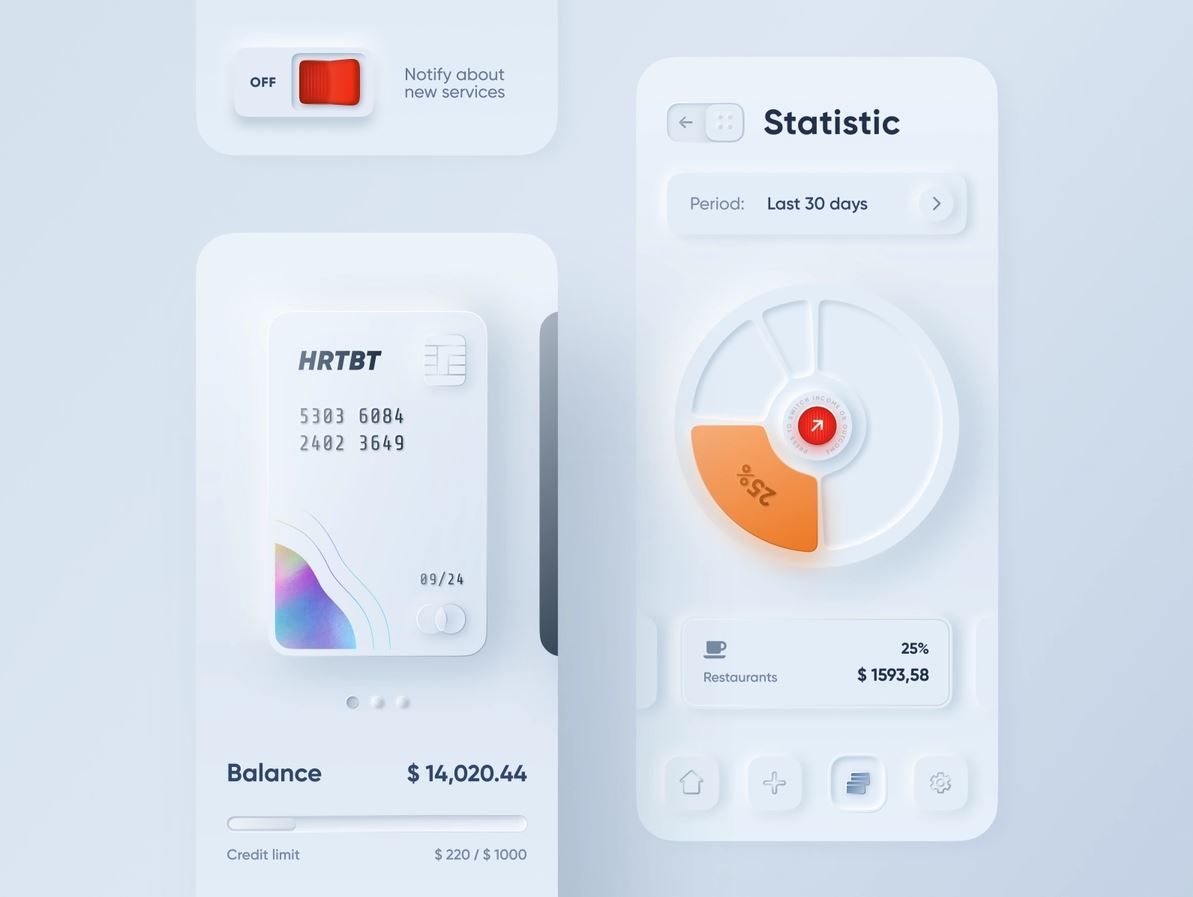
Banking app concept where buttons seem to extrude from the background and sliders look like they could be physically moved.

This design of a banking app done by Alexander Plyuto went viral on Dribbble, and it is said to be the first neumorphic design. His intention was to explore how skeuomorphism could have evolved in mobile interfaces, and the design community welcomed it as a fresh and exciting trend to explore.

© Alexander Plyuto via Dribbble, Fair Use

Why Is Neomorphism Important?

Neomorphism is significant in design for its innovative aesthetic which enhances user engagement with tactile, visually appealing interfaces. It supports a minimalist approach, adds depth and texture and potentially increases psychological comfort and user satisfaction. This style also allows for brand differentiation through a distinctive, modern look. However, Neomorphism's success can be viewed through a mixed lens, depending on the criteria used to evaluate it:

  • Design innovation: Neomorphism has been successful in terms of offering a fresh aesthetic and pushing the boundaries of digital design. It introduced a new way of thinking about UI aesthetics which focused on depth, texture, and a tactile feel. It was a departure from the flat design that had dominated the previous decade.

  • User engagement: For applications and websites that aim to stand out visually, neomorphism has helped create unique and engaging user interfaces. Its distinctive look can capture users' attention and provide a novel interaction experience.

  • Practical usability and accessibility: The success of neomorphism is more controversial when it comes to usability and accessibility. Critics argue its reliance on subtle gradients and soft shadows can lead to poor contrast and visibility, particularly for visually impaired users. This can make neomorphic designs less accessible and potentially reduce their effectiveness in providing a clear and easy user experience.

  • Adoption and longevity: While neomorphism sparked interest among designers and was quickly adopted in various digital products for its novelty, its long-term success is debatable. The practical challenges associated with its implementation—especially regarding accessibility—have led some in the design community to view it as more of a stylistic experiment than a lasting trend.

Neomorphism’s true impact may ultimately inspire designers to explore new directions while remaining mindful of the fundamental principles of good design.

Neomorphism vs Skeuomorphism: What’s the Difference?

Neumorphism and Skeuomorphism represent two distinct approaches to UI design, both commonly used in mobile UX design, each with its unique philosophy and aesthetic. Skeuomorphism, a design approach popularized in the early 2010s, particularly by early versions of Apple’s iOS, focuses on making digital elements mimic their real-world counterparts. This technique employs realistic textures, shadows, and gradients to emulate 3D objects on a 2D screen, with materials like leather, paper, and metal to create interfaces that feel intuitive and familiar to users. It aims to leverage users' pre-existing knowledge of physical objects to facilitate interaction, enhancing usability for newcomers with familiar visual cues.

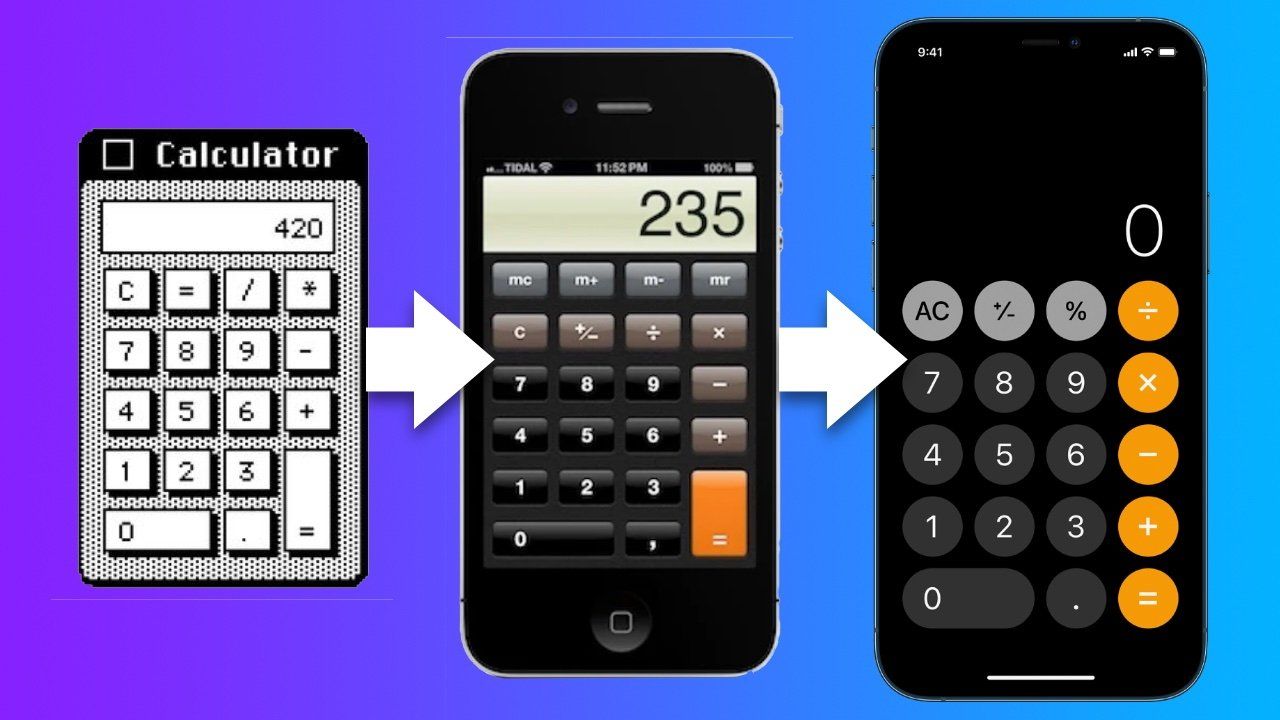
Early versions of Apple’s mobile operating system, iOS, used skeuomorphism heavily across the user interface

The evolution of Apple’s skeuomorphic calculator. The visual interface of early Apple apps and software imitated real-life objects to make their use more straightforward and intuitive for first-time users.

© Apple Insider, Fair Use

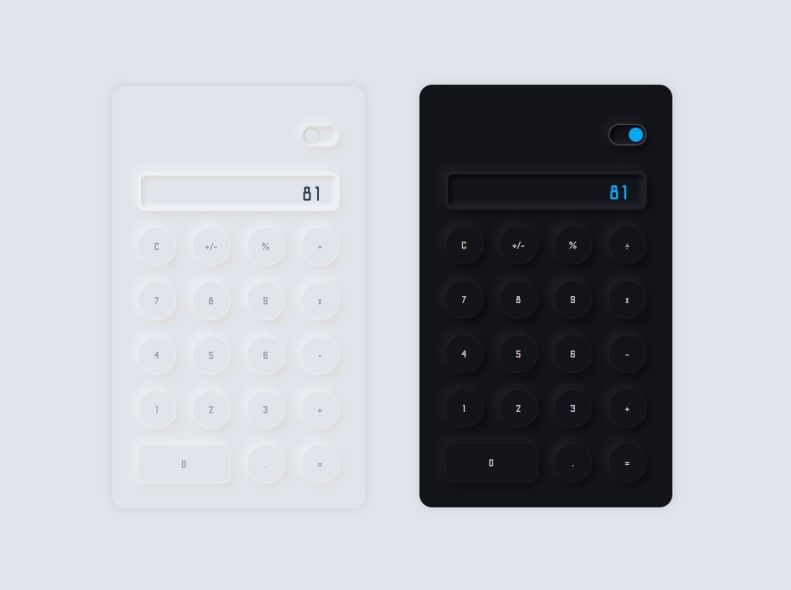
In contrast, neumorphism, which emerged as a trend in the late 2010s, blends concepts from skeuomorphism with a new, minimalist approach. It distinguishes itself by creating a soft, almost tactile feel in UI elements, making them appear as if they are emerging from the background. This design style uses soft shadows and highlights for subtle depth, coupled with a muted color palette and rounded shapes for simplicity and sophistication. While neumorphism aims for a balance between realism and minimalism, it prioritizes aesthetic innovation over direct emulation of the physical world. However, it has been critiqued for potential accessibility issues due to its subtle use of contrast, which can make interfaces less intuitive for some users.

Concept of a neumorphic calculator in dark and light themes.

Concept of a neumorphic calculator.

© Ricky Eckhardt, Dribbble, Fair Use

The key differences between these design philosophies lie in their visual approach and design objectives. Skeuomorphism's direct imitation of real-world materials aims to reduce the learning curve for digital interfaces and make them more accessible through familiarity. Neumorphism, however, seeks to innovate by offering a new form of realism that emphasizes depth and dimension through minimalistic design cues. While skeuomorphism can lead to more cluttered interfaces with its detailed textures, neumorphism offers a cleaner, modern aesthetic that focuses on content. Despite their differences, both styles serve distinct purposes in UI design, with the choice between them depending on project goals, target audience, and context of use.

Neumorphism: Key Characteristics

Neumorphism is distinguished by several key characteristics that set it apart from other design styles.. Here are the main characteristics of neumorphism:

  • Soft, subtle shadows: Neumorphism heavily relies on the use of soft, subtle shadows to create a sense of depth. These shadows are often used to simulate extrusion or intrusion on the screen—the elements appear as if they are embedded within the background or gently protruding out of it.

  • Light and dark color contrast: It utilizes a palette of light and dark variations of colors to enhance the sense of depth and dimensionality. The balance between light and shadow is crucial to achieve the neumorphic effect.

  • Semi-flat colors: While neumorphism departs from the flat design, it still uses semi-flat colors. The colors are usually muted, with low saturation, to keep the design soft and unobtrusive.

  • Rounded corners: The rounded corners of design elements contribute to neumorphism’s soft and approachable look.

  • Minimalistic approach: Despite its focus on shadows and depth, neumorphism maintains a minimalistic approach. The design avoids unnecessary embellishments, focusing instead on cleanliness and simplicity.

  • Tactility and texture: Neumorphism aims to mimic real-world materials and textures, creating a sense of tactility. This is achieved through the subtle use of gradients and shadows, giving the impression that the objects can almost be felt through the screen.

Neumorphism stands out for its unique approach to depth and dimensionality; it offers a new twist on digital interfaces by seamlessly blending backgrounds and interface elements. This design trend seeks to create a bridge between the digital and the physical, providing users with a more intuitive and engaging interaction experience.

How to Create the Neomorphism Effect in UI Design?

The creation of the neomorphic effect in UI design involves a careful balance of colors, shadows, and highlights to achieve a soft, embossed, or inset look. Here's a step-by-step guide:

  1. Choose a Soft Color Palette

Start with a soft, almost monochromatic color palette. Neumorphic elements usually have very subtle color differences, so choose a background color and then select slightly lighter or darker shades for the elements.

  1. Design Background

Use a light color for the background. Neumorphism relies heavily on shadows and light to create depth, so a neutral or pastel background makes the elements stand out.

  1. Create the Elements

Design your UI elements (e.g., buttons, sliders) with the same background color but slightly different shade. This minimal difference in color helps achieve a soft, subtle look.

  1. Apply Soft Shadows and Highlights:

  • Shadows: Apply a soft box shadow to create depth. Use a darker shade of your element’s color. To create a lifted effect, the shadow should be subtle and often applied on two opposite sides of the element (e.g., bottom and right).

  • Highlights: Apply a light source as an inner shadow on the opposite sides of where you placed the box shadow, using a lighter shade than the element’s color. This simulates the effect of the element being lit from above, adding to the 3D appearance.

  1. Adjust the Radius

    Use a large radius for your box shadows and elements to soften the edges. neumorphism is known for its soft, pillowy look, so avoid sharp edges.

  2. Fine-tune Contrast

Ensure enough contrast between the elements and the background while maintaining a subtle, soft appearance. This might require adjusting the colors, shadow intensity, or highlight brightness.

  1. Test for Accessibility

Since neumorphism can sometimes lead to accessibility issues, especially regarding contrast and readability, test a design with various users, including those with visual impairments, to ensure usability.

  1. Integrate with UI Components

Apply the neumorphic style to various UI components such as input fields, checkboxes, and toggles, ensuring consistency across your design.

  1. Use Gradients for Added Depth (Optional)

A subtle gradient to the background or elements can enhance the 3D effect making the design more dynamic.

  1. Prototype and iterate

Prototype your design to see how it works in practice. Collect feedback and iterate to improve the design with a focus on usability and aesthetics.

By following these steps, you can create a UI design that harnesses the unique and tactile feel of neumorphism, ensuring it's not only visually appealing but also user-friendly and accessible.

Neumorphism: Applications in Design

While neumorphism has been a popular trend in UI/UX design, specific well-known apps adopting this style outright can be less common, as mainstream applications often prioritize accessibility and usability, which can conflict with the neumorphic design's subtle features. However, there are several concept designs and smaller-scale applications where neumorphism has been explored more freely. Here are examples in line with the categories mentioned, noting that these might lean more toward conceptual or niche applications rather than mainstream ones:

  • Music player apps: Concept designs for music player apps on platforms like Dribbble or Behance showcase neumorphic design elements for play buttons and sliders. A specific example is hard to pinpoint as mainstream apps like Spotify or Apple Music maintain more accessible designs.

  • Smart home apps: While specific mainstream smart home apps (like those from Nest or Philips Hue) typically use more standard design approaches for broader accessibility, concept designs for smart home apps on Behance or Dribbble often experiment with neumorphism to represent physical switches or dials.

  • Fitness and health apps: Fitness app concepts, rather than widely recognized brands such as Fitbit or MyFitnessPal, might use neumorphic design for daily activity tracking or nutrition logging in their UI mockups.

  • Banking and finance apps: Most banking apps stick to more traditional design paradigms for clarity and security reasons. However, fintech startups occasionally experiment with modern design trends, including neumorphism, for features like transaction buttons or account balance displays in their app prototypes or concept stages.

  • User Interface (UI) kits and themes: Designers on platforms like UI8, ThemeForest, and Creative Market offer neumorphic UI kits and themes for various applications and websites, providing resources for developers and designers to implement this style in their projects.

  • Dashboard interfaces: Conceptual dashboards for CRM, analytics, or IoT device management showcased on design inspiration websites might incorporate neumorphic elements to highlight key data points or controls.

  • Gaming apps: Indie game developers or concept designs for game interfaces might use neumorphic design to create a unique tactile feel for game controls or menus, although these are less common in mainstream games.

  • Website design: Portfolio websites or design-centric sites occasionally adopt neumorphic design elements to showcase creativity. These are usually individual projects or design agency websites rather than large-scale commercial sites.

Given the nature of neumorphism as a niche or emerging design trend, its adoption is more prevalent in design exploration and conceptual projects. Mainstream applications may incorporate elements of neumorphism subtly, but they typically do so while carefully balancing other design considerations to ensure usability and accessibility for a broad audience.

Neumorphism in UX and UI Design: What’s Next?

The future of neumorphism in UX/UI design hinges on balancing aesthetic appeal with accessibility. As technology and design tools evolve, neumorphism may adapt, integrating with other design trends and improving usability. 

Future iterations could see it merging with new technologies or evolving into contemporary styles that address its limitations. The design community's feedback and technological advancements will likely dictate its role, potentially leading to hybrid approaches that combine neumorphism's tactile feel with more accessible and user-friendly designs.

Questions About Neumorphism?
We've Got Answers!

How does neumorphism differ from flat design?

Neumorphism and flat design are two design styles with distinct features. Neumorphism uses soft shadows and gradients to mimic physicality and depth, making elements appear as though they are emerging from the background. It aims for a tactile and realistic effect. Flat design, in contrast, embraces minimalism with clean, two-dimensional elements, solid colors, and simplicity, focusing on usability and efficiency by stripping away unnecessary details.

The critical difference lies in their treatment of realism and depth. neumorphism seeks to create a sense of real-world materials and depth, while flat design prioritizes clarity and functionality with a straightforward, no-frills approach. While neumorphism can offer a visually engaging experience, it may suffer from usability issues like reduced contrast. Flat design, although more accessible, might lack visual interest for some.

Learn more about UI trends in the article Top 10 UI Trends Every Designer Should Know.

Learn more about Visual Design in our course Visual Design: The Ultimate Guide.


To create neumorphic designs, tools like Adobe XD, Figma, Sketch, and Mockplus come highly recommended. Adobe XD and Figma allow for detailed shadow and gradient manipulation, which is crucial for the subtle effects​​of neumorphism. Sketch is known for its specialized plugins that ease neumorphic design. Mockplus offers extensive libraries for rapid prototyping and testing neumorphic interfaces, ensuring visual appeal and usability​​. Additionally, the Neumorphic Generator simplifies UI creation by enabling easy customization of shapes and shadows, integrating seamlessly with these design tools​​. These tools provide a robust set of resources for designers to craft and iterate on neumorphic designs effectively.

Learn more about Visual Design in our course Visual Design: The Ultimate Guide.

Neumorphism combines skeuomorphism's depth with flat design's simplicity, using subtle shadows for a 3D effect while keeping interfaces clean and minimalist. It strikes a balance, making digital elements intuitive and visually engaging, ideal for touchscreens. However, it faces challenges with accessibility due to its subtle contrasts. Despite this, the unique aesthetic of neumorphism has made it a popular trend in UI design.

Learn more about UI trends in the article Top 10 UI Trends Every Designer Should Know.

Learn more about Visual Design in our course Visual Design: The Ultimate Guide.

What colors work best for neumorphic design?

For neumorphic design, opt for soft, muted color palettes like shades of gray, off-white, or light pastels. These colors enhance the style's subtle shadows and highlights, creating a soft, extruded look. A gray-on-white scheme is particularly effective, allowing the design's depth and dimension to stand out​​​​. Stick to monochromatic schemes to maintain subtlety and ensure elements are distinguishable, mainly to accommodate users with visual impairments​​​​. This approach supports the visual depth and tactile feel characteristic of neumorphism while ensuring usability and accessibility.

Learn more about UI trends in the article Top 10 UI Trends Every Designer Should Know.

Learn more about Visual Design in our course Visual Design: The Ultimate Guide.

How do you ensure text readability in neumorphic interfaces?

To ensure text readability in neumorphic interfaces, it's crucial to balance the design's aesthetic appeal with usability and accessibility. neumorphism's characteristic use of soft shadows and low contrast can pose challenges for text readability, especially for users with visual impairments. Here are some strategies to maintain text clarity:

  • Contrast and color choice: The main challenge in neumorphism is achieving sufficient contrast between the text and its background. Opt for color schemes that offer enough contrast to keep text legible. Avoid using colors that blend too closely with the background, and consider the needs of users with color vision deficiencies​​.

  • Shadow and light for depth: Utilize neumorphism's hallmark shadow effects to create depth, making text elements stand out more against the background. Apply a subtle, light shadow on one side and a darker shadow on the opposite to simulate a light source and give the text a raised or inset appearance​​​​.

  • Accessibility guidelines: Adhere to Web Content Accessibility Guidelines (WCAG), especially regarding contrast ratios. This ensures the design is accessible to a broader audience, including those with visual impairments. Tools like color contrast checkers can help verify that your text meets these guidelines​​.

  • Sparing use of neumorphism: Given its potential drawbacks for accessibility, it's advisable to use neumorphic elements selectively. Focus on applying neumorphic principles where they enhance the user experience without compromising text readability. For critical information and calls to action, consider using clearer, more conventional design elements that guarantee legibility

Learn more about Visual Design in our course Visual Design: The Ultimate Guide.

Is neumorphism accessible to all users?

Neumorphism's design, characterized by its soft shadows and light used to create depth, poses significant accessibility challenges. Its reliance on subtle visual cues can make it difficult for users with visual impairments, such as low vision or color blindness, to navigate and interact with interfaces effectively. The low contrast and subtle distinctions between elements can hinder the ability to discern buttons or actions, impacting text legibility and overall usability. To improve accessibility, incorporating higher contrast, clear text labels, and alternative indicators of functionality is essential. Ensuring digital products are accessible to all users requires a thoughtful balance between innovative design and inclusivity.

Learn more about Visual Design in our course Visual Design: The Ultimate Guide.

Can neumorphism be combined with other design styles for better usability?

Combining neumorphism with other design styles like flat or material design can enhance usability while preserving its distinct look. This approach allows for improved contrast and clarity, offers clearer interactive cues through tactile and animated elements, and incorporates accessibility features for broader usability. By integrating high-contrast elements and intuitive interaction cues from other design philosophies, designers can create aesthetically pleasing and functional interfaces, ensuring a seamless user experience for a diverse audience.

Learn more about UI trends in the article Top 10 UI Trends Every Designer Should Know.

Learn more about Visual Design in our course Visual Design: The Ultimate Guide.

Is neumorphism a passing trend or here to stay in UI design?

The future of neumorphism in UI design remains a topic of debate. While its unique aesthetic has garnered interest, concerns over accessibility and usability challenge its longevity. neumorphism might evolve, integrating with other design styles to mitigate these concerns, suggesting it could adapt rather than disappear. The design community's focus on innovation and inclusivity will determine whether neumorphism becomes a staple or a footnote in design history.

Learn more about UI trends in the article Top 10 UI Trends Every Designer Should Know.

Learn more about Visual Design in our course Visual Design: The Ultimate Guide.


What are the main criticisms of neumorphism?

Neumorphism faces criticism primarily for its accessibility and usability issues. While aesthetically pleasing, the design's subtle shadows and light effects can hinder visibility for users with visual impairments, making it challenging to distinguish interactive elements. Moreover, the focus on style can sometimes compromise functionality, leading to clearer user interfaces. Implementing neumorphism also demands careful attention to detail, potentially causing inconsistencies across different devices. Balancing its innovative look with practical design considerations is crucial for ensuring a positive user experience.

Learn more about Visual Design in our course Visual Design: The Ultimate Guide.

What alternatives to neumorphism are considered more effective by some designers?

Some designers consider alternatives to neumorphism that prioritize accessibility and usability without sacrificing aesthetic appeal. These alternatives include:

  • Flat design: Celebrated for its simplicity, clarity, and emphasis on color and typography, flat design eschews realistic textures for a minimalist approach, improving legibility and ease of use.

  • Material design: Developed by Google, material design introduces depth and shadow in a more structured manner than neumorphism, using z-axis and defined shadows to indicate interactivity, enhancing usability while maintaining visual appeal.

  • Skeuomorphism: The precursor to neumorphism, skeuomorphism mimics real-world materials and textures more explicitly, which can offer clear cues for interaction but may appear dated or cluttered in modern UI contexts.

  • Glassmorphism: Characterized by transparency (frosted-glass effect), multi-layered approach, and vivid background colors, glassmorphism focuses on depth and layering to create a lightweight and airy interface, offering a balance between aesthetic and functionality.

Each design style offers a distinct approach to UI design, addressing some of the accessibility and usability concerns associated with neumorphism. The choice among them depends on the specific goals of the project, the target audience, and the desired user experience.

Learn more about UI trends in the article Top 10 UI Trends Every Designer Should Know.

Learn more about Visual Design in our course Visual Design: The Ultimate Guide.

Earn a Gift Earn a Gift, Answer a Short Quiz!

1
2
3
4
1
2
3
4
Question 1
Question 2
Question 3
Get Your Gift
Interaction Design Foundation logo

Question 1

What is a defining feature of neumorphism in UI design?

1 point towards your gift

  • Bright and high-contrast colors
  • Elements that appear extruded or embedded in the background
  • Sharp and defined edges in the foreground only
Interaction Design Foundation logo

Question 2

What is a common criticism of neumorphism in UI design?

1 point towards your gift

  • It can cause usability and accessibility issues due to low contrast.
  • It lacks visual appeal and bores the user so they exit faster.
  • It uses too many bright colors.
Interaction Design Foundation logo

Question 3

Which design element is important to achieve the neumorphic effect?

1 point towards your gift

  • Bold and vibrant color schemes
  • Complex textures and patterns
  • Soft shadows and highlights

Learn More About Neumorphism

Make learning as easy as watching Netflix: Learn more about Neumorphism by taking the online IxDF Course Visual Design: The Ultimate Guide.

Why? Because design skills make you valuable. In any job. Any industry.

In This Course, You'll

  • Get excited when you use visual design principles to create impressive visuals people love! Great visual design makes the message clear, memorable, and persuasive—whether it's an app, a logo, or a presentation slide. You'll learn what makes a design excellent and how science and culture influence what works and what doesn't. You'll create designs that truly connect with people. Visual design isn't just about beauty—it's about shaping ideas that inspire action, build trust, and give meaning to your work. As AI makes visual production faster and cheaper, you stay in demand when you can turn rough or AI-generated visuals into successful designs that get approved, adopted, and used. If you want to stand out with timeless human-centered design skills, this course is for you.

  • Make yourself invaluable with practical design skills that amplify your impact in any industry! Did you know that you only have 50 milliseconds to make a good first impression? Great visual design ensures you pass the test every time. You'll learn to use visual elements to guide emotions, influence purchasing decisions, and optimize User Experience (UX) and User Interface (UI) design. You'll master color theory, typography, and grid systems to improve usability, build credibility, and create designs that stop the scroll.

  • Gain confidence and credibility as you fast-track results with step-by-step exercises and downloadable templates! Complete optional tasks to walk away with portfolio-ready case studies that will help you land your dream job and advance your career. You'll get hands-on and design a low-fidelity wireframe, apply a monochromatic, complementary, or triadic color scheme, choose typefaces, and select a grid system. It's easier than you think! No matter your background, you can master Visual Design. With clear guidance and real-world examples, you'll apply your skills right away. This course will give you the visual design skills you need to solve design challenges, collaborate smarter, and make it easy for decision-makers to say yes to your vision.

It's Easy to Fast-Track Your Career with the World's Best Experts

Master complex skills effortlessly with proven best practices and toolkits directly from the world's top design experts. Meet your experts for this course:

  • Mia Cinelli: Associate Professor of Art Studio and Digital Design at the University of Kentucky.

  • Joann Eckstut: Color Consultant, Founder of The Roomworks, and one of the 12 designers chosen by the Color Association of the USA to create the yearly forecast used by industries to keep up with color trends.

  • Arielle Eckstut: Author, Agent-at-large at the Levine Greenberg Rostan Literary Agency, and Co-Founder of The Book Doctors and LittleMissMatched.

Get an Industry-Recognized IxDF Course Certificate

Increase your credibility, salary potential and job opportunities by showing credible evidence of your skills.

IxDF Course Certificates set the industry gold standard. Add them to your LinkedIn profile, resumé, and job applications.

Course Certificate Example

Be in distinguished company, alongside industry leaders who train their teams with the IxDF and trust IxDF Course Certificates.

Our clients: IBM, HP, Adobe, GE, Accenture, Allianz, Phillips, Deezer, Capgemin, Mcafee, SAP, Telenor, Cigna, British Parliament, State of New York

All Free IxDF Articles on Neumorphism

Read full article
Top 10 UI Trends Every Designer Should Know - Article hero image
Interaction Design Foundation logo

Top 10 UI Trends Every Designer Should Know

People get easily bored with trends, and every few years, the pendulum swings from one way to another. We have all seen the rise and fall of iconic fashion pieces or art movements. The same thing happens in User Interface (UI) design. UI trends go from interfaces that mimic real-world objects to sup

Social shares
1k
Published
Read Article

Top 10 UI Trends Every Designer Should Know

Top 10 UI Trends Every Designer Should Know

People get easily bored with trends, and every few years, the pendulum swings from one way to another. We have all seen the rise and fall of iconic fashion pieces or art movements. The same thing happens in User Interface (UI) design. UI trends go from interfaces that mimic real-world objects to super-minimal interfaces with no embellishments. All of these have their advantages and disadvantages. With knowledge about these UI trends, you can create and experiment with new ideas, which are essential to innovate, push the design industry forward, and elevate your own design practice.

To deliver exceptional visual designs and an excellent user experience, let’s look back and learn from the most relevant UI design patterns and UI trends since the earliest graphical user interfaces appeared. Only then can we understand how different visual choices bring value to users and their relationship with the context of use. Let’s learn the 10 UI trends every UI designer should know.

1. Skeuomorphism

Skeuomorphism was the visual approach used to design the earliest graphical user interfaces. In skeuomorphism, design elements mimic their real-world counterparts to bridge the physical and digital worlds. The most well-known example is the recycle bin icon, which mimics a real-life recycle bin.

When personal computers or smartphones first appeared, it made sense to design them in a way that would help first-time users immediately grasp how to navigate the new digital world. Skeuomorphic designs, therefore, prioritize similarities to the real world over visual appeal to ensure an intuitive user experience.

Early versions of Apple’s mobile operating system, iOS, used skeuomorphism heavily across the user interface. 
The evolution of Apple’s skeuomorphic calculator. The visual interface of early Apple apps and software imitated real-life objects to make their use more straightforward and intuitive for first-time users.

© Apple Insider, Fair Use

Skeuomorphic design was the standard until early 2010. This design aesthetic played a big part in making the transition to digital platforms as smooth as possible. As more and more people became digital natives, literal design elements weren’t as essential for a good user experience. 

In addition, skeuomorphic design elements require a lot of technical ability since they are highly detailed. The increased digital literacy today paved the way for new UI design styles to flourish. 

2. Minimalism as a UI Trend

The minimalist UI trend is based on the Minimalism art movement, the main principle of which is “Less is more.” Minimalism doesn’t translate into an empty and vague design. It focuses on “The More of Less”—as stated in the title of the American author Joshua Becker’s book. That means using fewer elements to reduce clutter, and give more attention to what matters most.

Minimalist interfaces are elegantly simple and focus on the functionality of every element, the use of negative space combined with bold colors and font combinations. Overall, minimalist UIs can be very usable since there are no decorative elements, and thus—if they are designed well—the user will have a highly intuitive journey through the design. Typically, minimalist interfaces have an elegant and sophisticated visual appeal. 


Short text with highlighted words. When one word is clicked, more words appear. For instance when the word

The writer Alan Trotter’s website is an example of a minimalist UI with a twist. Users have to click the highlighted words to discover the hidden message.

© Alan Trotter, Fair-Use

Minimalism emerged in the late 1950s in New York, and its main characteristics were order, simplicity and harmony. The German industrial designer Dieter Rams adapted the “Less is more” principle of minimalism to become the “Less, but better” principle of Good Design. In other words, “Good design is as little design as possible.” 

“A shape, a volume, a color, a surface is something itself. It shouldn’t be concealed as part of a fairly different whole. The shapes and materials shouldn’t be altered by their context.” 

— Donald Judd, American artist  

Besides minimalist UI designs, many other UI trends—including flat design—follow the principles of minimalism to a greater or lesser extent.

3. Flat Design

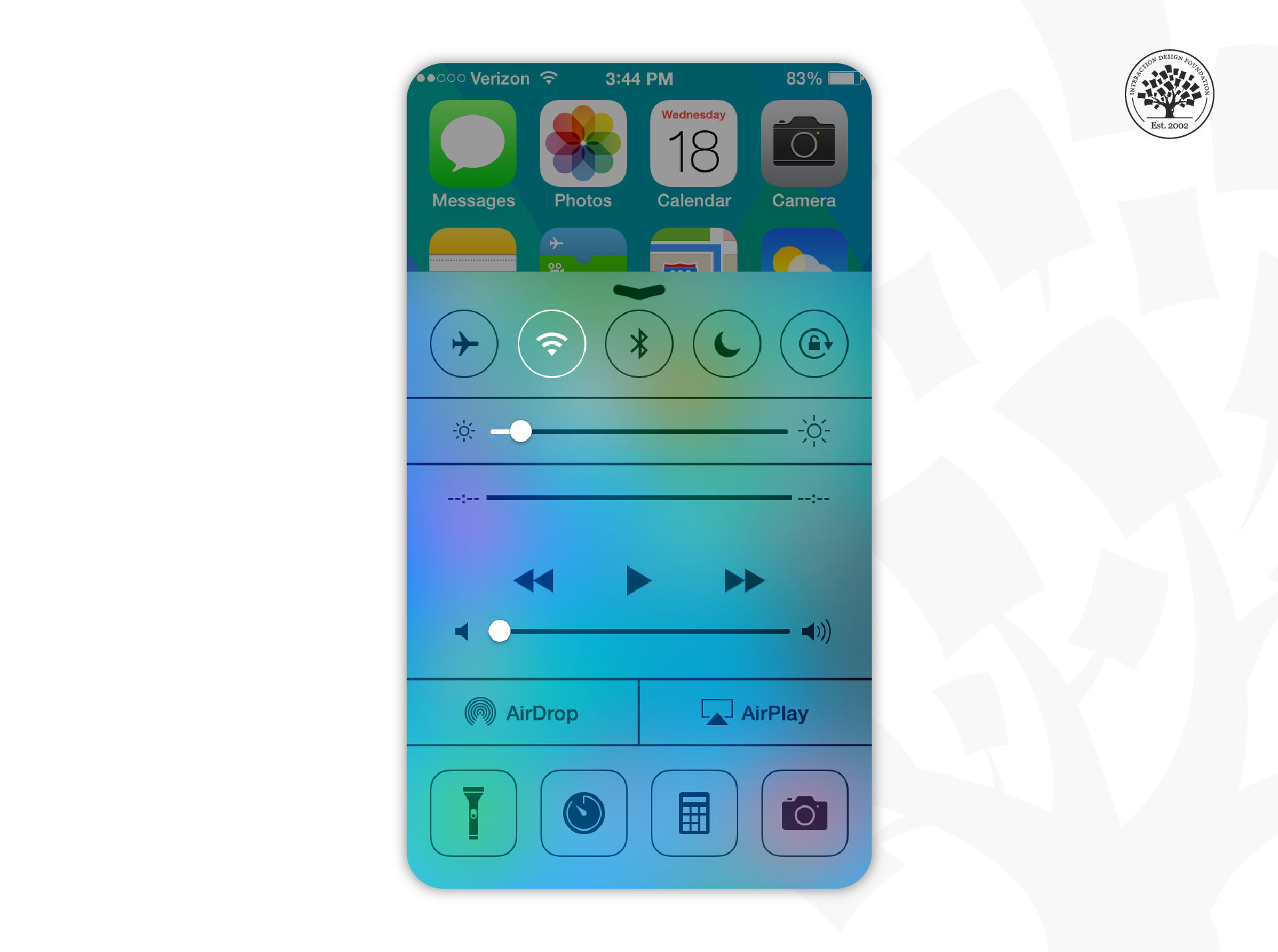
Flat design is a UI design aesthetic centered around simplicity. It shifted the interface design paradigm from real-life-looking objects to schematic simplifications of elements. This UI trend represented a substantial technical advantage, especially in mobile user experience design and mobile devices, since it allowed faster loading speeds. Flat design uses a minimalistic approach to UI elements without any shadows or decorative elements. It heavily relies on bright colors and good use of typography to infuse character and visual appeal into the designs. For instance, look for typefaces that have some flair and can add visual interest but that have even strokes and are coherent with a minimalist aesthetic.

Flat design gained traction in 2012 with the release of Windows 8, Apple’s iOS 7, and Google’s Material Design. However, to some extent, flat designs lack visual affordances, and users might not know which elements are interactive or not.

The iOS 7 Control Center uses flat design.

© iOS Guides, Fair-Use

Flat design 2.0 addressed this concern to improve usability. This evolution of flat design uses subtle shadows or color variations to highlight interactive elements to indicate to users how to interact with a design. These subtle changes help increase depth and dimension and thus improve usability.

Overall, flat design lends an uncluttered and clean visual appeal to digital interfaces. 

4. Bauhaus Style

The Bauhaus UI style revolves around geometric graphics: semicircles, circles, rectangles, triangles, and other shapes. It’s also known for the innovative use of typography and non-distracting non-functional details. This design style relies on the design elements themselves: line, shape, color, and it features abstract shapes and balanced forms. 

In this video, find out more about the Bauhaus movement and how it has impacted design.

In this video, find out more about the Bauhaus movement and how it has impacted design.

© Google Arts & Culture, Fair-Use

This UI design style is based on the Bauhaus art and design movement that began in 1919 in Weimar, Germany. This movement created a bridge between art and industry by combining crafts with art. The basic principle of the Bauhaus Movement was “Form follows function.” This principle has profoundly shaped design ever since. According to it, simple geometric shapes were designed based on an object’s intended function or purpose, resulting in a minimalist aesthetic that can also be beautiful. Bauhaus championed a geometric, abstract style featuring little sentiment or emotion and no historical nods.

Bauhaus-style interfaces have an elegant, modern and clean visual appeal to digital interfaces.

“Transferring the Bauhaus principles into a modern product design setting means to be brave enough to remove noise.” 

— Melanie Daveid, UX designer & art director and Adobe Live host

5. Bold Typography

Bold typography, or rule-breaking typography, is a UI trend where typography takes center stage. In this design style, typography transcends its traditional role and becomes the center of the design. When typography is the main element of a design, rules change; spinning, twisting, extravagant sizes, division of words in many lines and poor readability are all fair game. However, it is essential to comprehend the principles of typography to bend them successfully. It’s best to make these bold design choices only when they serve a purpose. 

Bold typography usually makes a big statement and can have shock value, and thus needs to be thought through and planned very carefully and intentionally. 

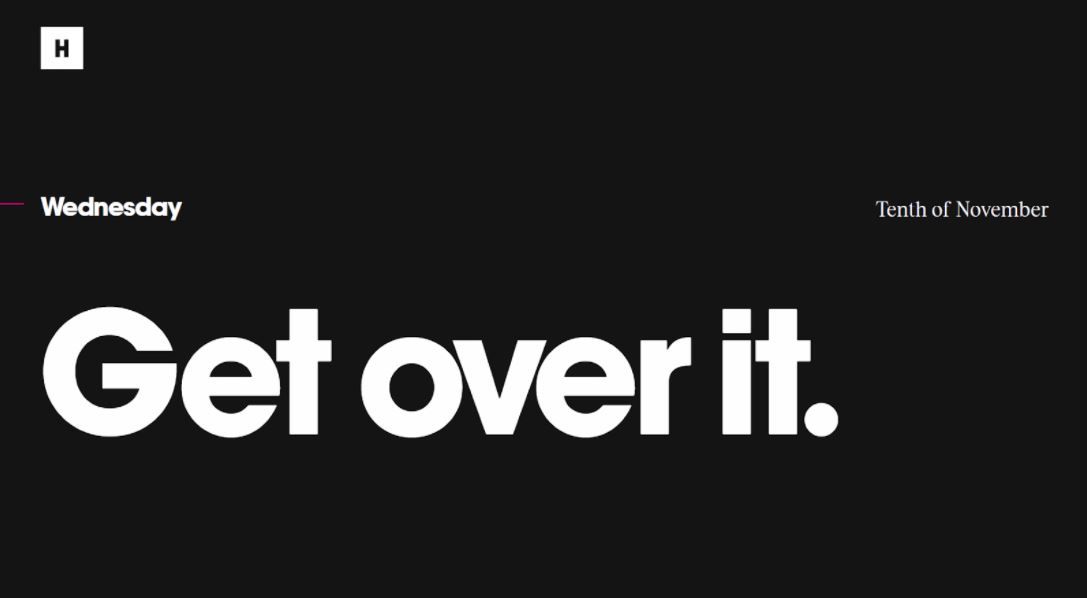
Website where the main element is big white text that reads

The website of the digital agency Huge uses bold typography.

© Huge Inc, Fair-Use

6. Neumorphism

In neumorphic design, elements seem to extrude from the background. Neumorphism combines the minimalism of flat design with the realism of skeuomorphism. However, it doesn’t focus on imitating objects from real life but rather on creating objects that could work in real life. A neumorphic UI interface looks like you can physically interact with it; you can press buttons and move sliders.

Banking app concept where buttons seem to extrude from the background and sliders look like they could be physically moved.

This design of a banking app done by Alexander Plyuto went viral on Dribbble, and it is said to be the first neumorphic design. His intention was to explore how skeuomorphism could have evolved in mobile interfaces, and the design community welcomed it as a fresh and exciting trend to explore.

© Alexander Plyuto via Dribbble, Fair Use

The key to neumorphism is how it treats depth. Buttons will appear raised until you press them, and then they will display on the sunken level. Neumorphism uses shadows and gradients to achieve a three-dimensional look, resulting in a sleek and fresh interface design. The essential elements of neumorphism are low contrast, monochromatic color schemes and subtle shadows.

This type of design may come with potential accessibility issues, especially in dark mode, due to its characteristic low contrast. People with vision loss, blindness and color blindness will find it very difficult to interact with this style of interface design. Therefore, good neumorphic design requires extra attention to design elements and principles such as typography, space or hierarchy to ensure the interface has good usability despite its low contrast. Designers are problem solvers and thus may find several strategies to ensure good accessibility in neumorphic designs.  

The term “Neumorphism” was first coined by Michał Malewicz, Creative Director and CEO of Hype4, in 2019, after seeing a new take on skeuomorphism in designs on Dribbble and Behance. Neumorphism comes from the expression “New skeuomorphism”. This UI trend has also been called “soft UI” due to its characteristic low contrast.

7. Glassmorphism

Glassmorphism is a UI trend where design elements have the appearance of translucent frosted glass. Users feel that they can see through the elements, and it has a sense of verticality to it. Design elements look layered—with objects floating on space—and the top layer seems like a piece of virtual glass. To achieve the frosted glass effect, you can use a background blur and a semi-transparent outline to simulate the edge of the glass. For this trend to shine, backgrounds need to have enough tonal difference to make the glass effect visible. 

The three most important characteristics of glassmorphism are transparency, light borders, and vivid or pastel colors.

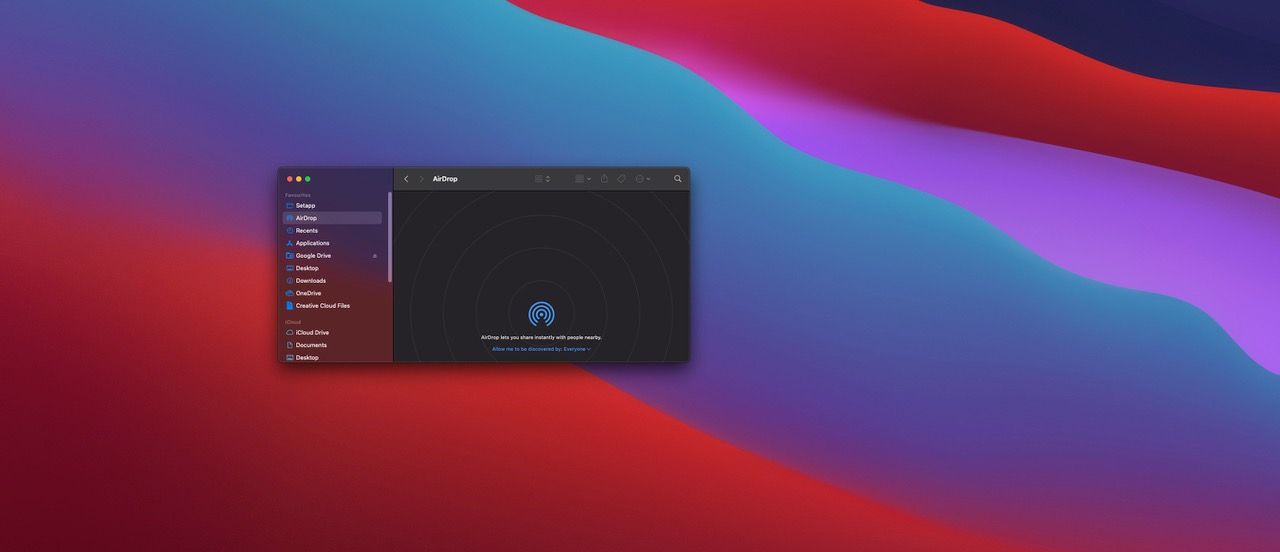
Mac's finder sidebar with a frosted glasse effect.

Apple’s macOS Big Sur operating system uses the frosted glass effect.

© Apple Inc, FairUse

There’s a great deal of discussion between designers about whether this trend can promote good accessibility. A safe starting point is to use this effect only in backgrounds since a UI should still work without any background. This way, visually impaired people could still interact with the interface.

Michał Malewicz also coined the term “Glassmorphism”. This UI design style became popular after Apple’s update of macOS Big Sur in 2020. Glassmorphism offers an eye-catching, beautiful and minimalistic visual appeal.

8. Animation/Motion as a UI Trend

Motion UI refers to the trend of adding attractive and customized animations and transitions to an interface. Motion or animation is a fun way to enrich a user experience and add life-like elements to an interface. This trend boosts visual appeal by adding the dimension of movement to a design. 

If we want moving elements to make sense and feel natural, we need to add animations that enhance the design rather than distract from it. It is very easy to get carried away with all the fun animations, but we have to choose wisely to ensure a successful design. For example, you can use animations to guide or even entice your user to perform a specific action or give them feedback.

What’s more, beyond adding motion to an interface to boost visual appeal, you can use motion to tell a story. A common way to add storytelling to digital platforms is through scroll-triggered animation. In this case, motion occurs after users scroll through the page. Users feel an active role in the story since they make it unfold, something that creates an immersive experience—to a certain extent. 

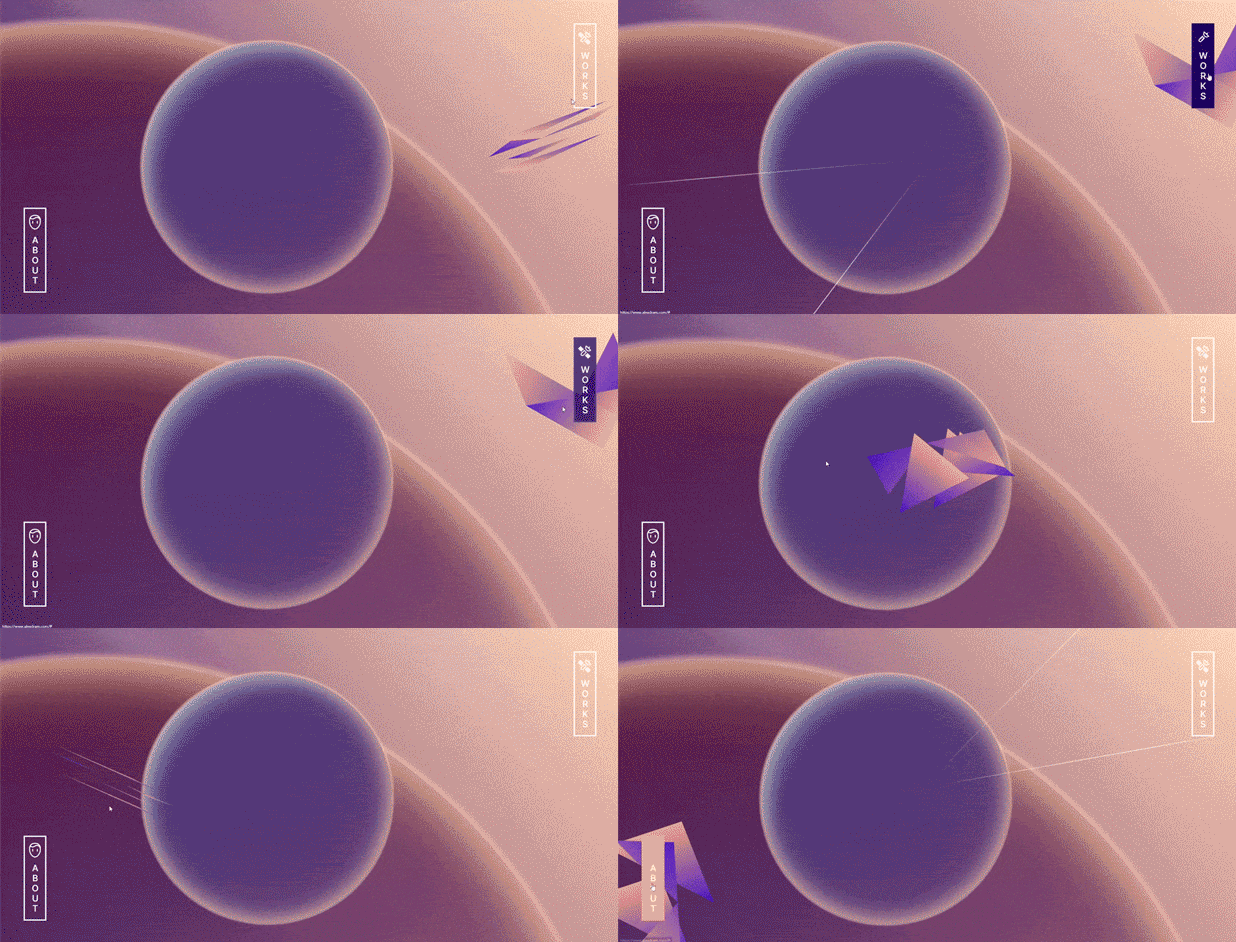
Online portfolio where the cursor has a plane-like shape and the animation of the website makes us feel like we are travelling towards a planet in the background. Then the

Alex Dram’s UX/UI portfolio’s website is an example of using motion in an organic and innovative manner to grab the user’s attention.

© Alex Dram, Fair-Use

Overall, adding motion or animation to your designs can be a way to breathe life into static interfaces, which, if done correctly, will improve user experience and user engagement in your products.

9. Illustration as a UI Trend

As a UI trend, illustration helps differentiate and give products more personality. In a sea of endless digital platforms, the ability to stand out is a precious asset. Illustrations can be digital or hand-drawn, 2D or 3D, and can have very different aesthetics. In addition, illustrations can also help static pages come to life, especially when combined with motion design. People are drawn to people, and thus, adding characters into a digital platform or a product can generate empathy, make a memorable experience and improve user engagement.  

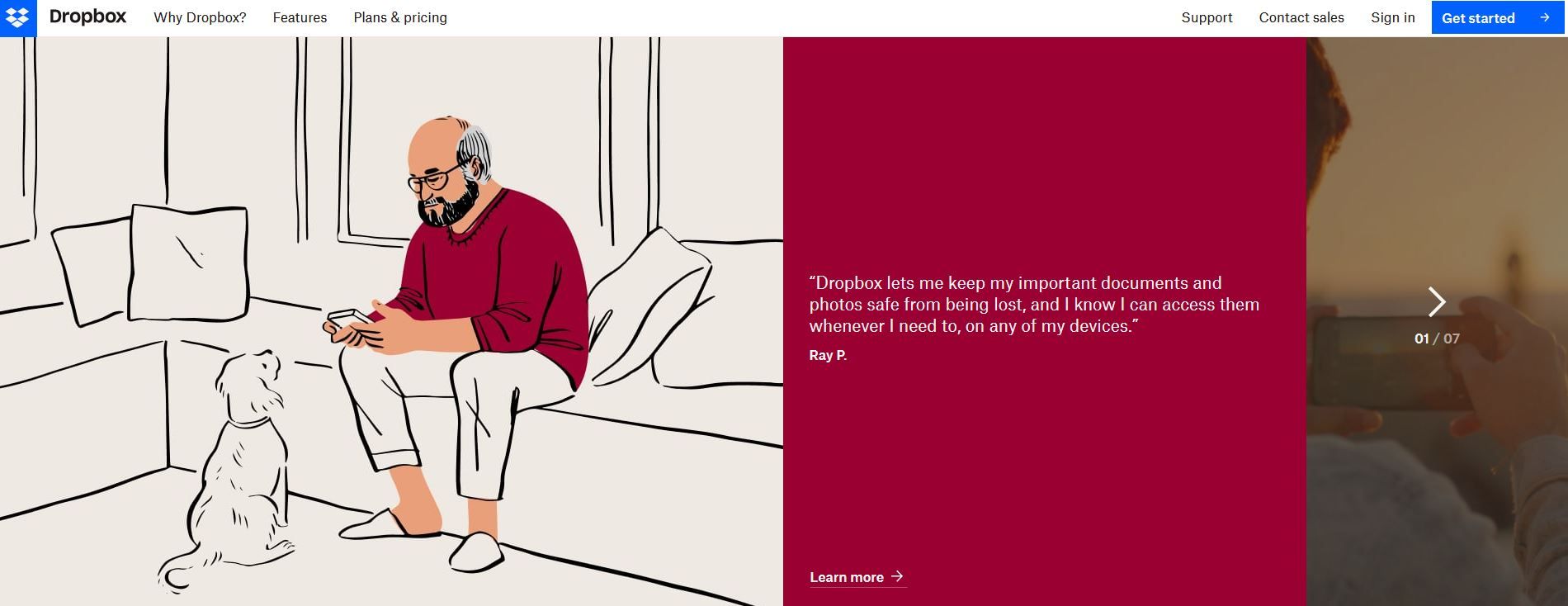
Illustration where an old man is looking at his phone while his dog is looking at him, representing important moments.

Dropbox uses illustrations on their website to help visualize their message and create emotions.

© Dropbox, Fair Use

However, we should create illustrations strategically to enhance user experience instead of distracting users or slowing down the platform. When done right, purposeful illustrations can increase conversion rates and significantly improve user experience.

Custom illustrations have taken over from stock images and have the power to give a unique visual appeal to your designs and help tell the story of your products.

10. Dark Mode as a UI Trend

The dark mode UI is a design style where light text sits on a dark background. This color scheme reduces the luminance emitted by device screens. Some studies suggest that it helps improve visual ergonomics by reducing eye strain. Dark mode also helps conserve battery power to some extent. 

Dark theme UIs came about as a countermove to the dark-on-light color schemes, which simulated the appearance of ink on white paper. Implementing a dark mode is not about using black and white but rather low light and high contrast between elements. Google's Material Design recommends using dark gray for backgrounds and a lighter one for text (not entirely white, though).

This trend appeared in 2016 when Twitter experimented with a light-on-dark color scheme. However, many older operating systems worked with light text on dark backgrounds—you probably remember the screen with green numbers on a dark background from The Matrix films. 

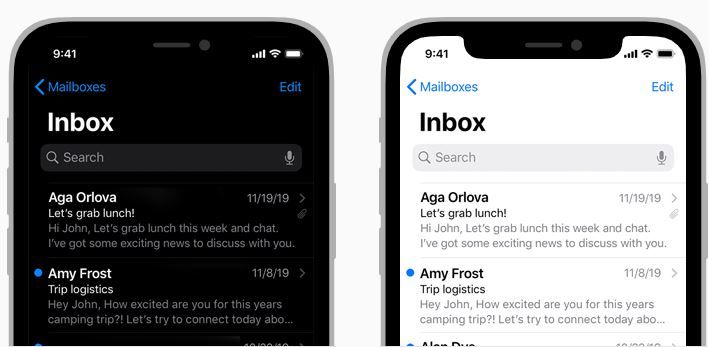
This trend seemed to take off when Apple released a dark mode option in the iOS 13 update. Since then, dark modes have become a common alternative in many interfaces, where users can choose between a light and a dark interface.

Dark mode vs. light mode.

© Apple Inc, Fair Use

Dark mode UIs have a sharp, sleek, and modern visual appeal that might be gentler on the eye. Therefore, dark themes may have become popular in response to the increase in users’ time spent staring at a screen. If you’re designing a product where users will be on-screen for long periods, you may want to consider adding a dark theme option, as you always must consider your user's context of use and brand requirements.

The Take Away

UI design has seen the rise and fall of many trends, from skeuomorphism—where UI elements mimic real-world objects—to minimalism—where UI elements are schematic and have no embellishments. Each was a product of its time and brought something relevant to the table. If you understand the reason behind each trend, you’ll be able to use that knowledge to improve your visual design choices and deliver exceptional user interfaces.

Regardless of the visual style you choose for your projects, always ask yourself how you can best support user experience with visual design. Doing this will ensure that no matter what the trend of the moment is, you’ll make the right visual design choices and deliver the best user experience. 

References and Where to Learn More

To learn more about how users engage with different UI visual trends, read the article From skeuomorphism to flat design: age-related differences in performance and aesthetic perceptions

Learn more about visual design in the IxDF Visual Design: The Ultimate Guide course.

Hero Image: © Google, Fair Use 


Feel Stuck?
Want Better Job Options?

AI is replacing jobs everywhere, yet design jobs are booming with a projected 45% job growth. With design skills, you can create products and services people love. More love means more impact and greater salary potential.

At IxDF, we help you from your first course to your next job, all in one place.

See How Design Skills Turn Into Job Options
Privacy Settings
By using this site, you accept our Cookie Policy and Terms of Use.
Customize
Accept all

Be the One Who Inspires

People remember who shares great ideas.

Share on:

Academic Credibility — On Autopilot

Don't waste time googling citation formats. Just copy, paste and look legit in seconds.