User Needs

Your constantly-updated definition of User Needs and collection of videos and articles.
Be a conversation starter: Share this page and inspire others!

690 Shares

What are User Needs?

User needs refer to users’ desires, goals, preferences and expectations when they interact with a product or service. These can encompass a wide range of factors such as functionality, usability, aesthetics, accessibility and emotional satisfaction. Designers research and understand needs to create user-centric designs that prioritize usability, satisfaction and more. 

User Experience Strategist and Educator William Hudson explains where user needs fit into the design space.

Transcript

Why User Needs are the Backbone of UX Design

To design with user needs in mind comes with its own set of challenges. User experience (UX) designers face obstacles as they try to identify, prioritize and address user needs effectively from these users’ problems—and more. Some of the key challenges to their design work include: 

1. Diverse User Backgrounds and Contexts

Users come from diverse backgrounds and have different cultural, social and personal contexts. This real-life diversity introduces degrees of complexity for how designers might understand the people in their target audience’s needs. Designers have to think about these various factors—and carefully so. It’s vital for them to tailor solutions to accommodate those unique needs and preferences that different user groups actually have. Designers need to consider accessibility, too—as a legal requirement in many jurisdictions—to cater to the needs of users of all abilities. 

Author and Human-Computer Interaction Expert, Professor Alan Dix explains why designers need to consider users’ culture, for instance:

Copyright
Transcript

2. Misalignment between User Needs and Design Inputs

Sometimes, there can be a misalignment between what users actually need and what designers perceive as their needs. Designers may—unintentionally—impose their assumptions or biases onto the design, or they might rely on anecdotal evidence about users. That can end up taking the shape of a product or service that doesn’t fully meet the users’ needs—and fail in the marketplace. So, it’s crucial that designers do thorough user research and engage in continuous feedback loops. From that, they can make sure that the design runs in line with the actual user needs upon release of the product—and beyond. Another essential thing is to make sure that other team members, product managers and any other stakeholders who have an impact on the outcome are aware of the sheer need to get this alignment just right. 

3. Lack of User Research

The need to match market research and field studies to mirror customer experiences accurately is an essential in all industries. In a similar vein, not doing enough user research is a common problem that can plague UX designers. And if they don’t have a deep understanding of user needs, designers might end up creating products that don’t effectively address user pain points, help in their problem-solving or even provide value. User research helps designers get insights into user behaviors, preferences, points of view and motivations. Quantitative and qualitative user research methods—including card sorting and semi-structured interviews, among many—enable designers to ask relevant research questions and make informed design decisions. 

See why proper user research is so vital an ingredient in UX design:

Transcript

4. Failure to Iterate and Adapt

User needs evolve over time—and design solutions have to adapt accordingly. If designers fail to iterate and update designs based on changing user needs, that’s a mistake that can lead to outdated and irrelevant products. So, continuous evaluation and improvement are essential parts of making sure that the design does indeed stay aligned with users’ needs and expectations. 

5. Role Ambiguity

Another of the main challenges is the ambiguity over UX designers’ role and their responsibilities. Many people confuse UX design with graphic design, or they consider it a subset of user interface (UI) design. This muddiness blocks a clear view—and it can lead to misunderstandings and limitations in the scope of the UX designer's role. It’s a crucial thing for designers to educate stakeholders and be advocates for their—and the brand’s—users. That’s how they can establish a clear understanding of the value and impact of UX design as they stretch to address user needs properly. 

Why Good User Research is a Vital Way to Understand User Needs

It’s impossible to overstate the point that user research plays a critical role for designers to understand user needs and make sure that their design solutions effectively do address these requirements. Research splits between attitudinal and behavior approaches when designers and UX researchers are gathering information to guide their efforts and those of product developers and others in the design team. 
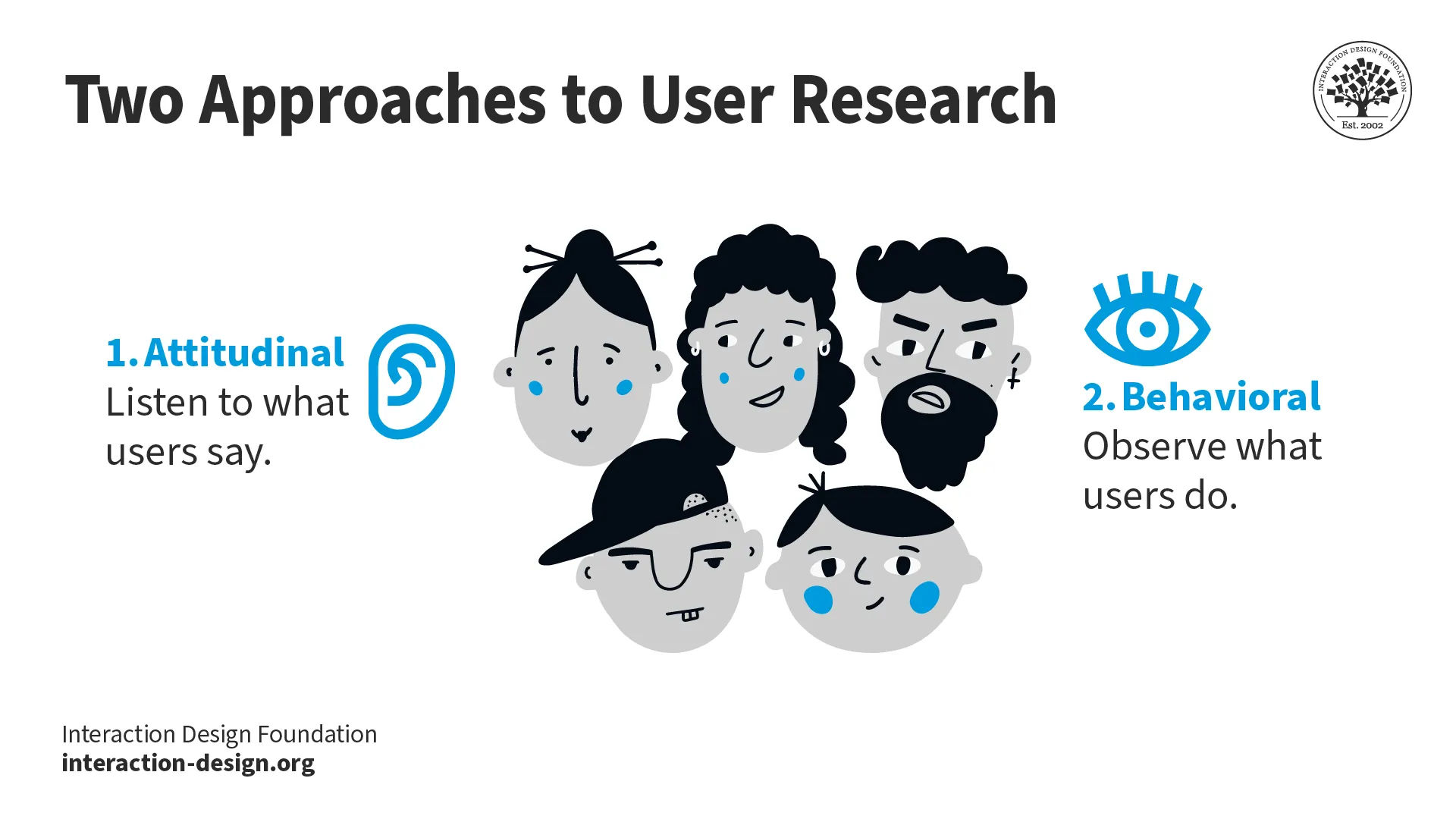
Illustration showing faces of individuals and two approaches to user research.

The two approaches to user research.

© Interaction Design Foundation, CC BY-SA 4.0

When designers conduct user research well, they gain valuable insights into their user’s world. These insights span user behaviors, motivations, pain points and preferences. This information guides the design process and enables designers to create user-centered solutions. More precisely, user research helps designers to: 

1. Validate Assumptions

User research helps validate—or challenge—assumptions about user needs. When designers directly engage with users, they can collect real-world insights that shape the design’s direction. They can avoid basing decisions on unfounded assumptions, too. 

2. Uncover Hidden Needs

Sometimes, users mightn’t express their needs explicitly—or they might even be totally unaware of them. Through qualitative user research and quantitative user research methods—like interviews, surveys and observation—designers can uncover these hidden needs and work them into the design process. 

3. Prioritize Features and Functionality

User research provides designers with data-driven insights so they can prioritize features and functionality based on user needs and preferences. When designers have got these top of mind, it helps make sure that they and others in the design team can allocate limited resources to the most critical aspects of the design. For example, it takes a dedicated eye and specialized mindset to design for mobile users. 

CEO of Experience Dynamics, Frank Spillers explains the human-centered mobile design approach:

Transcript

4. Test and Validate Design Solutions

User research methods such as usability testing let designers observe how users interact with prototypes or existing designs. This feedback loop is something that helps them find potential usability issues—and helps them keep in line with requirements for accessible designs. It helps to both validate design decisions and make iterative improvements based on user needs, too. 
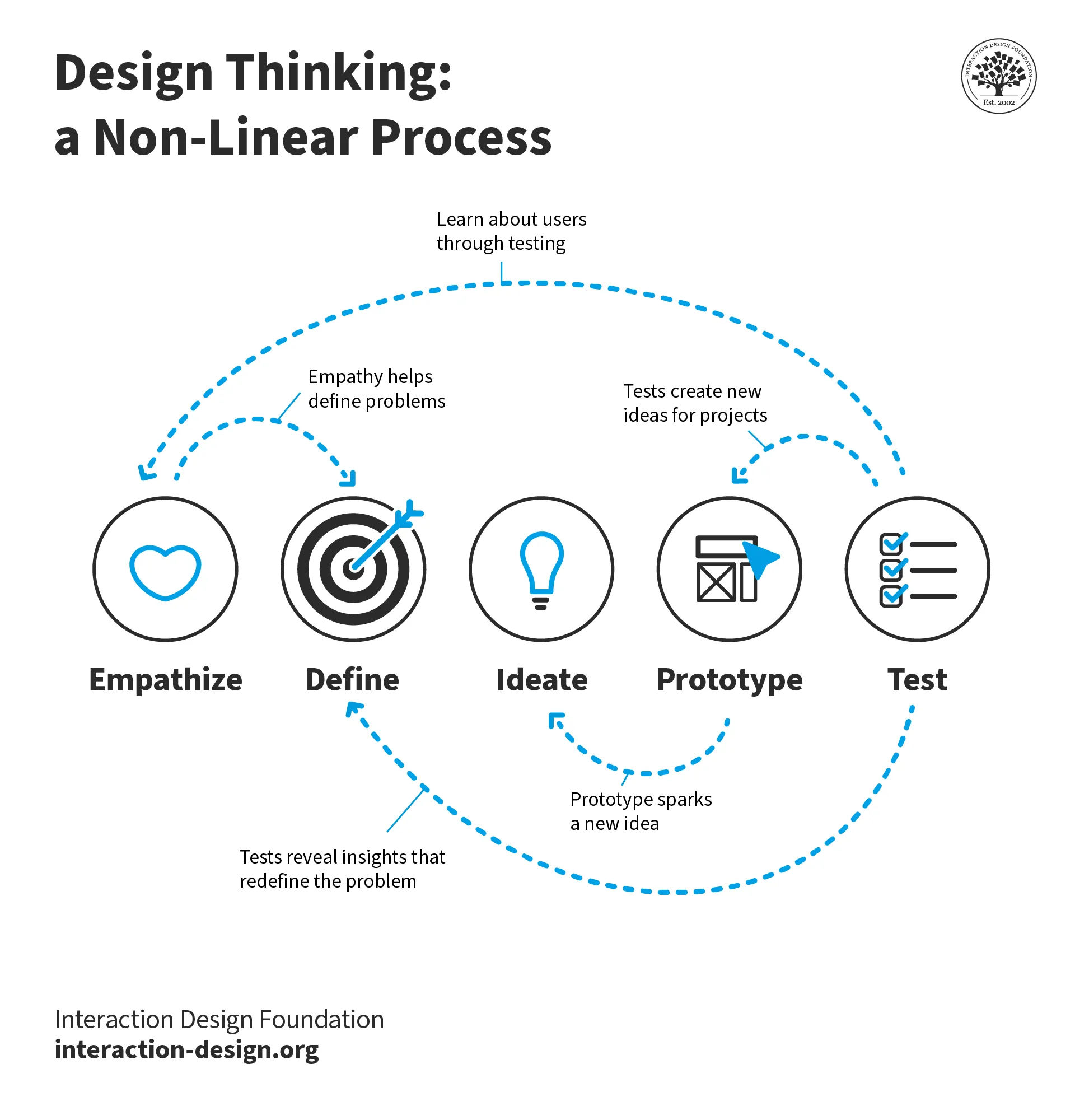
Diagram showing the Design Thinking process.

Design Thinking is a process that revolves around a solid understanding of the needs of the users whom designers seek to help.

© Interaction Design Foundation, CC BY-SA 4.0

Methods and Best Practices to Discover User Needs

In terms of design processes, user needs are the “sparks” with which designers seek to ignite their problem-solving “engine.” For example, in design thinking, designers empathize with users to be able to define their needs accurately. In any case, to uncover user needs effectively, research is key. UX designers get to work with various research methods and best practices—and here are some commonly used approaches: 

1. Surveys and Questionnaires

Surveys and questionnaires are valuable tools for designers to collect quantitative data about users’ needs and preferences with. Designers can distribute surveys to a big number of users—and get insights from them on a broader scale. It’s important for them to carefully design the surveys they send out, too. And designers really need to make sure that the questions are clear, concise and, indeed, relevant to their research objectives. 
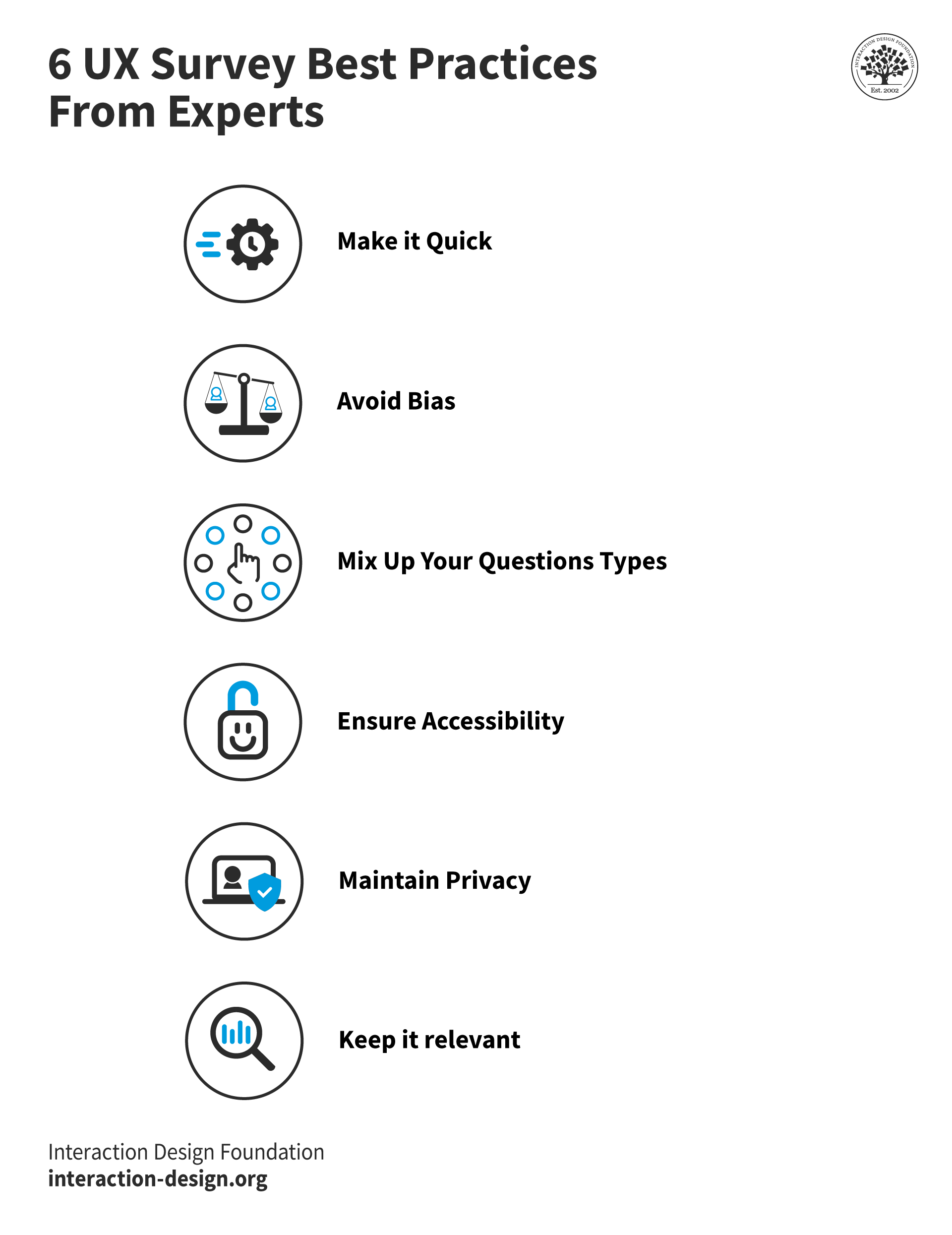
Illustration showing six best practices about UX surveys.

Surveys require careful thought to tailor them correctly to the users who can supply vital information about their needs.

© Interaction Design Foundation, CC BY-SA 4.0

2. Interviews and Focus Groups

In-depth interviews and focus groups help shed qualitative insights on user needs. Whenever designers get into direct conversations with users, they can delve deeper into the latter’s experiences, plus their motivations and pain points. These methods permit open-ended discussions that uncover rich, contextual information about users’ needs. 

3. User Observation and Shadowing

When designers and UX researchers watch users in their natural environments—or shadow them as they’re interacting with a product or service—it gives valuable insights into these users’ behaviors, frustrations and needs. This method lets designers and others in the design team get to really understand the context in which users operate and so find pain points or areas for improvement. 

4. Analytics and Data Analysis

When designers leverage analytics tools and analyze user data, it can offer up valuable insights into user behaviors and needs. If designers look carefully at user interactions, patterns and engagement metrics, they can identify areas where users may encounter difficulties—or unmet needs. 

5. Persona Development

Personas are fictional representations of target users that encapsulate their characteristics, needs and goals—they’re extremely valuable tools. They’re an essential part of the design thinking process, too. When designers create personas that are based soundly on user research, they can develop a deeper understanding of their target audience—and from there design solutions that truly meet their specific needs. 

Author and Expert in Human-Computer Interaction, Alan Dix explains the importance of personas and how to get them right for design projects:

Transcript

6. User Journey Mapping

User journey mapping visualizes the user's experience throughout their interaction with a product or service. This method helps designers identify pain points, opportunities and moments of delight along the user journey. When designers understand the user's needs at each touchpoint, they can optimize the experience and address any gaps or challenges for these users as well. 

CEO of Experience Dynamics, Frank Spillers explains how important journey mapping is—in this case as it applies to service design

Transcript
 

Tools to Assist Designers to Understand User Needs

Several tools and frameworks can assist UX designers to understand user needs and incorporate them into the design process. Here are some commonly used tools: 

1. Empathy Maps

These maps help designers get a deeper understanding of users as they map the users’ thoughts, feelings, needs and behaviors. When designers visualize these aspects, they can empathize with users and design solutions that truly address their needs in an effective way. 
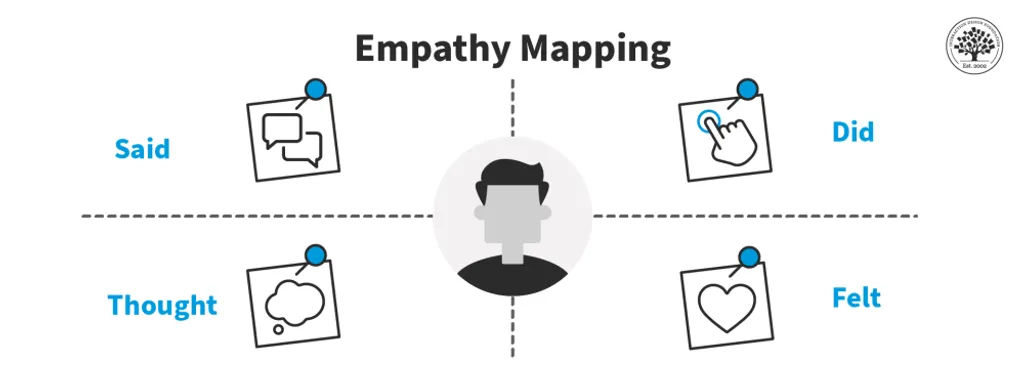
A diagram showing the different facets of empathy mapping.

Empathy maps can reveal critical insights to guide the design process.

© Interaction Design Foundation, CC BY-SA 4.0

2. User Personas

User personas deserve a second mention in particular here. They bring home a human-centered perspective—one that informs design decisions and makes sure that the design actually lines up with the target audience's goals and preferences. 
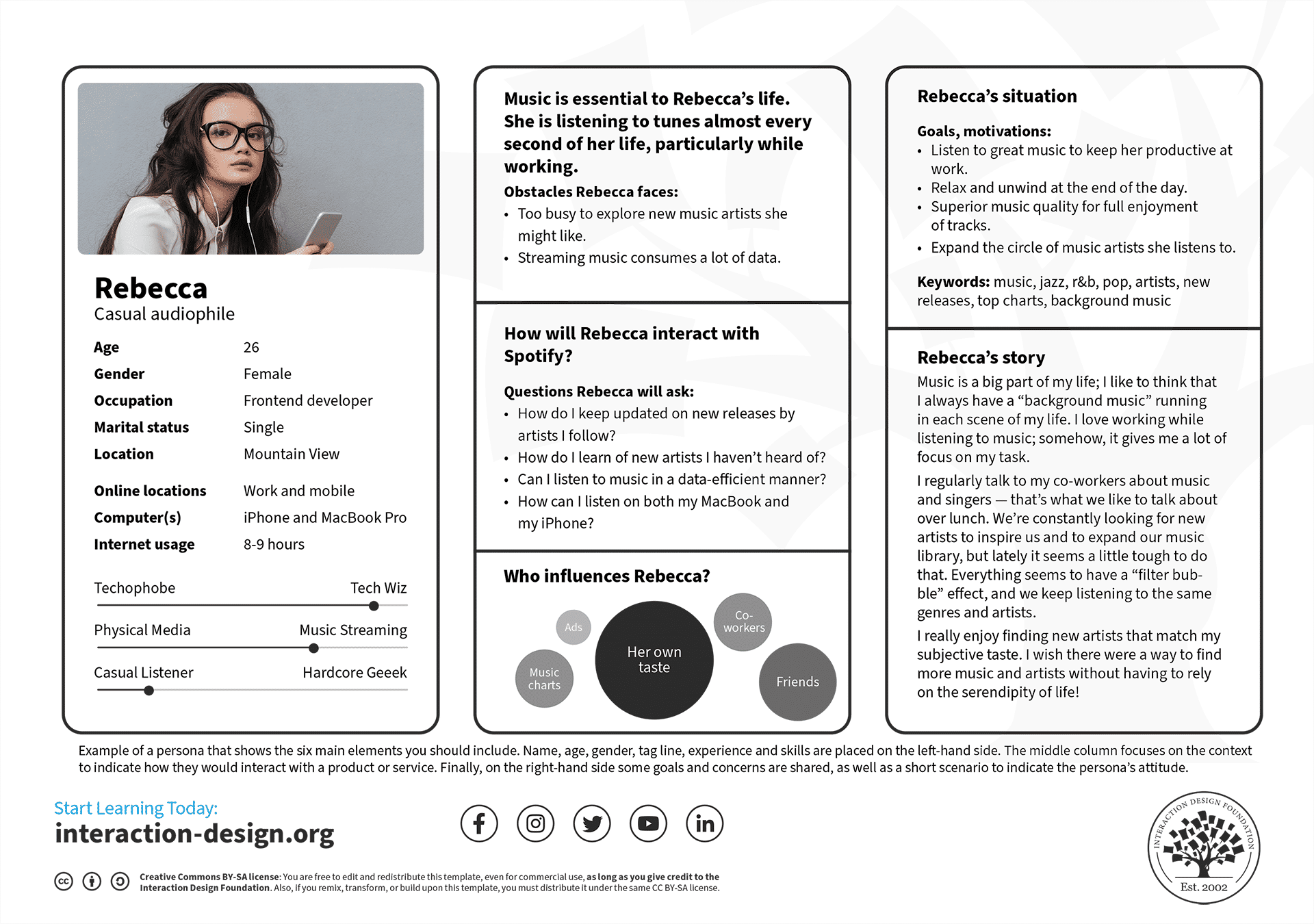
An image showing a persona, with picture and details.

User personas contain a wealth of information and insights—nuggets that designers can tap to more effectively meet these users’ needs.

© Interaction Design Foundation, CC BY-SA 4.0

3. User Stories

User stories are concise narratives that describe a specific user's needs, their goals—and their expected outcomes. They help designers keep a user-centered focus throughout the design process and make sure that the end product really does address user needs effectively. 

UX Designer and Author of Build Better Products and UX for Lean Startups, Laura Klein explains user stories and their significance:

Transcript

4. User Testing

User testing is all about observing users as they interact with a prototype or an existing design. When designers gather feedback and insights directly from users, they can find usability issues, validate design decisions and align their product with users’ needs—and that includes fine-tuned aspects of visual design

Examples of How to Address User Needs

Numerous case studies illustrate how companies have successfully identified and addressed user needs in their products and services. Notable examples include these: 

1. Apple's iPhone

Apple revolutionized the smartphone industry—by understanding and addressing user needs very effectively. They identified the need for a device that combines multiple functionalities—such as phone calls, internet browsing and music playback—and do it in a user-friendly and intuitive way. When Apple designed the iPhone with a sleek interface, touch screen technology and an ecosystem of apps, they met the diverse needs of users—and created a truly groundbreaking product. 
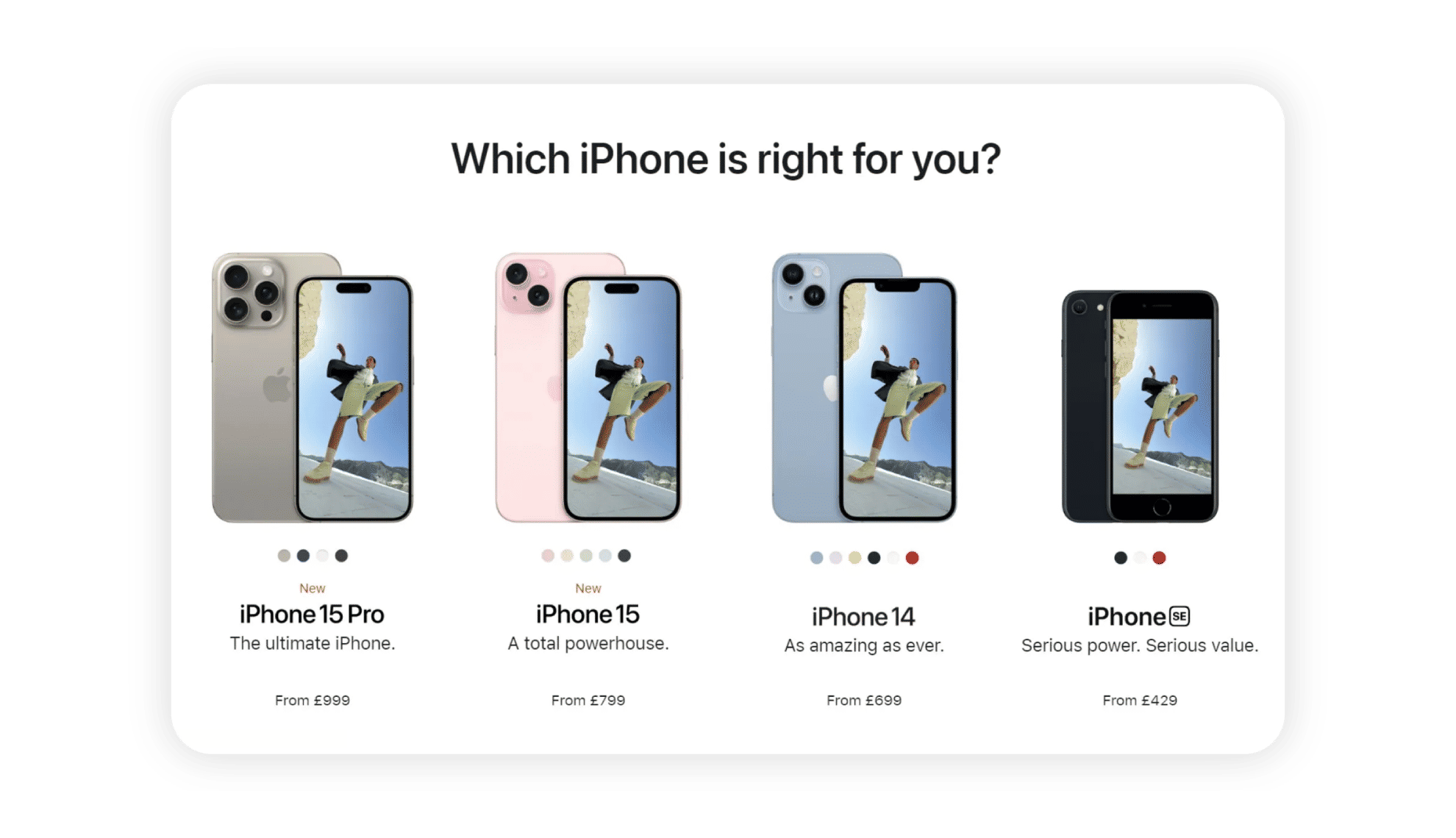
Image showing four different types of iPhone.

Apple recognized the need to meet their users’ needs—in this intuitive handheld package, available as popularly desired.

© Apple, Fair Use

2. Slack

Slack identified the need for a streamlined and collaborative communication tool for teams to use. And when Slack designed a platform that integrates messaging, file sharing and project management features, they addressed the pain points associated with fragmented communication channels and improved team collaboration. Their user-centric approach has made Slack a very widely adopted tool for businesses all over the world. 

3. Uber

Uber identified the need for a really convenient and reliable transportation service. They focused on user needs—such as ease of use, quick access to drivers and transparent pricing. From there, they revolutionized the transportation industry. 

4. Airbnb

Airbnb recognized the users’ need for affordable and unique accommodations while they’re traveling. And when Airbnb created a platform that connects travelers with hosts offering unique and personalized lodging options, it was a game-changer—and they disrupted the traditional hotel industry. They addressed user needs for authenticity, affordability and immersive travel experiences—efforts that resulted in a highly successful platform. 
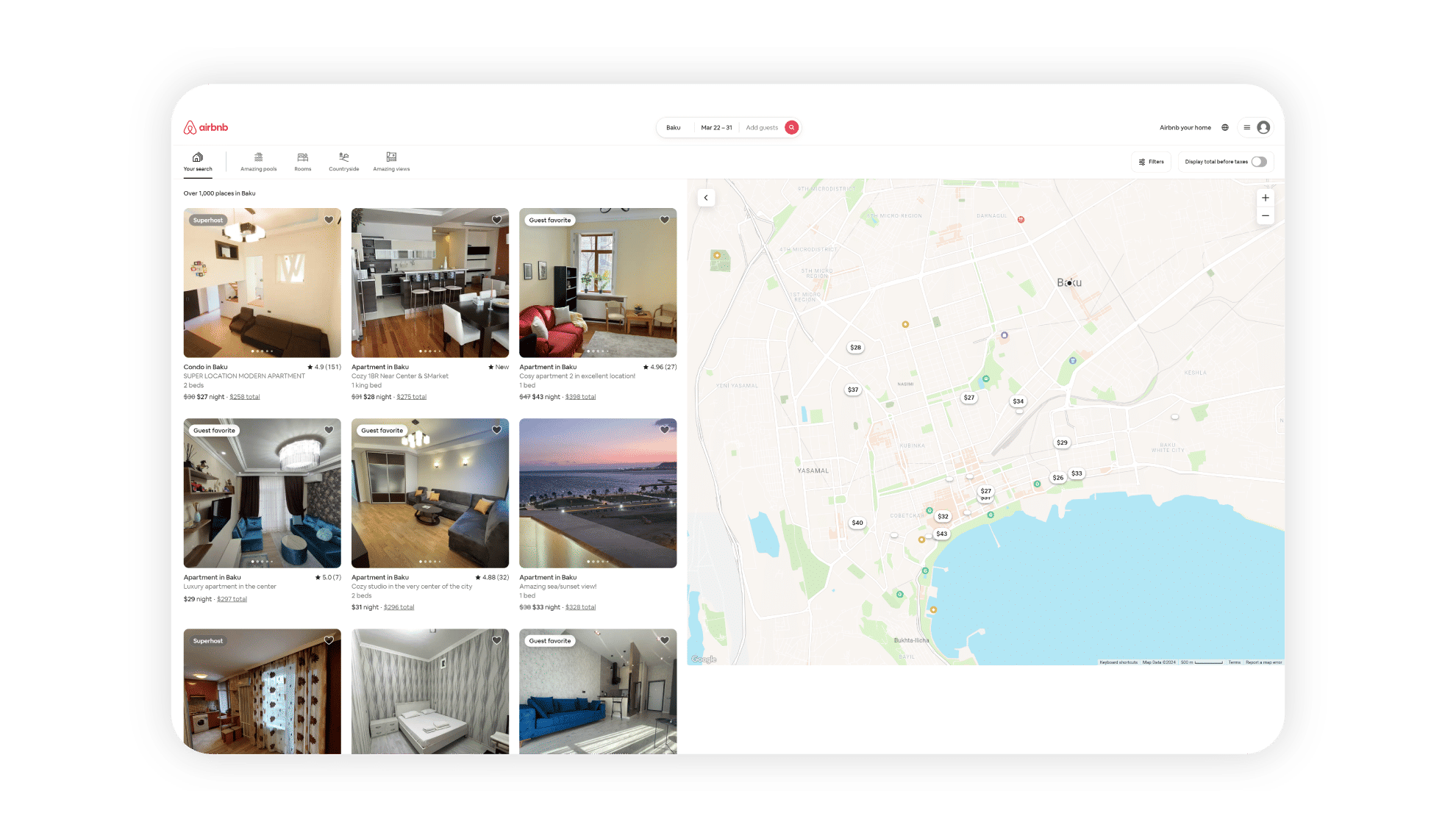
Screenshot from the Airbnb website showing Baku properties.

Airbnb’s solid grasp of their users’ needs has translated to a highly intuitive site and app that bridges the divide between problem and solution effectively, seamlessly and desirably.

© Airbnb, Fair Use

Tips to Uncover and Design for User Needs

To uncover and design for user needs effectively, UX designers can follow these practical tips: 

1. Conduct Comprehensive User Research

Invest time and resources to conduct thorough user research and so get a deep understanding of user needs, motivations and pain points. Use a combination of qualitative and quantitative research methods to gather rich insights. 

One of the best “keys” to shed light on the problem space is a problem statement. Otherwise called a Point of View (POV), it is a concise description of the design problem, and encapsulates the user’s needs. 
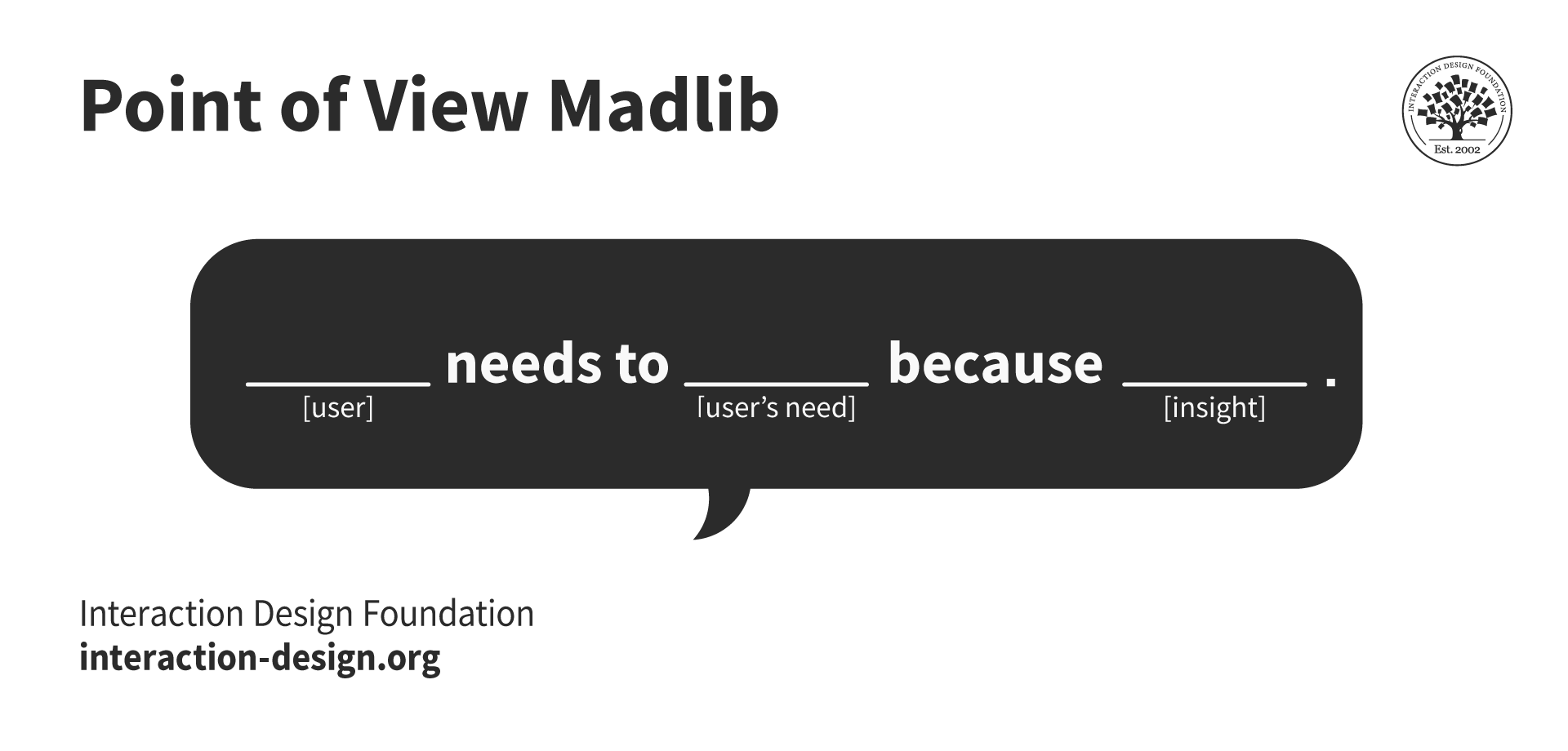
Illustration showing a Point of View Madlib framework.

Designers identify how to address the user’s needs when they set out what it is that users require in a scenario. Like so:

© Interaction Design Foundation, CC BY-SA 4.0
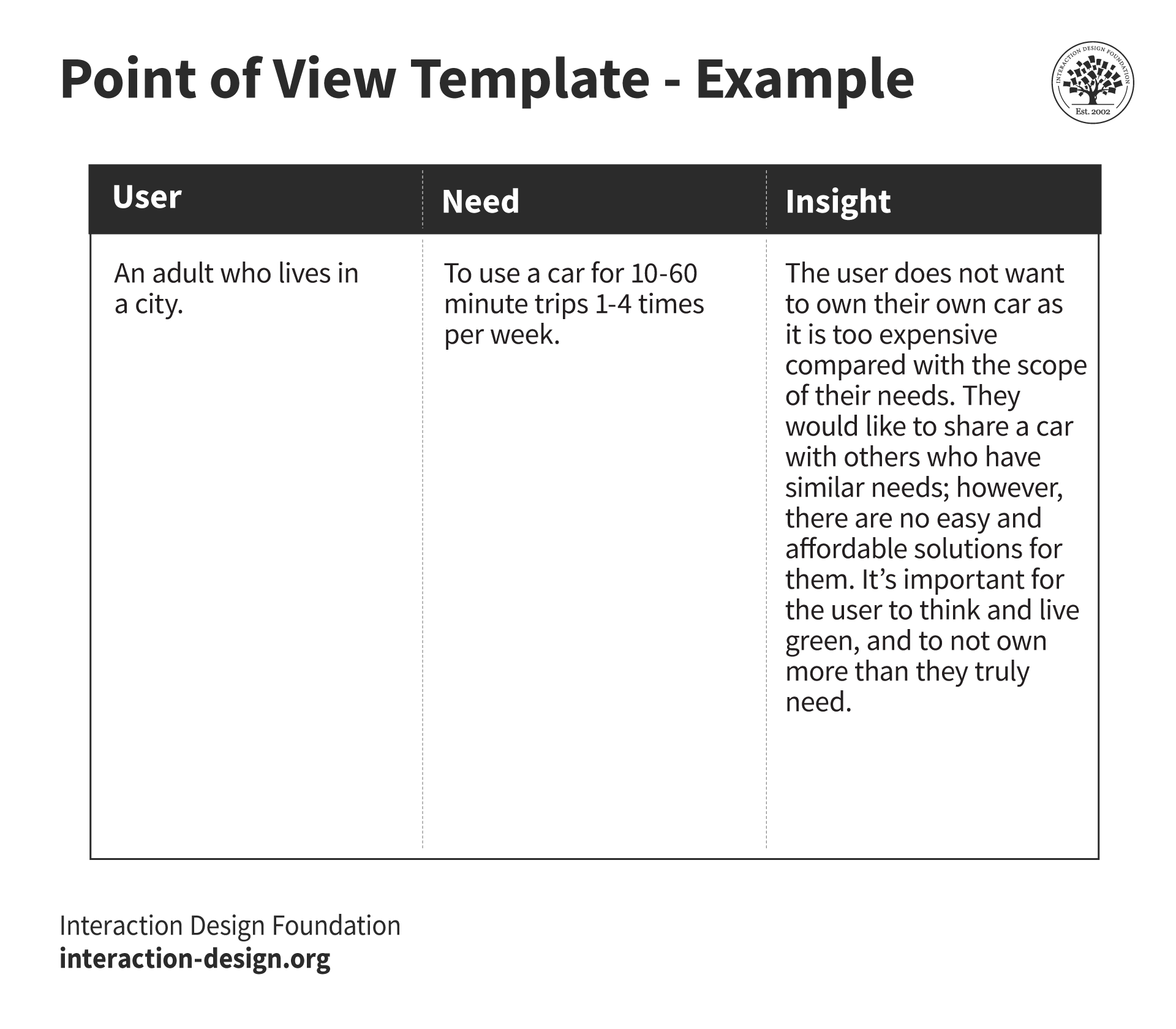
Image showing a completed Point of View Madlib.

In the above example, the designer has set out the user as a type of person with a sharply defined need. This translates to the insight from which the designer can start to work on a potential solution.

© Interaction Design Foundation, CC BY-SA 4.0

2. Involve Users Throughout the Design Process

Include users in the design process through user testing, co-creation sessions and feedback loops. When designers engage their users, they can make sure that they consider these needs at every stage—and so lessen the risk that anything gets misaligned. Designers should plant themselves firmly in their users’ shoes and work to understand their goals, motivations and—of course—challenges. This empathy will guide the design decisions and help create user-centered solutions. 

See why empathy for users is the most fundamental ingredient in a design process. 

Transcript
  

3. Prioritize User-Centered Design

Place user needs at the center of the design process—throughout all the efforts. It’s a vital thing to do, to continuously refer back to user research and personas—to inform design decisions, plus make sure that the design is on line with users’ expectations. 

4. Iterate and Refine

Embrace an iterative design process—and be sure that it’s one that permits continuous improvement with user feedback as a basis. It’s a vital thing to test and refine the design regularly—to make sure that it stays aligned with user needs as they evolve. 

5. Collaborate with Cross-functional Teams

Get working with stakeholders from different disciplines—like development, marketing and customer support. When designers involve diverse perspectives, they can get a more holistic understanding of user needs and work to make truly comprehensive solutions. That’s where an Agile process can come in especially handy, for instance. 

UX Designer and Author of Build Better Products and UX for Lean Startups, Laura Klein explains how valuable cross-functional teams are in design: 

Transcript
 

6. Stay Updated on UX Trends

Stay informed and up-to-date about current UX trends and emerging technologies. If designers keep up with developments in the industry, they can be well positioned to stay ahead—and anticipate future user needs and design solutions that are truly ahead of the curve. 

Overall, designers need to really understand and address user needs; it’s something that perhaps should go without saying. Still, only when designers do this—and only when they do it well, too—can they hope to create successful and impactful user experiences. It’s utterly vital to approach matters in a proper way—and that includes the need to prioritize user-centered design and continuously iterate on the design based on user feedback. That’s how designers can create products and services that provide value, delight users and drive business success.  

Remember, user needs are at the very core of UX design. So, it’s vital to design with empathy and a deep understanding of users of all types. It’s also extremely important to factor in accessibility considerations mindfully—and not as an afterthought. These considerations are absolutely key to getting in step with user needs, user flows—and then creating experiences that are meaningful and impactful for all users. 

Questions About User Needs?
We've Got Answers!

Can you give examples of common user needs in digital products?

In digital products, user needs often revolve around efficiency, ease of use, personalization, accessibility and security. Here are some common examples: 

  • Efficiency and productivity: Users want to get tasks done quickly and easily. For instance, in a project management app, being able to create and delegate tasks with a few clicks meets this need. 

  • Ease of use: Simplicity is key, and a user-friendly interface—with intuitive navigation and clear instructions—lets users use a product and not get confused along the way. For an example, think of a banking app that simplifies the process of transferring money. 

  • Personalization: Users appreciate it whenever digital products cater to their preferences and history. Streaming services like Netflix recommend shows and movies based on past viewing habits—and so provide a personalized experience. 

  • Accessibility: Digital products must be usable for everyone—and that includes those with disabilities. Features like text-to-speech for visually impaired users or voice recognition for those who can’t use traditional input devices are extremely important. 

  • Security and privacy: In an era where data breaches are common things, users need to feel extra secure that their information really is safe. Secure login methods and transparent privacy policies are examples of how digital products can meet this need well. 

  • Entertainment and engagement: Games, social media platforms and video streaming services have got to provide content that’s engaging so that users keep coming back. 

  • Learning and development: Educational apps need to offer valuable content and in an engaging way—helping users learn new skills or knowledge efficiently. 

  • Social connection: Especially in social media apps, users want to connect with others easily, share content, and communicate in real-time. 

Watch our topic video on accessibility to appreciate the need to design with accessibility in mind. 

Transcript
 

What's the difference between user needs, wants and expectations?

User needs refer to the essential requirements users must have met to achieve their goals effectively within a digital product. Wants—though—are the features or experiences users would like to have but aren’t essential for the core functionality. Expectations are the preconceived standards or levels of performance that users believe the product’s going to deliver. Past experiences or market standards are things that often influence these. It’s crucial for designers to really understand the distinction between these concepts so they can prioritize features and create products that don’t just meet fundamental requirements but exceed users' expectations and include desirable elements when possible, too. Of course, accessibility requirements form a fundamental level of expectations for a design to have. 

Take our course Emotional Design—How to Make Products People Will Love for essential and in-depth insights into how to design products that users will truly enjoy. 

What tools or methods work best to uncover user needs?

To uncover user needs best, designers should be sure to use a combination of tools and methods. So, conduct interviews and take surveys to collect direct insights from users about their preferences and experiences. Perform observational studies—such as usability testing—to watch users interact with a product and notice unarticulated needs of theirs. Use analytics and data analysis to spot patterns in how people use the product; these offer clues about their needs. This mix provides a full picture of user needs. 

Watch as User Experience Strategist and Educator William Hudson explains the significance of user research and various methods involved. 

Transcript
 

How do you resolve conflicts between user needs?

This calls for prioritizing based on the product's goals, the impact on the user experience and feasibility. Designers can use techniques such as stakeholder interviews to understand different perspectives, user research to validate the importance of conflicting needs, and design workshops to explore solutions collaboratively. Ultimately, the decision often requires a designer to balance user satisfaction and responsibilities such as accessibility requirements, with business objectives and technical constraints. 

Watch our Master Class How To Get People Who Don’t Get Design with Morgane Peng, Design Director at Société Générale for insights into how to bridge the divide between stakeholders and designers. 

Can user needs evolve, and how should designers adapt?

User needs indeed evolve as technology advances, markets shift and personal preferences change. If they’re to adapt, designers must engage in ongoing research so they understand these changes. Another thing they should do is seek regular feedback from users, so they can capture the users’ evolving needs and preferences. Observing how users interact with products gives insights into areas for improvement. As they iterate on product design based on this feedback and observation, designers can make sure that their products do indeed remain relevant and keep meeting the changing needs of their users. 

Take our Master Class Top Ten Things Designers Need to Know About People  with Susan Weinschenk, Chief Behavioral Scientist and CEO, The Team W Inc. for insights into users as people. 

How do ethical considerations influence the identification and prioritization of user needs?

Ethical considerations are crucial keys to identify and prioritize user needs because they make sure that designers respect user privacy, consent and data security. These considerations keep this kind of harm at bay. Plus, they make sure that fairness rules, especially when it comes to vulnerable populations. Designers must prioritize needs that are in line with ethical standards and societal values—and that often calls for a balance between user benefit and potential risks. Ethical design is a huge issue—one that nurtures trust and long-term engagement as it makes user well-being and societal impact a big priority over short-term gains. 

Product Design Lead at Netflix, Nival Sheikh explains the dimension of ethics as it applies to artificial intelligence (AI). 

Transcript
 

What challenges might teams encounter when meeting user needs in complex systems?

Teams often face multiple challenges with that. These include the ability to understand the diverse needs of various user groups, integrate these needs into a cohesive system design—and manage the technical complexity that comes with advanced features and functionalities. What’s more, it’s vital to make sure accessibility is a reality for all users, maintain data security and privacy, and deal with constraints—such as budget and timelines—as these can complicate the design process. Communication within the team and with stakeholders has to be as effective as possible. Agile and iterative design approaches are key strategies here, too. With them, designers can overcome these obstacles and meet their users’ needs in complex systems and do it successfully.  

Watch The Impact of AI on Design with AI Product Designer, Ioana Teleanu to understand more about complex systems and design: 

Transcript
 

How can designers promote user needs in organizations that prioritize business goals over user experience?

Designers can do this when they show how user-centered design makes a direct contribution to the achievement of those business objectives. They can present case studies and evidence that shows how an improved user experience really does lead to higher satisfaction, increased loyalty and—ultimately—greater revenue and market share. Designers can also use prototypes and user feedback to make a strong case for the sheer value of user-centered design approaches. Designers can—and should—also make sure that stakeholders are aware of accessibility requirements. When designers get user needs aligned with business goals, they can create a win-win situation—one where both users and the organization benefit. 

Watch our Master Class How To Get People Who Don’t Get Design with Morgane Peng, Design Director at Société Générale for insights into how to bridge the divide between stakeholders and designers. 

What are common pitfalls when designers try to validate user needs in design?

There are several common ones. First, designers might assume they fully understand the user—but don't conduct thorough research—and so they end up with solutions that are based on wrong assumptions. Another thing is to not get a diverse group of users involved in the research phase—and so end up overlooking the needs of certain user segments. What’s more, if designers confuse what users say they want with what they actually need, designers might prioritize features that really don't address fundamental problems.  

Designers might also ignore the context of how a product gets used—and miss crucial factors that affect user experience. Last—but not least—if designers fail to iterate based on user feedback, it can keep the refinement of solutions from better meeting the users’ needs. To avoid these pitfalls, designers should engage really deeply with user research, include diverse user perspectives, distinguish between the wants and the needs, consider the context of use—and continuously iterate based on feedback. 

Watch Professor of Human-Computer Interaction at University College London, Ann Blandford explain how to approach the interview situation. 

Transcript
 

What are highly cited scientific articles on the subject of user needs?

1. Bordegoni, M., Carulli, M., & Spadoni, E. (2023). User Experience and User Experience Design. In Prototyping User eXperience in eXtended Reality (Chapter). SpringerBriefs in Applied Sciences and Technology.  

This chapter offers a comprehensive overview of UX Design—emphasizing its multidisciplinary nature and focus on crafting valuable user experiences. It covers fundamental concepts, methodologies as well as how important a User Centered Design (UCD) philosophy is. The authors outline the UCD's main phases, advocate for user participation and discuss qualitative and quantitative methods employed at each stage. The chapter also debunks the myth that UX Design is solely for digital products, highlighting its application in broader contexts.  

2. Manciaracina, A. (2022). How to design learning using technology and users’ needs? In SpringerBriefs in Applied Sciences and Technology.  

This chapter by Andrea Manciaracina delves into designing learning environments that integrate pedagogy, space, and technology. It discusses research outputs and project activities, creating scenarios for learning environments—and proposes a tool for applying these scenarios in real-world teaching. The tool—validated through co-design activities with teachers from Politecnico di Milano—aims to help users select appropriate technologies for teaching. The chapter ends with a rule manual for the tool—combining methodological insights from research and practical findings from tool experimentation. 


  1. Norman, D. A. (2013). The Design of Everyday Things [Paperback – Illustrated]. Basic Books.  

 
The Design of Everyday Things by Don Norman has been influential for its insightful exploration of the relationship between design and user experience. The book highlights how product design impacts user interactions—emphasizing the importance of user-centered design principles rooted in cognitive psychology. Norman argues that good design should make functions visible, utilize natural relationships between function and control, and incorporate intelligent constraints to guide users effortlessly. By addressing common design flaws such as hidden controls and lack of feedback, the book sets out a framework for creating products that satisfy users—rather than frustrate them. Norman's work serves as a foundational guide for designers who seek to make the most of usability and create meaningful user experiences across various products and interfaces. 

2. Van de Bruggen, H. (2023). Learnability Isn't Enough: How to Design Apps That Are Easy to Use in the Long Run, Not Just the First Run [Kindle Edition].  

 
Learnability Isn't Enough: How to Design Apps That Are Easy to Use in the Long Run, Not Just the First Run—by Hans van de Bruggen—delves into the crucial distinction between learnability and usability in digital product design. The book emphasizes how important it is to address usability issues that may only become apparent after users have spent time interacting with the product. By introducing a new method for preemptively identifying and resolving such issues, the book equips designers with tools to enhance user experience over time. This approach helps with the identifying of subtle—yet significant—design flaws, ensuring user satisfaction and facilitating continuous improvement of interfaces. Van de Bruggen's work offers valuable insights and practical strategies for creating user-centered designs that prioritize long-term ease of use and user satisfaction.  

Earn a Gift Earn a Gift, Answer a Short Quiz!

1
2
3
4
1
2
3
4
Question 1
Question 2
Question 3
Get Your Gift
Interaction Design Foundation logo

Question 1

What primarily defines user needs in the context of UX design?

1 point towards your gift

  • The personal preferences of the product manager, lead designer and researchers.
  • The requirements users must have met to effectively achieve their goals.
  • The technical specifications desired by the development team.
Interaction Design Foundation logo

Question 2

How should designers use user needs to prioritize features in a product?

1 point towards your gift

  • Align features with the highest business costs.
  • Focus on the most complex features to develop first.
  • Prioritize features based on user preferences and essential requirements.
Interaction Design Foundation logo

Question 3

What is a common challenge designers face to identify user needs?

1 point towards your gift

  • Exclusive use of quantitative data to understand user behaviors.
  • Over-reliance on user suggestions without validation.
  • Prioritization of aesthetic design over functionality.

Learn More About User Needs

Make learning as easy as watching Netflix: Learn more about User Needs by taking the online IxDF Course User Research – Methods and Best Practices.

Why? Because design skills make you valuable. In any job. Any industry.

In This Course, You'll

  • Get excited as you learn the business superpower: user research! Master it, and you'll solve meaningful problems, create better experiences, and drive success in any field. Why? User research empowers you to become a detective of human behavior. You'll discover what people truly need so that you can create products and services they love. You can use user research to reduce abandoned carts in online shopping, improve patient outcomes in healthcare, and solve challenges in any industry. It's easier than you think! With step-by-step guidance, you'll master User Research quickly—no matter your background. Studies show that user research can improve time to market by up to 330% and increase revenue by up to 320%. So get on board, do work you're proud of, and get paid what you're worth.

  • Make yourself invaluable with timeless human-centered skills. At the heart of great design is understanding people: What they need, what holds them back, and what keeps them coming back. As AI becomes part of how teams build and iterate, this deep understanding of people turns AI from a tool into your superpower. Effortlessly transform insights into Return on Investment (ROI) as you design solutions people love. You'll learn to make data-driven decisions that eliminate guesswork as you design products and services based on real user needs. That drives loyalty and outperforms competitors. You'll easily translate research into visuals that win over stakeholders, managers, and clients. Discover exactly what motivates people and build solutions that consistently deliver results.

  • Gain confidence and credibility with hands-on experience in usability testing, contextual inquiries, semi-structured qualitative interviews, and observational methods. Master how to ask the right questions and create actionable personas from your research. You'll plan, conduct, and analyze research in real-world scenarios, fast-tracking your success with 40+ ready-to-use templates like interview guides, affinity diagrams, and customer journey maps. If you want to leave assumptions behind and create with precision, purpose, and impact, this course is perfect for you. If you're interested, we'll even help you build your portfolio around an app, so your new superpowers shine clearly.

It's Easy to Fast-Track Your Career with the World's Best Experts

Master complex skills effortlessly with proven best practices and toolkits directly from the world's top design experts. Meet your experts for this course:

  • Frank Spillers: Service Designer and Founder and CEO of Experience Dynamics.

  • Ann Blandford: Professor of Human-Computer Interaction at University College London.

  • Alan Dix: Author of the bestselling book “Human-Computer Interaction” and Director of the Computational Foundry at Swansea University.

Get an Industry-Recognized IxDF Course Certificate

Increase your credibility, salary potential and job opportunities by showing credible evidence of your skills.

IxDF Course Certificates set the industry gold standard. Add them to your LinkedIn profile, resumé, and job applications.

Course Certificate Example

Be in distinguished company, alongside industry leaders who train their teams with the IxDF and trust IxDF Course Certificates.

Our clients: IBM, HP, Adobe, GE, Accenture, Allianz, Phillips, Deezer, Capgemin, Mcafee, SAP, Telenor, Cigna, British Parliament, State of New York

All Free IxDF Articles on User Needs

Read full article
Card Sorting: The Ultimate Guide for 2026 - Article hero image
Interaction Design Foundation logo

Card Sorting: The Ultimate Guide for 2026

Whenever you’re working in UX (User Experience) design, you have to understand user expectations if you’re going to be able to group information effectively. Card sorting is a handy and relatively simple way to engage participants so they categorize topics in a way they find logical. This approach h

Social shares
925
Published
Read Article
Read full article
Flow Design Processes - Focusing on the Users' Needs - Article hero image
Interaction Design Foundation logo

Flow Design Processes - Focusing on the Users' Needs

It can be really tempting to start a design project by leaping into the deep end and starting to sketch out pages and work on the information architecture of the final product. However, it’s almost certainly the wrong approach to take. To create great user experiences – designers must focus on the u

Social shares
1k
Published
Read Article
Read full article
User Experience (UX) Surveys: The Ultimate Guide - Article hero image
Interaction Design Foundation logo

User Experience (UX) Surveys: The Ultimate Guide

Imagine you’re a business owner who wants to know what’s working and what’s not on your website—and, oh yes, where you need improvements. Sure, there are a bunch of research methods you can try—like user interviews, usability tests, and A/B testing, but read on and see how a user experience (UX) sur

Social shares
1k
Published
Read Article
Read full article
How to Understand User Needs in Virtual Reality - Article hero image
Interaction Design Foundation logo

How to Understand User Needs in Virtual Reality

The principles you use in a user experience (UX) design process carry over into the sphere of virtual reality (VR) and all the richness 3D experiences can afford, and what unlocks the true potential your VR experience has is that “magic” element of user research. That’s why, dear designer of great V

Social shares
553
Published
Read Article
Read full article
Stop the Generic Portfolio Trap! Design a Stand-Out Portfolio for Your UX/UI Niche: User Research - Article hero image
Interaction Design Foundation logo

Stop the Generic Portfolio Trap! Design a Stand-Out Portfolio for Your UX/UI Niche: User Research

User research is indispensable—and without it, well... UX design is guesswork. When you’re a user researcher, you know this well—but it can be hard to communicate your work in a way that grabs the viewer and holds their attention. And that’s what a portfolio is all about—grabbing the attention of yo

Social shares
380
Published
Read Article
Read full article
How Personas Shape Stronger Design Decisions - Article hero image
Interaction Design Foundation logo

How Personas Shape Stronger Design Decisions

Why bother with personas? Why not "users"? Because the way you see someone shapes the way you design for them. We are accustomed to referring to people by their roles, but this practice is dehumanizing. When you use role labels, you quickly forget that these are real people, just like your family or

Social shares
413
Published
Read Article

Flow Design Processes - Focusing on the Users' Needs

Flow Design Processes - Focusing on the Users' Needs

It can be really tempting to start a design project by leaping into the deep end and starting to sketch out pages and work on the information architecture of the final product. However, it’s almost certainly the wrong approach to take. To create great user experiences – designers must focus on the user’s needs and that means developing an understanding of how to create the best task flow for that user. The better you facilitate the user moving from start to finish on a particular process – the easier the product is to work with and the more likely that you are to deliver an awesome user experience.


Author/Copyright holder: John Azzolini. Copyright terms and licence: Public Domain.

Flow design doesn’t just have to examine user flows – it can also examine other types of flow. However, UX designers are generally going to be concerned with user flows.

How Do We Design for User Flow?

We begin with the user themselves. Instead of going through the technical specification documents and trying to base designs on that – we examine what the user’s objective (or objectives) are and what the business’s objective (or objectives) are.

So for example on a retail website this might include:

  • User wants to buy a new product

  • User wants to research alternative products

  • User wants to return a product

By mapping out all the possible objectives and comparing them to business objectives – it becomes easy to create user flows. Flows are simply the process steps from the user arriving on a website to completing their task or tasks.

Once you know what users want to do – you might also want to look at where a user might arrive on your site and where they are coming from. A user who is responding to e-mail marketing will probably be delivered to a different place in the site to a user who finds you through organic search.

These define the entry points into task completion funnels (similar to marketing conversion funnels).


Author/Copyright holder: Photo.iep. Copyright terms and licence: CC BY 3.0

The classic conversion funnel is one that nearly everyone in marketing and product design is familiar with. It tracks the expectation of customers moving through a sales flow.

The Task Completion Funnel

Task completion funnels should be designed for flow from the point of entry to the funnel to the completion of the task.

This will normally involve:

  • Design of the point of entry (Banner Ad, Search Text, E-mail, etc.)

  • Design of the landing page (How will you welcome the visitor to the site and get them to begin the process for which they arrived?)

  • Design of the process itself

Considerations for Point of Entry

With each point of entry you may want to consider:

  • What user group or groups are we targeting with this point of entry?

  • Are they actively looking to get involved with our site or product or are they going to “stumble” across us?

  • Will they be looking to solve a problem and if so what?

  • How can we grab their attention and hold it for long enough for them to decide to click through to the site?

  • How can we best relate to the user involved? What messages might work well with these users? Can we articulate their pain points and a solution simply?

  • What are the best calls to action to use to get that click through?


Author/Copyright holder: Free Stock Images. Copyright terms and licence: CC BY 2.0

Not every call to action is “buy now!” These are all examples of call to action buttons that you will be familiar with already. Even if you don’t think of them that way when you see them.

Considerations for Landing Pages

For each landing page you will want to think about:

  • How can we create confidence for the user? What benefits should we highlight? How do we keep the reading burden low whilst still providing enough evidence to reassure the user?

  • How do we focus the content on a call to action?

  • How can we keep the cognitive friction for the user in this process to a minimum?

Considerations for Process Steps

As the processes which you will want to guide a user through may vary dramatically – it is harder to provide a concrete list of things to take into account. However, you should focus on:

  • How can we minimize steps in the process without over-complicating screens?

  • Can we get the process completed and then ask for more information afterwards? If so, how can incentivize that?

Once you have these flows mapped for each point of entry, landing page and process – you will discover there are large areas of overlap. At this point you can start to map each task completion funnel to each other – which will reduce the overall design burden and suggest a useful structure for information architecture within the finished product.

As Scott Belsky, the VP of Products and Community at Adobe says; “Rule of thumb for UX: More options, more problems.”


Author/Copyright holder: Gary Stevens of https://hostingcanada.org/. Copyright terms and licence: CC BY-SA 4,0

The simpler and clearer the process – the easier it is for a user to follow. Take the process above and think about how you could make it simpler for your organization?

The Take Away

Flow design makes designers focus on what users want to get out of interactions with a specific product. It ensures that user experience takes priority over graphic design or information architecture structuring and provides a solid framework to move the project forward when visual design and IA are required. Task completion funnels can be sketched on paper and used to explain user flows to other team members (such as developers) and are a clear and simple way of showing what the user wants.

User flows are the ultimate representation of user experience. When design works to user flows – it ensures that users get exactly what they came for.

References

This article looks at the difference between site flow and user flow and when to focus on each.

If you want to create smooth user flows this article has some useful tips too.

Feel Stuck?
Want Better Job Options?

AI is replacing jobs everywhere, yet design jobs are booming with a projected 45% job growth. With design skills, you can create products and services people love. More love means more impact and greater salary potential.

At IxDF, we help you from your first course to your next job, all in one place.

See How Design Skills Turn Into Job Options
Privacy Settings
By using this site, you accept our Cookie Policy and Terms of Use.
Customize
Accept all

Be the One Who Inspires

People remember who shares great ideas.

Share on:

Academic Credibility — On Autopilot

Don't waste time googling citation formats. Just copy, paste and look legit in seconds.