Generative AI

Your constantly-updated definition of Generative AI and collection of videos and articles.
Be a conversation starter: Share this page and inspire others!

295 Shares

What is Generative AI?

Generative AI (Artificial Intelligence), refers to a class of algorithms and models designed to autonomously produce content, such as text, images, music, or other forms of data, by learning patterns and structures from vast datasets. 

Unlike traditional AI systems that follow predefined rules, generative AI has the ability to create entirely new and often highly realistic outputs, generally in response to AI prompts or with prompt engineering. It operates at the intersection of creativity and artificial intelligence.

In this video, AI product designer Ioana Teleanu dives into generative AI and how to use it as a designer.

Transcript

How Does Generative AI Work?

Generative AI works through a process that involves learning patterns, structures, and relationships from extensive datasets. This process allows the AI model to generate new and often highly realistic outputs. Here's a simplified breakdown of how generative AI works:

  1. Neural Networks 

Generative AI relies on neural networks, which are computational models inspired by the human brain. These networks consist of interconnected nodes or artificial neurons that process information. Learn more about neural networks in the following video.

Transcript

  1. Generative Models 

The core of generative AI lies in generative models, with two prominent types being Generative Adversarial Networks (GANs) and Variational Autoencoders (VAEs).

GANs, introduced in 2014, have a generator and a discriminator working against each other to make content look real. They improve together until the generator fools the discriminator. GANs are great for realistic and varied outputs in art and design.
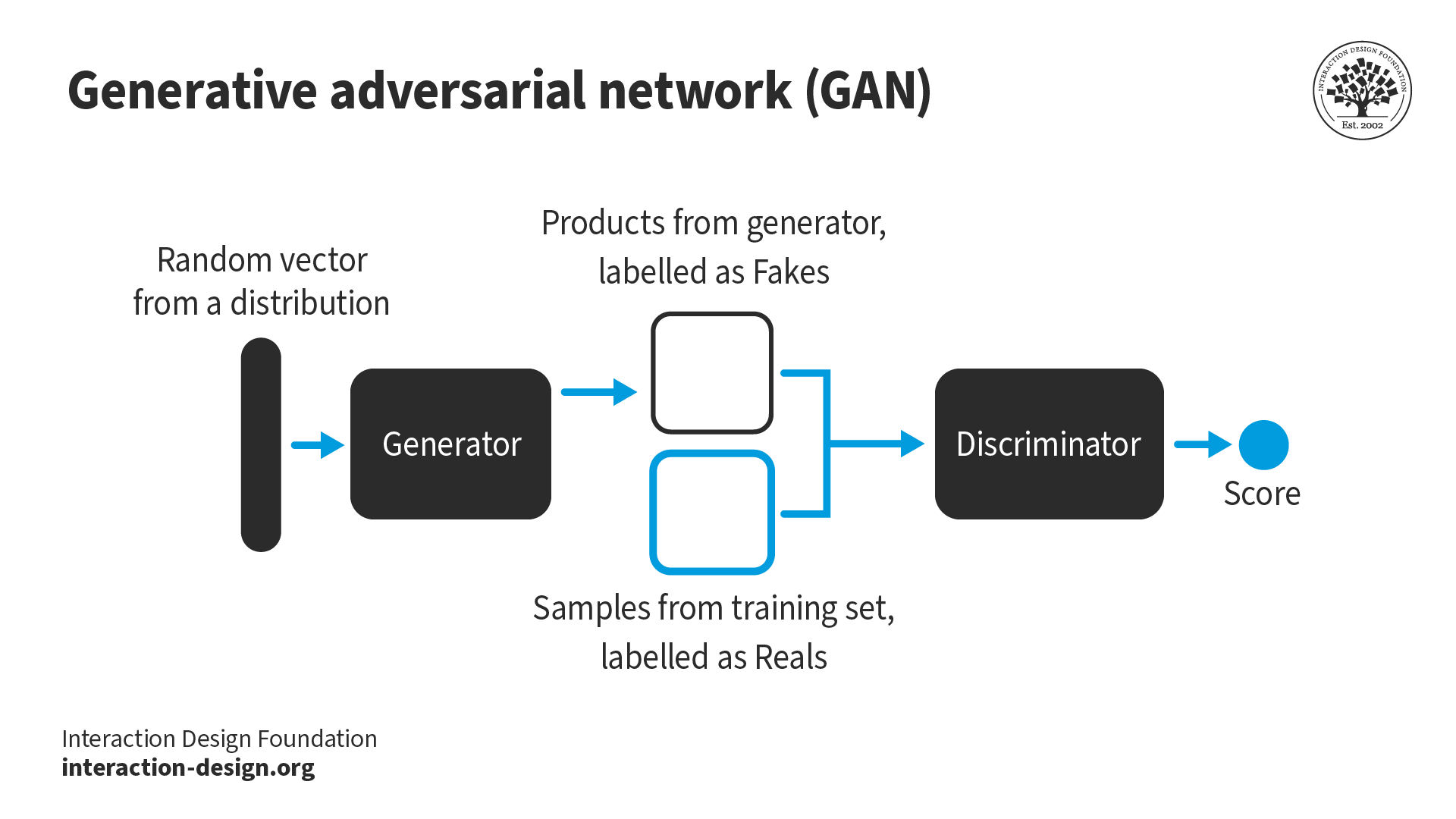
An illustration that represents the GAN generative model process.

© Interaction Design Foundation, CC BY-SA 4.0

On the other hand, VAEs, introduced in 2013, have an encoder and a decoder. The encoder turns input into a variable space, adding diversity. Then, the decoder reconstructs the input. VAEs are good for varied and realistic outputs for images and creative tasks. Both GANs and VAEs are essential in AI to create diverse and lifelike content.
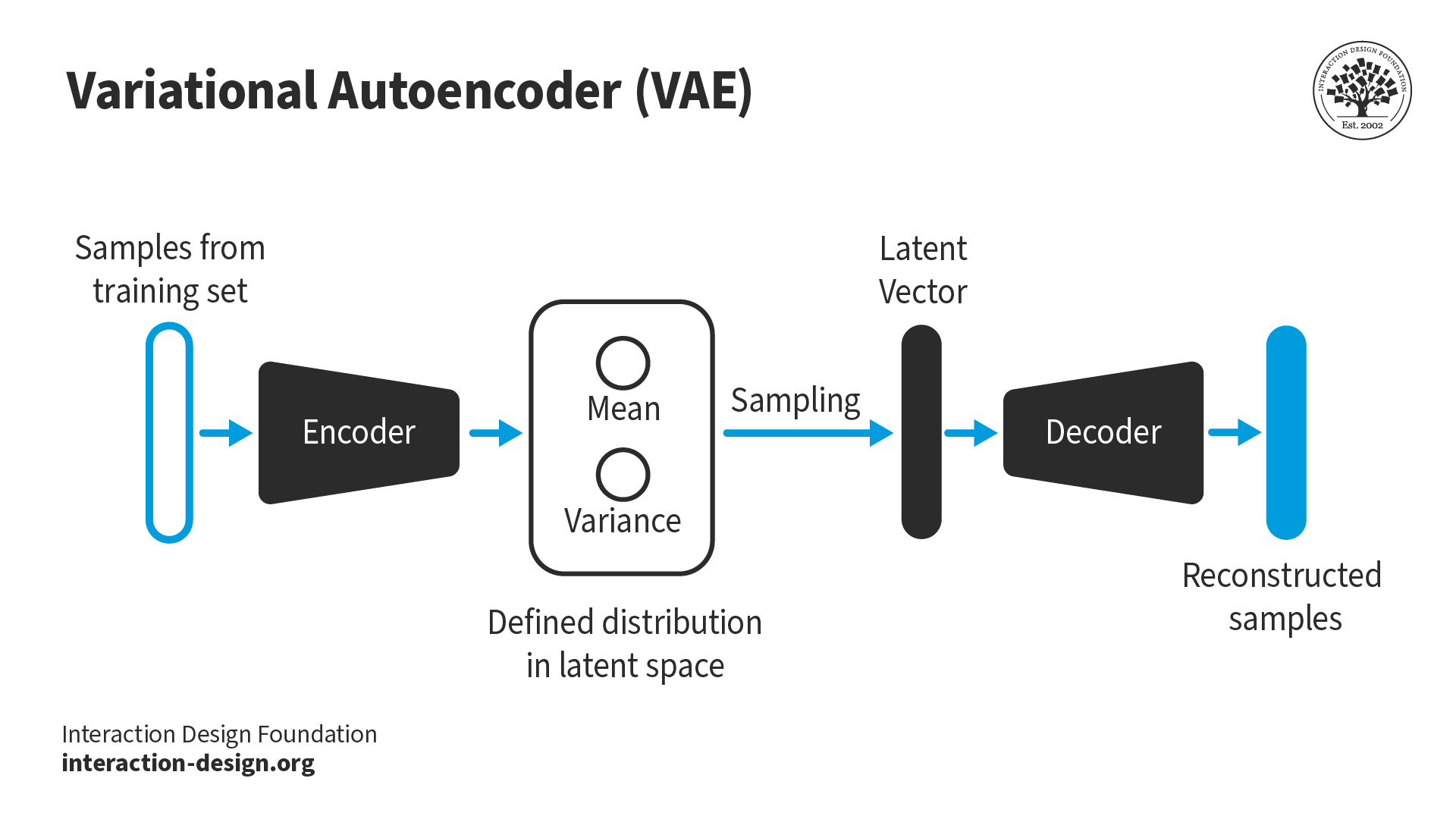
An illustration that represents the VAE generative model process.

© Interaction Design Foundation, CC BY-SA 4.0

GANs are ideal for high-quality image generation, like photorealistic images, or to modify image attributes. They are used in tasks like style transfer, photo-realistic rendering, or creating entirely new images from scratch. VAEs are useful for tasks where understanding the data's underlying structure is important, like data denoising, anomaly detection, or generating new data with controlled variations. 

Specific software tools or platforms might prefer one over the other based on the application. For instance, tools for realistic image generation might lean towards GANs, whereas those for data analysis or less photorealistic image manipulation might use VAEs.

Designers should choose between GANs and VAEs based on the specific requirements of their project, considering factors like the desired output quality, the level of control over the output, and the nature of the data used by the AI.

  1. Training Process 

© Interaction Design Foundation, CC BY-SA 4.0

Generative AI is trained on large datasets containing examples of the type of content it's intended to generate. During training, the model learns to identify patterns, styles, and features in the data. The learning process involves adjusting the parameters of the neural network to minimize the difference between the generated content and the real data.

  1. Learning from Data 

The model learns by exposure to diverse and representative datasets, which enables it to generalize its understanding and generate content that aligns with the characteristics of the training data. This learning phase is critical for the model to produce coherent and relevant outputs.

  1. Fine-Tuning and Refinement 

After the initial training, generative AI models often undergo fine-tuning to improve their performance. This refinement process involves the adjustment of parameters, optimization of algorithms, and sometimes the incorporation of feedback mechanisms.

  1. Generation of New Content 

© Interaction Design Foundation, CC BY-SA 4.0

Once trained, the generative AI model can autonomously produce new content based on its learned understanding of the patterns and structures present in the training data. Depending on the application, this content may range from realistic images to coherent text and even music.

How Generative AI is Changing Design

Ioana Teleanu shares how designers can incorporate AI into their design process in this video.

Transcript

Designers can leverage Generative AI in various impactful ways, some of which are:

  1. Idea Generation: Generative AI can quickly produce a range of design options, providing inspiration and starting points for projects.

  2. Prototyping and Testing: Use Generative AI to create multiple design prototypes, enabling rapid testing and iteration.

  3. Customization and Personalization: Tailor designs to specific user preferences or requirements by training Generative AI with relevant data.

  4. Efficiency and Productivity: Automate repetitive design tasks, freeing time for more creative and complex aspects of design work.

  5. Explore New Design Frontiers: Experiment with innovative design forms and patterns that may take time to be obvious and intuitive to human designers.

While Generative AI is a powerful tool, it's essential to maintain a balance. Designers must drive the design process and use AI as a collaborative partner.

What Programs Use Generative AI?

There are several programs that use Generative AI for a wide range of applications, from content creation to the enhancement of traditional software capabilities. See some of these programs in the following video.

Here are some examples of tools that use Generative AI:

  1. Adobe Photoshop: Adobe has integrated AI features into Photoshop, which enables tasks like content-aware fill, which intelligently fills portions of an image based on its surroundings.

  2. Autodesk: Autodesk uses AI in its CAD and 3D modeling software to optimize design processes, such as generative design in Fusion 360, which allows designers to explore multiple design iterations based on specific constraints and requirements.

  3. GPT by OpenAI: While primarily known for text generation, GPT has been used in various applications, including the generation of code, writing, and even aiding in creative brainstorming processes.

Can Generative AI Create Original Designs?

Generative AI can create completely original designs. It learns from a vast array of existing data and patterns and then uses this knowledge to generate new designs that are unique and have not been explicitly programmed by humans. 

However, it's essential to understand that the originality of these designs is influenced by the data on which it has been trained. The AI's output reflects its input; it remixes and reinterprets existing styles, patterns, and elements to create something new. While generative AI can provide designs that appear original, designers should critically assess and refine these outputs to ensure they meet specific design goals and maintain a human touch in their work.

In the field of AI-generated art, projects like Unsupervised by artist Refik Anadol showcase the impressive capabilities of generative AI. Using a unique AI model trained on data from the Museum of Modern Art (MoMA), Unsupervised produces abstract artworks, illustrating the intersection of art and advanced AI research. However, this creative potential raises concerns about transparency and ethics. Anadol addresses the copyright debate by openly recognizing the collaborative role of the AI model, StyleGAN2 ADA, and the human artist. Unsupervised adopts a shared authorship model, providing clarity in navigating the evolving landscape of art copyright for AI-generated art.

Transcript

What Are The Limitations of Generative AI?

It's crucial to understand that while Generative AI is a powerful tool, it's not without its flaws. One significant limitation is the dependency on data quality. The outputs of generative AI are only as good as the data it's trained on. If the training data is limited, biased, or of poor quality, the AI's outputs will reflect these flaws. This can lead to designs that are not only substandard but potentially biased or culturally insensitive.

Another key limitation is the lack of true creativity and intuition. Generative AI can produce novel designs, but it doesn't truly “understand” what it's creating. It lacks the ability to comprehend the cultural, emotional, or contextual significance of a design, something that's second nature to human designers. This means that while AI can assist in the design process, it can't replace the nuanced understanding and creative intuition of a human designer.

Additionally, there are ethical and legal concerns. AI-generated designs might inadvertently replicate elements that are copyrighted, leading to potential legal issues. There's also the risk of over-reliance on AI, which could lead to a decline in human skill development and an undervaluing of human creativity.

Generative AI is a fantastic tool that can enhance and streamline the design process but it's important to use it as a collaborative partner, not a replacement. Designers need to understand Generative AI’s limitations to harness its power effectively while maintaining the irreplaceable value of human creativity and judgment in the design process.

Generative AI: What’s Next?

There are many ways that Generative AI might evolve in the coming years. One key area of development could be its seamless integration into design tools. This integration would not only streamline the design process but also enhance collaboration. Designers would be able to quickly iterate designs, with AI providing options and suggestions based on your inputs.

Another key area is personalization. Generative AI might get even better at understanding individual preferences and cultural contexts. This means designs would become more personalized and user-centric, catering to specific needs and tastes. Designers might be able to create websites that change its layout and style based on who's viewing it, or products that adapt their features to suit each user.

Generative AI could also expand into newfields like 3D modeling, VR, and AR. This expansion opens up thrilling possibilities for designers, allowing you to create immersive experiences and explore design in entirely new dimensions.

Moreover, as ethical and sustainability considerations become increasingly important, generative AI could become a vital tool to make designs more eco-friendly and socially responsible. By analyzing complex datasets, AI could help identify sustainable materials and ethical design practices.

As generative AI shapes the future of design, it's essential to navigate emerging ethical and legal challenges. Designers will need to balance innovation with respect for intellectual property rights and ethical considerations, while upholding core design principles.

In this video, UX design pioneer Don Norman, talks about how we can collaborate with AI and highlights that the AI apps designers use need human input. 

Transcript

Questions About Generative AI?
We've Got Answers!

What is generative AI?

Generative AI is a branch of artificial intelligence focused on creating new content. It learns from large datasets to generate outputs like images, text, and music. This technology is instrumental in design, where it can assist in developing visual elements and user interfaces.

For designers, generative AI offers a powerful tool to generate design ideas and get inspiration quickly. It's essential to use it to complement human creativity, not as a replacement.

Take our AI for Designers course to learn more about AI.

What is the difference between generative AI and other AI?

Generative AI distinguishes itself from other AI forms by its unique ability to create new content, unlike traditional AI which primarily analyzes or processes existing data. Generative AI, exemplified by models like Generative Adversarial Networks (GANs), excels in generating novel data such as images, text, or music. This contrasts with other AI models that focus on analyzing user behavior, interpreting data, or automating routine tasks. Generative AI's trial-and-error learning approach, where it continually refines its output based on feedback, also sets it apart from other AI that might rely on supervised or unsupervised learning methods.

To learn more about generative AI, read What is generative AI? By IBM and take our AI for Designers course to learn more about AI.

How can Generative AI be used in UI/UX design?

Generative AI significantly impacts UI/UX design, primarily by automating and enhancing design processes. It enables rapid generation of diverse design options, aiding in brainstorming and prototyping. This technology facilitates the creation of personalized UI/UX designs by analyzing user data, thereby improving user engagement. Additionally, it aids in efficiently producing design iterations, allowing for experimentation with various layouts and color schemes.

In practical terms, designers can utilize generative AI for several purposes. Firstly, AI-driven analytics tools can provide valuable insights into user behavior, guiding design decisions to enhance user experience. Secondly, AI can be instrumental in ensuring designs are accessible and inclusive, catering to a wide range of users. Lastly, automated testing through AI can identify potential issues in UI/UX elements, ensuring both functionality and user satisfaction.

Take our AI for Designers course to learn more about AI.

What skills are needed to effectively use Generative AI in design?

To effectively use Generative AI in design, a combination of technical and creative skills is essential. Technical skills include a basic understanding of machine learning and AI principles, as well as proficiency in using design software that integrates AI technologies. Designers should also have a grasp of data handling, as Generative AI relies heavily on data inputs to create outputs. These technical skills enable designers to effectively harness AI tools, customize them for specific tasks, and interpret their outputs accurately.

On the creative side, strong foundational design skills are crucial. This encompasses knowledge of design principles, color theory, typography, and user experience design. Designers must have the ability to critically evaluate AI-generated outputs, ensuring that they align with the project's aesthetic and functional requirements. 

Take our AI for Designers course to learn more about AI.

What are the benefits of using Generative AI in product design?

Generative AI in product design primarily boosts creativity and efficiency. It enables rapid generation of diverse design options, pushing the boundaries of innovation. This leads to more imaginative, meaningful and user-centric products. 

Additionally, AI automates routine tasks, something that allows designers to focus on refining designs and enhancing user experience, while AI-driven simulations help in early identification of design flaws, saving time and improving product quality.

Take our AI for Designers course to learn more about AI.

How does generative AI assist in prototyping and wireframing?

Generative AI streamlines prototyping by enabling the quick generation of multiple design iterations, which allows for efficient exploration of various layouts and styles. It integrates user feedback to refine prototypes and ensures they meet user needs. 

In wireframing, AI assists in creating detailed frameworks, suggesting layouts and UI elements based on extensive design data. This accelerates the wireframing process and introduces data-driven insights, enhancing usability and the final product's effectiveness.

Take our AI for Designers course to learn more about AI.

What are some common tools and platforms for Generative AI in design?

Some common tools and platforms for Generative AI in design include:

  • Adobe Sensei: Integrated into various Adobe products, Sensei uses AI and machine learning to automate complex design tasks, enhance creativity, and improve workflow efficiency.

  • RunwayML: A platform that offers easy access to cutting-edge machine learning models, enabling designers and artists to experiment with AI without needing extensive programming knowledge.

  • DeepArt: Specializes in transforming photos into artworks using the styles of famous artists through deep learning algorithms.

  • Artbreeder: A collaborative platform that allows users to create and manipulate images, including portraits, landscapes, and objects, through generative AI techniques.

  • GPT by OpenAI: While primarily known for text generation, GPT has been used in design for generating content for websites, marketing material, and even ideation for design concepts.

  • Figma’s FigJam: While not exclusively an AI tool, FigJam integrates AI functionality for assisting in the collaborative design process, from brainstorming to wireframing.

These tools and platforms are revolutionizing the way designers approach creative tasks, offering new possibilities for innovation and efficiency in the design process.

Take our AI for Designers course to learn more about AI.

Is ChatGPT a generative AI tool?

Yes, ChatGPT is a generative AI tool. It is based on the GPT (Generative Pre-trained Transformer) architecture developed by OpenAI. ChatGPT is designed to generate text based on the input it receives. It can create coherent and contextually relevant responses, making it suitable for a wide range of applications including conversation simulation, content creation, and answering queries. The tool leverages advanced machine learning techniques to understand and respond to text inputs, making it a powerful example of generative AI in action.

In the context of design, while ChatGPT is not specifically tailored for visual design tasks like prototyping or wireframing, it can assist in areas such as content generation for UI elements, creating descriptive texts, generating ideas for design concepts, and even providing guidance or answering questions about design principles and practices.

Take our AI for Designers course to learn more about AI.

What are the ethical considerations of using Generative AI in design?

Ethical considerations in using Generative AI in design focus on originality and data privacy. Designers must ensure AI-generated designs don’t infringe on intellectual property and maintain creative authenticity. Additionally, the use of data in Generative AI requires adherence to privacy laws and ethical standards, ensuring data is collected and used responsibly to avoid biases and uphold user privacy.

Take our AI for Designers course to learn more about AI.

How does Generative AI impact intellectual property rights in design?

Generative AI's impact on intellectual property rights in design presents a complex challenge. On one hand, AI can generate new designs by learning from existing data, which raises concerns about the originality and ownership of these AI-created works. Determining the authorship of designs generated by AI is complicated, as they are products of algorithms trained on pre-existing works. This blurs the lines of copyright and raises questions about whether AI-generated designs can be considered entirely new creations or derivatives of their training data.

On the other hand, AI's ability to mimic styles and elements from existing designs can lead to potential copyright infringements. Ensure that AI-generated designs do not unintentionally replicate copyrighted elements too closely. This requires designers and AI developers to be vigilant about the data used to train AI models and the outputs they produce. Additionally, there's an ongoing debate about whether laws need to evolve to address the unique challenges posed by AI in the creative process, including the need for clear guidelines on the ownership and copyright of AI-generated content.

Take our AI for Designers course to learn more about AI.

Emerging trends in generative AI for design are reshaping how designers approach creativity and problem-solving:

  • Increased Personalization: AI is being used to create highly personalized user experiences and designs. By analyzing user data, AI can tailor designs to individual preferences, enhancing user engagement and satisfaction.

  • Collaborative AI Design Tools: The integration of AI into design tools is making them smarter and more intuitive. These tools can now assist designers with suggestions, automate routine tasks, and even generate complete design concepts.

  • AI in User Research and Testing: AI algorithms are increasingly used to analyze user behavior and testing data, providing insights that guide design decisions and improve user experiences.

  • Sustainable Design: AI is being used to create designs that are not only aesthetically pleasing but also environmentally sustainable, by optimizing materials and processes for minimal environmental impact.

  • Interactive and Dynamic Designs: Generative AI enables the creation of designs that can change and evolve in real-time based on user interactions, leading to more dynamic and engaging user experiences.

  • 3D and Spatial Design: With the rise of virtual and augmented reality, AI is being used to generate immersive and complex 3D environments and objects.

These trends show a future where AI not only assists in the design process but also enables new forms of creativity and interaction, pushing the boundaries of what's possible in design.

Take our AI for Designers course to learn more about AI.

Earn a Gift Earn a Gift, Answer a Short Quiz!

1
2
3
4
1
2
3
4
Question 1
Question 2
Question 3
Get Your Gift
Interaction Design Foundation logo

Question 1

What is the primary function of generative AI?

1 point towards your gift

  • To enhance the speed of data processing in real-time systems
  • To follow predefined rules in processing data
  • To produce new, realistic outputs by learning from large datasets
Interaction Design Foundation logo

Question 2

Which technology is fundamental to the operation of generative AI?

1 point towards your gift

  • Basic algorithmic scripting
  • Linear regression models
  • Neural networks
Interaction Design Foundation logo

Question 3

Which of the following does NOT typically use generative AI?

1 point towards your gift

  • The creation of educational content
  • The decision process of high-frequency trading
  • The generation of text-based content

Learn More About Generative AI

Make learning as easy as watching Netflix: Learn more about Generative AI by taking the online IxDF Course AI for Designers.

Why? Because design skills make you valuable. In any job. Any industry.

In This Course, You'll

  • Get excited about how quickly you can create meaningful results when you turn AI into your new superpower and combine it with timeless human-centered design skills. As an AI-powered designer, you’ll increase your efficiency and salary potential, and as a human-centered leader, you'll create ethical AI-powered products people love. When these abilities come together, you’ll solve real-world problems faster and make the world a better place. Studies show that AI-driven productivity accelerates growth and helps busy professionals like you achieve in months what once took decades. Now's the time to master the powerful combination that keeps you in demand.

  • Make yourself invaluable when you use AI to accelerate repetitive tasks while applying your irreplaceable human strengths like empathy, critical thinking, and ethical decision-making to guide every solution toward what users truly need. Leaders seek professionals with AI fluency because the people who thrive combine AI efficiency with deep human insight that machines can't replicate. You'll learn to automate and streamline repetitive tasks, make data-driven decisions, and optimize your workflow for innovation and cost savings. No matter your background, you'll easily master AI for Designers. With clear guidance and real-world examples, you'll apply your skills immediately.

  • Gain confidence and credibility as you master the art of text prompts for design. You'll learn how to deal with bias in AI and how to use AI tools to create intuitive user experiences that drive business success. You can fast-track your portfolio of AI-enhanced case studies with step-by-step guidance, practical tips for real-life projects, and downloadable templates. This course gives you the hands-on knowledge to guide AI with timeless human-centered design skills, and that's how you stay in demand in any industry!

It's Easy to Fast-Track Your Career with the World's Best Experts

Master complex skills effortlessly with proven best practices and toolkits directly from the world's top design experts. Meet your experts for this course:

  • Ioana Teleanu: Founder of UX Goodies and former Lead Product Designer (AI) at Miro.

  • Rafael Hernandez: Lead Product Designer at T. Rowe Price.

  • Jarvis Moore: Senior Design Lead, Design Systems at Microsoft.

  • Niwal Sheikh: Product Design Lead at Netflix.

  • Vitaly Friedman: Senior UX Consultant for the European Parliament, and Creative Lead, Smashing Magazine.

  • Pablo Stanley: Designer and CEO of Musho and Lummi.

Get an Industry-Recognized IxDF Course Certificate

Increase your credibility, salary potential and job opportunities by showing credible evidence of your skills.

IxDF Course Certificates set the industry gold standard. Add them to your LinkedIn profile, resumé, and job applications.

Course Certificate Example

Be in distinguished company, alongside industry leaders who train their teams with the IxDF and trust IxDF Course Certificates.

Our clients: IBM, HP, Adobe, GE, Accenture, Allianz, Phillips, Deezer, Capgemin, Mcafee, SAP, Telenor, Cigna, British Parliament, State of New York

All Free IxDF Articles on Generative AI

Read full article
UI & UX Designer Salaries: How Much Can I Earn in 2026? - Article hero image
Interaction Design Foundation logo

UI & UX Designer Salaries: How Much Can I Earn in 2026?

How much can you earn as a UI or UX designer in 2026? The truth is that there's no single answer. Your earning potential depends less on averages and more on factors you can actually control. Designers using AI to accelerate execution while bringing strategic thinking, user empathy, and measurable b

Social shares
942
Published
Read Article
Read full article
How to Supercharge Your Design Workflow with AI - Article hero image
Interaction Design Foundation logo

How to Supercharge Your Design Workflow with AI

AI won't replace you. But a designer who uses AI will. That's the reality we face today. AI amplifies your natural ability to solve people's problems, improve their lives, and do fulfilling, career-accelerating work. But it can't replace your human-centered skills like empathy, creativity, and syste

Social shares
601
Published
Read Article
Read full article
Are AI-Generated Synthetic Users Replacing Personas? What UX Designers Need to Know - Article hero image
Interaction Design Foundation logo

Are AI-Generated Synthetic Users Replacing Personas? What UX Designers Need to Know

AI-generated personas sound like a dream: faster insights, lower costs, happier stakeholders. But there’s a catch—if you build for fake users, you risk losing the real ones. The choice isn’t just about speed. It’s about trust, accuracy, and your reputation as a thoughtful, strategic designer. A tra

Social shares
528
Published
Read Article

How to Supercharge Your Design Workflow with AI

How to Supercharge Your Design Workflow with AI

AI won't replace you. But a designer who uses AI will. That's the reality we face today. AI amplifies your natural ability to solve people's problems, improve their lives, and do fulfilling, career-accelerating work. But it can't replace your human-centered skills like empathy, creativity, and systems thinking.

At each stage of the design process, AI offers you golden opportunities to optimize your workflows and get results faster. In this video, Ioana Teleanu, Founder of UX Goodies and former Lead Product Designer (AI) at Miro, uses two types of AI research tools (insight generators and collaborators) as a lens to explain broader limitations of AI tools in design and what to watch out for.

Transcript

The Designer's Role Has Shifted: From Creator to Director

When you use AI well, you're not just "asking for answers." You're curating solutions strategically:

  • You frame the situation so the tool understands what matters.

  • You provide evidence to guide the tool and avoid assumptions.

  • You specify deliverables so output drives decisions.

  • You refine and judge output to stay aligned with real user needs and business constraints.

This separates "AI that sounds helpful, but isn't" from "AI that moves work forward." Common advice is to treat AI as a junior designer, and for good reason. When you instruct AI with clarity and provide context, constraints, success criteria, and how you'll evaluate results, you protect against its capability to make things up, introduce bias, and lead us astray. These pitfalls can result in disastrous design decisions that affect real people and business profits.

The AI Workflow Framework

Use this lightweight framework to apply AI across the design thinking process: empathize (research), define, ideate, prototype, and test, plus delivery of the final design. It keeps your process flexible while helping you get consistent, useful outputs.

At any stage, clarify your intent, what constraints apply, what evidence matters, and what "good" output looks like. Then use AI to accelerate work within those boundaries, without surrendering judgment.

For each stage, define the following:

  1. Goal: What do you need to create or figure out?

  2. Design Context: What must be true in this situation?

  3. Inputs: What evidence or constraints should AI use?

  4. Desired Output: What deliverable do you need?

  5. Quality Checks: How will you validate it?

  6. Refinement: What will you judge and iterate?

If you're ready to begin working with AI, you should already have the answers to these questions at each stage. If not, you likely need to step back and define what decision you're actually trying to make. AI amplifies whatever you input, whether it's clarity or confusion.

How to Write Prompts That Actually Work

If you've filled in the framework for your current stage, you already have all the key parts of a strong prompt.

In this snippet from a 1-hour Master Class, Rafael Hernandez, Lead Product Designer at T. Rowe Price, shows you how the four elements of design context, input, desired output, and refinement turn vague prompts into clear, decision-ready briefs for AI.

Transcript

When you include refinement in prompts, you prevent AI from overstepping. Many tools recommend which option to choose or what to do next. That's a slippery slope: AI evaluating and iterating its own outputs. This approach keeps you in control as the strategic decision maker, while AI provides options, not judgment.

Stay in Control with These Four Quality Checks

AI can be fast and persuasive, even when wrong. These checks prevent "plausible nonsense" from becoming poor decisions.

Quality Check 1: Traceability

Ask, "Where did this come from?" Request sources that point to your inputs, web searches, or training data. Prompt AI to clearly label its assumptions. If it's not supported by the evidence you provided, treat it as a hypothesis, not a fact.

Quality Check 2: Context Completeness

Ask, "What might be missing because it wasn't in the prompt?" Add constraints, user reality, and specify what not to optimize for. AI only knows what you tell it, so fill in the gaps proactively.

Quality Check 3: Separation of Data vs Interpretation

Ask, "What is observation vs opinion?" Your inputs will vary from raw notes to direct user quotes and other evidence. Make sure AI understands the difference and ask it to label which is which, so you act on facts, not speculation.

Quality Check 4: Bias and Blind Spots

Ask, "Who or what might this exclude?" Request edge cases, counterexamples, and alternative perspectives. AI trained on existing patterns can reinforce existing biases, so you must actively check for fairness. Often, the best practice is to use a dedicated bias-checking tool rather than the same AI that generated the output.

Six Ways to Use AI Across the Design Process

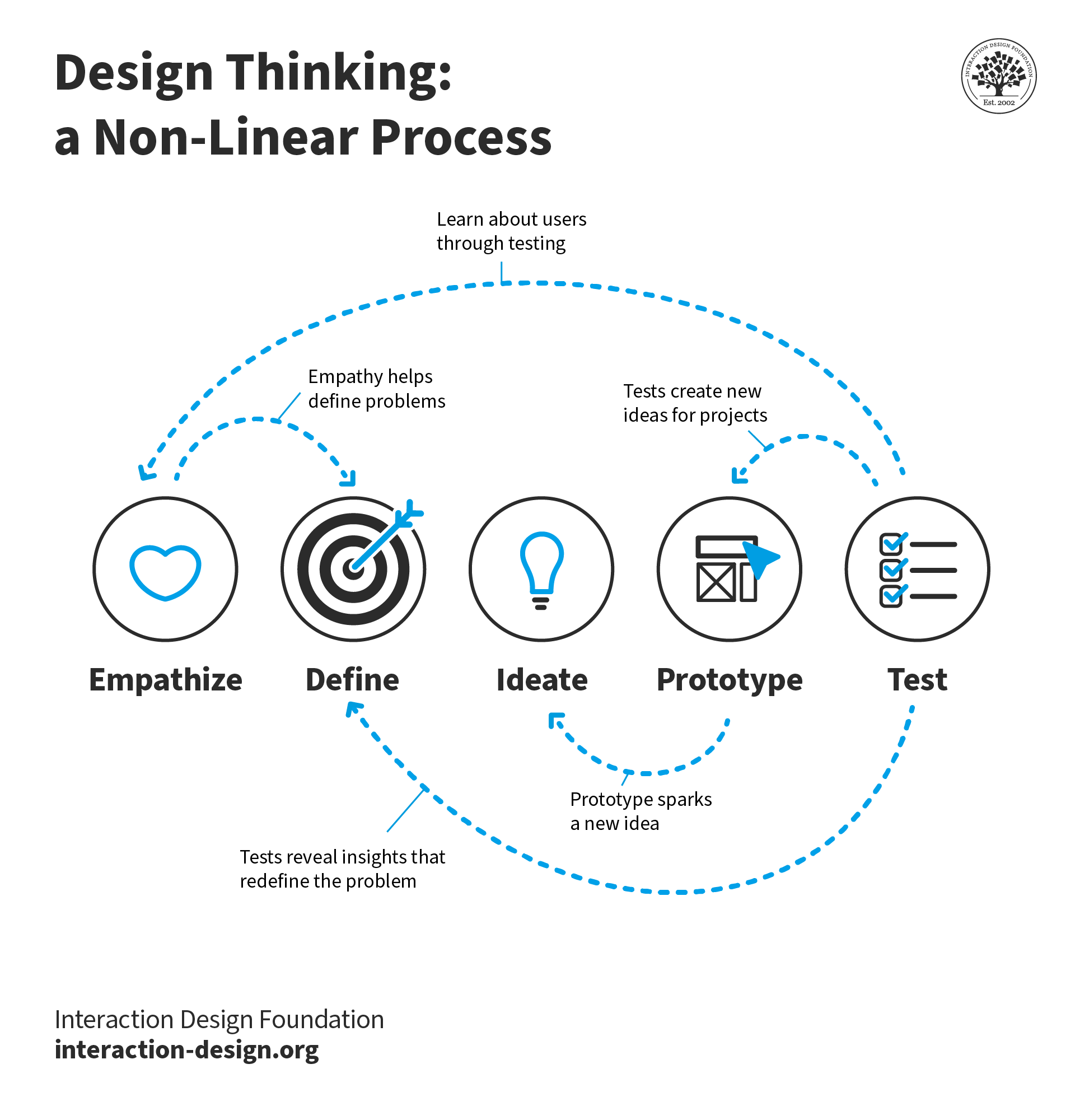
Five stages in the design thinking process: Empathize, Define, Ideate, Prototype, and Test.

The design thinking process consists of five stages. Delivery of the final design isn't typically included, but it also benefits greatly from AI's capabilities.

© Interaction Design Foundation, CC BY-SA 4.0

Here are just a few ways you can use AI in the design process to give you inspiration:

1. Empathize (Research): Understand the Problem Space

Use AI to: Organize messy information, summarize notes, cluster themes, and draft interview guides.

Ask for: Themes with supporting evidence and unanswered questions. Have AI cite which of your inputs support each theme.

Avoid: Treating summaries as truth. AI organizes what you give it, but doesn't validate whether your research was complete or unbiased.

2. Define: Turn Your Research into Direction

Use AI to: Draft multiple problem framings, assumption lists, hypotheses, and success metrics.

Ask for: 3 problem statements and what evidence would confirm or deny each. This forces you to consider alternatives instead of locking onto the first framing.

Avoid: Accepting the first framing because it sounds confident. AI doesn't know which problem matters most to your users or business. Only you do.

3. Ideate: Generate and Compare Ideas

Use AI to: Supply breadth. Multiple approaches, edge cases, alternative flows, and content variations. AI excels at generating volume quickly.

Ask for: 10 solution directions, including pros and cons and risks for each. Then you curate the most promising and develop them further.

Avoid: Deciding too early because something sounds polished. Polish doesn't mean appropriate. Instead, judge ideas on whether they solve the actual problem.

4. Prototype: Make Ideas Concrete

Use AI to: Create quick variations of copy, UI states, error messages, micro-interactions, naming conventions, and documentation drafts.

Ask for: Variants optimized for clarity, trust, and accessibility. Specify constraints like reading level, tone, or character limits.

Avoid: Moving forward without checking tone, accessibility, and brand fit. AI generates plausible text, but you must ensure it serves real users appropriately.

5. Test: Stress Test Before Launch

Use AI for: Heuristic reviews, edge-case checklists, "what could go wrong?" analysis, and predictive heatmaps.

Ask for: Top usability risks and how to test them quickly. AI can systematically check against known patterns and principles.

Avoid: Using AI as your "test participant." It can suggest issues based on averaged data, but it's not actual user behavior. Always validate with real people.

6. Deliver: Handoff and Continuous Improvement

Use AI to: Summarize decisions and write release notes, support docs, experiment plans, and stakeholder updates.

Ask for: A decision log of what changed, why, the risks, and how you'll measure impact. This creates useful documentation for teams.

Avoid: Sharing sensitive or identifying data with tools that aren't approved by your organization. Check privacy and security policies first.

The Take Away

Use AI strategically, and you'll get ahead of everyone still prompting randomly. At every design stage, define your goal, provide design context and inputs, specify desired output, establish quality checks, and determine how you'll refine results.

This framework translates to your prompt structure. Apply it to organize research, draft problem statements, generate solution ideas, create prototype variations, and stress test before launch. Each stage requires the same discipline: clear goals, specific context, and defined outputs.

But the framework only works if you validate what AI produces. Always apply quality checks. Require traceability to sources, check for missing context, separate data from interpretation, and watch for bias and blind spots.

This is the role shift that defines success in the age of AI: from creator to director. You frame situations, provide evidence, specify deliverables, and judge results. AI accelerates repetitive work and expands exploration. You now have more time to focus on the strategic thinking that moves your projects and your career forward.

References and Where to Learn More

Follow Rafael's full AI-powered design process in our 1-hour Master Class, Get Ahead in Product Design with AI.

Build on your existing creativity, problem-solving, and people skills to learn the powerful 5-stage method called design thinking in our course, Design Thinking: The Ultimate Guide.

Explore how you can apply AI insight generators and collaborators in your research and persona creation process with our article, AI for Persona Research and Creation: Build Better Profiles in Less Time.

Feel Stuck?
Want Better Job Options?

AI is replacing jobs everywhere, yet design jobs are booming with a projected 45% job growth. With design skills, you can create products and services people love. More love means more impact and greater salary potential.

At IxDF, we help you from your first course to your next job, all in one place.

See How Design Skills Turn Into Job Options
Privacy Settings
By using this site, you accept our Cookie Policy and Terms of Use.
Customize
Accept all

Be the One Who Inspires

People remember who shares great ideas.

Share on:

Academic Credibility — On Autopilot

Don't waste time googling citation formats. Just copy, paste and look legit in seconds.