Narrow AI

Your constantly-updated definition of Narrow AI and collection of videos and articles.
Be a conversation starter: Share this page and inspire others!

197 Shares

What is Narrow AI?

Narrow AI, sometimes called Weak AI, encompasses artificial intelligence systems purpose-built for specific, well-defined tasks or applications. These AI systems excel at executing precise functions within a limited scope, and their capabilities remain restricted when compared to human intelligence. Narrow AI can’t generalize its knowledge or skills to tasks beyond its designated domain.

In this video, AI Product Designer Ioana Teleanu defines Narrow AI and the differences between Narrow AI and General AI.

Transcript

Narrow AI vs General AI: What’s the Difference?

While Narrow AI is tailored for specific tasks, the concept of General AI, or Strong AI, embodies an artificial intelligence system's capability to comprehend, learn, and apply knowledge across a diverse spectrum of tasks, mirroring the adaptability and versatility inherent in human intelligence. Unlike Narrow AI, General AI possesses the potential for advanced reasoning, intricate problem-solving, and the ability to navigate and adapt to novel and unpredictable situations.
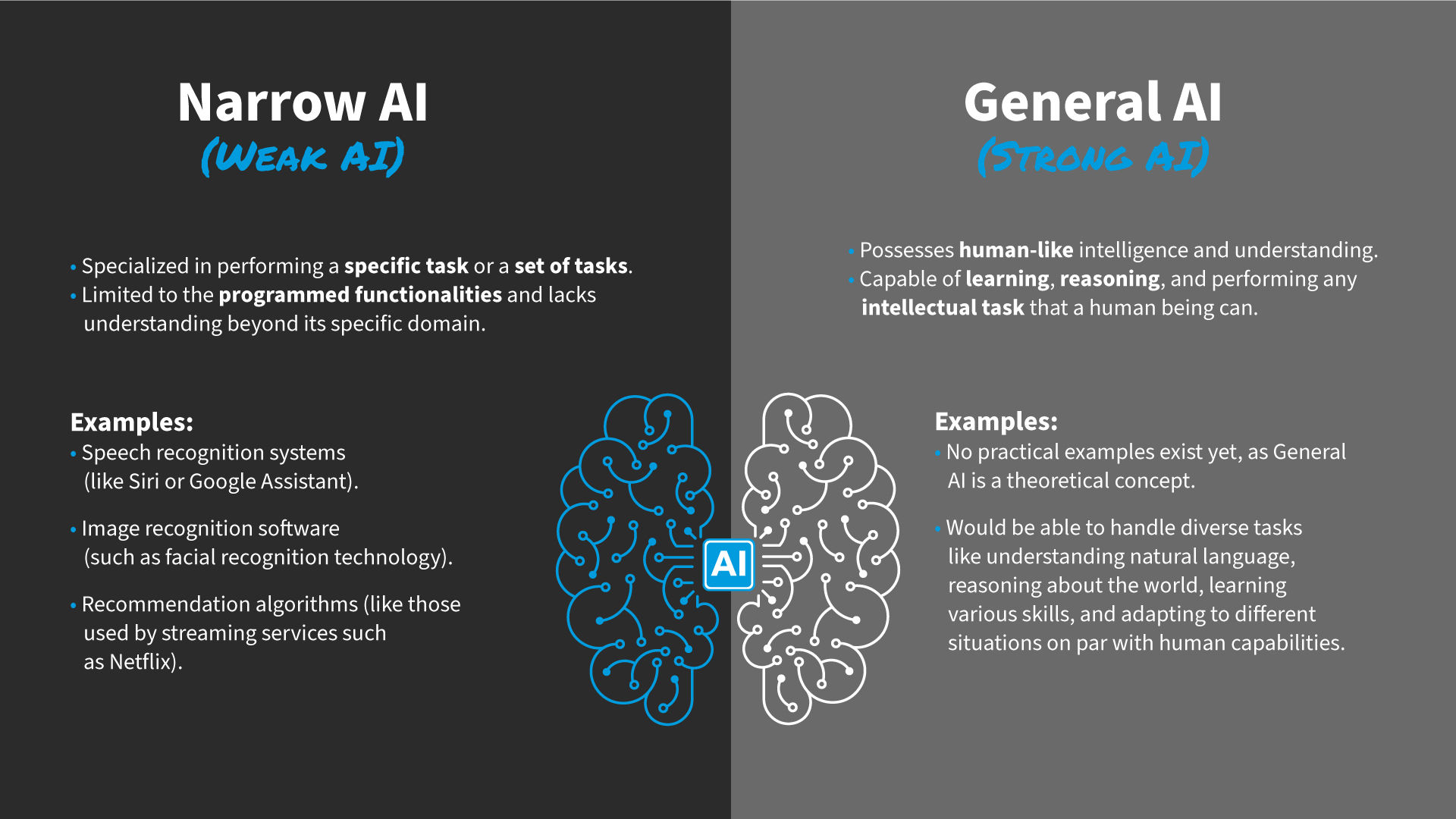
An illustration that represents Narrow AI also known as Weak AI vs General AI or Strong AI. The image includes text descriptions, examples and an illustration of a brain.

© Interaction Design Foundation, CC BY-SA 4.0

Key Distinctions:

  • Scope of Tasks:

    • Narrow AI: Specialized in a specific task or set of tasks.

    • General AI: Capable of performing any intellectual task that a human being can.

  • Learning and Adaptation:

    • Narrow AI: Limited to predefined tasks and cannot generalize knowledge.

    • General AI: Possesses the capacity to learn from experience and apply knowledge to unfamiliar scenarios.

  • Flexibility:

    • Narrow AI: Highly specialized and lacks versatility.

    • General AI: Exhibits adaptability across diverse domains akin to human intelligence.

Examples of Narrow AI

Narrow AI systems excel within limited scopes, showcasing prowess in executing precise functions. Examples of Narrow AI include:

  • Voice Recognition Systems: Siri and Alexa demonstrate the application of Narrow AI in seamless human-machine interaction.

  • Recommendation Algorithms: Streaming services like Netflix and Spotify use Narrow AI to tailor user experiences based on preferences.

  • Chatbots: These provide customer service assistance on websites, showcasing the efficiency of narrow AI in addressing specific queries.

  • Specialized Image Recognition Software: Used in facial recognition or medical imaging analysis, which highlights its role in diverse domains.

  • Fraud Detection Systems: Financial institutions leverage Narrow AI to detect unusual transaction patterns and anomalies, enhancing security measures.

  • Language Translation Services: Platforms like Google Translate use Narrow AI to provide accurate and context-aware translations, breaking language barriers globally.

  • Autonomous Vehicles: The automotive industry integrates Narrow AI for tasks such as object recognition and decision-making, contributing to the development of self-driving cars.

How Can Designers Leverage Narrow AI?

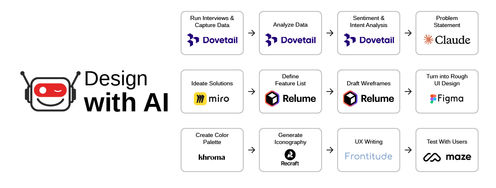
In this video, Ioana Teleanu explains how you designers can work with AI as a partner.

Transcript

Designers have a unique opportunity to harness the power of Narrow AI to create more efficient, personalized, and intuitive user experiences. Here are some ways designers can leverage Narrow AI:

1. Personalized User Interfaces

Designers can use Narrow AI to analyze user behavior and preferences, customizing interfaces to provide personalized experiences. This ensures that users receive content and recommendations tailored to their specific needs.
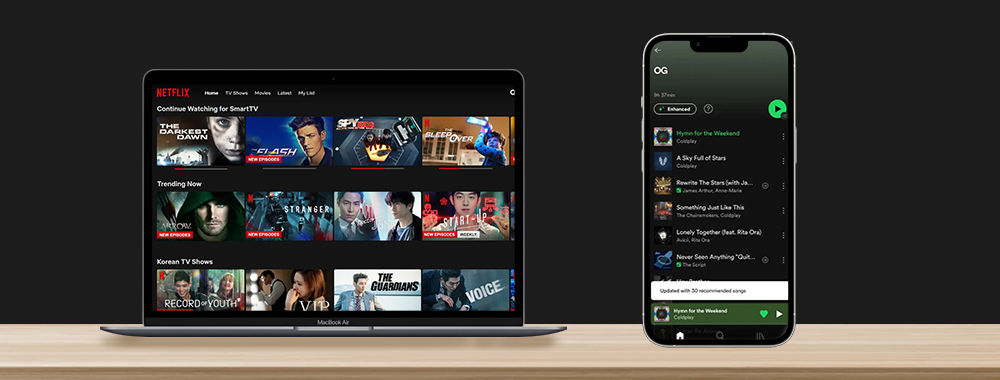
Digital streaming applications like Netflix and Spotify use AI to personalize song and movie recommendations.

© Netflix and Spotify, Fair Use

2. Predictive Analytics for Design Optimization

Implementing Narrow AI in predictive analytics can help designers anticipate user interactions and optimize design elements accordingly. This data-driven approach enhances user satisfaction and engagement.

Zalando employs Narrow AI to predict user preferences and optimize the design layout. By analyzing historical data, the system predicts which products a user will likely be interested in and strategically places them, enhancing the overall user experience.

© Zalando, Fair Use

3. Enhanced User Support with AI Chatbots

Integrating AI chatbots into user interfaces can streamline customer support. Designers can ensure that the chatbot's interactions align with the brand's tone and style, providing users with efficient and helpful assistance.

4. Visual Recognition for Augmented Reality (AR)

Designers working on AR applications can incorporate Narrow AI's visual recognition capabilities. This enables the application to understand and interact with the user's physical environment, creating immersive and contextually relevant experiences.
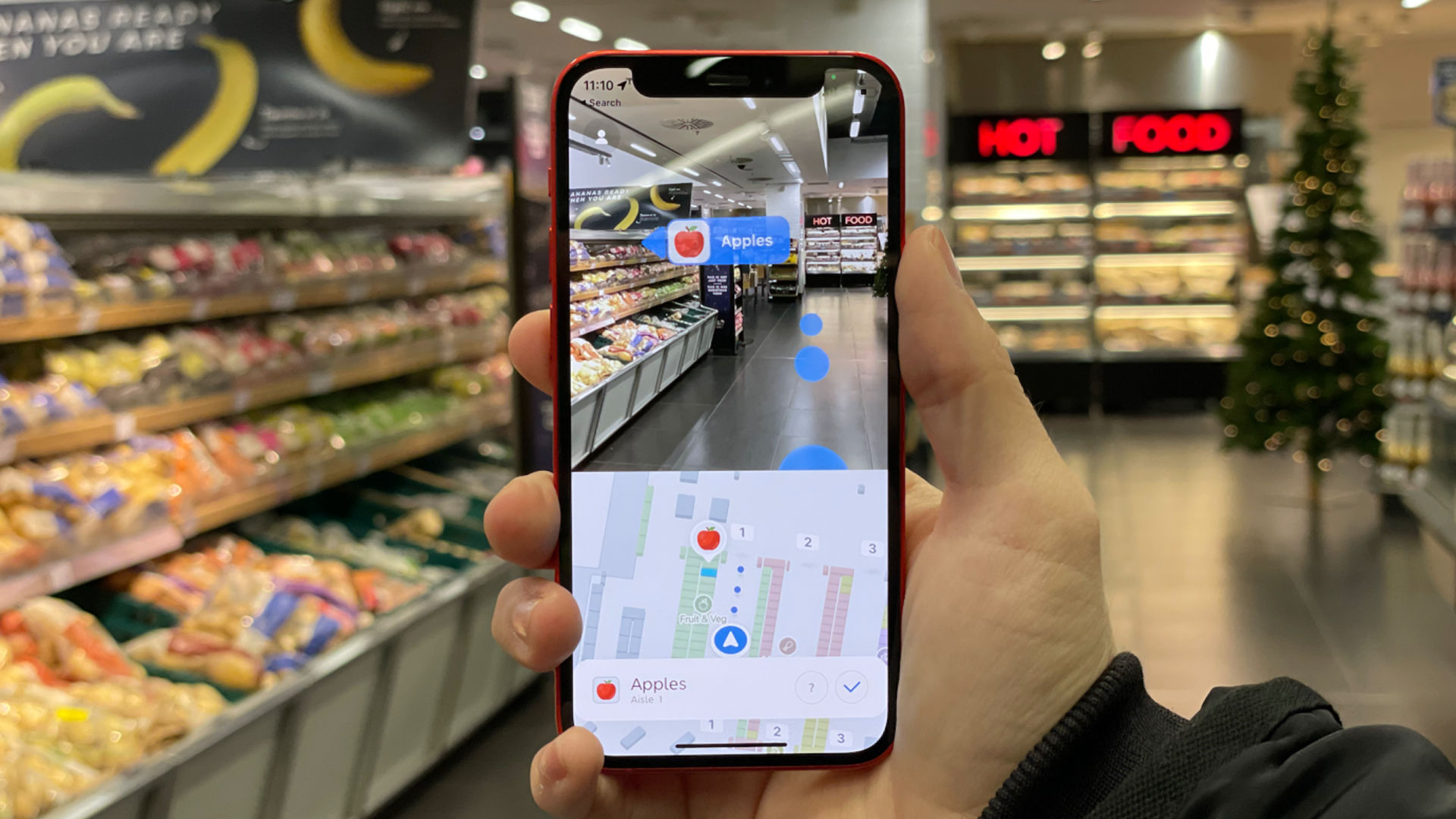
An AR HUD in a grocery store giving directions and labelling sections.

AR apps can provide guidance and assist in everyday tasks, like grocery shopping.

© Dent Reality, Fair Use

5. Efficient Content Curation

Narrow AI can analyze user preferences and behavior, facilitating the curation of relevant content. Designers can use this insight to create interfaces that present information that resonates with their user's interests.
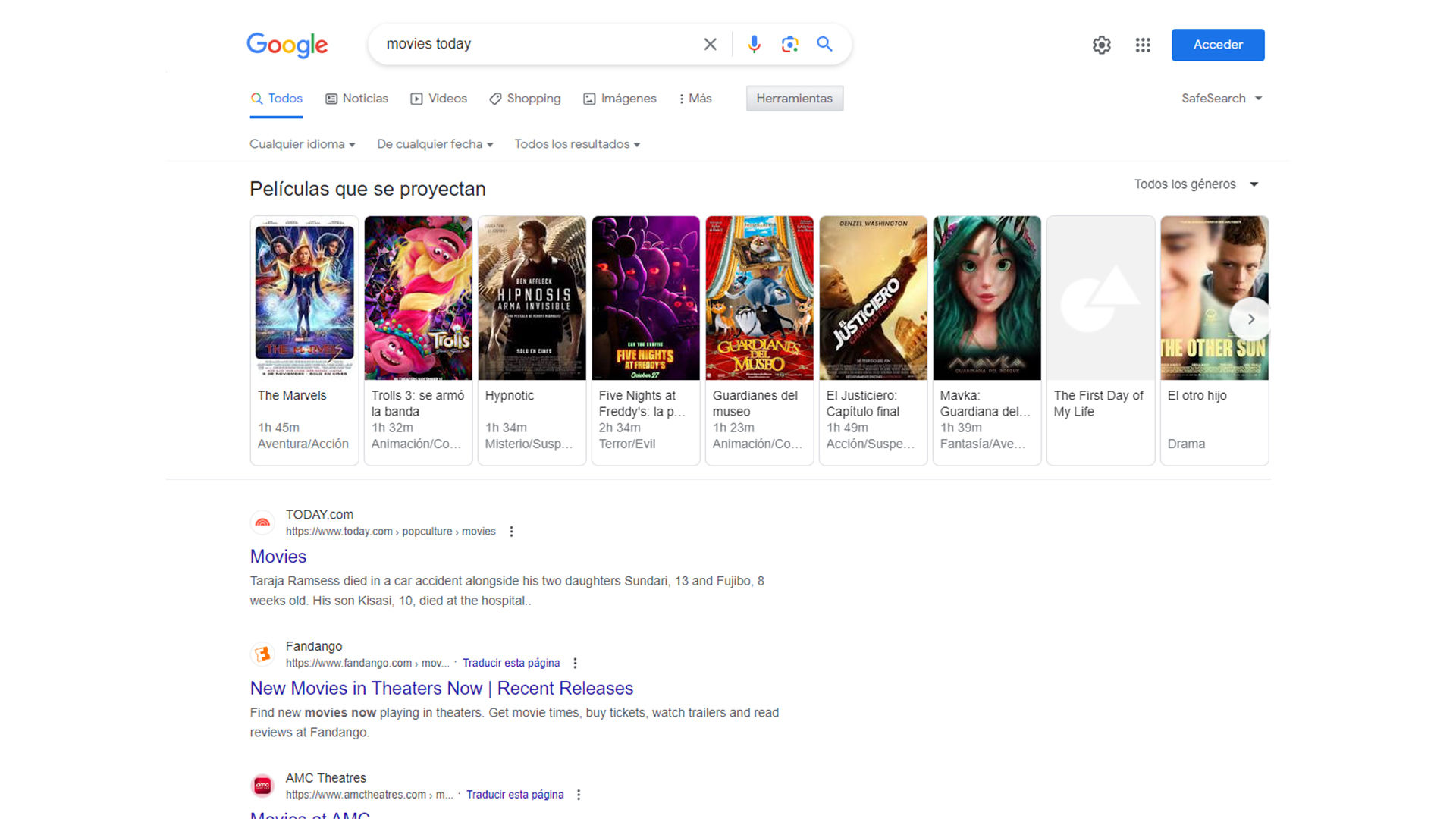
Google’s search results page offers contextual information. For example, when you search for a movie, the page will display the show times, a search for a flight will return timings, and a search for a product will return shopping results at the top of the page.

© Google, Fair Use

How Can Designers Incorporate Narrow AI into the Design Process

In design, Narrow AI emerges not just as a technological innovation but as a powerful collaborator, offering designers a myriad of tools and capabilities that enhance and streamline their design process. 

In this video, Ioana Teleanu explains how designers can incorporate AI into their processes.

Transcript

Here's how Narrow AI can be a game-changer for designers:

1. Data-Driven Design Decisions

Insight Generation: Narrow AI can analyze vast datasets, giving designers valuable insights into user behavior, preferences, and trends. This data-driven approach empowers designers to make informed decisions, ensuring their creations align with user expectations. For example, Google Analytics utilizes machine learning algorithms to analyze user data, providing designers with insights into user behavior, popular content, and demographic information. Designers can leverage these analytics to inform their design decisions and enhance user experiences.

2. Automated Repetitive Tasks

Time Efficiency: Design often involves repetitive tasks such as resizing images, organizing files, or formatting layouts. Narrow AI can automate these routine activities, allowing designers to focus on more complex and creative aspects of their work. This not only boosts efficiency but also minimizes the risk of human error.

3. Personalized User Experiences

Tailored Content: Leveraging Narrow AI enables designers to create personalized user interfaces and content. By understanding user preferences and behaviors, AI-driven designs can dynamically adapt, providing a tailored experience for each user. This personalization enhances user engagement and satisfaction. For example, integrated into Adobe Creative Cloud, Adobe Sensei automates repetitive design tasks. It can intelligently tag and organize assets, suggest layout adjustments, and even automate complex processes like image masking, saving designers valuable time and effort.

4. Prototyping and Testing

Rapid Prototyping: Narrow AI facilitates rapid prototyping by generating design iterations based on specified parameters. Designers can explore multiple options quickly, accelerating the prototyping phase and fostering a more iterative and experimental design process. For example, Dynamic Yield is an AI-powered personalization platform. Designers can use it to create personalized user interfaces, dynamically adjusting content based on user behavior, preferences, and real-time interactions. For example, RunwayML is a creative toolkit that enables designers to experiment with AI models for rapid prototyping. It provides a range of pre-trained models designers can use to generate visuals, making the prototyping phase more dynamic and exploratory.

5. Predictive Design Trends

Forecasting Aesthetics: Narrow AI can analyze current design trends, predict emerging aesthetics, and even suggest design elements that resonate well with the target audience. This foresight allows designers to stay ahead of the curve and create visually compelling and contemporary designs. For example, IBM Watson Trend uses AI to analyze online trends and predict emerging consumer preferences. Designers can leverage this tool to stay informed about evolving design aesthetics and align their work with current and future trends.

6. Natural Language Processing (NLP) for Design Briefs

Enhanced Communication: Designers can use Narrow AI equipped with NLP to interpret and understand design briefs expressed in natural language. This improves communication between designers and stakeholders, ensuring a clearer understanding of project requirements and objectives. For example, ChatGPT-3, developed by OpenAI, is a powerful language model that can understand and generate human-like text. Designers can use GPT-3 to interpret and generate design-related text based on natural language input, improving communication with stakeholders.

7. Image and Style Recognition

Inspiration Sourcing: Narrow AI's image recognition capabilities aid designers in sourcing inspiration. AI systems can identify patterns and styles by analyzing visual elements, helping designers stay inspired and informed about evolving design aesthetics. For example, Clarifai is an AI platform that excels in image and video recognition. Designers can use Clarifai to analyze visual elements, identify patterns, and gain inspiration from various styles, streamlining the creative process.

8. User Journey Prediction

Anticipating Interactions: Narrow AI can analyze user interactions with a design and predict potential user journeys. This anticipatory approach enables designers to optimize user flows, enhancing the designed product's overall user experience and usability. For example, Pendo uses AI to analyze user interactions within digital products. Designers can benefit from insights provided by Pendo to predict and optimize user journeys, ensuring a more intuitive and user-friendly design.

9. Color Palette and Typography Suggestions

Visual Design: AI algorithms can suggest color palettes and typography combinations based on design principles and user preferences. Designers can experiment with these suggestions, ensuring harmonious and visually appealing compositions. For example, Adobe Color Wheel uses AI algorithms to suggest color palettes based on design principles. Designers can experiment with these suggestions to achieve harmonious color combinations, ensuring visually appealing compositions.

10. Feedback Analysis

Iterative Improvement: Narrow AI can analyze user feedback on design elements, helping designers understand user sentiment and preferences. This iterative feedback loop allows designers to continuously refine and improve their designs based on real-time user responses. For example, SentiSum employs AI to analyze user feedback and sentiment. Designers can use this tool to understand user responses, identify areas for improvement, and iteratively enhance their designs based on real-time feedback.

As designers embrace the capabilities of Narrow AI, it becomes a valuable collaborator in the creative journey, offering efficiency, innovation, and insights that enrich the design process. 

Narrow AI: Challenges and Considerations for Designers

Despite its undeniable advantages, designers must grapple with challenges when incorporating Narrow AI. As a designer, you need to strike a balance between technological innovation and responsible design, which is crucial to navigating the evolving landscape of Narrow AI. 

Here are a few tips:

1. Diverse and Representative Data: Ensure that the training data used for Narrow AI models is diverse and representative of the intended user base. This helps mitigate biases and create systems catering to a broad range of users.

2. Bias Detection and Mitigation: Implement tools and methodologies to detect and mitigate biases in the AI algorithms. Regularly review and audit the AI systems to identify and rectify any biased patterns that may emerge during usage.

3. Transparency and Explainability: Design AI systems with transparency in mind. Provide users with understandable explanations of how the AI functions and influences outcomes. This transparency fosters trust and allows users to comprehend the decision-making processes.

4. User Empowerment and Control: Incorporate features that empower users to control and customize AI interactions. This includes settings that allow users to adjust preferences, turn off certain AI features, or provide feedback on the system's performance.

5. Ethical Guidelines and Standards: Adhere to established ethical guidelines and standards in AI development. Stay informed about industry best practices and regulatory frameworks to ensure alignment with ethical principles and legal requirements.

Questions About Narrow AI?
We've Got Answers!

What is Narrow AI vs Weak AI?

Narrow AI and Weak AI are often used interchangeably to describe a specific type of artificial intelligence, but it's essential to understand their subtle distinctions. Narrow AI refers to artificial intelligence systems that are purpose-built for highly specific tasks or applications. These systems excel at performing well-defined functions within a limited scope, showcasing expertise in a narrow domain. 

On the other hand, Weak AI is a broader concept that suggests the limited cognitive abilities of these AI systems compared to human intelligence. The 'weakness' in Weak AI doesn't imply inefficiency but underscores the specificity of the tasks these systems are designed for. In essence, while Narrow AI emphasizes the focused application of AI in a specific domain, Weak AI emphasizes the relative limitation of cognitive abilities compared to the broader spectrum of human intelligence.

Learn more about AI in the course AI for Designers.

Is ChatGPT a Narrow or General AI?

ChatGPT is an example of Narrow AI. It is a sophisticated language model designed for natural language understanding and generation, excelling in conversational contexts. Unlike General AI, which would possess broad cognitive abilities akin to human intelligence across various domains, ChatGPT specializes in processing and generating human-like text based on the input it receives. 

ChatGPT’s proficiency is notable within the specific language understanding and generation task, but it cannot generalize its knowledge to a wide range of unrelated tasks. In essence, ChatGPT showcases the capabilities of Narrow AI by demonstrating expertise in a particular domain—in this case, natural language processing.

Learn more about AI in the course AI for Designers.

Is Siri an example of Narrow or General AI?

Siri is a prime example of Narrow AI. As a virtual assistant developed by Apple, Siri is purpose-built for specific tasks related to voice recognition, language understanding, and task execution within the Apple ecosystem. 

Siri excels at responding to voice commands, setting reminders, sending messages, and providing information based on user inquiries. However, its capabilities are confined to the predefined set of tasks it is designed for and the Apple ecosystem. Unlike General AI, which would be able to understand and perform a wide array of tasks across diverse domains, Siri's functionality is limited to the specific applications and services integrated into its design.

Learn more about AI in the course AI for Designers.

Is Alexa General AI or Narrow AI?

Alexa is an example of Narrow AI. Developed by Amazon, Alexa is a virtual assistant designed for specific tasks such as voice recognition, natural language processing, and controlling smart home devices. Its capabilities are finely tuned for executing predefined functions, such as providing weather updates, setting reminders, or playing music. 

While Alexa exhibits a high level of proficiency within its designated tasks, it operates within a constrained domain and lacks the broad cognitive abilities associated with General AI. In essence, Alexa showcases the characteristics of Narrow AI; it excels in specific applications but doesn’t possess the capacity to generalize knowledge or skills across a wide range of unrelated tasks.

Learn more about AI in the course AI for Designers.

What is the difference between Generative AI and Narrow AI?

Generative AI and Narrow AI represent different facets of artificial intelligence. Narrow AI, or Weak AI, is tailored for specific tasks within a limited domain, lacking the ability to generalize knowledge. Examples include virtual assistants and specialized algorithms. 

Generative AI, on the other hand, refers to systems capable of creating new content, often with the potential for novelty and creativity. While both may operate within specific domains, Narrow AI emphasizes specialized functionality, while Generative AI focuses on content creation.

Learn more about AI in the course AI for Designers.

What best describes Narrow AI?

Narrow AI, also known as Weak AI, is a term that characterizes artificial intelligence systems specifically designed and optimized for well-defined tasks or applications. These systems demonstrate expertise within a limited scope, excelling at executing precise functions but lacking the ability to generalize their knowledge or skills to tasks beyond their designated domain. In essence, Narrow AI is highly specialized, showcasing efficiency and accuracy within its predefined boundaries. This stands in contrast to the broader concept of General AI, which encompasses the potential for artificial intelligence to understand, learn, and apply knowledge across a diverse spectrum of tasks akin to human intelligence.

Learn more about AI in the course AI for Designers.

What is an example of Narrow AI?

Narrow AI, or Weak AI, refers to artificial intelligence systems designed for specific and well-defined tasks or applications. These systems excel within a limited scope, showcasing expertise in executing precise functions tailored to a particular domain. Unlike General AI, Narrow AI cannot generalize its knowledge or skills to tasks beyond its designated focus. 

An illustrative example of Narrow AI is voice recognition technology, such as Apple's Siri or Amazon's Alexa. These virtual assistants are meticulously designed to understand and respond to spoken commands, demonstrating proficiency in a narrowly defined area of natural language processing but not possessing the versatility associated with more generalized artificial intelligence.

Learn more about AI in the course AI for Designers.

What is a simple way to describe Narrow AI?

A straightforward way to describe Narrow AI is to think of it as specialized artificial intelligence designed for specific tasks. Unlike a versatile, all-encompassing intelligence, Narrow AI excels at performing particular functions within a well-defined domain. It's like having a smart tool that's really good at one job, such as recognizing voices, predicting outcomes based on data, or understanding specific types of images. The essential characteristic is its focused expertise, tailored to handle particular tasks effectively but without the ability to generalize to diverse or unrelated activities.

Learn more about AI in the course AI for Designers.

What is an advantage of Narrow or Weak AI?

An advantage of Narrow or Weak AI lies in its specialized efficiency. Because these artificial intelligence systems are purpose-built for specific tasks or applications, they can demonstrate high performance, accuracy, and speed within their designated domain. This focused expertise allows for the development of highly effective solutions tailored to particular needs. Additionally, the more targeted nature of Narrow AI often makes it more accessible and practical for implementation in real-world scenarios, offering solutions to specific problems without the complexity associated with more generalized artificial intelligence systems.

Learn more about AI in the course AI for Designers.

How does Narrow AI work?

Narrow AI employs specialized algorithms and models designed for a specific task or application. The process typically involves the following steps:

  1. Task Definition: The first step is defining the specific task or problem the Narrow AI is intended to address. This could range from speech recognition and image classification to data analysis or language translation.

  2. Data Collection: Relevant data for the task is collected and prepared. The quality and diversity of the data play a crucial role in the effectiveness of the Narrow AI system.

  3. Training the Model: The AI model is trained using machine learning techniques, often supervised learning. During training, the model learns patterns and features from the provided data to make accurate predictions or decisions related to the defined task.

  4. Validation and Testing: The trained model is validated and tested using separate datasets to ensure its accuracy, robustness, and generalization to new, unseen data.

  5. Deployment: Once validated, the Narrow AI model is deployed for real-world use. It can then perform the specific task it was designed for recognizing voices, analyzing images, or making predictions based on data.

  6. Iterative Improvement: Continuous improvement is achieved through iterations. The model is refined based on ongoing feedback and new data, enhancing its performance over time.

In essence, Narrow AI works through the application of specialized algorithms to perform a predefined task, leveraging data and iterative learning to optimize its capabilities within that specific domain.

Learn more about AI in the course AI for Designers.

Earn a Gift Earn a Gift, Answer a Short Quiz!

1
2
3
4
1
2
3
4
Question 1
Question 2
Question 3
Get Your Gift
Interaction Design Foundation logo

Question 1

What distinguishes Narrow AI from General AI?

1 point towards your gift

  • Narrow AI can perform many unrelated tasks like a human.
  • Narrow AI is designed for specific tasks and cannot generalize knowledge.
  • Narrow AI can adapt to unpredictable situations.
Interaction Design Foundation logo

Question 2

Which of the following is an example of Narrow AI?

1 point towards your gift

  • A virtual assistant like Siri.
  • A robot capable of complex problem-solving across domains.
  • A self-learning algorithm that can handle any intellectual task.
Interaction Design Foundation logo

Question 3

How does Narrow AI help designers create personalized user experiences?

1 point towards your gift

  • By analyzing user data and adapting interfaces to their preferences.
  • By predicting emerging design trends.
  • By automatically generating multiple design prototypes.

Learn More About Narrow AI

Make learning as easy as watching Netflix: Learn more about Narrow AI by taking the online IxDF Course AI for Designers.

Why? Because design skills make you valuable. In any job. Any industry.

In This Course, You'll

  • Get excited about how quickly you can create meaningful results when you turn AI into your new superpower and combine it with timeless human-centered design skills. As an AI-powered designer, you’ll increase your efficiency and salary potential, and as a human-centered leader, you'll create ethical AI-powered products people love. When these abilities come together, you’ll solve real-world problems faster and make the world a better place. Studies show that AI-driven productivity accelerates growth and helps busy professionals like you achieve in months what once took decades. Now's the time to master the powerful combination that keeps you in demand.

  • Make yourself invaluable when you use AI to accelerate repetitive tasks while applying your irreplaceable human strengths like empathy, critical thinking, and ethical decision-making to guide every solution toward what users truly need. Leaders seek professionals with AI fluency because the people who thrive combine AI efficiency with deep human insight that machines can't replicate. You'll learn to automate and streamline repetitive tasks, make data-driven decisions, and optimize your workflow for innovation and cost savings. No matter your background, you'll easily master AI for Designers. With clear guidance and real-world examples, you'll apply your skills immediately.

  • Gain confidence and credibility as you master the art of text prompts for design. You'll learn how to deal with bias in AI and how to use AI tools to create intuitive user experiences that drive business success. You can fast-track your portfolio of AI-enhanced case studies with step-by-step guidance, practical tips for real-life projects, and downloadable templates. This course gives you the hands-on knowledge to guide AI with timeless human-centered design skills, and that's how you stay in demand in any industry!

It's Easy to Fast-Track Your Career with the World's Best Experts

Master complex skills effortlessly with proven best practices and toolkits directly from the world's top design experts. Meet your experts for this course:

  • Ioana Teleanu: Founder of UX Goodies and former Lead Product Designer (AI) at Miro.

  • Rafael Hernandez: Lead Product Designer at T. Rowe Price.

  • Jarvis Moore: Senior Design Lead, Design Systems at Microsoft.

  • Niwal Sheikh: Product Design Lead at Netflix.

  • Vitaly Friedman: Senior UX Consultant for the European Parliament, and Creative Lead, Smashing Magazine.

  • Pablo Stanley: Designer and CEO of Musho and Lummi.

Get an Industry-Recognized IxDF Course Certificate

Increase your credibility, salary potential and job opportunities by showing credible evidence of your skills.

IxDF Course Certificates set the industry gold standard. Add them to your LinkedIn profile, resumé, and job applications.

Course Certificate Example

Be in distinguished company, alongside industry leaders who train their teams with the IxDF and trust IxDF Course Certificates.

Our clients: IBM, HP, Adobe, GE, Accenture, Allianz, Phillips, Deezer, Capgemin, Mcafee, SAP, Telenor, Cigna, British Parliament, State of New York

All Free IxDF Articles on Narrow AI

Read full article
How to Supercharge Your Design Workflow with AI - Article hero image
Interaction Design Foundation logo

How to Supercharge Your Design Workflow with AI

AI won't replace you. But a designer who uses AI will. That's the reality we face today. AI amplifies your natural ability to solve people's problems, improve their lives, and do fulfilling, career-accelerating work. But it can't replace your human-centered skills like empathy, creativity, and syste

Social shares
601
Published
Read Article
Read full article
AI Challenges and How You Can Overcome Them: How to Design for Trust - Article hero image
Interaction Design Foundation logo

AI Challenges and How You Can Overcome Them: How to Design for Trust

As a designer, designing for trust in Artificial Intelligence (AI) products is paramount. AI presents unique challenges that require transparent interfaces, clear feedback, and ethical considerations to build user confidence. If you prioritize trust, you can ensure user adoption and satisfaction, wh

Social shares
613
Published
Read Article

AI Challenges and How You Can Overcome Them: How to Design for Trust

AI Challenges and How You Can Overcome Them: How to Design for Trust

As a designer, designing for trust in Artificial Intelligence (AI) products is paramount. AI presents unique challenges that require transparent interfaces, clear feedback, and ethical considerations to build user confidence. If you prioritize trust, you can ensure user adoption and satisfaction, which enhances the overall user experience in AI-powered products.

In this video, Ioana Teleanu, Founder of UX Goodies and former Lead Product Designer (AI) at Miro, discusses AI hallucination and how to ensure that your AI-enabled solutions are reliable and trustworthy.

Transcript

“We all fear what we do not understand.”

― Dan Brown, The Lost Symbol

The best way to build trust with our users is to be as transparent as possible (without overwhelming the user with too much technical information).

  1. Clearly communicate:

    1. Where does your system get its data? Indicate sources where possible.

    2. What user-generated information does the system use? For example, does the system rely on other users to provide data? 

    3. How does your system learn from user data?

    4. What are the chances of errors?

  2. If your system relies on personal data (such as location data, demographic information, or web usage metrics):

    1. Always collect this information with full consent.

    2. Ask users to explicitly opt in to share information instead of asking them to turn off the setting.

    3. Allow the user to use your solution without providing any personal data.

Characteristics of a Trustworthy AI System

The National Institute of Standards and Technology (NIST) defines seven characteristics of a trustworthy AI system:  

  1. Valid and reliable: Validity refers to the system’s ability to meet user needs. Reliability refers to the system’s ability to keep performing without fail. To ensure your AI products are valid and reliable, define success criteria and metrics to measure the performance of the system. Constantly assess the system to confirm it's performing as intended.

  2. Safe: AI systems must never cause harm to their users. Rigorously test and simulate real-world usage to detect possible use cases where the system may cause harm and address them through design. Designers, data scientists, and developers must work together to safeguard user safety. For example, you may prohibit a user from performing certain actions based on their age or location, or display warnings prominently. 

  3. Secure and resilient: A system is resilient if it can continue to perform under adverse or unexpected conditions and degrade safely and gracefully when this is necessary. For example, you might design a non-AI-based solution to allow the user to continue using the solution in case the AI system breaks down. 

  4. Accountable and transparent: Transparency refers to the extent to which users can get information about an AI system throughout its lifecycle. The more transparent a system is, the more likely people are to trust it. For example, the system can provide status updates on its functioning or information on its process so that people using the system can understand it better.

  5. Explainable and interpretable: An explainable system is one that reveals how it works. The system can offer descriptions tailored to users’ roles, knowledge, and skill levels. Explainable systems are easier to debug and monitor.

  6. Privacy-enhanced: Privacy refers to safeguarding users’ freedoms, identities and dignity. There is a tradeoff between enhanced privacy and bias. Allowing people to remain anonymous can limit the inclusive data needed for AI to function with minimal bias.

  7. Fair with harmful bias managed: Fairness relates to equality and eliminating discrimination. Bias isn’t always negative. Fairness is a subjective term that differs across cultures and even specific applications.

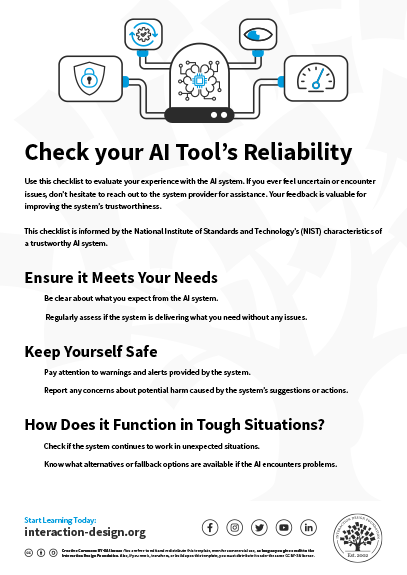
Use this checklist to check the reliability of your AI tool.

Advance Your Career With This Free Template for “Check Your AI Tool's Reliability”
Check Your AI Tool's Reliability
We respect your privacy
Get 1 powerful email each week: Design a life you love!

Unsupervised: AI Art that Sidesteps the Copyright Debate

Generative AI can create stunning works of art. Unsupervised, part of artist Refik Anadol’s project, called Machine Hallucinations, is a generative artwork. The abstract images are driven by the Museum of Modern Art’s (MoMA) data, guided by machine learning and intricate algorithms, showcasing the intersection of art and cutting-edge AI research.

Anadol trained a unique AI model to capture the machine's "hallucinations" of modern art in a multi-dimensional space. Data was collected from MoMA’s extensive collection and processed with machine learning models.

This project tackles the challenges of AI-generated art: It has huge potential for creative expression, but it raises concerns with transparency and ethics. Anadol's work invites a conversation about the interplay between art, AI research, and technology's far-reaching impact. 

The art copyright debate centers on attributing creative rights in AI-generated artworks. Traditionally, copyright law is based on human authorship. Unsupervised addresses this issue by openly acknowledging the collaborative role of its AI model, StyleGAN2 ADA, in creating the art. This approach avoids copyright complexities by recognizing both the AI and the human artist, Refik Anadol, as co-creators. In doing so, Unsupervised fosters a shared authorship model, providing transparency and clarity in navigating the evolving landscape of art copyright for AI-generated works. 

Transcript

The Take Away

In design, building trust with users is paramount, especially with AI, and transparency plays a pivotal role. As designers, it's essential to clearly communicate various aspects, such as the data sources, how the system learns from user data, and the probability of errors. 

A trustworthy AI system possesses several vital attributes. Firstly, it must be valid and reliable, meeting user needs and performing consistently. Safety is non-negotiable; rigorous testing is crucial to detect potential harm, and collaboration between designers, data scientists, and developers is vital to ensure user safety. 

Accountability and transparency are achieved through regular status updates and clear insights into the system's processes. Explainability and interpretability make the system understandable, aiding in debugging and monitoring. 

Privacy-enhanced AI respects users' privacy while managing biases, acknowledging the delicate balance between privacy and data inclusivity. Lastly, fairness, a nuanced concept varying across cultures, should be strived for, with careful management of biases to eliminate discrimination.

As a designer, it is fundamental that you understand and implement these principles in order to craft ethical and trustworthy AI systems.

References and Where to Learn More

Watch our Master Class with Niwal Sheikh, Product Design Lead, Netflix, Human-Centered Design for AI.

Feel Stuck?
Want Better Job Options?

AI is replacing jobs everywhere, yet design jobs are booming with a projected 45% job growth. With design skills, you can create products and services people love. More love means more impact and greater salary potential.

At IxDF, we help you from your first course to your next job, all in one place.

See How Design Skills Turn Into Job Options
Privacy Settings
By using this site, you accept our Cookie Policy and Terms of Use.
Customize
Accept all

Be the One Who Inspires

People remember who shares great ideas.

Share on:

Academic Credibility — On Autopilot

Don't waste time googling citation formats. Just copy, paste and look legit in seconds.