Imagine a new mobile app or an e-commerce site gets launched; it looks great, sure, and it should be a hit because it at least looks like it’s got what it takes, but—drumroll—it tanks in the marketplace, all because people find it hard to complete even the simplest tasks. That’s rough, but—behind that—the use cases for the digital product weren’t planned well, and it’s the real “culprit.” Use cases are situations that outline how a user interacts with a product or service, in steps from their user goal through to the fulfillment of it. See some real-world examples, know how to make good ones, and get these right and you’ll be able to plug in insights that can help that app or site to rock and rule when it hits the market!
What is a Use Case in UX?
Use cases in UX (user experience) design are essential for continuous product discovery, where teams search and test ideas regarding the target audience’s needs, challenges, and desires, and more. Product managers and UX designers need a clear view of this information because it fills in a great deal about the “why” and “how” behind successful product design, and it guides them through the user journey, helps guardrail them from mistakes that could cost big-time in the “hurt” department for the brand, and helps them produce a user-friendly interface.
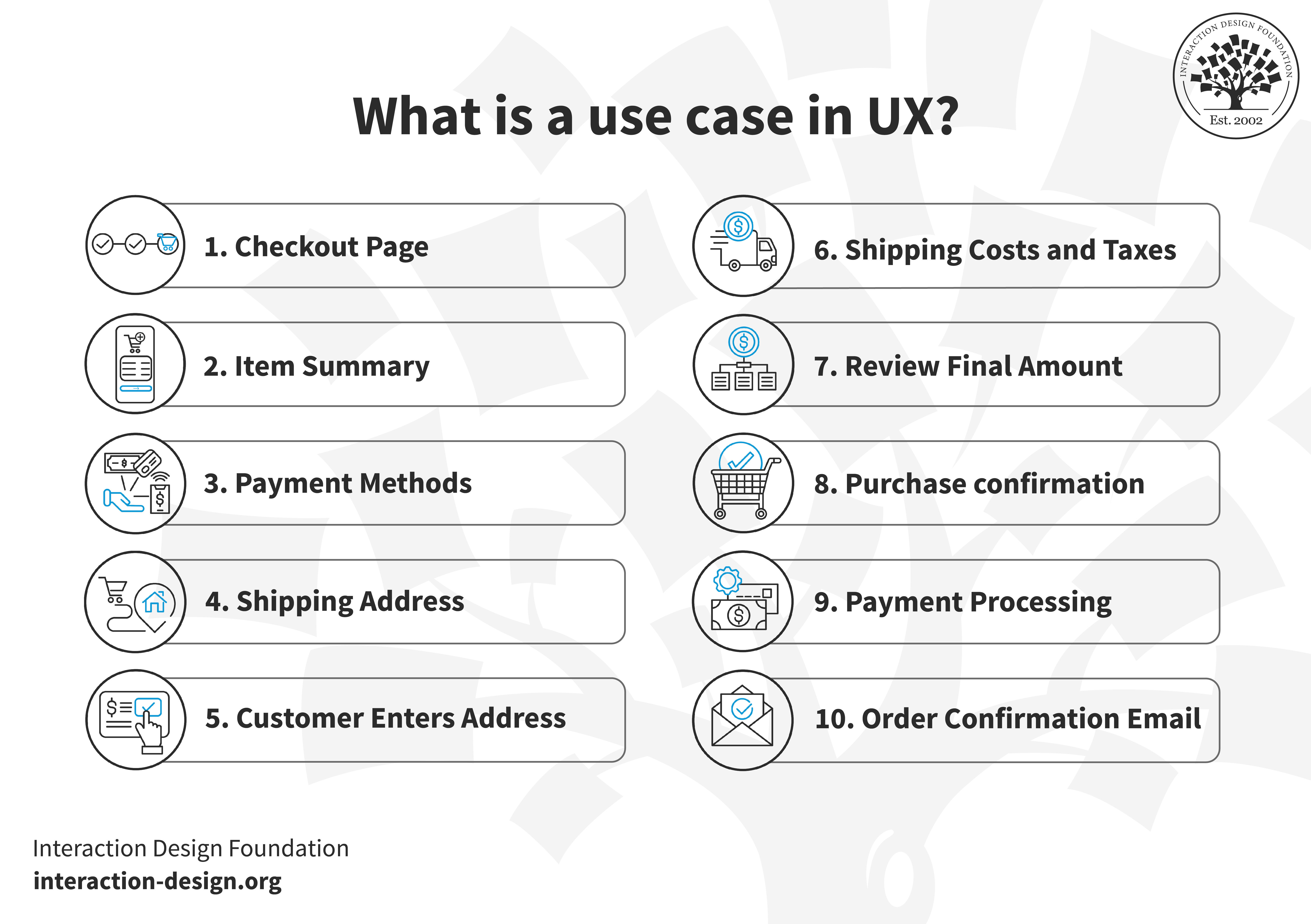
Each use case starts with a user goal and ends when the system fulfills that goal, and the use case details this process through simple and active steps.
© Interaction Design Foundation, CC BY-SA 4.0
Use cases revolve around what users do—and what they need or want to do—on a design solution you intend to give them; so, for this, think about a use case for the checkout page of a site where, first of all, the customer navigates to the checkout page. Then, the system displays a summary of items, total cost, and payment options for that person to review, after which they pick a payment method that suits them.
And then, with the payment info done and dusted and out of the way, the system asks for a shipping address, to which the customer responds and enters their address details. From getting that input, the system calculates shipping costs and taxes, shows it to the customer, who then reviews the final amount and, happy—or at least satisfied with how things are, even if they’re not too thrilled price-wise—then confirms the purchase. And, with that, the system processes the payment and then sends a confirmation email to the customer; job done for this use case.
When you explore user behavior by creating specific use cases like this, it lays the foundation for building an intuitive and user-friendly product—not least since you’ll have been able to shape the user experience. The “trick”—or knack—to this is that you use use cases that are based on researched and tested user experience so they’re grounded in real-life data.
What are Benefits of Incorporating Use Cases in UX?
Maybe a better way of wording that might be to put it as—since creating use cases isn’t a step to skip or overlook—“What are the perils of not incorporating them?” and the opening lines of this piece kind of hinted at what might happen. In any case, though, whether you’re in the early stages of design of a brand-new product or in the process of refining a product, use cases help bucket-loads.
Streamlines Design Process
Since use cases outline what a user needs from a product, they can help you create journey maps and understand what to focus on rather than—more or less—guess into the problem space, and that knowledge is something that makes the design process faster and more efficient. When a team’s got clear ideation and specific goals, they can safeguard themselves from wasting time and effort on less important features that might even work against the digital solution in a holistic sense.
For example, imagine if you had a task of designing a travel booking app—a clear use case would give you the framework you’d want (and need!) to see how you’d have to prioritize ease of search, payment, and confirmation to give your users awesome service. Then, when you’ve got a firm grasp of that, you and your design team can then move forward with a single, clear goal in mind to make sure that the app would live up to what its core purpose is and no travelers-in-waiting would be left “stranded,” wanting something they had needed.
Watch as CEO of Experience Dynamics, Frank Spillers explains important points about service design:
Reduces Development Costs
In the finest tradition of UX research and user research, when you know what the users’ needs are upfront, it’ll help prevent costly rework from needing to happen later in software development and stakeholders won’t need to scream—another bonus. To take an online grocery store as an example, if the use case indicates a “quick checkout” is a good idea, then developers can implement this feature from the start, and so save them—and the brand paying them—from the financial burden of having to modify the system later on.
Improves User Satisfaction
One of the big ideas with use cases is that they cover all eventualities that users might encounter when using a product—a niftily structured approach to problem-solving ahead of the game for them. Because of this, when you’ve got solutions designed with comprehensive use cases, they’re ones that are more likely to be robust and usable as they stand up in the marketplace and get lauded due to the greater user satisfaction they deliver.
Enhances Team Collaboration
When everyone understands the use cases, there’s a unified vision and stakeholders, developers, and other team members can be on the same page at every turn in the design process. Imagine a team working on a fitness app, and from knowing the key use case is “easy tracking of workouts,” designers and developers align their tasks, so raising efficiency levels and helping ensure that each team member does their part in the name of the user and of successful project management.
What is The Process of Creating Use Cases in UX?
© Interaction Design Foundation, CC BY-SA 4.0
What are Essential Elements a Use Case Needs to Have?
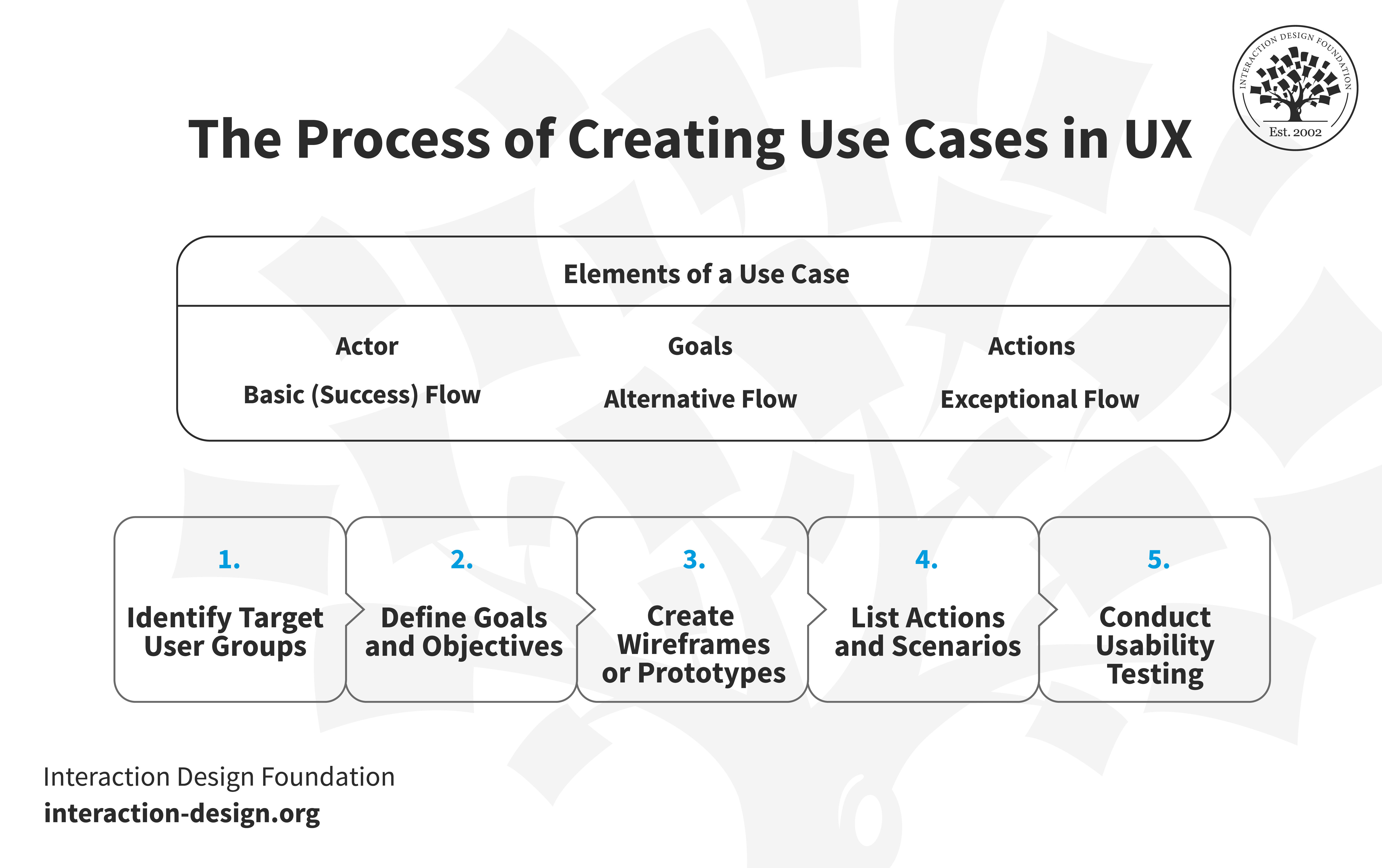
First up, the actor needs to be there—and in system design, this is a role such as customer or passenger, while in user experience design, it would be a persona who acts on the system, and you’d want to design the best persona possible for that.
Then there are the goals—as in, you want your actor to achieve these objectives with the product, and for them to get there, they’ll then need to take actions, which are the steps the user needs to take to reach the particular goal along with the system response.
Then there are flows to get into, and the basic (success) flow is the ideal sequence where the user achieves the goal without issues, and so the seamless experience has a much better chance of coming about. But in case something does crop up—or some things do get in the way— you’ll want an exception flow to cover situations where the user can’t achieve the goal. Alternative flows are the next thing to look into, and they outline other routes a user might take to reach the goal—plus, alt flows also include error conditions.
Identify Target User Groups
Let’s say we want to create a website review app—and the first step there is to perform user research and identify who is going to use the app: business owners, digital marketers, or SEO experts? To get behind the “who,” you create user personas and know your target audience so you can shape the features and functionalities you’re going to focus on.
Watch as CEO of Experience Dynamics, Frank Spillers explains important points about personas:
Define Goals and Objectives
You want your persona to achieve specific goals and objectives and get through the tasks to the ultimate goal without disruption, and so you’re going to want to define them while you create your use cases. For this, you’re going to want to distinguish goals for different personas to help you better understand individual needs and intentions.
The persona for a website review app might aim “to analyze and improve website performance,” for example, and for additional objectives you could have “monitor SEO metrics” or “track visitor behavior.” And for the different personas, you’ll want to define the primary and secondary actors for the use case.
The primary actor is central to a particular use case and wants to achieve a goal using the system, and they’re the main beneficiaries of the system and the ones who tend to initiate the use case in the first instance.
Then, you’ve got the secondary actors—and they’re the ones who help the system achieve the primary actor’s goal for them, and provide additional services or information that the system needs to fulfill the primary actor’s request.
So, to take each actor, represented as personas, the goals would be like this, for instance. First, we’ve got James, who’s a front-end developer, a primary actor in this—and his primary goal is to analyze and improve website performance. Leslie is up next, an SEO analyst, who’s a secondary actor in this, with a primary goal of optimizing the website for search engines; and then, bringing up the rear, is Ruskin, a UX lead—another secondary actor, whose primary goal is to deliver an exceptional user experience on the website; a noble cause if ever there was one!
List Actions and Scenarios
The “people” are in place, and so “What are they going to do?” is the question to answer with all the actions which a persona has to perform to achieve the goal they want to get to—and what they get up to in aid of their goal may include “logging in,” “inputting a website URL,” or “selecting a type of analysis.”
Those are actions, but what you’ll also want to do is to outline the basic, exceptional, and alternative flows—for instance, the basic flow could be a successful login and analysis, while the alternative flow could include actions taken whenever a user forgets a password (something that does—and may well continue to—happen with many a user).
Watch as Author and Human-Computer Interaction Expert, Professor Alan Dix explains important points about user scenarios:
Create Wireframes, Mockups, or Prototypes
Now you’ve got the first fundamental things in place, it’s time to head on over and create wireframes, mockups, or prototypes using UX design tools like Sketch or Figma and base them on the defined actions and flows—the visual representation you get from that will serve as a blueprint for you as a designer and your design team, and developers, too.
Conduct Usability Testing
You’re done creating a wireframe or prototype—well done—so now it’s time to conduct usability tests on it, and what tests should do is involve personas performing the goals identified in your use cases. Be sure to watch for any friction or obstacles that deviate from the basic flow, and then adjust the design based on the insights you get from what you noticed.
Watch as UX Strategist and Consultant, William Hudson explains important points about usability testing:
What is The Difference Between Use Cases and User Scenarios?

Use cases help capture a system’s functional needs, and they detail all interactions between users and the system. A key point is that it isn’t possible to write user-centered use cases without incorporating stories of use from user research—and in the main, you do this in the form of user scenarios. User scenarios describe how users achieve their goals through a series of actions, and to show the difference between them and use cases, it might be best to take an example of an online store where a “Buy Product” user scenario would look something like the following.
A customer selects items from the catalog and then places them in the shopping cart. Then, when they’re ready, the customer enters shipping and payment details to finalize the purchase and then confirms the order, whereupon the system verifies the payment and in an instant confirms the sale via a follow-up email.
© Interaction Design Foundation, CC BY-SA 4.0
But different scenarios can exist, for sure—for example, a payment authorization forms one scenario. For another scenario, you’d have a returning customer with stored payment and shipping details at the ready—expecting that “recognition” factor to mean the brand cares about them as an individual and they can trust it. Though the scenarios vary, they’ve got a common thread, and it’s the user’s goal to purchase a product, and although the user mightn’t always succeed, the goal remains constant—and this unified user goal binds various scenarios into a single use case.
The use case is broader than a single scenario and acts as a blueprint for system design, to be sure, while a scenario is a single path through the basic and alternative paths. Different successful routes can lead to the same goal, but you’ve got to describe the error flows as well, and both use cases and user scenarios are essential tools in UX design but serve different needs and stages of the design process.
What are Tips to Create Use Cases?
© Interaction Design Foundation, CC BY-SA 4.0
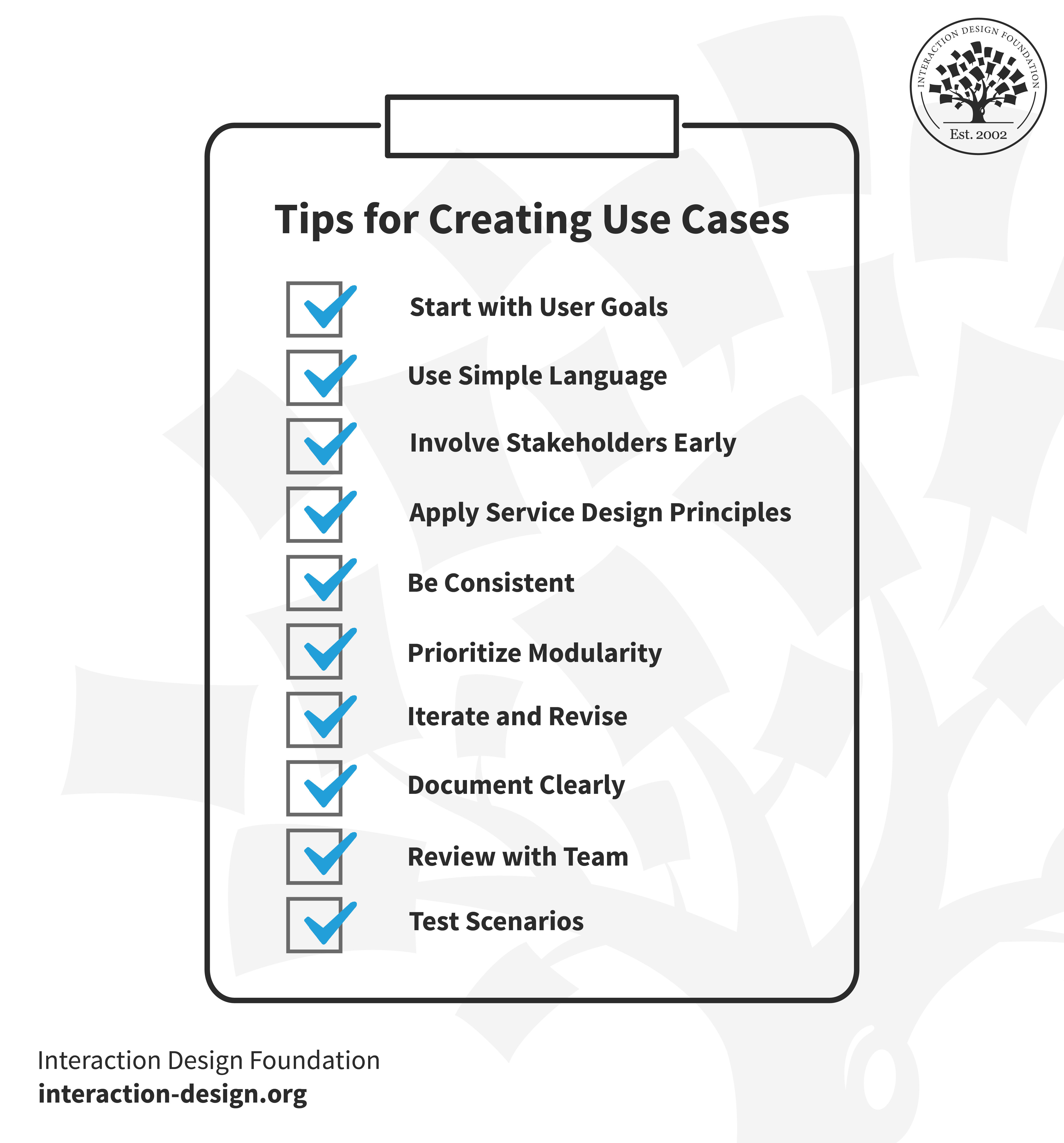
1. Start with User Goals
To begin with, you’ll always want to identify what the user aims to achieve—not least since a clear understanding of user objectives forms the backbone of your use case. Get this right and you’ll make sure that all scenarios you develop align with meeting these primary goals, and so you can get things spot-on to enhance user satisfaction and system functionality.
2. Involve Stakeholders Early
Consult key stakeholders such as users, product managers, and developers early on, and that helps you identify real-world needs and constraints and get them defined in sharp relief. The insights you get from doing that can be invaluable for refining your use case to be more effective and realistic and so mirror what’s going to happen in the real-world scenarios when you do release your product.
3. Use Simple Language
It’s a point that’s easy to forget when you’re caught up in the design side, but you’ll always want to use straightforward and easy-to-understand language—and there are two reasons for that. For one thing, the terms you use may well end up in the user interface—and nobody wants to get confused when they encounter your designed product.
But it’s not just for the sake of preserving that all-important seamless experience, because simple language also means that team members can grasp the concept even if they’ve only got limited technical knowledge—which a fair few of them might well lack, anyway—and so those “easy” words make for better collaboration.
4. Apply Service Design Principles
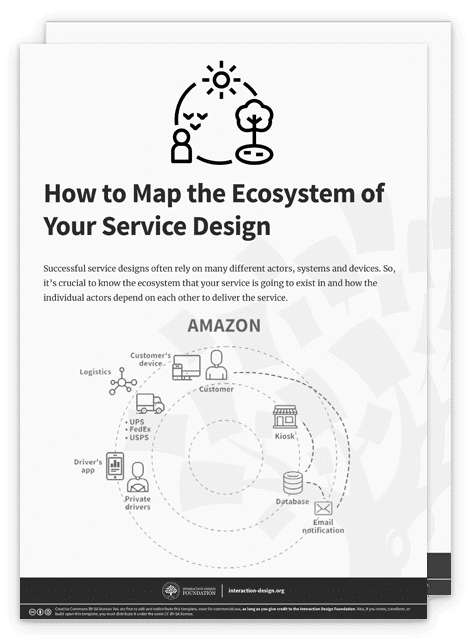
Keep broader service design principles in mind while you create the use cases, as that will make sure that each use case contributes in a positive way to the user’s overall experience. Think of the various facets of what users can encounter when they—for example—place an order and venture out to pick it up from the store, and think of their expectations and the need to address and embrace an omnichannel concept there so the use cases satisfy the various facets and touchpoints with which users encounter your brand.
5. Be Consistent
Consistency is a big deal—and then some—so be sure to keep uniform symbols, terminology, and flow going throughout your use cases. For instance, English is a generous language that has “buy” and “purchase,” but pick one and stick with it (preferably “buy”!). Get things consistent and it makes for easier understanding and interpretation, for sure, and—what’s more—it’s a vital thing to have in place in particular if your project includes multiple use cases that interact with or depend on each other.
6. Prioritize Modularity
Design your use cases as modular units—and the reason for that approach is it makes them easier to update, review, and manage rather than if they’re more “organic” or “sprawling.” Speaking of “sprawl,” you’ll be bound to have complex scenarios from time to time and rather than have a monolithic entity with intricate things going on within it, feeding into one another with a great deal of interdependence, it’s better to take a modular approach by breaking the “big-picture” things down into smaller, more manageable pieces.
7. Iterate and Revise
Requirements may change, and initial designs can have flaws, so be sure to make it a habit to revisit and revise your use cases. If you do frequent revisions, you can make sure that they stay relevant and align with any new project developments or insights that come up.
8. Document Clearly
It’s pretty much a given that each use case has got to have clear documentation to outline its reason for being, the main and alternative flows, and any preconditions or triggers that are in there—to serve as a reference point and aid in training, and it can be crucial for future modifications, so do make sure it’s there.
9. Review with Team
Before you finalize things and mark them as “done,” review the use case with your development team—and note that it should be a straightforward affair (with no disappointing surprises) if you’ve collaborated with developers while you’ve been working on the creation of the use case. Do that and it’ll help with spotting logical errors, missing steps, or inconsistencies, and—what’s more—team reviews can spark ideas for improvements, too, or reveal overlooked requirements that need addressing; not for nothing is the review stage there, rather like a safety net and then some.
10. Test Scenarios
Once the use case is all developed and fit for service, well done; pat yourself on the back for a moment, take a deep breath, and then—drumroll—run test scenarios to validate how effective and accurate it is. And you’ll want to do that not least because testing helps make good and sure that all paths lead to the desired outcomes and meet the user’s goals—all the while sticking to system constraints to make sure the system can deliver on the “promises.”
If you’re in doubt about this, think about involving users through paper prototyping or some such way to engage them and get their feedback in nice and soon—you may be surprised by the incisiveness and insightfulness both of the people you get results back from.
What about Some Use Case UX Examples?
1. Upgraded Online Booking for Airlines
Let’s say an international airline wants to modernize its booking platform so it can offer layered fare options and extra services to customers, including conveniences like curbside check-in. The team’s redesign is for the booking page to offer features like tiered fares, lounge access, and payment with loyalty miles; so, for that, we could have actor Laura (the customer) as a frequent international traveler for business and leisure.
Laura browses flights and prices; she picks a flight date and time; then adds extras like a lounge and checked bags; and then she pays with a credit card but finds she can pay with the loyalty miles she’s racked up.
2. Optimizing News Portal
A news website aims to personalize the user experience—and developers test several use cases, such as actor Alex (the user), a recent college grad who wants to stay updated with news tailored to his interests. For this one, we’ve got it that Alex chooses categories of interest during signup; he sees trending articles in the area of interest; he bookmarks articles for later; then, Alex shares an article via social media; and then he cancels a subscription.
3. Simplified Online Learning Platform
An e-learning platform wants to make course selection and learning easier, and for them the use cases tested involve actor Mia (the user), a lifelong learner who’s after expanding her skills in her free time. Now, Mia logs in and browses courses; then she adds a course to the wishlist; she then enrolls in a course with one click; then starts a course and tracks progress she’s making; and then—to end—Mia completes a course and receives a certificate for it.
What are Common Pitfalls and Challenges?
1. Don’t Overlook User Goals
Believe it or not, but it’s possible to fail to center the use case on actual user goals—something that can lead to designs that are functionally rich but user-poor (although this shouldn’t happen with good user research!).
For example, a travel app may focus too much on showcasing beautiful destination photos, but for all the beautiful beach scenes, iconic landmarks, and charming locales, they go and neglect an easy booking process—a serious design misfire when the core user goal is to book a trip, not browse photos.
Watch as UX Strategist and Consultant, William Hudson explains important points about user research:
2. Don’t Have Excessive Complexity
Making a use case too complex can obscure its purpose and make it difficult to implement—and while complexity is sometimes a part of life and does crop up by nature in many an industry, you can’t afford to get lost in it when you want a functional use case.
For instance, a healthcare portal that’s got numerous steps for booking an appointment could discourage users—when they’d be better off to simplify design and make for a better user experience, and (vital in this case, too) prove a solid sense of empathy for what may be “users” (or patients-in-waiting!) who need more than a little compassion and gentle touch when they’ve got some pain or malady and a potential avalanche of worries due to it, too.
Watch our video to understand important points about designing with user empathy in mind:
3. Don’t Ignore Alternative Flows
The main flow is the main one and not “the one”—as in, the only one—so to focus just on the main user flow and ignore alternative or “edge” cases is a recipe for not-so-good experiences to come of it.
That seamless experience with maximum convenience and solid proof of brand empathy for the user is a vital but fragile thing, and an e-commerce checkout—for example—that doesn’t account for gift card or coupon usage can make for a frustrating user experience, as can failing to deal with error conditions. It may sound fickle, but users can “turn” on a brand that had been turning them on up till the point the magic soured because of one overlooked factor.
4. Don’t Have Inadequate Stakeholder Involvement
The stakeholders have a great deal to offer, and not involving key stakeholders early and throughout the process is asking for trouble. To take a banking app developed without input from actual bank employees, for example, it might miss key functionalities—like a feature for scheduling recurring payments—that get customers frustrated and put strain on the customer support helpline to boot (for those customers who decide to stay; many a new user might be turned off and look elsewhere just because of that omission).
5. Don’t Have Inconsistent Terminology
Don’t use inconsistent names, labels, or icons—they can confuse users no matter how much they might make sense to whoever’s doing the designing. You can see this in a streaming service where the “Watchlist” gets referred to as “My List” in another section—and it can confuse users who are looking to find saved content because they’ve seen “Watchlist” before and now it’s changed on them (as in, into another thing).
6. Don’t Ignore Technical Constraints
It’s nice to aim big and design to delight users, of course, but overlooking what is technically feasible can lead to impractical use cases. For user-centered solutions, the user experience and development teams have got to work together to keep any “castles” from starting to get built in the “sky.”
For this one, think of a feature in a food delivery app that allows real-time tracking of all ingredients of a dish—“Wow, how cool; customers will love that!” we might cry out in unison—but then reality might kick in and it may be impractical to implement that.
7. Don’t Fail to Update
This one can happen because—well—when it’s done, it’s done, right? Wrong; not revisiting and updating use cases to get in step with changing user needs or business goals can spell disaster.
This one might manifest in an education platform that fails to update its course offerings based on current job market needs—and the organization may see decreased enrollments (don’t worry; design is going to be around for quite some time, though, and we’re well on the ball with keeping things up to date!).
8. Don’t Forget to Validate
You might think this wouldn’t need to feature, but it’s in here because it’s impossible to overstate just how vital usability testing is, and failing to validate use cases through user testing is a surefire way to crash not just the use case that never got tested—but even the final product if it manages to somehow get out, too.
Say there’s an online bookstore that introduces a recommendation service that involves numerous steps. Users get lost and frustrated, but testing the use cases early would have revealed this and saved a pretty penny and many a headache for the frustrated, flustered (and probably furious) brand when they have a rude awakening about what they should have done instead to offer a valuable, user-centric solution.
Watch as Psychologist and Researcher Ditte Hvas Mortensen explains important points about validation and more:
The Take Away
And that’s a wrap in a piece about a pretty vital topic—one where what’s come up has been the critical role of designing use cases in UX, then the benefits, process, and essential tools for crafting effective use cases, along with real-life examples and common challenges to put things into view with the most light (and focus).
To get use cases spot-on, it’s a vital thing to center user goals in the UX design process and keep on validating use cases through testing and stakeholder input—and keep them “alive” as invaluable living documentation of what’s going to work well.
Use cases are there to put you through the paces of what your users will do, so you can stay ahead of what your users—and customers—want, expect, and act upon, so get them done well and fine-tuned and you’ll equip yourself better to develop intuitive, user-focused interfaces across various industries. From there, you’ll be all set to work the “magic” and meet users at every turn in seamless experiences from the brands you help—industry names which the target users you design for can trust and keep coming back to as a loyal target audience who know they’re valued and heard by a brand they like (or love!).
References and Where to Learn More
Learn more about user stories by heading to IxDF’s comprehensive piece.