Workplace AR

Your constantly-updated definition of Workplace AR and collection of videos and articles.
Be a conversation starter: Share this page and inspire others!

98 Shares

What is Workplace AR?

Workplace AR refers to social, workplace-integrated augmented reality tools and interfaces that help workers complete their job tasks. Workplace Augmented Reality (AR) products and services are increasingly common, especially among remote workers as they can help prevent siloing and create a workplace culture that feels more "in-person." 

In this video, CEO of Experience Dynamics, Frank Spillers, describes the characteristics of social AR

Transcript
 

UX Design's Role in Workplace AR 

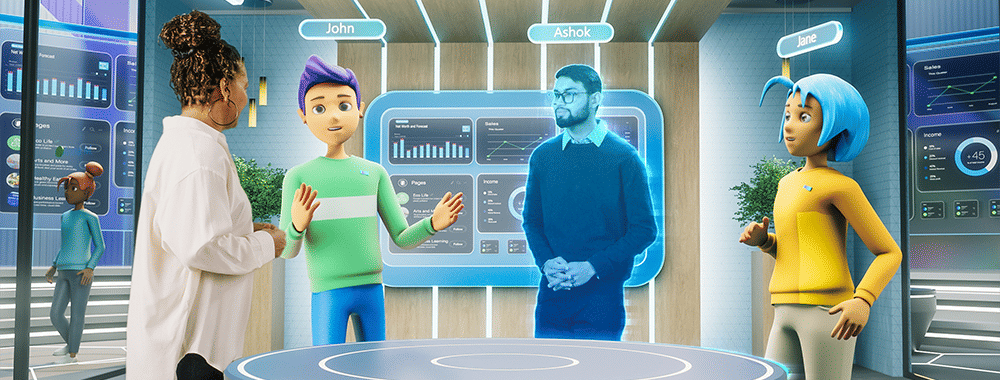
Image showing both virtual characters or avatars and real people meeting in a shared virtual space.

The success of Workplace AR hinges on user experience (UX) design, as it dictates how intuitively and effectively users interact with augmented reality in their work environment. UX designers face a unique challenge—to combine digital information with the physical world in a way that feels natural to the user. This requires a deep understanding of user needs, behaviors, and the specific contexts in which AR will be used. 

Intuitive Interactions 

Interactions need to be intuitive in Workplace AR. UX designers must craft interfaces that minimize cognitive load so users can access and comprehend augmented information without feeling overwhelmed. This involves clear visual cues, straightforward navigation, and interaction patterns that align with users' expectations based on their real-world experiences. 

© Interaction Design Foundation, CC BY-SA 4.0

Contextual Relevance, Accessibility and Inclusivity 

Workplace AR applications must provide contextually relevant information tailored to the user's immediate tasks and environment. UX designers play a crucial role in filtering and presenting data in ways that enhance the user's ability to perform their job, rather than distract or hinder them.  

Designers must ensure AR tools are accessible to all employees, including those with disabilities. Features such as voice commands, haptic feedback, and adjustable visual settings make AR applications more inclusive and foster an equitable workplace environment. 

In this video, UX Content Strategist, Katrin Suetterlin, discusses the meaning of inclusive design.  

Transcript
 

User-Centric Design  

UX designers must engage with actual users throughout the development process, from initial concept through prototyping to final implementation to ensure a user-centric approach. This involves regular user testing and feedback loops to refine AR interfaces based on real-world use and user preferences. Such an approach not only improves usability but also ensures that the AR solutions genuinely address the challenges and opportunities within the workplace. 

Consider Ethics and Safety  

As Workplace AR gains prominence, designers must prioritize safety, privacy and data security for their users. AR applications process extensive employee data, which necessitates robust data protection measures and transparent policies to safeguard privacy and build trust. 

In this video, Frank Spillers discusses safety in AR: 

Copyright
Transcript
  

Address the Learning Curve 

Comprehensive onboarding, training and ongoing support is key to empower employees. If they can confidently use AR tools, then the organization can leverage the full potential of AR and ensure it effectively revolutionizes workplace practices. 

Prepare for the Future  

As workplace dynamics continue to evolve, UX designers must anticipate future needs and scenarios where AR can play a transformative role. This foresight enables the design of adaptable and scalable AR applications that can grow and evolve in line with technological advancements and changing workplace requirements. 

Workplace AR and VR: What’s the Difference?

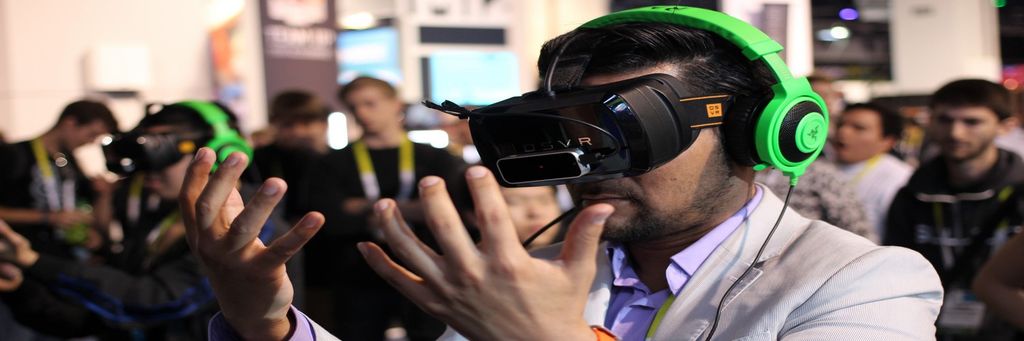
An image showing a man with a VR headset, in a virtual environment.

© Interaction Design Foundation, CC BY-SA 4.0

Workplace AR and Virtual Reality (VR) both offer amazing potential in professional settings and beyond. However, due to their inherent technological differences, they serve different purposes and create distinct experiences. 

Augmented Reality in the Workplace 

In the workplace, AR can provide real-time data, assist with task visualization, and offer hands-on training without removing the worker from their physical space. This dual interaction with the digital and physical realms makes AR particularly useful for tasks that require constant awareness of the real-world environment, such as manufacturing, repair, or surgery. 

Virtual Reality in the Workplace 

Conversely, VR creates a fully immersive digital environment, which isolates the user from their physical surroundings. This total immersion allows for deep focus and engagement with the virtual content––this makes VR ideal for scenarios where a distraction-free environment is crucial. In professional settings, VR is often used for training in simulated environments that would be too dangerous, expensive, or impractical to replicate in the real world, such as firefighting, pilot training, or complex surgical procedures. 

Key Differences 

  • Immersion level: AR integrates digital elements with the real world and maintains the user's connection to their surroundings. VR, however, immerses the user entirely in a digital environment, cutting off all real-world interaction. 
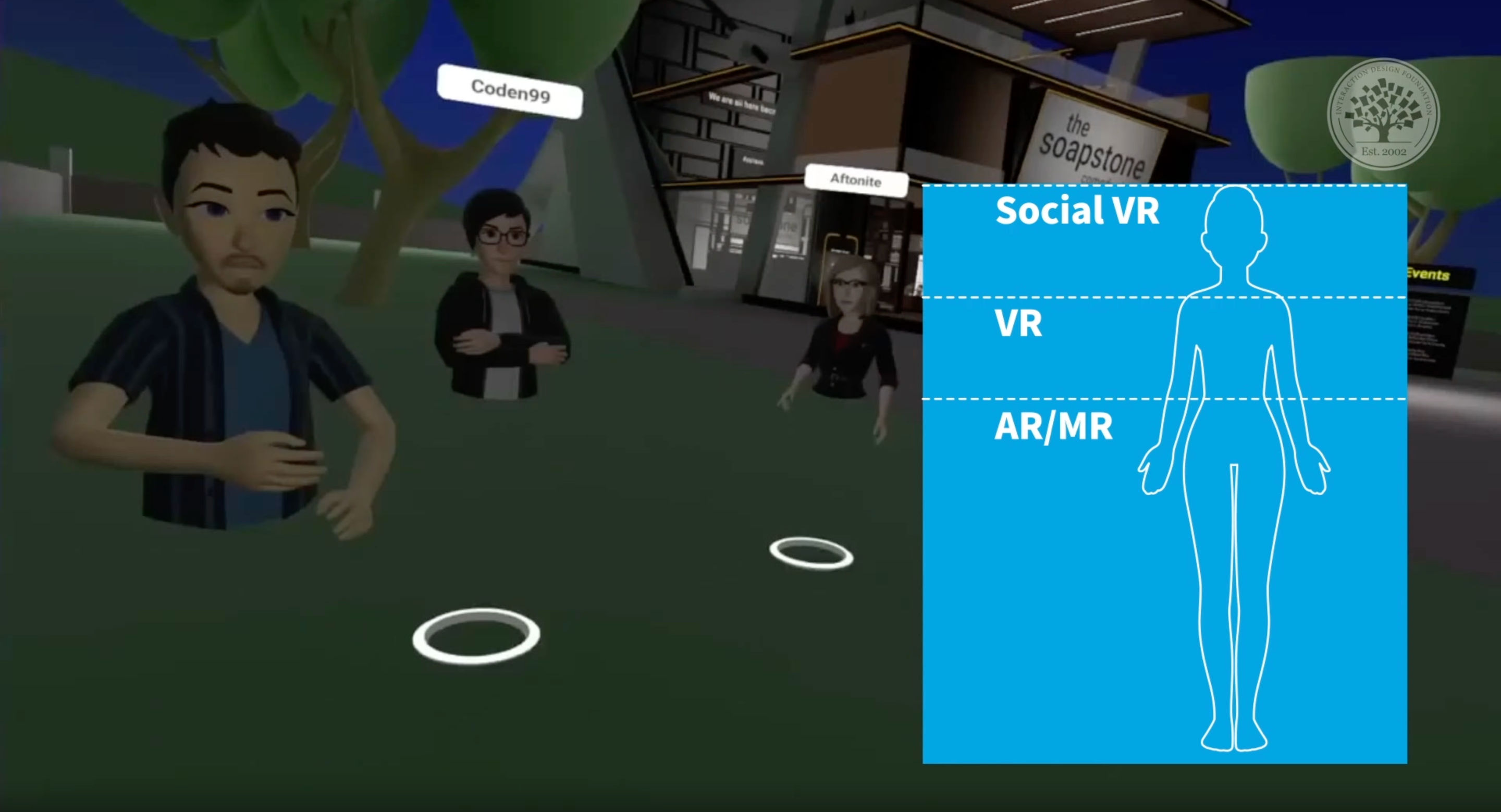
    An illustration showing the different levels of immersion or AR, MR, VR and Social VR.

    Augmented reality and workplace AR are less immersive than their VR counterparts. 

    © Interaction Design Foundation, CC BY-SA 4.0

    • Application use cases: AR's real-world integration makes it suited for enhancing day-to-day tasks with additional information and guidance. VR's total immersion is best for training, simulation, and scenarios where physical presence in the actual environment isn't necessary or possible. 

    • Hardware requirements: AR can often be accessed through smartphones, tablets, or specialized glasses, allowing for more flexibility and broader application in various work settings. VR requires headsets that may be tethered to powerful computers, limiting mobility but providing a more immersive experience. 

    Both Workplace AR and VR offer innovative ways to enhance productivity, training, and task efficiency, but their applications differ significantly due to AR's enhancement of the real-world environment and VR's creation of a completely immersive digital experience. The choice between AR and VR depends on the specific goals, context, and requirements of the task at hand.  

    The Benefits of Workplace AR 

    One of the critical benefits of AR is its ability to create a more immersive and interactive work environment. This immersion can be particularly useful in industries such as manufacturing, where workers can benefit from a more hands-on approach to training and problem-solving. By using AR, workers can visualize complex processes and machinery more intuitively, which helps them understand and retain information more easily. 

    Another advantage is its ability to streamline workflow processes. Workers can access real-time data and information more intuitively and efficiently through the integration of AR technology into existing systems.  These AR interfaces can help reduce errors and improve accuracy to increase productivity and profitability. 

    Applications of Workplace AR 

    1. Process optimization: Since AR allows users to see additional information in the context of the real world, businesses can use it wherever real-time information is required on the job. For example, retail giant Walmart offers AR solutions to its employees for inventory management. 

    1. Employee training and education: AR can simulate complex (or even hazardous) scenarios and help train employees on how to manage them. This can help companies safeguard employee (and even customer’s) safety, reduce training costs and improve overall productivity. 

    See how Boeing cut production time by 25% with the use of AR: 

    1. Remote assistance: AR can empower employees to tackle problems on-site. For example, auto manufacturers such as Audi and Volkswagen have created dedicated AR-enabled applications to assist their service technicians in diagnosing and repairing vehicles. 

    2. Visualization and presentation: With three-dimensional visualization, designers and product teams can simulate, test and present concepts for physical products much more easily. For example, architects can visualize their 3D models at real-world sites to get a more realistic view of their blueprints before finalizing them. Similarly, urban planners can visualize the impact of large-scale projects before committing resources.  

    3. Navigation: AR can help employees navigate complex work environments such as large factories, construction sites or warehouses. AR applications can also suggest optimized routes based on the employees’ assigned work to save time and fuel.  

Questions About Workplace AR?
We've Got Answers!

How can AR be used for training and development in the workplace?

AR can revolutionize training and development in the workplace through immersive, interactive learning environments that mimic real-world scenarios. AR enables employees to practice skills and procedures in a safe, controlled setting by overlaying digital information onto the physical world. This enhances their learning experience and allows for hands-on training without the risks associated with real-life training––which is particularly valuable for high-risk industries. AR applications can guide users through complex tasks, provide instant feedback, and adapt to individual learning speeds to ensure a personalized training experience that can significantly improve skill acquisition and retention. 

 Additionally, AR supports the visualization of abstract concepts and processes that are difficult to grasp through traditional learning methods. For instance, employees can explore machinery internals or visualize data flows within systems, gaining a deeper understanding of their operations. This capability not only accelerates the learning process but also fosters a more engaging and motivating learning environment. As a result, AR in training and development not only enhances the efficiency and effectiveness of learning programs but also contributes to a more skilled and confident workforce, ready to tackle the challenges of their roles. 

Learn more about AR in our course, UX Design for Augmented Reality

What are the benefits of using AR for remote collaboration and meetings?

Remote collaboration and meetings with AR brings a new dimension of interaction and engagement that traditional video conferencing cannot match. AR enables participants to share and manipulate 3D models in real-time, which allows for a more comprehensive review and discussion of designs, products, or data visualizations. This capability fosters a collaborative environment where team members can effectively communicate ideas, make changes on the fly, and reach consensus more efficiently. Additionally, AR can recreate the sense of presence, which makes remote participants feel as though they are in the same room, which enhances teamwork and fosters a stronger connection among team members. 

Learn more about AR in our course, UX Design for Augmented Reality. Watch the video below:  

Transcript
 

How does AR assist in complex task management and execution?

AR assists in complex task management and execution by providing workers with real-time, contextually relevant information overlayed directly onto their physical work environment. This can include step-by-step instructions, safety warnings, and crucial details about equipment or processes, visible through AR glasses or other devices. By guiding workers through tasks in this way, AR minimizes errors, speeds up training, and ensures consistency in how tasks are performed, regardless of the worker's prior experience. This level of guidance is particularly valuable in industries where precision and accuracy are critical, such as manufacturing, maintenance, and healthcare. 

 Moreover, AR enhances the ability to remotely support workers by allowing experts to see what the worker sees and provide live, interactive feedback. This not only reduces downtime by quickly resolving issues but also improves the quality of work by leveraging expert knowledge in real-time. AR's capacity to visually integrate complex data and instructions into the user's field of view streamlines task management makes complex procedures more accessible and less daunting. As a result, AR significantly boosts productivity, safety, and efficiency in task execution, and thus transforms how work is done across various industries. 

Learn more about AR in our course, UX Design for Augmented Reality.

What industries are currently benefiting from workplace AR?


Industries such as manufacturing, healthcare, and construction are currently reaping significant benefits from the integration of AR in the workplace. In manufacturing, AR aids in assembly, maintenance, and training, by overlaying digital instructions directly onto machinery and components. This not only accelerates the learning curve for new employees but also reduces errors and downtime by providing immediate access to critical information. Healthcare professionals use AR for enhanced diagnostics, patient education, and precision in surgeries by projecting vital data and imaging directly into their field of view, improving outcomes and patient care. 

Construction and engineering sectors benefit from AR by visualizing projects in their actual environments before construction begins which enables better planning, design, and communication among teams. AR allows for the overlay of digital blueprints onto physical sites, facilitating accurate installations and inspections. Moreover, in retail and design, AR offers customers and clients the ability to preview products or designs in real-world settings, enhancing decision-making and satisfaction. These industries demonstrate how AR's immersive and interactive capabilities can significantly enhance efficiency, accuracy, and user experience, leading to innovative practices and improved performance. 

Learn more about AR in our course, UX Design for Augmented Reality

Can AR improve workplace safety and how?

AR can significantly improve workplace safety by providing employees with real-time information and warnings about potential hazards in their immediate environment. For instance, AR can highlight dangerous zones within a factory floor or construction site, ensuring workers are aware of risks like moving machinery or open ledges. Additionally, AR can display safety protocols and emergency procedures directly in the user's line of sight, ensuring quick and correct responses to incidents, which is crucial in high-risk environments. 

 Moreover, AR facilitates safety training in a more engaging and effective manner by simulating dangerous scenarios in a controlled, risk-free virtual environment. Workers can practice responding to emergencies, such as fires or equipment malfunctions, without the actual danger. This hands-on approach to training not only reinforces safety procedures but also improves confidence and preparedness among employees, reducing accidents and enhancing overall workplace safety. Through these applications, AR acts as a critical tool in preventing workplace injuries and fostering a culture of safety. 

Learn more about AR in our course, UX Design for Augmented Reality

What are the challenges of integrating AR into existing workflows?

Integrating AR into existing workflows presents several challenges, including the need for significant technological investment and infrastructure upgrades. Companies must acquire AR-capable hardware and develop or procure specialized software applications tailored to their specific industry needs. This initial setup requires a substantial financial investment and may encounter resistance from stakeholders concerned about costs and return on investment. Additionally, the existing IT infrastructure may need updates to support the seamless operation of AR technologies, involving further expenses and potential disruptions to ongoing operations. 

 Another challenge is the user adoption and training required to effectively utilize AR in daily tasks. Employees may be resistant to adopting new technologies, especially if they perceive them as complicated or unnecessary. To overcome this resistance requires comprehensive training programs and clear demonstrations of AR's benefits to their work processes. Furthermore, integrating AR into workflows must account for ergonomic considerations and the potential for cognitive overload, ensuring that AR tools enhance rather than hinder job performance.  

Learn more about AR design in this article, How to Use the Environment in Your AR Experience.

How does AR facilitate data visualization and decision-making in professional settings?

AR facilitates data visualization in professional settings by overlaying complex data sets and analytics onto the real world to make abstract information tangible and easier to understand. This technology enables professionals to interact with 3D models and simulations in their actual environment, allowing for a more intuitive grasp of data patterns, trends, and anomalies. For example, engineers can visualize infrastructure projects within a physical context, or healthcare professionals can examine medical data superimposed on a patient's body. This immersive approach to data analysis not only speeds up the comprehension process but also enhances accuracy in decision-making. 

AR supports collaborative decision-making by allowing multiple users to view and interact with the same data visualization in real-time, regardless of their physical location. Teams can manipulate data, explore different scenarios, and make informed decisions together in a shared virtual space. This capability streamlines the decision-making process, fosters a collaborative work environment, and leads to more effective problem-solving.  

Learn more about data visualization in our course, Information Visualization

What hardware and software requirements are needed for implementing AR in the workplace?

The Implementation of AR in the workplace requires a combination of specialized hardware and software tailored to the specific needs of the industry and tasks at hand. Essential hardware includes AR headsets or glasses, which provide the most immersive experience by overlaying digital information onto the user’s field of vision. Alternatively, smartphones and tablets equipped with AR capabilities can also serve as accessible platforms for AR applications, offering a more cost-effective solution for businesses starting with AR. These devices must have sufficient processing power, high-resolution displays, and accurate sensors (such as GPS, gyroscope, and accelerometer) to support complex AR experiences. 

 On the software side, AR applications customized for specific workplace tasks are necessary to provide relevant, interactive content. This might involve development platforms like ARKit for iOS and ARCore for Android that allow for the creation of AR experiences. Additionally, cloud-based services are often required to store and manage the vast amounts of data involved in AR applications to ensure smooth and responsive performance. To integrate AR seamlessly into existing workflows, compatibility with current IT infrastructure and software ecosystems is crucial, which may require additional software tools for content management, data analysis, and security measures to protect sensitive information. 

Learn more about AR in our course, UX Design for Augmented Reality

Earn a Gift Earn a Gift, Answer a Short Quiz!

1
2
3
4
1
2
3
4
Question 1
Question 2
Question 3
Get Your Gift
Interaction Design Foundation logo

Question 1

What is Workplace AR?

1 point towards your gift

  • A type of software used for video editing
  • A virtual reality tool for gaming
  • Social, workplace-integrated AR tools that assist workers
Interaction Design Foundation logo

Question 2

Why is UX design crucial in Workplace AR?

1 point towards your gift

  • It determines how intuitively users interact with AR tools.
  • It eliminates the need for user feedback.
  • It focuses solely on hardware compatibility.
Interaction Design Foundation logo

Question 3

How can AR improve training and development in the workplace?

1 point towards your gift

  • It can provide immersive, interactive learning environments.
  • It can replace all human trainers.
  • It can simplify all training materials to text-only formats.

Learn More About Workplace AR

Make learning as easy as watching Netflix: Learn more about Workplace AR by taking the online IxDF Course UX Design for Augmented Reality.

Why? Because design skills make you valuable. In any job. Any industry.

In This Course, You'll

  • Get excited about immersive experiences that effortlessly blend the digital and physical worlds! Feeling stuck in a 2D job? The UX Design for Augmented Reality (AR) course will help you fulfill your potential by creating 3D AR experiences people love with intuitive interfaces and a seamless real-world connection. Use AR overlays for real-time training in industrial settings to improve retention by 80% or to help people visualize a product in their home before purchasing. You'll merge reality with imagination to reshape how people interact with the world around them. More love, more impact, greater salary potential.

  • Make yourself invaluable with sought-after skills in spatial mapping, gesture-based input, object manipulation, and 3D interaction. Brands that use AR in campaigns see up to a 200% increase in engagement! From AR-assisted surgeries in healthcare to virtual try-ons with your favorite retailer, AR isn't limited to one industry, it's everywhere! And you can easily learn to master it, no matter your background. With clear guidance, hands-on templates, and real-world examples, you'll apply your skills immediately.

  • Gain confidence and credibility as you discover the AR design process step-by-step, from research to heuristic evaluation. You’ll develop timeless human-centered design skills to create natural, intuitive interfaces that blend digital and physical worlds with genuine empathy and insight. These skills become even more powerful as AI accelerates how fast we build and iterate. They let you turn AI into your superpower as you guide emerging tools toward meaningful and authentic outcomes that only your unique human insight can deliver. You’ll learn how to create customer journey maps, prototype your AR design, and gather usability feedback. With optional hands-on exercises and downloadable templates like the 3D Persona Template and the AR Heuristic Scorecard, you'll walk away with an impressive portfolio featuring your own AR project that accelerates your career success.

It's Easy to Fast-Track Your Career with the World's Best Experts

Master complex skills effortlessly with proven best practices and toolkits directly from the world's top design experts. Meet your expert for this course:

  • Frank Spillers: Service Designer and Founder and CEO of Experience Dynamics.

Get an Industry-Recognized IxDF Course Certificate

Increase your credibility, salary potential and job opportunities by showing credible evidence of your skills.

IxDF Course Certificates set the industry gold standard. Add them to your LinkedIn profile, resumé, and job applications.

Course Certificate Example

Be in distinguished company, alongside industry leaders who train their teams with the IxDF and trust IxDF Course Certificates.

Our clients: IBM, HP, Adobe, GE, Accenture, Allianz, Phillips, Deezer, Capgemin, Mcafee, SAP, Telenor, Cigna, British Parliament, State of New York

All Free IxDF Articles on Workplace AR

Read full article
Augmented Reality – The Past, The Present and The Future - Article hero image
Interaction Design Foundation logo

Augmented Reality – The Past, The Present and The Future

Augmented reality has come a long way from a science-fiction concept to a science-based reality. Until recently the costs of augmented reality were so substantial that designers could only dream of working on design projects that involved it – today things have changed and augmented reality is even

Social shares
1.1k
Published
Read Article

Augmented Reality – The Past, The Present and The Future

Augmented Reality – The Past, The Present and The Future

Augmented reality has come a long way from a science-fiction concept to a science-based reality. Until recently the costs of augmented reality were so substantial that designers could only dream of working on design projects that involved it – today things have changed and augmented reality is even available on the mobile handset. That means design for augmented reality is now an option for all shapes and sizes of UX designers.

Augmented reality is a view of the real, physical world in which elements are enhanced by computer-generated input. These inputs may range from sound to video, to graphics to GPS overlays and more. The first conception of augmented reality occurred in a novel by Frank L Baum written in 1901 in which a set of electronic glasses mapped data onto people; it was called a “character marker”. Today, augmented reality is a real thing and not a science-fiction concept.

A Brief History of Augmented Reality (The Past)

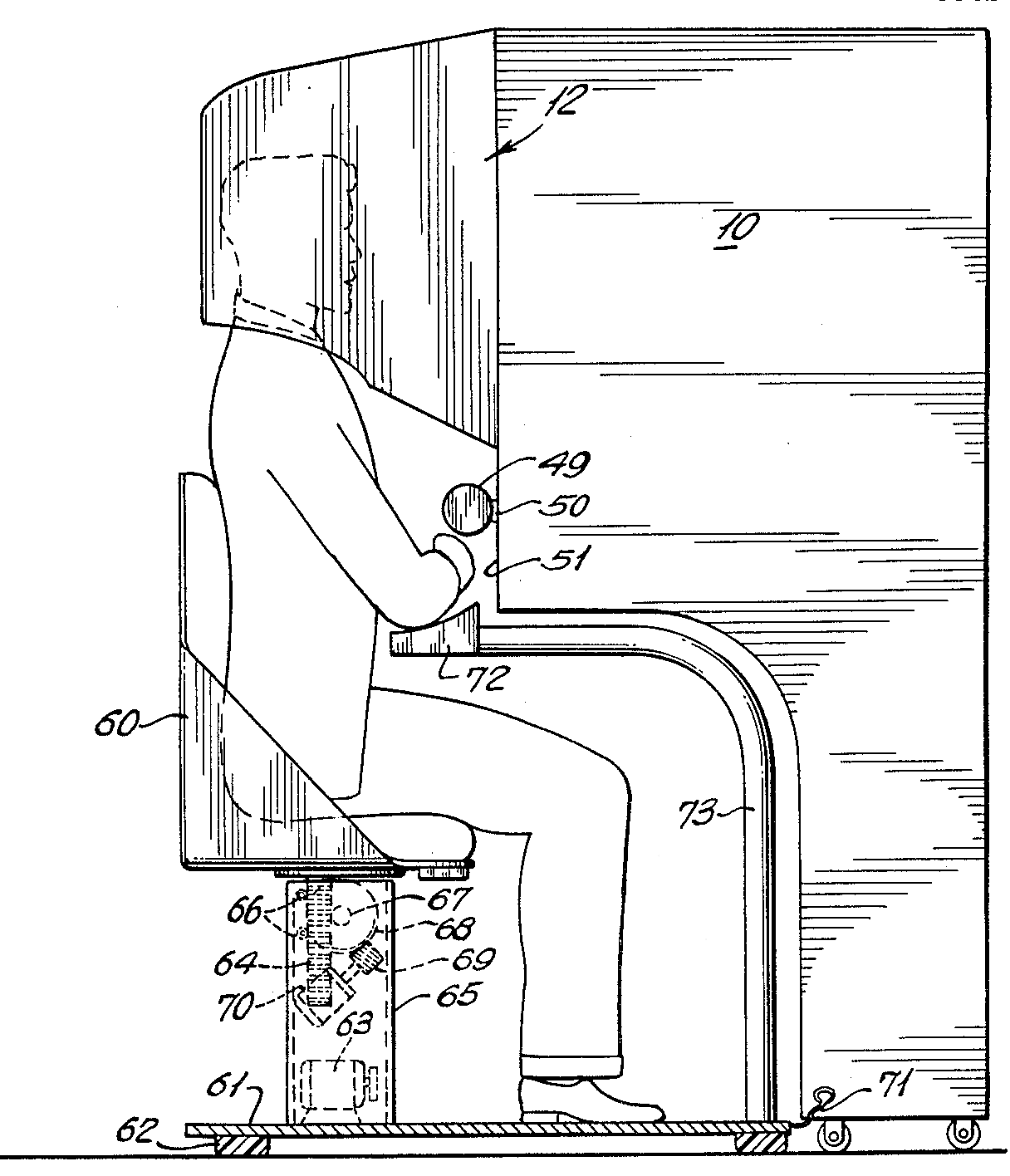
Augmented reality was first achieved, to some extent, by a cinematographer called Morton Heilig in 1957. He invented the Sensorama which delivered visuals, sounds, vibration and smell to the viewer. Of course, it wasn’t computer controlled but it was the first example of an attempt at adding additional data to an experience.

Author/Copyright holder: Morton Heilig. Copyright terms and license: Public Domain.

Then in 1968, Ivan Sutherland the American computer scientist and early Internet influence, invented the head-mounted display as a kind of window into a virtual world. The technology used at the time made the invention impractical for mass use.

In 1975, Myron Krueger, an American computer artist developed the first “virtual reality” interface in the form of “Videoplace” which allowed its users to manipulate and interact with virtual objects and to do so in real-time.

Steve Mann, a computational photography researcher, gave the world wearable computing in 1980.

Of course back then these weren’t “virtual reality” or “augmented reality” because virtual reality was coined by Jaron Lainer in 1989 and Thomas P Caudell of Boeing coined the phrase “augmented reality” in 1990.

The first properly functioning AR system was probably the one developed at USAF Armstrong’s Research Lab by Louis Rosenberg in 1992. This was called Virtual Fixtures and was an incredibly complex robotic system which was designed to compensate for the lack of high-speed 3D graphics processing power in the early 90s. It enabled the overlay of sensory information on a workspace to improve human productivity

There were many other breakthroughs in augmented reality between here and today; the most notable of which include:

  • Bruce Thomas developing an outdoor mobile AR game called ARQuake in 2000

  • ARToolkit (a design tool) being made available in Adobe Flash in 2009

  • Google announcing its open beta of Google Glass (a project with mixed successes) in 2013

  • Microsoft announcing augmented reality support and their augmented reality headset HoloLens in 2015

The Current State of Play in Augmented Reality (The Present)

Augmented reality is achieved through a variety of technological innovations; these can be implemented on their own or in conjunction with each other to create augmented reality. They include:

  • General hardware components – the processor, the display, the sensors and input devices. Typically a smartphone contains a processor, a display, accelerometers, GPS, camera, microphone etc. and contains all the hardware required to be an AR device.

  • Displays – while a monitor is perfectly capable of displaying AR data there are other systems such as optical projection systems, head-mounted displays, eyeglasses, contact lenses, the HUD (heads up display), virtual retinal displays, EyeTap (a device which changes the rays of light captured from the environment and substitutes them with computer generated ones),Spatial Augmented Reality (SAR – which uses ordinary projection techniques as a substitute for a display of any kind) and handheld displays.

  • Sensors and input devices include – GPS, gyroscopes, accelerometers, compasses, RFID, wireless sensors, touch recognition, speech recognition, eye tracking and peripherals.

  • Software – the majority of development for AR will be in developing further software to take advantage of the hardware capabilities. There is already an Augmented Reality Markup Language (ARML) which is being used to standardize XML grammar for virtual reality. There are several software development kits (SDK) which also offer simple environments for AR development.

There are apps available for or being researched for AR in nearly every industrial sector including:

  • Archaeology, Art, Architecture

  • Commerce, Office

  • Construction, Industrial Design

  • Education, Translation

  • Emergency Management, Disaster Recovery, Medical and Search and Rescue

  • Games, Sports, Entertainment, Tourism

  • Military

  • Navigation

Author/Copyright holder: Sonk54. Copyright terms and license: CC BY-SA 3.0

The Future of Augmented Reality

Jessica Lowry, a UX Designer, writing for the Next Web says that AR is the future of design and we tend to agree. Already mobile phones are such an integral part of our lives that they might as well be extensions of our bodies; as technology can be further integrated into our lives without being intrusive (a la Google Glass) – it is a certainty that augmented reality provides opportunities to enhance user experiences beyond measure.

This will almost certainly see major advances in the much-hyped but still little seen; Internet of Things. UX designers in the AR field will need to seriously consider the questions of how traditional experiences can be improved through AR – just making your cooker capable of using computer enhancements is not enough; it needs to healthier eating or better cooked food for users to care.

The future will belong to AR when it improves task efficiency or the quality of the output of an experience for the user. This is the key challenge of the 21st century UX profession.

Author/Copyright holder: Austin Berner. Copyright terms and license: Public Domain

The Takeaway

AR or augmented reality has gone from pipe dream to reality in just over a century. There are many AR applications in use or under development today, however – the concept will only take off universally when UX designers think about how they can integrate AR with daily life to improve productivity, efficiency or quality of experiences. There is an unlimited potential for AR, the big question is - how will it be unlocked?

References & Where to Learn More:

DID L. FRANK BAUM PREDICT AUGMENTED REALITY OR WARN US ABOUT ITS POWER? Some food for thought.

Ivan Sutherland’s research can be found here: http://90.146.8.18/en/archiv_files/19902/E1990b_123.pdf

Steve Mann’s research can be read here: "Eye Am a Camera: Surveillance and Sousveillance in the Glassage". Techland.time.com

Rosenberg’s original research paper was published as: L. B. Rosenberg. The Use of Virtual Fixtures As Perceptual Overlays to Enhance Operator Performance in Remote Environments. Technical Report AL-TR-0089, USAF Armstrong Laboratory, Wright-Patterson AFB OH, 1992.

Find out more about ARQuake at Wiki.

Learn more about Google Glass at the New York Times.

Jessica Lowry’s article: Augmented reality is the future of design

Hero Image: Author/Copyright holder: Maurizio Pesce. Copyright terms and license: CC BY 2.0

Feel Stuck?
Want Better Job Options?

AI is replacing jobs everywhere, yet design jobs are booming with a projected 45% job growth. With design skills, you can create products and services people love. More love means more impact and greater salary potential.

At IxDF, we help you from your first course to your next job, all in one place.

See How Design Skills Turn Into Job Options
Privacy Settings
By using this site, you accept our Cookie Policy and Terms of Use.
Customize
Accept all

Be the One Who Inspires

People remember who shares great ideas.

Share on:

Academic Credibility — On Autopilot

Don't waste time googling citation formats. Just copy, paste and look legit in seconds.