Typography

Your constantly-updated definition of Typography and collection of videos and articles.
Be a conversation starter: Share this page and inspire others!

789 Shares

What is Typography?

‍Typography is the discipline designers use to arrange typefaces in a user interface to ensure text is legible, readable, and scalable. It must also be visually appealing to users. The right typography can enhance a product’s aesthetic, optimize user-friendliness, and contribute to brand perception.

Transcript

How Important is Typography in UX Design and Product Design?

Of the many factors that shape a website or application's user interface (UI), typography is vital. It can significantly influence a user's experience with your product. So, the way you portray text has a huge bearing on your work as a user experience (UX) designer. In fact, how long users stay on your website or app will depend largely on your typographical choices.

For example, typography is half of your message when you include written copy on your website. That’s why it’s important to keep your copy streamlined and efficient. You can think of typography as the form that carries the substance of what you want users to find and learn. What you write, how you write, and how that text looks all come together to make an impact. That makes it crucial to understand how to use typography effectively.

Typography differs from type. Type is the style or appearance of text in itself. Also, type sometimes refers to the process of working with text. Your decisions about typography in user interface design go beyond just how to select fonts, for example. There’s more involved than whether to use a sans-serif font or a serif. 
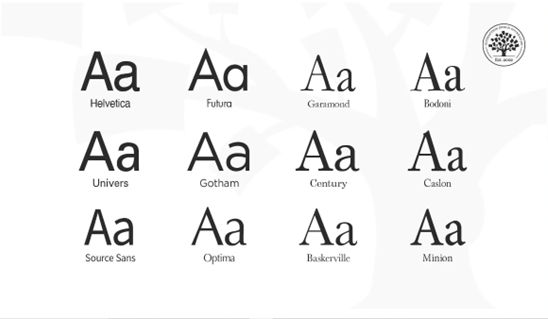
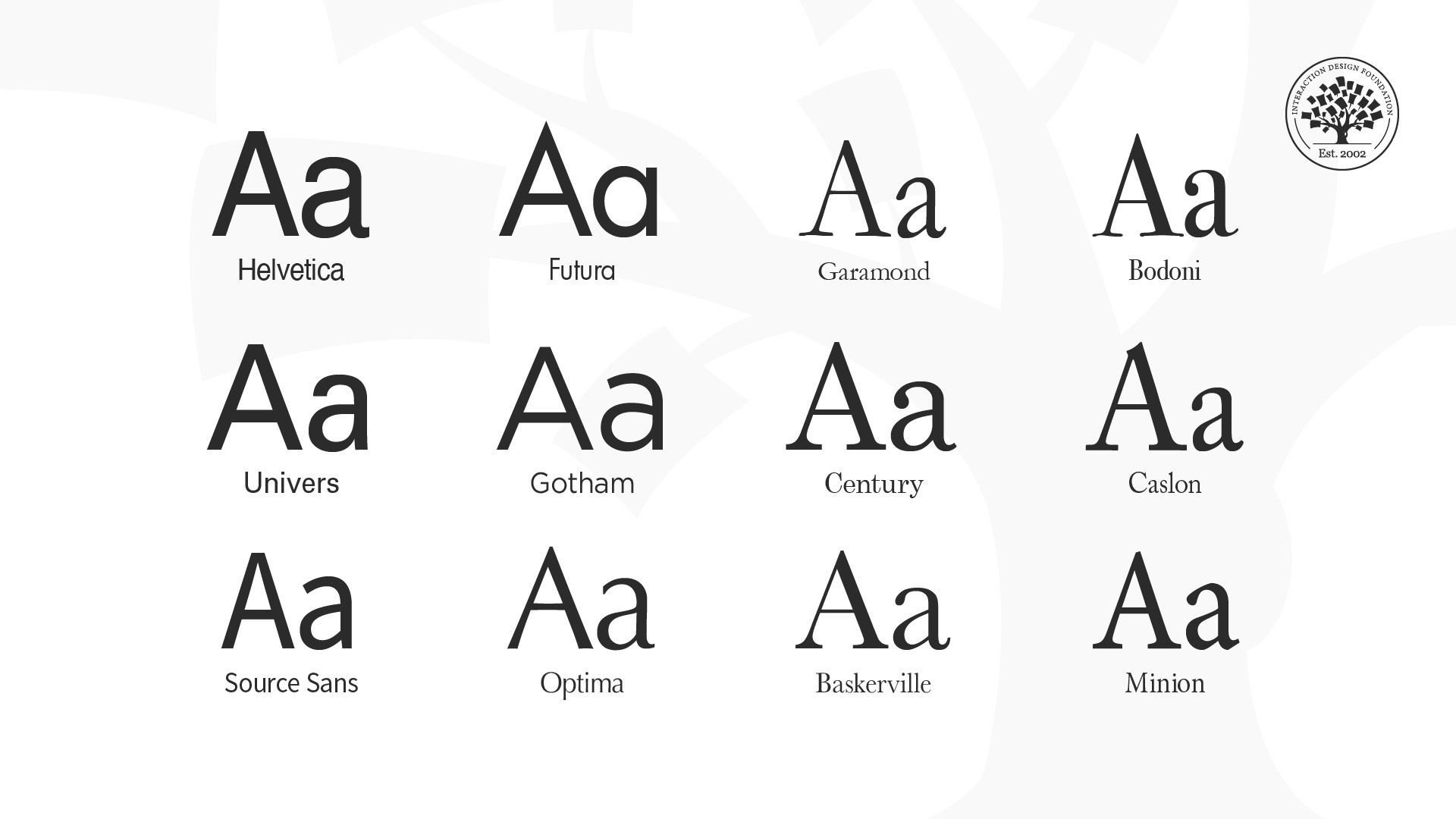
A screenshot showing 12 different typefaces.

Typefaces of Helvetica, Futura, Garamond, Bodoni, Univers, Gotham, Century, Caslon, Source Sans, Optima, Baskerville and Minion.

© Daniel Skrok and Interaction Design Foundation, CC BY-SA 4.0

When you pick the right typography for your UI design work, it:

Communicates Essential Information

Your selection of typography for your interface acts as a visual communication tool. It helps users find the information they need swiftly. It guides their eyes as they navigate and interact with your interface. That way, you can ensure that the most crucial content stands out and guides users to take actions seamlessly. 
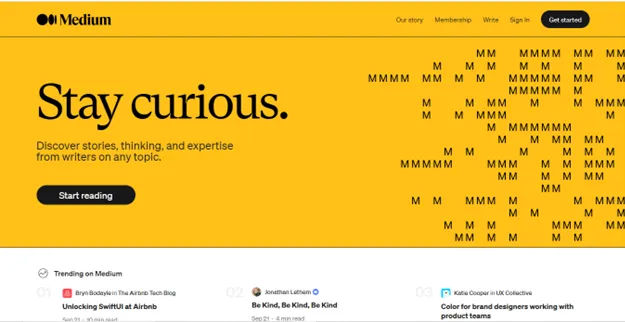
Screenshot of Medium Home Page

Medium uses clean, minimalist typography that is easy to read. They utilize optimal line lengths, line spacing, font sizes and font families.

© Medium, Fair Use

Enhances Readability and Accessibility

When you use good typography in your digital product, you prioritize readability and accessibility. This makes it easier for users to consume and navigate content, whoever and wherever they are.
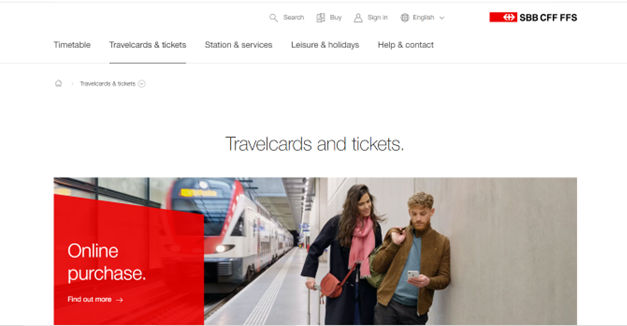
Screenshot of Swiss Federal Railways Page

SBB CFF FFS – Swiss Federal Railways – uses fonts with pristine alignments and styles, boosting readability and accessibility.

© SBB CFF FFS, Fair Use

Establishes a Consistent Brand Tone

It can help create a consistent tone throughout a website or app. This reinforces your brand identity for your target audience and makes it memorable for all users. For example, if a product team is designing their startup’s fashion app for young people, the look of the text should have a trendy feel.
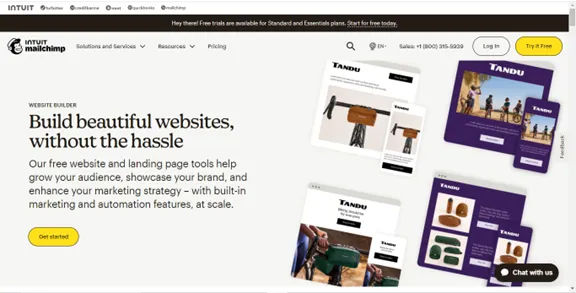
Screenshot of Mailchimp Home Page

Mailchimp (mailchimp.com) – Mailchimp balances playful, friendly fonts for headlines with highly legible body text. Their typography aligns with their quirky brand personality.

© Mailchimp, Fair Use

Differentiates the Product

When you find that unique typography that’s right for your brand, you can help set your website or app apart from competitors. This enhances its appeal to users and improves user engagement.
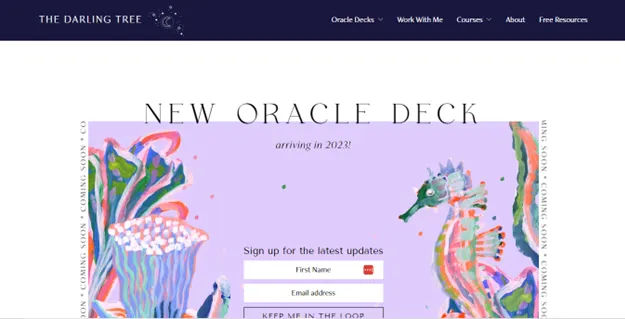
Screenshot of The Darling Tree Home Page

The Darling Tree presents a beautifully unique and appropriate brand image also through its typography.

© The Darling Tree, Fair Use

Drives Conversion

If you’ve got your typography well thought out, it can encourage users to respond to call-to-action buttons. That will boost conversion rates and ultimately, sales.

Screenshot of Airbnb Home Page

Airbnb also uses typography to their advantage. They use minimalistic fonts and lines that are both visually appealing and easy to read.

© Airbnb, Fair Use

What are Key Elements of Typography?

When you set out to pick the best and most appropriate typography, it isn’t just about good design. Typography is also a powerful tool to create an emotional connection with users. When you use the right typeface, size, and spacing, you can evoke certain feelings in your users. That is a large part of how to form an engaging experience for them. What’s more, design teams for brands all over the world understand how to leverage typography to add personality to their designs and make them stand out.

Effective typography is a blend of several elements. Here are the main ones:

Fonts and Typefaces

Fonts are specific weights within a typeface. You choose a typeface; you use a font. If you were to select Arial as your typeface, then Arial bold, italic and regular would be your fonts. As such, a font is the distinct, stylized characteristics found within a typeface. It’s important to choose your fonts and typefaces well in your projects.
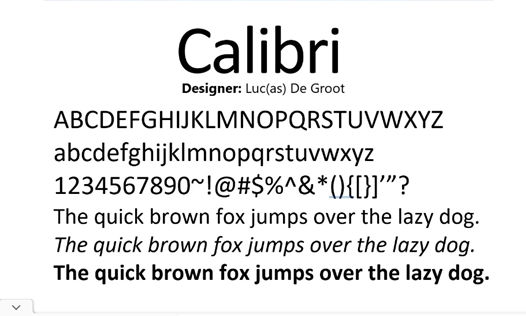
Screenshot of Calibri Font Demonstration Page

Calibri is a popular typeface with a warm and soft feel, featuring in Microsoft applications, for example.

© Free Fonts, Fair Use

Letter and Line Spacing

These also go by the names of kerning and leading, respectively. They influence the readability of the text. When you optimize the space between letters and lines, you ensure the text doesn't appear too crowded or too sparse.
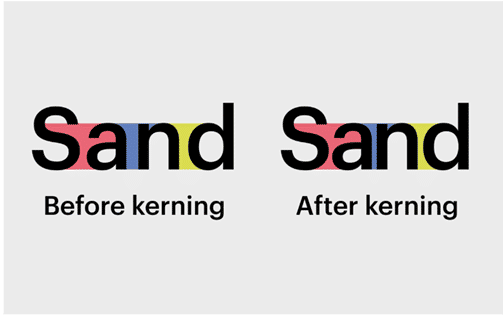
Screenshot of Type Shown Before And After Kerning

Kerning in action, tightening up the letters.

© Fabrik, Fair Use

Font Weight, Height, and Size

These aspects of typography contribute to uniformity in the text. When you make them consistent across your website or app, you maintain your brand’s identity and enhance readability.
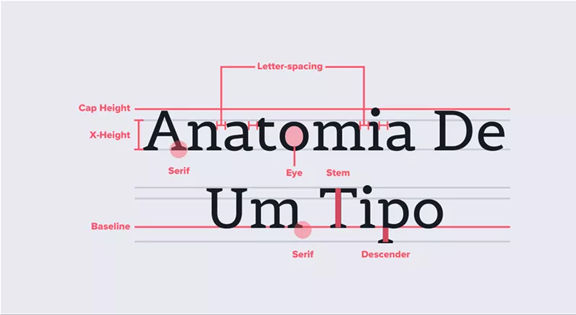
Screenshot of Text Showing Various Parts of Type

Find all the little elements of type here.

© Aelaschool, Fair Use

Character

This is an individual element—commonly a single letter, number or punctuation mark.

Baseline

This is the invisible line upon which all letters rest. You can create a grid using the baseline of your chosen type to create a harmonious layout. Learn more about grid systems here.

x-height

This is the distance between the baseline and the height of the lowercase letter “x”. If you’re working with a font that has an unusually large (or small) x-height, it could affect the entire interface—sometimes even breaking the layout.

Stroke

This is a straight or curved line that creates the principal part of a letter.

Serif

This is the stroke, or foot-like element, connected to the end of the main stroke of some typefaces. Serif fonts are often more readable, as the tiny “feet” guide the readers’ eyes to the next character. Nonetheless, because of their tiny size, they may not always render well on screens.

Sans serif

This is a typeface without strokes or any extra elements at the bottom of a letter. Due to the lower resolution of screens, sans serifs are often preferable for digital interfaces. As technology improves and screens come equipped with better resolutions, this may no longer be a deciding factor in choosing a font.

Ascender and descender

The vertical stroke that extends upward beyond the x-height and downward beyond the baseline, respectively.

Alignment

This is how text is positioned. There are 4 main alignments: left, right, centered and justified. Alignment helps designers to create a coherent composition.

Hierarchy

This is the principle of arranging elements according to importance. Creating a strong hierarchy is paramount to helping users identify where to look first. No matter the screen size, if an interface has multiple elements, it is important to guide the user towards the most important elements of the screen. Your choice of font, its weight, size, letter spacing, alignment and surrounding white space, along with other visual design elements, work together to create this hierarchy.  

White Space

Also called whitespace and negative space, this is the area between elements on a page. When you use white space properly, it can make your interface look clean and organized. That will help your design to “breathe” while it lets users find what they need to quickly and effortlessly. That seamlessness is a magic component of a great user experience.
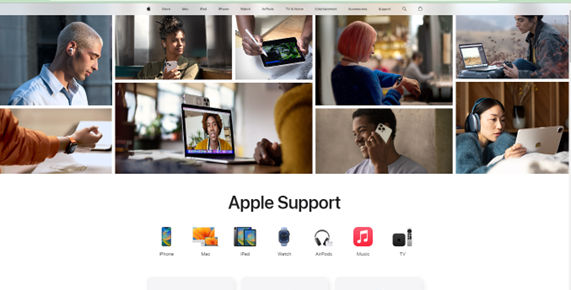
Screenshot of Apple Support Page

Apple employs effective use of white space to deliver a calm and seamless experience.

© Apple, Fair Use

How to Use Typography Best?

Here are some key principles, best practices, and examples to consider so you can optimize how users interact with your design:

Maintain Consistency

Consistency in typography helps you create a seamless user experience. So:

○     Stick to a defined set of fonts and typefaces throughout your design. That’s essential also for building and maintaining trust with your users. It’s best to keep to the standard fonts rather than have ones that are overly “interesting” for users to think about.

○      Use no more than 3 different fonts on a website, and don’t have too many type sizes and styles. Two fonts that complement each other are ideal.
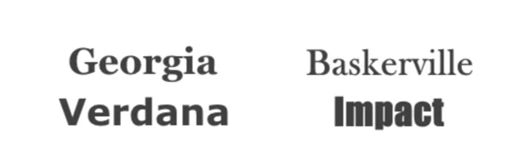
Screenshot of Two Sets of Font Pairings

Georgia and Verdana complement each other; Baskerville and Impact don’t.

© Nick Babich, Fair Use

Establish a Clear Hierarchy

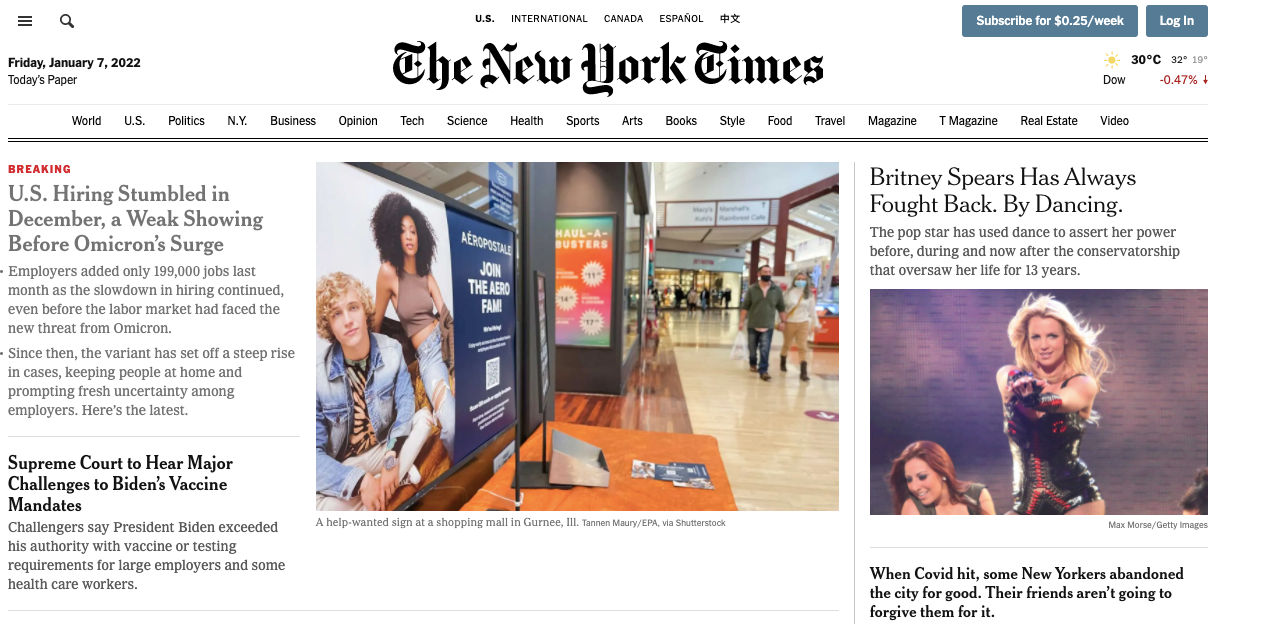
A clear typographic hierarchy guides users through the content. As with information architecture in general, this makes it easier for them to find what they're looking for. Ensure they don’t hesitate or become confused. This is essential for any product or service. So, make sure you distinctly style headers, subheaders, and body text with the best font sizes and weights to establish this hierarchy.
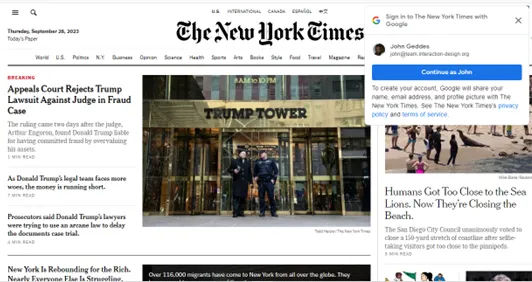
Screenshot of The NY Times Home Page

The New York Times exemplifies a clear hierarchy in type.

© The New York Times, Fair Use

Ensure Readability and Accessibility

Make the text easy to read and accessible to all users. Choose font sizes, weights, and line spacings that enhance readability.  It’s best to limit the line length to 60 characters per line, or 30 to 40 per line for mobile. Also, remember how color contrast is especially important for users with visual impairments. And bear in mind, too, that “impairments” can also be temporary ones. A user may have to squint to read on a mobile phone screen on a bright sunny day. That’s a form of impairment.
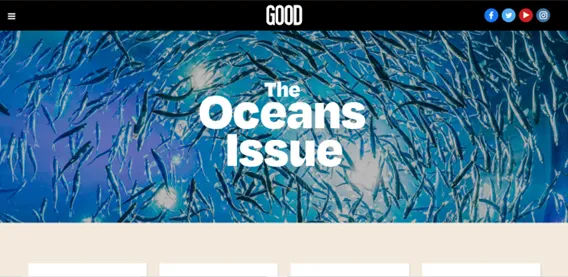
Screenshot of Good Home Page

Good exemplifies easily readable, accessible typography on its site.

© Good, Fair Use

Use Responsive Typography

Use a typeface that works well whatever its size. Your design will have to scale well across different devices, and so should the typefaces you use. Make sure the text stays legible and aesthetically pleasing whether users view it on a smartphone, tablet, or desktop. Remember too that mobile devices are behind the majority of experiences. So, envision small screen sizes and how your text looks on these.
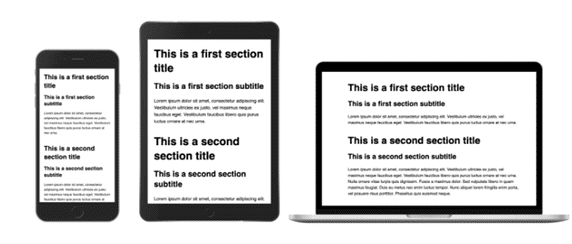
Screenshot Showing Three Devices With Various Formats of Same Type

Remember that things look different on different devices; that includes your typography.

© Adrian Bece, Fair Use

Use Visual Contrast in Typography

You can adjust visual contrast through color, size, or typeface variations. Use it to highlight specific messages or areas of the page, improve readability and guide user attention. However, don’t rely solely on color to convey information. Remember other factors, and this is especially important for accessibility purposes.
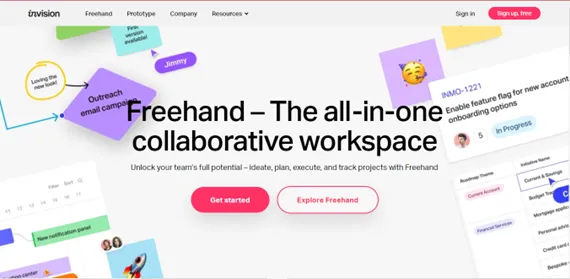
Screenshot of InVision Home Page

InVision’s home page shows a highly effective use of contrast.

© InVision, Fair Use

Consider the Role of Animated Copy in Typography

When you animate the copy, especially banners or headers, you can catch users' attention and increase engagement rates. However, make sure the animations are light and aesthetically pleasing to avoid distracting users. 

Use a font that reflects your brand identity

Select a font that best reflects your brand’s values and personality. Of course, if you’re designing for an established brand, follow their style guide to preserve the brand identity.
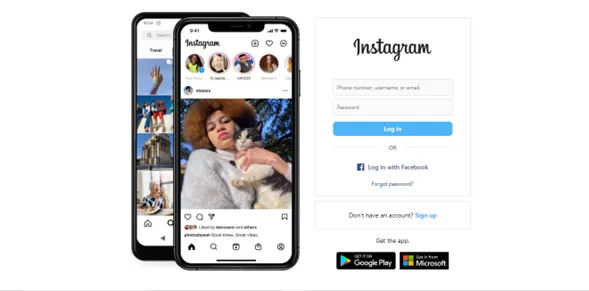
Screenshot of Instagram Home Page

Instagram’s simple yet stylish font is a powerful brand identifier as well as easy on the eye.

© Instagram, Fair Use

Do your user research and usability testing

To confirm you have the best typography going in your visual design. User testing can reveal great insights about how well you’ve matched effective text to an intuitive design overall.

Remember that typography should not overpower the content

The main goal in UX and UI design is to make the content easier to read and understand. If too much is going on within the design, it can distract from the message. Therefore, strive for balance, with a view to cater to the many potential contexts involved in a user journey. Overall, remember that the right typography can make your design speak to users on more levels than one. 

Questions About Typography?
We've Got Answers!

What is leading in typography?

Leading, in typography, refers to the vertical space between lines of text. It plays a crucial role in improving readability and aesthetics. Proper leading ensures that text is comfortably spaced, preventing it from looking cramped or too spread out. It also helps guide the reader's eye smoothly from one line to the next.

What is a widow in typography?

In typography, a widow refers to a single word or a short line of text that appears alone at the end of a paragraph or column. Widows disrupt the visual flow of text and can create awkward spacing.

What is the difference between widows and orphans in typography?

In typography, widows and orphans are terms used to describe unwanted stray words or lines of text. The main difference between them is their position in the text.

Widows refer to the single words at the end of a paragraph.

Orphans refer to first word or line of a paragraph that appears alone at the bottom of a page or column, with the rest of the paragraph appearing on the next page.

Why is typography important?

Typography is crucial in UX design because it influences how users perceive and interact with content. Effective typography enhances readability, establishes hierarchy, and conveys the tone and personality of a design. It plays a pivotal role in creating a visually appealing and user-friendly experience, which can boost engagement and comprehension.

In this video, Ellen Lupton, Bestselling Author of "Thinking with Type," explains how typography underpins design systems and helps you select and pair typefaces by balancing objective details like x-height with subjective tone, so your designs feel consistent, readable, and on brand.

Transcript

What is typography design?

Typography design is the art and practice of arranging type elements to create visually appealing and effective communication. It encompasses font selection, spacing, size, color, and layout to convey information and evoke emotions in aesthetically pleasing forms. Typography is a fundamental aspect of graphic and web design. It significantly impacts user experience and brand identity on all screen sizes.

Transcript

This video shows the various parts of typographical design, including the anatomy of type and font styles.

How do you use typography in design?

Typography in design involves selecting fonts, adjusting spacing, and arranging text to enhance readability and convey a message effectively. It establishes hierarchy, tone, and visual appeal. For example, in web design, a sans-serif font like "Helvetica" is something you can use for headings to create a modern, clean look. 

For a more detailed understanding of typography, take the course, Visual Design: The Ultimate Guide.

What makes good typography?

Good typography involves choosing appropriate fonts, sizes, and spacing to ensure readability and convey the intended message effectively. It establishes hierarchy, coherence, and visual appeal. For example, a harmonious combination of fonts, such as pairing a sans-serif headline with a legible serif body text, can enhance visual contrast and readability in a good design.

What is typography vs font?

Typography refers to the art and technique of arranging and designing type, encompassing various aspects like font selection, spacing, and layout. Font, on the other hand, is a specific style and design of a typeface, including variations in size, weight, and style within that typeface family. In essence, typography is the broader discipline, while font refers to the individual styles within it.

In this video, designer and educator Mia Cinelli explains the difference between typefaces and font—the components of typography. 

Transcript

What some some highly cited research on the subject of Typography?

Here are some highly cited research papers on typography:

  1. Skrok, D. (2022). The UX Designer's Guide to Typography. Interaction Design Foundation. This article provides a comprehensive guide to typography in UI design, including typography terminology, the anatomy of type, and typography guidelines to keep in mind when designing websites or apps for optimal user-friendliness. It emphasizes the importance of effective typography in enhancing UX, optimizing usability, catching users’ attention, and increasing conversion rates.

  2. Szerovay, K. (2023). Typography Study Guide for UX Designers. UX Planet. This article provides a study guide for UX designers to learn about typography, including a comprehensive resource of the basics, the anatomy of type, and why typography is important. It also lists out some of the best typography design resources to help UX designers upgrade their type skills.

  3. Lupton, E. (2004). The Science of Typography. Typotheque. This article examines the scientific literature on typography from the late nineteenth century to the present, including research from various fields such as psychology, ergonomics, human computer interaction (HCI), and design. It takes a rigorous approach to how people respond to written words on page and screen and affirms human tolerance for typographic variation and the elasticity of the typographic system.

  4. Kenna, H. (2015). A Practice-led Study of Design Principles for Screen Typography. UAL Research Online. This PhD thesis examines design principles for screen typography, with reference to the teachings of Emil Ruder Type. It provides a practice-led study of typography and its application to screen-based media, including the development of a set of design principles for screen typography.

  5. Ngai, J. (2023). 7 Best Design Books on Typography. Prototypr. This article lists out the top typography design resources to help designers upgrade their type skills, including classic introductions to type, design classics, visual resources, and books on web typography. It emphasizes the power of typography to evoke the right voice, association, and even make things seem easier to understand.

  6. Önduygu, D. C. (n.d.). Typography Is Important | An Introductory Practical Guide. This article provides an introductory practical guide to typography, including references to classic typography books such as The Elements of Typographic Style by Robert Bringhurst and Thinking With Type by Ellen Lupton. It emphasizes the importance of typography in enhancing the readability, legibility, and overall user experience of digital media.

If you're looking to learn more about typography, here are some highly recommended books that cover the topic in-depth:

  • "The Elements of Typographic Style" by Robert Bringhurst

    • This is often considered the definitive guide to typography. It covers typography principles, history, and practical advice for both print and digital design.

  • "Thinking with Type" by Ellen Lupton

    • This book provides a comprehensive overview of typography, including its history, terminology, and practical application in design. It's suitable for both beginners and experienced designers.

  • "Typography Workbook: A Real-World Guide to Using Type in Graphic Design" by Timothy Samara

    • A hands-on guide that offers exercises and design projects to help you develop your typographic skills and understanding.

  • "Type Matters!" by Jim Williams

    • This book explores the fundamental principles of typography and provides practical tips for selecting and using type effectively in design projects.

  • "Stop Stealing Sheep & Find Out How Type Works" by Erik Spiekermann and E.M. Ginger

    • A beginner-friendly book that explains typographic concepts and rules in a clear and engaging manner.

  • "Designing with Type: The Essential Guide to Typography" by James Craig and Irene Korol Scala

    • A classic text that covers typography basics, history, and application in a variety of design contexts.

  • "Typography Sketchbooks" by Steven Heller and Lita Talarico

    • This book offers a unique perspective by showcasing the sketchbooks and creative processes of various typographers and designers.

  • "Detail in Typography" by Jost Hochuli

    • A more advanced book that delves into the subtleties of typography, focusing on the details that can make a design exceptional.

  • "Just My Type: A Book About Fonts" by Simon Garfield

    • A lively and informative book that explores the history and personalities behind different fonts, making it an enjoyable read for typography enthusiasts.

  • "Typographic Design: Form and Communication" by Rob Carter, Sandra Maxa, and Mark Sanders

    • This book provides a comprehensive look at typographic design principles and their application in various design projects.

Where to learn more about typography?

Eager to deepen your visual design skills? Dive into the following resources:

  1. Comprehensive Course: Enroll in Visual Design: The Ultimate Guide to understand the foundational concepts and practices of visual design.

  2. Comprehensive Course: Enroll in Mobile UX Design to understand additional dimensions where typography is an essential ingredient. 

3. Masterclasses to Refine Your Craft:

Combining these courses and masterclasses will provide both foundational knowledge and specialized expertise, positioning you for success in the field and applications of typography.

Earn a Gift Earn a Gift, Answer a Short Quiz!

1
2
3
4
1
2
3
4
Question 1
Question 2
Question 3
Get Your Gift
Interaction Design Foundation logo

Question 1

What best defines typography in the context of design?

1 point towards your gift

  • The art and technique of arranging type to make written language readable and appealing.
  • The method of choosing different colors for text to enhance readability.
  • The process of making text larger or smaller to fit different devices.
Interaction Design Foundation logo

Question 2

How does effective typography improve user experience in design?

1 point towards your gift

  • It changes the font style automatically based on user preferences.
  • It increases the loading speed of text on web pages.
  • It makes the text visually interesting and easy to navigate.
Interaction Design Foundation logo

Question 3

What role does typography play to help establish brand identity?

1 point towards your gift

  • It contributes to the aesthetic consistency that supports brand recognition.
  • It dictates the technical performance of digital platforms.
  • It solely focuses on the animation of text for digital advertisements.

Learn More About Typography

Make learning as easy as watching Netflix: Learn more about Typography by taking the online IxDF Course Visual Design: The Ultimate Guide.

Why? Because design skills make you valuable. In any job. Any industry.

In This Course, You'll

  • Get excited when you use visual design principles to create impressive visuals people love! Great visual design makes the message clear, memorable, and persuasive—whether it's an app, a logo, or a presentation slide. You'll learn what makes a design excellent and how science and culture influence what works and what doesn't. You'll create designs that truly connect with people. Visual design isn't just about beauty—it's about shaping ideas that inspire action, build trust, and give meaning to your work. As AI makes visual production faster and cheaper, you stay in demand when you can turn rough or AI-generated visuals into successful designs that get approved, adopted, and used. If you want to stand out with timeless human-centered design skills, this course is for you.

  • Make yourself invaluable with practical design skills that amplify your impact in any industry! Did you know that you only have 50 milliseconds to make a good first impression? Great visual design ensures you pass the test every time. You'll learn to use visual elements to guide emotions, influence purchasing decisions, and optimize User Experience (UX) and User Interface (UI) design. You'll master color theory, typography, and grid systems to improve usability, build credibility, and create designs that stop the scroll.

  • Gain confidence and credibility as you fast-track results with step-by-step exercises and downloadable templates! Complete optional tasks to walk away with portfolio-ready case studies that will help you land your dream job and advance your career. You'll get hands-on and design a low-fidelity wireframe, apply a monochromatic, complementary, or triadic color scheme, choose typefaces, and select a grid system. It's easier than you think! No matter your background, you can master Visual Design. With clear guidance and real-world examples, you'll apply your skills right away. This course will give you the visual design skills you need to solve design challenges, collaborate smarter, and make it easy for decision-makers to say yes to your vision.

It's Easy to Fast-Track Your Career with the World's Best Experts

Master complex skills effortlessly with proven best practices and toolkits directly from the world's top design experts. Meet your experts for this course:

  • Mia Cinelli: Associate Professor of Art Studio and Digital Design at the University of Kentucky.

  • Joann Eckstut: Color Consultant, Founder of The Roomworks, and one of the 12 designers chosen by the Color Association of the USA to create the yearly forecast used by industries to keep up with color trends.

  • Arielle Eckstut: Author, Agent-at-large at the Levine Greenberg Rostan Literary Agency, and Co-Founder of The Book Doctors and LittleMissMatched.

Get an Industry-Recognized IxDF Course Certificate

Increase your credibility, salary potential and job opportunities by showing credible evidence of your skills.

IxDF Course Certificates set the industry gold standard. Add them to your LinkedIn profile, resumé, and job applications.

Course Certificate Example

Be in distinguished company, alongside industry leaders who train their teams with the IxDF and trust IxDF Course Certificates.

Our clients: IBM, HP, Adobe, GE, Accenture, Allianz, Phillips, Deezer, Capgemin, Mcafee, SAP, Telenor, Cigna, British Parliament, State of New York

All Free IxDF Articles on Typography

Read full article
Web Fonts are Critical to the Online User Experience - Don’t Hurt Your Reader’s Eyes - Article hero image
Interaction Design Foundation logo

Web Fonts are Critical to the Online User Experience - Don’t Hurt Your Reader’s Eyes

Bill Gates said; “Content is King” and when it comes to the online user experience it is the 100% truth. Delivering a great user experience doesn’t just mean delivering great content – it also means providing that content in a usable and useful format that encourages reading and interaction rather t

Social shares
897
Published
Read Article
Read full article
Physiological Needs: Maslow's Hierarchy of Needs - Article hero image
Interaction Design Foundation logo

Physiological Needs: Maslow's Hierarchy of Needs

At the base of Maslow's hierarchy of human needs we find the physiological level, which encompasses the basic, yet self-preserving needs, such as sleep, water, and shelter. The ability to work our way further up the hierarchy, to satisfy our more complex needs, is based on fulfilling the physiologic

Social shares
936
Published
Read Article
Read full article
The Top 4 Things You Can Learn from IxDF’s New Visual Design Course - Article hero image
Interaction Design Foundation logo

The Top 4 Things You Can Learn from IxDF’s New Visual Design Course

Users’ first impressions typically form in 50 milliseconds, and visual design plays a substantial role in whether users get a good or a bad one. Good first impressions are essential to engage new users and ensure the success of a product or experience. Studies show that visual appeal—what we see—is

Social shares
611
Published
Read Article
Read full article
Top 10 UI Trends Every Designer Should Know - Article hero image
Interaction Design Foundation logo

Top 10 UI Trends Every Designer Should Know

People get easily bored with trends, and every few years, the pendulum swings from one way to another. We have all seen the rise and fall of iconic fashion pieces or art movements. The same thing happens in User Interface (UI) design. UI trends go from interfaces that mimic real-world objects to sup

Social shares
1k
Published
Read Article
Read full article
The UX Designer’s Guide to Typography - Article hero image
Interaction Design Foundation logo

The UX Designer’s Guide to Typography

Typography can make or break the success of a site or app. It’s a cornerstone of UX design; more than 90% of online information is in text form. But the design discipline of typography is so much more than choosing an attractive font for your website or app. There are a number of elements to conside

Social shares
937
Published
Read Article
Read full article
The 10 Most Inspirational UI Examples in 2026 - Article hero image
Interaction Design Foundation logo

The 10 Most Inspirational UI Examples in 2026

Users typically take just 50 milliseconds to assess the visual appeal of a website. The UI of your website has a massive impact on whether they choose to stay or depart, and it acts as the bridge between users and technology. Beyond visual appeal, its design and functionality often determine a platf

Social shares
1.1k
Published
Read Article

The UX Designer’s Guide to Typography

The UX Designer’s Guide to Typography

Typography can make or break the success of a site or app. It’s a cornerstone of UX design; more than 90% of online information is in text form. But the design discipline of typography is so much more than choosing an attractive font for your website or app. There are a number of elements to consider when practicing typography. Here is a list of terms and a set of typography principles that will help you to become more proficient in this discipline so that you can create user-friendly designs. 

But first, what exactly is Typography? 

Typography is a design discipline that involves the use of typefaces and the organization of those typefaces to create readable, usable and ideally, user-friendly interfaces or experiences. Effective typography enhances UX, optimizes usability, catches users’ attention and has the potential to increase conversion rates.  

There is some confusion around typographic terminology, so we’ve compiled the following list of terms to provide some clarity. This is not an exhaustive list, but this specific collection of terms is particularly relevant to you, as a UX designer.

Typography Terms

Typeface: Also known as a font family, the word “typeface” comes from physical print and refers to the faces of physical letter blocks. A typeface is composed of fonts—much like an album is composed of tracks or a book is composed of chapters. A typeface includes multiple font weights, and its style is shared across all characters, numbers and symbols. Arial, Times New Roman and, yes, even Comic Sans are all typefaces. 

Illustration of widely used typefaces
Typefaces of Helvetica, Futura, Garamond, Bodoni, Univers, Gotham, Century, Caslon, Source Sans, Optima, Baskerville and Minion.

© Daniel Skrok and Interaction Design Foundation, CC BY-SA 3.0


Font: Fonts are specific weights within a typeface. You choose a typeface; you use a font. If you were to select Georgia as your typeface, then Georgia bold, italic and regular would be your fonts. In other words, a font is the distinct, stylized characteristics found within a typeface. You’ll likely use 2-3 fonts per project, and they’ll be the foundation of your typography and a key element of your overall design. 

Character: an individual element, most commonly a single letter, number or punctuation mark. 

Baseline: the invisible line on which all letters rest. You can create a grid using the baseline of your chosen type to create a harmonious layout. Find out more about grid systems here

x-height: the distance between the baseline and the height of the lowercase letter “x”. If you are working with a font that has an unusually large (or small) x-height, it could impact the entire interface—sometimes even breaking the layout. 

Stroke: a straight or curved line that creates the principal part of a letter.

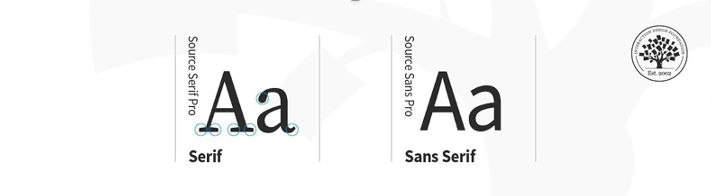
Serif: the stroke, or foot-like element, connected to the end of some typefaces’ main strokes. Serif fonts are often more readable, as the tiny “feet” guide the readers’ eyes to the next character. However, due to their tiny size, they may not always render well on screens. 

Sans serif: a typeface without strokes or any extra elements at the bottom of a letter. Owing to the lower resolution of screens, sans serifs are often preferred for digital interfaces. As technology improves and screens come equipped with better resolutions, this may no longer be a deciding factor in choosing a font.

Illustration depicting the difference between a serif and sans serif typeface

Comparison of a serif and sans serif typeface.

© Daniel Skrok and Interaction Design Foundation, CC BY-SA 3.0


Weight, height, and size: This refers to the thickness, length and overall size of a typeface. You can experiment with different weights and sizes and use the variations judiciously on your interface to break the monotony on long passages of text, or to direct attention to specific elements.

Ascender and descender: the vertical stroke that extends upward beyond the x-height and downward beyond the baseline, respectively. 

Letter spacing (or tracking): the distance between the widest point of each character. Tracking specifically refers to the uniform increase or decrease in the horizontal space between characters. 

White space: also known as negative space, is the area between elements in a design composition. If the white space is not balanced, copy will be hard to read. 

Alignment: refers to how text is positioned. There are 4 main alignments: left, right, centered and justified. Alignment helps designers to create a coherent composition. 

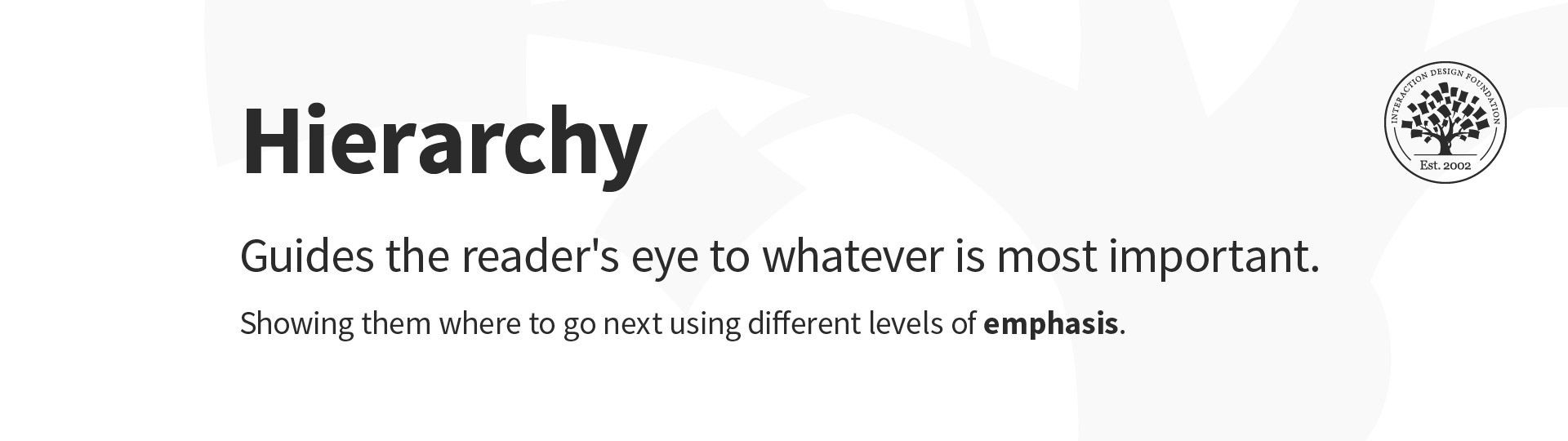
Hierarchy: the principle of arranging elements according to importance. Creating a strong hierarchy is paramount to helping users identify where to look first. No matter the screen size, if an interface has multiple elements, it is important to guide the user towards the most important elements of the screen. Your choice of font, its weight, size, letter spacing, alignment and surrounding white space, along with other visual design elements, work together to create this hierarchy.  

Illustration depicting hierarchy in typography
Hierarchy in typography.

© Daniel Skrok and Interaction Design Foundation, CC BY-SA 3.0


Typography Principles 

Here are some typography guidelines to keep in mind when designing your website or app for optimal user-friendliness. It’s by no means an exhaustive list, but it provides a good starting point in your burgeoning typography practice. 

1. Too many typefaces hinder good user experience

Keep it simple! Too many typefaces can look sloppy and lead to confusion. It’s best to stick to between two and three typefaces in design. Using multiple typefaces also adds to the size and loading time of applications. For optimizing the experience, use fonts that are likely to be available/installed at the users’ end. 

2. Choose typefaces that compliment and contrast with one another

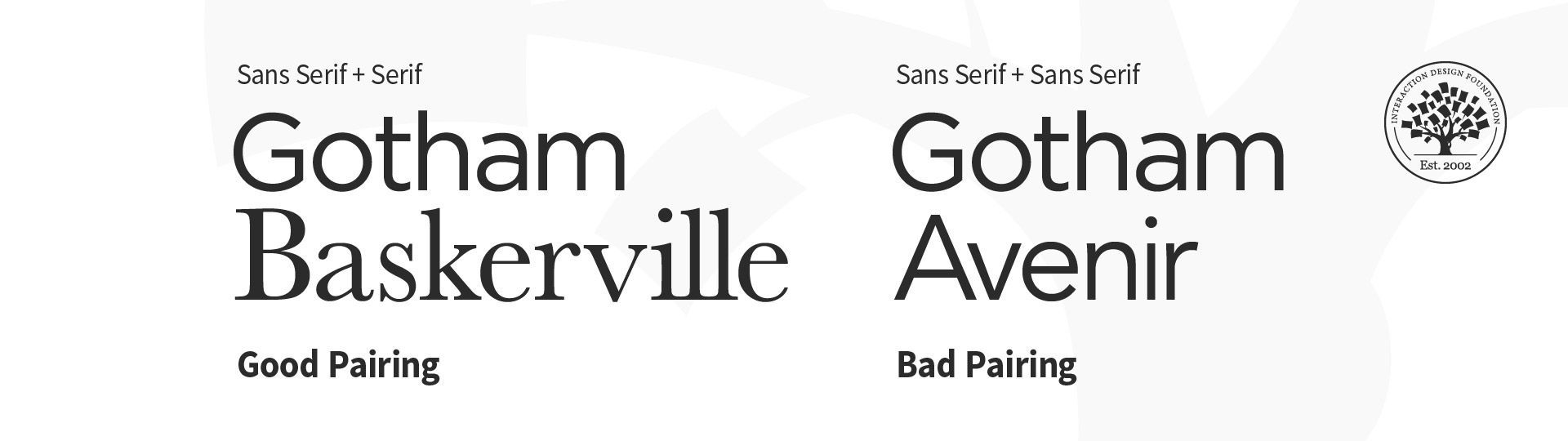
Your typefaces shouldn’t be too similar; otherwise, their nuances will be lost. Create contrast by choosing one serif and one sans serif font.

Examples of bad and good pairing in typography. The example on the left shows a good pairing of a sans serif and serif typeface. The one on the right shows a bad pairing of two sans serif typefaces.
Examples of bad and good pairing in typography.

© Daniel Skrok and Interaction Design Foundation, CC BY-SA 3.0


3. Keep readability, legibility, and accessibility top of mind

The text your typography creates needs to be understandable; otherwise, it defeats the purpose of communicating information through text. Consider your user, their environment and the medium with which they’re engaging with your product. Color and contrast can make or break accessibility; pale yellow text placed on an orange background is going to be more difficult to read than the same yellow text on a navy-blue background. 

The prevalence of “dark mode” is a good example with which to illustrate the importance of accessibility—it reduces the discomfort of looking at a bright screen and improves overall legibility (the characters and words of your text are recognizable and easy to comprehend) and readability (your text is easy to follow, overly-complex words and overwrought sentence structures are avoided). Some studies suggest that serifs are not as accessible as sans-serifs, particularly for dyslexic users. The research, however, is inconclusive. To make sure your designs are accessible, always test them with real users.  

4. Great visual hierarchy improves UX

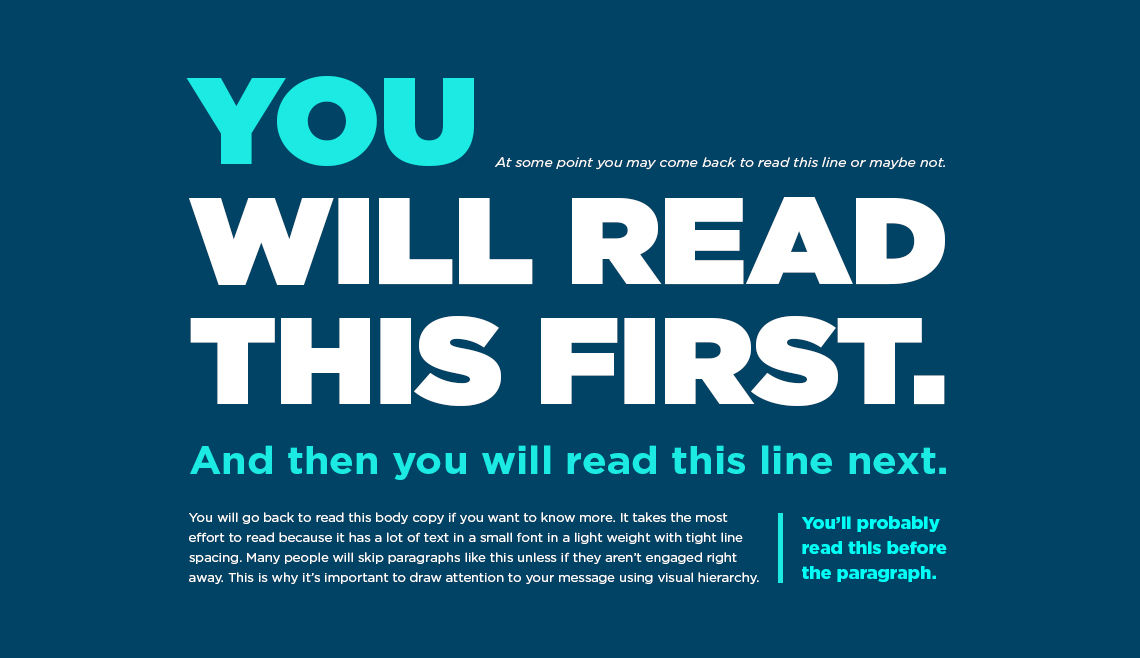
Type hierarchy for your app/site is crucial as it allows your users to quickly scan through information. Organize your content according to priority; the most important must be the most prominent and the least important should be smaller and unobtrusive. Size, weight and color are effective ways of creating visual hierarchy

When you’re designing a page, you should begin with an, and each type style that follows should be beneath, from and beyond. As an added bonus, an effective hierarchy also improves SEO.

Image showing visual hierarchy with text of different colors, sizes and weights.
Create visual hierarchy through typography. © Chaosamran_Studio, Fair Use

5. Make your typography scalable 

In your design work, you will be asked to create a website or app that works on both desktop and mobile. So, it’s important to design your typography in a way that considers the user’s experience on both platforms. You want your typography to scale well, no matter the screen size. Define a scale for your font and typefaces at the beginning of the design process. Remember, your scale guidelines should include different operating systems, as well as different platforms. 

6. Enrich UX with typography 

Typography is part of the overall visual language you use to communicate with your users. Just like the visual elements of color, form and pattern, typography can set a mood, set a tone and present a product the way you want it perceived

Image showing The New York Times' website homepage.
The New York Times uses calligraphy for its logo and a serif font for its headlines, evoking a classic, hard copy newspaper.© New York Times


Image showing website homepage of Texas band, Khruangbin.
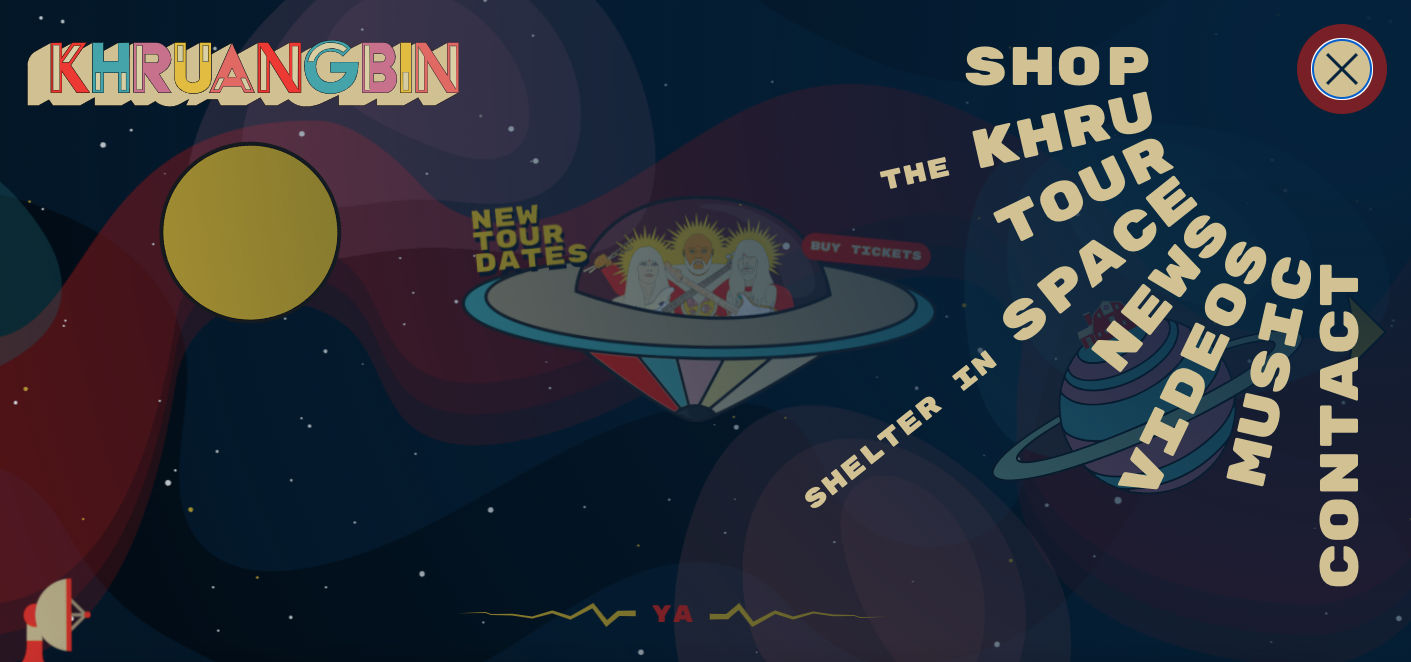
Khruangbin is a unique band, crossing genres of classic rock, funk, soul and psychedelia. Their website’s design, the colors, typography and illustrations all add to their retro, funky and unique style.  © Khruangbin

Image showing Netflix's series, Stranger Things, typography or logo.
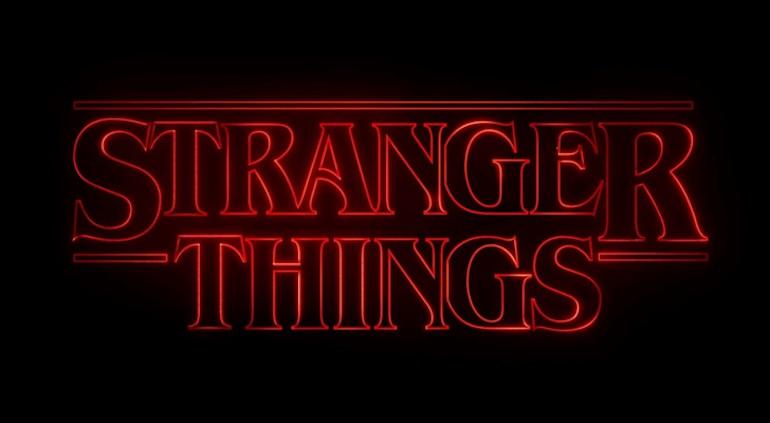
Successful typography can make a statement and set a mood. © Netflix, Fair Use

7. Test and learn

As with any stage of the design process, it’s vital to test and learn. Try out different typefaces and fonts, see how they work with one another and scale from one platform to the next. A nifty trick to test out a typeface is with the phrase “the quick brown fox jumps over the lazy dog” as it contains all the letters from the English alphabet. It’s possible that your app or website may be translated into another language, so it’s important to test for that outcome. You want to ensure that your typography design still works with diacritics (the accents or marks above, below or next to letters that indicate a particular pronunciation or emphasis) or different scripts. Through testing and learning, you can make the experience seamless for everyone!  

The Take Away

Typography can seem an obscure part of design, but it’s fundamental to creating a positive user experience. By familiarizing yourself with basic terms and principles of typography, you can transform the success of your designs. Simplicity is your friend; don’t overcomplicate your life (or design) by trying to do too much with type. Ultimately, you want your typography to be readable, accessible and understandable. Words are important, and so is how they look. So, the better your typography, the better your user experience. 

References & Where To Learn More 

Learn more about typography and other elements of visual design from our course Visual Design: The Ultimate Guide.

Discover more typography terminology and learn about the anatomy of type.

Dig deeper into typography in UI design with some free online resources by Adobe XD, Shopify, and Protoypr

Explore more best practices of typography with Mockplus

Hero Image

© Mika Baumeister, UnSplash, Fair Use

Feel Stuck?
Want Better Job Options?

AI is replacing jobs everywhere, yet design jobs are booming with a projected 45% job growth. With design skills, you can create products and services people love. More love means more impact and greater salary potential.

At IxDF, we help you from your first course to your next job, all in one place.

See How Design Skills Turn Into Job Options
Privacy Settings
By using this site, you accept our Cookie Policy and Terms of Use.
Customize
Accept all

Be the One Who Inspires

People remember who shares great ideas.

Share on:

Academic Credibility — On Autopilot

Don't waste time googling citation formats. Just copy, paste and look legit in seconds.