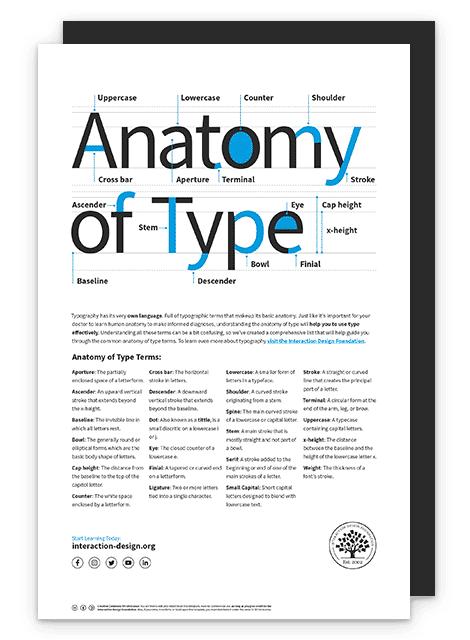
Illustration depicting the word type on a typographic grid with highlighted anatomy terms

What Is Type Anatomy?

by Daniel Skrok • 8 min read

828 Shares


Typography has its very own language
. It’s full of typographic terms that make up its basic anatomy. Just like it’s vital for your doctor to learn human anatomy to make an informed diagnosis, it’s important for you to understand the anatomy of type to use it effectively.

Let’s begin with the basics of anatomy. Designer and educator Mia Cinelli will help us understand.

Transcript

Understanding all these terms can be a bit confusing, so we’ve created a comprehensive list that will help guide you through the common anatomy of type terms. 
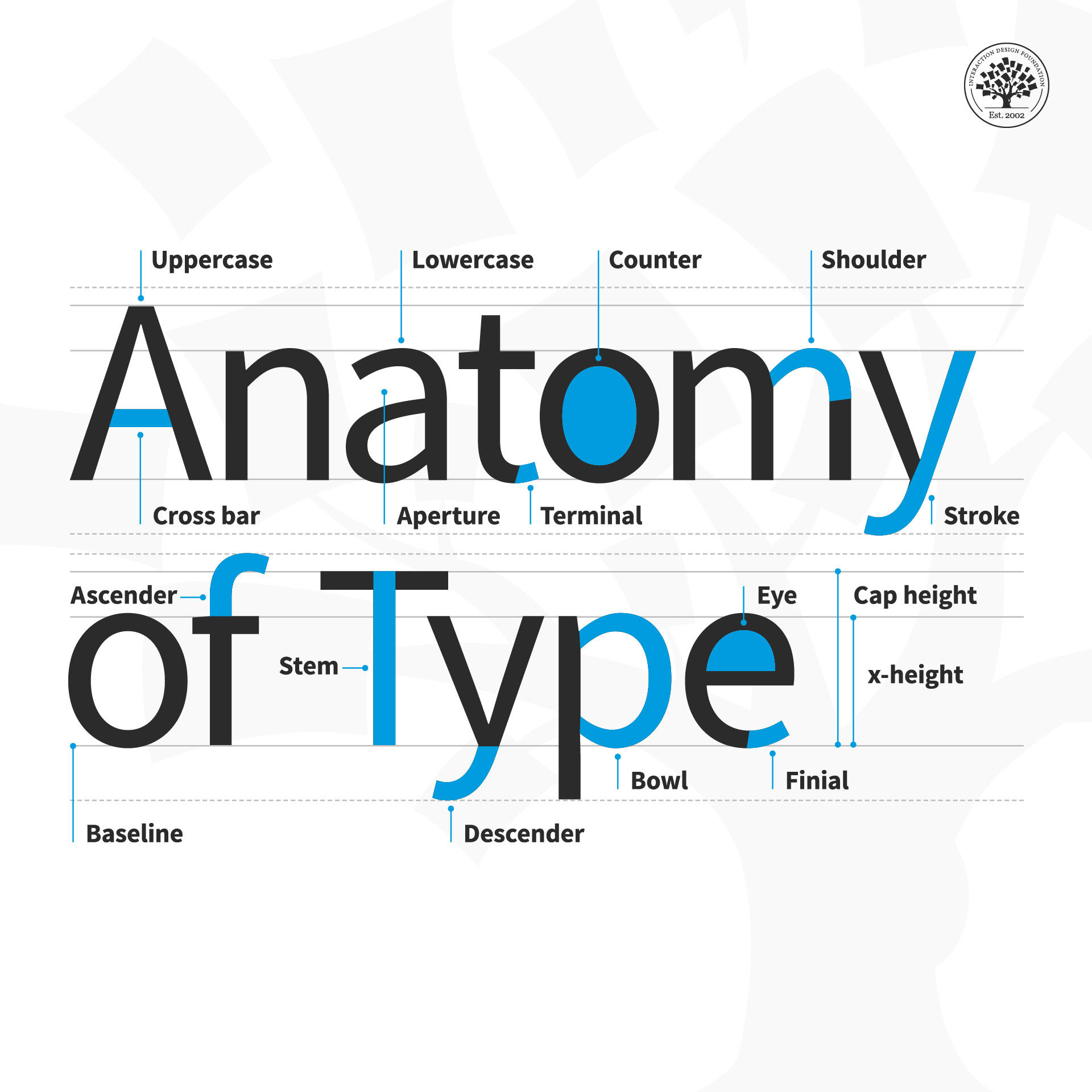
Illustration depicting the anatomy of type

© Daniel Skrok and Interaction Design Foundation, CC BY-SA 3.0

Anatomy of Type Terms

  • Aperture: The partially enclosed space of a letterform.

  • Ascender: An upward vertical stroke that extends beyond the x-height.

  • Baseline: The invisible line on which all letters rest.

  • Bowl: The generally round or elliptical forms which are the basic body shape of letters.

  • Cap height: The distance from the baseline to the top of the capital letter.

  • Counter: The white space enclosed by a letterform.

  • Cross bar: The horizontal stroke in letters.

  • Descender: A downward vertical stroke that extends beyond the baseline.

  • Dot: Also known as a tittle, is a small diacritic on a lowercase i or j.

  • Eye: The closed counter of a lowercase e.

  • Finial: A tapered or curved end on a letterform.

  • Ligature: Two or more letters tied into a single character.

  • Lowercase: A smaller form of letters in a typeface.

  • Shoulder: A curved stroke originating from a stem.

  • Spine: The main curved stroke of a lowercase or capital letter.

  • Stem: A main stroke that is more or less straight, not part of a bowl.

  • Serif: A stroke added to the beginning or end of one of the main strokes of a letter.

  • Small Capital: Short capital letters designed to blend with lowercase text.

  • Stroke: A straight or curved line that creates the principal part of a letter.

  • Terminal: A circular form at the end of the arm, leg or brow in letters.

  • Uppercase: A typecase containing capital letters.

  • x-height: The distance between the baseline and the height of the lowercase letter ‘x’.

  • Weight: The thickness of a font’s stroke.
Advance Your Career With This Free Template for “Anatomy of Type”
Anatomy of Type
We respect your privacy
Get 1 powerful email each week: Design a life you love!

The Take Away

As Mia mentioned, type has anatomy. It has its very own language full of serifs, shoulders and stems. Whether you’re an aspiring designer or a typography enthusiast, learning the building blocks of typography will help you apply it effectively within your designs. 

Remember, all letters rest on an invisible line known as the baseline. The distance between the baseline and the height of the lowercase letter ‘x’ is the x-height. And the distance between the baseline and the top of the capital letter is the cap height. Some letters extend beyond the baseline and x-height. These vertical strokes are known as ascenders and descenders.

The thickness of a letter's stroke determines its weight. Letters may appear in capital letters known as uppercase, in smaller forms known as lowercase, or in short capital letters designed to blend with lowercase text known as small capitals.

A stroke is a straight or curved line that creates the principal part of a letter. A curved stroke originating from a stem is a shoulder. A stroke that is more or less straight is a stem. A curved stroke is a spine. The horizontal stroke in letters is known as a cross bar.

A bowl is a rounded stroke that forms the basic body shape of letters. The white space enclosed by a letterform is known as a counter. The partially enclosed space of a letterform is known as the aperture. An eye is the closed counter of a lowercase ‘e’.

Two or more letters tied into a single character are known as ligatures. A dot, also known as a tittle, is a small diacritic on a lowercase i or j.

A stroke added to the beginning or end of a letter is a serif. Similarly, a tapered or curved end on a letterform is a finial and a circular form at the end of the arm, leg or brow in letters is known as a terminal.

Now that you understand the anatomy of type, take what you learned and handle type that much better than before.

References and Where to Learn More

Learn more about the Typography by reading this thoughtful book by Ellen Lupton:
Ellen Lupton. Thinking with Type. 2010. (Link)

Learn more about Type Anatomy at Thinking With Type.

Understanding Typography by visiting Google Material Design:

Practice Shaping Letters in this interactive game.

Image

© Daniel Skrok and Interaction Design Foundation, CC BY-SA 3.0

Topics in This Article

Learn More in This Course:

AI for Designers

11 days
12 % booked
View Course

What You Should Read Next

  • Read full article
    The Grid System: Building a Solid Design Layout - Article hero image
    Interaction Design Foundation logo

    The Grid System: Building a Solid Design Layout

    Now that we’ve seen some grids at work in the Rule of Thirds article, let’s examine them a little more deeply. As a concept that deals so fundamentally with the fabric and background of our work as designers, it’s easy to overlook the power of grids and think more about the elements we want to creat

    Social shares
    1.4k
    Published
    Read Article
  • Read full article
    The Key Elements & Principles of Visual Design - Article hero image
    Interaction Design Foundation logo

    The Key Elements & Principles of Visual Design

    Visual design is about creating and making the general aesthetics of a product consistent. To create the aesthetic style of a website or app, we work with fundamental elements of visual design, arranging them according to principles of design. These elements and principles together form the building

    Social shares
    1.4k
    Published
    Read Article
  • Read full article
    UX Roles: The Ultimate Guide – Who Does What and Which One You Should Go For? - Article hero image
    Interaction Design Foundation logo

    UX Roles: The Ultimate Guide – Who Does What and Which One You Should Go For?

    Do you have the ambition and enthusiasm for a career in UX design but don’t know where to start? You’ll be pleased to know there are many paths you can take. Even as a relatively new field, user experience (UX) design has both general and specialist job roles. This variety means there is a role wait

    Social shares
    1.2k
    Published
    Read Article
  • Read full article
    The 10 Most Inspirational UI Examples in 2026 - Article hero image
    Interaction Design Foundation logo

    The 10 Most Inspirational UI Examples in 2026

    Users typically take just 50 milliseconds to assess the visual appeal of a website. The UI of your website has a massive impact on whether they choose to stay or depart, and it acts as the bridge between users and technology. Beyond visual appeal, its design and functionality often determine a platf

    Social shares
    1.1k
    Published
    Read Article
  • Read full article
    Complementary Colors: The Ultimate Guide in 2026 - Article hero image
    Interaction Design Foundation logo

    Complementary Colors: The Ultimate Guide in 2026

    Part of the magic of how colors work together in impressive designs lies in the art of color selection. Designers often use complementary colors to craft visually appealing and efficient UX (User Experience). Complementary colors sit on the opposite ends of the color wheel, such as orange and blue,

    Social shares
    1.1k
    Published
    Read Article
  • Read full article
    Symmetry vs. Asymmetry - Recalling basic design principles - Article hero image
    Interaction Design Foundation logo

    Symmetry vs. Asymmetry - Recalling basic design principles

    Now we’re going to look at two powerful design principles that may, at first glance, seem too simple and second nature to us to warrant too much thought. However, we would be wise not to underestimate their capabilities and the benefits of their effects. Always keeping a firm appreciation for symmet

    Social shares
    1.1k
    Published
    Read Article
  • Read full article
    Flow Design Processes - Focusing on the Users' Needs - Article hero image
    Interaction Design Foundation logo

    Flow Design Processes - Focusing on the Users' Needs

    It can be really tempting to start a design project by leaping into the deep end and starting to sketch out pages and work on the information architecture of the final product. However, it’s almost certainly the wrong approach to take. To create great user experiences – designers must focus on the u

    Social shares
    1k
    Published
    Read Article
  • Read full article
    Physiological Needs: Maslow's Hierarchy of Needs - Article hero image
    Interaction Design Foundation logo

    Physiological Needs: Maslow's Hierarchy of Needs

    At the base of Maslow's hierarchy of human needs we find the physiological level, which encompasses the basic, yet self-preserving needs, such as sleep, water, and shelter. The ability to work our way further up the hierarchy, to satisfy our more complex needs, is based on fulfilling the physiologic

    Social shares
    936
    Published
    Read Article
  • Read full article
    Graphic Artist vs. Graphic Designer: What's the difference? - Article hero image
    Interaction Design Foundation logo

    Graphic Artist vs. Graphic Designer: What's the difference?

    Graphic art versus graphic design is pretty much still a bone of contention, and that’s after a long-standing debate that just keeps going on and on—more a source of intrigue than anything negative. Some believe the two overlap with a great deal of things that are interchangeable between them—but, f

    Social shares
    860
    Published
    Read Article
  • Read full article
    Consistency: MORE than what you think - Article hero image
    Interaction Design Foundation logo

    Consistency: MORE than what you think

    Let’s examine a subject that has more to it than meets the eye. Applying a deeper appreciation of consistency to your designs will yield precious results, including keeping users happy.Consistency enables users to feel familiar with your website, your brand, etc. and to be reassured that it is your

    Social shares
    847
    Published
    Read Article

Top Articles

Top Topic Definitions

Feel Stuck?
Want Better Job Options?

AI is replacing jobs everywhere, yet design jobs are booming with a projected 45% job growth. With design skills, you can create products and services people love. More love means more impact and greater salary potential.

At IxDF, we help you from your first course to your next job, all in one place.

See How Design Skills Turn Into Job Options
Privacy Settings
By using this site, you accept our Cookie Policy and Terms of Use.
Customize
Accept all

Be the One Who Inspires

People remember who shares great ideas.

Share on:

Academic Credibility — On Autopilot

Don't waste time googling citation formats. Just copy, paste and look legit in seconds.

Feel Stuck? Want Freedom?

Join 326,077+ designers who get one powerful email each week. Learn to design a life you love.

Next email in
0
days
17
hrs
33
mins
44
secs

Free forever. No spam. Unsubscribe anytime.