Anatomy of Type

Your constantly-updated definition of Anatomy of Type and collection of videos and articles.
Be a conversation starter: Share this page and inspire others!

98 Shares

What is Anatomy of Type?

The anatomy of type describes the visual elements that make up the letterforms within a typeface. Each letterform is made up of individual components (e.g., spine, stem, stroke). Type designers create typefaces using components — crucial parts that contribute to the overall appearance and legibility of a typeface. 

Transcript

Typography is an art. Good typography is art.”

— Paul Rand, Art director and graphic designer whose logos include IBM

Learn more about what type is and what it means to design.

Transcript

The Finer Points of Type

Your text plays a vital role in carrying the right message to your users. Not only are the words you choose important; the typographic choices you make such as font style and how you lay out your text onscreen are equally vital, too. So, it’s important to have an understanding of what goes into the type that you select. Be it for a website headline, a call-to-action button or a host of other functions, when you break type down to the anatomical level, you’ll have the building blocks to create a more legible and readable experience for your users. These are the terms to have in your “type dictionary” so you better understand how type is created and how to use it effectively in your work:

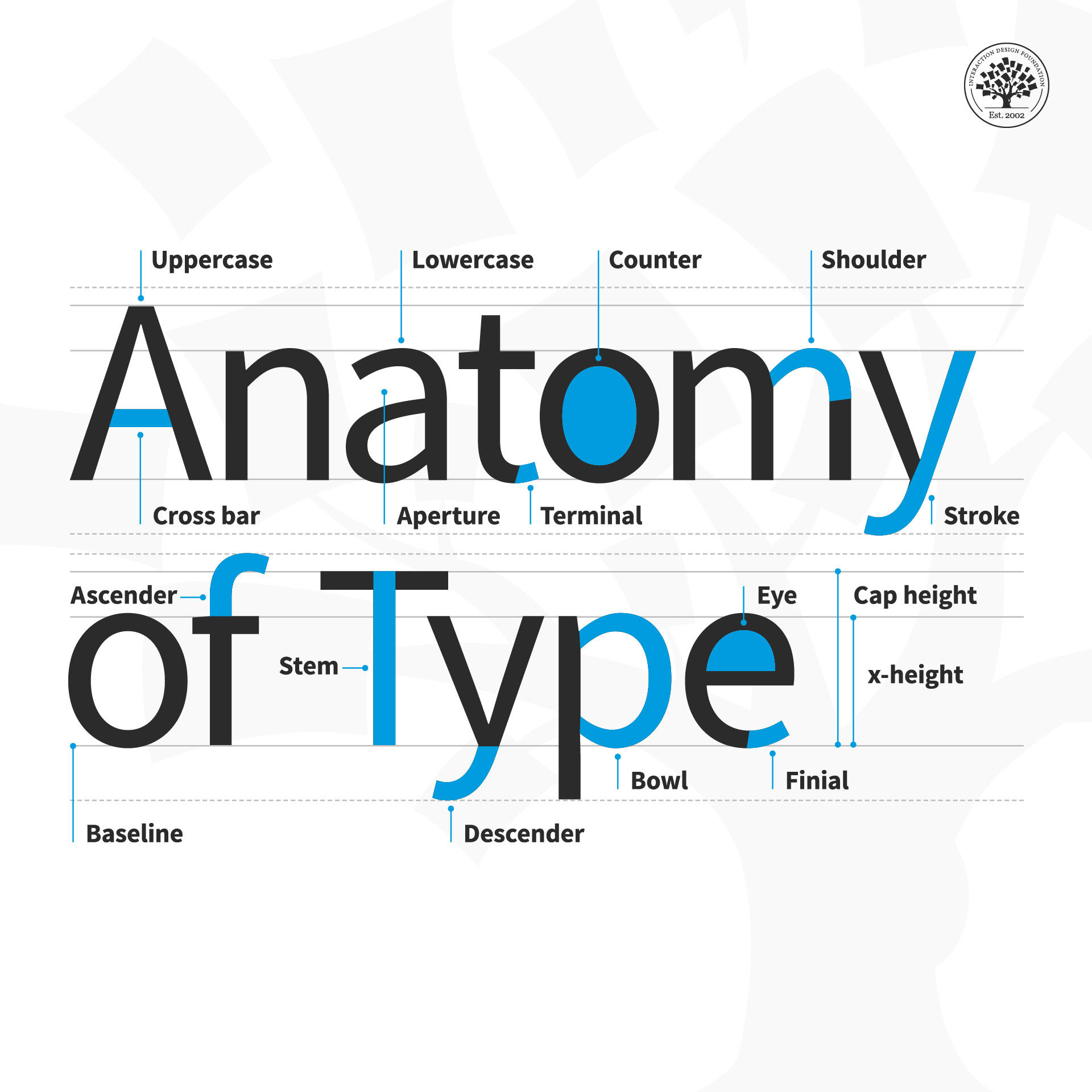
  • Aperture: The partially enclosed space of a letterform.

  • Ascender: An upward vertical stroke that extends beyond the x-height.

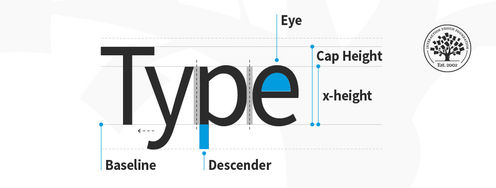
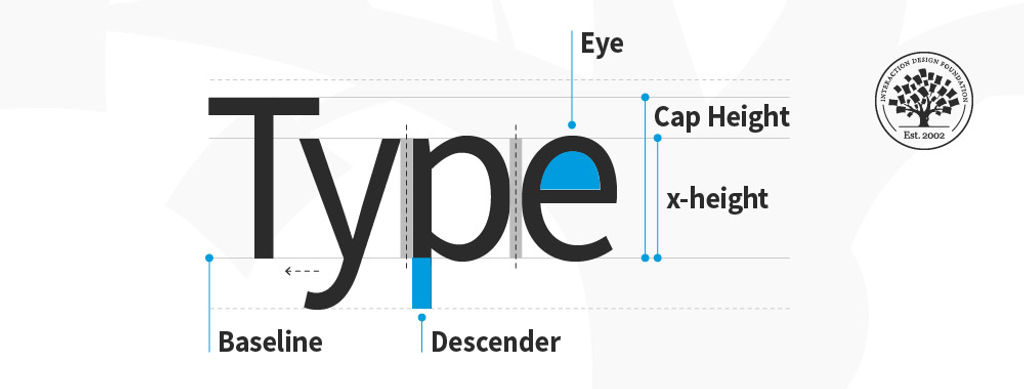
  • Baseline: The invisible line on which all letters rest.

  • Bowl: The generally round or elliptical forms which are the basic body shape of letters.

  • Cap height: The distance from the baseline to the top of the capital letter.

  • Counter: The white space enclosed by a letterform.

  • Cross bar: The horizontal stroke in letters.

  • Descender: A downward vertical stroke that extends beyond the baseline.

  • Dot: Also known as a tittle, is a small diacritic on a lowercase i or j.

  • Eye: The closed counter of a lowercase e.

  • Finial: A tapered or curved end on a letterform.

  • Ligature: Two or more letters tied into a single character.

  • Lowercase: A smaller form of letters in a typeface.

  • Shoulder: A curved stroke originating from a stem.

  • Spine: The main curved stroke of a lowercase or capital letter.

  • Stem: A main stroke that is more or less straight, not part of a bowl.

  • Serif: A stroke added to the beginning or end of one of the main strokes of a letter.

  • Small Capital: Short capital letters designed to blend with lowercase text.

  • Stroke: A straight or curved line that creates the principal part of a letter.

  • Terminal: A circular form at the end of the arm, leg or brow in letters.

  • Uppercase: A typecase containing capital letters.

  • x-height: The distance between the baseline and the height of the lowercase letter ‘x’.

  • Weight: The thickness of a font’s stroke.
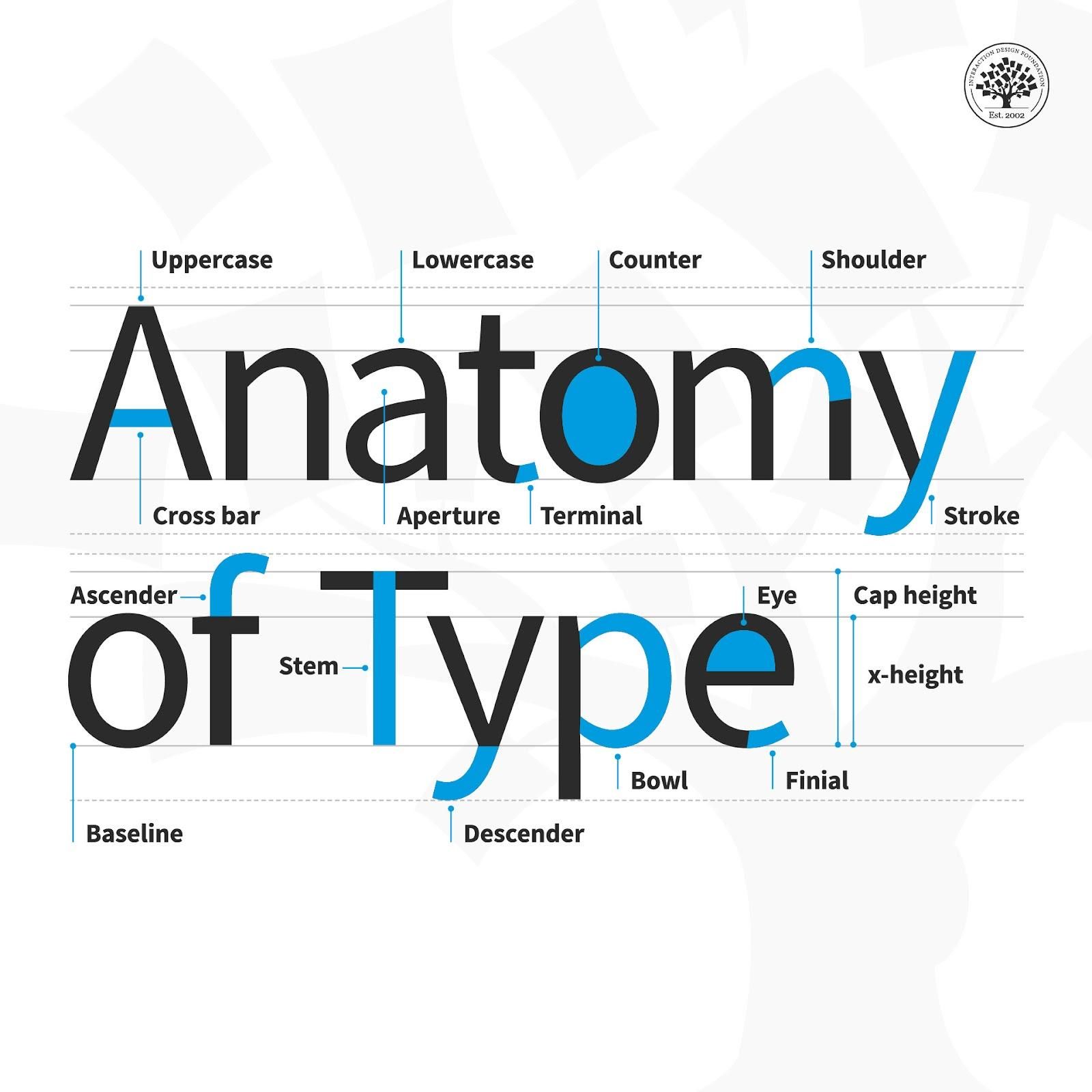
Illustration depicting the anatomy of type

© Daniel Skrok and Interaction Design Foundation, CC BY-SA 3.0

Design Tips for Type

Here are some helpful points to consider with the finer points of type:

  • Kerning – This is the adjustment of space between two individual letters. An example of bad kerning is when you use a font that has the letters so close together that (e.g.) what you typed as “kerning” shows up as “keming” (the letters get mashed together). It’s better to devote time to kerning with larger text and headlines (as opposed to smaller text and body copy). Also, if you kern one headline, be consistent and kern the others.

  • Tracking – This is the adjustment of space between a whole group of letters (rather than each one, as in kerning). You can fine-tune tracking by compacting or expanding this space to optimize your text.

  • Leading – This is the adjustment of vertical space between lines of text. While the default is typically fine, you can always fine-tune leading to make text extra-comfortable to read for your users.

  • Legibility – This refers to how easy it is to distinguish one letter from another in a particular typeface. This is the most fundamental consideration because you’ll know at a glance how legible your text is.

  • Readability – This refers to how comfortably users can read your text. Although they may be able to make out each letter, a poor choice of (e.g.) small caps use and font can slow users down or turn them off completely from proceeding with your design or product.

Here is a helpful list of common mistakes to avoid when designing with type.
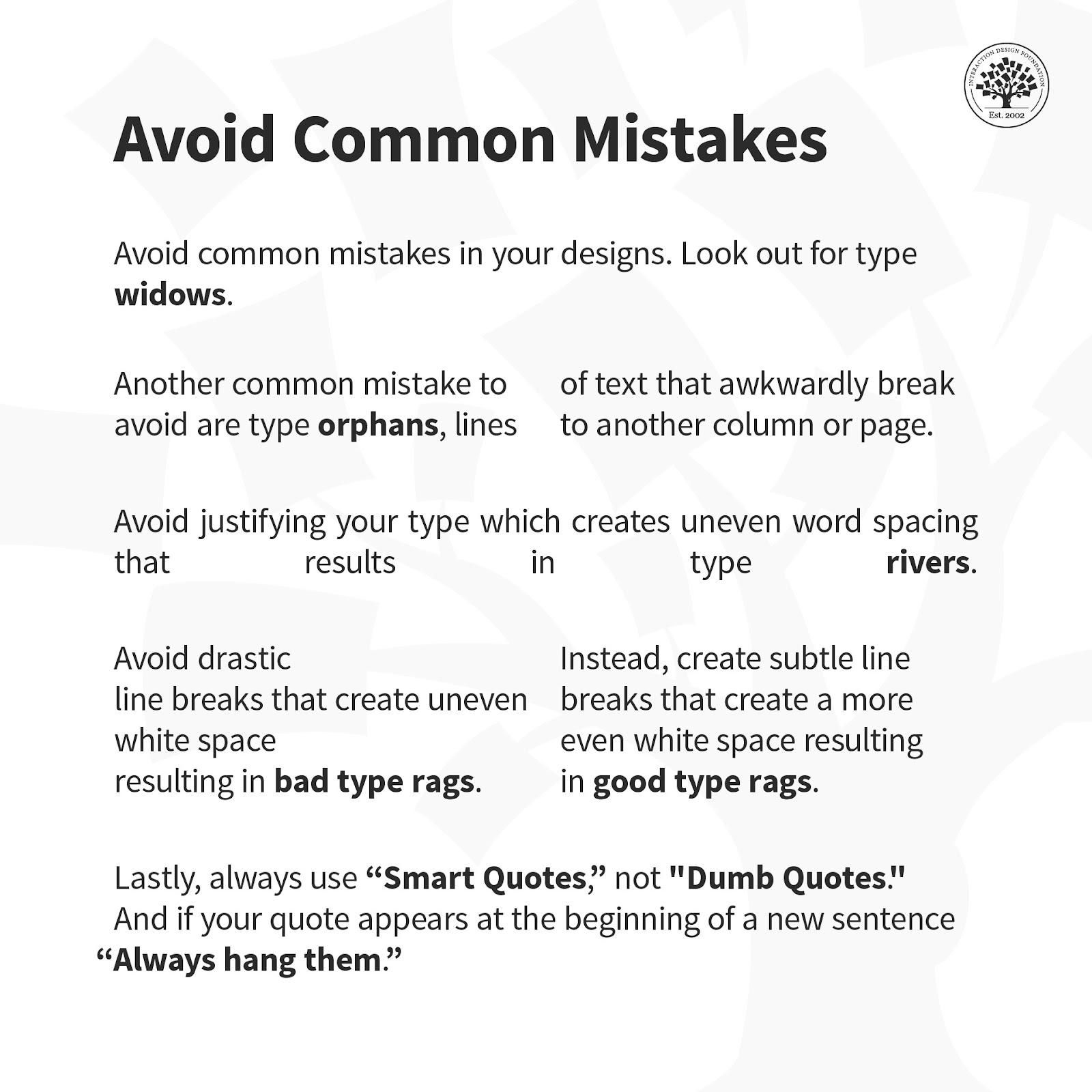
© Daniel Skrok and Interaction Design Foundation, CC BY-SA 3.0

Overall, remember that the best designs are ones where users don’t stop to think about what you’re trying to show them. That’s why your typography not only has to complement the well-thought-out wording of your messages as well as the other design elements such as your images. Text needs to present well at both the micro and macro levels, too, hence why typographic knowledge is vital to design.

Questions About Anatomy of Type?
We've Got Answers!

What is the baseline in type anatomy?

The baseline in type anatomy is the invisible line upon which letters sit. It serves as the reference point for most of the characters within a typeface. Most letters rest on the baseline, ensuring a visual consistency when typeset. The descenders in letters like lowercase ‘g’ and ‘y’ are so-called because they drop below the baseline. Baselines align text to create a uniform appearance in a body of text. They anchor the design of all the letters, enabling coherent text flow and readability. 

When typesetting, designers measure the height of x-height, ascenders, and descenders from the baseline to create balanced and harmonious typography. Watch this video for a simple example of Gestalt Principles in typography.

Transcript

Carefully selecting and arranging type elements is important to convey the intended message and emotion of the text.

What is the tail in type anatomy?

In type anatomy, the tail is the descending, often decorative stroke on certain letterforms. They are decorative flourishes, as seen in the capital letter ‘Q.’ Note that tails are related to descenders but are not the same thing. Descenders are the parts of lowercase letters that drop below the baseline. Descenders are normally used in the letters  ‘g,’ ‘j,’ 'p,’ ‘q,’ and ‘y’.

Tails vary significantly in design, length, and style across different typefaces, contributing to their unique character andaesthetic. Tails can be long and elaborate or short and straightforward, depending on the typeface’s design intention.

What are the four major font types?

The four major types of fonts are

  1. Serif Fonts: Traditional and legible with small lines at ends (e.g., Times New Roman).

  2. Sans-serif Fonts: Modern, clean, without small lines (e.g., Arial).

  3. Script Fonts: Mimic handwriting, fluid, and cursive (e.g., Brush Script).

  4. Display Fonts: Highly stylized for headings, not for body text readability.

As you read more about why web fonts are critical to the online user experience, you understand the importance of choosing the right font for your website’s readability and overall aesthetic.

What is a terminal in type?

A terminal-in-type design is the end of a stroke that does not include a serif. Terminals may take straight or curved forms and vary significantly in shape. It may influence the typeface’s overall feel. You can find them in letters with curved strokes, like ‘f’ or ‘c.’ They have a defining characteristic in serif and sans-serif typefaces. Terminals add a stylistic touch and contribute to the readability of a font by guiding the reader’s eye along the letterforms.

What are the numbers in type anatomy?

In type anatomy, numbers, often referred to as numerals, have distinct qualities. They come in two main styles: lining and old style. Lining numerals align with the uppercase letters’ cap height and baseline, making them uniform with the rest of the type. 

Old-style numerals come in different heights. Some go above the x-height, others drop below the baseline, like uppercase and lowercase letters. In typography, numerals have special terms like ascender, descender, and x-height. These terms define their shape and readability in a typeface and correspond to similar features in letters.

What are the holes in letters called?

“Counters” name the holes in letters, referring to the open spaces within them. These spaces include the fully enclosed areas inside letters like ‘o’ and ‘b,’ and the partially open spaces in letters like ‘c’ and ‘e.’ Counters critically influence type design by affecting a typeface’s legibility and overall look. The counters’ size and shape are pivotal in shaping perceptions of a typeface as open and airy or dense and solid. They are essential elements in typography that significantly enhance a font’s readability, especially in small or extensive texts.

Transcript

What is a curving stroke of S called in typography?

In typography, the “spine” describes the curving stroke of an “S.” This spine gives the “S” its distinctive sinuous shape and stands as the central curve defining its form. The spine’s elegance or strength adds to the typeface’s overall style and energy. Designers meticulously craft a well-designed spine to balance the “S” with the alphabet’s other characters, ensuring aesthetic appeal and readability. This feature is crucial for the dynamism and harmony of the typeface. Watch the informative video to enhance your typography skills and delve deeper into the differences between fonts and typefaces.

Transcript

What is a spur in a typeface?

A spur in a typeface acts as a slight projection or pointed part that juts out from the primary stroke of a letter. Letters such as ‘G’ and ‘a’ often feature spurs, providing a unique flair and assisting in character recognition. In serif typefaces, spurs stand out, adding to the font’s style and personality. While less prominent in sans-serif typefaces, they still offer letters a distinct appearance. The design and inclusion of a spur can influence a typeface’s readability and aesthetics, making it particularly important in display fonts where you focus on details. 

What is an arm in a typeface?

In typography, an arm is a horizontal or upward-sloping stroke not connected at one end. This sets it apart from a crossbar, which connects two sides of a letter. You can find arms in letters like the uppercase’ E,’ ‘F,’ and the lowercase’ t.’ The arm’s design—its thickness, length, and curvature—adds character and visual interest, influencing a typeface’s style and readability. It plays a vital role in the balance and legibility of the letterform, making it an essential element in type design.

The UX Designer’s Guide to Typography explains different typography terms, classifications, and styles in detail.  

Where to learn more about the anatomy of type?

You can take the visual design course to understand more about the anatomy of type. This course offers insights into the anatomy of type, which is essential for anyone interested in design. It guides you in selecting typefaces and effectively using them in communication. Leading experts teach this course and provide high-quality, industry-relevant knowledge. You’ll gain practical skills and create a portfolio case study, enhancing your understanding and showcasing your expertise in typography. This course is a valuable resource for grasping the complexities and nuances of type anatomy.

Earn a Gift Earn a Gift, Answer a Short Quiz!

1
2
3
4
1
2
3
4
Question 1
Question 2
Question 3
Get Your Gift
Interaction Design Foundation logo

Question 1

What is the baseline in typography? 

1 point towards your gift

  • The partially enclosed space inside a letterform
  • The distance between the top of a lowercase letter and the baseline
  • The line on which all letters rest
Interaction Design Foundation logo

Question 2

What does the x-height of a typeface refer to? 

1 point towards your gift

  • The distance from the baseline to the top of capital letters
  • The vertical space between two lines of text
  • The distance from the baseline to the top of a lowercase 'x'
Interaction Design Foundation logo

Question 3

What is a ligature in typography? 

1 point towards your gift

  • The horizontal stroke found in letters such as ‘A’ and ‘H’
  • Two or more letters combined into a single character
  • A small capital letter used in place of a lowercase letter

Learn More About Anatomy of Type

Make learning as easy as watching Netflix: Learn more about Anatomy of Type by taking the online IxDF Course Visual Design: The Ultimate Guide.

Why? Because design skills make you valuable. In any job. Any industry.

In This Course, You'll

  • Get excited when you use visual design principles to create impressive visuals people love! Great visual design makes the message clear, memorable, and persuasive—whether it's an app, a logo, or a presentation slide. You'll learn what makes a design excellent and how science and culture influence what works and what doesn't. You'll create designs that truly connect with people. Visual design isn't just about beauty—it's about shaping ideas that inspire action, build trust, and give meaning to your work. As AI makes visual production faster and cheaper, you stay in demand when you can turn rough or AI-generated visuals into successful designs that get approved, adopted, and used. If you want to stand out with timeless human-centered design skills, this course is for you.

  • Make yourself invaluable with practical design skills that amplify your impact in any industry! Did you know that you only have 50 milliseconds to make a good first impression? Great visual design ensures you pass the test every time. You'll learn to use visual elements to guide emotions, influence purchasing decisions, and optimize User Experience (UX) and User Interface (UI) design. You'll master color theory, typography, and grid systems to improve usability, build credibility, and create designs that stop the scroll.

  • Gain confidence and credibility as you fast-track results with step-by-step exercises and downloadable templates! Complete optional tasks to walk away with portfolio-ready case studies that will help you land your dream job and advance your career. You'll get hands-on and design a low-fidelity wireframe, apply a monochromatic, complementary, or triadic color scheme, choose typefaces, and select a grid system. It's easier than you think! No matter your background, you can master Visual Design. With clear guidance and real-world examples, you'll apply your skills right away. This course will give you the visual design skills you need to solve design challenges, collaborate smarter, and make it easy for decision-makers to say yes to your vision.

It's Easy to Fast-Track Your Career with the World's Best Experts

Master complex skills effortlessly with proven best practices and toolkits directly from the world's top design experts. Meet your experts for this course:

  • Mia Cinelli: Associate Professor of Art Studio and Digital Design at the University of Kentucky.

  • Joann Eckstut: Color Consultant, Founder of The Roomworks, and one of the 12 designers chosen by the Color Association of the USA to create the yearly forecast used by industries to keep up with color trends.

  • Arielle Eckstut: Author, Agent-at-large at the Levine Greenberg Rostan Literary Agency, and Co-Founder of The Book Doctors and LittleMissMatched.

Get an Industry-Recognized IxDF Course Certificate

Increase your credibility, salary potential and job opportunities by showing credible evidence of your skills.

IxDF Course Certificates set the industry gold standard. Add them to your LinkedIn profile, resumé, and job applications.

Course Certificate Example

Be in distinguished company, alongside industry leaders who train their teams with the IxDF and trust IxDF Course Certificates.

Our clients: IBM, HP, Adobe, GE, Accenture, Allianz, Phillips, Deezer, Capgemin, Mcafee, SAP, Telenor, Cigna, British Parliament, State of New York

All Free IxDF Articles on Anatomy of Type

Read full article
What Is Type Anatomy? - Article hero image
Interaction Design Foundation logo

What Is Type Anatomy?

Typography has its very own language. It’s full of typographic terms that make up its basic anatomy. Just like it’s vital for your doctor to learn human anatomy to make an informed diagnosis, it’s important for you to understand the anatomy of type to use it effectively.Let’s begin with the basics o

Social shares
828
Published
Read Article

What Is Type Anatomy?

What Is Type Anatomy?


Typography has its very own language
. It’s full of typographic terms that make up its basic anatomy. Just like it’s vital for your doctor to learn human anatomy to make an informed diagnosis, it’s important for you to understand the anatomy of type to use it effectively.

Let’s begin with the basics of anatomy. Designer and educator Mia Cinelli will help us understand.

Transcript

Understanding all these terms can be a bit confusing, so we’ve created a comprehensive list that will help guide you through the common anatomy of type terms. 

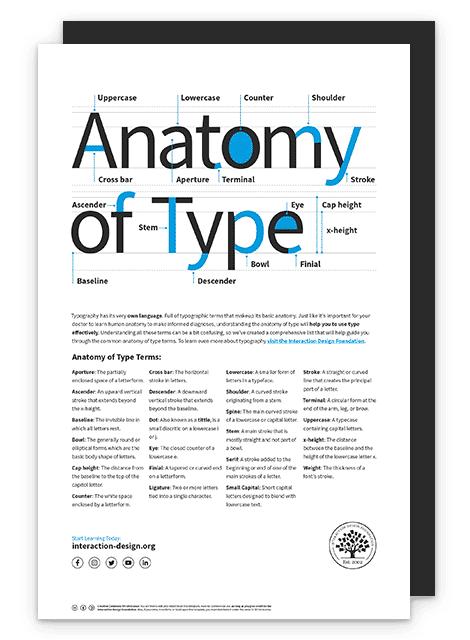
Illustration depicting the anatomy of type

© Daniel Skrok and Interaction Design Foundation, CC BY-SA 3.0

Anatomy of Type Terms

  • Aperture: The partially enclosed space of a letterform.

  • Ascender: An upward vertical stroke that extends beyond the x-height.

  • Baseline: The invisible line on which all letters rest.

  • Bowl: The generally round or elliptical forms which are the basic body shape of letters.

  • Cap height: The distance from the baseline to the top of the capital letter.

  • Counter: The white space enclosed by a letterform.

  • Cross bar: The horizontal stroke in letters.

  • Descender: A downward vertical stroke that extends beyond the baseline.

  • Dot: Also known as a tittle, is a small diacritic on a lowercase i or j.

  • Eye: The closed counter of a lowercase e.

  • Finial: A tapered or curved end on a letterform.

  • Ligature: Two or more letters tied into a single character.

  • Lowercase: A smaller form of letters in a typeface.

  • Shoulder: A curved stroke originating from a stem.

  • Spine: The main curved stroke of a lowercase or capital letter.

  • Stem: A main stroke that is more or less straight, not part of a bowl.

  • Serif: A stroke added to the beginning or end of one of the main strokes of a letter.

  • Small Capital: Short capital letters designed to blend with lowercase text.

  • Stroke: A straight or curved line that creates the principal part of a letter.

  • Terminal: A circular form at the end of the arm, leg or brow in letters.

  • Uppercase: A typecase containing capital letters.

  • x-height: The distance between the baseline and the height of the lowercase letter ‘x’.

  • Weight: The thickness of a font’s stroke.

Advance Your Career With This Free Template for “Anatomy of Type”
Anatomy of Type
We respect your privacy
Get 1 powerful email each week: Design a life you love!

The Take Away

As Mia mentioned, type has anatomy. It has its very own language full of serifs, shoulders and stems. Whether you’re an aspiring designer or a typography enthusiast, learning the building blocks of typography will help you apply it effectively within your designs. 

Remember, all letters rest on an invisible line known as the baseline. The distance between the baseline and the height of the lowercase letter ‘x’ is the x-height. And the distance between the baseline and the top of the capital letter is the cap height. Some letters extend beyond the baseline and x-height. These vertical strokes are known as ascenders and descenders.

The thickness of a letter's stroke determines its weight. Letters may appear in capital letters known as uppercase, in smaller forms known as lowercase, or in short capital letters designed to blend with lowercase text known as small capitals.

A stroke is a straight or curved line that creates the principal part of a letter. A curved stroke originating from a stem is a shoulder. A stroke that is more or less straight is a stem. A curved stroke is a spine. The horizontal stroke in letters is known as a cross bar.

A bowl is a rounded stroke that forms the basic body shape of letters. The white space enclosed by a letterform is known as a counter. The partially enclosed space of a letterform is known as the aperture. An eye is the closed counter of a lowercase ‘e’.

Two or more letters tied into a single character are known as ligatures. A dot, also known as a tittle, is a small diacritic on a lowercase i or j.

A stroke added to the beginning or end of a letter is a serif. Similarly, a tapered or curved end on a letterform is a finial and a circular form at the end of the arm, leg or brow in letters is known as a terminal.

Now that you understand the anatomy of type, take what you learned and handle type that much better than before.

References and Where to Learn More

Learn more about the Typography by reading this thoughtful book by Ellen Lupton:
Ellen Lupton. Thinking with Type. 2010. (Link)

Learn more about Type Anatomy at Thinking With Type.

Understanding Typography by visiting Google Material Design:

Practice Shaping Letters in this interactive game.

Image

© Daniel Skrok and Interaction Design Foundation, CC BY-SA 3.0

Feel Stuck?
Want Better Job Options?

AI is replacing jobs everywhere, yet design jobs are booming with a projected 45% job growth. With design skills, you can create products and services people love. More love means more impact and greater salary potential.

At IxDF, we help you from your first course to your next job, all in one place.

See How Design Skills Turn Into Job Options
Privacy Settings
By using this site, you accept our Cookie Policy and Terms of Use.
Customize
Accept all

Be the One Who Inspires

People remember who shares great ideas.

Share on:

Academic Credibility — On Autopilot

Don't waste time googling citation formats. Just copy, paste and look legit in seconds.