Stories of use help you define and communicate user needs by using narrative descriptions that show how specific people interact with products, services, or experiences to achieve meaningful goals. These stories often draw from user research, which provides structure and focus to create products based on how real people actually behave, what motivates them, and what they try to accomplish. However, not all stories start from research; some are based on assumptions, particularly in contexts where research budgets are limited or teams need to move quickly.
The term encompasses any narrative method that uses storytelling to connect user understanding with design decisions, from a quick sketch to formalized methods like user stories. When you base your decisions on a user's context and goals, you communicate more effectively with your team and build experiences that truly matter to your users.
In this video, William Hudson, User Experience Strategist and Founder of Syntagm Ltd, explains how use cases, a type of stories of use, bridge the requirements-to-design gap.
Why Stories of Use Help You Manage Complexity and Communicate Clearly
Stories of use are planning and communication tools that help you translate abstract requirements into concrete descriptions of how people actually use your system. This makes requirements easier to understand, discuss, and validate with your team.
When you base stories on user research, they also help you build empathy and drive design decisions rooted in real user needs. Research-based stories give you confidence that you're solving actual problems. Assumption-based stories help you move forward when research isn't available, and you can refine them as you learn more.
Bridge the Gap Between Requirements and Design
One of their main strengths is that stories of use fill the requirements-to-design gap. By describing interactions between your system and users, you can reason about how your solution should behave before you commit to specific designs or implementations.
Reveal What Your System Must Do
Stories focus on functional requirements: what users try to achieve and how your system supports those goals. This helps you avoid jumping straight to UI decisions or implementation details before you understand the core interactions.
Support Collaboration Through Shared Language
Stories give your team a common reference point. Instead of debating features in isolation, developers, designers, and stakeholders can discuss concrete scenarios and agree on how the system should respond in specific situations. This alignment reduces miscommunication and keeps everyone focused on user goals.
Reduce the Risk of Hidden Complexity
More detailed stories make it harder for large, complex requirements to hide behind short descriptions. When you write out the full interaction, you spot complexity early and avoid surprises later in development. This is especially valuable with use cases and detailed scenarios that expose alternative flows and edge cases.
For example, instead of a vague requirement like "users need checkout," you write a story: "Maria adds items to her cart, proceeds to checkout, applies her discount code, and completes payment." Now you can see all the steps involved, identify potential problems, and discuss solutions with your team before you build anything.
Different Types of Stories of Use: Choose the Right One for Your Situation
Stories of use is an umbrella term for any narrative method you use to communicate user needs, behaviors, and goals. What matters is that you use storytelling to connect user understanding with design decisions.
The main differences between story formats are their form (visual versus text) and level of detail. Some situations call for rich, comprehensive narratives. Others need lightweight placeholders that keep teams aligned during fast-moving sprints. You choose based on what your team needs to move forward confidently.
Ideally, your stories should come from research: Evidence about real user behaviors and needs. In practice, budget constraints, tight timelines, or organizational culture often mean you'll need to work with assumptions instead. Research is always preferable, but assumptions let you move forward when research isn't an option. Most teams end up using a mix: Starting with assumptions to build momentum, then validating and refining with research as resources allow.
User Stories
These originated in Extreme Programming in 1998 and work well in development sprints but lack the contextual richness you need for early design exploration. User stories follow the Agile format:
As a [user type], I want to [action] so that [benefit].
User stories provide a lightweight way to capture requirements without extensive documentation. The brevity of user stories makes them easy to write and discuss, but this same brevity can hide complexity until implementation begins.
When to use them: User stories work well when your team already understands the problem domain and needs simple placeholders for conversations during agile sprints. They work best with developers who need quick reference points for building features.
Persona Stories
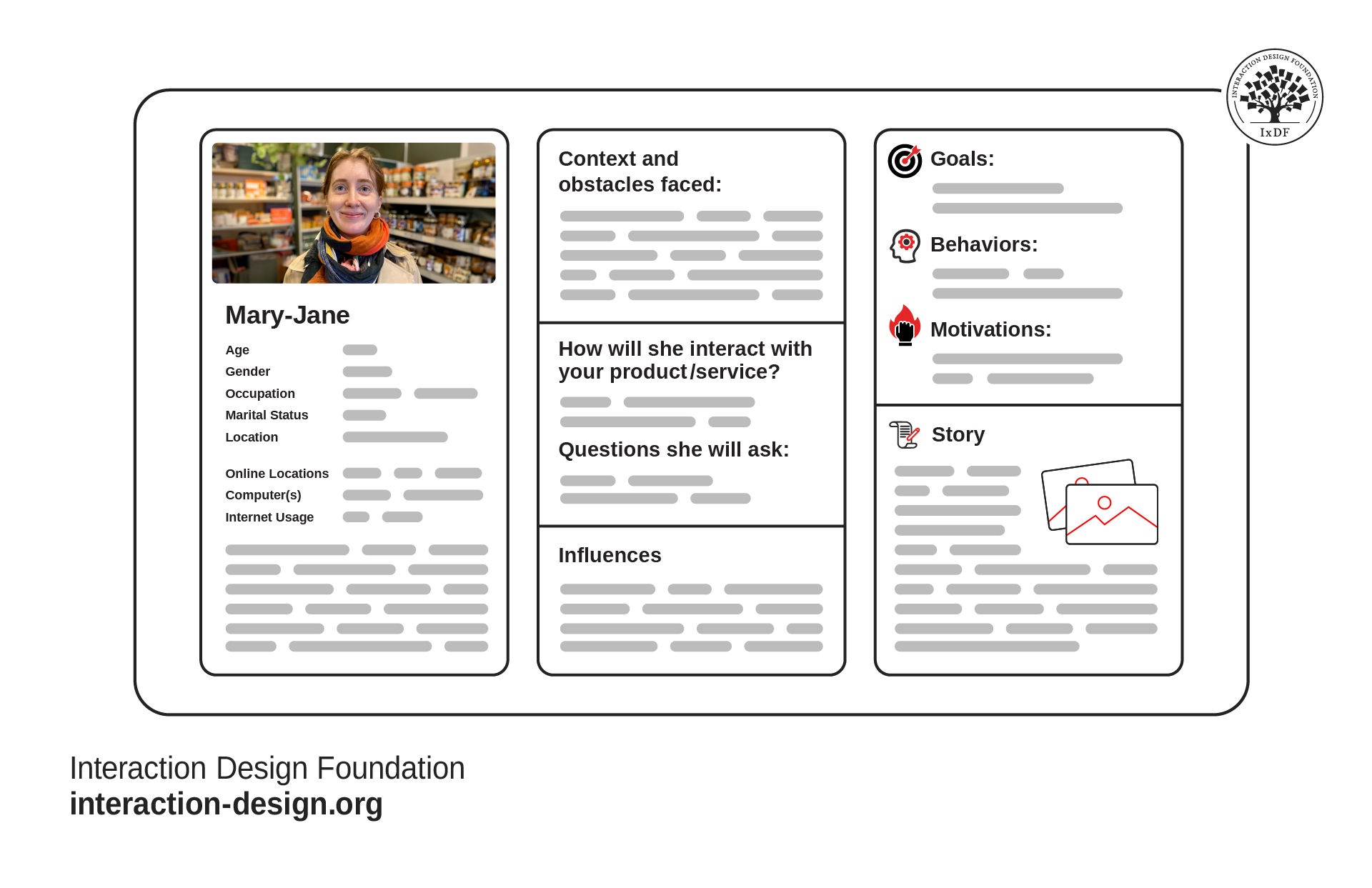
Personas are research-based representations of user types that embody specific behaviors, motivations, and goals. When you build persona stories around these characters, you create narratives grounded in real user research rather than assumptions.
© Interaction Design Foundation, CC BY-SA 4.0
To address the limitations of user stories, William Hudson introduced persona stories, which incorporate research-based personas and provide both what the user should do and the rationale for it. While Hudson formalized this approach with a specific name, similar methods exist across the industry, sometimes under different names or with no formal label at all. These produce descriptive rather than prescriptive interactions based on user research.
When you use persona stories, you create richer narratives that explain user motivation, not just desired outcomes. The research foundation ensures that personas represent real user behaviors and needs rather than stereotypes or assumptions. This approach helps teams maintain empathy throughout the design process.
When to use them: Use persona stories during early design when you need rich context about user motivations and behaviors. They work especially well when your team needs to maintain empathy throughout the design process and understand not just what users do, but why they do it.
In this video, William Hudson explains how persona stories differ from user stories and why they focus on researched behaviors rather than generic roles.
Use Cases
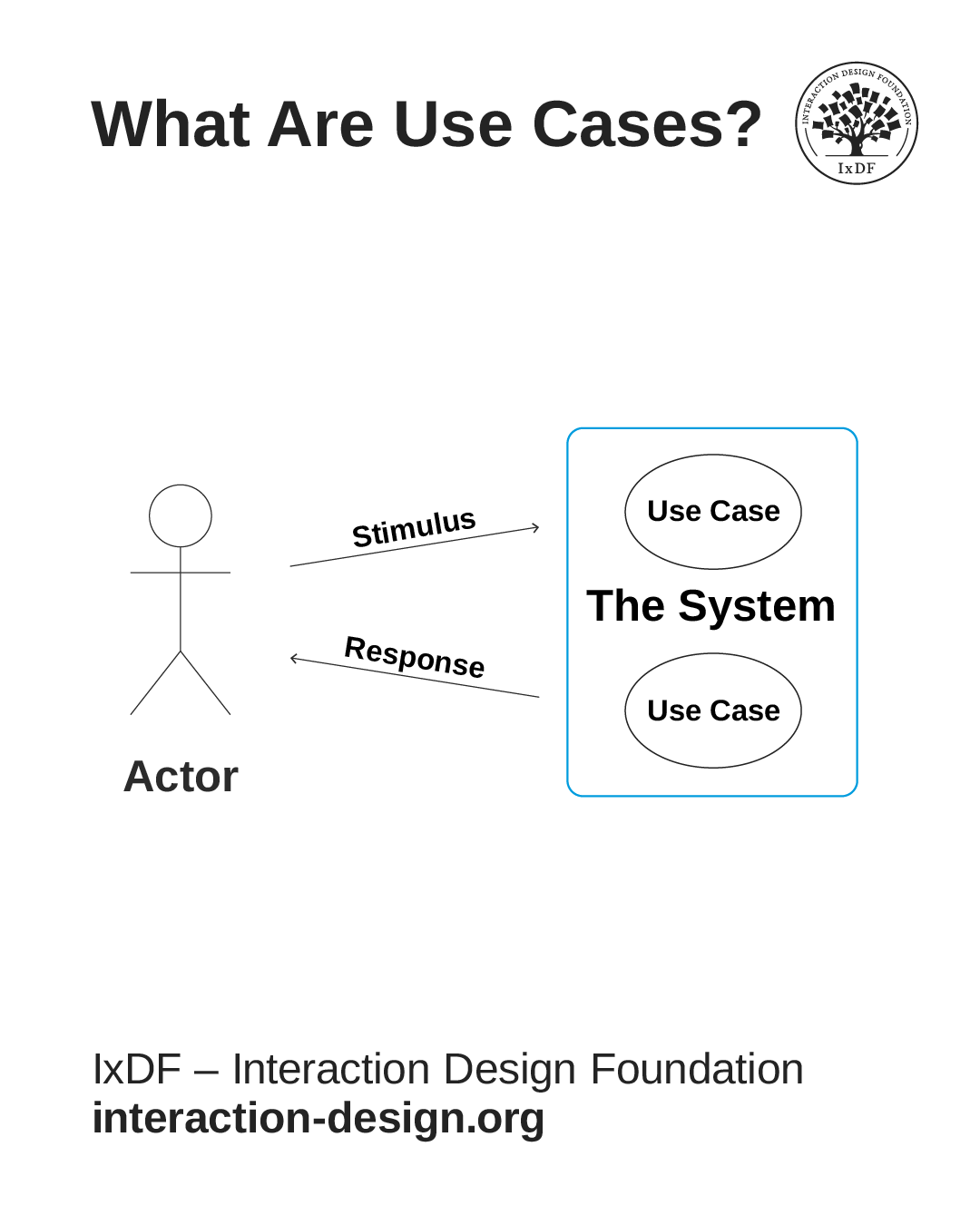
The basic components of a use case: The actor (who uses the system), the system boundary (what you're building), the use cases inside (goals the actor can achieve), and arrows that show communication between actor and system.
© Interaction Design Foundation, CC BY-SA 4.0
Use cases provide comprehensive, structured documentation of every step in a system-user interaction, which includes alternative flows and exception handling. They emerged from software engineering and became central to methodologies like UML (Unified Modeling Language).
Use cases give you detailed, technical descriptions of system behavior, but are often too detailed for design concept exploration. You use them when you need to document complex interactions or when you work with engineering teams who require precise specifications. The structured format ensures nothing gets overlooked during implementation.
When to use them: Use cases work well when you need to document complex interactions or when you work with engineering teams who require precise specifications. They're ideal for technical stakeholders who need complete documentation of system behavior, including all edge cases and error handling.
Scenarios
Scenarios are rich narrative descriptions that are common in academic HCI literature. They capture context, motivation, and emotional state; not just what users do, but why they do it. You can elaborate scenarios at different resolutions:
A cognitive view conveys moment-to-moment thoughts and experiences
A functional view focuses on actions.
An implementation view describes hardware and software components.
Scenarios let you explore the emotional dimensions of user experience. When you describe not just actions but feelings, frustrations, and delights, you design with empathy. The narrative format makes abstract concepts concrete and helps stakeholders understand user needs more deeply than requirement lists alone can achieve.
When to use them: Use scenarios during ideation and concept exploration when you need to evaluate how well different design directions support user goals. They work best with cross-functional teams who need to understand the full context of user experiences, including emotional states and motivations.
Storyboards
Storyboards provide visual, sequential representations of user journeys. Storyboards consist of sequences of drawings or images that show a user's interactions with a product and portray the user's emotions and challenges. You can use storyboards to convey usability test findings, enrich journey maps, and support ideation.
Visual storytelling helps non-designers understand user experiences quickly and emotionally. Storyboards make abstract concepts tangible and create shared understanding across diverse team members. The visual format also reveals gaps or inconsistencies that might remain hidden in text-only descriptions.
When to use them: Use storyboards when you need to communicate with stakeholders who have little knowledge of user needs or when working with non-designers who need to visualize how users will interact with your product. They're ideal for presentations to executives, clients, or anyone who needs to grasp user experiences quickly without reading detailed documentation.
As you begin writing stories of use, you need a practical structure to ground your narratives in user research. This template provides a comparison of user and persona stories, along with a worksheet to guide you in crafting effective persona stories.
How Stories of Use Connect to Requirements
All design begins with requirements. As a designer, you help shape them around not just user needs, but also organizational goals, market competition, and constraints like app store approval or accessibility standards.
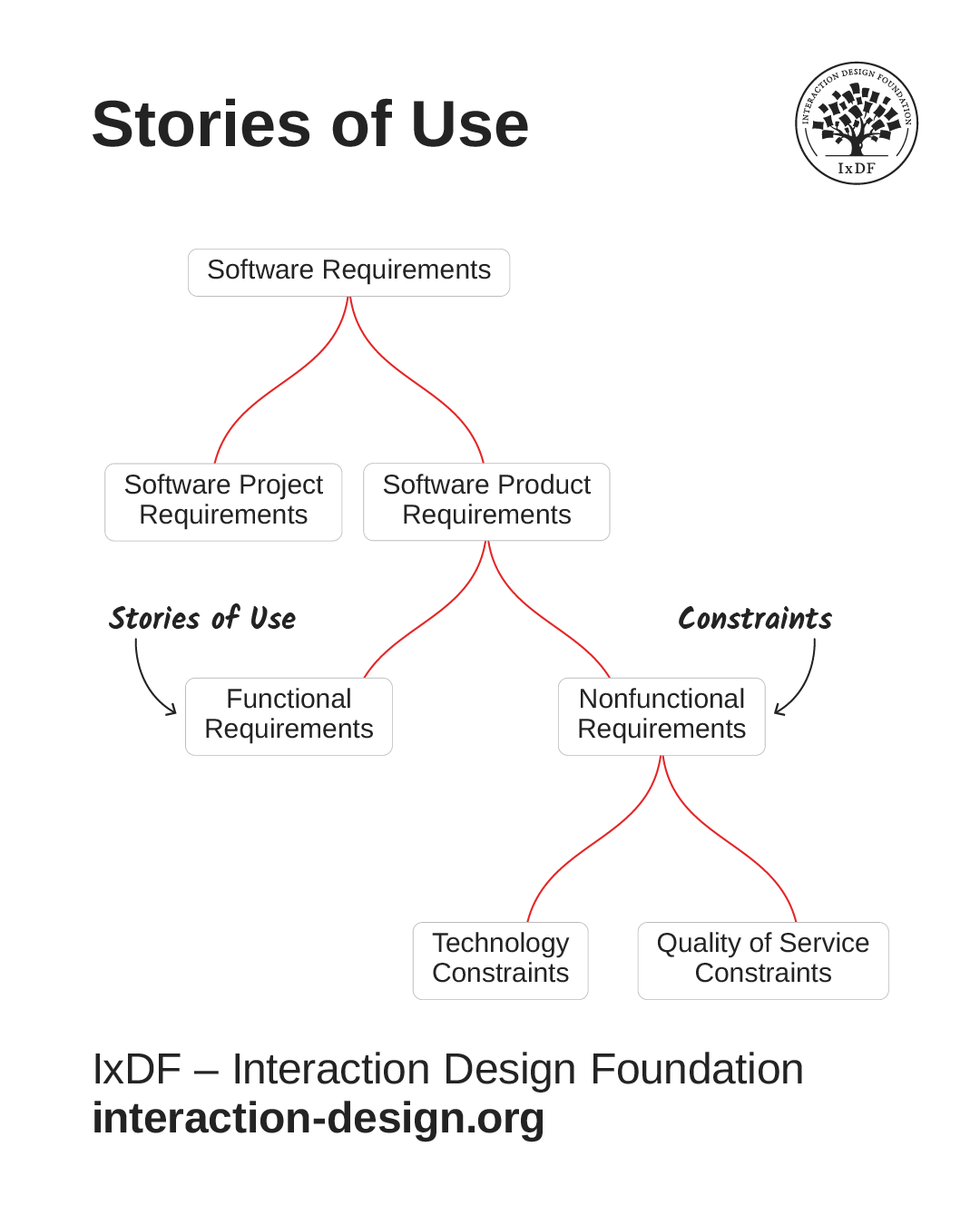
Good design must satisfy non-functional and functional requirements to be effective. Non-functional requirements are known as constraints, while functional requirements are mostly found through stories of use.
© Adapted from the Software Engineering Book of Knowledge V4 by Interaction Design Foundation, Fair use
Functional requirements are things that a solution must do. You can express each requirement as a story of use. For example, “users must be able to create an account and log in”, or “customers can add items to a basket and complete a purchase.”
Non-functional requirements (also called constraints) are requirements that shape your solution, such as “must work as an app on Android and iOS”, or “meets WAI WCAG 2.x Guideline at level AA.” These matter for two critical reasons:
They're often make-or-break for your solution to get accepted by app stores or meet legal requirements.
They ensure your product is accessible and usable for as many people as possible.
When you design with accessibility standards in mind, you create experiences that work for users with different abilities, devices, and contexts. This means more people can benefit from what you build
Best Practices for Stories of Use
Stories of use don’t have a specific prescribed form. They can range from sketches on a napkin to elaborate graphics panels. Most are simple prose, perhaps with some sketches or photos.
However, certain characteristics make stories more useful:
Provide meaningful context: You do not need elaborate backstory, but if aspects of the story are important to your design, the context should support these. If you try to make a goal quick or easy, the context should suggest a situation where speed or simplicity matters.
Show interactions, not just intentions: Describe a user who performs a series of actions with your solution. Show the back-and-forth between person and system, not just what someone wants to accomplish.
Use concrete details: Vague stories produce vague designs. Instead of "a user wants to find information," write "Martha opens the app during her morning commute to check if her usual train is delayed."
Focus on an individual: Stories should be about one person, either real (a research participant) or a representation of a user group (a persona). It is easier to empathize with an individual than with an abstract "user group."
This focus on individuals isn't just intuition. Research shows that people respond more strongly to stories about specific individuals than to stories about groups. In this video, William Hudson, explains the psychological evidence behind why individual stories create stronger empathy and more actionable design insights.
Here's an example story of use that demonstrates key principles:
"A.J. arrives at the meeting and opens a new journal document. As she writes notes she makes work items clear by highlighting them in yellow. Halfway through the meeting she adds the title 'Meeting Notes' and saves it in her 'My Notes' directory. At the end she publishes the notes so she can share them with the other participants."
How to Identify Stories of Use from User Goals
User research often reveals broad, high-level goals like "find a hotel for my vacation" or "manage my team's workload." Goals are often hierarchical, ranging from high-level intentions to specific actions. User research uncovers higher-level goals at the top, but you create stories of use from the actionable goals at the bottom two levels.
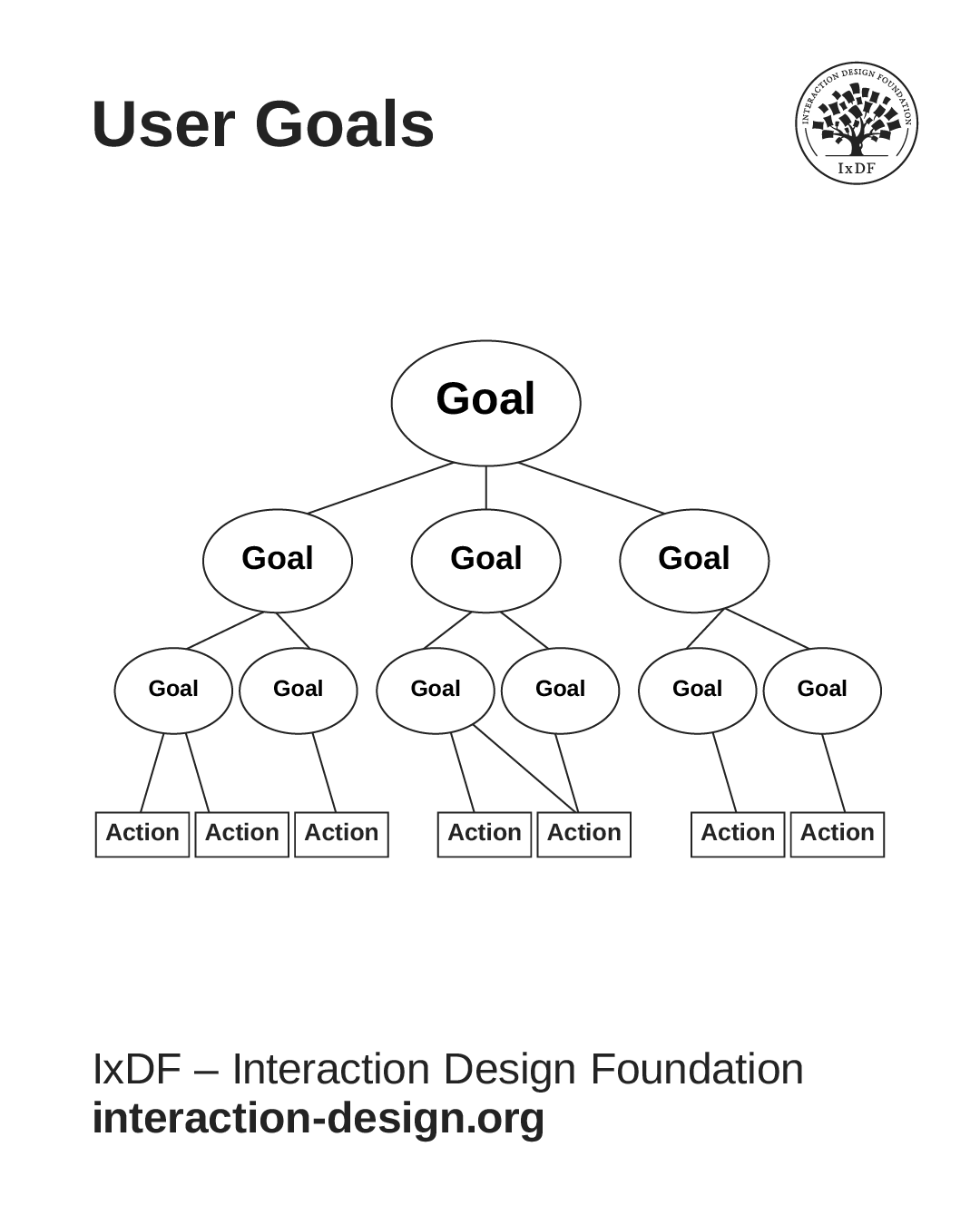
Goals form a hierarchy, from high-level intentions to specific actions. User research uncovers higher-level goals at the top, but you create stories of use from the actionable goals at the bottom two levels.
© Interaction Design Foundation, CC BY-SA 4.0
Goals that consist mostly of sub-goals are called epics. An epic is a user goal that's too large to implement as a single story. The problem with epics is they hide complexity. When you leave a goal at the epic level, you can't see all the interactions involved, which makes it impossible for developers to estimate effort or build confidently.
Consider a hotel checkout example. "Jane checks out of the hotel" is an epic that contains several sub-goals: Jane reviews charges, Jane provides payment details/confirmation, Jane requests an invoice, and Jane fills out the guest satisfaction survey.
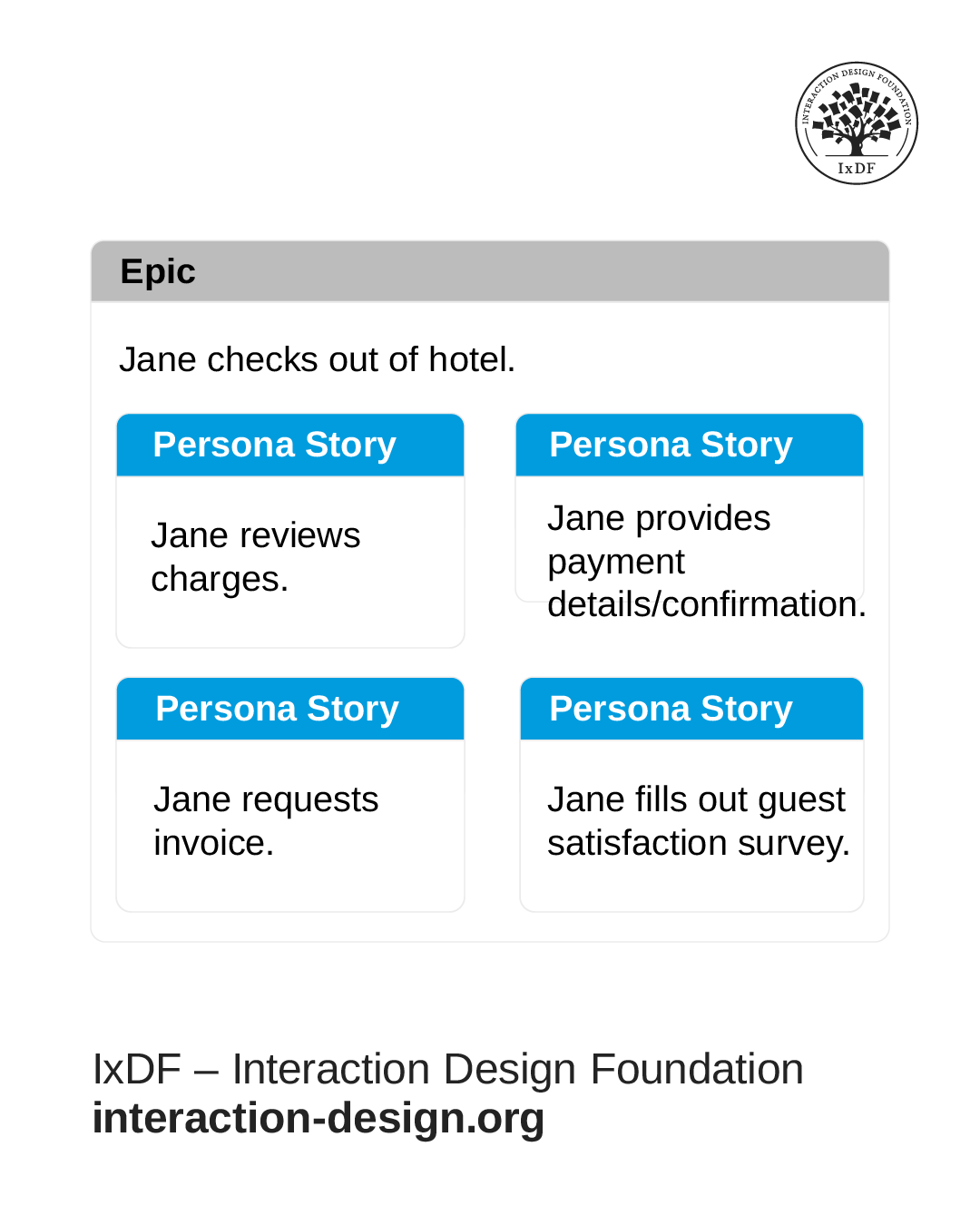
When you break an epic down into smaller persona stories it helps you focus on specific user goals while maintaining the bigger picture of what users need to accomplish.
© Interaction Design Foundation, CC BY-SA 4.0
Each checkout story sits at a level where it mostly involves actions rather than more sub-goals. This is the right granularity for development. In early design, you might describe the overall process in one story. But by implementation, this epic needs to become individual stories of use that appear in the development team's backlog.
When to Use Stories of Use: Research, Ideation, and Development
You will encounter or create stories of use throughout the development of an interactive product or service.
During Research: Capture Current Reality
In the research phase, you collect stories of use from participants. These stories describe how people solve problems now, with or without technological assistance. Document real workflows, workarounds, tools they use, and pain points as users describe them.
For example, you might learn: "Sarah receives client requests via email, copies them into a spreadsheet, then manually checks inventory in a separate system before responding." This story captures her actual process and reveals inefficiencies your design could address.
These research-based stories help you translate findings into concrete narratives your team can reference. They preserve user language and mental models, which provides valuable insight into how users think about their work and what matters most to them. Pay attention to the nouns and actions users naturally use, these reveal the concepts and tasks that should shape your design decisions.
During Ideation: Explore Possibilities
In ideation, you develop design ideas and test them with stories of use. You transform the as-is stories from research into future possibilities. Ask "what if?" questions about alternative ways your system could support users.
Using the example above, you might create: "Sarah receives a client request, clicks 'Check Availability' in the system, which automatically queries inventory and suggests response text. She reviews, adjusts if needed, and sends the reply." This future story lets you evaluate whether your proposed solution truly improves her workflow.
Compare different design directions by imagining how each would change the story. This helps you evaluate ideas based on how well they support user goals, before you commit to specific UI details. You can also reveal edge cases early. For instance, what happens if inventory data is unavailable when Sarah checks?
During Prototyping and Implementation
As you create prototypes, use stories to guide what your prototype must support and demonstrate. Check that your design actually enables complete, coherent user activities.
Test stories with real users, especially those your primary personas represent. Use card sorting or paper prototyping to verify that the terms and concepts make sense. For the example above, you'd prototype the "Check Availability" interaction and test whether Sarah can successfully complete the story with your design.
In implementation, stories become backlog items that teams assign to sprints. They help align designers and developers on expected system behavior and prevent hidden epics by making complexity visible before development begins.
Across all stages, stories provide continuity. They ensure that what you build stays grounded in real use, not disconnected features or screens.
The Professional Value of Stories of Use
Stories of use provide tangible outcomes when you use them to evaluate design decisions against real user needs. The most effective practitioners treat stories of use not as documentation artifacts but as live tools to maintain user focus.
Over time, this approach earns you recognition as a thoughtful, evidence-driven designer: someone trusted to translate real user needs into tangible results. When you master stories of use, you develop a reputation as someone who brings structure, empathy, and clarity to complex problems. That ability becomes your edge: the mark of a designer who can turn insight into impact.