Eye tracking is—pretty much—just what it sounds like, and eye tracking technology measures and analyzes eye movements to show what captures visual attention when a person’s being measured this way, so read on about this technique—including what it can help with, its limitations, and more—as it’s a handy way to help you understand how you take what you find with it and then enhance user interfaces and product designs.
What is Eye Tracking, and How Does it Work?
Eye tracking technology is helpful to show what’s going on in a user interface (UI) because it observes and records where and how a person who’s being measured’s eyes move, through sensors and cameras that detect the eyes' position and movement as they look at something. What happens is the system shines infrared light on the eyes, and this light is what makes reflections on the cornea and pupil, and eye-tracking devices capture these reflections, algorithms analyze this data, and they figure out where the person is looking. The point of gaze shows where a person focuses on a screen or in the environment, and that sheds light on what’s grabbing and holding their attention. This technology helps us—as designers and researchers—to understand how people see and process information.
Other methods—like interviews and surveys, for example—rely on how well participants remember and describe their thoughts, but these can be subjective.
Studies in cognitive science show that what people think they do—and what they say they do—can differ from their actual thoughts and actions, and that’s a critical aspect of human awareness or cognizance that’s especially important in user experience (UX) design. Eye tracking offers a clearer, more direct way to see these cognitive processes and intentions at work—and it's a technique that’s useful in many fields—and it generates data in the form of heat maps and saccade pathways:
Heat maps: Heat maps are tools that show where visitors looked and for how long. They use colors to indicate the duration of the gaze, and—typically—colors shift from blue to red. Red areas on a page suggest that a participant or a group focused there for a longer time.
Saccade pathways: They’re pathways that map the eye's movements across different focus points, and these pathways get displayed as lines on the screen. A red circle marks an area where there’s focus going on, and a red line shows the eye's path moving from one focus point to another.
The Benefits of Eye Tracking in UX Research
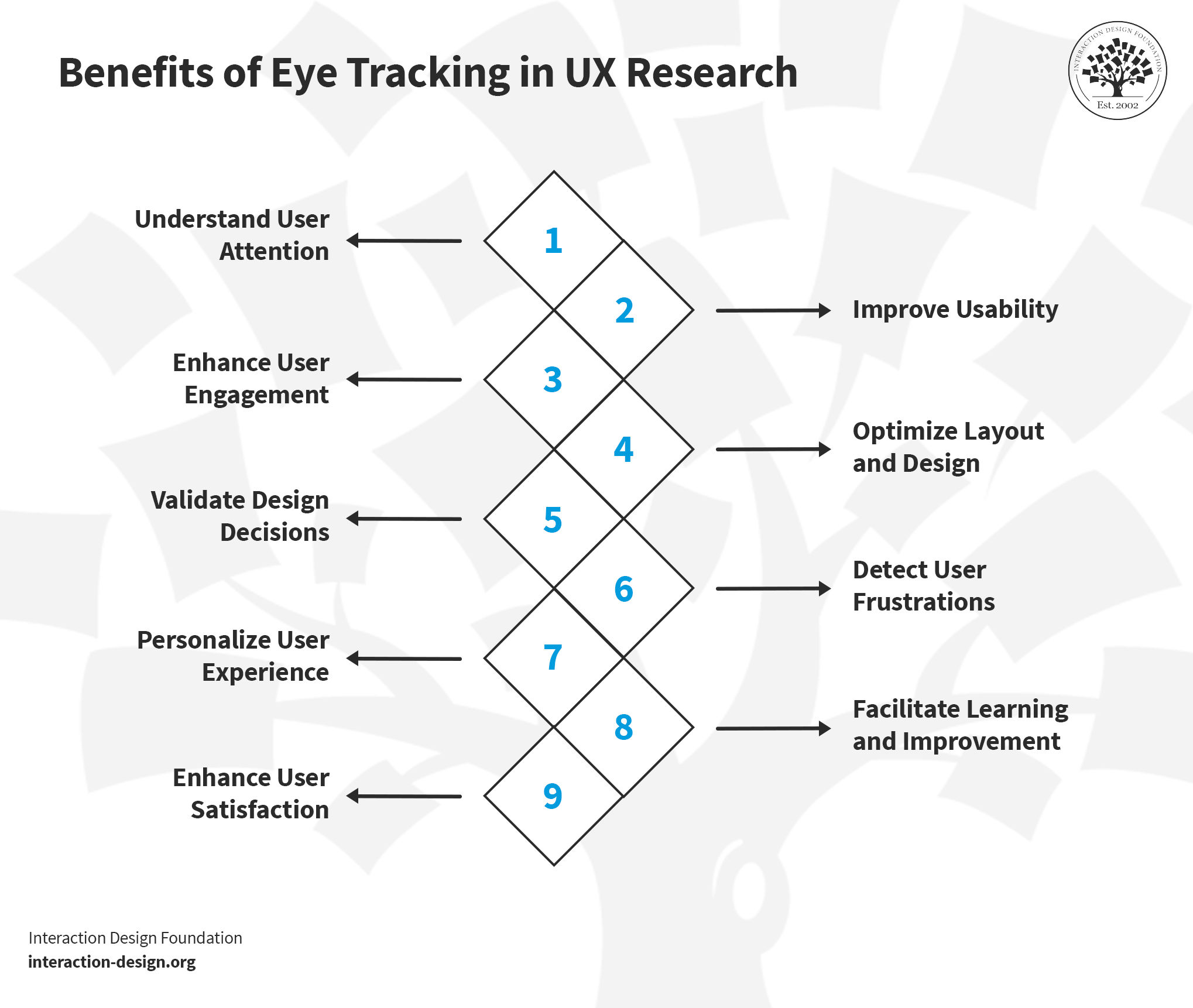
Eye tracking in UX research is something that can offer unique insights into user behavior, as it reveals information as to how users interact with designs—and, from there, designers can take the data to guide improvements for a better user experience. Here’s a look into its key benefits:
© Interaction Design Foundation, CC BY-SA 4.0
1. Understand User Attention
Eye tracking can uncover where users focus their attention, it’s a tool that shows what really catches their eyes on a website or an app, and—what’s more—it doesn’t just identify elements that draw attention but sheds light on those that users overlook, too. UX designers can examine the results from eye tracking studies and make more engaging and effective designs, since, when they know what works, for instance, they can put important elements and information where users look—where they naturally look.
2. Improve Usability
Eye tracking provides feedback on usability, and it’s a good way to highlight areas users struggle with—like, for instance, if users frequently miss a call-to-action button, designers understand they’ve then got to make it more prominent for users so they’ll find what they need quickly and easily in future.
3. Enhance User Engagement
Eye tracking measures how long—and how often—users engage with specific elements, and it’s data that helps designers understand what keeps their digital products’ users interested. When they’ve got good data on board like this, designers can then replicate these engaging elements throughout the design—and so give the overall user engagement with the product a boost.
4. Optimize Layout and Design
When they do eye tracking studies, designers get to see how users navigate a page. They learn which layouts are most effective—and these are the sorts of insights that can help designers optimize visual hierarchy in a natural flow for the user. And, of course, when they make the layout the best it can be, it’ll improve the overall aesthetic and functional appeal of the product.
5. Validate Design Decisions
Another helpful thing that eye tracking does is it provides empirical evidence to support design choices. It helps to validate what works—and what doesn’t—in a design. This takes guesswork and personal biases out of the design process—things that could otherwise cause serious problems. Decisions become data-driven, and it’s something that leads to more successful designs.
6. Detect User Frustrations
The eyes say a lot, and so eye tracking can reveal when users feel frustrated with what’s in front of them. Rapid eye movements or a fixed gaze can indicate confusion or annoyance—just think about how a user might scan around looking for a needed item, in vain, or stare hard at a block of text that they can’t make sense of. If designers understand these pain points, it can really help them fix the areas that would stump or fluster users—and when they’ve addressed these issues, they’ll find it can nicely improve the overall user experience.
7. Personalize User Experience
How do you make a brand’s product speak to the users so well that they feel it really is theirs? Personalize the UX, and eye tracking data can help inform personalized experiences. From building up a good grasp of individual user behaviors, designers can tailor experiences to reach users that much more, and they’ll feel understood and valued from that personalization.
8. Facilitate Learning and Improvement
Eye tracking in UX research is a learning tool, and designers and researchers learn about user behavior. They understand visual perception and cognitive processing, and this knowledge continuously improves UX practices.
9. Enhance User Satisfaction
Ultimately, when designers get eye tracking to work well for them and understand what the outputs are, it can help lead to designs that meet user needs more effectively. To get the visuals right is a big deal and a powerful ingredient when it comes to how satisfied—and, hopefully, delighted—users are.
How to Conduct Eye Tracking Testing?
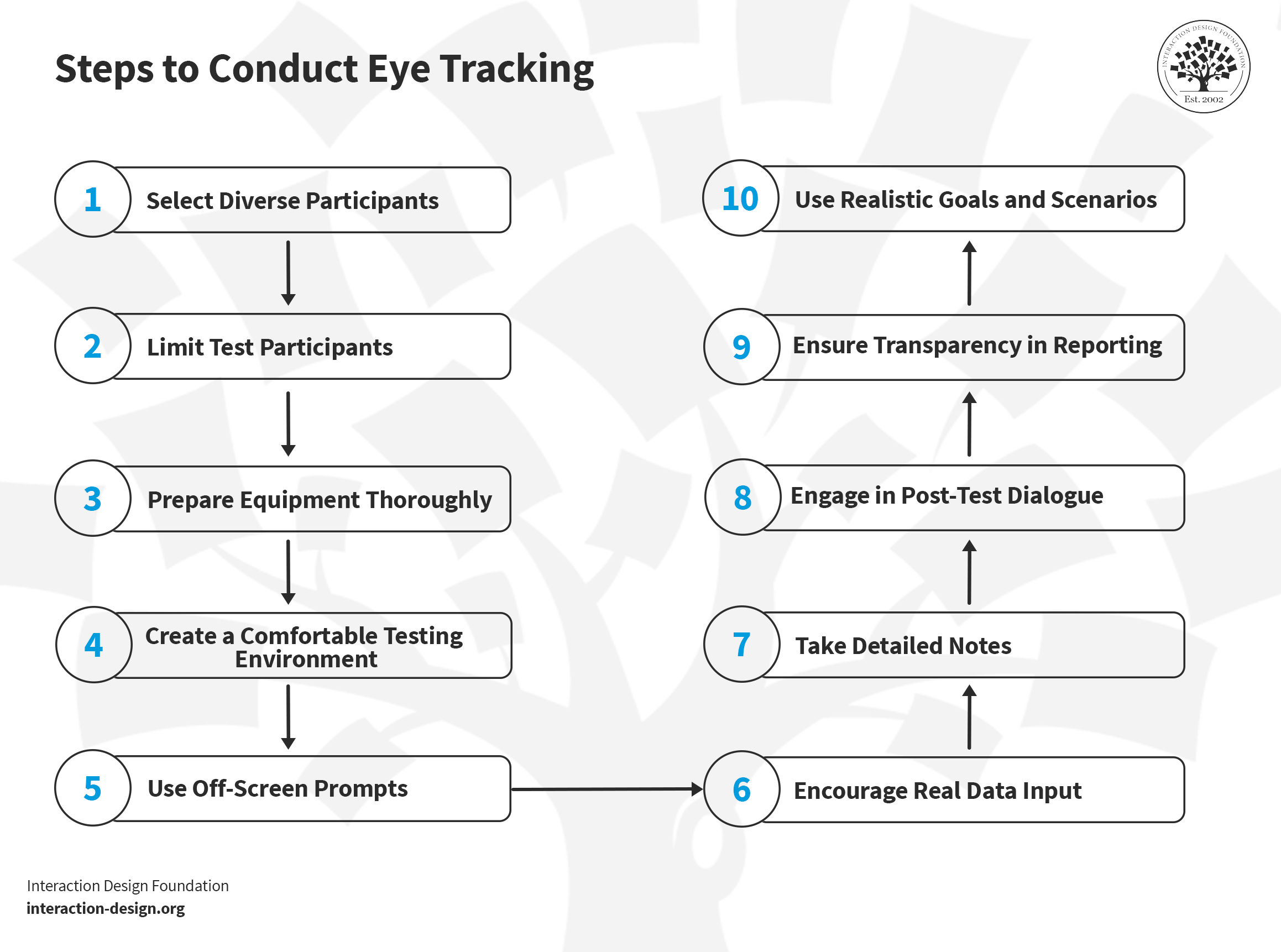
Conducting eye-tracking testing in UX research involves a structured approach. Follow these steps for effective implementation of eye tracking.
© Interaction Design Foundation, CC BY-SA 4.0
1. Select Diverse Participants
First off, pick real users who’ll represent your product's audience; it’s important, and choose people from various backgrounds—not just one company or area—as this’ll give you a wide range of views and help you get a full picture of how your product works for everyone. Another thing is to make sure that your eye-tracking system supports participants who wear glasses, and, if it doesn’t, adjust your participant selection to set things right.
2. Limit Test Participants
Five or fewer people should do the trick to find most issues in your test—and adding more people might just show you the same problems. If you can do it, do more tests at different times—it’s so you can see how well your changes work without showing them to too many users at once.
3. Prepare Equipment Thoroughly
This may sound almost too obvious, but it can be easy to overlook, too, so do make sure that you’ve got your eye-tracking tools and computers ready well before your test day. Check everything and get it set up early—so you won’t run into problems on the test day—and try to get there early to double-check everything, too, as you’ll be able to fix any last-minute issues.
4. Create a Comfortable Testing Environment
It’s vital to minimize distractions and the chances of “performance anxiety” on the part of the users, so do make sure that the place you’ll do your tests is one that’s nice and calm and quiet, with nothing extraneous that might distract the users or put them off. Tell the people you’re going to test what they can expect when they get there and when it’s going on, and let them know you're looking at the product—like the website, for instance—and you’re not judging them in any way. What’s more, keep the number of people who’ll be watching the test low, as too many people there during testing might end up making participants feel nervous. If you can, use a viewing room that’s got one-way mirrors and soundproofing so it minimizes the observers’ impact. These are things that market researchers tend to use frequently, and they’re a big help in this regard.
5. Use Off-Screen Prompts
Give out clear printed instructions for each part of the test. It’ll help people remember what to do—plus, they won’t need to ask for help—and if things are self-contained like this, it’ll help keep the test smooth and focused.
6. Encourage Real Data Input
Ask people to use their info when they fill out forms—as it’ll make the test more real—and another big plus is that it’ll show if there are any problems with how the form works, too. You’ve got to tell your participants that their information is safe and won't be shared, too. What’s more, make sure that they’ve got the required data to hand before the session starts in earnest.
7. Take Detailed Notes
Even if you record videos of participants using the eye-tracking system, it’s really important to write down everything you notice about each person you test. Things like how they act and what they say will be more than just tidbits—these notes can neatly add to what you learn from the eye tracker. They’ll help you spot patterns and understand how people use your product.
The way you collect data is a factor that can impact the results you get, so watch this discussion on the advantages and disadvantages of different data-gathering methods like video, audio, and notes.
8. Engage in Post-Test Dialogue
Keep the all-important human aspect going and talk to people right after they’ve finished the test. Ask them how it felt for them and what they thought about things, but be careful with how you ask questions, though—so, no leading questions—as you want honest answers that can help you make your product better. Each user should feel free to speak their mind, so assure them beforehand that they won’t offend if they found things that didn’t work well and the like.
9. Ensure Transparency in Reporting
Now it’s time to take things back to the clients, and here it’s vital to be clear and open whenever you’re telling them about the test results. Explain any technical terms and what the data means—as they’ll need to understand what it’s about—and include all your notes and data, so they’ll see how you did your work and trust your results.
10. Use Realistic Goals and Scenarios
Design tests around events that really do happen to participants, and be sure that you use common language. Don’t lead participants by using terms from your user interface—let them work it out without being “spoon-fed.” For example, if you’re trying to assess website functionality for changing the expiration date of a credit card, don’t describe the task as “update the expiration date of your credit card.” Instead, explain to participants that they’ve received a new issue of their credit card and ask them to make any needed changes to their payment information on the website.
Limitations of Eye Tracking in Usability Testing
Eye tracking in usability testing does have limitations that’ll have a bearing on what you can learn, so let's explore these now
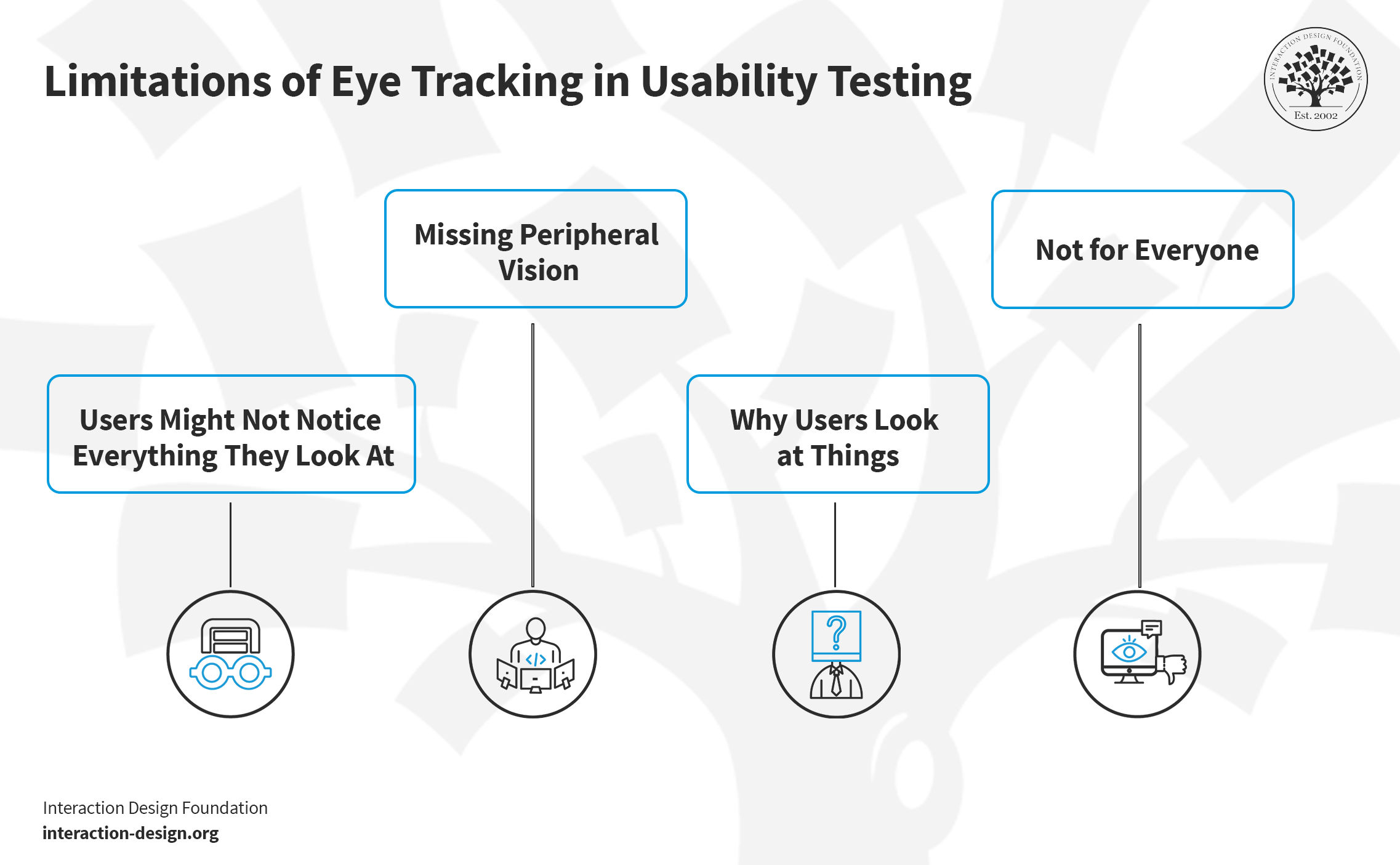
Understand the limitations and constraints of eye-tracking to interpret results accurately.
© Interaction Design Foundation, CC BY-SA 4.0
1. Users Mightn’t Notice Everything They Look At
Eye tracking can't always tell if users know what they see. Sometimes, users might look at a part of the screen—but they mightn’t notice an important feature. This means that we can't be sure they actually notice something whenever someone looks at it.
2. Missing Peripheral Vision
Eye tracking doesn't catch what users see on the sides of their vision—on the periphery—and, from that, we can't know for sure if they’ve missed something. The sides of our vision help us see our world, to be sure, but eye tracking mostly looks at fixations and gaze points. Fixations are excellent measures of visual attention, but—alas—they don’t occur in our peripheral vision.
3. Why Users Look at Things
We may well get to see “what,” but as to “why,” well, we can't know why users look at certain things with eye tracking alone. Sure, it shows where—and for how long—users look at something, but it doesn't tell us what they're thinking, and that’s why you’ll need to talk to users or give them surveys, to dig past the evidence and get to the reasons behind.
4. Not for Everyone
Eye tracking doesn't work the same for all people, not least since things like glasses, contact lenses, small pupils, or moving eyes can make it hard to track eye movements.
How to Work with These Limitations
Eye tracking does have its challenges, but it's still a helpful way to build up an understanding of users and, as UX designers and researchers, we can use it better when we know what it can—and can't—do. Along with other ways of learning about users, eye tracking helps us make things easier and more fun for them to use, and so we’ll get to build a fuller understanding as to how users interact with the digital products we make for them, and testing with different kinds of users can help, too. Know these limits and it’ll help you to plan better studies and get more helpful information from a tool you’ve got a good grasp with.
References and Where to Learn More
Read Mariana Macedo’s insights on Eye-Tracking In Mobile UX Research
Read the Frontiers article on the Contribution of Eye-Tracking to Study Cognitive Impairments Among Clinical Populations
Get insights from Robert J.K. Jacob’s research on Eye Tracking in Advanced Interface Design
Read the Nielsen-Norman Group’s free report, How to Conduct Eyetracking Studies.