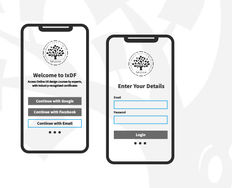
Five steps in HCD for mobile: Assess, Understand, Define, Differentiate, Sketch

5 Steps for Human-Centered Mobile Design

• 11 min read

908 Shares
Save

Many businesses start with the end-point in mind; “We need a mobile app or a mobile website!” They do not consider why their users would want it. Having a mobile website or app isn’t the key to success—you must provide value to your users. When you take a user- and task-centered approach to mobile (and other forms of) design, you can focus on outcomes rather than wasting time on unrewarding designs. Let’s see how you do that.

Designing for mobile isn’t any different from designing for other devices. We look at a version of human-centered design tailored to meet the challenges (and leverage the power) of mobile. Here’s Frank Spillers with an overview:

Transcript

HCD for Mobile, Is It Really Different from HCD for Other Platforms?

Human-centered design is human-centered design. The process for mobile user experience (UX) design should be the same as it is for any other platform. However, mobile platforms are different from desktop and laptop platforms because of the contexts of use in which people use them.

The process above is based on general human-centered approaches and asks you to reflect on the context inherent to mobile before moving ahead with the design.

The Take Away

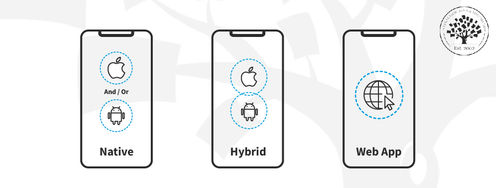
Mobile usage doesn’t necessarily mean your users need an app for your product. Conduct research to decide whether your users need mobile web content or an app. Then, just as you would for any other platform, use a sound, human-centered design methodology to increase your chances of success.

Follow all the steps to ensure you stand out from the rest of the crowd and truly create mobile experiences that delight your users.

There are several models of human-centered design. At the core of each model lies an iterative process that focuses on people first. Here we’ve seen one version of the design process tailored for mobile devices. We begin by understanding the business requirements and our users’ needs. We then define the value proposition and create the UX strategy to differentiate the value proposition, after which we sketch our solutions and iterate. 

References and Where to Learn More

To learn more about general human-centered design principles, see the topic definition here.

We’ve seen one version of the human-centered design process. For more frameworks, see 10 Insightful Design Thinking Frameworks: A Quick Overview. 

Cognitive psychologist and design consultant Don Norman offers a much broader view of human-centered design in his course Design for the 21st Century.

The course Design Thinking: The Ultimate Guide dives into the details of the framework and includes several methods and tools you can use in your design projects.

Hero image: © Interaction Design Foundation, CC BY-SA 4.0

Learn More in This Course:

Learn Design and AI From the Best

Get one powerful email each week, like 313,972 others.

Next email in:

What You Should Read Next

  • Read full article
    Adaptive vs. Responsive Design - Article hero image

    Adaptive vs. Responsive Design

    The differences between responsive and adaptive design approaches spotlight important options for us as web and app designers. Choosing with insight can empower you to plan and execute your designs with better aim, purpose and results.With the pervasiveness and diversity of mobile devices, as design

    Social shares
    1.3k
    Published
    Read Article
  • Read full article
    10 of Our Favorite Login Screen Examples - Article hero image

    10 of Our Favorite Login Screen Examples

    Login screens are the first point of contact between a user and an app or website—and they’re vital gateways to brands, whatever their products or services. That’s why it’s so important to create a better login screen—it, quite simply, sets the tone for the user's experience. An engaging, user-frien

    Social shares
    1.1k
    Published
    Read Article
  • Read full article
    Responsive Design: Best Practices - Article hero image

    Responsive Design: Best Practices

    Responsive Design allows people to access content across multiple device resolutions. As more people interact with websites through mobile devices, users now expect websites to be responsive. Here we’ll look at the main principles of responsive design and how it supports accessibility and device-swi

    Social shares
    1.1k
    Published
    Read Article
  • Read full article
    Minimum Viable Product (MVP) and Design - Balancing Risk to Gain Reward - Article hero image

    Minimum Viable Product (MVP) and Design - Balancing Risk to Gain Reward

    The idea of the minimum viable product (MVP) has been around for some time. The term itself was coined by Frank Robinson but was made popular by two influential names in product design – Steve Blank, a serial-entrepreneur and academic, and Eric Ries, the pioneer of the Lean Startup movement.What is

    Social shares
    1.1k
    Published
    Read Article
  • Read full article
    Native, Web or Hybrid App: Which One is Better? - Article hero image

    Native, Web or Hybrid App: Which One is Better?

    Hybrid apps offer versatility across different operating systems, and web apps boast simplicity in development. However, certain users tend to have a better experience on native mobile apps. Since every type of app has different use cases, we will discuss the critical aspects of choosing between nat

    Social shares
    1.1k
    Published
    Read Article
  • Read full article
    Don’t Build It, Fake It First – Prototyping for Mobile Apps - Article hero image

    Don’t Build It, Fake It First – Prototyping for Mobile Apps

    The design phase for mobile applications should include a prototyping stage. It is at this point that users can “play” with your ideas and concepts and give you valuable feedback that shapes the final designs before you begin development. This can save time and money in development and create produc

    Social shares
    1.1k
    Published
    Read Article
  • Read full article
    Simple Guidelines When You Design for Mobile - Article hero image

    Simple Guidelines When You Design for Mobile

    In mobile user experience (UX) design, it’s important that we respect a user’s task and mindset, as well as the device’s limitations. Here you’ll learn about the general principles that can help you get started with your design.Josh Clark, the author of Tapworthy: Designing Great iPhone Apps, descri

    Social shares
    984
    Published
    Read Article
  • Read full article
    The Anatomy of a Smartphone – Things for Designers to Consider for Mobile Development - Article hero image

    The Anatomy of a Smartphone – Things for Designers to Consider for Mobile Development

    If you’re going to design for mobile, then it’s a good idea to have a grasp of what makes up the modern smartphone in terms of hardware and software. You can then start to think about the possibilities these offer when creating user experiences. The better you know the device, the more you can explo

    Social shares
    929
    Published
    Read Article
  • Read full article
    Understand the User’s Perspective through Research for Mobile UX - Article hero image

    Understand the User’s Perspective through Research for Mobile UX

    User research is crucial to design great user experiences for mobile apps. While any UX research technique can be adapted for mobile, some have proven more effective than others. Let’s look at how becoming proficient in these techniques will help you to develop mobile apps and sites that better meet

    Social shares
    885
    Published
    Read Article
  • Read full article
    Your Guide to Hamburger Menus - Article hero image

    Your Guide to Hamburger Menus

    The hamburger menu—with its three horizontal lines—simplifies website navigation. Not every interface benefits from its use, but it can help in certain scenarios. That’s why it’s vital to understand when it shines and when alternatives might serve users better. So, learn the pros and cons of using t

    Social shares
    881
    Published
    Read Article

Top Articles

Top Topic Definitions

39% of Today's Skills Will Change by 2030

The World Economic Forum expects 39% of today's skills to be transformed or become outdated by 2030.

The good news is that jobs in UX / UI design and AI are among the fastest-growing professions globally.

Build Skills That Keep You Relevant

Privacy Settings

By using this site, you accept our Cookie Policy and Terms of Use.
Customize
Accept all

Be the One Who Inspires

People remember who shares great ideas.

Share on:

Academic Credibility — On Autopilot

Don't waste time googling citation formats. Just copy, paste and look legit in seconds.

Learn Design and AI From the Best

Get one powerful email each week, like 313,972 others.

Next email in: