Don Norman quote: "when a device as simple as a door has to come with an instruction manual... then it is a failure, poorly designed.

5 Ways to Incorporate Affordances in User Interfaces

by Frank Spillers • 8 min read

497 Shares

Affordances define what people can do with your product. Here, we look at the different areas where you can incorporate affordances in mobile UX design.

Visual perception psychologist James Gibson introduced the concept of affordances to describe the relationship between organisms and their environments. Don Norman brought affordances to the UX community’s attention with a concept called the “Norman door”. In the “Norman door” example, a push door has a plate that affords to push and a pull door has a handle that affords to pull.

A mobile device’s user interface, just like other physical objects, affords certain uses and actions. Researchers and professors Eric Klopfer & Kurt Squire identified five affordances of mobile devices. Let us look at each of these and learn how to improve experiences with them in mind.

1. Portability

Mobile users are in motion. Their eyes are not fixed on one place or thing. People constantly face distractions and interruptions. So, your designs must factor in movement, device-switching and task-switching behaviors. Affordances should respect the device in motion and be “glanceable”. Don’t make people squint or interpret anything.

2. Social Interactivity

Mobile affords social communication, collaboration, and interaction with other users or other users' content. Sociability—how your design allows users to discover, interact and co-problem solve—is critical on mobile. Social affordances should facilitate better cooperation, communication, and collaboration

Many service apps have user-to-user social interaction. Think food delivery, app-based taxis or holiday home rentals.

Airbnb offers an excellent example of how sociability can improve user experience. When you select a home to rent, Airbnb allows you to view reviews from guests of that home and chat with the host even before you book.
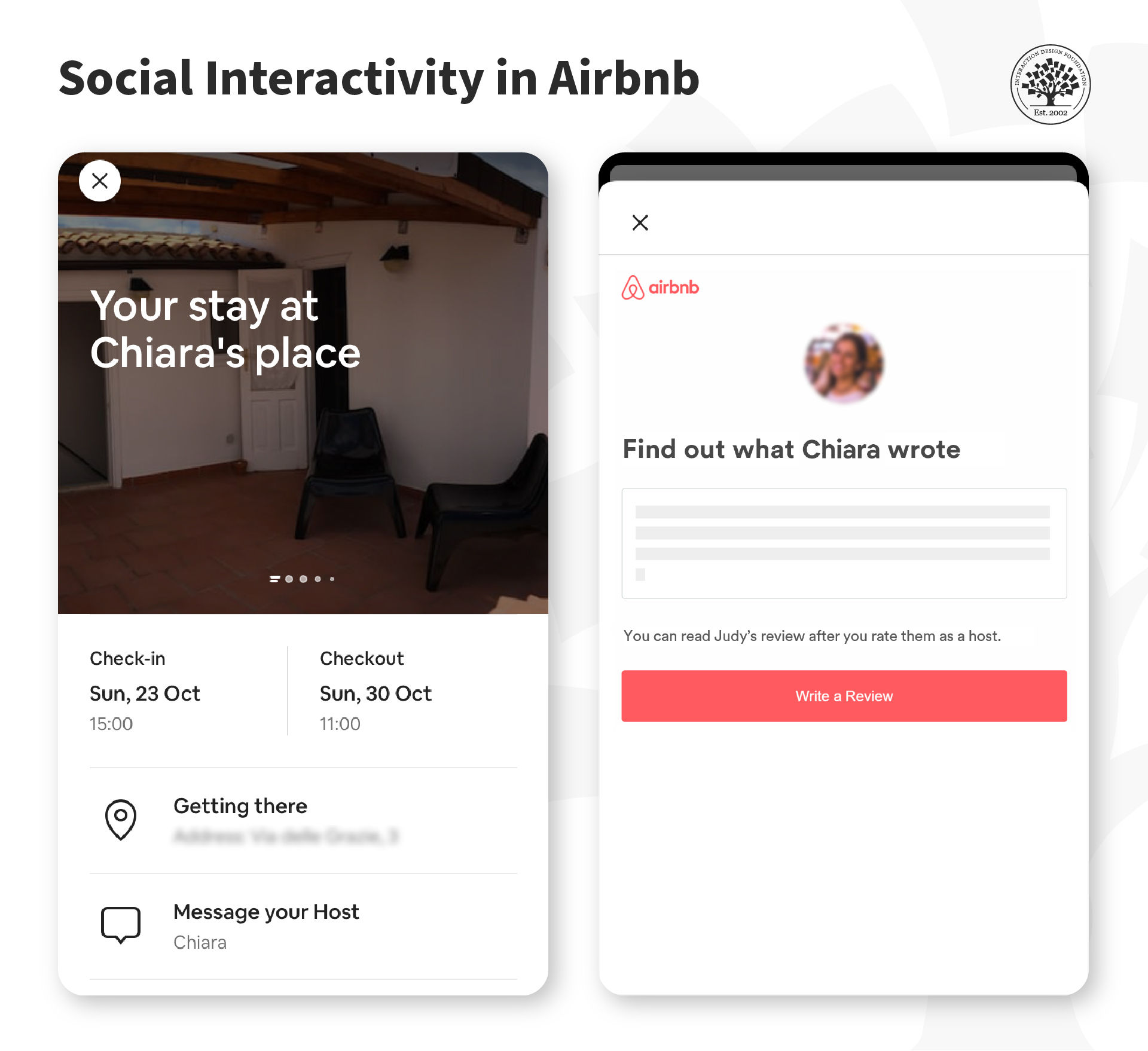
The Airbnb app lets guests chat with the host to ask for help or answer urgent questions easily. Guests can leave reviews to help others in the community make more informed decisions.

© Airbnb, Fair Use

3. Context Sensitivity

With the many sensors built into smart devices, apps can detect when the user changes context. You can leverage this data and tailor the user experience to suit the current context. Several products offer location-based services. However, apps cannot fully exploit the full range of “you are here, so this is available to you”—primarily because of privacy.

Affordances should be sensitive to users’ context requirements and constraints. For example, if the user is on a mobile banking app at 1:00 am, don’t offer a live chat feature and say, “nobody here, be back soon” when the user types something. Instead, you can disable the chat and offer the user other, non-realtime ways to communicate. 

Pokémon Go combines location and social interactivity to create multi-player contests to shape its AR (augmented reality) narrative.

© Pokémon Go, Fair Use

Context sensitivity offers great opportunities for mobile as well as IoT (Internet of Things). The more devices that can adapt to the specific needs of a user in real-time, the “smarter” they will be for the user. For example, an app that detects you are near your home can connect with the home thermostat and automatically set the room temperature to suit your preference.

4. Connectivity

Mobile network coverage and bandwidth speed vary across different regions. For example, in some countries, users must buy additional bandwidth or pay extra for high-speed temporary access. Affordances should respect offline or low-bandwidth scenarios

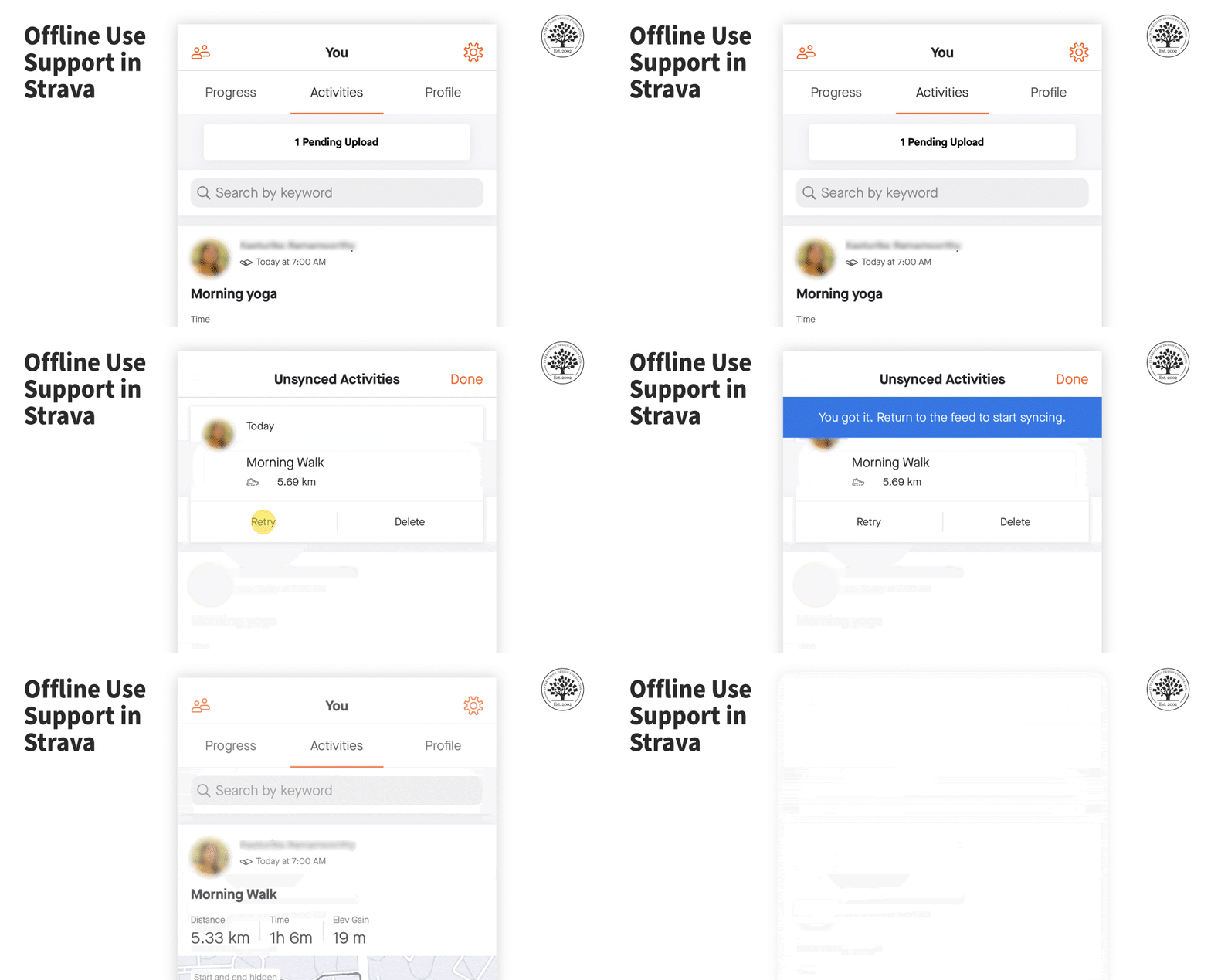
Fitness tracking app Strava saves a user’s progress offline and allows users to sync the data once network connectivity is available.

© Strava, Fair Use

5. Individuality

The personal nature of mobile gives us the opportunity to customize and personalize interactions.

“Customization is all about the user making changes and choosing what they want in an app. Personalization is … about tailoring the app experience to meet the needs of a specific user.”

— Andrea Knezovic, Head of Content, Udonis Inc.

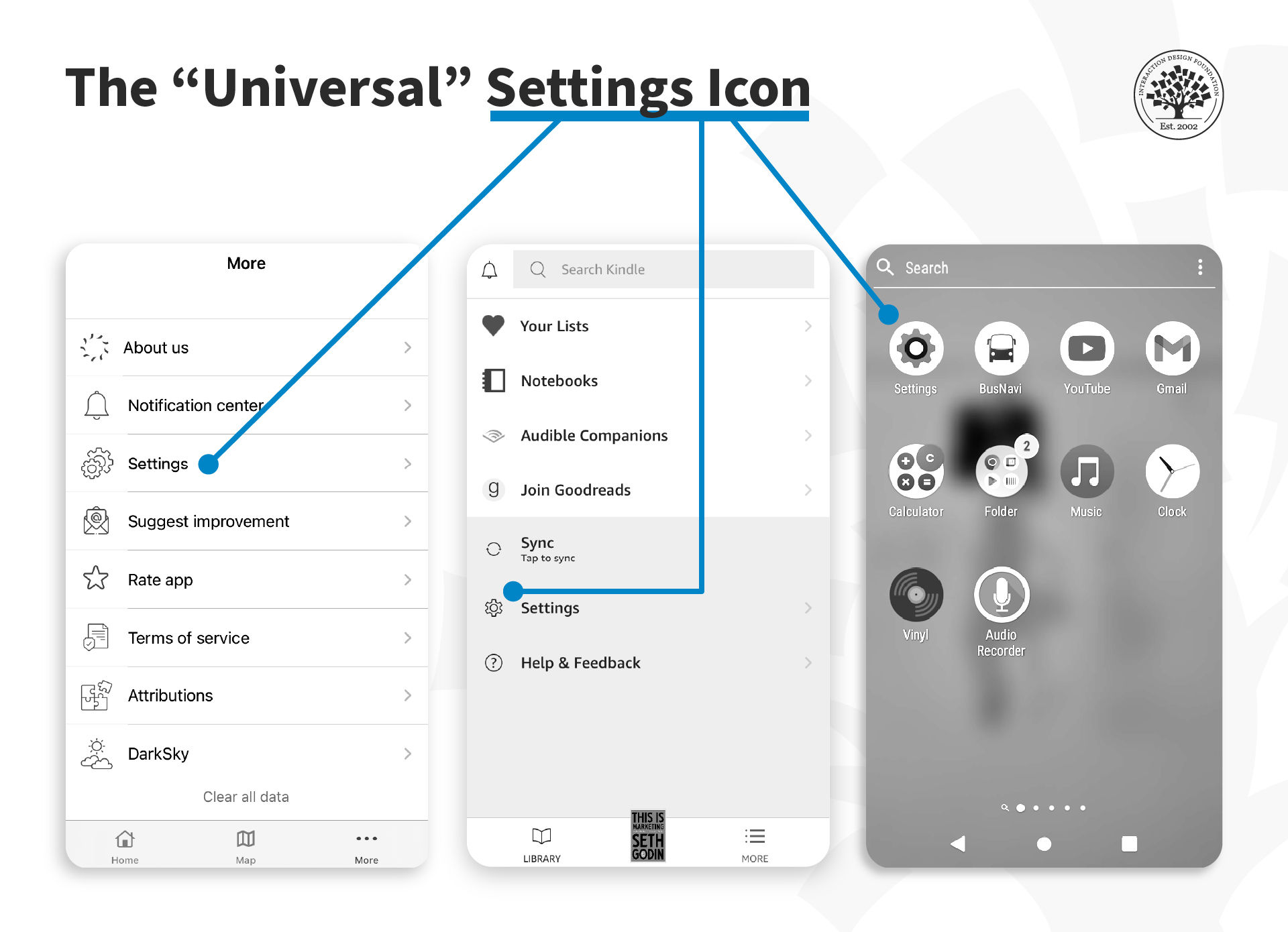
The gear icon has become the default for “settings” preferences in most applications.

© Airly, Amazon (Kindle), Android, Fair Use

The key here is to offer the optimum level of customization. If you offer too many customization settings, it can get tedious—to implement technically, as well as for users to fine-tune several options.

“The thing about us humans is that we want to feel special. We want to feel that we are understood and that our needs will be met. That’s why users love personalization. It’s as though everything is tailored just for them.

Mobile app personalization can include push notifications, recommendations, suggestions, tips, discounts, special offers, etc. All of it individualized and relevant to the user.”

— Andrea Knezovic, Head of Content, Udonis Inc.

The Take Away

Just like physical objects, a mobile device affords certain uses and actions. Researchers and professors Eric Klopfer and Kurt Squire identified five affordances of mobile devices:

  1. Portability: Users can take the device anywhere and use it on the go. Hence, affordances must be glanceable.

  2. Social Interactivity: Users can communicate and interact with other users. Social affordances should facilitate better cooperation, communication, and collaboration.

  3. Context Sensitivity: The device can sense the user’s context (such as location, orientation, lighting levels, etc.); so, affordances should be sensitive and adapt to context requirements and constraints.

  4. Connectivity: Mobile devices can be used with and without internet (and network) connectivity. Affordances should respect offline or low-bandwidth scenarios.
  5. Individuality: Devices are personal, which makes it possible to design personalized and customized experiences.

References and Where to Learn More

Here’s a summary of Eric Klopfer & Kurt Squire’s work on Affordances of Mobile Devices.

Researchers Seann Dikkers, John Martin and Bob Coulter explore different ways in which mobile devices can be used in education. See their book Mobile Media Learning: Amazing Uses of Mobile Devices for Learning for more.

Airbnb experimented with an app for users to collaborate and vote on home search strategies, leveraging the iOS iMessage platform. Read more about it at AirbnbEng’s blog: A new way to plan your trip: Introducing the Airbnb iMessage App.

Learn about how Airbnb designs for community collaboration in the article Co-hosting: Designing a service to support community collaboration.

See Marina Thomas’s article for tips on how to personalize experiences: Personalization of Mobile Apps and Ways to do It

Andrea Knezovic shares strategies on how to implement personalization in mobile apps in her article, Drive Engagement with Mobile App Personalization.


Hero image: © Michael Coghlan, CC SA 2.0

Learn More in This Course:

Mobile UI Design

Course Closed
100 % booked
View Course

What You Should Read Next

  • Read full article
    What is Interaction Design? - Article hero image
    Interaction Design Foundation logo

    What is Interaction Design?

    Interaction design is an important component within the giant umbrella of user experience (UX) design. In this article, we’ll explain what interaction design is, some useful models of interaction design, as well as briefly describe what an interaction designer usually does.A simple and useful unders

    Social shares
    1.5k
    Published
    Read Article
  • Read full article
    Adaptive vs. Responsive Design - Article hero image
    Interaction Design Foundation logo

    Adaptive vs. Responsive Design

    The differences between responsive and adaptive design approaches spotlight important options for us as web and app designers. Choosing with insight can empower you to plan and execute your designs with better aim, purpose and results.With the pervasiveness and diversity of mobile devices, as design

    Social shares
    1.3k
    Published
    Read Article
  • Read full article
    Recalling Color Theory Keywords: a way to refresh your memories! - Article hero image
    Interaction Design Foundation logo

    Recalling Color Theory Keywords: a way to refresh your memories!

    Choosing the best combination of colors for an interactive design layout is not, as it may appear, a guessing game. Knowing which ones to use will save you time (and headaches). Getting it right will also keep your users connected.Since the early days of art and design, the use of color has followed

    Social shares
    1.1k
    Published
    Read Article
  • Read full article
    Don’t Build It, Fake It First – Prototyping for Mobile Apps - Article hero image
    Interaction Design Foundation logo

    Don’t Build It, Fake It First – Prototyping for Mobile Apps

    The design phase for mobile applications should include a prototyping stage. It is at this point that users can “play” with your ideas and concepts and give you valuable feedback that shapes the final designs before you begin development. This can save time and money in development and create produc

    Social shares
    1.1k
    Published
    Read Article
  • Read full article
    Natural User Interfaces – What does it mean & how to design user interfaces that feel naturaly - Article hero image
    Interaction Design Foundation logo

    Natural User Interfaces – What does it mean & how to design user interfaces that feel naturaly

    User interfaces that you interact with using modalities such as touch, gestures or voice are often referred to as Natural User Interfaces (NUI). We consider them interfaces that we find so easy to use that they feel natural. However, what does it mean for an interface to be natural? Also, how do you

    Social shares
    1k
    Published
    Read Article
  • Read full article
    Simple Guidelines When You Design for Mobile - Article hero image
    Interaction Design Foundation logo

    Simple Guidelines When You Design for Mobile

    In mobile user experience (UX) design, it’s important that we respect a user’s task and mindset, as well as the device’s limitations. Here you’ll learn about the general principles that can help you get started with your design.Josh Clark, the author of Tapworthy: Designing Great iPhone Apps, descri

    Social shares
    979
    Published
    Read Article
  • Read full article
    Product Thinking is Problem Solving - Article hero image
    Interaction Design Foundation logo

    Product Thinking is Problem Solving

    It can be easy to get bogged down in developing features when we get into user experience design. It’s not that features aren’t important but that they are often secondary to the reason a customer or user buys our product. That reason is simple; the user buys the product to solve a real world proble

    Social shares
    955
    Published
    Read Article
  • Read full article
    The Anatomy of a Smartphone – Things for Designers to Consider for Mobile Development - Article hero image
    Interaction Design Foundation logo

    The Anatomy of a Smartphone – Things for Designers to Consider for Mobile Development

    If you’re going to design for mobile, then it’s a good idea to have a grasp of what makes up the modern smartphone in terms of hardware and software. You can then start to think about the possibilities these offer when creating user experiences. The better you know the device, the more you can explo

    Social shares
    922
    Published
    Read Article
  • Read full article
    5 Steps for Human-Centered Mobile Design - Article hero image
    Interaction Design Foundation logo

    5 Steps for Human-Centered Mobile Design

    Many businesses start with the end-point in mind; “We need a mobile app or a mobile website!” They do not consider why their users would want it. Having a mobile website or app isn’t the key to success—you must provide value to your users. When you take a user- and task-centered approach to mobile (

    Social shares
    900
    Published
    Read Article
  • Read full article
    Understand the User’s Perspective through Research for Mobile UX - Article hero image
    Interaction Design Foundation logo

    Understand the User’s Perspective through Research for Mobile UX

    User research is crucial to design great user experiences for mobile apps. While any UX research technique can be adapted for mobile, some have proven more effective than others. Let’s look at how becoming proficient in these techniques will help you to develop mobile apps and sites that better meet

    Social shares
    878
    Published
    Read Article

Top Articles

Top Topic Definitions

Feel Stuck?
Want Better Job Options?

AI is replacing jobs everywhere, yet design jobs are booming with a projected 45% job growth. With design skills, you can create products and services people love. More love means more impact and greater salary potential.

At IxDF, we help you from your first course to your next job, all in one place.

See How Design Skills Turn Into Job Options
Privacy Settings
By using this site, you accept our Cookie Policy and Terms of Use.
Customize
Accept all

Be the One Who Inspires

People remember who shares great ideas.

Share on:

Academic Credibility — On Autopilot

Don't waste time googling citation formats. Just copy, paste and look legit in seconds.

Feel stuck? Want Freedom?

Get one powerful email each week, like 324,527 others.

Learn to design a life you love.

Next email in:
0
days
16
hrs
44
mins
33
secs