Color Harmony

Your constantly-updated definition of Color Harmony and collection of videos and articles.
Be a conversation starter: Share this page and inspire others!

98 Shares

What is Color Harmony?

Color harmony in design refers to the balanced and aesthetically pleasing interaction of colors. Designers use color harmony to influence user experiences, create brand identity, and enhance accessibility. Color harmony is not only about attractive colors but their impact on the overall design.

In this video, Joann and Arielle Eckstut, leading color consultants and authors, give six tips to help designers choose colors:

Transcript

The Basics of Color Theory: Where Does Color Harmony Fit In?

Color harmony is an application of color theory principles that focuses on the creation of visually pleasing combinations of colors. Color theory is a set of principles and guidelines that explores the relationships and interactions between colors. It provides a systematic way to understand how colors work together and how they affect emotions.

Color theory consists of these fundamental elements:

The Color Wheel
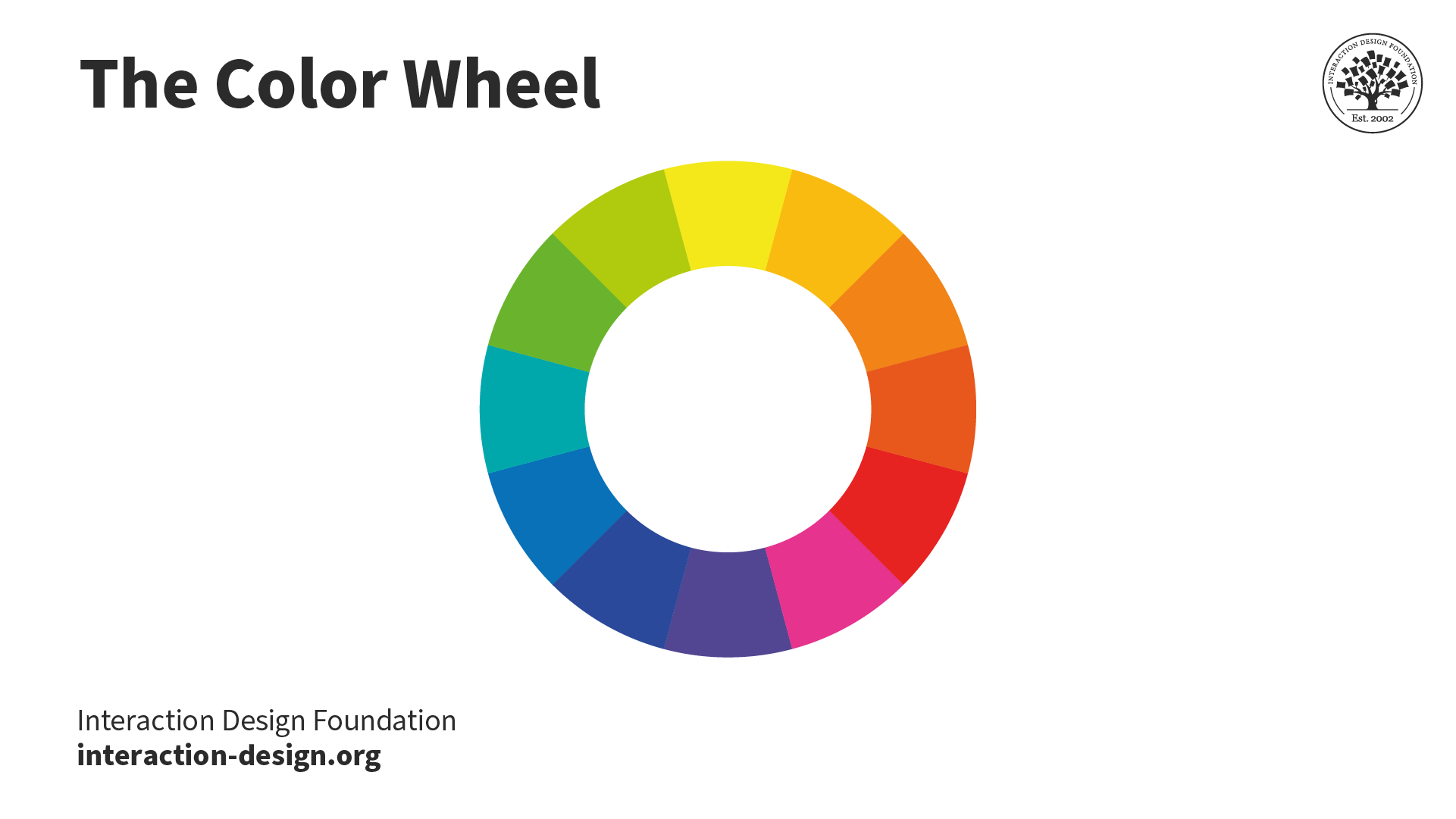
The primary, secondary, and tertiary colors are arranged in a torus shape in individual segments.

The color wheel comprises the primary, secondary, and tertiary colors.

© Interaction Design Foundation, CC BY-SA 4.0

The color wheel comprises:

  • Primary colors: red, blue, and yellow.

  • Secondary colors: colors formed by mixing two primary colors. These are green, orange, and purple.

  • Tertiary colors: colors formed by mixing primary with secondary colors. Examples of tertiary colors are blue-green (often called teal) and red-purple (often called magenta).

The color wheel visualizes how colors relate and is an essential tool to choose color schemes.

Hue, Value, and Saturation
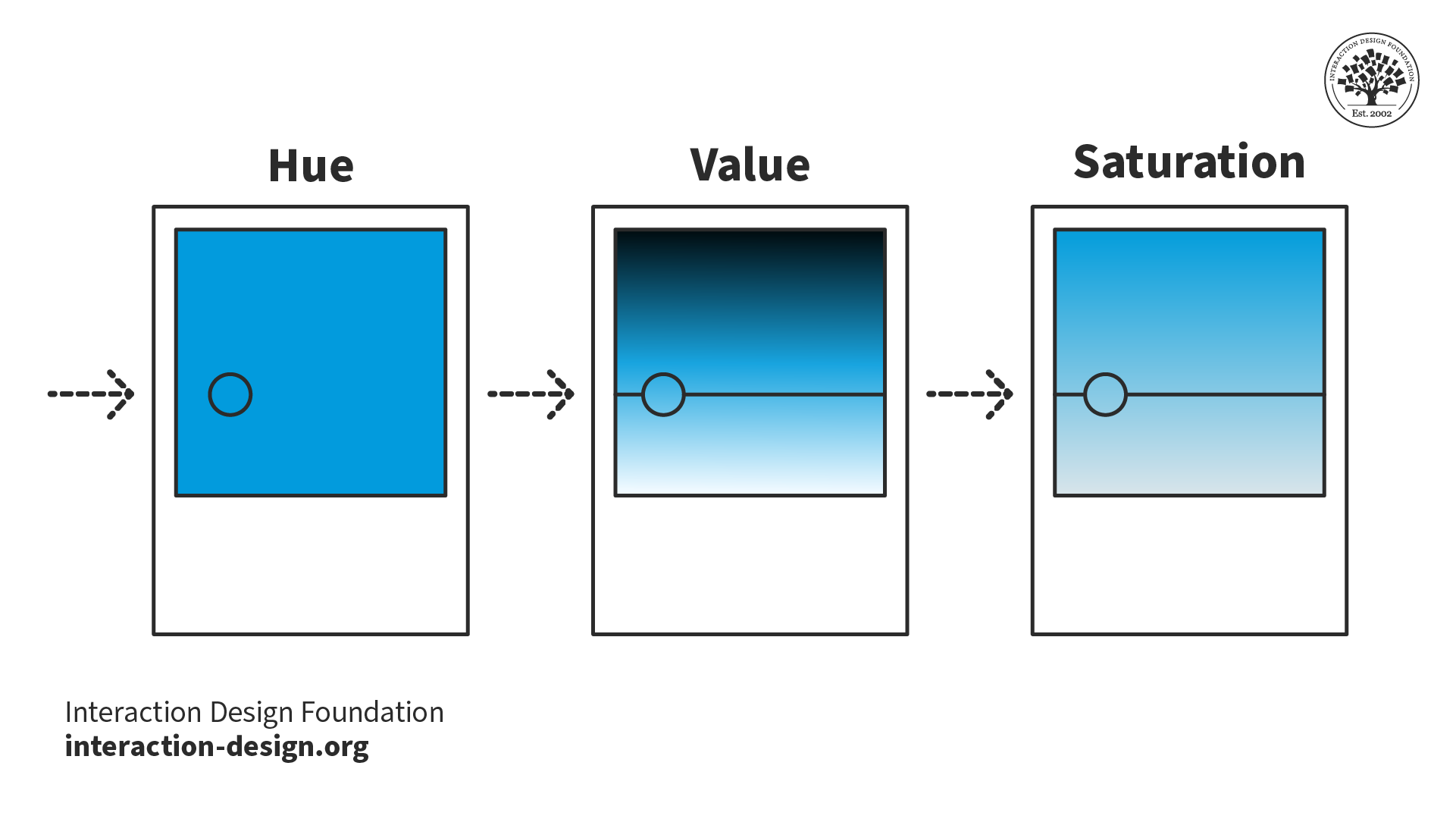
3 squares depicting the three color values: hue, value, and saturation. Hue is represented by solid blue. Value is represented by blue fading into black at the top of the square and white at the bottom. Saturation is represented by blue fading into gray from the top to the bottom of the square.

In the RGB color model, hue, value, and saturation are the three components of color.

© Interaction Design Foundation, CC BY-SA 4.0

Every color consists of three components:

  • Hue is the specific color that makes it different from other colors on the color wheel.

  • Value represents a color's relative lightness or darkness in grayscale. Value is essential to establish contrast and depth in visual art.

  • Saturation, also called chroma or intensity, describes the purity and vividness of a color. Saturation can vary from fully saturated (vibrant) to desaturated (grayed).

Using these three components, designers define their color schemes.

Color Temperature
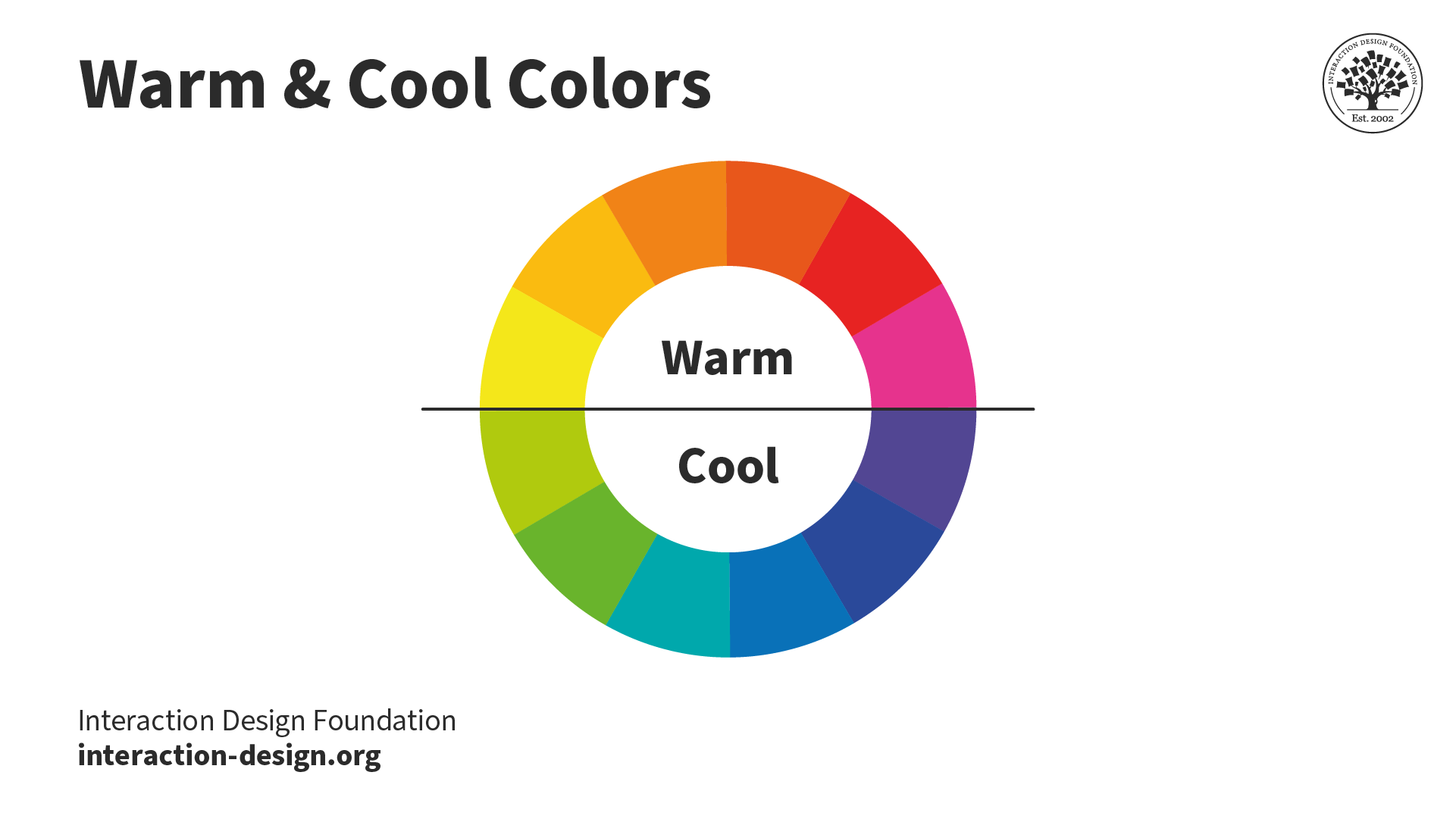
The primary, secondary, and tertiary colors are arranged in a torus shape in individual segments. A line cuts through the middle horizontally, which separates the warm colors at the top and the cool colors at the bottom. The warm colors range from yellow to red-purple. The cold colors range from purple to yellow-green.

Each color on the color wheel has its own perceived temperature. Yellow to red-purple are warm colors, while purple to green-yellow are cool.

© Interaction Design Foundation, CC BY-SA 4.0

Color temperature refers to the perceived warmth or coolness of a color. Warm colors (reds, yellows) and cool colors (blues, greens) can dramatically affect the color harmony in a design. Color temperature can influence the mood and emotions of the user.

What Is the Impact of Color Harmony on UX?

Color harmony significantly enhances User Experience (UX) in the following ways:

Draw Attention and Engage Users

An interface's balanced and attractive color scheme can hold the user's attention. For example, an online learning platform might use a subdued, monochromatic color scheme interspersed with vibrant, contrasting colors for important elements. Beyond aesthetics, a serene color palette can minimize visual fatigue, making study sessions more comfortable. This color harmony enhances user engagement over more extended periods.
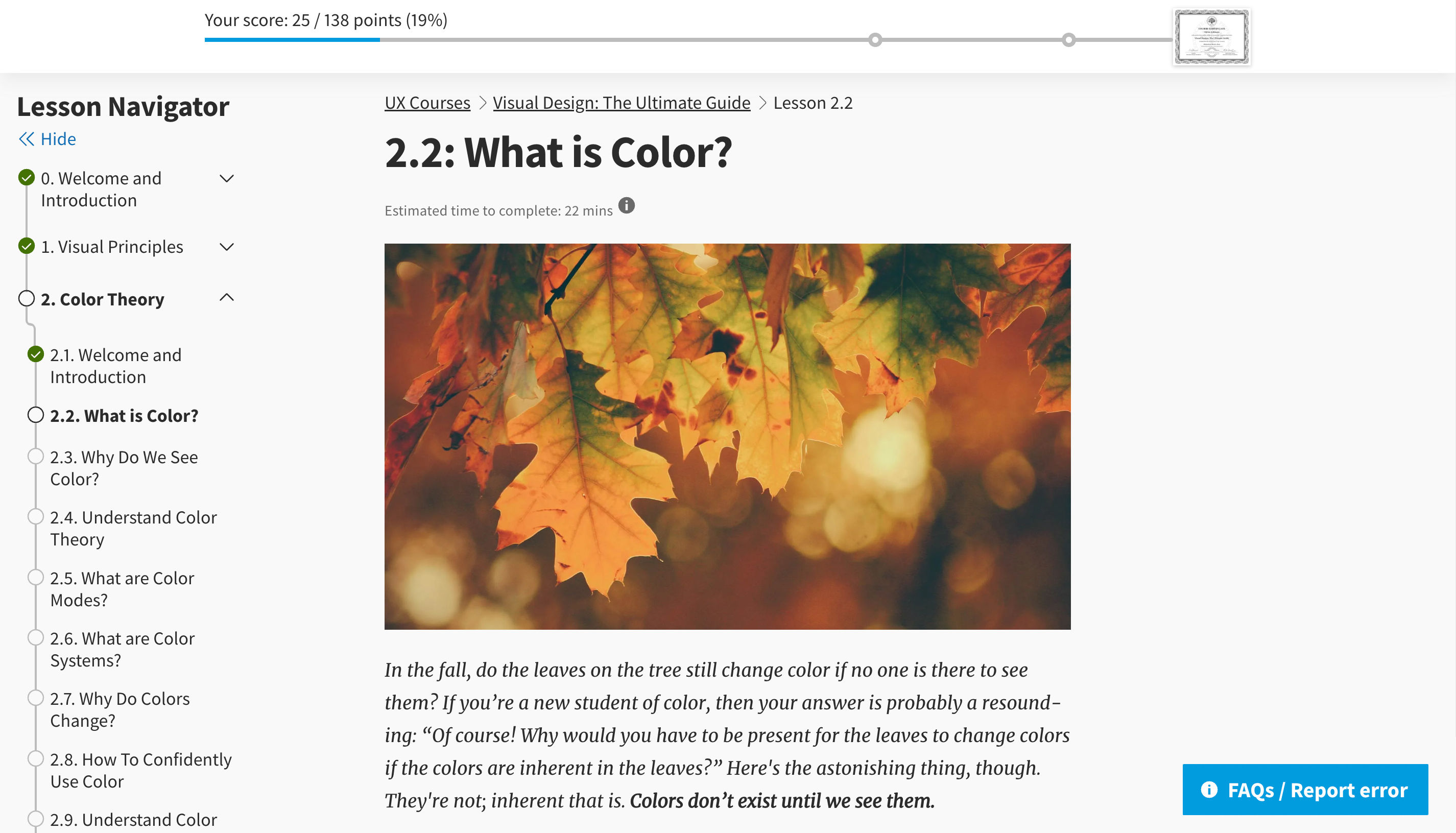
An IxDF lesson page. At the top of the page is a progress bar with a blue line indicating progress. On the left is the lesson navigator showing the list of lessons. In the center of the page is the lesson content, a combination of images and black text on a light gray background. On the bottom right of the page is a blue button that says

The IxDF course platform primarily uses a monochromatic grayscale scheme to help users stay immersed as they learn. The use of blue as a highlight helps users quickly identify their progress in the course and get any support they might need.

© Interaction Design Foundation, CC BY-SA 4.0

Enhance Usability

Designers use color harmony techniques to create contrast in their designs. Contrast aids users by clearly separating content types and functionalities. For example, Ryanair uses color harmony techniques to make essential elements more prominent. This use of color makes it easier for customers to navigate the site, easily understand where they are, and find what they’re looking for. 

The Ryanair search box. The search box is white on a blue background. To the right of the search box is a yellow-orange search button. Across the top are four search categories to choose from: Flights, Car Hire, Hotels, and Events and Activities. The selected category, Flights, has a yellow-orange line beneath it.

Ryanair uses a complementary blue and yellow-orange color scheme across its website. A yellow-orange line indicates the current page the user is on. The search button's use of color makes its purpose clear and draws attention to the search function as a whole.

© Ryanair, Fair Use

Readability

Colors with poor contrast can blur elements together and create a confusing user interaction path, the opposite of color harmony. A typical example of poor color balance is when the colors used for text and background make it difficult for users to read the content. Faced with such poor balance, users often choose to leave the site.
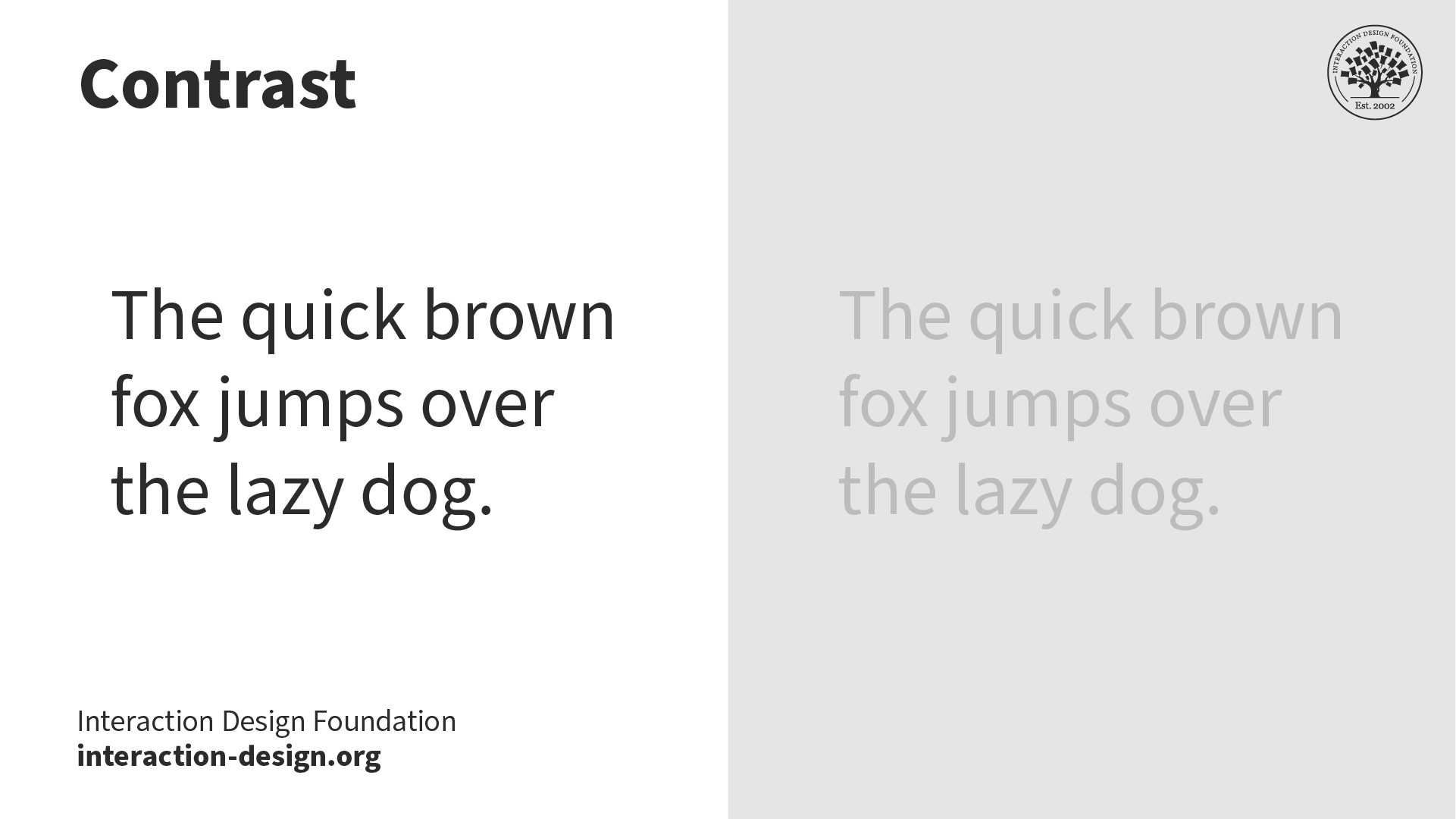
A comparison of how contrast affects readability. On the left, there is some black text on a white background. On the right, there is some dark grey text on a light grey background.

In this example, the gray-on-gray text is more difficult to read than the black-on-white text. Text with high contrast against its background vastly improves readability.

© Interaction Design Foundation, CC BY-SA 4.0

Brand Perception

Colors can symbolize emotions that align with a brand's persona. Brands that promote environmental care often use shades of green and earth tones, which represent tranquility and eco-friendliness. Another example is fast food brands, many of which use red in their color schemes. For some people, the color red stimulates hunger.

Two versions of the Uber homepage that have different color schemes. Both versions have the headline

The ride-hailing app Uber uses black and white as its primary colors—a monochromatic harmony. The example on the right shows a different color scheme applied—yellow and purple, a complementary color harmony. In this example, the Uber website feels vibrant and almost regal. However, Uber chose black and white to imply elegance and simplicity, which is not symbolized by the yellow and purple scheme.

© Uber, Fair Use

How to Achieve Color Harmony

Designers use a step-by-step process to choose colors that create harmony in their designs. While intuition and taste are involved when selecting colors, there are defined steps, tools, techniques, and tests that designers use to ensure color harmony:

  1. Find Inspiration: Start with broad visual brainstorming. Take cues from nature, art, architecture, or even fashion. Review successful designs within your industry that achieve color harmony. Assemble these inspirations to spot themes and spark potential color ideas.

  2. Select a Dominant Color: This color should align with crucial aspects such as brand ethos, target user group, or the emotions you want to convey. This color forms the foundation of your palette.

  3. Consult the Color Wheel: Use your chosen color as a compass to see different color harmonies on the color wheel. If red is your selected color, an analogous harmony will add red-orange and red-purple to your scheme, while a triadic harmony will add yellow and blue.

  4. Use a Tool or Template: Use color scheme generators or pre-made templates to create harmonious color combinations. These can streamline the creation process and serve as a source of inspiration.

  5. Keep It Simple: Creating complex color schemes with many different colors can be tempting. The more colors you add, the more complex color harmony is to achieve. Start with a simple scheme, and see if it fits your design needs before adding more colors.

  6. Define Color Hierarchy: With your colors identified, assign functional roles to each. The dominant color takes center stage, secondary colors support, and accent colors highlight essential elements such as call-to-actions.

  7. Implement Contrast: Pair contrasting colors for important functionalities and contents, ensuring readability and visual guidance throughout the interface.

  8. Be Mindful of Cultural Contexts: Keep users' cultural color-related attitudes and perceptions in mind. Make sure your chosen palette reads as intended to your target audience.

  9. Prototype and Test: Apply your scheme to your design mock-up, then conduct user testing or surveys. A/B testing is beneficial for color harmony.

  10. Iterate and Refine: Based on feedback, continuously adjust your palette. Ensure it remains relevant to your brand, attractive to your users, and functional within your interface.

What Are the 7 Main Color Schemes?

These 7 schemes serve as a guide for designers to choose harmonious colors. Designers use these schemes as they are or as a foundation to build their color palettes. Remember, while the color wheel consists of 12 main colors—primary, secondary, and tertiary—there are millions of colors with different hues, values, and saturations. Experiment with these color schemes and the array of colors available to you as a designer.

Monochromatic
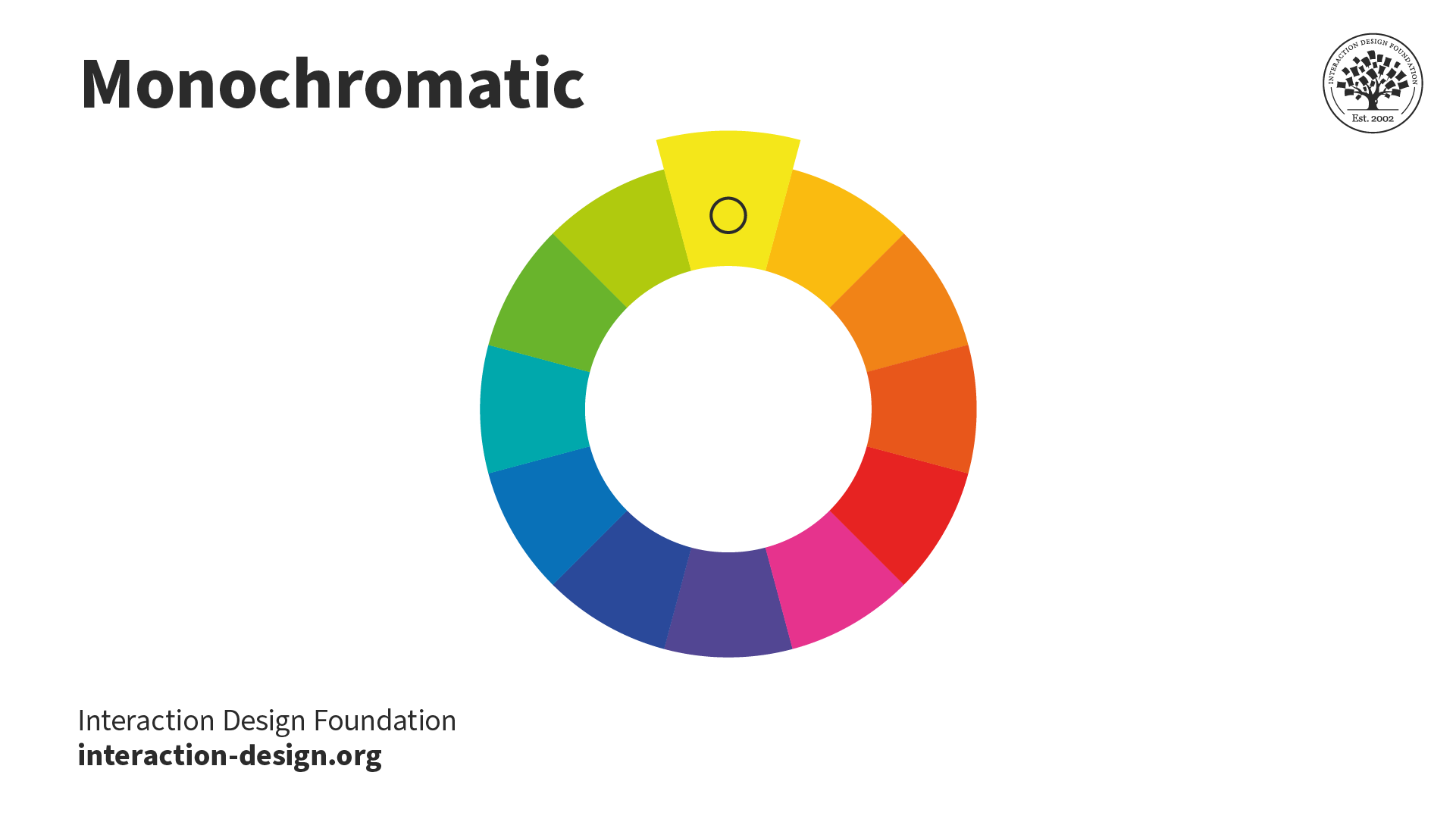
The primary, secondary, and tertiary colors are arranged in a torus shape in individual segments. The yellow segment, at the top of the torus, is enlarged.

© Interaction Design Foundation, CC BY-SA 4.0

When designers use monochromatic schemes, they combine different versions of the same color to create a unified and elegant look. Designers must maintain contrast in these schemes to prevent monotony.

Designers often employ monochromatic schemes in minimalist designs, as using one color reduces distractions. However, the simplicity of monochromatic schemes comes with a limitation: designers cannot utilize multiple colors to aid in visualizing information.

The Uber logo. The word

The Uber logo uses the most simplistic monochromatic color schemes—black and white.

© Uber, Fair Use

Analogous
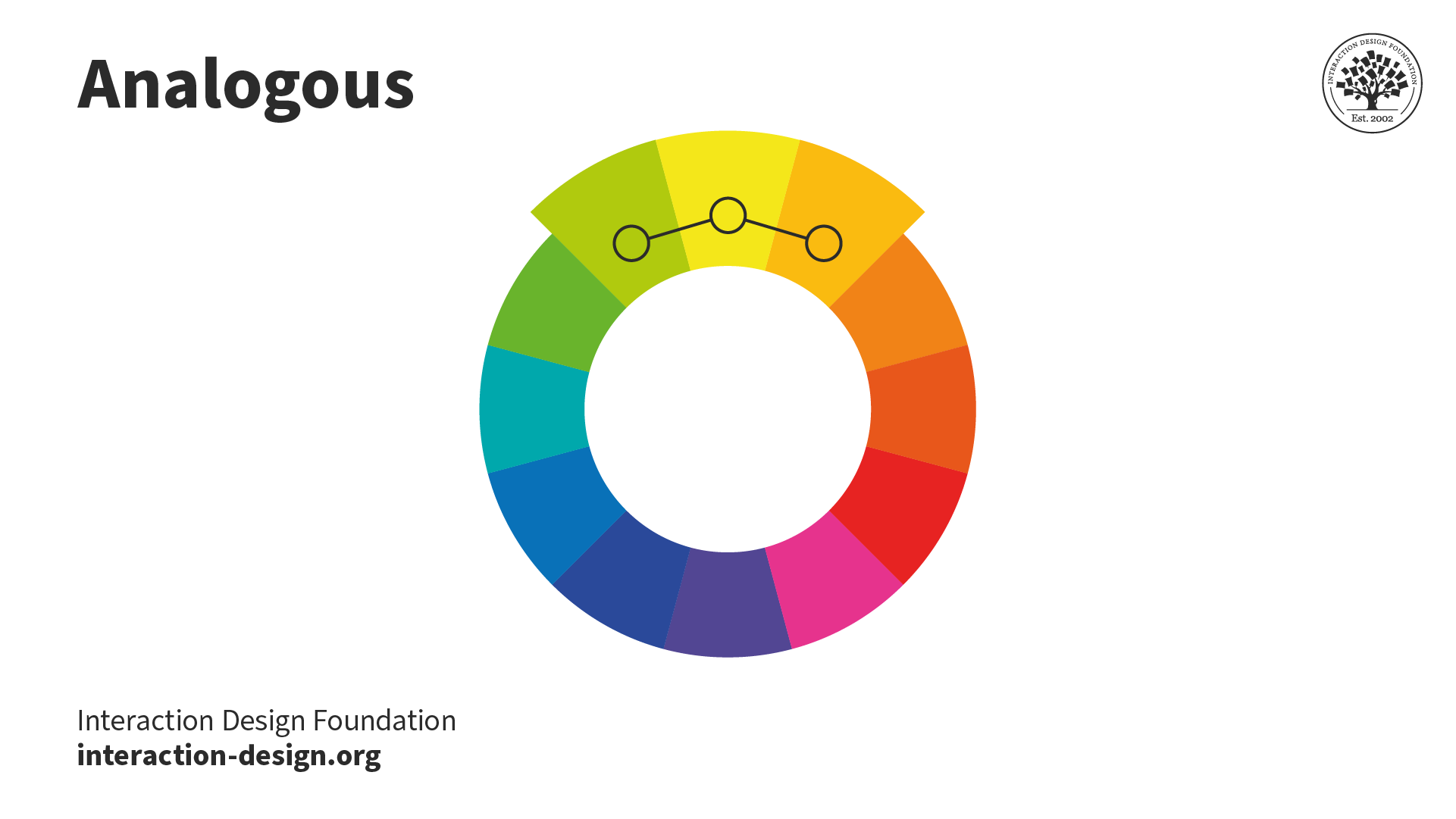
The primary, secondary, and tertiary colors are arranged in a torus shape in individual segments. The three segments at the top of the torus are enlarged. These segments are yellow-green, yellow, and yellow-orange.

© Interaction Design Foundation, CC BY-SA 4.0

An analogous color scheme involves three adjacent colors on the color wheel. This scheme is often seen in nature, like autumn leaves, as they change colors. There's a variation known as the "high-key" analogous color scheme, created by blending analogous colors with white.

Impressionist artists frequently use this scheme. The result is a shimmering, blurring effect of colors merging. From afar, a high-key analogous scheme might give the impression of being a single color.

The Mastercard logo. A red and a yellow circle are interconnected like a Venn diagram. Where they intersect, the color is orange. The word

The MasterCard logo uses an analogous color scheme—red, orange, and yellow.

© Mastercard, Fair Use

Complementary

The primary, secondary, and tertiary colors are arranged in a torus shape in individual segments. The yellow segment at the top of the torus and the purple segment at the bottom are enlarged. There is a line connecting these two segments.

© Interaction Design Foundation, CC BY-SA 4.0

Complementary color schemes pair colors that neutralize each other when mixed, typically resulting in white, black, or a grayscale shade. This approach, also called the "opposite color" scheme, creates a high contrast. Modern color theory identifies these pairs as red/cyan, green/magenta, and blue/yellow.

The Ryanair logo. A yellow-orange angel next to the word Ryanair in a bold, all caps, blue-purple, sans serif font.

The Ryanair logo uses a blue-purple and yellow-orange complementary color harmony.

© Ryanair, Fair Use

Triadic

The primary, secondary, and tertiary colors are arranged in a torus shape in individual segments. An equilateral triangle connects three enlarged segments together. These segments are yellow, blue, and red.

© Interaction Design Foundation, CC BY-SA 4.0

A triadic color scheme consists of three colors spaced evenly around the color wheel. To identify these colors, you can place an equilateral triangle on the wheel; each corner will point to a color 120° apart from the others.

Triadic schemes offer a harmonious yet visually striking contrast. They appear vibrant, even if the individual hues lack vibrancy.

Many artists prefer using triadic color schemes in their work. Compared to complementary schemes, triadic ones make it simpler for artists to achieve visually appealing results.

The Airtable logo. A red-purple, yellow-orange, and blue-green graphic of a table is positioned the the left of the word

The Airtable logo uses a triadic color harmony—red-purple, yellow-orange, and blue-green.

© Airtable, Fair Use

Split-complementary

The primary, secondary, and tertiary colors are arranged in a torus shape in individual segments. An isosceles triangle connects three enlarged segments together. These segments are red-orange, green, and blue.

© Interaction Design Foundation, CC BY-SA 4.0

In split-complementary color schemes, designers blend the principles of complementary and analogous colors. They select the complementary color to their primary and then include the adjacent colors on the color wheel. 

This approach moderates the often bold or harsh effect of using complementary colors alone, making it easier on the viewer's eye.
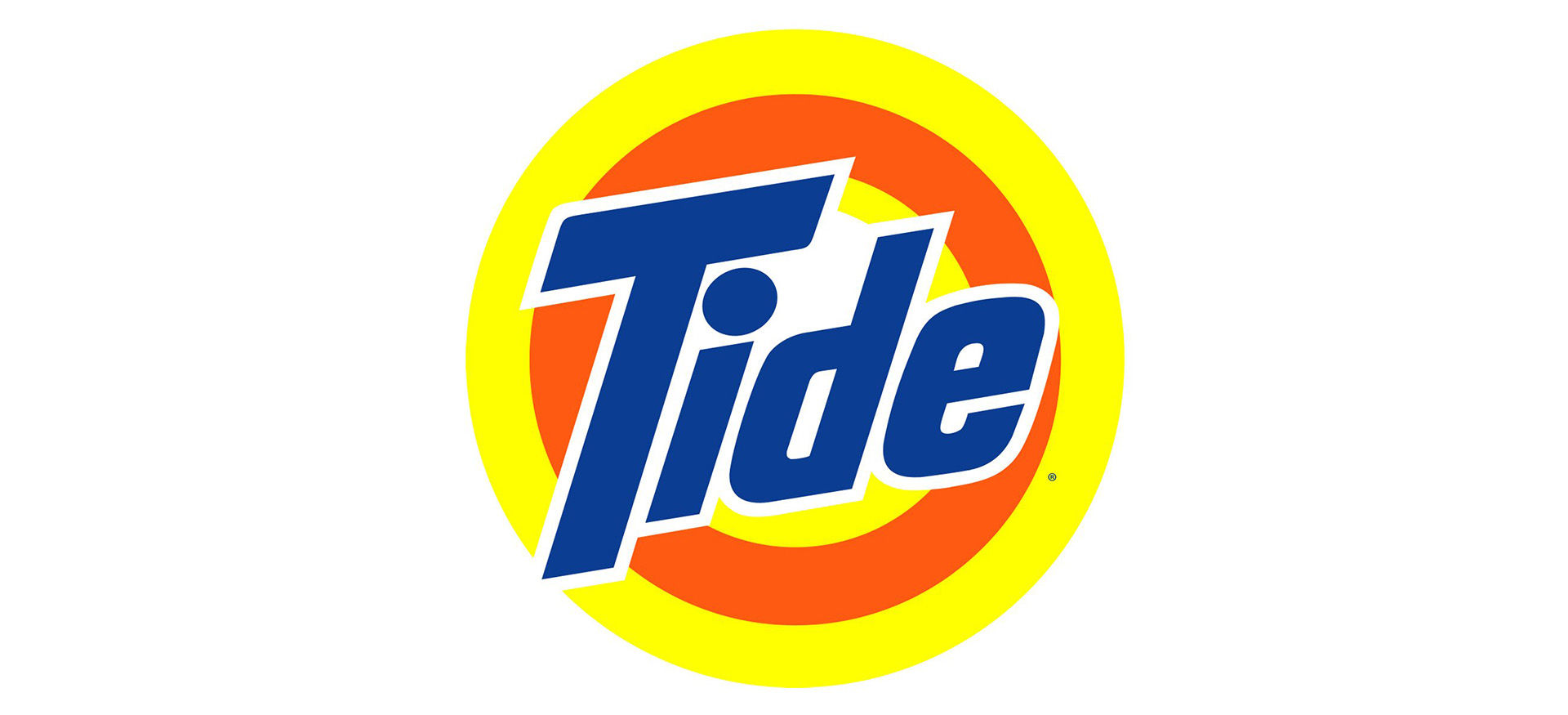
The Tide logo. The word

Tide uses a blue-purple, yellow, and orange split complementary color scheme. The blue has a lower intensity contrast against the two other colors compared to a blue-purple and yellow-orange complementary color scheme.

© Tide, Fair Use

Tetradic
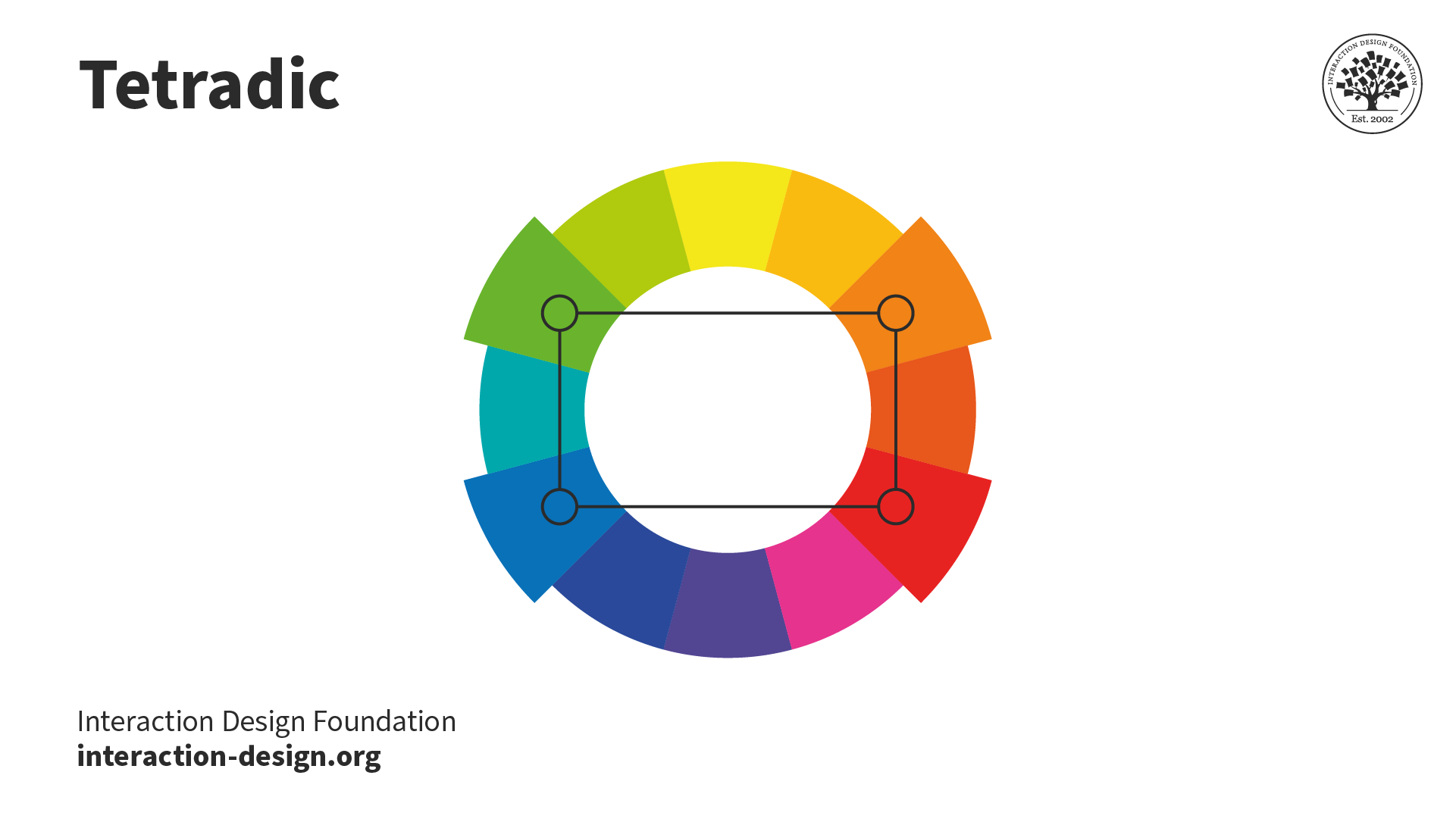
The primary, secondary, and tertiary colors are arranged in a torus shape in individual segments. Four segments are connected by a rectangle. These segments are green, orange, red, and blue.

© Interaction Design Foundation, CC BY-SA 4.0

The tetradic color scheme includes two complementary color pairs. This scheme can produce vibrant visuals, yet designers find it challenging to achieve balance. 

In a tetradic scheme, designers must choose a dominant color, ensuring it doesn't overpower the others and cause imbalance. If designers use equal amounts of each color, it can result in an unappealing appearance, which they aim to avoid.

The Google logo. The word

The Google logo uses a tetradic color harmony.

© Google, Fair Use

Square (A Variant of Tetradic)
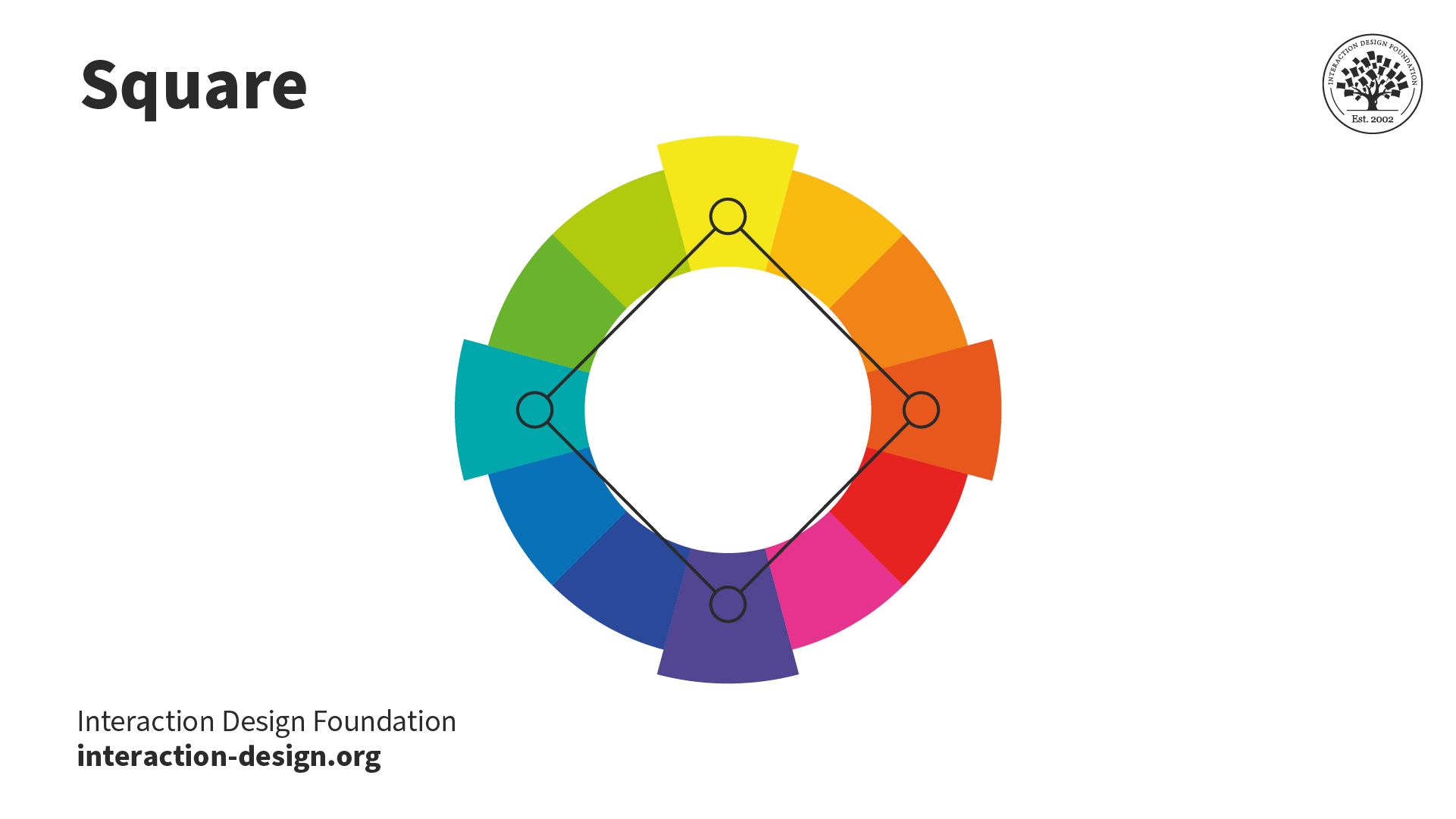
The primary, secondary, and tertiary colors are arranged in a torus shape in individual segments. Four segments are connected by a diamond shape. These segments are yellow, red-orange, purple, and blue-green.

© Interaction Design Foundation, CC BY-SA 4.0

In the square scheme, a variant of the tetradic scheme, designers select four colors by positioning a square on the color wheel. These colors offer a balanced palette when spaced equally at 90° intervals. The design typically looks best when the designer incorporates all four colors uniformly.

Color Harmony: Key Considerations

Depending on what a design is for, who will be using it, and where it will be used, designers must consider several factors when creating color harmony. 

Established Color Schemes

Brands employ defined colors to resonate with their audience, emanate their brand persona, and enhance recall value. Therefore, established brands may limit designers' choice of color based on existing brand color schemes. 

For example, Coca-Cola relies heavily on red and white, a monochromatic color harmony. The vibrant red symbolizes energy and passion, while the pure white offers balance. This color harmony represents Coca-Cola’s dynamic yet universal appeal.

Designers working with Coca-Cola must consider the brand color scheme in their work.
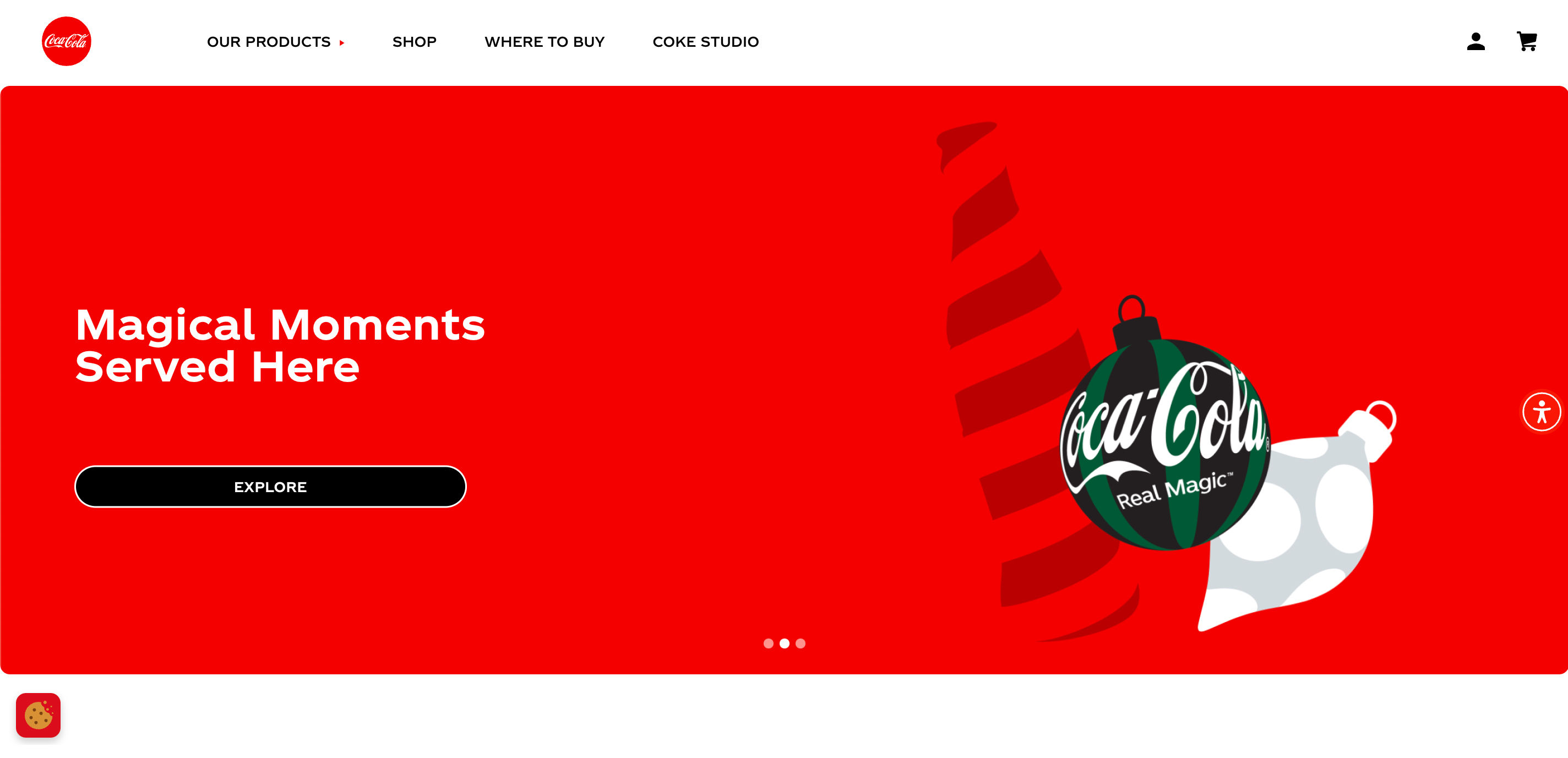
The Coca-Cola website homepage. The menu bar at the top of the page has a white background with black text. The red Coca-Cola logo is positioned on the far left of the menu bar. Below the menu is a large background with white text and a graphic of a green and black bauble.

The Coca-Cola website uses the brand’s red and white color scheme for its primary colors. The cookies and accessibility widgets also use this color scheme. The headline image introduces additional colors as part of Coca-Cola’s holiday campaign. Green is one of the colors used, which forms a complementary color harmony with red.

© Coca-Cola, Fair Use

Color Symbolism

Our relationship with color is complex and rooted in biological, cultural and personal associations. Designers must use research and investigate cultural values to create good designs. 

Every color carries different symbolisms that should inform color choices. While designers may choose a specific color to evoke certain feelings in users, all our experiences differ. Yellow may make one person feel happy while representing danger to another. That said, here are some common color symbolisms in Western cultures:

  • Red: Love, Passion, Strength, Power, Danger, Excitement, Energy.

  • Orange: Warmth, Creativity, Adventure, Freshness, Happiness, Attraction, Success.

  • Yellow: Optimism, Cheer, Happiness, Warmth, Caution, Energy, Intellect.

  • Green: Nature, Growth, Wealth, Luck, Envy, Freshness, Quality.

  • Blue: Trust, Calm, Sadness, Peace, Loyalty, Depth, Authenticity.

  • Purple: Royalty, Nobility, Wisdom, Luxury, Imagination, Mystery, Spirituality.

  • White: Purity, Simplicity, Innocence, Peace, Cleanliness, Emptiness, Goodness.

  • Black: Sophistication, Formality, Sorrow, Boldness, Elegance, Death, Mystery.
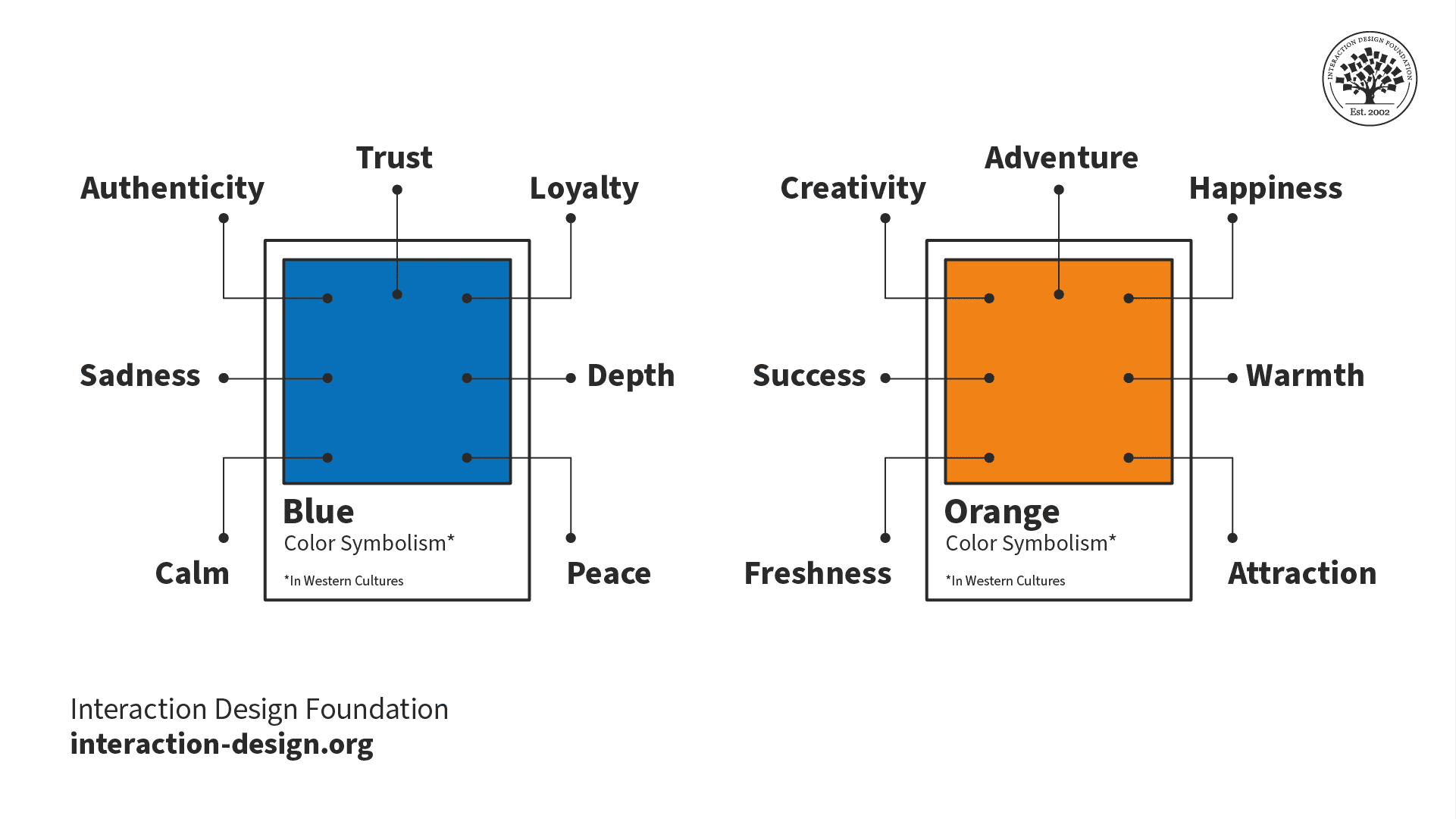
Two squares with block colors. The one on the left is blue. The one on the right is orange. Both have 7 labels. The blue box's labels are peace, sadness, calm, trust, loyalty, depth, and authenticity. The orange box's labels are freshness, adventure, creativity, warmth, happiness, attraction, and success.

Designers commonly use the blue and orange color scheme to create a complementary harmony. However, while a blue/orange scheme can symbolize trust and warmth, it can also symbolize sadness and success. For this reason, designers always test their color schemes with their target users. This testing ensures their chosen color scheme pleases their users instead of repelling them.

© Interaction Design Foundation, CC BY-SA 4.0

Cultural Influence

Designers must consider the significance of colors in different cultures. The perception of colors can vary depending on the region where their users are and the customs of that region. 

For example, in the 1950s, Pepsi changed the color of its vending machines in Southeast Asia from royal blue to light blue. In this region, the designers did not realize light blue is associated with death and mourning. As a result, Pepsi saw a notable decrease in sales.

Color Blindness

Color blindness affects a considerable portion of the population and presents unique challenges. Forms of color blindness include:

  • Protanomaly and deuteranomaly: certain shades of green look more red, and vice versa.

  • Protanopia and deuteranopia: unable to tell the difference between red and green.

  • Tritanomaly: it’s difficult to tell the difference between blue and green and yellow and red.

  • Tritanopia: unable to distinguish between blue and green, purple and red, and yellow and pink.
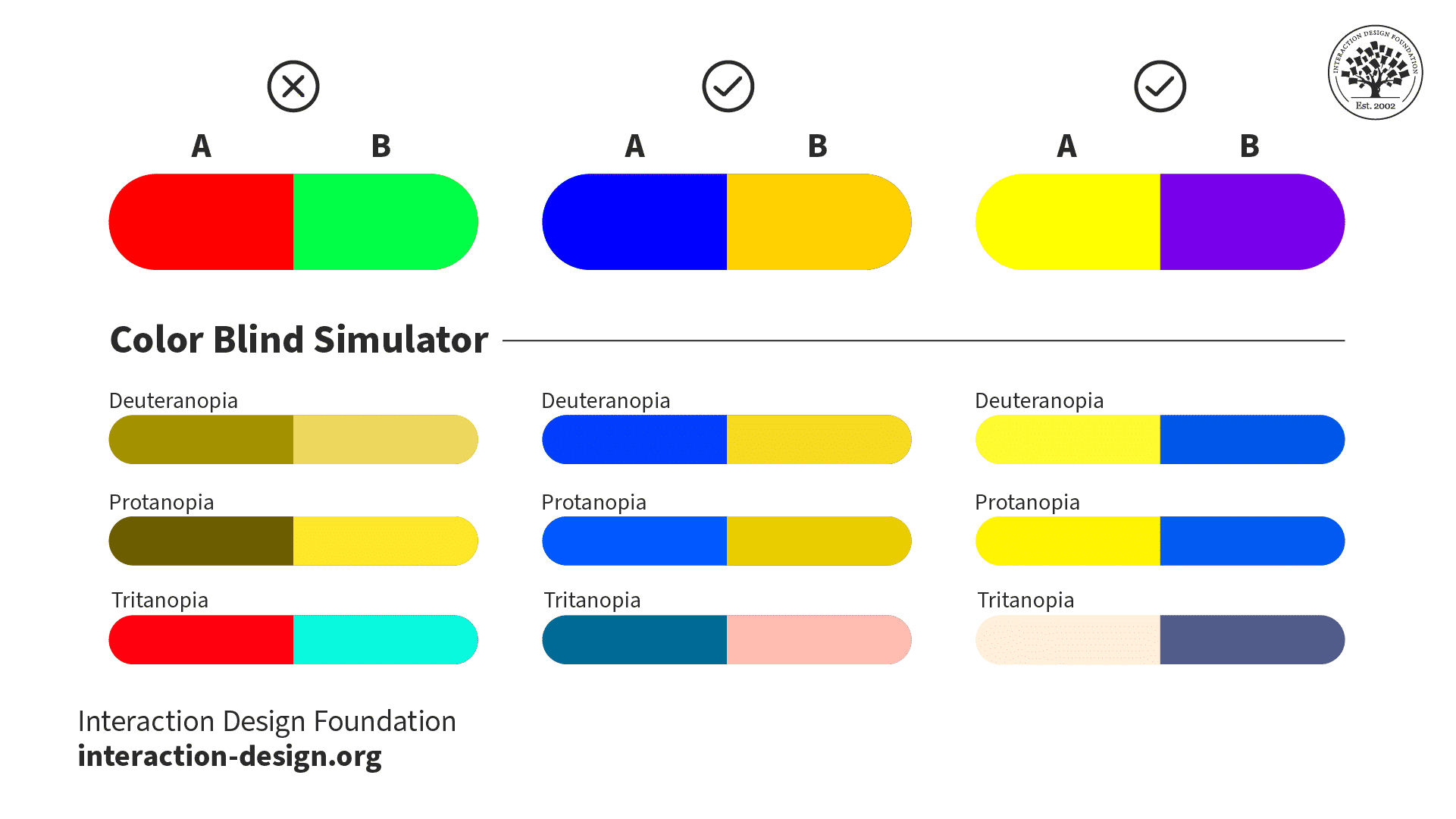
A color blind simulator with three different color schemes. From left to right the color schemes are: red and green, blue and yellow-orange, and yellow and purple. Beneath each color scheme are examples showing how the color scheme might appear to users with deuteranopia, protanopia, and tritanopia. Red and green has poor color contrast for the deuteranopia and protanopia simulations, while blue and yellow-orange and yellow and purple have good contrast. All 3 have good contrast in the tritanopia simulation.

Red and green together create a complementary color scheme. However, people with color blindness perceive these two colors differently. There is very little, or often no, contrast between red and green for people with protanopia and deuteranopia. On the other hand, blue and yellow-orange, and yellow and purple complementary color schemes retain contrast for users with protanopia, deuteranopia, and tritanopia.

© Interaction Design Foundation, CC BY-SA 4.0

If a color scheme primarily relies on colors that color-blind users find challenging, they may miss essential elements. To improve accessibility, designers use: 

  • Colorblind-friendly palettes, such as blue and yellow-orange, and yellow and purple.

  • User research.

  • Tools that simulate different types of color vision deficiency.

Color should not be the sole indicator of meaning. If color is the only indicator used for error fields in a form, those with color blindness may not recognize the difference. Designers supplement colors with icons, text prompts, and other visual cues. This way, users with color vision deficiency can still understand the information.

Questions About Color Harmony?
We've Got Answers!

What are some highly cited scientific research about color harmony?

Some highly cited research on color harmony and related topics includes:

Burchett, K. E. (2002). Color harmony. Color Research & Application. 

Burchett's publication discusses color harmony and its application, providing insights into the principles and practices of color combination and their visual effects. Its comprehensive exploration of color harmony has influenced researchers and practitioners in the field, making it a valuable resource.

Westland, S., Laycock, K., Cheung, V., Henry, P., & Mahyar, F. (2007). Colour Harmony. Color: Design & Creativity, 1(1), 1–15.

This article explores the main theories of color harmony, addressing the search for its rules and fundamental laws. It thoroughly examines color harmony theory, including historical and systematic concepts, making it a significant contribution to understanding color harmony principles and their applications.

Chevreul, M. E., & Martel, C. (1854). The Principles of Harmony and Contrast of Colours, and Their Applications to the Arts. Longman, Brown, Green and Longmans.

Chevreul and Martel's classic work lays the foundation for the principles of harmony and contrast of colors. Its early exploration of color harmony and its applications to the arts have been influential.

​​If you’d like to cite content from the IxDF website, click the ‘cite this article’ button near the top of your screen.

Some recommended books on color harmony and related topics include:

Leatrice Eiseman. (2017). The Complete Color Harmony, Pantone Edition. Rockport Publishers.

Designers consider this book the only color guide they will ever need. This book provides a complete update with Pantone colors and new text. It is an essential resource for professionals who use color harmony.

Joann Eckstut, & Arielle Eckstut. (2013). The Secret Language of Color: Science, Nature, History, Culture, Beauty and Joy of Red, Orange, Yellow, Green, Blue, and Violet. Black Dog & Leventhal.

Joann and Arielle thoroughly investigate the role of color in every aspect of life on our planet. The book delves into the physics, chemistry, and perception of color and its presence in art and nature. 

Josef Albers. (2006). Interaction of Color. Yale University Press.

This book is an essential guide to changing our perception of colors depending on their nearby hues. It explains how colors can appear to morph and change shades depending on how you arrange them. It is a fundamental resource for understanding color theory and harmony.

Johannes Itten. (1973). The Art of Color: The Subjective Experience and Objective Rationale of Color. John Wiley & Sons.

The Art of Color explores color theory, examining the subjective experience and objective rationale of color. Itten, a prominent color theorist, offers clear explanations and illustrations. This book is a valuable resource for artists, designers, and psychologists.

Kassia St Clair. (2017). The Secret Lives of Colour. John Murray.

This book uncovers the surprising history behind the theory of color. It offers a fascinating and in-depth exploration of different shades and tones. It is an influential resource for understanding the cultural and historical significance of color harmony.

What are some of the most common mistakes in color harmony?

Designers use color harmony to transform a good design into a great one. However, navigating the spectrum of colors requires a keen eye and understanding of some common mistakes:

  • Making color schemes too complicated.

  • Ignoring contrast.

  • Neglecting cultural implications.

  • Disregarding emotional and psychological implications.

  • Overlooking color blindness.

For an overview of why accessibility is important in design, watch this video from Elana Chapman, Accessibility Research Manager at Fable:

Transcript

To learn more about accessibility, take our course, Accessibility: How to Design for All.

What are some of the best practices in color harmony?

In design, mastering color harmony is crucial to creating compelling, appealing compositions. Designers understand the interactions, psychological impacts, and cultural significance of different types of color harmony.

  1. Start with a simple color scheme. Expand as needed.

  2. Use high contrast for visibility and readability in text.

  3. Analyze cultural context and the psychological implications of color.

  4. Test and iterate; your first color choice isn’t final.

Discover in this video how maintaining strong color contrast and clear typography enhances accessibility, helping you design interfaces that are both visually engaging and usable for everyone.

Transcript

Learn more UI tips from Michal by watching his Master Class, Beyond Interfaces: The UI Design Skills You Need to Know.

What tools are used in color harmony?

Designers and artists use various tools to achieve color harmony in their work. These tools help select and combine colors effectively:

  1. Color Wheel: Essential to understand and choose colors.

  2. Color Palettes: Predefined schemes for harmonious design.

  3. Digital Software: Tools to select harmonious color schemes.

  4. Online Tools: Website and apps to generate color schemes.

  5. Pantone Guides: Ensure color consistency across media.

  6. Physical Swatches: Match and select colors in real-world applications.

  7. Mobile Apps: Capture environmental colors and create palettes.

These tools serve as a guide to mix and match colors effectively. Designers use tools to ensure their final design is aesthetically pleasing while delivering the intended message or mood.

Many AI tools are available to aid in creating color schemes and palettes. Ioana Telenu, Senior Product Designer, AI at Miro, recommends setting aside a few hours each week to test and play with AI tools:

Transcript

Our course, AI for Designers, teaches you how to make the most of AI and your human skills to future-proof your career.

What are the 3 basic color principles?

Three of the main principles of color theory are: 

  • The color wheel.

  • Color harmony.

  • Color context.

The color wheel is vital for designers to mix colors effectively. Primary colors form the basis for secondary and tertiary hues.

Designers create color harmony using schemes like analogous and complementary, influencing mood and viewer perception.

Color perception varies based on context, culture, and trends. Designers must consider these factors for impactful use.

Understanding color theory aids designers in creating compositions that enhance user experience and emotional impact.

Joan Eckstut, a leading color consultant and author, explains why colors change based on context:

Transcript

Our course, Visual Design: The Ultimate Guide, covers color theory and other key design concepts.

What are the best colors for harmony?

Harmonious design colors depend on context and desired emotions. For example, analogous colors create serenity, while complementary colors offer vibrancy. Examples include blue-green-teal (analogous) and blue-orange (complementary) pairings.

Color harmony involves balancing saturation, value, and warmth. Pastel palettes offer calmness, whereas bright, saturated colors suit energetic designs, emphasizing the importance of balance.

Color choice for harmony should consider cultural perceptions and emotional responses. For instance, blue can symbolize trust and calm, while red can suggest passion or urgency.

Designers use color harmony in UX/UI, interior design, and marketing to: 

  • Guide behavior.

  • Set moods.

  • Convey brand personality. 

Designers try different combinations, make changes based on the situation, and improve their work with the help of suggestions.

Arielle and Joan Eckstut explain how many alleged emotional responses to colors are not based on science. These emotional responses are unreliable indicators of how a color may make someone feel:

Transcript

Read our article, UI Color Palette: Best Practices, Tips, and Tricks for Designers, to level up your color selections.

What are the 2 best colors that go together?

When designers select two colors that work well together, they often choose complementary colors. A complementary color scheme consists of two colors that sit opposite each other on the color wheel. 

Complementary colors like blue and orange are popular in design for their high contrast and visual harmony. These characteristics draw attention and highlight key elements.

Blue and orange balance each other: 

  • Blue can evoke calmness and stability

  • Orange can add energy and enthusiasm.

This combination enables a diverse emotional response in design.

With any color scheme, designers consider cultural, accessibility, and contextual implications.

Take our course, Visual Design: The Ultimate Guide, to learn how to use color in your designs.

What is a family of colors called?

Designers refer to a family of colors as a color scheme or palette, selecting harmonious colors for aesthetic appeal in various contexts.

Using color theory, designers create schemes like monochromatic or complementary for unique visual effects and emotional responses in design.

In UI/UX and product design, designers use color palettes for consistency, usability, and branding, enhancing user engagement and product appeal.

Colors have psychological effects; for instance, blue evokes calmness and trust, commonly used in corporate designs.

Designers should choose color palettes considering context, audience, brand identity, and accessibility, ensuring readability and alignment with the design's message.  

To learn more about UI design, take our course, UI Design Patterns for Successful Software.

How do artists use color harmonies?

Artists use color harmonies for visually appealing, balanced compositions. These harmonies combine colors aesthetically, creating order and balance in art.

  • Monochromatic harmony uses a single color's variations, offering a soothing, cohesive look.

  • Analogous harmony employs adjacent colors on the color wheel, found in nature, harmonious and eye-pleasing.

  • Complementary harmony pairs opposite wheel colors for a vibrant, high-contrast appearance.

  • Split-complementary harmony, a complementary variation, uses a base color and adjacent complements, reducing tension.

  • Triadic harmony selects evenly spaced wheel colors, vibrant even with unsaturated hues.

  • Tetradic harmony uses two complementary pairs, offering a rich, variable color scheme.

Artists apply these mood, message, and emotional response principles, enhancing design effectiveness.  

Are you an artist who wants to transition into user experience design? Cory Lebson, author of The UX Careers Handbook, advises how to reframe your past professional experience for UX design.

Transcript

Our course, How to Create a UX Portfolio, helps you build your UX portfolio from scratch.

Earn a Gift Earn a Gift, Answer a Short Quiz!

1
2
3
4
1
2
3
4
Question 1
Question 2
Question 3
Get Your Gift
Interaction Design Foundation logo

Question 1

What is color harmony in design?

1 point towards your gift

  • The balanced and aesthetically pleasing interaction of colors.
  • The exclusive use of primary colors in design.
  • The use of random colors without any specific pattern.
Interaction Design Foundation logo

Question 2

How does color harmony enhance user experience (UX)?

1 point towards your gift

  • It creates a confusing and chaotic interface.
  • It incorporates only neutral colors.
  • It uses balanced and attractive color schemes that draw attention and engage users.
Interaction Design Foundation logo

Question 3

What tool helps designers achieve color harmony by showing the relationships between colors?

1 point towards your gift

  • Color wheel
  • MS Paint
  • Text editor

Learn More About Color Harmony

Make learning as easy as watching Netflix: Learn more about Color Harmony by taking the online IxDF Course Visual Design: The Ultimate Guide.

Why? Because design skills make you valuable. In any job. Any industry.

In This Course, You'll

  • Get excited when you use visual design principles to create impressive visuals people love! Great visual design makes the message clear, memorable, and persuasive—whether it's an app, a logo, or a presentation slide. You'll learn what makes a design excellent and how science and culture influence what works and what doesn't. You'll create designs that truly connect with people. Visual design isn't just about beauty—it's about shaping ideas that inspire action, build trust, and give meaning to your work. As AI makes visual production faster and cheaper, you stay in demand when you can turn rough or AI-generated visuals into successful designs that get approved, adopted, and used. If you want to stand out with timeless human-centered design skills, this course is for you.

  • Make yourself invaluable with practical design skills that amplify your impact in any industry! Did you know that you only have 50 milliseconds to make a good first impression? Great visual design ensures you pass the test every time. You'll learn to use visual elements to guide emotions, influence purchasing decisions, and optimize User Experience (UX) and User Interface (UI) design. You'll master color theory, typography, and grid systems to improve usability, build credibility, and create designs that stop the scroll.

  • Gain confidence and credibility as you fast-track results with step-by-step exercises and downloadable templates! Complete optional tasks to walk away with portfolio-ready case studies that will help you land your dream job and advance your career. You'll get hands-on and design a low-fidelity wireframe, apply a monochromatic, complementary, or triadic color scheme, choose typefaces, and select a grid system. It's easier than you think! No matter your background, you can master Visual Design. With clear guidance and real-world examples, you'll apply your skills right away. This course will give you the visual design skills you need to solve design challenges, collaborate smarter, and make it easy for decision-makers to say yes to your vision.

It's Easy to Fast-Track Your Career with the World's Best Experts

Master complex skills effortlessly with proven best practices and toolkits directly from the world's top design experts. Meet your experts for this course:

  • Mia Cinelli: Associate Professor of Art Studio and Digital Design at the University of Kentucky.

  • Joann Eckstut: Color Consultant, Founder of The Roomworks, and one of the 12 designers chosen by the Color Association of the USA to create the yearly forecast used by industries to keep up with color trends.

  • Arielle Eckstut: Author, Agent-at-large at the Levine Greenberg Rostan Literary Agency, and Co-Founder of The Book Doctors and LittleMissMatched.

Get an Industry-Recognized IxDF Course Certificate

Increase your credibility, salary potential and job opportunities by showing credible evidence of your skills.

IxDF Course Certificates set the industry gold standard. Add them to your LinkedIn profile, resumé, and job applications.

Course Certificate Example

Be in distinguished company, alongside industry leaders who train their teams with the IxDF and trust IxDF Course Certificates.

Our clients: IBM, HP, Adobe, GE, Accenture, Allianz, Phillips, Deezer, Capgemin, Mcafee, SAP, Telenor, Cigna, British Parliament, State of New York

All Free IxDF Articles on Color Harmony

Read full article
Everything You Need To Know About Triadic Colors - Article hero image
Interaction Design Foundation logo

Everything You Need To Know About Triadic Colors

Here’s a handy statistic that’s worth remembering: over 60% of people accept or reject new products based on color, and that’s a figure you can think about when you consider the link between colors and products—like, for instance, whenever you think of Coca-Cola, you’ll likely think of red, or McDon

Social shares
1.1k
Published
Read Article

Everything You Need To Know About Triadic Colors

Everything You Need To Know About Triadic Colors

Here’s a handy statistic that’s worth remembering: over 60% of people accept or reject new products based on color, and that’s a figure you can think about when you consider the link between colors and products—like, for instance, whenever you think of Coca-Cola, you’ll likely think of red, or McDonald’s with the arches in yellow, or Starbucks with its signature green. It’s no accident that colors and top brands have such a strong relationship, and a big part of design is knowing how to pick the perfect colors, which—by the way—isn’t just about aesthetics but about giving your brand a personality and values, and designers use color schemes both to evoke emotions and to make a lasting impression on users, and customers. One of the techniques designers use to find the best colors for their brands is something called the triadic color scheme—and you can see how to use it to create visuals that make a big impact.

What Is a Triadic Color Scheme?

As you can likely tell from the “tri” in “triadic,” there are three colors involved for any one selection you make—but there’s a specific way to get them, and they’re not ones that sit next to or right across from each other. Triadic colors sit at equal distances from the color wheel—that handy tool that artists and designers have referred to since Sir Isaac Newton invented his color wheel in 1666—so your three triadic colors are equidistant and make an equilateral triangle if you draw joining lines between them.

© Interaction Design Foundation, CC BY-SA 4.0

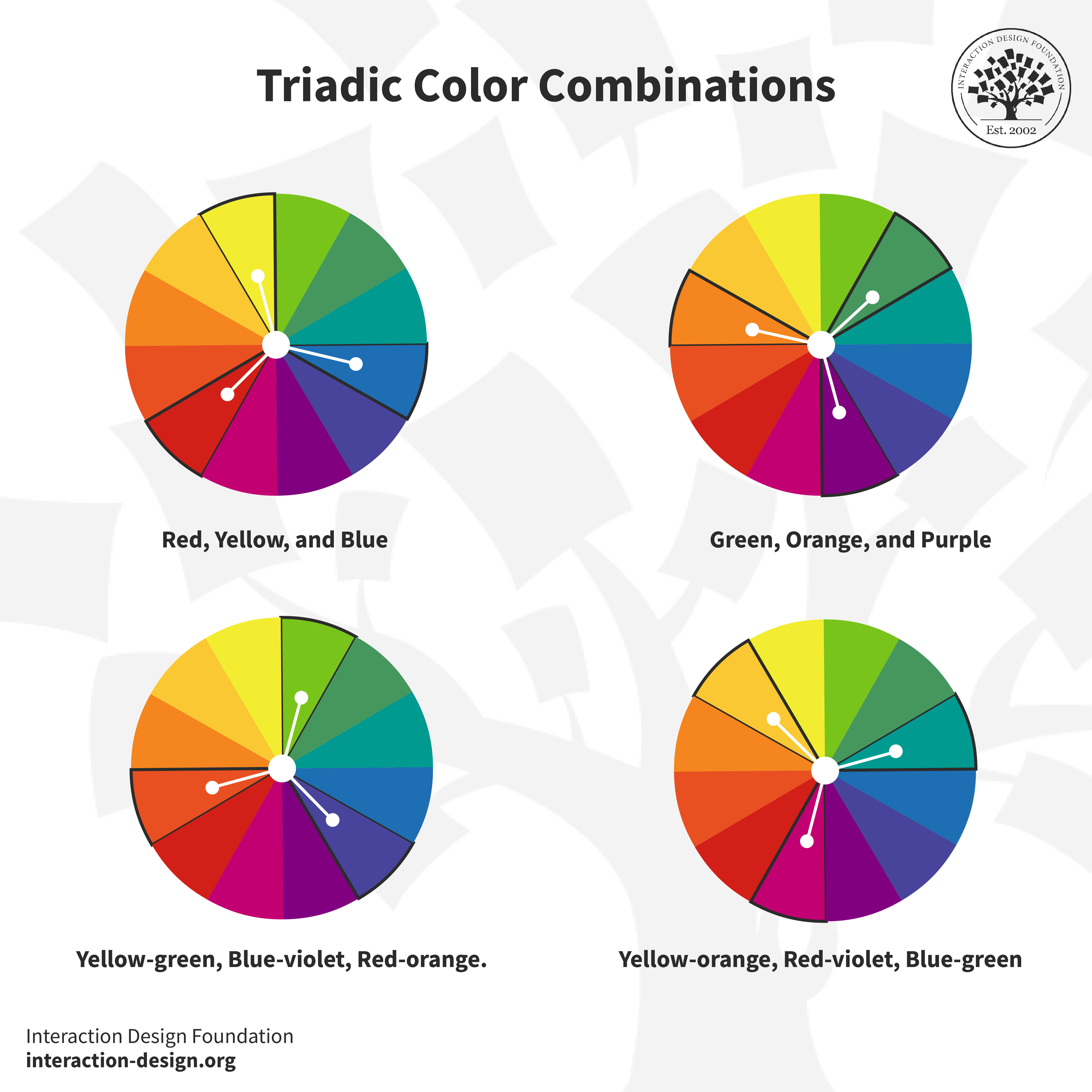
There’s a nice and easy example of what makes a triadic color scheme—and it’s our three primary colors, red, blue, and yellow—and an important point to remember is that triadic colors make a vibrant color palette. That’s because it means separating each color, no matter what the specific hues are, so as you look around the color wheel, you can land on triadic color combinations such as green, orange, and purple. And if you go into the “mixes” between these hues, you’ll get fascinating and alluring triadic combos of yellow-green, blue-violet, and red-orange, and yellow-orange, red-violet, and blue-green.

Four triadic color combinations are shown on four different color wheels.

© Interaction Design Foundation, CC BY-SA 4.0

Thanks to the many, many online resources that are available, it’s pretty much safe to say that anyone who can dabble or have a go at it can make impressive visuals, even if they don’t have much in the way of artistic talent. Still, with that said, you need to go beyond the area of picking your favorites if you’re going to pick the perfect color combination—and that’s where you’ll need to dive into color theory and design principles so you get things right.

So, what is color theory? It’s the study of how colors work together—especially because some work really well and some really don’t work well—and how the colors you can pick will affect emotions and perceptions whenever people look at the designs you set in front of them. That’s why it’s so critical for you to understand how colors work together if you’re going to reinforce your brand, make your website easy to read and navigate, and—above all—make it visually appealing.

Deep dive into color in this video by Arielle Eckstut, Author of What Is Color? 50 Questions and Answers on the Science of Color.

Transcript

How to Select a Triadic Color Scheme for Your Design

You’re going to know just how powerful color is in design no matter if you’re a designer who’s starting out or if you’ve been one for a long time—and, from that, you’ll know how vital it is to pick a color scheme that works (as in, makes the best impact on users and keeps anyone from getting confused). Sure, it’s more work to choose a triadic color scheme than it is to use pretty much any other color scheme, but—the good news—it can be far easier to pick a good or great one when you’ve got some handy tips you can count on.

Five essential tips to select a triadic color scheme for your design.

© Interaction Design Foundation, CC BY-SA 4.0

1. Understand the Color Wheel

That color wheel you encountered earlier, it’s pretty important for designers—along with artists—and you’ve got to understand the simple color wheel triads if you’re going to create beautiful color combinations. Aside from that, you’re also going to need to understand primary, secondary, and tertiary color placement on the wheel so you can have a good feel—or reference point—of what is what and what is where and then be able to take things from there.

2. Align Your Color Choices with the Purpose of Your Project

Now you’ve got to look at getting your color choices in line with your end goal, and it’s here where you’ll need to ask a few questions—for example, what feelings do you want to bring out of your users—or viewers—from your triadic color palette? This will need to be in line with what your product or service offers them, like food, travel, banking, healthcare—the list goes on (and can be as long and varied as the range of industries that exist). To be sure, some colors suit some industries or product or service types better than others, but one of the biggest advantages here is that when you’ve got your end goal in mind—as in, what your brand’s message is—it becomes so easy to choose the dominant color.

It’s here where it’s great to check out some examples of how colors suit businesses and industries, and if you want to—for instance—create a fintech app, then you can pick blue as your primary color (or dominant color). Take a look at fintech brands out there and you’ll notice how blue features a great deal, and that’s because blue represents power and trust—key ingredients whenever people are engaging with an organization that handles their money.

So, that’s one color, but there are still two others to address for our triadic combination here, and those other two colors you can bring on board to act as accents or accent colors, and you can bring the saturation level in these colors down so they’re more muted—something that helps make a more cohesive blend with your dominant color.

Just begin with what the purpose of your palette is—be it energy you want to invoke, calmness, or creativity—and take it from there. For example, take the blue you’re thinking about for your fintech app and see which other two colors are equidistant from it on the color wheel; whatever’s appropriate for your brand—and its brand guidelines should have much to say about whether it’s a “traditional” banking color scheme or something with more vibrant verve, maybe to suit a younger target audience. Then, taking things from there, you’d proceed with a trio of colors that evokes the desired feelings.

3. Understand the Emotions Behind Colors

Bold, bright colors make a strong impact, by their very nature, while pastel shades create a calm, unified look—so, as long as you understand the emotions of colors and what your brand is about and how users—and customers—are bound to react to your color choices (a factor that will depend on their culture, too), it can help you create a palette that’s nice and cohesive to your brand.

4. Test the Color Harmony

Once you’ve picked out the three colors, you’re going to have to test them out to see how they work together—and that’s because some combinations might clash or be too much and spell visual overload for whoever sees the design you make—and see if they’ve got enough contrast and that they don't clash. The best way for you to test the triadic color harmony is to create swatches or use an online color tool—and you can find online color tools that can help you explore and visualize different triadic combinations fast, and you’ve got some of the best tools that are available online to check out, such as Adobe Color, Coolors, and Hubspot Color Palette Generator.

5. Test Color Contrast

Another vital thing is accessible design, and while contrast has come up before, you’ve got to make sure that your color choices provide adequate contrast for reading on screen—and it’s something that you’ll need to do so your design complies with legislation for users with disabilities in most countries. For example, most shades of yellow and lighter shades of other colors don’t provide adequate color contrast on a white background—it’s extremely hard to make out what’s going on in a design even for users who don’t have visual disabilities. In any case, go and read the Web Content Accessibility Guidelines for advice and tools for measuring contrast.

In this video, Arielle and her co-author, Joann Eckstut, give you their top tips for choosing colors.

Transcript

A Step-by-Step Guide to Creating a Triadic Color Scheme

A step-by-step guide to creating a triadic color scheme.

© Interaction Design Foundation, CC BY-SA 4.0

1. Set the Context

Context is fundamental, foundational, and the primary thing you’ve got to decide on before you think about any primary colors, for example—so, what message do you want to convey? What emotions do you want to evoke from users and potential customers who visit the website you’ll make, for example? What mood do you want your triadic color combination to set for anyone who arrives on the design? Different colors evoke different emotions and associations, and red—for instance—can signify passion or danger much of the time. Another thing that will be a deciding factor is the associations, and users in Eastern cultures will more likely view red with connotations of good fortune, for instance, than those in Western cultures will. In any case, your triad colors have got to both align with the purpose and message of your project and mirror what feelings you want to bring out from the users who arrive on the site.

2. Select Lead Color and Identify Complementary Colors

The weightiest decision when you want to form a triadic color combination is to pick your dominant color, and that’s because your lead color is going to set both the tone and the mood of your project—say, our banking website as an example. Besides, the other two colors depend on it and need to work best with it so all three work with each other to maximum effect. So, with all that said, what kind of factors do you need to consider whenever you’re choosing the dominant color?

  1. Emotional impact is the first major thing, since each color has different emotional associations, which are cultural as well as down to the individual—where, say, red may evoke passion, excitement, or hunger, while blue may induce the trust and calmness a bank would need—and you’ve got to choose a lead color that’s in line with the desired emotional impact on your audience for your design.

  2. Brand identity is the other heavy consideration, and if you're selecting a triadic scheme for a brand, the dominant color has got to be in line with the brand’s existing identity—and that’s vital for brand recognition—and so it’ll be something that’s already decided for you in the brand guidelines (or “from corporate”). However, if you’re coming on board to a fresh startup that’s just coming into being, you’ll likely have more input or leeway to decide on a fresh look.

3. Decide Between Primary and Secondary Colors

One more thing for when you’re deciding on what the colors will be—depending on what your design objectives are, you can go for a triad of primary or secondary colors. A primary triadic color scheme will create a vibrant and lively design—something that can jump out more at users—while a secondary triadic color scheme will give you a more subdued and neutral color palette to work with—a better fit for brands with a different kind of message for their users and customers.

4. Check Visual Balance and Harmony

Now that you’ve got the colors picked out (and congratulations if the scheme turns out to be one that works as well as you intend it to!), you’re going to have to adjust the saturation or brightness so that you end up with a visually pleasing combination. You can experiment with different shades and tones—but the key here is "balance" and, in any case, your color choices in this step should be consistent with the message you want to get across to your viewers—or users and customers, to put it in user experience (UX) design terms.

5. Consider Proportion and Hierarchy

Decide on how you want to use the selected triad colors within your design—where the lead color tends to feature the most, while the two triadic colors act as accents or background colors—and you want to guide the user’s eye here, so create a good hierarchy in your design to do that with.

6. Follow the 60-30-10 Rule

The classic 60-30-10 rule is nice and simple—60% of your palette should be a dominant color, 30% should be the secondary color, and 10% should be an accent color—and it’s a time-tested rule for creating a balance and letting users move from one focal point to the next with comfort and ease.

7. Create Design Mockups

Before you commit fully to anything as a final design, you’ve got to try things out, so apply the triadic scheme you intend to use to design mockups or prototypes so that you can see how well it works. For one thing, it will help you determine whether the color scheme you’ve picked meets the objectives of your project; for another thing, it’ll save your sinking a great deal of time and effort (and money, by association) into something that doesn’t work as well as you had hoped at first.

8. Test for Accessibility

Remember to design for accessibility—it’s too vital a thing to overlook, no matter if you’re designing a website, an app, or marketing collateral—and whatever you’re working on, you’ll need to make color choices accessible. It’s so that the broadest possible audience can understand your design—and so that your design complies with legislation for users with disabilities—and you can use contrast-checking tools to make sure that text will be legible for users with disabilities such as color blindness.

Advance Your Career With This Free Template for “Color Schemes”
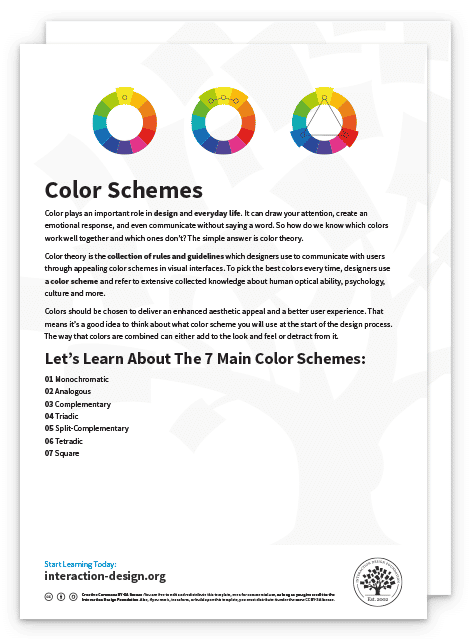
Color Schemes
We respect your privacy
Get 1 powerful email each week: Design a life you love!

Great Brand Examples That Use Triadic Color Schemes

There are a wealth of real-life triadic color scheme examples out there, and you can take inspiration from brands who have done it well, such as brands like Burger King, Mozilla Firefox, and Fanta—so it’s more than worth it to have a close look at a couple of examples.

1. Tide

Tide logo featuring the bold triadic colors - orange, yellow, and blue.

© Procter & Gamble, Fair Use

The type of orange or red-orange that American laundry detergent brand Tide has as the dominant logo color represents both zest (or enthusiasm) and freshness—and that’s a suitable choice, since it gives a great sense of cleanliness and revitalization; just what customers are after when they’ve got laundry to do and want great quality. On both sides of the orangey-red band or circle there’s the complementary shade of yellow that sets things off in an effective way—and in terms of the meaning it conveys, it doesn’t just align with cleanliness and freshness but adds a sunny and cheerful aspect to the brand, too.

Then there’s the second complementary color, a type of blue outlined in white, which contrasts with the dominant orange-red and makes for a visually appealing combination that “pops” iconically, as a much-loved brand logo should. But there’s something more than just the aesthetics involved here—remember how blue stands for trustworthiness and reliability, and it’s through this that Tide’s consumers—as well as store-goers and anyone who sees the logo—can feel all the more assured that their laundry is going to get nice and clean and bright when they use Tide products.

2. Airtable

Airtable logo features bold typography and shades of blue, yellow, and red.

© Wikipedia, Fair Use

Airtable is a project management software that uses a triadic color scheme, and the logo that it’s got has different triadic colors and tints of the three primary colors—red, yellow, and blue—and you can see how they work together to make up a highly effective look in the logo. Blue is dominant here and a prominent part of the logo, and that’s a fitting thing because blue—as well as its association with reliability in, say, banking—has got a common association with the tech industry.

For the complementary colors, there are a shade of yellow that not only works well with the blue as a contrasting accent to it but carries with it a nice touch of energy and creativity too, and last—but not least—the touch of red, which plays well with the other two colors, pointing forward with energy and creativity in its symbolism while it makes a neat and eye-catching and memorable addition to complete the trio.

How are Triadic Color Schemes Used in Various Industries?

1. Photography

A vibrant image featuring a young woman wearing a sunny yellow dress with striking blue hair, set against the backdrop of a bold red car.

© Pexels, Fair Use

Photographers use triadic color schemes to capture visually striking pictures—something that can help to emphasize the composition and subject of a photograph—and from how photographers use colors equally spaced on the color wheel, they create a natural balance within the frame. For instance, triadic schemes work well in the extreme in landscape photography of colorful markets, street festivals, or gardens in full bloom—check out these in magazines and online; they can be stunning.

Then there’s fashion photography, where photographers use the triadic scheme when they’re shooting portraits—and it’s an approach that extends to clothing, makeup, or backgrounds, and makes for a look that’s visually harmonious. Likewise, in product photography, a triadic color scheme helps capture the essence of the product and bring it that much closer to viewers so they can sense its qualities and imagine how it can benefit them all the better.

2. Movies

A movie still from Hulk. Features a monstrous creature set against a desert landscape.

© Pinterest, Fair Use

On the surface of it—and since we’re looking at designs as more or less “static” things here—you might not think that triadic color combinations could feature in feature films, but, yes, triadic turns up in movies, too. Ang Lee's The Incredible Hulk provides a superb example to capture this (although you’d be far less likely to capture the Hulk if you tried to), and the film’s approach to visual storytelling is distinctive and powerful.

In the still above, you’ll find our main character the Hulk—with his signature green to represent his monstrous and uncontrollable alter ego—and notice how his dominant hue works so well with the purple and orange as the other two colors in this triadic color scheme, a nifty effect.

3. Web design

A snapshot from Nickelodeon's website features bold and vibrant blue, green, and orange. 

© Nick, Fair use

Nickelodeon’s web design pays attention to its target audience, not least since its UI color palette is neat proof of how the brand keeps in mind children and families, and there’s an iconic way to how Nick incorporates their triadic color scheme—the dominant color of orange, and Nick’s signature bright orange dominates their website. Orange is a great choice because it represents the brand’s lively, energetic, and playful energy, but another nifty point about their color choice is how they capture the users’ attention right away with it, and so prompt excitement and fun through that unique “splat” effect.

Then, the secondary colors of green and blue work as neat complements—colors that people commonly associate with Nickelodeon’s iconic slime and water-themed branding, and it’s a triadic scheme that visually appeals to children and helps get across the sense of entertainment and adventure Nickelodeon is known—and loved—for.

The Take Away

Whenever you want to go for a triadic color scheme, you’ll need to understand color theory, practice, and use creativity to great effect if you’re to make the best use of triadic color combinations and schemes. Along with that, know the purpose of your design, your brand’s message (and brand guidelines), and what feelings you want to bring out from the people who see your design. You can create visually appealing and harmonious designs using a triadic color scheme and have fun on the way, even though it can sometimes take a great deal of thought and effort.

Sure, there’s no one-size-fits-all approach and, to be sure, you’ll need to experiment to find the perfect color combination for your project, but find a triadic color scheme that speaks best to your brand’s target audience, and even beyond, and you may just arrive at an iconic color scheme that becomes ingrained in the public consciousness for many years to come.

References and Where to Learn More

Learn how to design a UI Color Palette.

Learn more about color theory in this topic.

Read this blog post to understand the relationship between Colors and Emotions.

Deep dive into color with this course, User Experience: The Beginner’s Guide.

Feel Stuck?
Want Better Job Options?

AI is replacing jobs everywhere, yet design jobs are booming with a projected 45% job growth. With design skills, you can create products and services people love. More love means more impact and greater salary potential.

At IxDF, we help you from your first course to your next job, all in one place.

See How Design Skills Turn Into Job Options
Privacy Settings
By using this site, you accept our Cookie Policy and Terms of Use.
Customize
Accept all

Be the One Who Inspires

People remember who shares great ideas.

Share on:

Academic Credibility — On Autopilot

Don't waste time googling citation formats. Just copy, paste and look legit in seconds.