Augmented Reality (AR)

Your constantly-updated definition of Augmented Reality (AR) and collection of videos and articles.
Be a conversation starter: Share this page and inspire others!

887 Shares

What is Augmented Reality (AR)?

Augmented reality (AR) is an experience where designers enhance parts of users’ physical world with computer-generated input. Designers create inputs—ranging from sound to video, to graphics to GPS overlays and more—in digital content, which responds in real-time to changes in the user’s environment, typically movement.

See the differences between Augmented, Virtual and Mixed Reality here.

Transcript

AR’s Place in the World of Extended Reality

Augmented reality has science-fiction roots dating to 1901. However, Thomas Caudell described the term as a technology only in 1990 while designing to help Boeing workers visualize intricate aircraft systems. A major advance came in 1992 with Louis Rosenberg’s complex Virtual Fixtures AR system for the US Air Force. AR releases followed in the consumer world, notably the ARQuake game (2000) and the design tool ARToolkit (2009). The 2010s witnessed a technological explosion—for example, with Microsoft’s HoloLens in 2015—that stretched beyond AR in the classical sense, while AR software became increasingly sophisticated, popular and affordable.
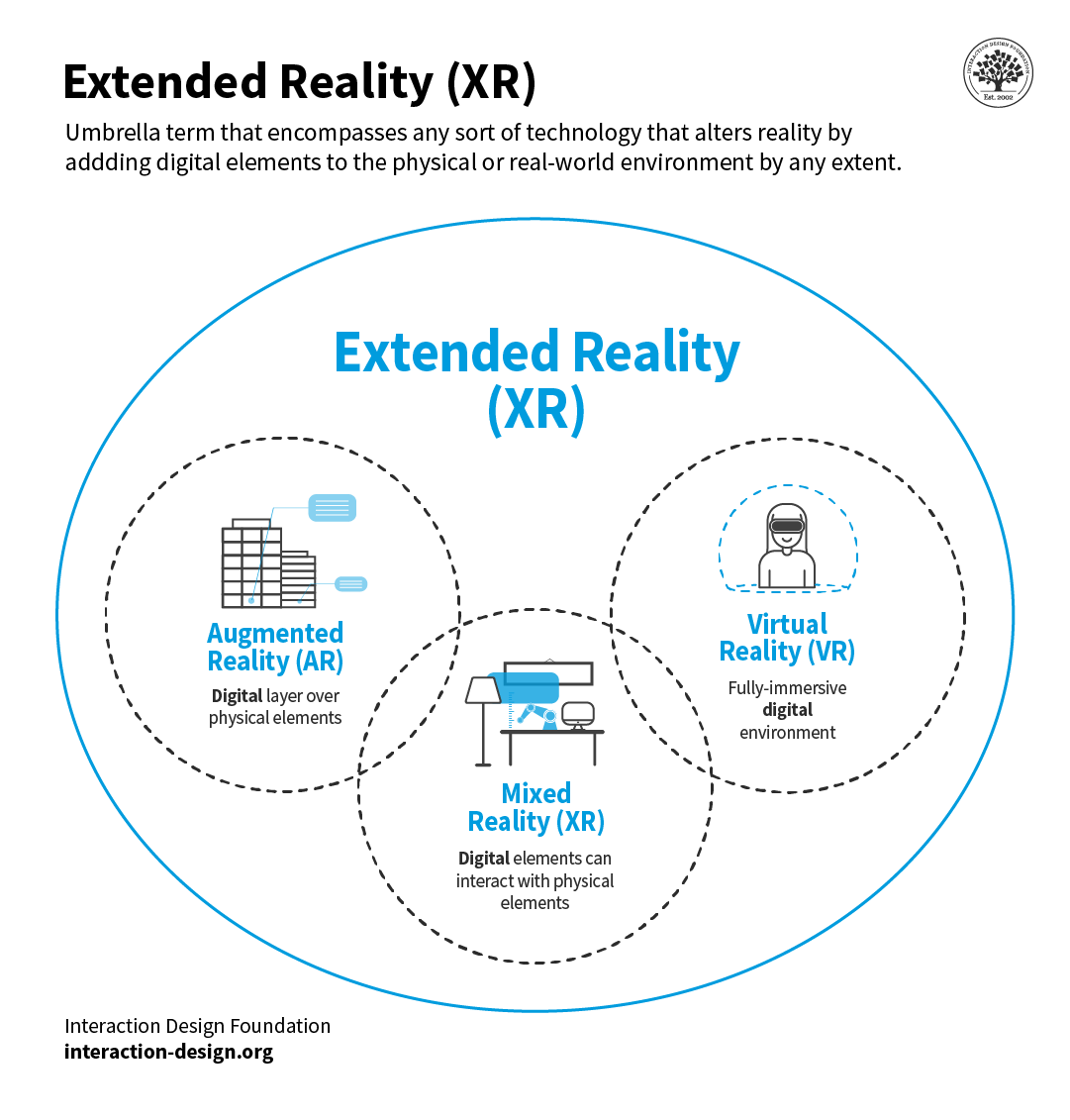
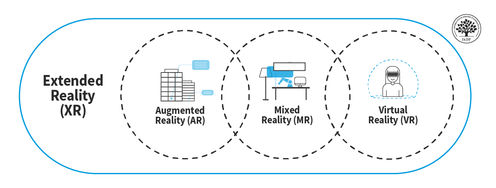
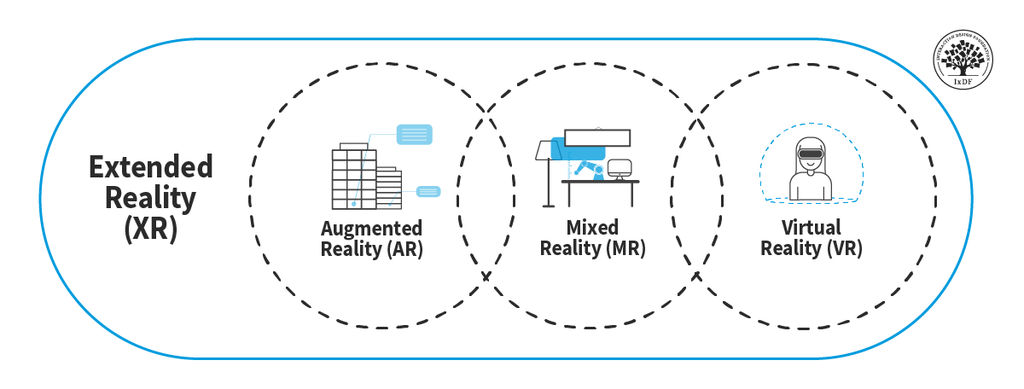
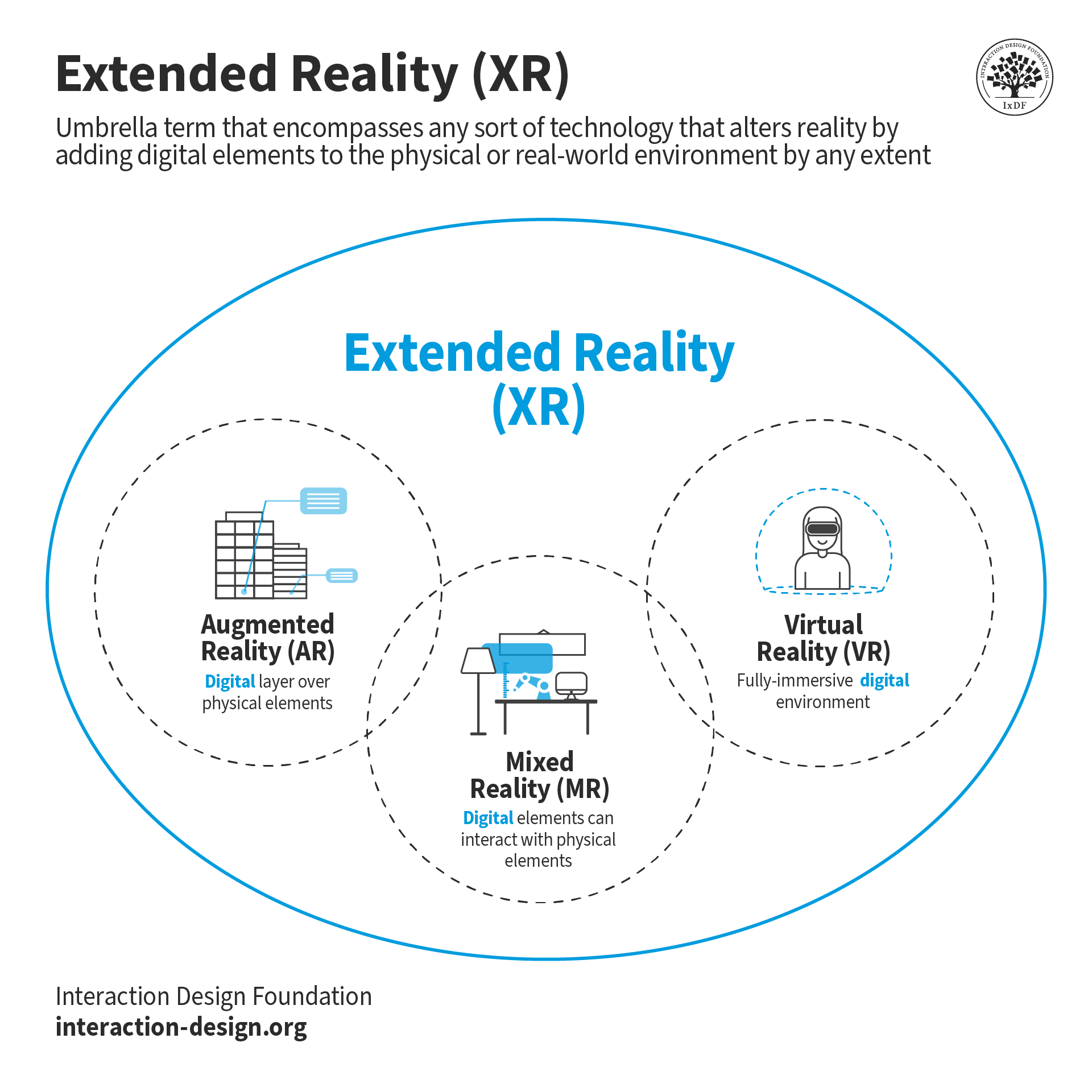
The term XR includes AR, MR, VR, and any technology that blends the physical and the digital world.

© Interaction Design Foundation, CC BY-SA 4.0

Under the umbrella term extended reality (XR), AR differs from virtual reality (VR) and mixed reality (MR). Some confusion exists, notably between AR and MR. Especially amid the 2020s’ technology boom, considerable debate continues about what each term covers. In user experience (UX) design, you have:

  • AR: You design for digital elements to appear over real-world views, sometimes with limited interactivity between them, often via smartphones. Examples include Apple’s ARKit and Android’s ARCore (developer kits), the Pokémon Go game.

  • VR: You design immersive experiences that isolate users from the real world, typically via headset devices. Examples include PSVR for gaming, Oculus and Google Cardboard, where users can explore, e.g., Stonehenge using headset-mounted smartphones.

  • MR: You design to combine AR and VR elements so digital objects can interact with the real world; therefore, you design elements anchored to a real environment. Examples include Magic Leap and HoloLens, which users can use, e.g., to learn more directly how to fix items.

Because of the slight overlap regarding interactivity, brands sometimes use AR interchangeably with MR. “Augmented reality” remains popular—despite the point that the original sense of AR design is overlaying digital elements upon real-world views, e.g., GPS filters/overlays on smartphone screens so users can find directions from street views. So, digital elements are merely superimposed on real-world views, not anchored directly to them: The computer-generated content can’t interact with the real-world elements users see—unlike in MR. The HoloLens is MR, for instance, because it interprets the space in a room and combines digital objects with the user’s physical environment.

How Does AR Work?

Augmented reality combines real-world sensory input with computer-generated real-time content using SLAM (Simultaneous Localization and Mapping).
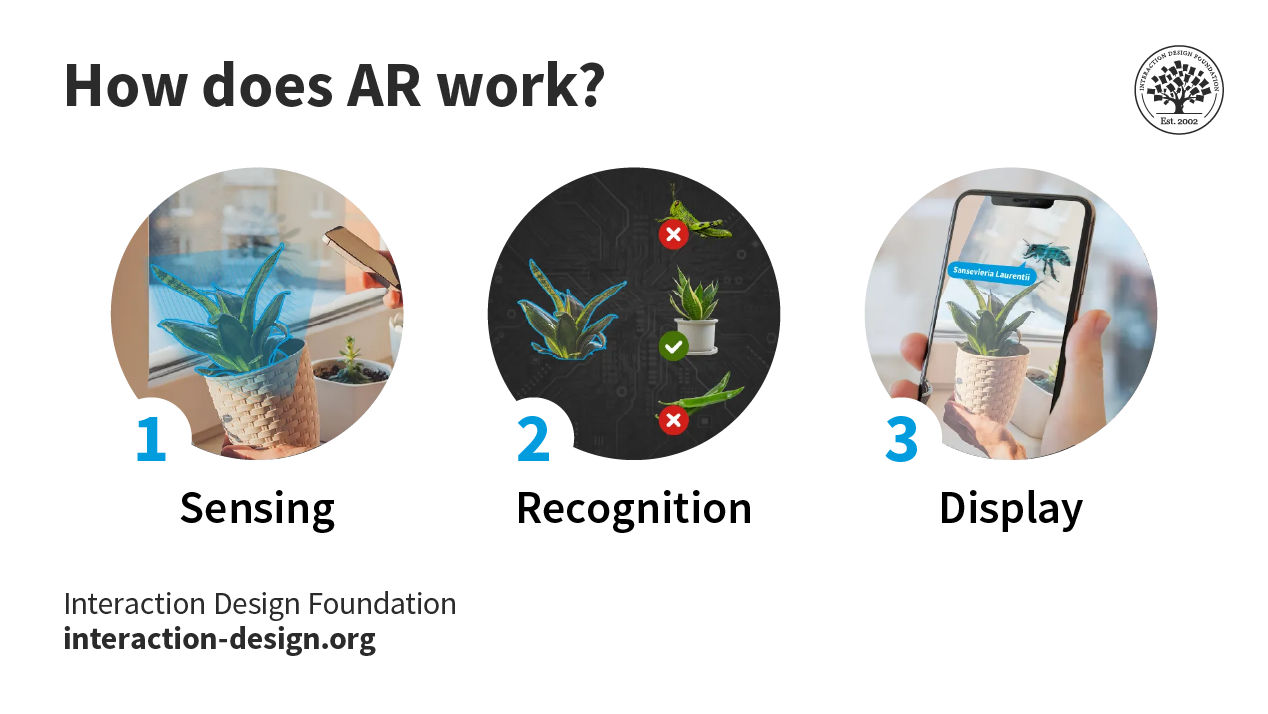
An illustration depicting the three stages of how an AR app works. Step one: sensing. The phone sees a flower with the camera. Step two: Recognition. The phone recognizes the flower as a specific flower by comparing against other flowers. Step three: Display. The Phone screen shows an animated bee flying near the flower with a speech bubble that says

The three stages a device goes through to display AR content.

© Interaction Design Foundation, CC BY-SA 4.0

This process involves three main steps:

  1. Sensing and Tracking: The AR device senses the environment with cameras, accelerometers, gyroscopes, GPS, and even lasers to track the position and orientation of the user and their device.

  2. Image Processing and Recognition: The system analyzes the sensor data and identifies objects or features in the environment that can be augmented. The device uses image processing and recognition algorithms to identify and track objects in real time.

  3. Rendering and Display: The final step is to generate and display the computer-generated content on top of the real-world environment. This step renders and displays virtual objects in the correct perspective and position relative to the user's viewpoint. To the user it should seem as if the objects are really there, like a hologram.

AR’s Expanding Appeal and Potential

AR designers made considerable strides in the 2010s—a decade full of invaluable AR lessons and examples while the required sensors became cheaper.

© Niantic, Fair Use

Pokémon GO is noteworthy, a GPS-oriented, social AR app that “inserts” Pokémon characters into users’ environments so users can find and capture them on device screens.

Google’s AR stickers are another prime example; users drop realistic images into their camera shots. Users find AR particularly appealing for its entertainment value. Still, AR’s mainstream future appears assured across a wide range of applications, including education inside museums. With AR applications, you can bring experiences closer to users in their environments through designs that are more directly engaging, personalized and—indeed—fun. Storytelling is a great way to achieve this.

“Augmented reality is going to change everything.”

— Tim Cook, Apple’s CEO

How to Take Digitalized Steps in the Analogue World

A UX designer for AR needs to understand context of use, which refers to the specific situation or environment in which the users will use AR technology.

In this video, Frank Spillers, founder of UX consultancy Experience Dynamics, covers the key characteristics of context of use that you should consider to create successful AR experiences.

Copyright
Transcript

To design successful experiences for AR consider:

  1. Safety: Remember users’ real-world contexts; don’t distract/mislead them into danger.

  2. Overkill: Beware of drowning users’ senses with meaningless data; keep experiences contextualized.

  3. Environment: Unlike desktop experiences, AR happens anywhere. So, the aim is primarily for users’ contexts regarding whether they’re outdoors/indoors and moving/static. Whatever their setting, users expect pleasurable, user-friendly experiences. AR UX’s Rob Manson stipulates user scenarios:

    1. Public: Interacting with software, using the entire body

    2. Personal: Using smartphones in public spaces

    3. Intimate: Sitting, using a desktop

    4. Private: Using a wearable

  4. Comfort: Make comfortable designs to prevent physical strains and reduce cognitive load.

  5. Security: AR data is rich, so design to ensure users’ data is secure.

How to Get Started with AR

  1. Familiarize yourself with AR terminology, such as spatial cognition, bodystorming, Field of View and task load.

  2. Constantly ask “Where are users?” and how they’ll apply and adopt your design.

  3. Remember physical limitations—users hold devices longer while seated, etc.

  4. Make interfaces automatic so users needn’t be prompted with commands. Consider voice controls.

  5. Use AR-software-creating resources optimally (e.g., Apple’s ARKit).

  6. Offer easy onboarding.

  7. Provide clues and maximum predictability.

  8. Prioritize screen real estate.

  9. Design for accessibility.

  10. Design animations where you consider how frame rates and processing power impact device compatibility.

  11. Ensure your design interprets and responds to users’ head and body movements so users can act intuitively and freely without giving commands.

Ultimately, understand what users—in various contexts—expect before you try to meet the experience demands. Do user testing that covers all feasible conditions (lighting, weather, etc.).

Questions About Augmented Reality (AR)?
We've Got Answers!

How does AR differ from virtual reality (VR) and mixed reality (MR)?

Augmented Reality (AR), Virtual Reality (VR), and Mixed Reality (MR) each offer unique digital experiences, but they differ in how they treat the real and virtual worlds.

  • AR overlays digital elements onto the real environment through devices like smartphones or AR glasses—think of Pokémon Go or IKEA’s Place app.

  • VR, in contrast, creates a fully immersive digital environment that replaces the real world entirely, usually through headsets like the early Oculus Quest. Users in VR interact only with the simulated world.

  • MR combines the two, as the name suggests. It anchors digital objects into the real world so users can interact with both simultaneously, using devices like Microsoft’s HoloLens, Meta (previously Oculus) Quest 2 and later.

Each technology serves different needs—while AR enhances real-world experiences, VR transports users elsewhere, and MR blends digital and physical spaces for highly interactive experiences.

Watch as CEO of Experience Dynamics, Frank Spillers discusses AR:

Transcript

Learn how to design AR experiences with our UX Design for Augmented Reality course.

What are examples of augmented reality applications in design?

Augmented reality (AR) applications enhance how users experience, interact with, and customize products or spaces. For example, in interior design, apps like IKEA Place allow users to visualize furniture at home by placing true-to-scale 3D models into real rooms. In fashion design, AR mirrors help customers try on clothes virtually, improving online shopping experiences. Automotive designers use AR to project concept models onto real environments, speeding up prototyping and user testing. TeamViewer Frontline is an enterprise productivity platform with fully integrated AR solutions to enhance productivity and efficiency in various industries. Examples also extend to the medical world, where surgeons use AR overlays to guide the cuts they need to make. Of course, AR features in game design, too, with Pokémon GO featuring as a leading example.

Watch as CEO of Experience Dynamics, Frank Spillers discusses AR:

Transcript

Learn how to design AR experiences with our UX Design for Augmented Reality course.

How do I design UX for augmented reality applications?

To design UX for augmented reality (AR) applications, focus on blending digital elements naturally into the real world and according to what users of your app expect to find and do. Always prioritize context—ensure virtual objects align realistically with users’ environments. Design intuitive interactions that mirror real-world behaviors, like tapping, grabbing, or swiping. Keep interfaces minimal and don’t clutter the user’s view with too much information. Use spatial audio cues and visual anchors to guide attention subtly. Always maintain good contrast and readability, even in varied lighting conditions.

Also, remember to design for the human body and consider ergonomics: minimize arm fatigue by designing interactions that require comfortable, natural gestures. In any case, user testing is critical—so, test with real-world conditions to catch usability issues early and bring AR design closer to your users.

Watch as Frank Spillers discusses AR:

Transcript

Learn how to design AR experiences with our UX Design for Augmented Reality course.

What UI elements work best in AR environments?

In AR environments, the best UI elements are those that feel natural, simple, and context-aware. Floating buttons, minimal menus, and gesture-based controls work especially well because they do not overwhelm the user's view. Anchored UI elements—such as tooltips or navigation markers—help users stay oriented without breaking immersion. Spatial audio cues act as powerful UI signals, too, by directing attention or confirming actions. Use clear, high-contrast visuals to maintain readability in changing lighting conditions. Interactive elements must be large enough for easy selection without requiring precise movements. Avoid clutter; prioritize essential information to reduce cognitive load. The best chosen elements and thoughtful UI design make AR experiences feel seamless, boosting both usability and user satisfaction.

Watch as CEO of Experience Dynamics, Frank Spillers discusses AR:

Transcript

Enjoy our Master Class How To Craft Immersive Experiences in XR with Mia Guo, Senior Product Designer, Magic Leap.

How do I balance real-world and digital elements in AR interfaces?

To balance real-world and digital elements in AR interfaces, prioritize enhancing the environment instead of overwhelming it. Place digital content in ways that respect the user’s physical surroundings—avoid blocking key real-world features like pathways or objects. Design UI elements that blend naturally into the user’s space, using semi-transparent visuals and subtle animations. Always anchor important information to relevant real-world objects or areas to maintain context. Keep digital elements lightweight and minimal to prevent clutter and visual fatigue.

Test your designs in diverse real-world conditions, such as different lighting and movement scenarios, to ensure consistency. Smart balancing makes the technology feel invisible, a vital part of a seamless experience. It helps users stay immersed in their real environment while benefiting from digital enhancements.

Watch as Frank Spillers discusses AR:

Transcript

Learn how to design AR experiences with our UX Design for Augmented Reality course.

What are spatial design principles in augmented reality?

Spatial design principles in augmented reality (AR) focus on how digital elements interact with physical space to create natural and intuitive experiences for users. One key principle is anchoring—to tie digital objects to real-world surfaces so they stay stable and believable. Depth perception is crucial; so, use shadows, scale, and occlusion to make digital elements feel grounded in the environment. Maintain clear spatial hierarchy by putting important elements within the user’s immediate view and secondary content further away. User movement must feel effortless, so avoid forcing users to make extreme gestures or move too much to interact. Always account for environmental variability like lighting, textures, and obstacles. Thoughtful spatial design turns digital overlays into seamless parts of the real world—and helps pave the way to seamless AR experiences.

Watch as Frank Spillers discusses AR:

Transcript

Learn how to design AR experiences with our UX Design for Augmented Reality course.

What limitations should I consider when designing for mobile AR?

When designing for mobile AR, consider hardware limitations first—smartphones have smaller screens, lower processing power, and limited battery life compared to dedicated AR devices. Keep experiences lightweight to prevent overheating and lag. Mobile cameras and sensors can struggle with tracking in low light, reflective surfaces, or cluttered environments, so design interactions that allow for tracking errors. User ergonomics are another major factor; prolonged device holding causes fatigue, so limit session lengths and encourage breaks. Also, mobile AR often requires standing or moving around, so always prioritize user safety and provide clear spatial boundaries. Finally, ensure accessibility by designing intuitive interactions that work for users of all abilities. Research shows that 39% of users abandon mobile AR apps due to performance or usability issues—designing around limitations helps deliver smoother, more satisfying experiences.

Watch as Frank Spillers discusses AR:

Transcript

Learn how to design AR experiences with our UX Design for Augmented Reality course.

What are the biggest challenges in designing for AR?

The biggest challenges in designing for AR revolve around blending digital content seamlessly with the real world. One major hurdle is environmental variability—AR experiences must work across different lighting conditions, textures, and spaces. Also, user comfort poses a challenge; a user holding a device for long periods or using awkward gestures can become fatigued. So, prioritize ergonomic interactions. Spatial accuracy remains a challenge, as imperfect tracking can lead to floating or jittery digital objects that break immersion. Designers must also carefully balance visual complexity, ensuring digital elements don’t clutter or obscure the real world. Last, but not least, designing intuitive onboarding is critical since many users are new to AR experiences.

Watch as CEO of Experience Dynamics, Frank Spillers discusses AR:

Transcript

Learn how to design AR experiences with our UX Design for Augmented Reality course.

What cultural considerations should I keep in mind when designing AR content?

When designing AR content, cultural considerations are crucial for creating respectful, relatable, and inclusive experiences. Always tailor visual elements, gestures, and symbols to fit the cultural context of your target audience. For instance, colors carry different meanings across cultures—while white symbolizes purity in Western countries, it often represents mourning in parts of Asia. Avoid culturally insensitive imagery, language, or humor that could alienate users. Consider local norms regarding privacy and public interaction, especially for AR experiences that involve location data or shared spaces.

Social AR and respect for personal space are important considerations in any case, but they can be even more vital to get right when designing for other cultures. Adapt voiceovers, text, and even body language in AR avatars to respect cultural communication styles. Thoughtful cultural design not only prevents misunderstandings but also builds stronger emotional connections with diverse audiences.

Watch as Author and Expert in Human-Computer Interaction (HCI), Professor Alan Dix explains important points about designing with culture in mind:

Copyright
Transcript

Learn how to design AR experiences with our UX Design for Augmented Reality course.

How do I make AR experiences accessible to people with disabilities?

To make AR experiences accessible to people with disabilities, design flexible, multi-sensory interactions that accommodate different needs. Provide audio descriptions for visual elements to support users with visual impairments, and ensure that gestures have voice-controlled or touch alternatives. Include captions for any audio content to assist users who are deaf or hard of hearing. Avoid small, precise interactions—use large, easily reachable elements for users with motor impairments. Offer customizable settings like adjustable text size, contrast, and control sensitivity.

Always test your AR experiences with assistive technologies such as screen readers and voice recognition software. Users come in many shapes and sizes and have many levels of ability, so stay mindful as you design in AR. Thoughtful accessibility in AR not only meets ethical and legal standards; it also enhances usability and engagement for all users.

Watch our video about accessibility and its importance in design:

Transcript

Learn how to design AR experiences with our UX Design for Augmented Reality course.

Schmalstieg, D., & Höllerer, T. (2016). Augmented Reality: Principles and Practice. Addison-Wesley Professional.

Augmented Reality: Principles and Practice by Dieter Schmalstieg and Tobias Höllerer offers a comprehensive exploration of augmented reality (AR), integrating insights from computer vision, graphics, and human-computer interaction. The book delves into technical foundations such as display systems, tracking, calibration, and registration, while also addressing visualization, interaction, and software architecture. Its balanced approach between theoretical concepts and practical applications makes it an essential resource for UX designers, developers, and researchers aiming to create effective and engaging AR experiences. By bridging engineering principles with user experience considerations, this work stands as a critical reference in the field of AR.

Papagiannis, H. (2017). Augmented Human: How Technology is Shaping the New Reality. O'Reilly Media. https://www.oreilly.com/library/view/augmented-human/9781491928325/

Augmented Human by Helen Papagiannis explores how augmented reality (AR) is transforming our experiences of the world by enhancing human capabilities across domains such as art, health, communication, and education. Written for a broad audience—including UX designers, technologists, and cultural analysts—it examines both the current state and the future trajectory of AR. The book emphasizes storytelling, design thinking, and the human-centric philosophy that should guide emerging technologies. By grounding its insights in real-world examples and visionary use cases, it equips UX professionals with a deep understanding of how to design engaging and meaningful AR experiences that truly empower users.


Hillmann, C. (2021). UX for XR: User Experience Design and Strategies for Immersive Technologies. Apress.

UX for XR by Cornel Hillmann is a vital resource for UX designers working with immersive technologies like augmented reality (AR), virtual reality (VR), and mixed reality (MR). The book explores the unique challenges of designing user experiences in spatial and multi-sensory environments. Hillmann covers key topics such as spatial interfaces, user testing in XR, and multi-modal feedback systems. What sets this book apart is its practical guidance rooted in real project experience, making it both theoretically insightful and immediately applicable. It empowers designers to build more intuitive, inclusive, and effective XR applications, making it a key text for advancing user-centered immersive tech design.

What are some recent or highly cited scientific articles about augmented reality?

Dirin, A., & Laine, T. H. (2018). User experience in mobile augmented reality: Emotions, challenges, opportunities and best practices. Computers, 7(2), 33.

This article examines user experience (UX) in mobile augmented reality (MAR) by focusing specifically on users’ emotional responses during interaction. Dirin and Laine define UX as the emotional journey experienced with an application, and through two case studies—including a Virtual Campus Tour MAR app—they analyze common challenges, opportunities, and best practices. Their findings highlight emotional engagement, technical limitations, and contextual design as critical factors for successful MAR applications. Importantly, they synthesize research and empirical results to recommend practices for improving emotional resonance and usability in future MAR designs. This paper is influential for emphasizing emotion-centered UX design in the rapidly evolving MAR landscape.

Stumpp, S., Kretschmer, A., & Latoschik, M. E. (2019). User experience design with augmented reality (AR). In Mensch und Computer 2019 (pp. 809–812). ACM.

This paper presents a framework for developing user experiences tailored to augmented reality (AR) systems. Stumpp, Kretschmer, and Latoschik argue that traditional UX methods need adaptation to address AR's unique challenges, including spatial interactions, mixed reality blending, and real-world context sensitivity. They introduce specific design dimensions and provide conceptual guidance for enhancing AR usability and engagement. Importantly, this work highlights the cognitive and ergonomic factors critical for AR application success. It has been influential because it bridges gaps between general UX design theory and the practical demands of immersive AR environments, offering a targeted model for future AR user experience research and practice.

Earn a Gift Earn a Gift, Answer a Short Quiz!

1
2
3
4
1
2
3
4
Question 1
Question 2
Question 3
Get Your Gift
Interaction Design Foundation logo

Question 1

What is augmented reality (AR)?

1 point towards your gift

  • It's the enhancement of real-world environments with computer-generated inputs like graphics and GPS overlays.
  • It's the enhancement of real-world environments with purely digital visuals.
  • It's the replacement of the real world with a fully immersive digital environment.
Interaction Design Foundation logo

Question 2

Who first described the term augmented reality in a technological context?

1 point towards your gift

  • Ivan Sutherland
  • Louis Rosenberg
  • Thomas Caudell
Interaction Design Foundation logo

Question 3

What technology is important for augmented reality to function by mapping and understanding the user's environment?

1 point towards your gift

  • RFID (Radio Frequency Identification) technology
  • SLAM (Simultaneous Localization and Mapping)
  • Bluetooth connectivity

Learn More About Augmented Reality (AR)

Make learning as easy as watching Netflix: Learn more about Augmented Reality (AR) by taking the online IxDF Course UX Design for Augmented Reality.

Why? Because design skills make you valuable. In any job. Any industry.

In This Course, You'll

  • Get excited about immersive experiences that effortlessly blend the digital and physical worlds! Feeling stuck in a 2D job? The UX Design for Augmented Reality (AR) course will help you fulfill your potential by creating 3D AR experiences people love with intuitive interfaces and a seamless real-world connection. Use AR overlays for real-time training in industrial settings to improve retention by 80% or to help people visualize a product in their home before purchasing. You'll merge reality with imagination to reshape how people interact with the world around them. More love, more impact, greater salary potential.

  • Make yourself invaluable with sought-after skills in spatial mapping, gesture-based input, object manipulation, and 3D interaction. Brands that use AR in campaigns see up to a 200% increase in engagement! From AR-assisted surgeries in healthcare to virtual try-ons with your favorite retailer, AR isn't limited to one industry, it's everywhere! And you can easily learn to master it, no matter your background. With clear guidance, hands-on templates, and real-world examples, you'll apply your skills immediately.

  • Gain confidence and credibility as you discover the AR design process step-by-step, from research to heuristic evaluation. You’ll develop timeless human-centered design skills to create natural, intuitive interfaces that blend digital and physical worlds with genuine empathy and insight. These skills become even more powerful as AI accelerates how fast we build and iterate. They let you turn AI into your superpower as you guide emerging tools toward meaningful and authentic outcomes that only your unique human insight can deliver. You’ll learn how to create customer journey maps, prototype your AR design, and gather usability feedback. With optional hands-on exercises and downloadable templates like the 3D Persona Template and the AR Heuristic Scorecard, you'll walk away with an impressive portfolio featuring your own AR project that accelerates your career success.

It's Easy to Fast-Track Your Career with the World's Best Experts

Master complex skills effortlessly with proven best practices and toolkits directly from the world's top design experts. Meet your expert for this course:

  • Frank Spillers: Service Designer and Founder and CEO of Experience Dynamics.

Get an Industry-Recognized IxDF Course Certificate

Increase your credibility, salary potential and job opportunities by showing credible evidence of your skills.

IxDF Course Certificates set the industry gold standard. Add them to your LinkedIn profile, resumé, and job applications.

Course Certificate Example

Be in distinguished company, alongside industry leaders who train their teams with the IxDF and trust IxDF Course Certificates.

Our clients: IBM, HP, Adobe, GE, Accenture, Allianz, Phillips, Deezer, Capgemin, Mcafee, SAP, Telenor, Cigna, British Parliament, State of New York

All Free IxDF Articles on Augmented Reality (AR)

Read full article
How to Create Design Plans for Virtual and Augmented Reality Experiences - Article hero image
Interaction Design Foundation logo

How to Create Design Plans for Virtual and Augmented Reality Experiences

Whenever you design something new – be it an interface, service or a product– you should start with a plan for what you want the user’s experience to be like. Having a clear goal for what you want the user to feel and achieve during the interaction will help guide you through the myriad of different

Social shares
595
Published
Read Article
Read full article
Less is (Also) More in Virtual and Augmented Reality Design - Article hero image
Interaction Design Foundation logo

Less is (Also) More in Virtual and Augmented Reality Design

One of the most exciting things about designing virtual and augmented reality experiences is all the things you’re able to do as a designer. You can take advantage of all of the user’s senses in design, you can create first-person stories, and you can overlay reality with any virtual object you can

Social shares
525
Published
Read Article
Read full article
How to Design Gesture Interactions for Virtual and Augmented Reality - Article hero image
Interaction Design Foundation logo

How to Design Gesture Interactions for Virtual and Augmented Reality

Gesture interactions have become an easy and convenient form of interaction on touch devices largely because we have developed conventions for how gestures should be performed. In virtual and augmented reality, gestures are also a very natural way to interact with digital artifacts and menus, but we

Social shares
677
Published
Read Article
Read full article
How to Use Voice Interaction in Augmented Reality - Article hero image
Interaction Design Foundation logo

How to Use Voice Interaction in Augmented Reality

The user experience with augmented reality applications is at its best when it’s multimodal. As much as possible, users should be able to use gaze, gesture and voice in a seamless blend to create an interaction with the digital world that’s as natural as interaction with the physical world -but with

Social shares
597
Published
Read Article
Read full article
Beyond AR vs. VR: What is the Difference between AR vs. MR vs. VR vs. XR? - Article hero image
Interaction Design Foundation logo

Beyond AR vs. VR: What is the Difference between AR vs. MR vs. VR vs. XR?

There is a fair amount of confusion about the differences between the terms virtual reality (VR), augmented reality (AR), mixed reality (MR), and extended reality (XR). While most people have stuck with AR and VR to describe the different technologies, these terms are not enough to fully comprehend

Social shares
1.2k
Published
Read Article
Read full article
Healthcare UX: Design that Saves Lives - Article hero image
Interaction Design Foundation logo

Healthcare UX: Design that Saves Lives

UX (user experience) design has the potential to improve people’s everyday lives. The stakes are even higher if you work as a UX designer in the healthcare industry. The health-tech sector is among the fastest-growing in the world, with expected revenue of USD 1,305.1 billion in 2030, according to G

Social shares
824
Published
Read Article

Beyond AR vs. VR: What is the Difference between AR vs. MR vs. VR vs. XR?

Beyond AR vs. VR: What is the Difference between AR vs. MR vs. VR vs. XR?

There is a fair amount of confusion about the differences between the terms virtual reality (VR), augmented reality (AR), mixed reality (MR), and extended reality (XR). While most people have stuck with AR and VR to describe the different technologies, these terms are not enough to fully comprehend the extent of these technologies and harness their potential. That’s why we’re going to explore them in detail now.

According to research by MarketsandMarkets, the market size of all extended reality technologies combined is expected to reach USD 125.2 billion by 2026, at a compound annual growth rate (CAGR) of 30.6% between 2021 and 2026. As a UX designer, you have the chance to contribute to this technology revolution and help define how to take user experience to the next level.

The first step is to define each technology clearly. Once you understand the possibilities each one offers, you’ll be able to adapt your UX design knowledge to these new environments.

Let’s start by looking at the word they all have in common: “reality.” What does “reality” mean in the context of AR, MR, VR and XR?

What is Reality?

Have you ever been in an argument with someone over a specific color? Did it seem dark blue to you and black to the other person? To some extent, the way we process information and construct reality is unique to each one of us—our genetics, previous experiences, etc.—and shapes how we perceive the world. 

Humans tend to confuse reality with the physical world and struggle to understand why virtual reality feels so real even when they know it is not.     

“We have had people literally run out of the VR room, even though they know that what they are witnessing is not real” 

— Mel Slater, Distinguished Scientist and VR pioneer, Institute of Neurosciences of the University of Barcelona

To understand these technologies, you need to understand reality as a construct that each of us makes based on what we perceive from our senses, whether what we perceive comes from the digital or the physical world. The same thing happens when we watch movies. Do you remember the last time you cried or laughed while watching a movie? Were you aware that what you were watching was not real? Yes. Did it make you cry or laugh anyway? If the movie was good, absolutely! Even though you knew you were watching fiction, it felt real at the time. Extended reality technologies add another layer to this phenomenon, which makes the experiences feel even more intense. 

“It’s really important to understand we’re not seeing reality. We’re seeing a story that’s being created for us.”

— Patrick Cavanagh, Research Professor, Dartmouth College

When you wear a VR headset, you can feel present in a fully digital environment. The digital information that you perceive through your senses overpowers your reasoning “this is not real.” For your body, at that moment, it is real.

And for all these technologies to work, they all need to feel real. The difference between them is how much they rely on physical or digital elements.

What is the Virtuality Continuum?

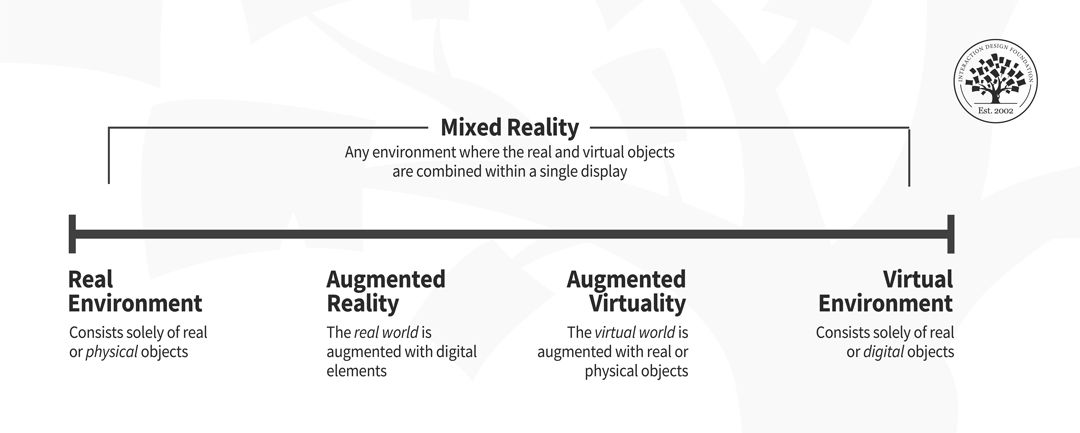
The virtuality continuumcontinuum being the critical word—contains the full spectrum of possibilities between the entirely physical world or real environment and the fully digital world or virtual environment. In a continuum, adjacent parts are almost indistinguishable, but the extremes are very different. The researchers Paul Milgram and Fumio Kishino first introduced the virtuality continuum or reality-virtuality continuum concept in 1994.


Virtuality continuum, from left to right: real environment, augmented reality, augmented virtuality and virtual environment. Mixed reality covers all the continuum except the ends.

Representation of the virtuality continuum (adapted from Milgram; Kishino, 1994).

© Laia Tremosa and the Interaction Design Foundation, CC BY-SA 4.0


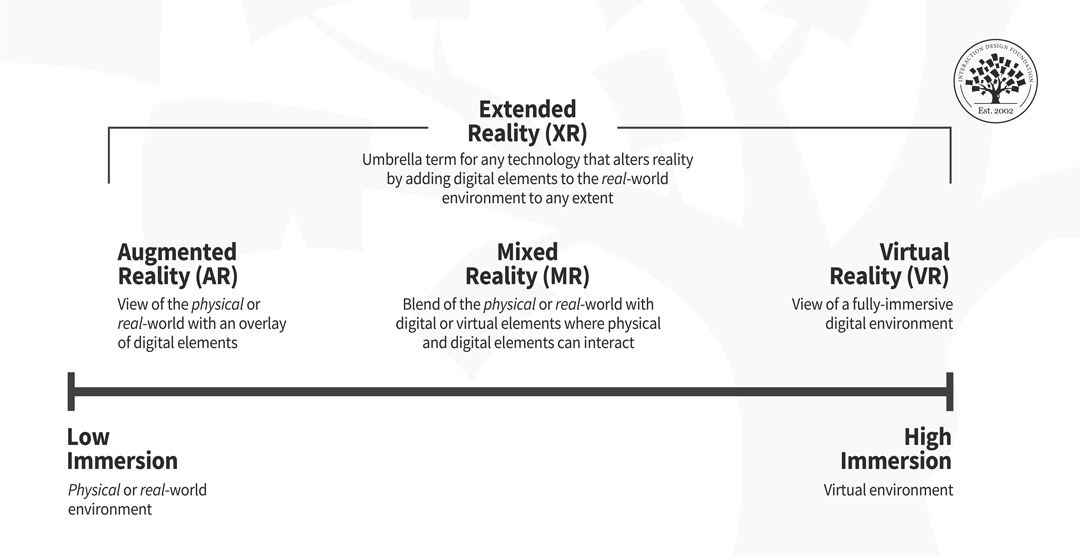
The virtuality continuum is a theoretical framework that can help you visualize and understand the differences between the various technologies that exist today and those that are yet to be invented. For example, you can simplify the concept and think of a spectrum of immersion, where one end is low immersion and the other end is high immersion. Then, you can situate the technologies according to the degree of immersion they provide. 

Extended reality technologies organized according to the degree of immersion, from left—low immersion— to right—high immersion: augmented reality, mixed reality and virtual reality.

Representation of current XR technologies according to the spectrum of immersion.

© Laia Tremosa and the Interaction Design Foundation, CC BY-SA 4.0


Sometimes the exact limits of the various technologies are not a hundred percent clear, and they may overlap. However, the critical part is that you understand the region they occupy in the spectrum. This exercise will help you clarify the differences between all these technologies.

What is Extended Reality (XR)?

Extended reality (XR) is an umbrella term that encompasses any sort of technology that alters reality by adding digital elements to the physical or real-world environment by any extent, blurring the line between the physical and the digital world.

XR includes AR, MR, VR, and any technology—even those that have yet to be developed—situated at any point of the virtuality continuum.

Three circles that overlap. From left to right: augmented reality, mixed reality and virtual reality. A big circle representing extended reality encompasses all the other circles.

The term XR includes AR, MR, VR, and any technology that blends the physical and the digital world.

© Laia Tremosa and the Interaction Design Foundation, CC BY-SA 4.0


Bear in mind that XR technologies keep evolving, and their full potential remains to be seen. There are still many things to discover about how users can better interact with them and achieve the best results. For a UX designer specializing in XR experiences, the difficulty lies in the lack of defined standards. An excellent place to start is to keep experiences simple and push the envelope a little bit at a time. In the case of new technologies, usability testing will be your best friend.   

What is Augmented Reality (AR)?

Augmented reality (AR) is a technology that allows the superposition of digital elements into the real-world environment. In the AR experience, you can see a composite view of physical or real-world elements and digital elements. While some AR experiences may offer a certain degree of interaction between physical and virtual elements, typically, there is limited to no direct interaction between the digital and physical world components.

AR experiences are close to the physical world end of the virtuality continuum. The ability to overlay digital objects onto the physical world is revolutionizing many industries such as gaming, education, healthcare, and manufacturing. For example, have you ever been to the doctor for a blood test, and the nurse couldn’t find your vein? It can be excruciating. What if AR technology could help with that?

AccuVein uses projection-based AR technology and a laser-based scanner to convert the heat signature of a patient’s veins into an image superimposed on the skin, making the veins easier for clinicians to locate. This AR technology increases the likelihood of a successful first-time injection by 350%.   

© AccuVein, Fair-Use (link)

As a UX designer specializing in AR experiences, you have the chance to go beyond the rectangular square of a screen and contribute to a revolution that will continue to change the way we interact with digital products. However, you’ll need to be aware of additional parameters to deliver a good UX that you may not be used to, like physical constraints and safety issues.

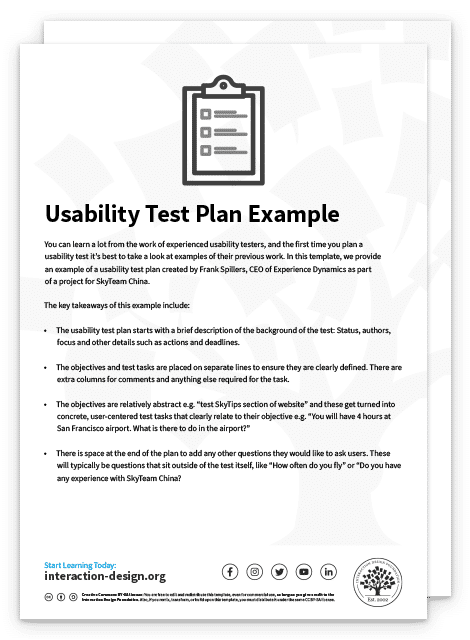
Advance Your Career With This Free Template for “AR Usability Plan Example”
AR Usability Plan Example
We respect your privacy
Get 1 powerful email each week: Design a life you love!

What is Mixed Reality (MR)?

 Mixed reality (MR) is a technology that allows not only the superposition of digital elements into the real-world environment but also their interaction. In the MR experience, the user can see and interact with both the digital elements and the physical ones. Therefore, MR experiences get input from the environment and will change according to it. 

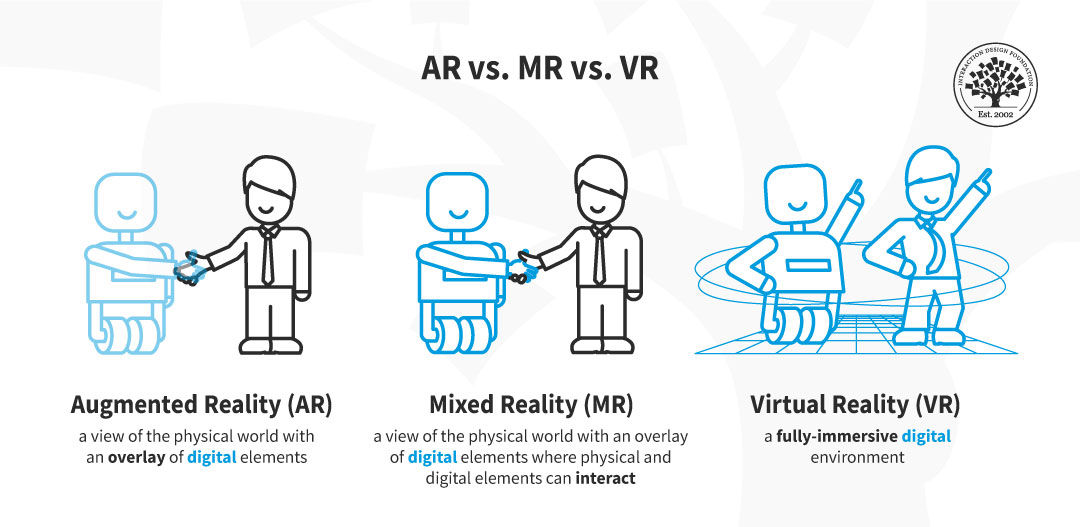
AR vs. MR vs. VR. In AR, we see a digital robot superposed to a person. In MR, we see a digital robot shaking hands with a person. In VR, we see a fully digital environment where the robot and the avatar of the person are dancing.

In MR experiences the user can interact with both digital and physical elements. MR differs from AR—where digital and physical elements don’t interact— and VR—where the physical or real world is completely blocked out.

© Christian Briggs and the Interaction Design Foundation, CC BY-SA 4.0

MR experiences cover the center of the virtuality continuum.

The concept of mixed reality can be a bit difficult to grasp; watch the video below to see an example of an MR experience.

This video shows how MR experiences blend the physical and digital worlds.

© Microsoft HoloLens, Fair-Use (link)

As a UX designer specializing in MR, you’ll have to master all the possibilities that MR technologies have to offer. Immersive experiences add a new layer to the user experience and require you to learn continuously and stay up to date to deliver an excellent user experience. 

What is Virtual Reality (VR)?

Virtual reality (VR) is a technology that allows the creation of a fully-immersive digital environment. In VR experiences, the physical or real-world environment is entirely blocked out

VR experiences are located at the fully virtual extreme of the virtuality continuum. 

Many people struggle with the fact that VR experiences generate true emotional responses even if we know it’s “fake.” Keep in mind that humans construct reality from the information they receive from their senses, and this is why, even if we are aware that we have a fully digital experience, our bodies respond in the same way. Typically, VR takes advantage of the visual and auditory systems. However, there is an even greater sense of presence and immersion if you add other senses. Have you heard about the “Walk the Plank” challenge? It is a VR experience where you enter an elevator and get out at the top of a skyscraper. Then you’re asked to “walk a plank.” Just with auditory and visual stimulation, many people (especially those who suffer from a fear of heights) can’t do it, even though they are aware that what they see and hear is not real. However, if you add a physical plank to the setup and thus activate the sense of touch, even fewer people will be able to do it. 

In this video, you can see how football players try the “Walk the Plank” VR experience with a physical plank and struggle to complete the experience, even though they are aware that the heights are not “real.”

© Fulham F.C. via B/R Football, Fair-Use (link)


The more coherent information we get through our senses, the more immersive the experience. As a UX designer, you’ll have to consider the different dimensions of the experience and the particularities of VR technology to create the best possible experience for your user. 

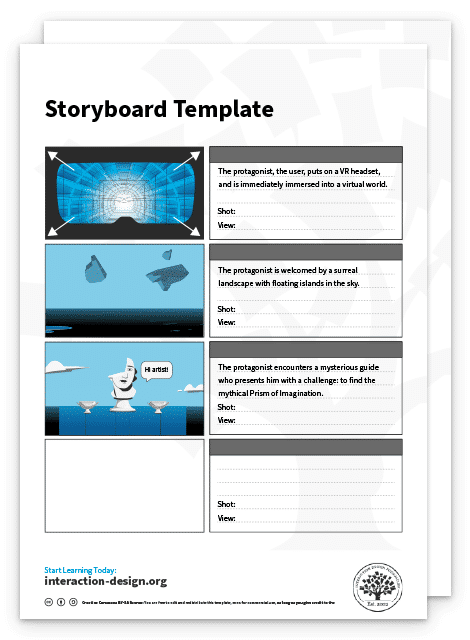
Advance Your Career With This Free Template for “Storyboard for VR”
Storyboard for VR
We respect your privacy
Get 1 powerful email each week: Design a life you love!

The Take Away

There are many technologies that alter our perception of reality by adding digital elements to the physical world to a greater or lesser extent. All these technologies can be situated at some point of the virtuality continuum according to the extent that the digital elements block the real-world environment and their interactive capabilities. If you have the image of the virtuality continuum in your head, you’ll be able to clearly see the difference between each type of technology.

The most important terms to learn to harness the potential of these new technologies are: 

  • Augmented reality (AR): a view of the real world—physical world—with an overlay of digital elements.

  • Mixed Reality (MR): a view of the real world—physical world—with an overlay of digital elements where physical and digital elements can interact.

  • Virtual reality (VR): a fully-immersive digital environment.

  • Extended reality (XR): an umbrella term that covers all these different technologies, including AR, MR, and VR.

As all these technologies keep evolving and new ones emerge, UX designers need to keep learning and understanding the characteristics of each one to deliver the best possible user experience. If you can clearly distinguish AR, MR and VR and any other XR technology, you’ll be able to design experiences that take advantage of each technology and give an outstanding boost to your UX career! 

References and Where to Learn More

Learn how to design your own XR experiences with our course: How to Design for Augmented and Virtual Reality.

Watch the How To Influence Behavior Through Virtual Reality Narratives on-demand Master Class by VR pioneer Mel Slater.

Vi, S. (2022). Exploring User Experience Guidelines for Designing HMD Extended Reality Applications. 

The way you see colour depends on what language you speak. (2022). Aina Casaponsa, Panos Athanasopoulos.

UX for XR by Cornel Hillmann.

Feel Stuck?
Want Better Job Options?

AI is replacing jobs everywhere, yet design jobs are booming with a projected 45% job growth. With design skills, you can create products and services people love. More love means more impact and greater salary potential.

At IxDF, we help you from your first course to your next job, all in one place.

See How Design Skills Turn Into Job Options
Privacy Settings
By using this site, you accept our Cookie Policy and Terms of Use.
Customize
Accept all

Be the One Who Inspires

People remember who shares great ideas.

Share on:

Academic Credibility — On Autopilot

Don't waste time googling citation formats. Just copy, paste and look legit in seconds.