Simultaneous Localization and Mapping (SLAM)

Your constantly-updated definition of Simultaneous Localization and Mapping (SLAM) and collection of videos and articles.
Be a conversation starter: Share this page and inspire others!

98 Shares

What is Simultaneous Localization and Mapping (SLAM)?

SLAM (simultaneous localization and mapping) is the method computers use to perceive their environment. In user experience (UX) design, it is most relevant to AR (Augmented Reality).

Copyright
Transcript

Cameras and laser sensors perceive distance and surfaces to project holograms on an AR display as if they were in real space. SLAM’s other applications include self-driving vehicles, drones and other technologies.

How Does SLAM Work?

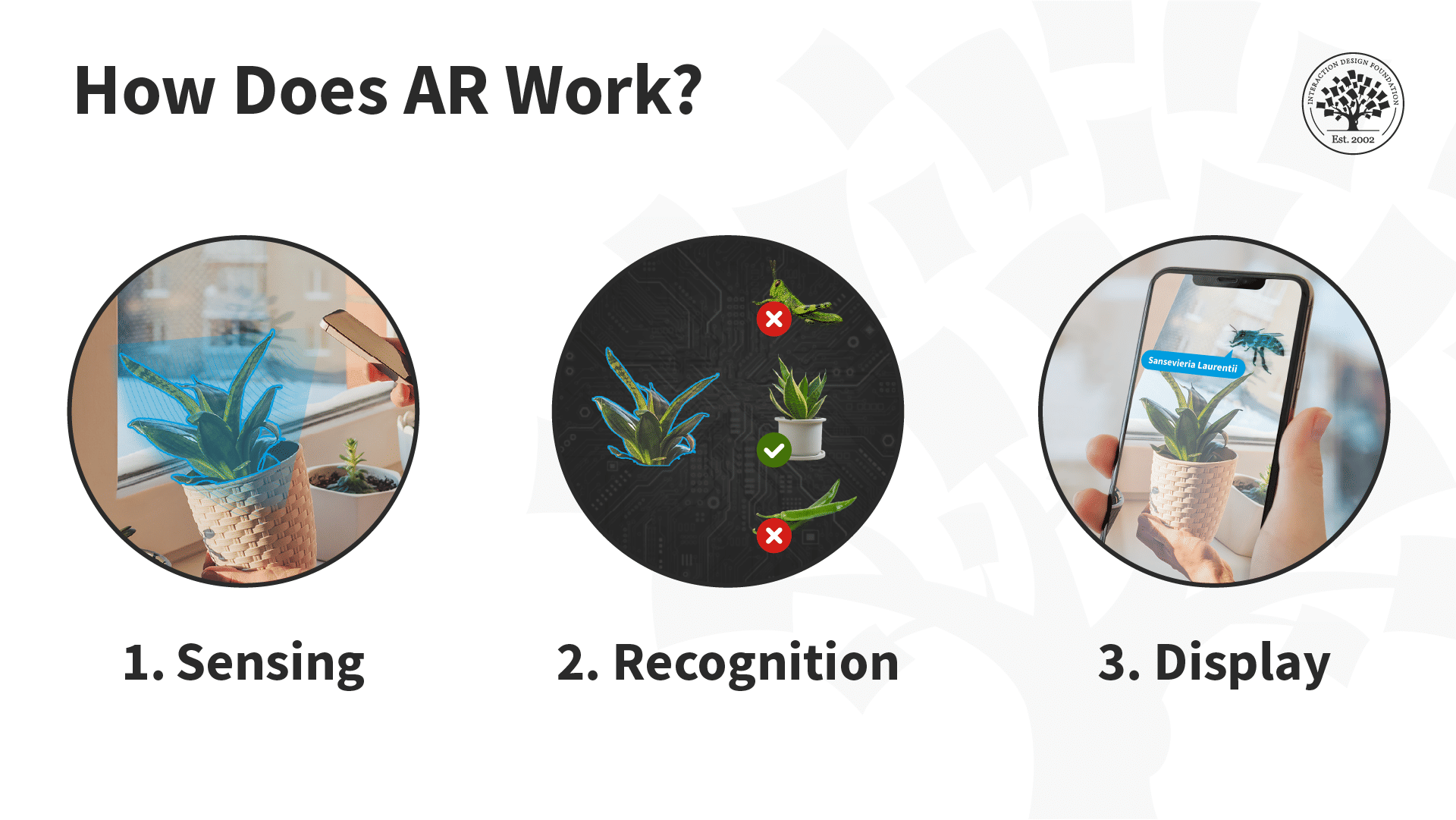
An illustration depicting the three stages of how an AR app works. Step one: sensing. The phone sees a flower with the camera. Step two: Recognition. The phone recognizes the flower as a specific flower by comparing against other flowers. Step three: Display. The Phone screen shows an animated bee flying near the flower with a speech bubble that says

© Interaction Design Foundation, CC BY-SA 4.0

SLAM's exact process might vary from device to device, as some are not equipped with distance-sensing lasers or dual cameras.

However, the essential function of SLAM is to identify surfaces using a camera and image recognition software. Devices with lasers can judge the distance using focal lengths and can also judge distance by triangulating from multiple perspectives. This helps with spatial cognition and field of view. This is identical to the depth-perceiving binocular vision that humans have. However, as the human eye can be fooled, so can SLAM.

SLAM Errors

SLAM errors must be handled correctly to ensure an excellent overall user experience. When SLAM fails, it should be easy for users to recalibrate the sensor or a UI prompt should instruct them to move around the area or reposition the sensors for a better look. The visual design should communicate the error and how to correct it.

A product or service should also be aware of situations where SLAM cannot perceive something, like a dark or shiny surface that reflects a lot of light. This can be relatively simple for lower-stakes interactions like AR entertainment, as it will be evident to the user that something is not mapped correctly.

© Interaction Design Foundation, CC BY-SA 4.0

However, this can be a more severe issue for other situations like self-driving cars and drones.

SLAM in Augmented Reality

SLAM is the foundation of augmented reality (AR.) It allows AR devices like AR glasses or mobile phones to perceive the world in three dimensions. AR apps can then identify objects or images in the real-world environment and project virtual content on the AR displays so it appears in the real world.

SLAM also provides the necessary information for the display to match the surface’s positioning and perspective needed for the object to look natural —which adds to the level of immersion.

Sophisticated SLAM technologies can recognize human faces by applying virtual filters or makeup. AR headsets often have a way of warning the user if they are too distracted to notice a wall or object they might run into.

Information overlays like Google Lens use SLAM and AI software to identify text, translate it, and display it in AR.

What are some other applications of SLAM besides AR?

In the case of drones and self-driving cars, ensuring that the interface notifies the user to take manual control when SLAM malfunctions or cannot perceive surfaces correctly is even more critical.

Even though virtual reality (VR) uses virtual environments, VR headsets often use SLAM sensors to let players know where they can walk in VR without walking into real walls or chairs. This becomes especially true for mixed reality (MR) or extended reality (XR) programs as well.

More experimental applications of SLAM include photogrammetry, which uses SLAM sensors to scan real objects as 3D models.

Questions About Simultaneous Localization and Mapping (SLAM)?
We've Got Answers!

How does SLAM work in simple terms?

SLAM—Simultaneous Localization and Mapping—lets a device such as a robot or AR (augmented reality) headset build a map of its surroundings and determine its own location within that map at the same time.

It gathers data from sensors like cameras, lidar, or IMUs (inertial measurement units), then continuously matches new observations to known features, updating the map and the device position using filtering techniques like particle filters or Kalman filters. This continuous process keeps the device aware of where it is, even in unfamiliar spaces, without relying on external references like GPS.

Find helpful insights about where AR is taking design and where designers might take AR in our article Augmented Reality – The Past, The Present and The Future.

What problems does SLAM solve?

SLAM solves two interlinked challenges in uncharted environments: mapping the space and tracking position within that map, both in real time. It enables devices without preloaded maps to navigate safely, avoid obstacles, and anchor virtual content accurately.

Applications for this include self-driving cars, drones, AR/VR systems, and robots working indoors or in GPS-denied spaces—empowering them with spatial awareness where external systems do not exist to be able to help.

Explore a wealth of inspiration for design possibilities by enjoying our Master Class How to Innovate with XR with Michael Nebeling, Associate Professor, University of Michigan.

What is the difference between SLAM and GPS?

SLAM builds its own map of the environment and keeps track of position using onboard sensors. It works accurately indoors or in areas without GPS.

GPS, by contrast, retrieves location from satellite signals and does not create maps or work well indoors or in rapid motion or occlusion conditions. SLAM is self-contained—data comes from what the device sees or senses—while GPS depends on external infrastructure and supplies only coordinates, not an environmental model.

GPS, by contrast, provides location coordinates from satellite signals with accuracy typically ranging from 4.9 meters (16 feet) for smartphones under open sky to ≤1.82 meters (5.97 feet) for high-quality receivers. Even when GPS signals are available, GPS may perform poorly in indoor venues owing to signal attenuation, shadowing and multipath fading imposed by indoor concrete and metallic structures.

GPS is fundamentally limited by its coarse accuracy compared to local sensors—while enhanced GPS systems like RTK can achieve centimeter-level accuracy, standard GPS provides only meter-level positioning. Also, GPS supplies only coordinates without creating environmental maps, whereas SLAM is self-contained—generating both positional data and detailed environmental models from what the device directly observes.

Delve deeper into this fascinating area in our article Getting Lost and Found – Maps and the Mobile User Experience.

How is SLAM used in augmented reality (AR) and mixed reality (MR)?

AR and MR rely on SLAM algorithms to track camera pose and map environmental features, enabling virtual objects to be spatially registered with the real world. SLAM systems identify keypoints and use sensor fusion to estimate depth and 3D structure, allowing digital content to appear anchored to surfaces and properly occlude behind real objects.

This spatial consistency is crucial for immersive experiences—and absolutely critical in medical applications where tracking failures could lead to dangerous misalignment between virtual surgical guidance and actual patient anatomy, for example—potentially giving “cutting edge tech” an unwanted meaning if unintentional contact were to be made.

Explore further aspects of extended reality by enjoying our Master Class How To Craft Immersive Experiences in XR with Mia Guo, Senior Product Designer, Magic Leap.

What sensors are commonly used in SLAM systems?

SLAM systems typically combine multiple sensors for accuracy. Popular choices include cameras (monocular, stereo, and RGB-D) for visual SLAM, lidar for precise depth mapping, and inertial measurement units (IMUs) for estimating orientation and motion. Some systems also use sonar, radar, or even Wi-Fi signal strengths. Sensor fusion helps the system remain stable in varied environments.

Discover additional aspects of augmented reality in our article Innovate with UX: Design User-Friendly AR Experiences.

How does SLAM deal with dynamic environments (moving objects, people)?

Modern SLAM systems use specialized techniques to detect and manage dynamic elements to remain accurate. One common approach is dynamic object detection, where systems use visual cues, depth data, or semantic segmentation to identify and ignore moving objects.

Algorithms like DynaSLAM or Co-Fusion isolate static backgrounds while excluding dynamic regions from mapping. Sensor fusion—combining camera, IMU, and depth sensor data—helps track stable features while filtering out motion noise. Also, methods like RANSAC reject outlier points that behave inconsistently. Advanced systems also apply semantic SLAM, using AI to recognize object types (e.g., people or vehicles) and handle them appropriately. These innovations let SLAM function effectively in crowded or changing environments, supporting robust AR, autonomous navigation, and robotics in real time, an essential, forward-thinking design consideration that helps keep SLAM relevant to user needs and not the sound of a collision.

Get a greater grasp of how to accommodate user needs in design.

How do you design interactions that respond to real‑world surfaces using SLAM?

Designers can leverage the spatial maps of SLAM to attach virtual UI elements to physical surfaces. For instance, surfaces can become interactive touchpoints or anchors for virtual controls. To make interactions natural, designers should prioritize surface detection, ensure object occlusion so that virtual elements appear behind real-world objects when appropriate, and provide visual consistency when users move or reorient view. These practices reinforce spatial cohesion and boost immersion to levels that can safely delight.

Before any great design comes a prototype to build upon—enjoy our Master Class Rapid Prototyping for Virtual Reality with Cornel Hillmann, XR Designer, CG Artist and Author.

How can poor SLAM performance lead to bad user experiences in AR?

When SLAM underperforms, virtual objects may drift, float, or jitter. They may scale inconsistently or detach from real surfaces. These issues damage immersion and cause user frustration—misaligned content can appear unnatural, triggering motion sickness or breaking interaction patterns. Depending on the type of AR experience or consequences of actions taken on a misaligned object, results can be more damaging if something is there that is not supposed to be. Stable SLAM is essential for believable, comfortable AR experiences that do not end in problems.

Get more from AR design in our article How to Design for AR Experiences on the Go.

What are common challenges when building or using SLAM in apps?

Designers and developers face several SLAM challenges: high processing demands can drain batteries and slow performance; poor lighting or texture-less surfaces can degrade tracking; dynamic environments introduce moving occlusions; and sensor limitations or calibration issues can create drift or map inconsistencies.

Ensuring cross-device compatibility adds complexity—especially on mobile hardware with varying capabilities—and is another reason that the application of SLAM requires careful thought for applications users can enjoy in comfort.

Get a firmer foundation in the fineries and theoretical aspects to help build better SLAM-oriented experiences, in our article Beyond AR vs. VR: What is the Difference between AR vs. MR vs. VR vs. XR?.

How accurate is SLAM and what affects its accuracy?

SLAM accuracy depends on sensor quality, algorithm robustness, and the consistency of the environment. Rich textures and structured environments (walls, distinct features) improve feature matching and mapping. High-quality cameras or lidar boost accuracy, helping matters greatly.

Meanwhile poor lighting, repetitive patterns, or dynamic scenes harm accuracy. Loop closure techniques—recognizing previously visited locations—can correct positional drift over time.

Find helpful insights about spatial design the AR way in our article Spatial UI Design: Tips and Best Practices.

Can I use SLAM on mobile devices or wearables in real time?

Yes, modern mobile devices such as AR-capable smartphones and wearables integrate SLAM with real-time performance. They combine cameras, IMUs (inertial measurement units), and efficient Visual SLAM algorithms to map indoor spaces and support immersive AR experiences.

These on-device implementations enable real-time interaction—however, note that performance depends on hardware specs and optimization.

Go further into AR and consider important aspects about how to design for it, in our article Cross-Device AR: How to Ensure a Seamless Experience.

What are some helpful resources about SLAM for UX designers?

Jakl, A. (2018, September 21). Basics of AR: SLAM – Simultaneous localization and mapping. Andreas Jakl Blog. https://www.andreasjakl.com/basics-of-ar-slam-simultaneous-localization-and-mapping/

This detailed technical blog post explains SLAM concepts specifically within the context of ARKit, ARCore, and HoloLens implementations. Jakl breaks down complex algorithms into understandable components, explaining feature extraction, keypoint tracking, loop closure detection, and uncertainty handling in SLAM systems. The post addresses practical limitations UX designers encounter, such as drift correction, tracking loss, and environmental requirements for reliable SLAM performance. This resource helps UX designers understand why AR applications behave certain ways and how to design experiences that work within SLAM technical constraints, making it invaluable for evidence-based AR design decisions.

Wilson, T. (2018, June 15). The principles of good UX for augmented reality. UX Collective. https://uxdesign.cc/the-principles-of-good-user-experience-design-for-augmented-reality-d8e22777aabd

This practical design article addresses UX principles specifically for AR applications, with particular attention to spatial interaction challenges that SLAM technology presents. Wilson discusses comfortable interaction zones, spatial UI placement, and how tracking limitations affect user interface design decisions. The article provides actionable guidance on designing within SLAM constraints, considering device ergonomics and tracking accuracy when placing virtual objects in real space. For UX designers, this resource offers concrete design recommendations for creating usable AR experiences that account for SLAM tracking limitations and spatial computing.

Tourani, A., Bavle, H., Sanchez‑Lopez, J. L., & Voos, H. (2022). Visual SLAM: What Are the Current Trends and What to Expect? arXiv.

Tourani and colleagues survey state-of-the-art VSLAM systems, covering algorithm types, sensor variants (monocular, stereo, RGB‑D), and performance across real-world datasets. UX designers can use this knowledge to set expectations for visual tracking, environment diversity, and device limitations in AR/MR interfaces.

Earn a Gift Earn a Gift, Answer a Short Quiz!

1
2
3
4
1
2
3
4
Question 1
Question 2
Question 3
Get Your Gift
Interaction Design Foundation logo

Question 1

What does SLAM stand for in the context of augmented reality and robotics?

1 point towards your gift

  • Simulated Learning and Mapping
  • Simultaneous Localization and Mapping
  • Single Layer and Mapping
Interaction Design Foundation logo

Question 2

Which of the following describes a fundamental step in the SLAM process?

1 point towards your gift

  • Generate random maps without sensor input
  • Ignore the environment to focus on the device location only
  • Use sensors to detect and map the environment while tracking the device's location
Interaction Design Foundation logo

Question 3

Which of the following is an application of SLAM outside of augmented reality?

1 point towards your gift

  • Autonomous vehicles
  • Text editing software
  • Video streaming

Learn More About Simultaneous Localization and Mapping (SLAM)

Make learning as easy as watching Netflix: Learn more about Simultaneous Localization and Mapping (SLAM) by taking the online IxDF Course UX Design for Augmented Reality.

Why? Because design skills make you valuable. In any job. Any industry.

In This Course, You'll

  • Get excited about immersive experiences that effortlessly blend the digital and physical worlds! Feeling stuck in a 2D job? The UX Design for Augmented Reality (AR) course will help you fulfill your potential by creating 3D AR experiences people love with intuitive interfaces and a seamless real-world connection. Use AR overlays for real-time training in industrial settings to improve retention by 80% or to help people visualize a product in their home before purchasing. You'll merge reality with imagination to reshape how people interact with the world around them. More love, more impact, greater salary potential.

  • Make yourself invaluable with sought-after skills in spatial mapping, gesture-based input, object manipulation, and 3D interaction. Brands that use AR in campaigns see up to a 200% increase in engagement! From AR-assisted surgeries in healthcare to virtual try-ons with your favorite retailer, AR isn't limited to one industry, it's everywhere! And you can easily learn to master it, no matter your background. With clear guidance, hands-on templates, and real-world examples, you'll apply your skills immediately.

  • Gain confidence and credibility as you discover the AR design process step-by-step, from research to heuristic evaluation. You’ll develop timeless human-centered design skills to create natural, intuitive interfaces that blend digital and physical worlds with genuine empathy and insight. These skills become even more powerful as AI accelerates how fast we build and iterate. They let you turn AI into your superpower as you guide emerging tools toward meaningful and authentic outcomes that only your unique human insight can deliver. You’ll learn how to create customer journey maps, prototype your AR design, and gather usability feedback. With optional hands-on exercises and downloadable templates like the 3D Persona Template and the AR Heuristic Scorecard, you'll walk away with an impressive portfolio featuring your own AR project that accelerates your career success.

It's Easy to Fast-Track Your Career with the World's Best Experts

Master complex skills effortlessly with proven best practices and toolkits directly from the world's top design experts. Meet your expert for this course:

  • Frank Spillers: Service Designer and Founder and CEO of Experience Dynamics.

Get an Industry-Recognized IxDF Course Certificate

Increase your credibility, salary potential and job opportunities by showing credible evidence of your skills.

IxDF Course Certificates set the industry gold standard. Add them to your LinkedIn profile, resumé, and job applications.

Course Certificate Example

Be in distinguished company, alongside industry leaders who train their teams with the IxDF and trust IxDF Course Certificates.

Our clients: IBM, HP, Adobe, GE, Accenture, Allianz, Phillips, Deezer, Capgemin, Mcafee, SAP, Telenor, Cigna, British Parliament, State of New York

All Free IxDF Articles on Simultaneous Localization and Mapping (SLAM)

Read full article
Augmented Reality – The Past, The Present and The Future - Article hero image
Interaction Design Foundation logo

Augmented Reality – The Past, The Present and The Future

Augmented reality has come a long way from a science-fiction concept to a science-based reality. Until recently the costs of augmented reality were so substantial that designers could only dream of working on design projects that involved it – today things have changed and augmented reality is even

Social shares
1.1k
Published
Read Article

Augmented Reality – The Past, The Present and The Future

Augmented Reality – The Past, The Present and The Future

Augmented reality has come a long way from a science-fiction concept to a science-based reality. Until recently the costs of augmented reality were so substantial that designers could only dream of working on design projects that involved it – today things have changed and augmented reality is even available on the mobile handset. That means design for augmented reality is now an option for all shapes and sizes of UX designers.

Augmented reality is a view of the real, physical world in which elements are enhanced by computer-generated input. These inputs may range from sound to video, to graphics to GPS overlays and more. The first conception of augmented reality occurred in a novel by Frank L Baum written in 1901 in which a set of electronic glasses mapped data onto people; it was called a “character marker”. Today, augmented reality is a real thing and not a science-fiction concept.

A Brief History of Augmented Reality (The Past)

Augmented reality was first achieved, to some extent, by a cinematographer called Morton Heilig in 1957. He invented the Sensorama which delivered visuals, sounds, vibration and smell to the viewer. Of course, it wasn’t computer controlled but it was the first example of an attempt at adding additional data to an experience.
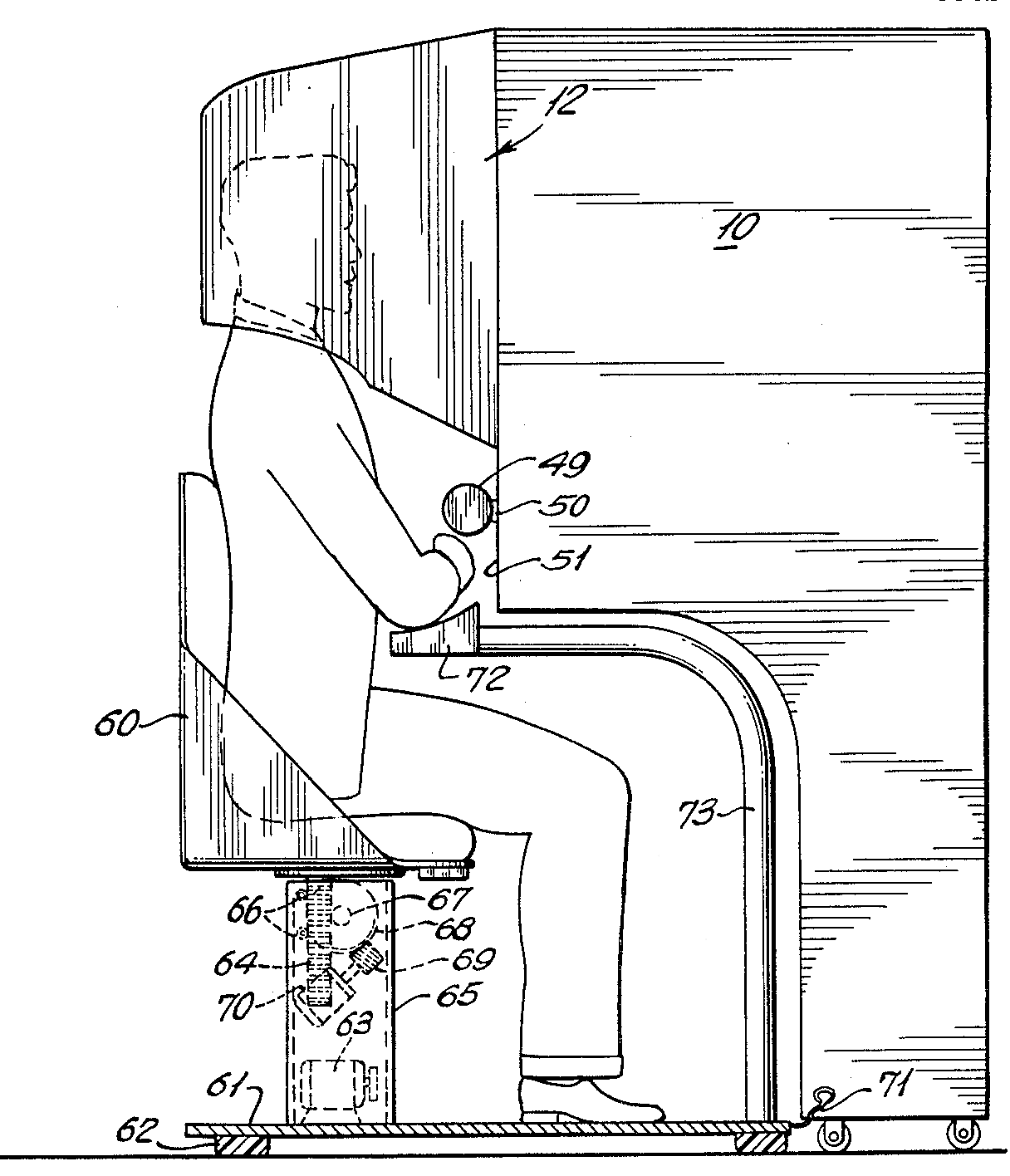
Author/Copyright holder: Morton Heilig. Copyright terms and license: Public Domain.

Then in 1968, Ivan Sutherland the American computer scientist and early Internet influence, invented the head-mounted display as a kind of window into a virtual world. The technology used at the time made the invention impractical for mass use.

In 1975, Myron Krueger, an American computer artist developed the first “virtual reality” interface in the form of “Videoplace” which allowed its users to manipulate and interact with virtual objects and to do so in real-time.

Steve Mann, a computational photography researcher, gave the world wearable computing in 1980.

Of course back then these weren’t “virtual reality” or “augmented reality” because virtual reality was coined by Jaron Lainer in 1989 and Thomas P Caudell of Boeing coined the phrase “augmented reality” in 1990.

The first properly functioning AR system was probably the one developed at USAF Armstrong’s Research Lab by Louis Rosenberg in 1992. This was called Virtual Fixtures and was an incredibly complex robotic system which was designed to compensate for the lack of high-speed 3D graphics processing power in the early 90s. It enabled the overlay of sensory information on a workspace to improve human productivity

There were many other breakthroughs in augmented reality between here and today; the most notable of which include:

  • Bruce Thomas developing an outdoor mobile AR game called ARQuake in 2000

  • ARToolkit (a design tool) being made available in Adobe Flash in 2009

  • Google announcing its open beta of Google Glass (a project with mixed successes) in 2013

  • Microsoft announcing augmented reality support and their augmented reality headset HoloLens in 2015

The Current State of Play in Augmented Reality (The Present)

Augmented reality is achieved through a variety of technological innovations; these can be implemented on their own or in conjunction with each other to create augmented reality. They include:

  • General hardware components – the processor, the display, the sensors and input devices. Typically a smartphone contains a processor, a display, accelerometers, GPS, camera, microphone etc. and contains all the hardware required to be an AR device.

  • Displays – while a monitor is perfectly capable of displaying AR data there are other systems such as optical projection systems, head-mounted displays, eyeglasses, contact lenses, the HUD (heads up display), virtual retinal displays, EyeTap (a device which changes the rays of light captured from the environment and substitutes them with computer generated ones),Spatial Augmented Reality (SAR – which uses ordinary projection techniques as a substitute for a display of any kind) and handheld displays.

  • Sensors and input devices include – GPS, gyroscopes, accelerometers, compasses, RFID, wireless sensors, touch recognition, speech recognition, eye tracking and peripherals.

  • Software – the majority of development for AR will be in developing further software to take advantage of the hardware capabilities. There is already an Augmented Reality Markup Language (ARML) which is being used to standardize XML grammar for virtual reality. There are several software development kits (SDK) which also offer simple environments for AR development.

There are apps available for or being researched for AR in nearly every industrial sector including:

  • Archaeology, Art, Architecture

  • Commerce, Office

  • Construction, Industrial Design

  • Education, Translation

  • Emergency Management, Disaster Recovery, Medical and Search and Rescue

  • Games, Sports, Entertainment, Tourism

  • Military

  • Navigation

Author/Copyright holder: Sonk54. Copyright terms and license: CC BY-SA 3.0

The Future of Augmented Reality

Jessica Lowry, a UX Designer, writing for the Next Web says that AR is the future of design and we tend to agree. Already mobile phones are such an integral part of our lives that they might as well be extensions of our bodies; as technology can be further integrated into our lives without being intrusive (a la Google Glass) – it is a certainty that augmented reality provides opportunities to enhance user experiences beyond measure.

This will almost certainly see major advances in the much-hyped but still little seen; Internet of Things. UX designers in the AR field will need to seriously consider the questions of how traditional experiences can be improved through AR – just making your cooker capable of using computer enhancements is not enough; it needs to healthier eating or better cooked food for users to care.

The future will belong to AR when it improves task efficiency or the quality of the output of an experience for the user. This is the key challenge of the 21st century UX profession.

Author/Copyright holder: Austin Berner. Copyright terms and license: Public Domain

The Takeaway

AR or augmented reality has gone from pipe dream to reality in just over a century. There are many AR applications in use or under development today, however – the concept will only take off universally when UX designers think about how they can integrate AR with daily life to improve productivity, efficiency or quality of experiences. There is an unlimited potential for AR, the big question is - how will it be unlocked?

References & Where to Learn More:

DID L. FRANK BAUM PREDICT AUGMENTED REALITY OR WARN US ABOUT ITS POWER? Some food for thought.

Ivan Sutherland’s research can be found here: http://90.146.8.18/en/archiv_files/19902/E1990b_123.pdf

Steve Mann’s research can be read here: "Eye Am a Camera: Surveillance and Sousveillance in the Glassage". Techland.time.com

Rosenberg’s original research paper was published as: L. B. Rosenberg. The Use of Virtual Fixtures As Perceptual Overlays to Enhance Operator Performance in Remote Environments. Technical Report AL-TR-0089, USAF Armstrong Laboratory, Wright-Patterson AFB OH, 1992.

Find out more about ARQuake at Wiki.

Learn more about Google Glass at the New York Times.

Jessica Lowry’s article: Augmented reality is the future of design

Hero Image: Author/Copyright holder: Maurizio Pesce. Copyright terms and license: CC BY 2.0
Feel Stuck?
Want Better Job Options?

AI is replacing jobs everywhere, yet design jobs are booming with a projected 45% job growth. With design skills, you can create products and services people love. More love means more impact and greater salary potential.

At IxDF, we help you from your first course to your next job, all in one place.

See How Design Skills Turn Into Job Options
Privacy Settings
By using this site, you accept our Cookie Policy and Terms of Use.
Customize
Accept all

Be the One Who Inspires

People remember who shares great ideas.

Share on:

Academic Credibility — On Autopilot

Don't waste time googling citation formats. Just copy, paste and look legit in seconds.