Fitts’ Law

Your constantly-updated definition of Fitts’ Law and collection of videos and articles.
Be a conversation starter: Share this page and inspire others!

296 Shares

What is Fitts’ Law?

Fitts’ law states that the amount of time required for a person to move a pointer (e.g., mouse cursor) to a target area is a function of the distance to the target divided by the size of the target. Thus, the longer the distance and the smaller the target’s size, the longer it takes.

© Interaction Design Foundation, CC BY-SA 4.0

In 1954, psychologist Paul Fitts, examining the human motor system, showed that the time required to move to a target depends on the distance to it, yet relates inversely to its size. By his law, fast movements and small targets result in greater error rates, due to the speed-accuracy trade-off. Although multiple variants of Fitts’ law exist,all encompass this idea.

Fitts’ law is widely applied in user experience (UX) and user interface (UI) design. For example, this law influenced the convention of making interactive buttons large (especially on finger-operated mobile devices)—smaller buttons are more difficult (and time-consuming) to click. Likewise, the distance between a user’s task/attention area and the task-related button should be kept as short as possible.

The law is applicable to rapid, pointing movements, not continuous motion (e.g., drawing). Such movements typically consist of one large motion component (ballistic movement) followed by fine adjustments to acquire (move over) the target. The law is particularly important in visual interface design—or any interface involving pointing (by finger or mouse, etc.): we use it to assess the appropriate sizes of interactive elements according to the context of use and highlight potential design usability problems.

© Interaction Design Foundation, CC BY-SA 4.0

By following Fitts’ law, standard interface elements such as the right-click pop-up menu or short drop-down menus have had resounding success, minimizing the user’s travel distance with a mouse in selecting an option—reducing time and increasing productivity. Conversely, long drop-downs, title menus, etc., impede users’ actions, raising movement-time demands.

Questions About Fitts’ Law?
We've Got Answers!

How is the Fitts law used in everyday life?

Fitts' Law is crucial in optimizing user interactions with digital interfaces. This translates to designing interfaces that minimize excessive tapping and boost 'tappability' in our daily interactions. As the video indicates, interfaces should be task-oriented, ensuring elements invite the expected interaction.

Transcript

Especially on mobile, it's vital to balance design aesthetics with visual clarity so users can quickly identify tappable elements. Incorporating animations can reinforce these affordances, serving as intuitive signifiers. These design cues are necessary for users to experience clarity and satisfaction. The goal is to highlight the correct tappable elements and streamline user interactions for efficiency and satisfaction.

What is an example of Fitts's law in motor learning?

Fitts's Law describes the relationship between the size of a target, its distance, and the time it takes to reach it. In motor learning, consider a basketball player aiming for a hoop. The time required to shoot accurately decreases as the player gets closer or the hoop's size increases. Conversely, a smaller circle or being further away makes the task more challenging. This Law highlights the predictable patterns in motor skills, aiding coaches and trainers in designing effective practice drills and understanding skill progression.

What is the Fitts law in physical therapy?

Fitts's Law, which describes the relationship between target size, distance, and movement time, plays a role in physical therapy. It helps therapists understand and predict the difficulty of motor tasks. For instance, a patient recovering arm mobility may find reaching a larger object close to them easier than a smaller one further away. By applying Fitts's Law, therapists can tailor exercises to each patient's capabilities, gradually increasing task difficulty as motor skills improve, ensuring optimal recovery progress.

What is an example of a Fitts law equation for a mouse?

The equation for Fitts's Law expresses MT as a sum of a and b multiplied by log2(WD + 1), where MT denotes the movement time, D is the distance to the target, W is the target width, and a and b are constants determined through regression analysis. When applied to a mouse in user interface design, this equation helps predict the time it takes for a user to move the cursor and click on a target. For instance, a button closer to the cursor and more prominent in size will generally have a shorter MT, making it quicker for users to interact with. Leveraging this formula allows designers to optimize user interface layouts, enhancing efficiency and usability. You can read more insights in Fitts's Law: Tracking Users' Clicks article.

Is the Fitts law open and closed loop?

As discussed in the glossary of Human-Computer Interaction, Fitts's Law primarily focuses on modeling the time it takes to move to and select a target. The law doesn't specify open or closed-loop control processes but encompasses both. Open-loop methods involve rapid, ballistic movements without feedback, while closed-loop techniques use continuous feedback to adjust movements. In human-computer interaction, initial cursor movements towards a target may be open-loop (the mouse movement is not influenced by any output or feedback). Still, as the cursor nears the mark, users often switch to closed-loop control, adjusting activities based on visual feedback. Thus, Fitts's Law can be applied in both contexts, helping designers optimize interfaces for efficient target selection.

Does Fitts law apply to children?

Yes, Fitts's Law applies to children as well. While the law was initially formulated based on adult motor movements, research has shown its relevance for children. Children, like adults, display a relationship between movement time and task difficulty, as Fitts's equation defines. However, due to developmental factors, children might exhibit different speeds and accuracy in motor tasks. Still, the foundational principle of Fitts's Law, relating movement, distance, and target size, remains consistent across age groups.

What is the Fitts law of speed and accuracy?

Fitts's Law describes the relationship between the speed and accuracy of human movement, especially in user interface (UI) design. According to this law, the time required to move to a target is a function of the distance to the target and its size. In UI design, more extensive and closer marks like buttons are more accessible to select accurately. Conversely, small or distant targets take longer and are more prone to errors. The principle behind Fitts's Law is pivotal in creating intuitive and efficient interfaces, ensuring that vital elements are easily accessible to users. By understanding and applying this law, designers can optimize the balance between speed and accuracy in user interactions. Learn more from this detailed article, Fitts's Law: The Importance of Size and Distance in UI Design on Interaction Design Foundation.

What is the Fitts law on smartphones?

On smartphones, Fitts's Law emphasizes "tappability" – ensuring that users can easily interact with UI elements. It's about creating an efficient "tap-tap efficiency" where pieces invite the expected interaction, known as "affordances" or "tappability affordances." For example, an affordance should indicate if it's meant to be tapped, just like a door handle indicates pulling. However, visual design biases can sometimes prioritize aesthetics over clarity, making it hard to discern tappable elements. This leads to a need for "signifiers," visual nudges like pulsating buttons, which guide users. Proper signifiers and affordances prevent user frustration, making interactions intuitive and controlling feelings of confusion. The goal is to make things tappable and ensure they support the user's intended task, augmented with strategic animation and motion graphics. Learn more from this informative video:

Transcript

Where to learn more about Fitt’s Law?

To dive deeper into Fitt's Law and its application in interaction design, consider enrolling in the "Interaction Design for Usability" course offered by the Interaction Design Foundation. This comprehensive course delves into the principles of Fitt's Law, among other essential usability concepts, ensuring you grasp its significance in designing user-friendly interfaces. Throughout the course, you'll gain hands-on experience and insights from industry experts, enriching your understanding of optimizing user interactions. For those eager to master usability in design, this course is a must-visit. Discover more and enhance your expertise by enrolling at Interaction Design for Usability today.

Earn a Gift Earn a Gift, Answer a Short Quiz!

1
2
3
4
1
2
3
4
Question 1
Question 2
Question 3
Get Your Gift
Interaction Design Foundation logo

Question 1

According to Fitts' Law, what two factors influence the time it takes to reach a target?

1 point towards your gift

  • The user's speed and accuracy.
  • The target's size and distance from the user.
  • The design complexity and color scheme.
Interaction Design Foundation logo

Question 2

How is Fitts’ Law applied in UI design?

1 point towards your gift

  • By making buttons smaller to save screen space.
  • By designing larger buttons that are easier to click, especially when nearby.
  • By placing important elements farther apart to increase user engagement.
Interaction Design Foundation logo

Question 3

Why is Fitts' Law especially important for designing mobile interfaces?

1 point towards your gift

  • Smaller screens make all interactions faster.
  • Users interact with their fingers, so larger, well-placed buttons improve accuracy.
  • Mobile users prefer detailed, complex interactions.

Learn More About Fitts’ Law

Make learning as easy as watching Netflix: Learn more about Fitts’ Law by taking the online IxDF Course Interaction Design for Usability.

Why? Because design skills make you valuable. In any job. Any industry.

In This Course, You'll

  • Get excited about designing products, services, and experiences people love. Interaction Design for Usability improves careers and transforms your life and the lives of the people you serve. Every tap, click, and swipe matters. Whether you design websites, apps, or physical products, you'll build trust, loyalty, and satisfaction. It's easy because you already have transferable skills like empathy, logical thinking, and problem-solving. As AI becomes part of how products are built, you stay in demand when you understand how people actually interact with interfaces and what makes interactions feel clear and predictable. These timeless human-centered interaction design skills help you turn AI from a tool into your superpower to ensure that faster production still leads to usable, ethical, and meaningful outcomes for real people.

  • Make yourself invaluable with design skills that save time, reduce costs, and create experiences people value. Did you know companies prioritizing usability achieve greater loyalty, less churn, and better Return on Investment (ROI)? Create work you're proud of when users praise your products for usability, accessibility, and elegance. Whether you use Agile workflows, design intuitive interfaces, manage products, develop content, or optimize customer experiences, these skills benefit any industry—including tech, healthcare, finance, education, and retail.

  • Gain confidence and credibility as you master the usability frameworks behind the world's most beloved designs—all in bite-sized, easy-to-follow lessons. You'll learn step-by-step techniques like card sorting, heuristic evaluation, and paper prototyping. No matter your background, you'll easily master Interaction Design for Usability. With clear guidance and real-world examples, you'll apply your skills immediately. Understand the psychology of persuasion and confidently advocate for usability within cross-functional teams. Get ready to make products better for people, businesses, and society, and make a meaningful impact in your industry. If you want more meaning, more impact, and greater earning potential, this course is perfect for you. 

It's Easy to Fast-Track Your Career with the World's Best Experts

Master complex skills effortlessly with proven best practices and toolkits directly from the world's top design experts. Meet your expert for this course:

  • William Hudson: User Experience Strategist and Founder of Syntagm.

Get an Industry-Recognized IxDF Course Certificate

Increase your credibility, salary potential and job opportunities by showing credible evidence of your skills.

IxDF Course Certificates set the industry gold standard. Add them to your LinkedIn profile, resumé, and job applications.

Course Certificate Example

Be in distinguished company, alongside industry leaders who train their teams with the IxDF and trust IxDF Course Certificates.

Our clients: IBM, HP, Adobe, GE, Accenture, Allianz, Phillips, Deezer, Capgemin, Mcafee, SAP, Telenor, Cigna, British Parliament, State of New York

All Free IxDF Articles on Fitts’ Law

Read full article
Fitts's Law: The Importance of Size and Distance in UI Design - Article hero image
Interaction Design Foundation logo

Fitts's Law: The Importance of Size and Distance in UI Design

Fitts's Law provides a model of human movement, established in 1954 by Paul Fitts, which can accurately predict the amount of time taken to move to and select a target. Although originally developed according to movement in the physical world, in human-computer interaction Fitts's Law is typically a

Social shares
1.1k
Published
Read Article
Read full article
Fitts’ Law: Tracking users’ clicks - Article hero image
Interaction Design Foundation logo

Fitts’ Law: Tracking users’ clicks

We’re now going to look at a subject that’s especially relevant to web design. Specifically, we’ll see how the user’s eye makes sense of web pages according to where it expects to find elements comfortably. Understanding Fitts’ Law (sometimes called Fitts’s Law) will give you a key to unlock another

Social shares
702
Published
Read Article

Fitts’ Law: Tracking users’ clicks

Fitts’ Law: Tracking users’ clicks

We’re now going to look at a subject that’s especially relevant to web design. Specifically, we’ll see how the user’s eye makes sense of web pages according to where it expects to find elements comfortably. Understanding Fitts’ Law (sometimes called Fitts’s Law) will give you a key to unlock another dimension in designing.

It can be very helpful to be able to track the way that your users work with your website. Knowing this allows you to tweak the design to get users to take the actions that you want them to take. Fitts’ Law is the basis for predicting user behavior on a website. Employing Fitts’ Law allows you to begin your design process with the end in mind. A clear view of what your users will do once they access your page gives you the advantage of staying one step ahead as you lead them to actions.

Fitts’ Law

Psychologist Paul Fitts (1912-1965) published his theory on “human mechanics and aimed movement” in 1954. He had seen that the action of pointing at or tapping on a target object could be predicted using mathematics and that it could be measured.

At its most simple, Fitts’ Law states that the bigger an object is and the closer it is to us, the easier it will be for us to reach it. That’s pretty obvious, isn’t it? Yet, the application of Fitts’ Law is important. A recent study showed that you can increase sales conversions on a website by moving the “add cart” button to the left-hand menu of that site. Doing that caused a 34% increase in sales! (Chopra, 2010)

Let’s think of Fitts’ Law as a way of measuring the difficulty level of a target activity. If you’re indoors, have a look around. Pick out five objects in the room. They could be the following:

  • Doorknob on the other side of the room

  • Your computer screen

  • Very tiny dot on the Artex (textured) ceiling

  • Bird sitting on a tree branch, 20 meters from your window

  • 10-floor apartment block, 150 meters from your window.

Now, try pointing at your chosen objects. Which ones can you clearly point out? Is there anyone else in the room? If so, why not ask, “What am I pointing at?”

Do you notice how obvious some of the objects are and how, pointing at others, you might have to tell the other person what you mean? In the case of our objects listed above, we might notice the following, giving them star ratings from one (very hard) to five (very easy) to indicate how easy it is to point at them.

  • Doorknob - ***

  • Computer screen - *****

  • Tiny dot on textured ceiling - *

  • Bird on branch - **

  • Apartment block - *****

These results tell us something. It’s easy to point at the screen. That apartment block is gigantic. The doorknob that’s two meters away is small, seen from where you’re sitting. Even though your eye can follow along your arm and finger to indicate it, do you notice how straight and still you have to keep your arm? If people were in the room, how would it be clear to them that you were pointing at the doorknob and not the door or something else in their field of vision?

It’s interesting how it works. Let’s try something now. Keeping your arm outstretched at the doorknob, raise your thumb so that it blocks your view of the doorknob. Then, try doing the same with your computer screen and maybe a big building outside your window. See how you can’t block them with your thumb?

Taking this rule of thumb (no pun intended!), we find that we also block out the tiny spot on the textured ceiling and the bird on the tree. The spot was a tiny spider, and the bird has just flown.

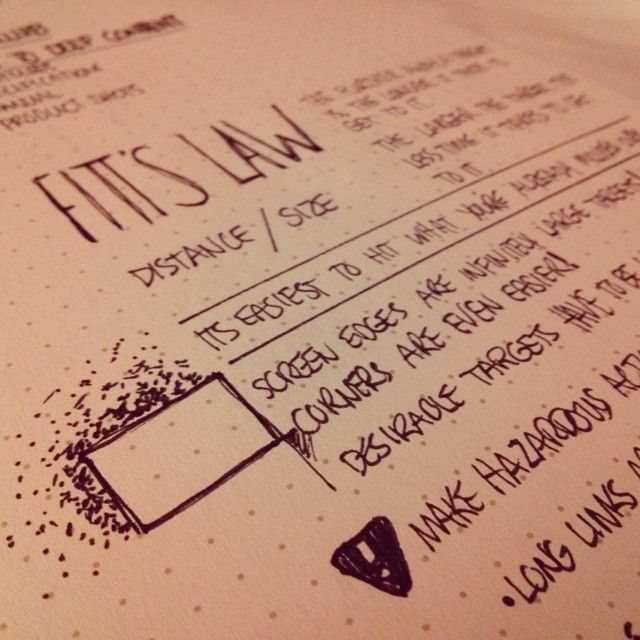
Now that we’ve seen Fitts’ Law applied in a simple setting, let’s see the nuts and bolts of the law. The mathematical formula behind Fitts’ law is T (Time) = a + b log2 (2 D (Distance)/ W (Width). Let’s take a closer look at that:

  • Time is the amount of time that it will take the user to complete his or her movement.

  • a + b: These are a little more complex. They’re “regression coefficients”, which means that we find these by observing the slope of the object.

  • Distance, as you might expect, is the distance between the user’s starting point and his or her end point (the target).

  • Width is the width of the target object.
Author/Copyright holder: evolvingblue. Copyright terms and licence: CC BY-NC 2.0

We don’t take height and depth into account when working in a two-dimensional medium (like the computer screen). However, that doesn’t mean that height isn’t important. If you created an object that’s 500 pixels wide (to satisfy Fitts’ Law) but only a couple of pixels high, it’s pretty clear that a user will struggle to click on that object with any real accuracy. In short, you also to have to apply a healthy dose of common sense if you want to use Fitts’ Law effectively.

Fitts’ Law and Prime (and Magic) Pixels
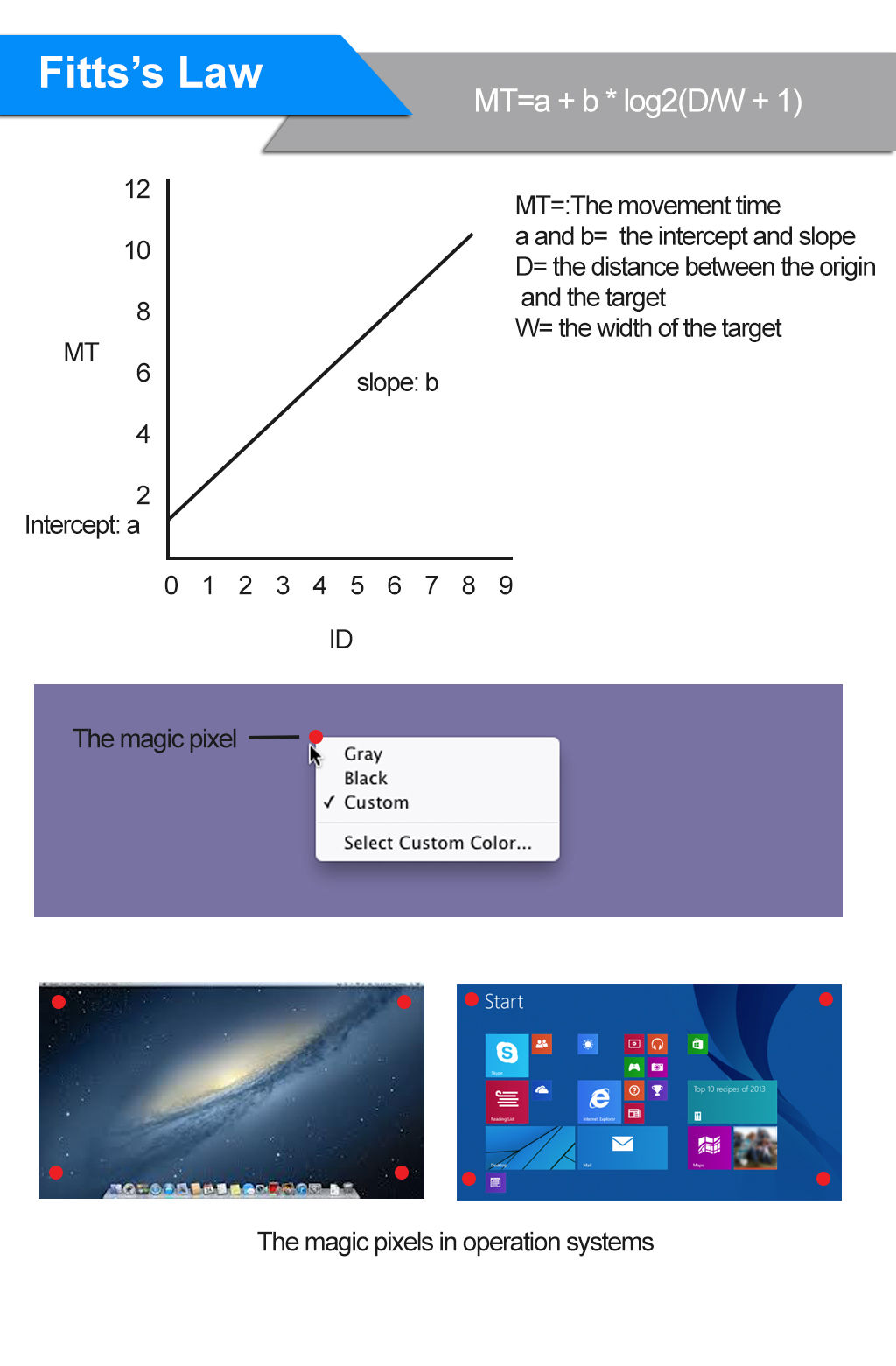
The ideal application of Fitts’ law would let us know where the user’s cursor is when it lands on the page. That would be the “prime pixel” – the point from which the user will carry out all of his or her actions while on your page. If we could determine this “prime pixel” for our user, we could then adapt our design to the user – e.g., we could create the shortest path to the actions we expect the user to take.

Unfortunately, while your browser and your applications can utilize the prime pixel (just right-click anywhere; do you see the menu that opens up? It opens up directly on the prime pixel: E.g., Where your cursor is now?), a website can’t take advantage of this data. Even if you could know the prime pixel, it would change every time the user moved the mouse. While it may sound disappointing, think about this: it would probably nauseate users if the design of the website were to change immediately every time they touched the mouse.

However, there is some good news. While you cannot determine the prime pixel when users arrive on a site or when they’re playing with their mouse, you can determine the likely prime pixel when a user takes an action. So, for example, if a user clicks “login”, the box that appears for the user to do so should be as close to the “login” option as possible, and the “submit” button should be as close to that text box as possible, too.

There are four other pixels that matter to Fitts’ Law in web design. We find these in each corner of the screen. They’re called “magic pixels”, and they provide a boundary that doesn’t exist in the real world (where Fitts’ Law is put in place for us to see more easily). There’s nowhere on earth that you can’t move to (assuming you have the appropriate transport), but on screen it’s different. You cannot go beyond the corners.

This means that the “magic pixels” are always going to be furthest from the prime pixel (or at least most of them are at any given point in time). Thus, they’re the least valuable real estate on screen; they’re considered to be the least useful places to put anything important when you apply Fitts’ Law.

So what does that mean for our designs? In essence, it leads to a generalization – the prime pixel, from a web designer’s point of view, is the one sitting in the middle of the screen (until such a point as an action is taken, whereupon it will shift). That’s why Google’s search box is in the center of the screen. When you visit Google, you want to find information. So, Google’s designers, knowing the most important possible action is placed where the prime pixel is, let you enter your search terms nice and easily. Imagine if the box were at the corner of the screen; our eyes would find it awkward. Awkwardness means work; working “switches” users off.

With this view of usability in mind, think about combining Fitts’ Law with other design principles (such as the Golden Ratio or symmetry). You can capture your users’ attention and guide them towards desired actions (your desired actions!) with creative and eye-catching features.

Applying Fitts’s Law to User Interface Design

The size of a target and its distance from the user’s current position within the user interface affect user experience in a number of ways. Some of the major implications for user interface design and user experience in turn are considered below:

1. Command buttons and any other interactive element in the graphical user interface must be distinguished from other non-interactive elements by size. Whilst it may seem obvious, user interface design often ignores that the larger a button is the easier it is to click with a pointing device. As interactive objects decrease in size there is a smaller surface area, requiring a level of precision that increases selection times.
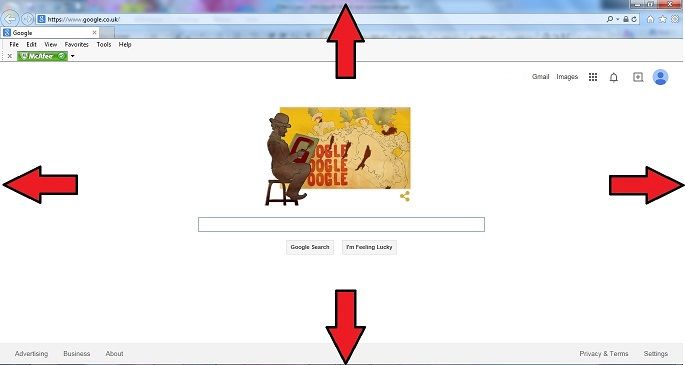

2. The outer edges and corners of the graphical user interface can be acquired with greater speed than anywhere else in the display, due to the pinning action of the screen. As the user is restricted in their movements the pointing device cannot move any further when they reach the outermost points of the screen; fixing the cursor at a point on the periphery of the display.
(Pop-up Menu)


3. Pop-up menus better support immediate selection of interactive elements than dropdown menus as the user does not have to move the cursor from its current position. Therefore, graphical designs that allow the user to interact without moving help to reduce the 'travel time'.
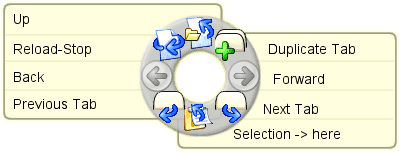
Example of a pie menu

(pie menu)

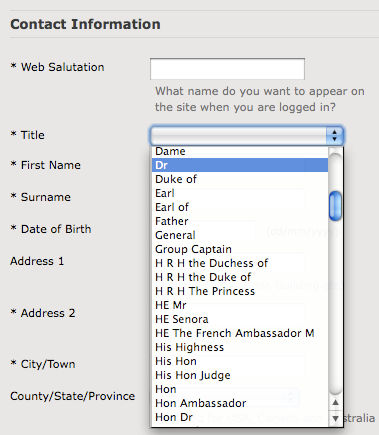
Example of a drop-down menu

(Dropdown menu)

4. Selecting options within linear menus, whether vertical (e.g. dropdown menus) or horizontal (e.g. top-level navigation), takes longer than clicking options in pie menus - where choices are arranged in a circle. Travelling distance is the same for all options in pie menus, unlike linear menus where distance increases the further along or down the list of options the user goes. In addition, the size of target areas is large in the pie menu, with the wedge-shaped buttons affording a larger margin for error when moving the cursor


5. Task bars impede movement through the interface as they require a more time-consuming level of precision than when options are placed on the outer limits of the screen. Although unconnected to Fitts's Law, multiple task bars can introduce a certain level of confusion or at the very least require the user to engage consciously with the screen arrangement to ensure appropriate selection.

The Take Away

If you’ve followed all this so far, you’re probably thinking, well… that means “bigger is better” right? Actually, no: this is a law about usability. While “so tiny I can’t see it” is clearly not very good, and “bigger than that” is better… there comes a point when increasing the size of an option makes it only a tiny bit more usable. This is something web designers should be grateful for; otherwise, all their web pages would have to consist of a single giant button for the user to press (in order for it to be “usable”, and users would likely find this primitive and very dull).

There’s also the factor of distance to consider. Where is this mouse pointer starting from? Is it from the middle, where we find the “prime pixel”? We intuitively know that this is important because we group menu items together. If you click one menu item, you may want to click another immediately afterwards. Menu items sit in the same spaces because it makes it much faster for the user to carry out a task. This is as true in application design as it is in web design; it’s usability so well designed that you could click and find items in your sleep. Typically, we take the prime pixel as a starting point, until we take the first action. The “magic pixels” are those at the corners of our screen – they are only borders, and far from being useful to us as designers.

Fitts’ Law shouldn’t be used on its own, either. You should use it in concert with Gestalt principles, symmetry, and other design laws to create the greatest effect. Knowing how your users will behave removes the guesswork for you, freeing you up to think hard about your design’s message. Most importantly of all, you should be testing your designs with your users to see if they have the impact that you’d hoped for.

Where to Learn More

Hero Image: Author/Copyright holder: lukasztyrala. Copyright terms and licence: CC BY-NC-SA 2.0

Feel Stuck?
Want Better Job Options?

AI is replacing jobs everywhere, yet design jobs are booming with a projected 45% job growth. With design skills, you can create products and services people love. More love means more impact and greater salary potential.

At IxDF, we help you from your first course to your next job, all in one place.

See How Design Skills Turn Into Job Options
Privacy Settings
By using this site, you accept our Cookie Policy and Terms of Use.
Customize
Accept all

Be the One Who Inspires

People remember who shares great ideas.

Share on:

Academic Credibility — On Autopilot

Don't waste time googling citation formats. Just copy, paste and look legit in seconds.