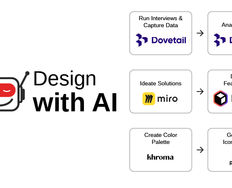
Ever found your workday disappearing into tasks that don't require your expertise? Scheduling meetings, reformatting decks, and tracking action items can keep you from the strategic design work you were hired to do. AI won't fix bad processes, but it can reclaim hours lost to repetitive work. Hours you can use for work only humans can do well: Interpreting user needs, making UX breakthroughs, and crafting experiences that build trust. When you automate the mechanical, you preserve energy for the meaningful: Work that advances your career and actually fulfills you.
In this video, Ioana Teleanu, Founder of UX Goodies and former Lead Product Designer (AI) at Miro, explains how automating side-process tasks with AI can free up your time for higher-value UX work.
AI as Your Exoskeleton, Not Your Replacement
Think of AI as an exoskeleton that amplifies your capacity without changing who's in control:
It handles repetition, scale, and variation: Necessary work that's rarely fulfilling.
You handle intent, quality, ethics, and context: The decisions that determine whether your design actually serves users.
This distinction matters because it clarifies your role as AI becomes embedded in every tool you use. You're not competing with AI for design jobs. You're learning to orchestrate it strategically so your expertise focuses where it creates the most value.
The designers who thrive aren't the ones resisting automation. They're the ones deliberately choosing what to automate and where human judgment must remain. AI adoption isn't just about efficiency. You're evolving your role from task executor to strategic orchestrator.
Identify What Should Be Automated: Four Simple Signals
It's tempting to say "Automate everything!" But there are four signals that ensure you put AI to best use, and don't unknowingly sabotage your work, your users, and yourself:
Repetitive: You do it frequently in a similar way each time.
Rule-Based: You can explain how to do it in clear steps or constraints.
Low-Risk: Mistakes are easy to detect, reverse, or correct.
Low-Empathy: The task doesn't rely on emotional understanding or ethical judgment.
Look at your tasks. The ones that meet most of these criteria will typically benefit from AI assistance. The ones missing most of them will require your human judgment.
For example, copying meeting notes into project management tools hits all four signals. Interpreting what users meant when they said "it feels off" hits none.
What Should Never Be Fully Automated
Even if AI can technically assist, it doesn't mean it should. Some activities require human context and responsibility, for example:
Interpreting user emotions and motivations: AI flags sentiment, and you understand what it means for your design.
Ethical trade-offs and value judgments: AI presents options, you decide what's right for users.
Strategic prioritization and vision: AI organizes information; you determine direction.
Final UX messaging tone: AI drafts copy, you ensure it builds trust and respect.
The rule is simple: If the output affects people's trust, dignity, or safety, AI assists but humans decide.
This boundary protects both quality and ethics. Automation should enhance your design judgment, never replace it.
Map Your Workflows and Build in Automation
When you map out your workflows, you can more easily slot in new tools and features as they're released, rather than constantly rebuilding your process around whatever tool happens to be popular in the moment. This way, you stop rebuilding your entire workflow every time a new AI feature launches. Instead, you ask, "Does this tool do X better than my current one?" If yes, swap it in. If no, ignore the hype and keep working.
Start small and pick one repetitive task this week. Find an AI feature in a tool you already use and test whether it saves you time and mental energy. Refine the workflow, then move to the next task.
Here's an example of meeting notes workflow:
Record and transcribe the meeting automatically.
AI compresses the transcript into themes and decisions.
AI extracts action items with owners and deadlines.
AI adapts output for different audiences (detailed notes for the team, executive summary for stakeholders).
You review for accuracy, add context AI missed, and distribute.
With your workflows established, carry out a review every quarter. Are there new tasks that feel repetitive or draining? Which steps can I partially automate today that I couldn't last year?
Small automations compound. Five tasks automated, each saving 30 minutes weekly, return 2.5 hours to strategic work. That's 10 hours monthly. 120 hours yearly. An entire month of creative capacity reclaimed from needless manual work.
Schedule Time for AI Play
Focus on workflows and outcomes should be your priority, not the tools. However, exploration time is still valuable. Ioana schedules a few hours a week for "AI playground time." Even if you only have 30 minutes, note down the tools and features you see and hear about throughout the week, then demo them during your session.
Try completing a recent task with a new tool to see if you get better results or more efficiency. Explore your current tools' new features to find quick boosts without learning a whole new platform. You might even find interesting UX patterns and approaches along the way to test in your own products, services, and experiences.
Stay in Control and Lead AI
As AI capabilities grow, you must maintain clear boundaries around responsibility. Always check that you're in control of:
Defining goals and constraints: What problem are we solving? What matters most?
Establishing success criteria: How do we know this works? What defines quality?
Evaluating relevance and quality: Does this output actually serve users? Is it accurate and appropriate?
Making ethical and contextual decisions: Should we build this? How does it affect different user groups?
AI accelerates execution. You ensure that execution serves the right goals with the right values. The designers who thrive in the AI age are those using it to amplify their strategic judgment and ethical reasoning: The uniquely human skills AI can't replicate.
The Take Away
Design freedom doesn't come from working faster. It comes from protecting your energy for work that requires human judgment, empathy, and creativity.
Automate tasks that are repetitive, rule-based, low-risk, and low-empathy. Build reusable workflows that survive tool changes by focusing on principles, not products.
But never fully automate decisions affecting people's trust, dignity, or safety. You define goals, establish success criteria, evaluate quality, and make ethical trade-offs. AI should always assist, not decide.
The goal isn't doing more work. It's doing more meaningful work: The kind that requires your unique human insight and advances both your career and your life. Start small with one repetitive task this week. Each small automation compounds into hours reclaimed for the creative, strategic thinking that drew you to design in the first place.
References and Where to Learn More
To keep yourself updated with the latest AI tools, see Futurepedia, and There's an AI for That.
Discover how automation can increase the efficiency of your design systems task in our 1-hour Master Class with Jarvis Moore, Senior Design Lead, Design Systems at Microsoft, AI for Design Systems: How to Stay Ahead and Lead.
Hero image: © Interaction Design Foundation, CC BY-SA 4.0