Game UX is the discipline that applies cognitive science and behavioral psychology to shape how a game feels to play: how players learn mechanics, how feedback hits, how difficulty builds, and how emotions carry a session from "one more try" to "one more hour." Game designers build the rules, but game UX professionals make sure those rules feel right in your hands.
In this video, Celia Hodent, PhD, Game UX Strategist and Author of the best-selling book The Gamer's Brain, explains what game UX is and why it matters.
Game UX Makes or Breaks Games
A game can have the best combat system ever designed, but if players can't figure out which button fires their weapon, they'll never see it. They'll quit before the game ever gets the chance to show them what it's capable of. Poor UX design kills more good games than bad gameplay ever does. That gap between what a game offers and what players can actually access is where game UX lives, and it's often the difference between a game that engages players weeks and one they uninstall after 20 minutes.
Consider Minecraft's crafting table. A game designer defines the recipes, ingredient categories, and inventory limits. A game UX professional defines how players see what they have, what they can make, and what they've already crafted, especially when the inventory overflows with wood, stone, and ore. Do players click a recipe directly, or hunt through menus and drag ingredients one-by-one? That interaction design decision changes whether a core game mechanic feels fluid or frustrating, and it's entirely separate from the mechanic itself.
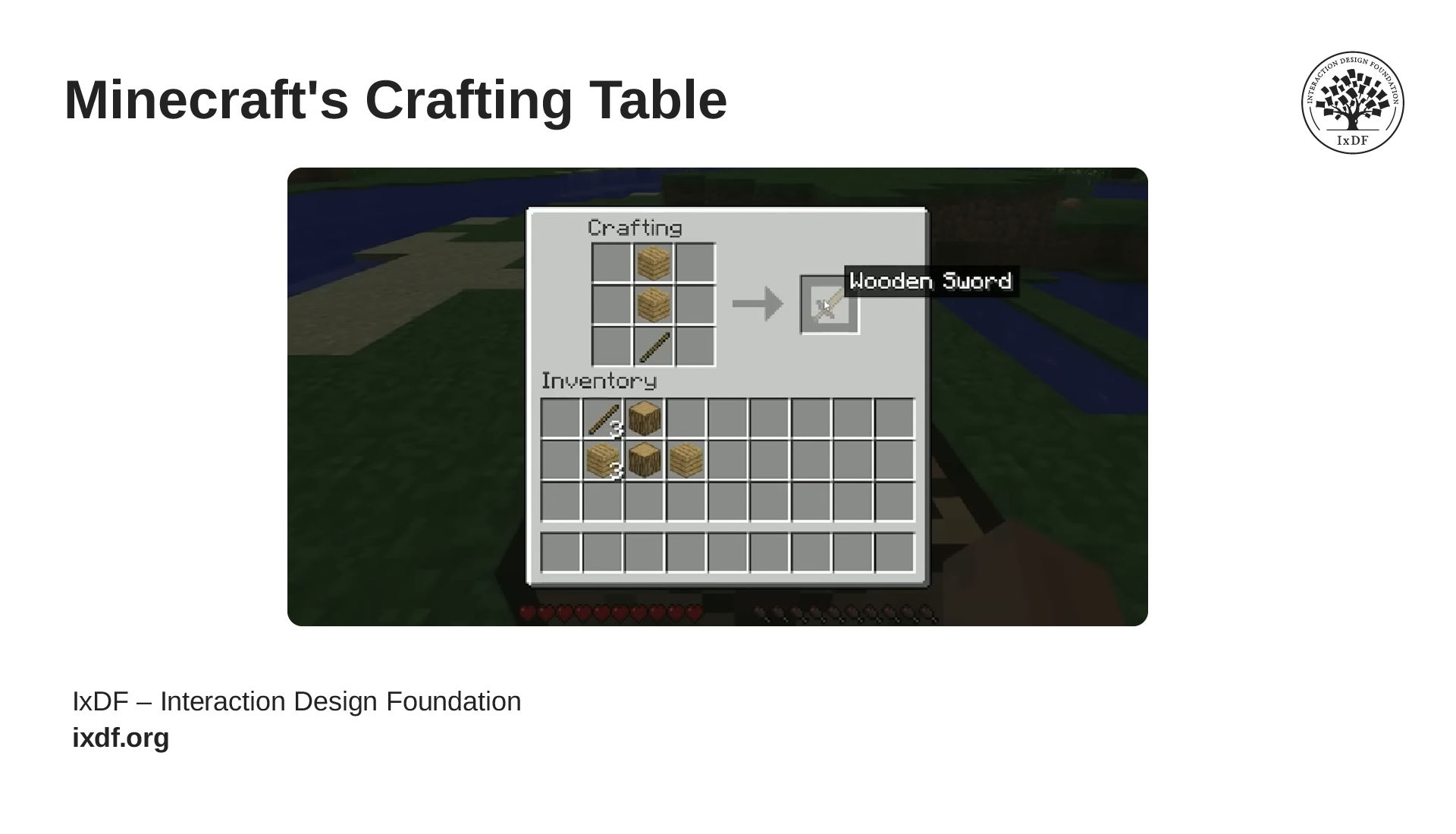
CC BY 3.0 Xbox México. Modified by Interaction Design Foundation.
Minecraft's crafting table interface puts every recipe, ingredient, and output in one visible grid, so players always know what they have and what they can make.
What does that look like when it works? You can see it in games that get UX right at every level. Portal teaches you its entire mechanic without a single line of tutorial text: every wall, every platform, every test chamber is a lesson disguised as play. Overwatch tells you an ultimate ability is ready through a glowing icon, a charging sound, and a screen-wide animation that all converge at the same instant, so the information lands even in the middle of a chaotic team fight. Resident Evil 4 carefully adjusts enemy behavior based on how well you're performing, so the tension holds without tipping you into the kind of frustration that makes you quit. Three different games, three different genres, but they all prove the same thing: the best game UX design disappears entirely, and the player just feels like they're playing.
Game UX Plays by Different Rules Than Traditional UX
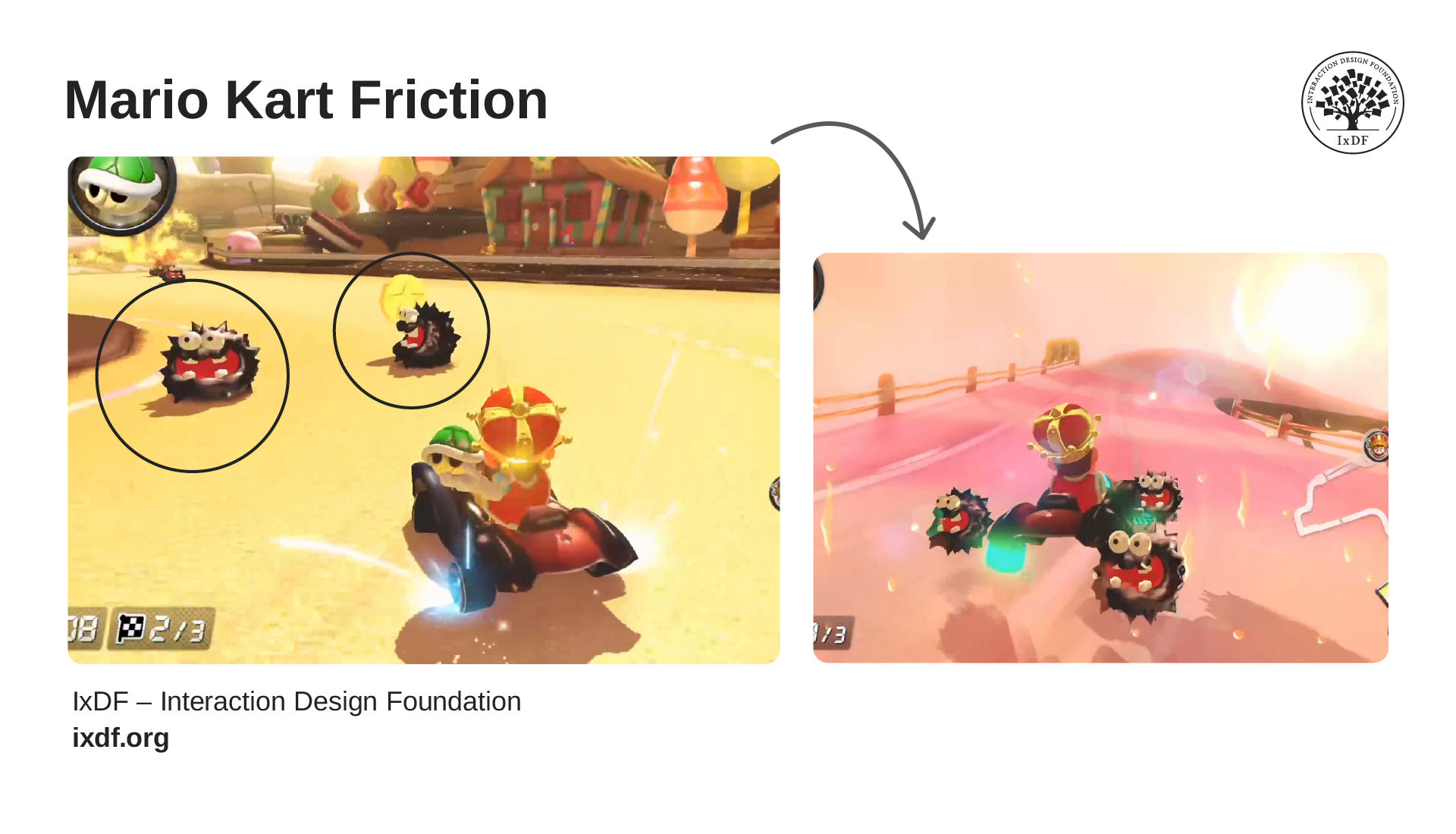
© Nintendo. Fair use. Modified by Interaction Design Foundation.
In traditional UX, obstacles like banana peels and homing shells would signal a broken experience, friction to be eliminated. In game UX, they are the experience. The spiny shells closing in (left) and the chaos that follows (right) aren't bugs in the design. They're the reason players keep coming back.
When you open a banking app, you want to pay a bill and move on. The best UX is the one you don't notice, because it quietly removes every obstacle between you and your goal. Now think about Mario Kart with its banana peels, red shells, and last-second collisions. Every one of those is an obstacle, and every one of them is the reason you keep playing. That's the fundamental difference in game UX.
You don't show up to complete a task efficiently. You show up for the friction itself, for the thrill of barely holding first place, the tension of a shell closing in behind you, and the satisfaction of dodging it at the last second. In traditional UX, that would be a failure, but in game UX, that’s the experience working exactly as intended.
Usability and Engageability: The Two Pillars of Game UX
When players can read your interface at a glance, find the right button without thinking, and understand exactly what just happened on screen, they're free to focus on what makes your game special. That clarity is usability. And when what's behind that interface is genuinely motivating, emotionally resonant, and absorbing to play, players choose to stay. That's engageability. Great game UX needs both. Let's break them down.
Usability: Clear the Path to the Real Challenge
Usability starts with a decision: where should the challenge live, and where should everything be smooth. In a fighting game, the struggle of reading your opponent and executing the right combo under pressure is the whole point. But if players can't tell which button triggers which move, that confusion serves no design purpose and gets in the way of the challenge you actually designed. That's the line. Everything on one side is the challenge you protect. Everything on the other side is friction you remove.
This is how game UX professionals ensure games are usable:
Clear visual hierarchy. Essential information should stand out through contrast, size, and screen position. In fighting games, health bars sit in consistent spots so players track them through peripheral vision, with their full attention still on the action.
Intuitive controls. Controls should feel natural within the game's context, so muscle memory builds quickly and players stop thinking about buttons
Smart feedback. Feedback should confirm what just happened the instant it happens. When a player lands a hit, takes damage, or reaches an objective, they should know immediately. Clear cause-and-effect lets players learn through play rather than instruction.
Engageability: What Players Actually Show Up For
© Interaction Design Foundation, CC BY-SA 4.0
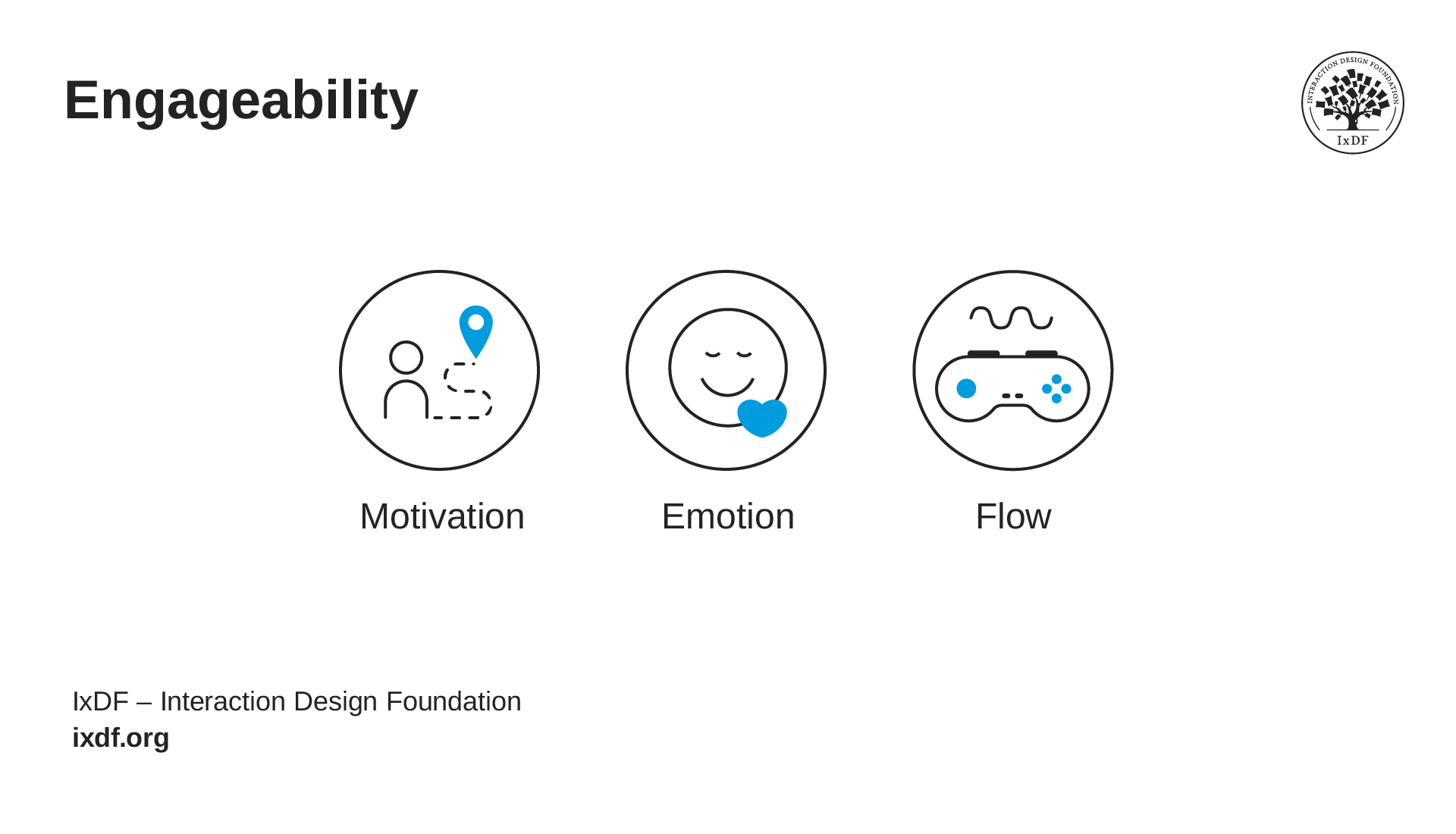
When a playtester tells a game UX professional that a game "isn't fun," what do they do with that? "Fun" is vague and can't design for vague. Celia Hodent's engageability framework gives them somewhere specific to look by breaking down what "fun" actually means into three elements you can design for, test against, and refine.
Motivation answers why players engage. Clear goals and meaningful choices give players a reason to invest. The Last of Us Part II offers both stealth and direct combat as valid paths forward, so players feel ownership over how they approach every encounter.
Emotion shapes what players feel as they play. You influence those feelings through pacing, music, visual design, and narrative beats. The quiet after an intense battle isn't empty space. It'scontrast that makes the next moment hit harder.
Flow determines whether players stay absorbed. When challenge matches skill, players enter a state of deep concentration where time disappears. If it’s too easy, attention drifts. If it’s too hard, frustration takes over. Your job is to find and hold that balance.
Together, these three elements turn "this isn't fun" into a diagnosis you can act on. Is the goal unclear? That's a motivation problem. Does the pacing feel flat? That's emotion. Are players bored or overwhelmed? That's flow. Vague feedback becomes a concrete design problem you can solve. Accessibility: More Players, Better Game
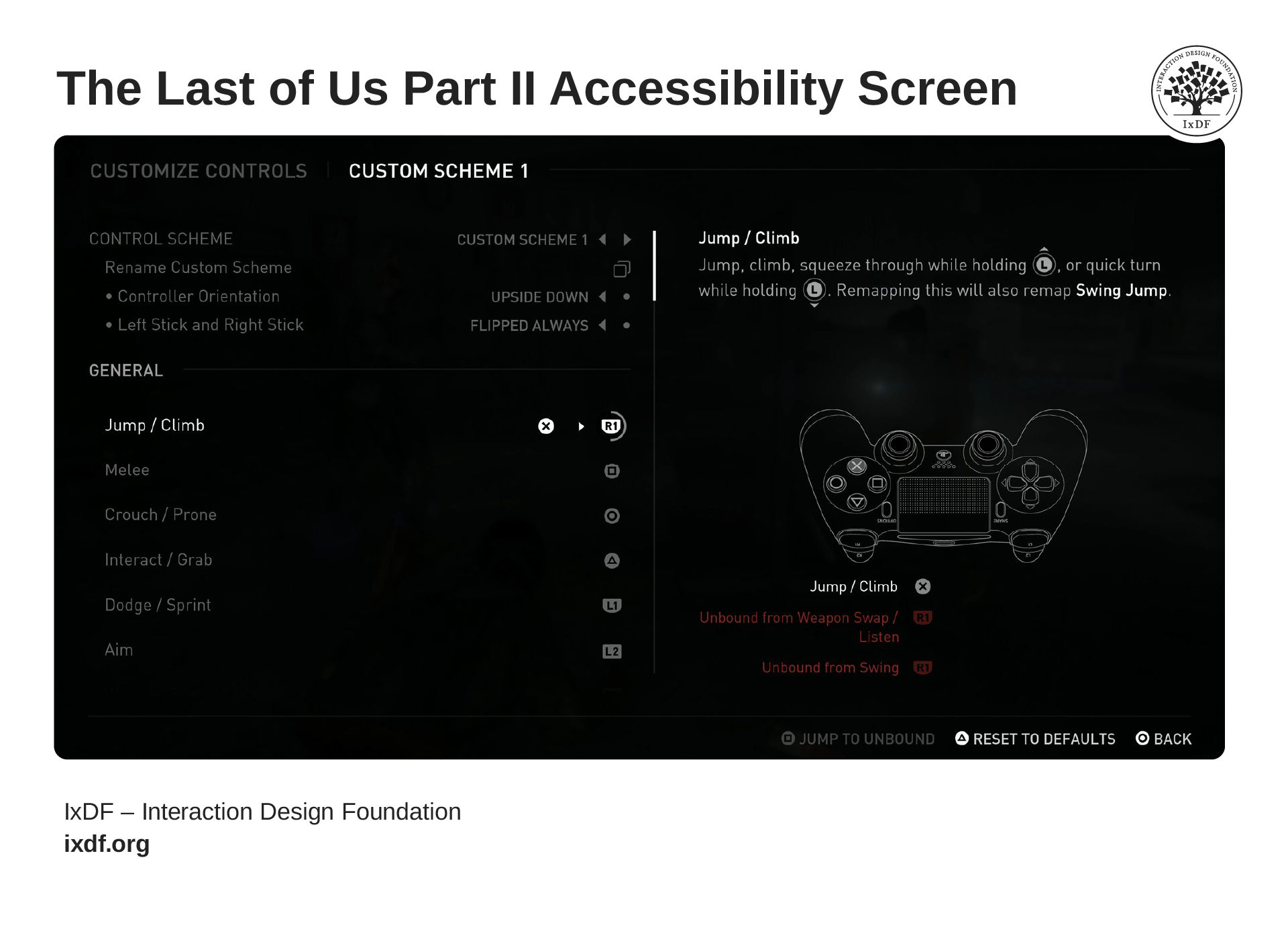
Every player who wants to experience a game should be able to. When The Last of Us Part II shipped with over 60 accessibility options, the result was a better game. Remappable controls opened the experience to players with motor disabilities. Colorblind modes and high-contrast settings ensured critical information reached players with visual impairments. Adjustable difficulty separated the ability to play from the level of challenge. And feedback across visual, audio, and haptic channels meant no single sense became a gatekeeper.
© Sony Interactive Entertainment / Naughty Dog. Fair use. Modified by Interaction Design Foundation.
With over 60 accessibility options, The Last of Us Part II lets players remap any control, adjust difficulty independently of challenge, and receive feedback across visual, audio, and haptic channels.
Accessible design doesn't dilute the experience. It extends it to players who would otherwise never get to have it, and it often makes the game more thoughtful and enjoyable for everyone who plays.
What Does a Game UX Career Look Like?
Game UX professionals sit at the intersection of cognitive psychology, design, and player advocacy. Across a full development cycle, they produce wireframes, run usability tests, write design specifications, and analyze player behavior data. Their work shows up in whether players can learn a new mechanic without a tutorial, whether an interface communicates clearly under pressure, and whether a difficulty curve holds players in flow rather than pushing them out. The role varies by studio size. At indie studios, one person often owns the full UX process from research through implementation. At larger AAA studios, the work often divides into specialized roles: UX researchers conduct player studies, UI designers build interfaces, data analysts track player behavior, and UX directors set strategy across the project.
What makes game UX distinct as a career is that players choose to be there. They aren't completing a task. They're pursuing an experience. That changes the entire design challenge, and it means studios need professionals who can think about both usability and engageability, not just one or the other. The industry is still catching up to that need, which means opportunities are growing for people with the right skill set.
References and Where to Learn More
Want more? If you haven't already, sign up for Game UX Design: The Ultimate Guide to learn directly from Celia Hodent, PhD, former Fortnite UX Director, and author of the best-seller The Gamer's Brain.
Read The Gamer's Brain by Celia Hodent.
Watch the How to Design for the Human Mind: Cognitive Science for UX Master Class by Celia Hodent.
Watch the How to Become a Games User Researcher Master Class by Steve Bromley, Games Researcher and Author.
Watch the AI for Game UX: Speed Up Research, Ideas, and Prototypes Master Class by Om Tandon, UX Design Leader at Nordeus (Zynga/Take-Two).
Watch the Level Up Your Career: How to Land a Job in the Game Industry Master Class with Om Tandon, UX Design Leader at Nordeus (Zynga/Take-Two).
Watch the UI Design for Games: Starter Edition Master Class with Stéfano Girardelli, Senior Visual Designer at Wildlife Studios.