Aesthetics in UX/UI Design

Your constantly-updated definition of Aesthetics in UX/UI Design and collection of videos and articles.
Be a conversation starter: Share this page and inspire others!

1,085 Shares

What are Aesthetics in UX/UI Design?

Aesthetics is a core design principle that defines a design’s pleasing qualities. In visual terms, aesthetics includes factors such as balance, color, movement, pattern, scale, shape and visual weight. Designers use aesthetics to complement their designs’ usability, and so enhance functionality with attractive layouts.

“Design is the method of putting form and content together. Design, just as art, has multiple definitions; there is no single definition. Design can be art. Design can be aesthetics. Design is so simple, that’s why it is so complicated.”

— Paul Rand, Art director & graphic designer famous for logos such as IBM’s

See why good aesthetics involves careful consideration in this video from Nielsen Norman Group.

Aesthetics in Design ≠ Art

Aesthetics is an age-old principle that revolves around the nature of beauty and the fact that people prefer pretty things. It’s central to the fields of architecture, graphic design and more. As a vital ingredient in user experience (UX) design and interaction design, aesthetics impacts an interface’s UX in several ways. Humans are hard-wired for visual input, and users’ first impressions typically form in 50 milliseconds – as their gut reactions guide them to either continue using your design/product or abandon it. Aesthetics here refers to the lines, colors, spacing and more on websites and apps, namely what elements you choose and how you apply them. For example, when your website has good aesthetics, you:

  1. Create an attractiveness bias – to appeal to users on a visceral level, leading to:

    1. Emotional design.

    2. More traffic.

    3. More time spent on site and page/screen views.

    4. A lower bounce rate.

  2. Make users more tolerant of usability issues – Studies show that users rate visually appealing designs as more usable than they truly are. This aesthetic-usability effect has been explored extensively, notably by UX design pioneer and author Don Norman.

Attractiveness bias is a short-term effect, though – good looks can’t save a bad product. So, it’s vital to design for the user experience and optimize usability, applying well-considered aesthetics to work together with your design’s functionality.

Copyright: Fair Use

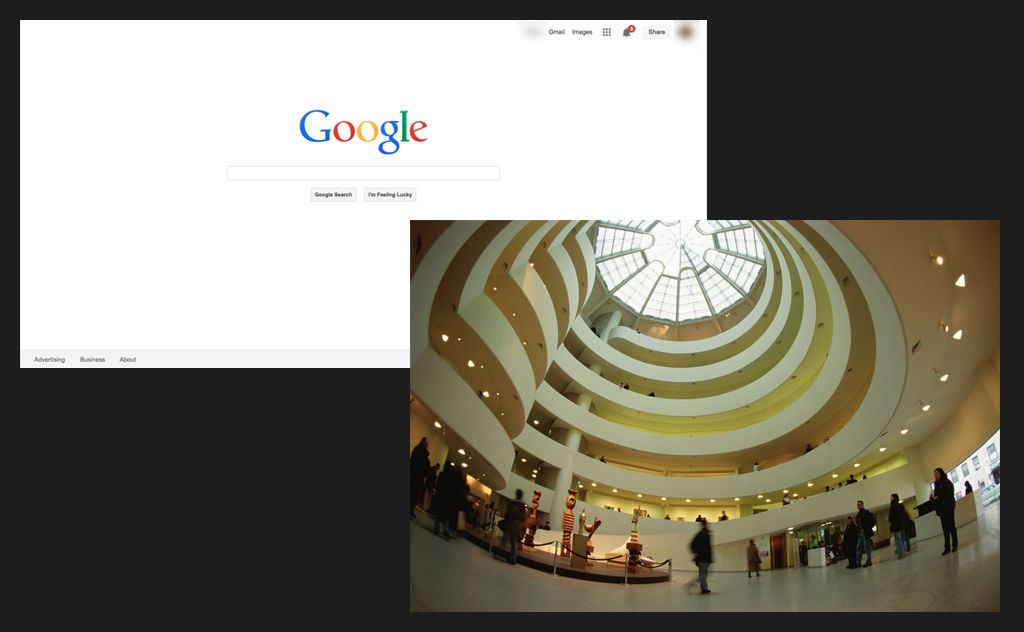
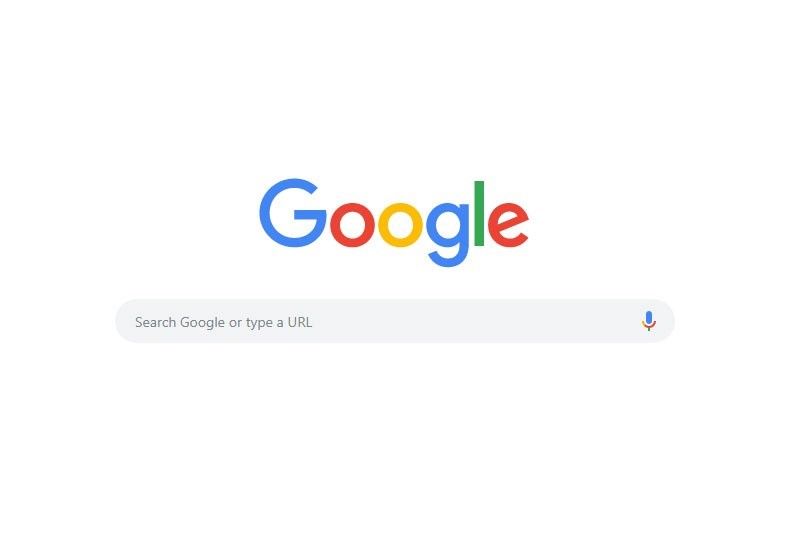
Google’s simple design showcases highly effective aesthetics – instantly declaring its purpose as users’ eyes are drawn to the function in the calm, clean layout they expect from Google.

Leverage Aesthetics to Make Beauty Work Best

Here are some key points:

  • Visual appeal exists in objectivity and subjectivity – While some aesthetic choices will resonate with all users and others will be flawed virtually everywhere (e.g., red elements on blue backgrounds), aspects of your users—including their culture, age and educational level—will impact how they perceive/receive your design. For example, the dangerous/racy connotations of the color red in the West contradict how Eastern cultures typically view red. So, user research is essential.

  • Let form follow function – This classic design concept means an object’s form (aesthetic design) should stem from the function it executes. As renowned designer Charles Eames stated, “Design is a plan for arranging elements in such a way as best to accomplish a particular purpose.” Therefore, it’s vital to set out well-chosen page/screen elements harmoniously and with a good visual hierarchy so you:

    • Guide the user’s eye to the page/screen’s functionality.

    • Make the aesthetics consistent with what users expect to see (e.g., sans-serif fonts for more casual websites).

  • Use timeless rules/principles such as the golden ratio, rule of thirds and Gestalt principles to optimize your choice and use of elements – to help eliminate users’ uncertainty and quickly give them the right visual cues. For example, by taking advantage of the Gestalt principles—where you exploit universal truths about how humans see things—you can achieve optimal contrast, spacing and more to please (or calm) users while sending the right messages about your product and brand. That includes maintaining transparency to maximize users’ trust.

  • Remember the context – Users access and use designs and products in—often complex and sometimes chaotic—real-world situations. They’ll want to achieve goals and get results fast, and need simple, crisp layouts with elements that maximize ease of use. When you respect their in-the-moment needs and use (e.g.) chunking to help lighten their cognitive loads, their appreciation will reflect in your design’s success. You can use aesthetics to highlight your design’s most crucial functionality and mute or disguise less critical functions. Good aesthetics can be extremely simple, as Google.com demonstrates.

In this video, Frank Spillers, Service Designer, and Founder and CEO of Experience Dynamics, illustrates how Google’s Material Design embodies the idea that form should follow function, using contrast, clarity, and simplicity to enhance usability while maintaining visual appeal. It’s a reminder that effective aesthetics serve a purpose: to guide users effortlessly and make interactions feel natural.

Transcript

Above all, design is a conversation with your users – and therefore why aesthetic and minimalist design (or zero clutter) is a principle used to check for usability issues in heuristic evaluation.

In this video, William Hudson, User Experience Strategist and Founder of Syntagm Ltd, explains how heuristic evaluations use established usability principles, like aesthetic and minimalist design, to assess how effectively an interface communicates with users.

Transcript

Your element and layout choices should show your users the right things in the right way while telling them a fresh, captivating story about your brand. All your elements—including their overall effect together on each page/screen—should serve a purpose and instantly direct users to what they want to do. To produce a clean, good-looking and highly usable design, you’ll often need to make compromises and cut back on what to include. However, your design’s critical functionality always comes first – an attractive product that draws users to use it for its main purpose. Unlike art, good design aesthetics should be easily understandable – where users never have to guess what your design means.

Our landing page’s aesthetics supports its functionality.

Questions About Aesthetics?
We've Got Answers!

How do aesthetics affect user experience?

Aesthetics play a huge role in user experience because people judge a product’s usability based on its visual appeal. A well-designed interface builds trust, improves usability, and enhances engagement. However, a poorly designed one can make even a functional product feel frustrating.

Users often perceive beautiful designs as more intuitive, a phenomenon called the aesthetic-usability effect. If a website or app looks polished and professional, users are more likely to forgive minor usability issues. On the other hand, cluttered layouts, poor typography, or inconsistent colors can confuse navigation and harm any trust users might have been building in the brand.

Good aesthetics also improve emotional connection. A visually pleasing interface makes users feel comfortable and encourages them to stay longer. For example, Apple’s minimalist design creates a sense of elegance and ease, reinforcing its premium brand image.

However, aesthetics should never come at the cost of usability. A beautiful design is only effective if it supports functionality, accessibility, and a seamless user experience.

Enjoy our course Visual Design: The Ultimate Guide for a deep-dive into visual design, including aesthetics.

What is the "aesthetic-usability effect" in UX design?

The aesthetic-usability effect is a phenomenon where users perceive well-designed products as easier to use—even if they have functional flaws. When something looks attractive and polished, people assume it works better, which leads to higher satisfaction and tolerance for minor usability issues.

For example, if a website has clean typography, balanced spacing, and a modern color scheme, users may feel it's intuitive—even if some navigation elements are slightly confusing. Conversely, a clunky but perfectly functional design may feel frustrating simply because it looks outdated or cluttered.

A classic example is Apple’s early iPods. Their sleek, minimalist design made users feel they were simple to operate, even though the click wheel had a learning curve. People trusted the design and were more willing to explore and adapt.

However, this effect has limits. If usability issues are too severe—like broken links or confusing interactions—good aesthetics won’t save the experience. Remember that users can “forgive” flaws only to a point, and the best UX balances beauty and function.

What are the key principles of aesthetic design in UX?

Aesthetic design in UX follows key principles that make interfaces visually appealing, easy to use, and emotionally engaging.

  1. Simplicity – Clean, uncluttered designs help users focus on what matters. Too many elements create cognitive overload and frustration. Example: Google’s homepage stays minimal to keep search effortless.

  2. Visual hierarchy – Designers use size, contrast, and spacing to guide users’ attention to the most important elements. Example: Call-to-action buttons stand out with bold colors and placement.

  3. Consistency – Designers repeat fonts, colors, and layouts across an interface to create a familiar experience. Example: Airbnb’s app maintains uniform spacing and typography for a smooth feel.

  4. Balance and alignment – Well-structured layouts improve readability and make interfaces feel stable. Example: Apple’s website uses a balanced grid to create harmony.

  1. Emotional appeal – Colors, typography, and imagery set the tone and influence user perception. Example: Calm’s app uses soft colors and gentle animations to create a relaxing experience.

Always remember that aesthetic design isn’t just about beauty—it enhances usability and builds user trust, too.

Watch as Author and Human-Computer Interaction Expert, Alan Dix explains important points about emotion and usability in design:

Transcript

How can I balance aesthetics and usability in UX design?

To balance aesthetics and usability in UX design, focus on creating a visually appealing interface which users enjoy without sacrificing functionality or ease of use.

That sounds a bit theoretical, so let’s get into how to do it. Start with clear navigation—users should instantly understand where to go and how to interact with elements. Don’t create overly complex visuals that distract from key actions. Example: Apple’s website looks sleek but keeps navigation simple and intuitive.

Then, use visual hierarchy to guide attention. Contrast, size, and spacing help highlight important elements like buttons and headlines without overwhelming users. Example: Spotify’s dark theme makes album covers and play buttons stand out.

Another thing to do is to maintain consistency in colors, fonts, and layouts. A polished, uniform design builds trust and reduces confusion. Example: Airbnb’s app uses the same clean design across its pages, which makes it nice and easy to explore.

Last, but not least, test your design with users. If an aesthetic choice makes interactions harder, simplify it. A beautiful design only works if it enhances usability—not if it gets in the way. So, make sure it’s an effective design for your brand’s users, not art for art’s sake—or because you think it looks “cool,” and everyone should too.

To get valuable insights into usability, enjoy our Master Class Micro-Usability: How to Design for Frictionless UX with William Hudson, Consultant Editor and Author.

How does color theory influence UX aesthetics?

Color theory is a major part of UX aesthetics because colors affect emotion, readability, and user behavior. The right color choices create visual harmony and smoothly guide users through an interface.

Psychology matters. Different colors trigger different feelings. For example, in the Western world, blue builds trust (often used in banking apps), red creates urgency (common in sales buttons), and green signals success (used in confirmation messages). Example: PayPal and Facebook use blue to convey security and reliability.

Contrast improves readability. High contrast between text and background ensures accessibility—making content easier to read. Example: Google follows strict contrast guidelines to enhance usability for all users.

Colors direct attention. Bright, bold colors highlight important elements, like call-to-action buttons. Meanwhile, neutral backgrounds keep the focus on content. Example: Spotify’s dark theme makes album covers and play buttons stand out.

A well-balanced color scheme improves both aesthetics and usability, which means the interface feels intuitive and visually appealing.

For one major dimension of aesthetic design, watch our Master Class How to Use Color Theory to Enhance Your Designs with Arielle Eckstut, Author and Co-Founder of The Book Doctors and LittleMissMatched, and Joann Eckstut, Color Consultant and Founder – The Roomworks.

Watch as Arielle Eckstut and Joann Eckstut explain important points about color:

Transcript

What role does typography play in UX aesthetics?

Typography plays a crucial role in UX aesthetics because it affects readability, hierarchy, and user perception. A well-chosen typeface makes content easy to read and visually appealing. In contrast, poor typography creates confusion and frustration.

Readability is key. Fonts should be clear, properly sized, and have enough spacing to avoid strain. Example: Google’s Material Design recommends a 14sp (scalable pixels) font size for body text to ensure readability.

Typography creates hierarchy. Bold, large fonts grab attention, while smaller text provides supporting details. Example: Apple’s website uses bold headlines to draw users in and smaller text for descriptions, making scanning effortless.

Font choice influences perception. Serif fonts feel traditional and trustworthy, while sans-serif fonts look modern and clean. Example: The New York Times uses serif fonts to maintain a classic, authoritative look, while Airbnb’s sans-serif typography creates a friendly, modern feel.

The main thing about well-designed typography is that it enhances UX by making content easy to digest and visually engaging—without overwhelming users.

Enjoy our Master Class The Tone of Typography: A Visual Communication Guide with Mia Cinelli, Author and Associate Professor of Art Studio and Digital Design, University of Kentucky.

Watch as Mia Cinelli explains important points about typography:

How do spacing and alignment affect the visual appeal of a design?

Spacing and alignment are essential in creating a visually appealing and user-friendly design. Proper spacing improves readability, while alignment makes a layout feel organized and professional.

Spacing enhances clarity. Too little space makes a design feel cluttered and overwhelming, while too much can disconnect related elements. Example: Apple’s website uses generous white space around text and images, and it makes content feel elegant and easy to scan.

Alignment creates structure. When elements are consistently aligned, the design feels balanced and polished. Poor alignment makes a layout look chaotic and unprofessional. Example: Google’s Material Design follows a strict grid system, ensuring elements align neatly for a clean and intuitive experience.

When designers use consistent spacing and alignment, users can navigate content effortlessly. These principles help guide the eye, reduce cognitive load, and create a visually harmonious interface. A well-structured layout isn’t just about aesthetics—it directly improves usability and user experience. There’s more to design than may meet the eye at first glance!

Enjoy our course Visual Design: The Ultimate Guide for a deep-dive into visual design, including aesthetics.

How do cultural differences influence UX aesthetics?

Cultural differences have a strong influence on UX aesthetics as different cultures have unique preferences for color, layout, imagery, and symbols. A design that works well in one country might feel confusing or unappealing in another.

Color meanings vary. Take white—in Western cultures, white symbolizes purity, but in some Asian cultures, it represents mourning. Example: Brands like Coca-Cola adjust their color use in global markets to align with cultural perceptions.

Reading patterns differ. Western users read left to right, so designs prioritize left-side content. However, Arabic and Hebrew speakers read right to left—so that will influence layout decisions. Example: Websites like Amazon adapt their layout for Middle Eastern markets.

Symbolism and imagery matter. Icons, gestures, and illustrations must be culturally appropriate. For instance, a thumbs-up is positive in Western countries but offensive in some parts of the Middle East. Example: Facebook modified its reaction emojis to be culturally sensitive worldwide.

Designers must understand cultural aesthetics so they can ensure designs resonate with users globally—improving usability and engagement—and don’t offend cultural norms.

Watch as Professor Alan Dix explains important points about designing with culture in mind:

Copyright
Transcript

How can I test the aesthetic appeal of my UX design?

You can test the aesthetic appeal of your UX design by gathering real user feedback and using data-driven methods to measure visual impact.

Start with preference testing—show users different design variations and ask which they find more appealing. This helps identify colors, layouts, and typography that resonate with your audience. Example: A/B testing two homepage designs can reveal which one users find more visually engaging.

Use first-impression testing by showing users your design for five seconds and asking what stood out. This reveals whether key elements, like calls to action, are noticeable and visually clear. This can be extended to first-click testing, where users are given a goal and shown a page design. The visual design of the page will influence their success rate.

Conduct usability tests to see if beauty enhances function. If users struggle despite a polished design, you may have to adjust spacing, contrast, or visual hierarchy.

Last, but not least, perceive and interact with your design. Aesthetic testing isn’t just about looks—it’s to ensure beauty supports usability for the best experience.

Take our course Data-Driven Design: Quantitative Research for UX for extensive insights into data-driven methods and how they can give powerful insights for more effective designs.

What are some highly cited scientific articles about aesthetics?
  1. Moshagen, M., & Thielsch, M. T. (2010). Facets of visual aesthetics. International Journal of Human-Computer Studies, 68(10), 689–709.

This study delves into the various dimensions that constitute visual aesthetics in the context of human-computer interaction. The authors propose a comprehensive framework that identifies key facets such as simplicity, diversity, colorfulness, and craftsmanship. They demonstrate how these facets influence user perceptions and interactions with digital interfaces through empirical research. This framework is a valuable tool for designers aiming to create visually appealing and user-friendly interfaces.

  1. Sonderegger, A., & Sauer, J. (2010). The influence of design aesthetics in usability testing: Effects on user performance and perceived usability. Applied Ergonomics, 41(3), 403–410.

This research examines how a product’s aesthetic design influences usability testing outcomes, focusing on user performance and perceived usability. The study reveals that aesthetically pleasing designs can positively affect users’ perceptions, even when functionality remains constant. These findings underscore the importance of considering aesthetic elements in the design process to enhance overall user satisfaction and performance.

Norman, Donald A. (2004). Emotional Design: Why We Love (or Hate) Everyday Things. New York: Basic Books.

In this seminal work, UX pioneer Don Norman explores the profound connection between emotions and design. He introduces the concept that attractive products provide functional benefits and evoke positive emotions, enhancing user satisfaction. Norman’s insights underscore the importance of aesthetics in creating pleasurable and effective user experiences.

Earn a Gift Earn a Gift, Answer a Short Quiz!

1
2
3
4
1
2
3
4
Question 1
Question 2
Question 3
Get Your Gift
Interaction Design Foundation logo

Question 1

What is a core component of aesthetics in design?

1 point towards your gift

  • Balance and visual weight
  • Complexity of features
  • Quantity of content
Interaction Design Foundation logo

Question 2

How do aesthetics in design primarily differ from art?

1 point towards your gift

  • Art focuses more on usability than aesthetics.
  • Art uses fewer colors and patterns than design.
  • Design aesthetics prioritize functionality alongside visual appeal.
Interaction Design Foundation logo

Question 3

What is one impact of good aesthetics on a user's experience with a design?

1 point towards your gift

  • Decreased website loading times
  • Increased user tolerance of usability issues
  • Reduced need for user feedback

Learn More About Aesthetics in UX/UI Design

Make learning as easy as watching Netflix: Learn more about Aesthetics by taking the online IxDF Course Emotional Design — How to Make Products People Will Love.

Why? Because design skills make you valuable. In any job. Any industry.

In This Course, You'll

  • Get excited as you discover the secret to creating unforgettable products people love! Studies show that 95% of our purchasing decisions are emotional. Emotional design turns functionality into connection and products people want more of. Your favorite pen probably isn't the smoothest or fanciest, yet you chose it every time. Why? Because it's not just a pen. There's a connection, a feeling, and a story. That's what separates iconic products from mediocre ones. Emotional design uses timeless human-centered skills to create meaning, attachment, and trust, turning one-time users into lifelong advocates. These skills are paramount to turn AI from a tool into your new superpower, no matter how much the tech advances. You don't have to start from scratch. You'll build on your existing human skills like empathy, intuition, and storytelling.

  • Make yourself invaluable with design skills that tap directly into emotional decision-making. People naturally recommend and repeatedly use products that make them feel good. With your new emotional design skills, you'll effortlessly inspire action, build loyalty, and increase engagement, conversions, and retention. Whether you're a designer, marketer, or leader, this course gives you a timeless skill set to amplify your impact in any role.

  • Gain confidence and credibility as you master the hidden emotional triggers that make people fall in love with products. It's easier than you think, even if you're completely new to design. Use downloadable templates like the Hierarchy of User Experience (UX) Needs and the 5 Principles of Humanity-Centered Design to fast-track your learning. Directly apply Don Norman's three levels of emotional design—visceral, behavioral, and reflective—to create irresistible products. Leverage tools like Maslow's Hierarchy of Needs and the Triune Brain model to design experiences that win hearts and minds every time. 

It's Easy to Fast-Track Your Career with the World's Best Experts

Master complex skills effortlessly with proven best practices and toolkits directly from the world's top design experts. Meet your expert for this course:

  • Alan Dix: Author of the bestselling book “Human-Computer Interaction” and Director of the Computational Foundry at Swansea University.

Get an Industry-Recognized IxDF Course Certificate

Increase your credibility, salary potential and job opportunities by showing credible evidence of your skills.

IxDF Course Certificates set the industry gold standard. Add them to your LinkedIn profile, resumé, and job applications.

Course Certificate Example

Be in distinguished company, alongside industry leaders who train their teams with the IxDF and trust IxDF Course Certificates.

Our clients: IBM, HP, Adobe, GE, Accenture, Allianz, Phillips, Deezer, Capgemin, Mcafee, SAP, Telenor, Cigna, British Parliament, State of New York

All Free IxDF Articles on Aesthetics in UX/UI Design

Read full article
What are the Five Elements of UX Design? - Article hero image
Interaction Design Foundation logo

What are the Five Elements of UX Design?

When you think about user experience design (UX design) and what the ingredients for users to enjoy great experiences are—and so, what you need to think about presenting to them in innovative and delightful ways they can hit the ground running with—does it seem a little overwhelming sometimes? Does

Social shares
760
Published
Read Article
Read full article
Aesthetics and form need to hold hands - Article hero image
Interaction Design Foundation logo

Aesthetics and form need to hold hands

This article examines two closely related ideas that are both about looks. Our design world revolves around nice images/form, but did you wonder why we’re allured to beauty? Let’s quickly ponder another question: why is a pretty post office different from a gorgeous art gallery?We’ll look at these t

Social shares
682
Published
Read Article
Read full article
Tell Me About Me – User Profiles for Mobile Applications - Article hero image
Interaction Design Foundation logo

Tell Me About Me – User Profiles for Mobile Applications

With the move away from websites to applications on mobile devices; there’s a need for many apps to create, maintain and manage user profiles so that users can effectively interact with the app and so that the app’s creators can collect and analyse data useful to their businesses. There is no “one s

Social shares
826
Published
Read Article
Read full article
How to Improve Your UX with HCI Insights - Article hero image
Interaction Design Foundation logo

How to Improve Your UX with HCI Insights

Design plays a role that’s utterly crucial in our daily lives—it bridges functionality with aesthetics to meet user needs. In product development, it’s design that determines how user-friendly and appealing a product is. The field of human-computer interaction (HCI) is foundational to UX design. To

Social shares
579
Published
Read Article

Aesthetics and form need to hold hands

Aesthetics and form need to hold hands

This article examines two closely related ideas that are both about looks. Our design world revolves around nice images/form, but did you wonder why we’re allured to beauty? Let’s quickly ponder another question: why is a pretty post office different from a gorgeous art gallery?

We’ll look at these two “sides” of this “coin”, namely Attractiveness Bias and Form Follows Function. With a grasp of both, you’ll be able to plan better designs.

The Attractiveness Bias or the power of beauty

We are biased towards aesthetic forms. That is a fact; we love looking at beautiful things and are drawn to prettiness, both in the bricks-and-mortar world and in the digital one. In the digital arena, a more attractive website is just one click away. When users visit a website or even try a new app, they make quick decisions on whether to stay on that site/app or keep looking for another one. Much of that decision hinges on the aesthetic appeal of the web page’s design. Cramped, ugly sites have a much harder time keeping a user engaged than well laid out sites. This is why, as designers, we can harness the principle of attractiveness bias to build relationships with users quickly. That might sound extremely obvious, but it’s crucial to understand and not take for granted. We can plan out a pretty picture.

It’s easy to get caught up in delivering an aesthetically pleasing website or app rather than one which delivers a great user experience. If you keep the rule of thumb that “form follows function” (which we will examine soon) in mind, you may be better placed to strike a balance between aesthetics and user experience.


The Call of Beauty
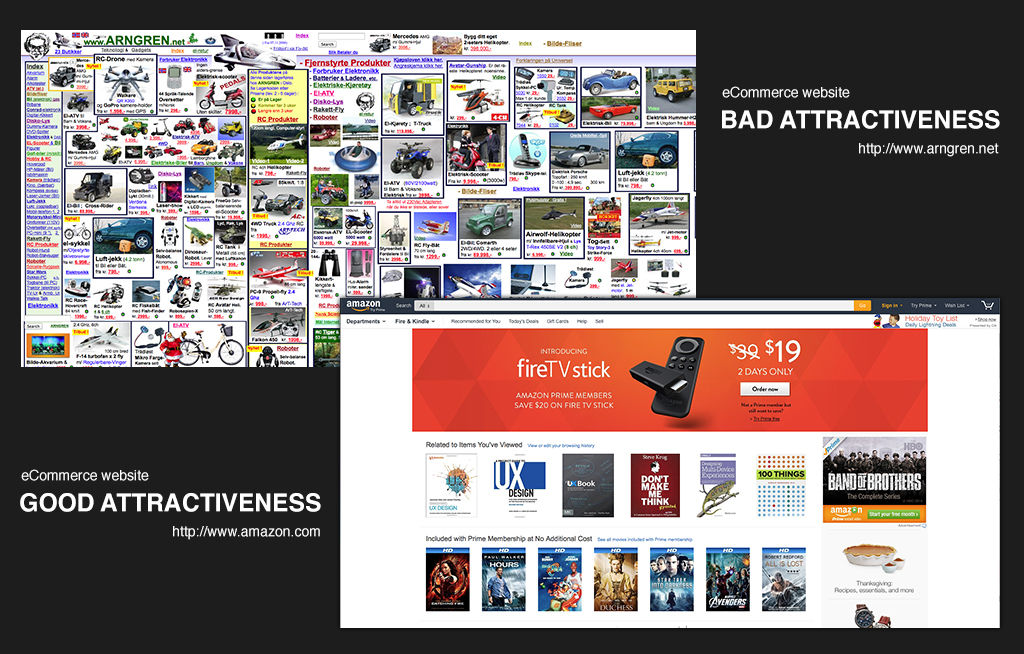
People have always been attracted to beauty or“attractiveness”. We see people who dress appealingly, and we respond favorably. We see a Ferrari or a Porsche, and our attention is captured by such “headturners”. Standards of beauty do differ from culture to culture and person to person. Have you heard the old expression, “there’s no accounting for taste”? There are, nonetheless, items, people, websites, etc. that the majority of folks find aesthetically pleasing. Eyes “understand” beauty, no translation required.

For centuries, architecture has harnessed the understanding that beauty matters. Buildings are permanent landmarks, so it’s important to enjoy them. Architects tend to design structures that appeal to those who live and work in them. Yes, there are always exceptions, but at least the monstrosities will remind us why getting it right is vital!

Attractiveness bias is simply the understanding that we’re drawn to beautiful things. When we see a group of people, we tend to see those we find the most attractive before noticing the rest of the group. People with confident smiles and moviestar looks may as well have a spotlight on them. Good clothes make them stand out more. Speaking of clothes...the same is true when you select jewelry or a garment from a display; the most beautiful piece will almost “leap out” from the other, less attractive pieces. Yes, most often it’s the most expensive one!

We designers can use this principle of attractiveness bias to help grab and hold the attention of users. We can use it in marketing to drive visits to a website. We can also use it to promote one product among many. Apple has done this incredibly successfully, enabling their products to shine in the consumer mind over many similar products from competitors.

The Short-term Effect of Attractiveness

It’s important to know that attractiveness bias is a short-lived effect. The most beautiful website cannot keep visitors without providing an equally attractive user experience. Once that “wow factor” has died down, it’s the utility of a site that holds the attention. Imagine a very good-looking actor turning up for an audition. The casting director will be impressed; however, our poor actor hasn’t mentioned that he’s only started acting school. Worse, he’s not good at acting and stammers when nervous. Alas, our casting director starts feeling disappointed very quickly.

In essence, while an ugly website may never grab the user’s attention, a beautiful website without any real use will not hold the user’s attention for more than a few seconds. Beauty may be in the eye of the beholder, but the eye gets tired very quickly, almost as quickly as it gets turned off by ugliness.

This also explains why an incredibly beautiful person who lacks intellect or personality may find it very easy to get a first date but very challenging indeed to get a second.

How Attractiveness Bias can help a website

Attractiveness bias can contribute to the success of a website in a variety of ways including:

Increased traffic to the website - An attractive site may draw more users via aesthetic appeal.

Emotional design - As people build an emotional connection with attractive people (even those they don’t know, such as actors and actresses), so do they form emotional connections with designs that move them or particularly appeal to them.

Lower bounce rate – Bounce rate is the time it takes a user to leave a website. An attractive website will likely hold the attention for longer than an ugly one. However, the main factor in deciding bounce rate will be the user experience. Pretty pictures can’t hold users for long: get the best of both worlds and enhance your beautiful design with one that gets users reading and clicking happily.

Increases in time on site and page views - If the website is pleasant-looking and the user experience is positive, it’s likely that users will spend more time on it.

While attractiveness bias is important to consider while designing your website, never forget the other half of the formula. Meeting the users’ needs and desires is in the long term more important to the success of your design.

Test your designs to see if they have the desired aesthetic appeal with your audience. A warm, sunny feel may be very appealing to the users of a website concerned with children’s toys. What about an adult using a horror movie website, though? The graveyard images, blood, gore and haunted nightscapes that they expect to find would scare off toy customers (unless Halloween is coming up and the pictures aren’t too shocking!).

Above all, stay mindful of how quickly the user’s eye will judge your design. You never get a second chance to make a first impression, so appeal to your users’ senses while you factor in everything else to keep them on your page.

Let’s now look at that ”everything else” and how they relate back to the look of what we choose to put in our designs. Let’s turn our ”coin” over and see, shall we?
Form Follows Function

The Guggenheim Museum and Google.com website exemplify how form follows function in design.Form follows function” is an expression you’ll likely have heard, but what does it really mean? How can it help us when designing a website?

The phrase “form follows function” indicates that form, or the aesthetic design, should be derived from the function that it carries out. In his 1896 article, “The Tall Office Building Artistically Considered”, American architect Louis Sullivan wrote:

It is the pervading law of all things organic and inorganic, of all things physical and metaphysical, of all things human and all things superhuman, of all true manifestations of the head, of the heart, of the soul, that the life is recognizable in its expression, that form ever follows function. This is the law.

Sullivan’s assistant, Frank Lloyd Wright, went on to champion this idea ferociously. One of his buildings, the Guggenheim Museum, is a good example of form following function, with its spiral shape designed so that visitors can easily view the artwork within the museum.

From the world of design, we have this quote by Charles Eames that matches the ideas above: “Design is a plan for arranging elements in such a way as best to accomplish a particular purpose.”

[Did you miss our “Meet the Eames” article? Check it out to learn more about him and his wife Ray and their amazing contribution to design!]

Form Follows Function: Descriptive vs. Prescriptive Interpretation
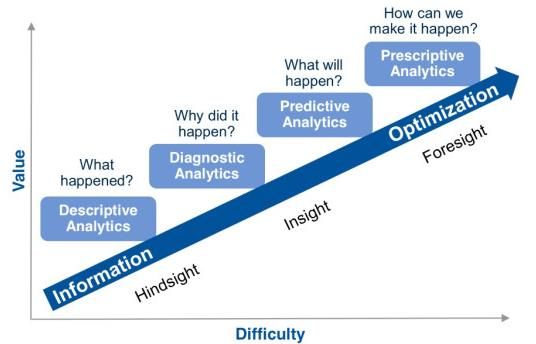

Author/Copyright holder: Rose Business Technologies. Copyright terms and licence: All rights reserved

Is it true that forms follow function? If that’s the case, then there are a couple of ways to look at the idea:

The descriptive interpretation – Any beauty in a design must result from the “purity” of the function.

The prescriptive interpretation – Any aesthetic consideration when designing something must always take second place to the functional requirements of the design.

The descriptive interpretation is easy to dismiss. If we look at nature, mutations in the genome (those which cause evolution) are random. There’s no recipe to be followed. A species gets handed a form and then has to derive its function from that form. (Giraffes might prefer to eat food that grows under the ground, for example, but their long-necked form makes that impossible; thus, their function is to eat leaves from high branches.)

If we were to use this concept in design, we’d need to understand that function is more objective than aesthetics (we may both find something usable and useful, but you might consider it ugly, and I might think it beautiful, or vice-versa). Remember, there is no accounting for taste.

The prescriptive interpretation also leads to problems. It assumes that functionality is the only imperative for design. Usability, aesthetic appeal, and simple ergonomics are all secondary to the functionality.

If that were true, then all websites carrying out a similar task should be identical. After all, if we are to shop online, for example, the process of shopping should be the same each and every time. The functionality is all identical, and the prescriptive interpretation asks the designer to consider, “what should be left out of my design because it fails to serve the function?” There should only be one optimal form based on function.

“Form Follows Function” in Web and App Design

If you’re going to apply form follows function in your web or app design, you’ll have to reach a compromise. Begin by determining what aspects of the design (from a functional perspective) are most critical to your design’s success. For instance, a shop where you cannot place an order or a search engine with no “search box” is going to be somewhat useless!

Once you’ve decided on your design’s functionality, you can start to design. This doesn’t mean eliminating all design elements that distract from the functionality. Remember, aesthetic appeal matters to users. However, it can guide us to using designs that highlight the most critical functionality and which, to some extent, disguise less critical functions.

It can also help, when you’re time- or resource-poor, to understand where you can make trade-offs in the design process, both in terms of functionality and aesthetic design. You may make compromises: not to the critical functionality, but to all other functions and to aesthetic appeal. You want an attractive design that draws the user to use it for its chief purpose.

A great example of such compromise is Google.com, which deftly applies the “form follows function” rule. When you access Google's website, all you see is the search field, which is the primary function of the website. Google have put all other services at the top right-hand corner of the site. Google prioritizes the critical function of search over all other functions.

The Take Away

People are attracted to beauty. Attractiveness bias accounts for this systematic pattern of deviation. Although standards of prettiness differ from culture to culture and according to personal taste, the majority of folks will enjoy looking at a beautiful item, be it a website, a car, or another person. As designers, we can use this bias to our advantage.

However, attractiveness bias is a short-term effect. The aesthetic appeal of a design will ebb quickly, even if it has helped to latch with the user, showing in the following:

  • Increased traffic to the website

  • Emotional design

  • Lower bounce rate

  • Increases in time on site and page views

Remembering that we have a scant amount of time in which to hold our user’s interest, we must focus on the user experience. This means that we have to think about who our users are and how we can show our product, service, or message in the most adapted to their needs and desires.

This is when the idea of Form Follows Function comes into play. If we start with the “function” of the product or service, it is more likely that our users will stay with us after the pretty effect wanes. Keep the essential function of your product, service or message firmly in focus, tailoring the aesthetics around it and putting all non-essential aspects on the side, in smaller buttons or bars.

All in all, keep both concepts in mind as you work. Your users don’t want a disordered, ugly page. Still, after raising their eyebrows in a moment’s admiration at the “Mona Lisa” you’ve shown them, they’ll want to navigate quickly to find what they’re looking for. Balance is key.

Where To Learn More

Resources

Hero Image: Author/Copyright holder: Unknown. Copyright terms and licence: Unknown.
Feel Stuck?
Want Better Job Options?

AI is replacing jobs everywhere, yet design jobs are booming with a projected 45% job growth. With design skills, you can create products and services people love. More love means more impact and greater salary potential.

At IxDF, we help you from your first course to your next job, all in one place.

See How Design Skills Turn Into Job Options
Privacy Settings
By using this site, you accept our Cookie Policy and Terms of Use.
Customize
Accept all

Be the One Who Inspires

People remember who shares great ideas.

Share on:

Academic Credibility — On Autopilot

Don't waste time googling citation formats. Just copy, paste and look legit in seconds.