A player intensely focused on a video game, with the quote on screen: "In Game UX we add friction points to entertain players."

Why You'll Frustrate Players on Purpose (And When You Shouldn't)

by Laia Tremosa • • 15 min read

207 Shares
Save

You're playtesting your game. A player drops the remote and says, "This is so frustrating!" Your heart sinks and your producer leans over and whispers, "Should we make it easier?" This is a moment that will define your game's success. Because not all frustration is a problem; the wrong kind of frustration is. This is why the question you need to ask first is: Is this the frustration I designed (the challenge that makes it engaging) or the frustration I need to fix (the usability problem breaking the experience)?

When you can identify whether the player's frustration is intentional or not, you'll know what to do next. In this video, Celia Hodent, PhD, Game UX Strategist and Author of the bestselling book The Gamer's Brain, shows you how to distinguish between the two types of frustration you'll encounter as a game UX designer.

Transcript

Not All Frustration Is Bad

In traditional UX, frustration is always the enemy. You find it and remove it. But in game UX you'll encounter two fundamentally different types of frustration, and they require opposite responses.

Frustration NOT by Design: Usability Problems

These are barriers that prevent players from accessing your intended experience. They break immersion, block progress, and create confusion. This is the kind you want to eliminate.

For example:

  • Players don't understand what button to press to use a powerful weapon.

  • Controls feel unresponsive or unpredictable.

  • UI elements are hard to read or locate.

  • Instructions are unclear or missing.

  • The game crashes or has technical issues.

These need to be fixed because players can't experience your intended game when these get in the way. No amount of great gameplay can make up for a confusing menu or broken controls.

Frustration BY Design: Crafted Challenges

These are intentional obstacles that create engagement, and they're the reason players keep playing. This is the kind you intentionally design for. Without them, your game becomes boring.

For example:

  • A boss fight that requires multiple attempts to master.

  • A puzzle that takes time to figure out.

  • A platforming sequence that demands precise timing.

  • Resource scarcity that forces strategic choices.

  • Opponents with abilities that counter your tactics.

These require careful crafting. If they're too easy, players will lose interest. If they're too hard, players might get frustrated and even quit. Finding that balance is where your skill as a game UX designer matters most. The goal is to make sure players feel frustrated at the challenge, not at your game.

The Gray Area: Is the Challenge Communicated Clearly?

Sometimes the challenge itself is good, but players don't understand what they're supposed to do. This is where usability and challenge intersect.

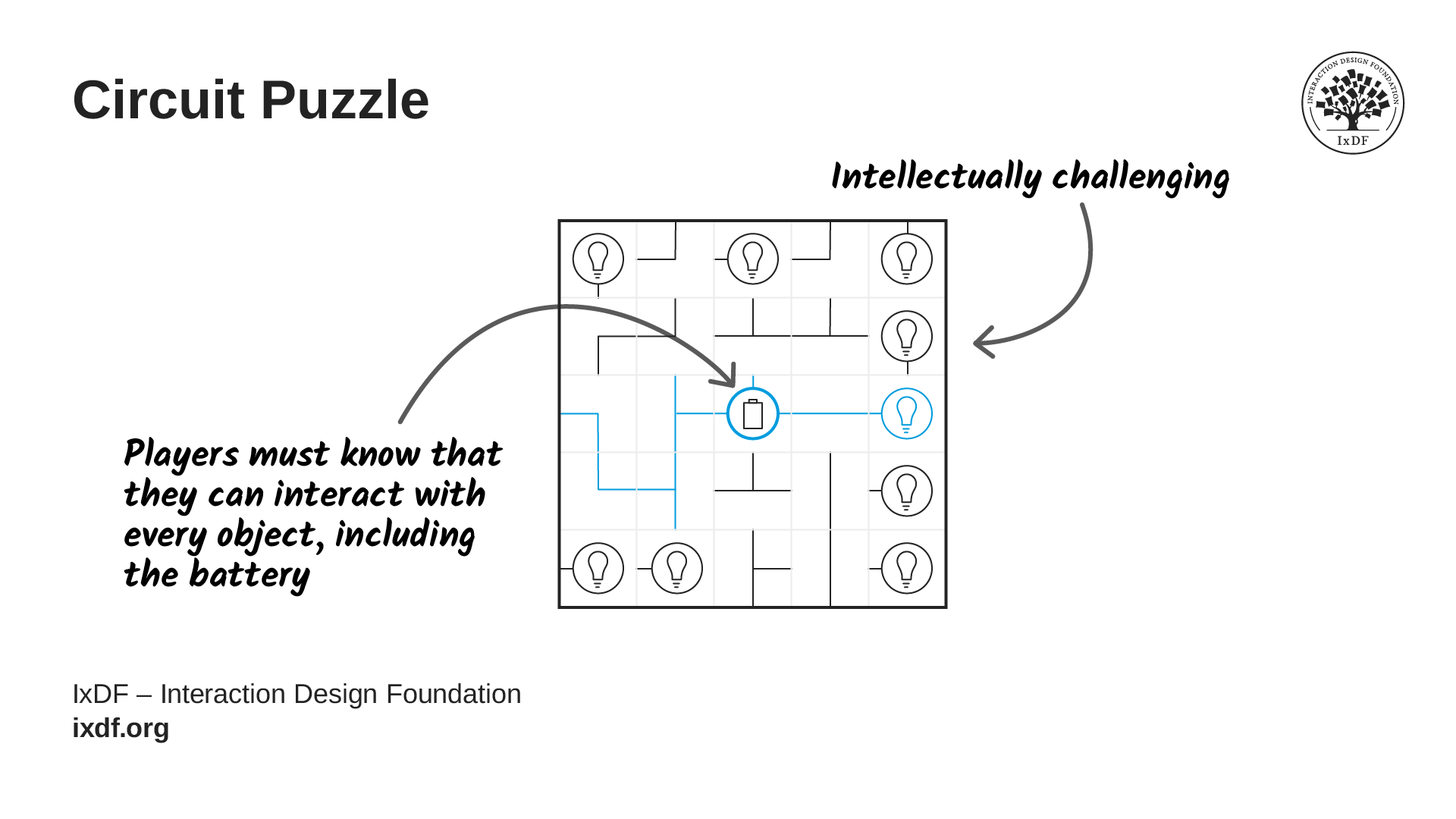
For instance, imagine a puzzle that's intellectually challenging (good frustration) but players don't realize they can interact with key objects (bad frustration). The solution isn't to make the puzzle easier but to improve the usability of interaction cues. You keep the challenge but fix the communication.
© Interaction Design Foundation, CC BY-SA 4.0

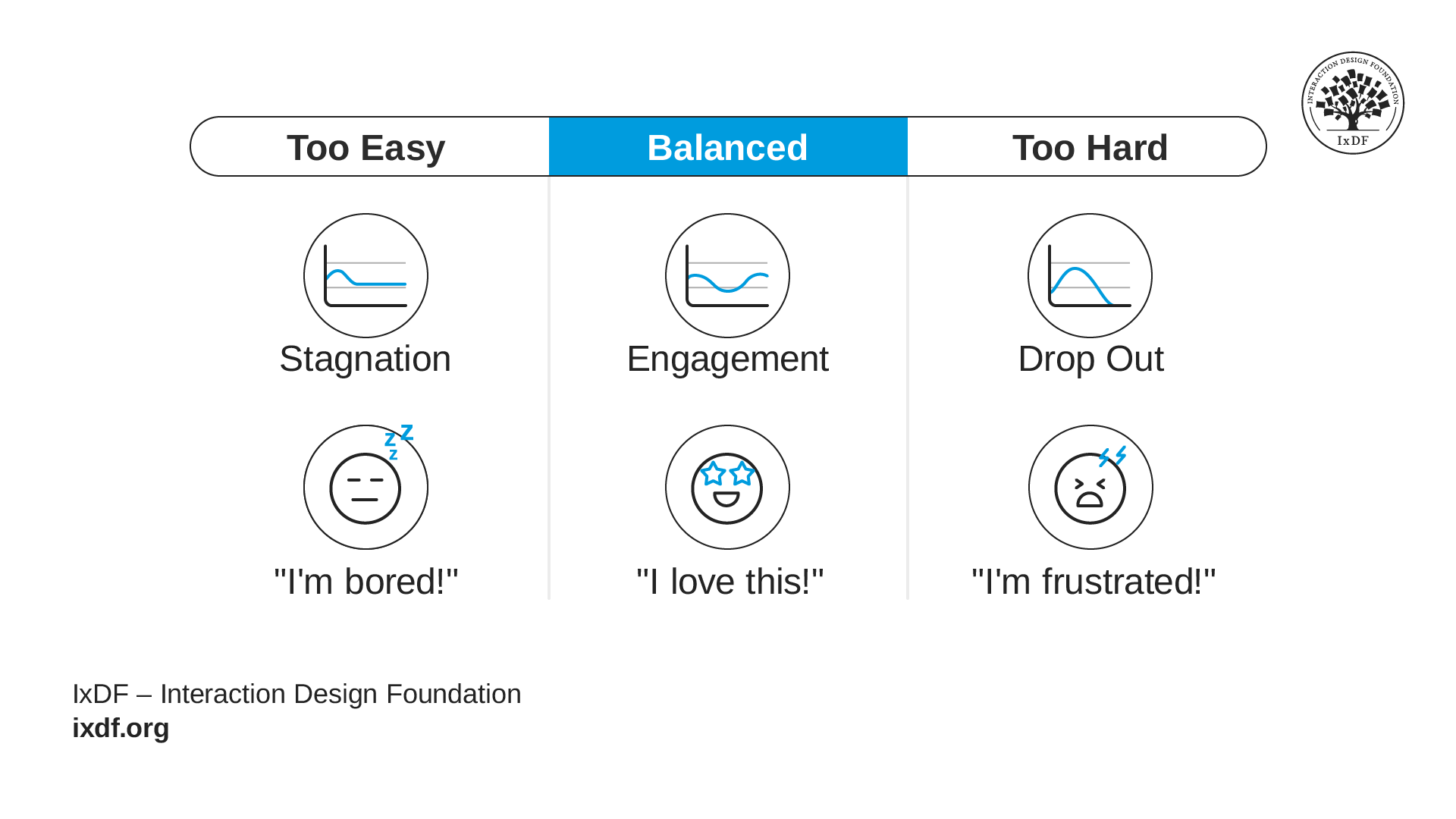
Creating the right level of challenge is actually quite complex. You need to test with players and calibrate difficulty to shape specific emotional experiences.

  • Too little frustration: Players breeze through without effort. No sense of accomplishment. Boring.

  • Too much frustration: Players can't progress. They feel incompetent rather than challenged. They quit.

  • Just right: Players struggle but make progress. They feel capable. When they succeed, they feel genuine accomplishment.
A colour-coded diagram with a grey

© Interaction Design Foundation, CC BY-SA 4.0

This calibration is never one-size-fits-all and requires constant testing and iteration. Different players have different skill levels, different abilities, and different tolerance for frustration. Also, difficulty perception is subjective. Your target audience shapes what "just right" means.

The Take Away

When a player says, "this is frustrating," your first response isn't to make the game easier. Your first response is to understand what kind of frustration they mean.

Some frustration belongs in the game (frustration by design). A boss fight may take several attempts or a puzzle may take time to understand. That kind of friction can make progress feel earned, as long as players understand what the game is asking of them. But there's another type of frustration that gets in the way of the game (not by design). If players can't read the interface, understand the controls, or tell what happened after they failed, they're no longer struggling with the intentional challenge, they're struggling with the design.

That distinction is one of the most important skills in game UX. You learn when to protect the challenge and when to fix the experience around it. So when a colleague asks, "Should we make it easier?" the better answer is: "Let's find out what is frustrating them first."

References and Where to Learn More

Want more? If you haven't already, sign up for Game UX Design: The Ultimate Guide to learn directly from Celia Hodent, PhD, former Fortnite UX Director, and author of the best-seller The Gamer's Brain.

Read The Gamer's Brain by Celia Hodent.

To grasp how design impacts emotions, read What Is Emotional Design.

To master the art of designing emotionally engaging experiences, read the book Designing for Emotion by Aaron Walter.

Watch the How to Design for the Human Mind: Cognitive Science for UX Master Class by Celia Hodent.

Watch the How to Become a Games User Researcher Master Class by Steve Bromley, Games Researcher and Author.

Watch the AI for Game UX: Speed Up Research, Ideas, and Prototypes Master Class by Om Tandon, UX Design Leader at Nordeus (Zynga/Take-Two).

Watch the Level Up Your Career: How to Land a Job in the Game Industry Master Class with Om Tandon, UX Design Leader at Nordeus (Zynga/Take-Two).

Watch the UI Design for Games: Starter Edition Master Class with Stéfano Girardelli, Senior Visual Designer at Wildlife Studios.

Hero image: © Interaction Design Foundation, CC BY-SA 4.0

Learn More in This Course:

Learn Design and AI From the Best

Get one powerful email each week, like 312,441 others.

Next email in:

What You Should Read Next

  • Read full article
    Turn Your Non-Design Experience into Design Portfolio Gold - Article hero image

    Turn Your Non-Design Experience into Design Portfolio Gold

    Have you ever wondered how to transition into UX and product design from a different career background without feeling insecure? Let's uncover strategies to confidently bridge the gap and showcase your skills to prospective employers with confidence and clarity.In this video, Morgane Peng, Desi

    Social shares
    507
    Published
    Read Article
  • Read full article
    Structure First: The Inverted Pyramid and Visual Organization - Article hero image

    Structure First: The Inverted Pyramid and Visual Organization

    This clip examines two principles that work hand in hand to make web content readable: the inverted pyramid approach to information order and the use of visual structure to help users scan efficiently. William Hudson, UX Strategist and Founder of Syntagm Ltd, describes the theoretical basis and prac

    Social shares
    205
    Published
    Read Article
  • Read full article
    What Is Card Sorting? - Article hero image

    What Is Card Sorting?

    In this video, William Hudson, UX Strategist and Founder of Syntagm Ltd, introduces card sorting: what it is, where it comes from, and the broad range of problems it can help solve.Card sorting is a research technique in which participants organize a set of items into groups that make sense to them,

    Social shares
    171
    Published
    Read Article
  • Read full article
    Design Accessible Navigation for Keyboards and Screen Readers - Article hero image

    Design Accessible Navigation for Keyboards and Screen Readers

    Accessibility is often treated as a finishing touch, but for navigation, it belongs at the foundation. Menus are how users reach everything else on a site, so a menu that works only with a mouse quietly shuts out anyone who depends on a keyboard, a screen reader, or another form of assistive technol

    Social shares
    172
    Published
    Read Article
  • Read full article
    The Scent of Information: Give Users the Confidence to Click - Article hero image

    The Scent of Information: Give Users the Confidence to Click

    William Hudson, UX Strategist and Founder of Syntagm Ltd, introduces the scent of information as a model for understanding how users navigate toward their goals, and sets out the principles for writing navigation links that strengthen that scent.Information Foraging and the Scent of InformationThe s

    Social shares
    171
    Published
    Read Article
  • Read full article
    4 UI Design Tips Every Designer Needs to Know - Article hero image

    4 UI Design Tips Every Designer Needs to Know

    User interface (UI) design can make or break any digital product. A user often won’t even notice when they interact with a great UI. They feel the visual appeal and simply trust it. On the contrary, a bad UI design can prevent the user from interacting with a product intuitively or at all and lead t

    Social shares
    646
    Published
    Read Article
  • Read full article
    How to Design Use Cases in UX - Article hero image

    How to Design Use Cases in UX

    Imagine a new mobile app or an e-commerce site gets launched; it looks great, sure, and it should be a hit because it at least looks like it’s got what it takes, but—drumroll—it tanks in the marketplace, all because people find it hard to complete even the simplest tasks. That’s rough, but—behind th

    Social shares
    804
    Published
    Read Article
  • Read full article
    How to Become a Product Manager: Best Career Advice - Article hero image

    How to Become a Product Manager: Best Career Advice

    Pick any product and you’ll find that product management is vital to how successful it is—and product managers are who make sure that a product’s life cycle runs smoothly, and it means they know how to align strategy, vision, and user needs. Product managers split into multiple roles that have got u

    Social shares
    603
    Published
    Read Article
  • Read full article
    Bad UX Exposed: A Comprehensive Guide to Avoiding Pitfalls - Article hero image

    Bad UX Exposed: A Comprehensive Guide to Avoiding Pitfalls

    In today’s vibrant digital design landscape, creating meaningful connections with users goes beyond offering innovative products or services. It leads us into the world of user experience design (or UX design). This critical factor shapes our interaction with the users and plays a big role in making

    Social shares
    975
    Published
    Read Article
  • Read full article
    Understand the Various Types of Creativity - Article hero image

    Understand the Various Types of Creativity

    When you want to be more creative, you’ll want to learn the techniques for creative thinking and understand the various forms of creativity and creative processes. This video will give you an overview of some of the different forms of creativity. For example, you’ll learn that there are two types of

    Social shares
    578
    Published
    Read Article

Top Articles

Top Topic Definitions

39% of Today's Skills Will Change by 2030

The World Economic Forum expects 39% of today's skills to be transformed or become outdated by 2030.

The good news is that jobs in UX / UI design and AI are among the fastest-growing professions globally.

Build Skills That Keep You Relevant

Privacy Settings

By using this site, you accept our Cookie Policy and Terms of Use.
Customize
Accept all

Be the One Who Inspires

People remember who shares great ideas.

Share on:

Academic Credibility — On Autopilot

Don't waste time googling citation formats. Just copy, paste and look legit in seconds.

Learn Design and AI From the Best

Get one powerful email each week, like 312,441 others.

Next email in: