How to Optimize Your Designs for Smartphones vs Tablets

• 11 min read

757 Shares

There are clear differences between smartphones and tablets and key differences in how users interact with them, which ultimately affects mobile user experience (UX) design. Here you’ll learn these differences so that your designs can satisfy both usage scenarios.

It has become an industry standard to put “mobile first” when you design for the mobile web. Generally, this is a good thing but can lead to neglect for the tablet platform.

Transcript

The smartphone tends to dominate discussions of the mobile internet, and there are no major surprises about that.
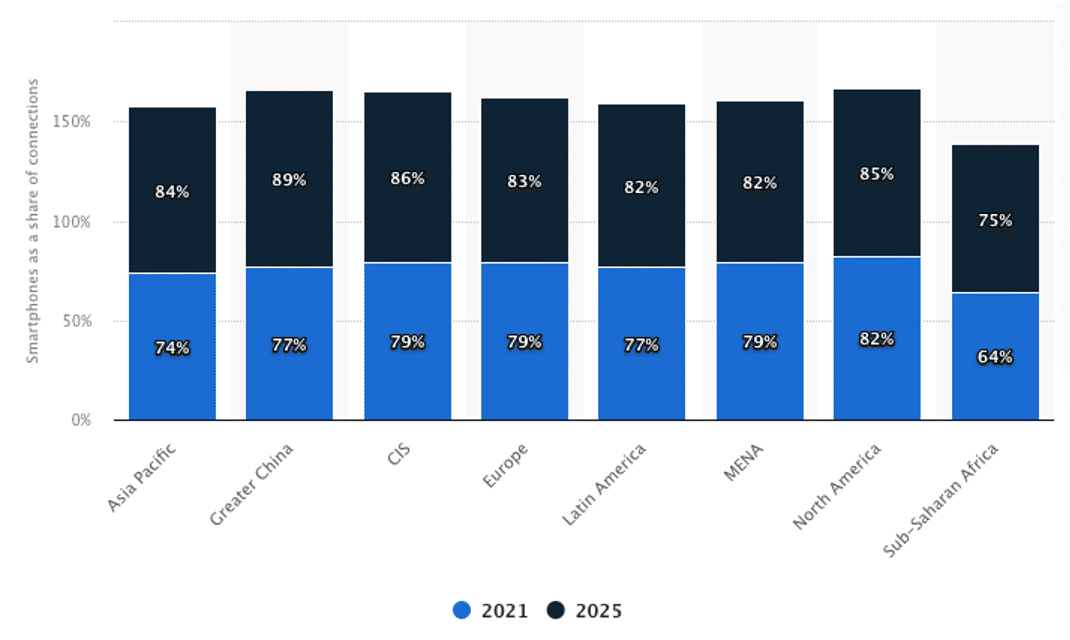
As of 2021, North America has the highest smartphone adoption rate, with 82 percent of total mobile connections. However, North America is expected to see a small increase in smartphone adoption in the future, while regions such as Asia Pacific and CIS (Commonwealth of Independent States) expect a dramatic increase.

© Statista, Fair Use (Link)

Key Usage Differences

Some earlier data from a Forrester Research (2014) mobile study, still relevant to usage behavior, found that tablets kept users engaged for longer periods than smartphones. This data reinforces other research that links smaller-size resolutions to shorter periods of engagement when using the device. Short, quick bursts of attention are the default on smartphones. This means that UX designers need to be even more vigilant regarding clarity and understanding on mobile.

© Sigismund von Dobschütz, CC BY-SA 3.0

Tablets allow for a more relaxed experience. A user might sit on a couch, chair or bed for prolonged periods while using one. While this is also true of phones, they tend to move more (known as the “carry principle”) as the user can take them from one area of the house or office, for example, a bit more easily (e.g., in pockets). Therefore context of use and context awareness is critical.

UX designers can show users more media (images or video content) on tablets. You can also engage users more fully (through a game or interactive visualization) on tablets than on phones. Finally, remember the “hand-off” principle (Apple tried to build it into iOS, though it’s not as smooth as the vision it seems): users will move between phone and tablet and even over to desktop and back. Consider how users will engage with content across each platform.

Key UX Considerations for Smartphones and Tablets

There are some clear distinctions between the two device types. We need to consider these when we design user experiences.

The Smartphone

Smartphones are:

  • More mobile than tablets and more likely to be used in a wide variety of locations and scenarios.

  • More likely to suffer from distracted use.

  • Smaller screen size than tablets.

  • Rarely the primary access point for users to the internet (though in developing nations they may be).

  • Likely to be used for multi-tasking (users flit from app to app rather than spending significant periods of time doing any particular task).

  • More personal and thus more likely to be used for social and emotional contexts.

  • Less likely to have controlled lighting available when in use.

The Tablet

Tablets are:

  • Less mobile; they’re too big to be user-friendly in all spaces (though we’ve noticed this doesn’t stop people from trying, nonetheless).

  • More likely to be used in a fixed position (at home, in the office, in a café).

  • More likely to be shared among family or partners, especially children.

  • More likely to provide higher resolution (or at least bigger) experiences than a smartphone.

  • More likely to invite the “free browsing” of content versus the more focused experience of scrolling through images and text on mobile 

Both tablets and smartphones require “fat finger friendly” designs. 44-pixel targets are a recommended minimum for buttons, icons, etc.

The Take Away

The tablet user experience differs from the smartphone user experience. A “one size fits all” mobile design approach will leave one mobile platform poorly catered for. We need to consider how space constraints can enhance tasks. Equally, consider the swipe and real-estate advantages tablets offer over smartphones.

Think about whether your content or app forces migration to another platform and if it  complements device-switching. If device-switching is a pleasant experience, you’ve made it worthwhile. If it isn’t, the device-switching behavior is a lost opportunity. As long as we keep these considerations in mind when we design, we can satisfy users no matter their mobile platform.

References and Where to Learn More

Continued growth for smartphones—check out the IDC report.

Techcrunch’s analysis of the Forrester data on the tablet and phablet market.

The Pew Research Center study (2021).


Hero image: © Interaction Design Foundation, CC BY-SA 4.0

Learn More in This Course:

Mobile UX Design: The Beginner's Guide

4 days
67 % booked
View Course

What You Should Read Next

  • Read full article
    What is Interaction Design? - Article hero image
    Interaction Design Foundation logo

    What is Interaction Design?

    Interaction design is an important component within the giant umbrella of user experience (UX) design. In this article, we’ll explain what interaction design is, some useful models of interaction design, as well as briefly describe what an interaction designer usually does.A simple and useful unders

    Social shares
    1.5k
    Published
    Read Article
  • Read full article
    Apple’s Product Development Process – Inside the World’s Greatest Design Organization - Article hero image
    Interaction Design Foundation logo

    Apple’s Product Development Process – Inside the World’s Greatest Design Organization

    Apple’s Product Development Process may be one of the most successful design processes ever implemented. With a valuation that exceeds $2 trillion, there’s a lot that designers can learn from Apple and introduce into their own design environments.Apple is a notoriously secretive business. In Steve J

    Social shares
    1.4k
    Published
    Read Article
  • Read full article
    Shneiderman’s Eight Golden Rules Will Help You Design Better Interfaces - Article hero image
    Interaction Design Foundation logo

    Shneiderman’s Eight Golden Rules Will Help You Design Better Interfaces

    Follow Ben Shneiderman’s 'Eight Golden Rules of Interface Design' if you want to design great, productive and frustration-free user interfaces. Apple, Google and Microsoft are among some of the highly successful companies whose well-designed products reflect Shneiderman’s rules. The characteristics

    Social shares
    1.4k
    Published
    Read Article
  • Read full article
    How to Change Your Career from Graphic Design to UX Design - Article hero image
    Interaction Design Foundation logo

    How to Change Your Career from Graphic Design to UX Design

    If there’s an occupation that is 100% linked with the public’s idea of what design is all about, it’s graphic design. From the familiar golden arches of the McDonald’s brand to the typography and colors of movie posters, graphic designers create some of the most iconic and ubiquitous designs around

    Social shares
    1.4k
    Published
    Read Article
  • Read full article
    The Grid System: Building a Solid Design Layout - Article hero image
    Interaction Design Foundation logo

    The Grid System: Building a Solid Design Layout

    Now that we’ve seen some grids at work in the Rule of Thirds article, let’s examine them a little more deeply. As a concept that deals so fundamentally with the fabric and background of our work as designers, it’s easy to overlook the power of grids and think more about the elements we want to creat

    Social shares
    1.4k
    Published
    Read Article
  • Read full article
    The Principles of Service Design Thinking - Building Better Services - Article hero image
    Interaction Design Foundation logo

    The Principles of Service Design Thinking - Building Better Services

    Service design is all about taking a service and making it meet the user’s and customer’s needs for that service. It can be used to improve an existing service or to create a new service from scratch. In order to adapt to service design, a UX designer will need to understand the basic principles of

    Social shares
    1.4k
    Published
    Read Article
  • Read full article
    A Simple Introduction to Lean UX - Article hero image
    Interaction Design Foundation logo

    A Simple Introduction to Lean UX

    Lean UX is an incredibly useful technique when working on projects where the Agile development method is used. Traditional UX techniques often don’t work when development is conducted in rapid bursts – there’s not enough time to deliver UX in the same way. Fundamentally Lean UX and other forms of UX

    Social shares
    1.3k
    Published
    Read Article
  • Read full article
    Dieter Rams: 10 Timeless Commandments for Good Design - Article hero image
    Interaction Design Foundation logo

    Dieter Rams: 10 Timeless Commandments for Good Design

    Let’s pay a virtual visit to a famous industrial designer’s workshop. By examining the principles of his winning approach, we can incorporate vital elements into our designs in the “less is more” age.As user experience practitioners, most of us have worked with Nielsen and Molich’s 10 heuristics or

    Social shares
    1.3k
    Published
    Read Article
  • Read full article
    The 7 Factors that Influence User Experience - Article hero image
    Interaction Design Foundation logo

    The 7 Factors that Influence User Experience

    User Experience (UX) is critical to the success or failure of a product in the market but what do we mean by UX? All too often UX is confused with usability which describes to some extent how easy a product is to use and it is true that UX as a discipline began with usability – however, UX has grown

    Social shares
    1.3k
    Published
    Read Article
  • Read full article
    10 Free-to-Use Wireframing Tools for UX Designers in 2026 - Article hero image
    Interaction Design Foundation logo

    10 Free-to-Use Wireframing Tools for UX Designers in 2026

    Wireframes help you quickly ideate and test your ideas. While paper wireframes are the fastest to create, digital wireframes look more polished and presentable. If you are looking for a pocket-friendly wireframing tool, look no further.Whether you prefer browser-based apps or offline desktop tools,

    Social shares
    1.3k
    Published
    Read Article

Top Articles

Top Topic Definitions

Feel Stuck?
Want Better Job Options?

AI is replacing jobs everywhere, yet design jobs are booming with a projected 45% job growth. With design skills, you can create products and services people love. More love means more impact and greater salary potential.

At IxDF, we help you from your first course to your next job, all in one place.

See How Design Skills Turn Into Job Options
Privacy Settings
By using this site, you accept our Cookie Policy and Terms of Use.
Customize
Accept all

Be the One Who Inspires

People remember who shares great ideas.

Share on:

Academic Credibility — On Autopilot

Don't waste time googling citation formats. Just copy, paste and look legit in seconds.

Feel Stuck? Want Freedom?

Join 326,038+ designers who get one powerful email each week. Learn to design a life you love.

Next email in
1
day
5
hrs
49
mins
21
secs

Free forever. No spam. Unsubscribe anytime.