As with every design decision, the answer to the question “Should UX designers learn to code?” is: “It depends.” When you work with digital products, you may not always need to write lines of code, but it is an added advantage to know how to build the product that you design.
In the early days of web design, graphic designers, who had previously worked in print, learned to write code so as to become web designers. The code at the time was early versions of HTML and CSS.
A lot has changed since then – internet and digital technologies have evolved and are more powerful. After Apple launched the first iPhone and introduced the App Store ecosystem in 2007, companies and start-ups began to offer rich interactive experiences to their customers via web and mobile applications. This led to the need for a more holistic approach towards the user’s experience.
Early UX designers tended to have a background in graphic and web design. This legacy of graphic-turned-web-turned-UX designers resulted in a very broad set of expectations from UX designers. Designers were expected to generate ideas, create illustrations as well as help build the products.
User experience (UX) design brings together multiple disciplines – from industrial design and human-computer interaction, to ethnography and psychology, to systems and visual design. Should computer programming also be a part of a UX designer’s skillset? Let’s look at both arguments: why you should, and why you don’t need to learn to code.
Why you should learn to code
Understand the Materials of the Product
Generally speaking, companies and clients expect designers to have knowledge of the materials and processes required to bring their designs to life.
Let’s say a fashion designer makes a sketch for a dress. What is the material used to create that dress? What is its texture like? How long will it take to assemble it? Will it, for instance, require specialized equipment to cut or stitch the material? The designer typically knows the answers to these questions, but does not necessarily perform any of the tasks (procure material, cut, sew, dye, etc.).
Similarly, an architect who creates the blueprint of an office space is aware of how her designs will be built. She needn’t mix concrete and lay the bricks, but would be expected to know if, say, the land demarcated for the project will be able to support a concrete building at all.
If we extend these analogies to UX design, then the materials used to bring designs to life—web / mobile applications, products or services—include technological components. A UX designer, thus, must know how the technologies required to build a product work, to be able to design it.
Faster workflows
When a designer understands technology, s/he can identify and implement solutions to solve customer challenges, without going back and forth with the development / technical team to check what is possible and when it can be implemented. This saves the team’s time and helps deliver products faster, with fewer iterations.
Essential for Lean Organizations
A lean organization is one that aims to maximize customer value, using the least possible resources. The organization strives to cut costs, increase profitability and, at the same time, build better solutions at a faster pace to stay ahead of the competition.
Bootstrapped start-ups, on the other hand, have fewer resources to begin with – it may not be feasible to fund a large team.
Irrespective of whether the organization chooses to cut costs (with a lean methodology) or is forced into it (by funding constraints), companies prefer to hire team members who are equipped with multiple skills.
Why you need not learn to code
Scope Creep
We began with the argument that designers must know the materials of the products that we design. However, code isn’t the only material in a digital product. The UX designer considers the entire journey of the end customer. This includes everything from the brand message that attracts customers, to the website where the customer makes purchases, to the language of the Terms of Service. It includes the microcopy on the product’s interface, the policy on personal data and the responses of any customer care executive who handles the customer’s queries.
If we were to include all the materials and processes required to deliver a great user experience, then that would include a host of other business functions as well. Where do we draw the line? In technical terms, we would call this scope creep – when the scope of work expands continually.
Tunnel Vision
Designers who are well versed with programming may restrict themselves in terms of solutions. If we are aware of the available technology, and its constraints, it influences our thought process. We may get caught up with technicalities and not be able to think freely. This defeats the entire purpose of user-centric design, where the objective is to think people-first, and not technology-first.
Poor Utilization of Resources
One of the challenges for UX designers (and even developers) is that the world of technology continues to evolve, with new languages and frameworks being developed at a fast pace. We may learn a language, only to find out that it has become obsolete within a few months. It is faster and easier for a software developer, who primarily works with code, to adapt and learn about new technologies. The designer can spend her time on design-related activities (understand users and their challenges and identify solutions) and not worry about the newest technology.
As technology continues to evolve, it is also likely that low-code or drag-and-drop tools may be available. In such a scenario, designers can simply use these tools and not need to read or write any code.
The question of whether to learn to code, then, is not relevant. It is more important to understand the different moving parts within the solution.
Just as with human languages, our ability to read a computer language may be different from our ability to write it. The ability to understand how a particular language or technology is used to build a product, is different from our ability to implement it.
The Balancing Act: I-Persona vs T-Persona
An I-persona or an I-shaped person is one who has deep knowledge in one field. For instance, in the context of a mobile application, a designer may be able to conduct user research, create user flows, draw wireframes, visualize interfaces and create illustrations. This vertical depth resembles the letter “I”.
A T-persona is one who has a similar level of expertise as the I-persona, but also has a general understanding of other fields. The broad knowledge of other areas becomes the horizontal line over the “I”, thus resembling the letter “T”.
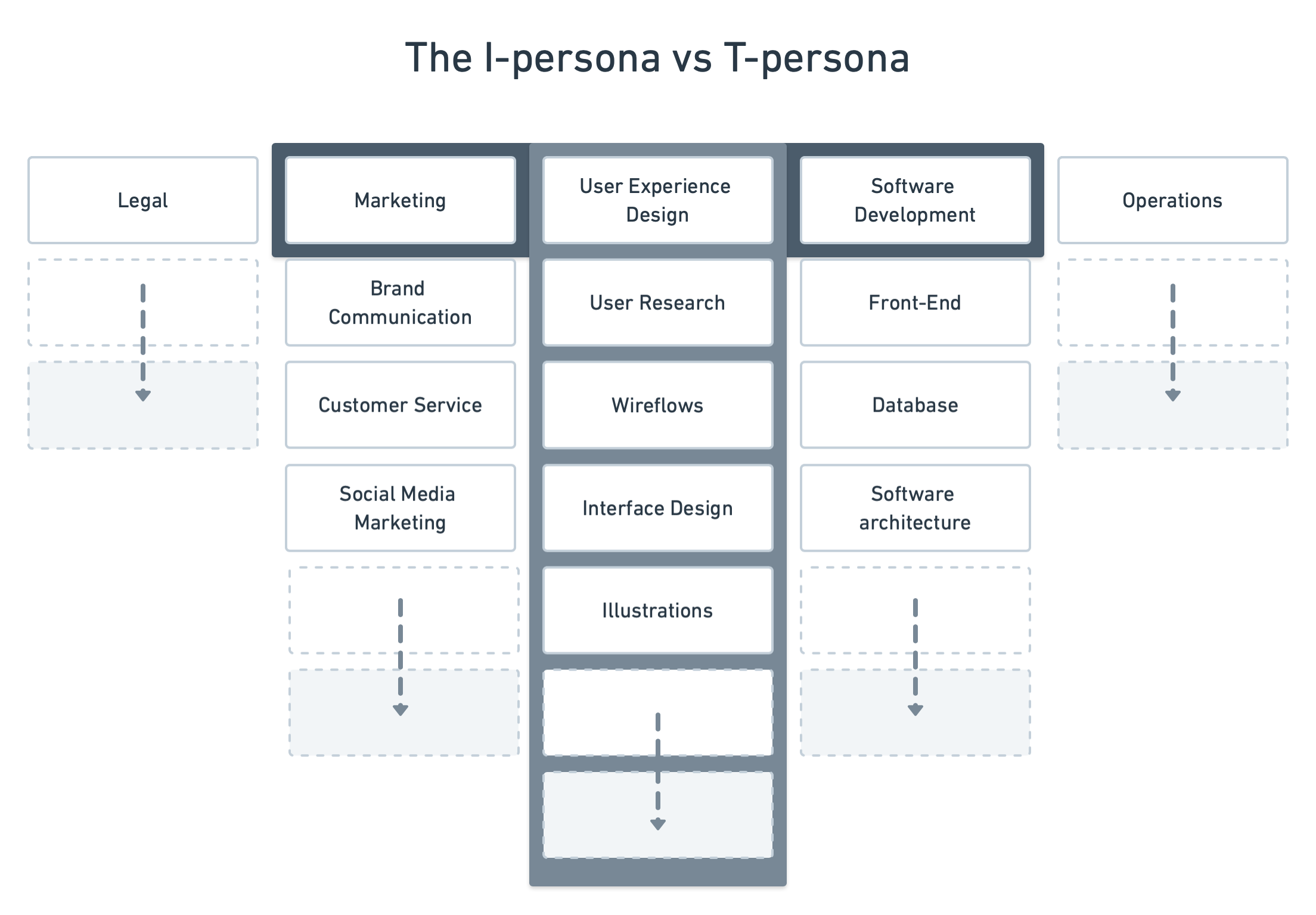
An I-shaped persona is one with deep knowledge within their domain. The T-persona has depth of knowledge in one domain, along with broad knowledge across domains.
© Interaction Design Foundation, CC BY-SA 3.0
In a team where there are more T-personas, communication within the team becomes easier. This results in better products, which can be shipped faster, with fewer iterations. In an interview with The Chief Executive Group, Tim Brown, CEO of IDEO, explained why the firm believes in hiring T-shaped people:
“Most companies have lots of people with different skills. The problem is, when you bring people together to work on the same problem, if all they have are those individual skills — if they are I-shaped — it’s very hard for them to collaborate. What tends to happen is that each individual discipline represents its own point of view. It basically becomes a negotiation at the table as to whose point of view wins, and that’s when you get gray compromises where the best you can achieve is the lowest common denominator between all points of view. The results are never spectacular but at best average.”
– Tim Brown, CEO, IDEO
Let’s take a hypothetical example of a company where everyone is an I-persona. One designer proposes that the application’s navigation can be restructured for better usability. The developer says that the application’s current architecture does not support this new navigation. Would it be worth re-building the entire application for the sake of the new navigation? Or should the designer think about alternative solutions? The developer may suggest an alternative technical solution, which the designer may not fully understand. In any of these scenarios, the entire team loses time in proposals, arguments and iterations. If the designer could understand the technical challenges, s/he would be in a better position to suggest an alternative. This holds true for other aspects of the user’s journey as well.
In a design-led organization, interdisciplinary teams work closely with each other. Each team member brings their expertise. It may not be possible for every team member to be equally proficient in design, business and technology. A general understanding of each other’s expertise helps improve communication within the team and speeds up the rate at which products are built.
Putting the Puzzle Pieces Together
We’ve focused on the importance of the designers’ breadth of knowledge – whether about technological components or other aspects of the user’s journey. The same holds true for other members in a design-led team. A general knowledge of technologies helps the business owner understand constraints and possibilities. Similarly, knowledge about the design process and the methodologies used is critical for all members of the team, not just designers. Ultimately, it is the end user’s journey which matters. The entire team must work with that common vision so that the whole experience is better than the sum of all parts.
The Take Away
UX designers are responsible for the end user’s journey. That journey includes different touchpoints – from the legal terms of use to the pricing model, from microcopy to illustrations and images, and from customer care to the code behind products.
In a small bootstrapped team, designers may need to assume more responsibility; and so, they may need to learn how to build the products as well. In larger teams, knowing the ins and outs of programming languages may not be necessary. However, knowledge of how different pieces of the solution fit and work together is important to be able to communicate within the team and make the product development process more efficient.
Finally, the onus of understanding each other’s work lies with every member of the team, not just designers.
References & Where to Learn More
Ryan Holiday makes the case for gaining expertise in more than one field, along with fascinating examples in this article:
The Case for Being a Multi-Hyphenate
Interview of Tim Brown by the Chief Executive Group
IDEO CEO Tim Brown: T-Shaped Stars: The Backbone of IDEO’s Collaborative Culture
Images
Hero image: © Pixabay, CC-0