You’re at your routine health checkup, sipping an iced coffee on a hot day. Suddenly, you get a sharp pain in your head. The doctor looks up from her notes, a sympathetic expression on her face. “You’re experiencing sphenopalatine ganglioneuralgia.” Your heart sinks. The coffee cup drops to the floor. Medication? Surgery? How long do you have? “Sorry! Doctor speak,” she says, noticing your panic. “You have brain freeze.” Two completely different terms for the exact same thing, and one of them nearly gave you a panic attack.
Designers and developers do this to each other all the time. You call it an "appointment," the developer calls it an "event," and the database calls it a "record." Everyone is describing the same thing without realizing it. Nobody’s wrong, but everyone’s confused. And three sprints later, the only thing the team has built together is a headache.
The fix comes from how developers have thought about code since the 1990s. They organize everything around objects, discrete units that have attributes (the details they contain) and operations (the actions users can perform with them). Consider the appointment: You agree on a shared name, then define it properly as an object, with attributes like date, doctor, and location, and operations like book, reschedule, and cancel.
As a designer you probably haven't been taught to think this way, but once you understand object-oriented UI (user interface) design, you and your developer work from the same page from the start. Not only this, but you build around objects users already recognize from real life, so the interfaces you create feel natural rather than learned.
In this video, William Hudson, User Experience Strategist and Founder of Syntagm Ltd, explains how conceptual models translate object-oriented thinking into a visible structure your whole team can work from, so your products feel clear rather than confusing.
Adopt an object-oriented approach, and you'll get developer love, user love, and far, far less brain freeze.
Earn the Trust of Every Developer You Work With
When a developer looks at your designs, they’re trying to understand the structure of the system, not just how it looks. Without a shared object model, your developer builds from their own interpretation of what you hand them. Sometimes they guess right, but often, user testing is the moment everyone finds out they didn't. When you ground your work in a shared object model from the start, the way you work together changes in concrete ways:
Handoffs become conversations: Instead of sending over a Figma file and waiting for questions, you can walk a developer through the object model together. "Here’s the central object, here’s what it contains, and here’s what users can do with it." Developers can engage with a shared structure rather than reverse-engineer your intent from screens alone.
Scope discussions become grounded. When a stakeholder asks for a new feature, you and your developer can evaluate it against the object model together. Does it fit naturally into an existing object, or does it introduce a new one? What attributes and operations does it require? You arrive at the same estimate of complexity because you’re working from the same picture of the system.
Changes become predictable. In feature-first design, a change to one screen can ripple unexpectedly through others. When your design organizes around stable objects, the impact of any change becomes traceable. Both you and your developer know exactly what’s affected before anyone writes a line of code.
When you communicate this way, you get noticed. Teams trust you with complex, high-stakes projects. You get pulled into conversations early rather than handed a brief at the last minute. In a job market where "works well with engineers" and "systems thinker" are key qualities in senior UX roles, that reputation translates directly into more responsibility, better projects, and higher pay.
A Shared Object Model Helps You Create Products Users Understand and Love
The difference between a product users love, and one they merely tolerate is usually structural. A shared object model gives you and your developer the same map before a single screen exists, so features connect rather than accumulate, and users experience the whole thing as one coherent product.
In a travel booking app built this way, the Booking is the central object, because that’s what travelers recognize, track, and manage. It’s their mental anchor for the entire product. Every feature (add bags, buy insurance, etc.) connects back to it and each has a logical home. Users move through the product as if it was designed around the way they already think about their trips, because structurally, it was.
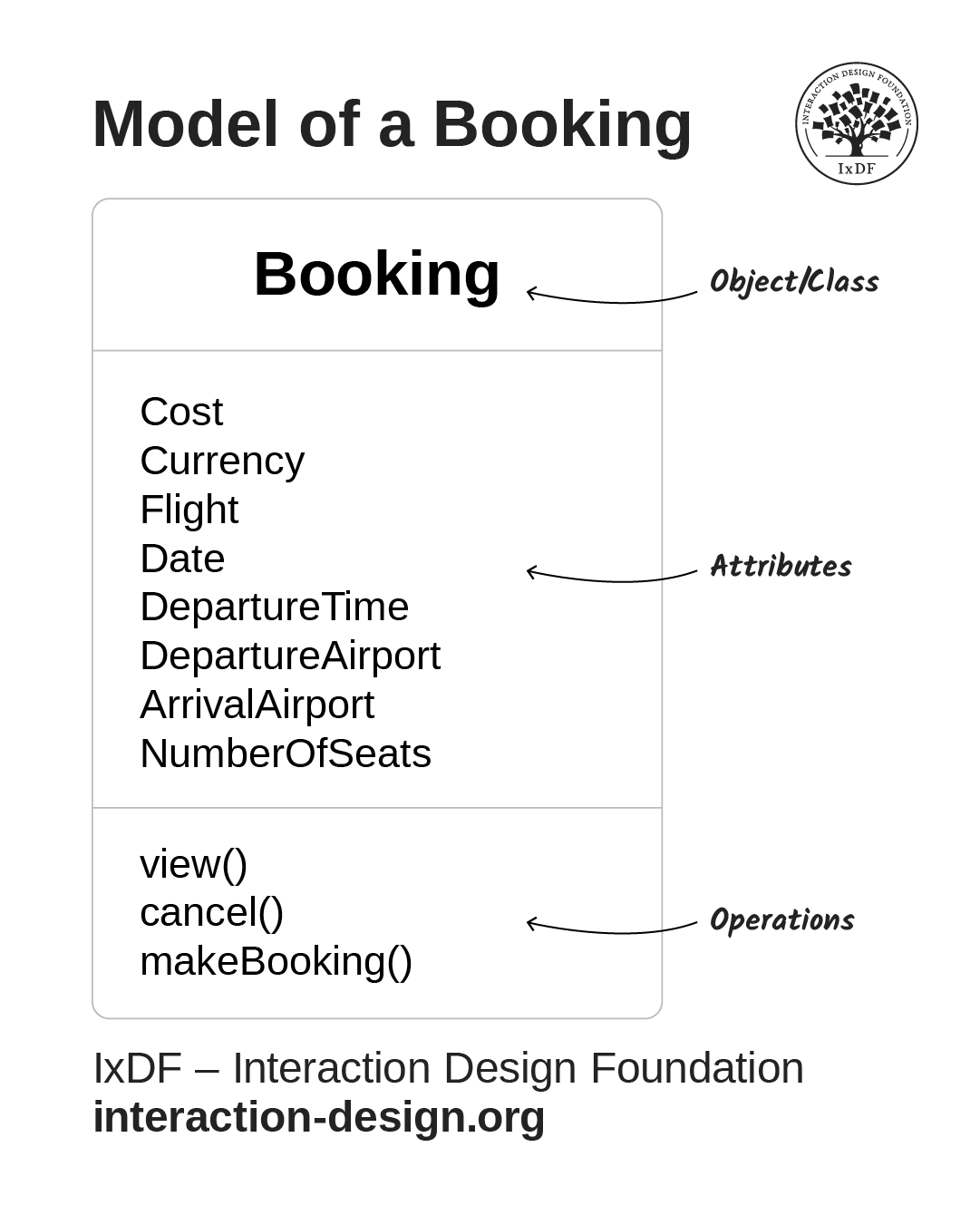
This model of a booking object shows its attributes and operations. Not only does this approach improve designer-developer communication, but it also makes organizing your interface easier. Each model shows you exactly what each object contains and is capable of.
© Interaction Design Foundation, CC BY-SA 4.0
A feature-first approach produces something different: rent-a-car arrives in one sprint, premium meal service in the next, and travel insurance after that. Every added feature makes sense when you build it, but without a central object to hold everything together, the product never quite feels whole. Users feel that difference, even when they can't name it.
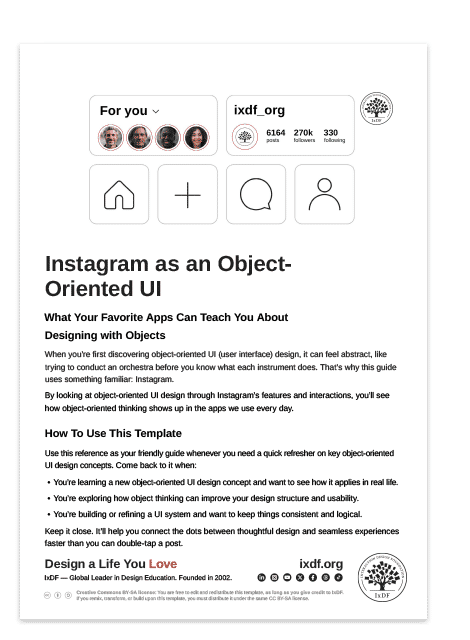
For a more detailed example of object-oriented design in action, download your free, simple guide.
You Don’t Need to Learn to Code
Your model and your developer's model describe the same system, just at different levels of detail. The difference is where each one starts.
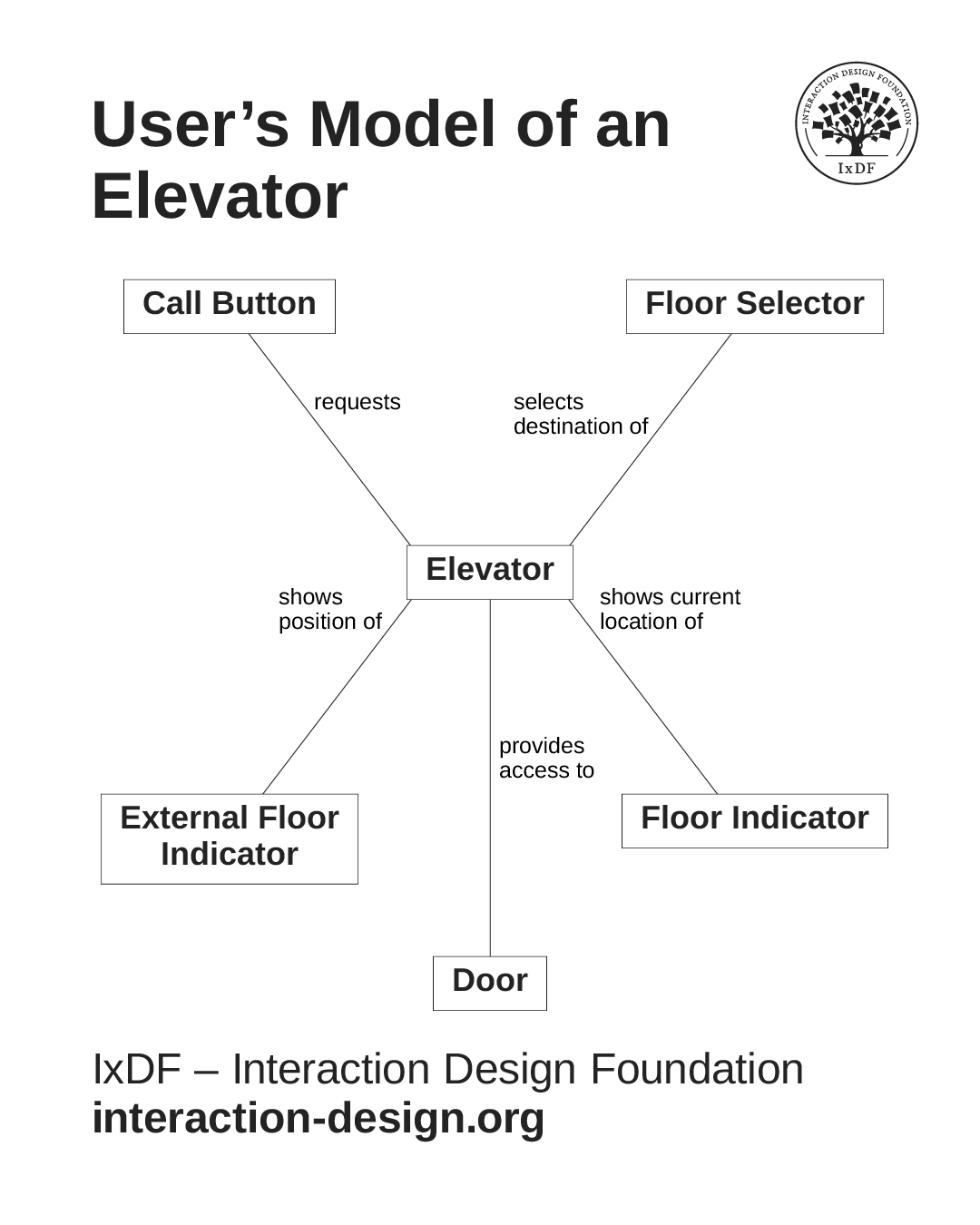
A passenger's model of an elevator: Press a button, watch the indicator, select a floor, arrive. Simple, task-focused, and built entirely around what the elevator does for them.
© Interaction Design Foundation, CC BY-SA 4.0
Think about how a passenger experiences an elevator. They have no mental model of motors, safety sensors, or control logic, just a button, a floor indicator, and a destination. Your users think about your product the same way: In terms of what it does for them, not how it works. That's where your objects come from.
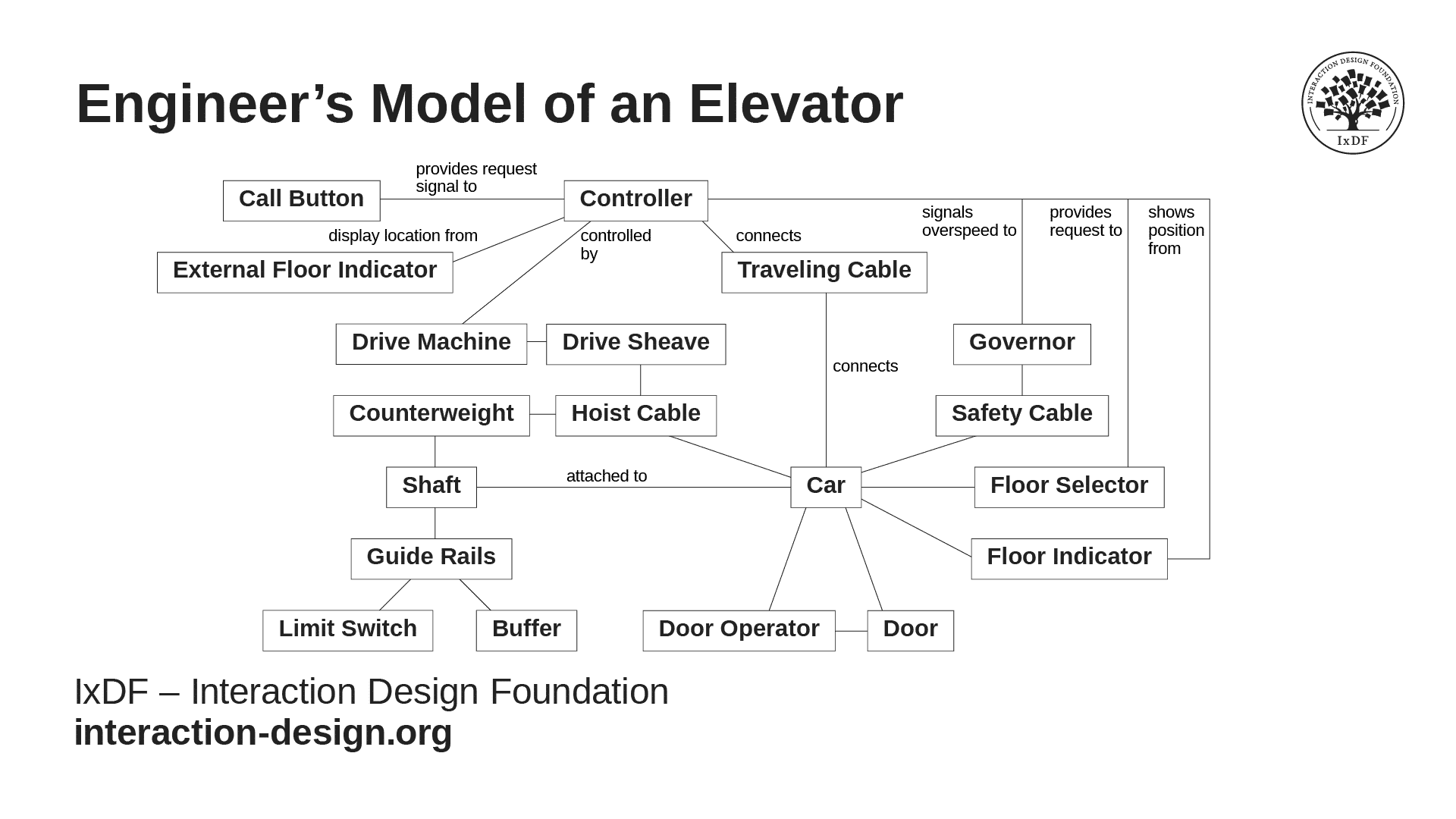
The engineer's model of the same elevator is far more detailed, but it contains the same objects and describes the same system.
© Interaction Design Foundation, CC BY-SA 4.0
An engineer's model includes motors, safety sensors, load calculations, and control logic. Both are correct, they just serve different purposes. Your model starts with what users call things and what they expect those things to do, which is the same user research you're already doing.
So how do you start? Think about your product the way your users do: As a set of meaningful things they interact with, rather than a collection of screens.
Build Your First Object Model Before You Open Figma
Before your next project, take one step before you open your design tool: Read through your user research and look for nouns. This will reveal the objects (the things) users keep referring to. In a patient portal, they’ll say “my appointment,” “my doctor,” “my prescription.” Those nouns are your objects.
For each object, ask three questions:
What details does it contain? (Attributes)
What can users do with it? (Operations)
What other objects does it connect to? (Relationships)
For an Appointment in a healthcare portal, attributes include date, doctor, location, and notes. Operations include book, reschedule, and cancel. Relationships connect it to a Patient, a Location, and a Doctor. When those three things are clear, your interface almost designs itself. A date and location become a summary card. Book, reschedule, and cancel become the actions on that card. The relationship to Doctor gives you a link. Instead of a blank canvas, you’re translating a structure that already exists.
Sketch this out, even roughly, and you have your first conceptual map. Share it with your developer before you go any further. This conversation is small and almost always skipped, and it’s exactly why it matters so much when you have it.
Already mid-project? You can still introduce the object model. Bring it as a working draft to your next sync: "I’ve been mapping out the core objects, does this match how you’re thinking about the system?" Even a rough list of nouns from your last research session is enough to start the conversation and catch potential misalignment.
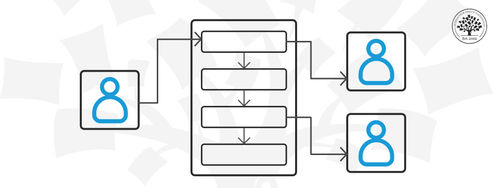
Once you've shared your object model, your developer's next question is: How do users actually move through this? Design maps are the answer: Collaborative diagrams that lay out the user journey using the objects you've already defined.
In this video, William Hudson shows you how design maps work in practice.
The Take Away
Designer-developer friction is usually a language problem: Designers speak in screens and features, while developers speak in objects and systems. The gap is smaller than it looks, because both sides are trying to describe the same thing.
An object-oriented approach gives you the vocabulary to bridge it. Identify the objects your users care about, define their attributes and operations, and share that structure with your developer before you design a single screen.
The result is fewer questions, fewer revisions, and a working relationship where both sides feel heard. That’s the difference between a product that ships the way you designed it and one that surprises everyone at launch.
Master this approach, and you become the designer every team wants: The one who bridges the gap between vision and reality, who developers trust, and who stakeholders call first when a project matters. That reputation compounds. It's the difference between a career where you wait to be handed work and one where the best work finds you.
References and Where to Learn More
Want to get developer and user love? Take our course, Object-Oriented UI Design: Build Interfaces Users Love, and master how to identify the objects and relationships that matter to your users, build conceptual models that guide every design decision, and create interfaces that feel intuitive from the first click. You'll walk away with practical skills, a hands-on project for your portfolio, and a certificate that demonstrates your ability to design products that users love and teams love to build.
Discover more about conceptual models and how they help you build products that feel natural to users in our article, Conceptual Models: The Hidden Structure Behind Your Next Great Interface.
Align your team and give your developers a collaborative guide they'll thank you for in the depths of implementation with our article, Who, What, and How: Design Maps Show You the Way for Implementation.
Hero image: © Interaction Design Foundation, CC BY-SA 4.0