Illustration of a design map.

Who, What, and How: Design Maps Show You the Way for Implementation

by William Hudson • • 51 min read

387 Shares
Save

For something called a “team project,” it’s amazing how often everyone’s on a different page. Design maps connect the dots. They organize your research, stories of use, and design artifacts into clear, user-centered interfaces that your team can actually build fast. No more “Wait, what did you mean here?” from developers. No more features disappearing between design and delivery. Just smoother handoffs, faster dev cycles, and teammates who want to build your vision.

In this video, William Hudson, User Experience Strategist and Founder of Syntagm Ltd, explains how you can build design maps that bring together personas, scenarios, and key design artifacts, like sketches, wireframes, and prototypes, so you can align user needs, system constraints, and implementation decisions in one clear framework.

Transcript

How to Create Design Maps for Collaboration

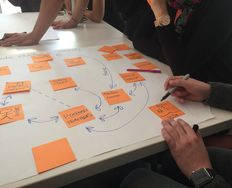
Design maps are a collaborative visual tool that combines stories of use with comments, questions and ideas from the project team.

© Pruitt & Adlin, The Persona Lifecycle, Fair use. Redrawn by Interaction Design Foundation.

Design maps appeared around the same time as user stories and are similar in concept and appearance to user story maps, which are popular in agile teams. However, user story maps only include the steps users take, not questions, comments, and ideas. Design maps, as they're covered here, are from Pruitt and Adlin’s The Persona Lifecycle.

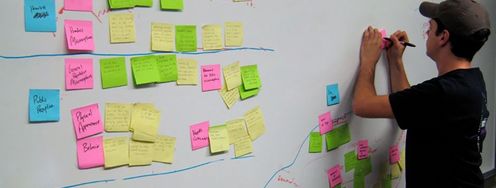
In this video, William demonstrates how to assemble all the basic elements of a design map, and, like with many tools in UX design, you do this with sticky notes.

Transcript

As mentioned in the clip, you should not rely solely on color to convey meaning. You can address this by labelling or marking comments, questions, and ideas, so that color is not the only cue to the type of note.

Design Map Tools

You can easily construct paper design maps using large paper sheets or rolls, such as flip chart pads, easel paper, butcher paper, or craft paper rolls. Sticky notes come in packs of four colors, often those shown in the design map above.

For digital design maps, you can use various collaborative digital tools. In these videos, William shows you how to build design maps in Figma and Miro with free accounts.

Figma

Transcript

Miro

Transcript

Whether you're building design maps in person or online, you start with the steps for your persona and add other notes as required. Paper design maps tend to be created through workshops. Workshops may still be the best option for online collaboration, but teams can make changes or additions at other times, if desired.

Add Your Visualizations

As you build your design maps, you can strengthen them by adding simple visual elements that clarify intent and guide implementation. Use quick sketches, thumbnails, or simplified screen views to show what users experience at each step.

Visual cues make it easier for your team to connect user actions with interface behaviors and ensure that design intent carries through to development. The level of visual detail you add depends on your team’s needs: sometimes a quick sketch communicates all that’s required, while other times you will need higher fidelity visualizations. What matters most is that your map remains a shared, easy-to-understand view of how your design works in practice.

Download Your Free Design Map Template

This template includes a step-by-step guide to help you build design maps, a full-page example map, and a fillable map for practice, as well as simple stories of use. Use it to start small, with one persona and one story, and build out a visual flow that captures each step, question, and design idea along the way.
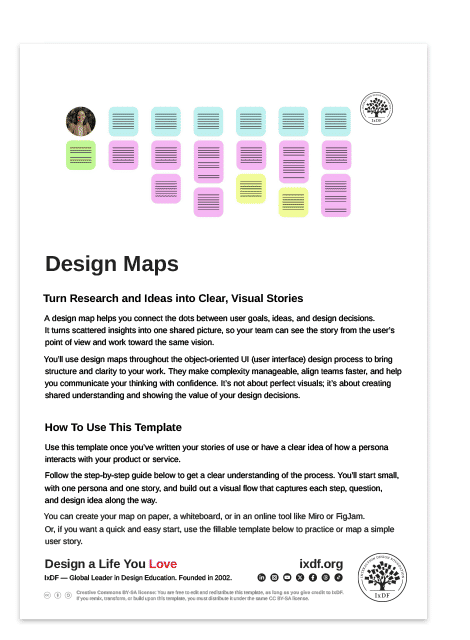
Advance Your Career With This Free Template for “Design Maps”
Design Maps
Optional
Optional
We respect your privacy
Get 1 powerful email each week: Learn Design and AI From the Best.

The Take Away

Design maps pull everything together: the who, what, and how of your design process, so your team is finally on the same page and builds toward a shared vision. Your personas define who you’re designing for. Your stories of use show what they’re trying to achieve. And your design artifacts, like sketches, wireframes, and prototypes, bring those journeys to life.

When you combine these with your team’s comments, questions, and ideas, you create a shared picture that’s easy to follow and hard to misinterpret. Remember to design for inclusion: use color thoughtfully and add clear labels or shapes so everyone stays on the same page.

Design maps keep your project grounded in user needs, strengthen collaboration, and help you deliver designs that not only work beautifully but make sense to everyone building them. Because when your team designs with shared purpose, you find more meaning in the work you do, and more pride in the impact it creates.

References and Where to Learn More

Read more about Design Maps in John Pruitt and Tamara Adlin's book, The Persona Lifecycle. There is also a shorter version in The Essential Persona Lifecycle. You can download Tamara Adlin's chapter on design maps as a PDF.

To discover more about how user story maps differ from design maps, read our article, User Story Mapping in Design.

Hero image: © Pruitt & Adlin, The Persona Lifecycle, Fair use. Redrawn by Interaction Design Foundation.

Topics in This Article

Learn More in This Course:

Learn Design and AI From the Best

Get one powerful email each week, like 314,486 others.

Next email in:

What You Should Read Next

  • Read full article
    A Simple Introduction to Lean UX - Article hero image

    A Simple Introduction to Lean UX

    Lean UX is an incredibly useful technique when working on projects where the Agile development method is used. Traditional UX techniques often don’t work when development is conducted in rapid bursts – there’s not enough time to deliver UX in the same way. Fundamentally Lean UX and other forms of UX

    Social shares
    1.3k
    Published
    Read Article
  • Read full article
    What Are Wicked Problems and How Might We Solve Them? - Article hero image

    What Are Wicked Problems and How Might We Solve Them?

    Have you ever come across a problem so complex that you struggled to know where to start? Then you might have stumbled upon a wicked problem. While wicked problems may not have a definite solution, there are certainly things you can do to mitigate any negative effects. When you learn how to tackle w

    Social shares
    1.3k
    Published
    Read Article
  • Read full article
    14 UX Deliverables: What Will I Be Making as a UX Designer? - Article hero image

    14 UX Deliverables: What Will I Be Making as a UX Designer?

    What does a UX designer actually produce? Here’s a map of the most common UX deliverables, the things you'll make day to day, from early research through testing and launch. You won't make all of the deliverables from day one, and you’ll most likely not make them alone, so think of this as a guide t

    Social shares
    1.3k
    Published
    Read Article
  • Read full article
    User Stories: As a [UX Designer] I want to [embrace Agile] so that [I can make my projects user-centered] - Article hero image

    User Stories: As a [UX Designer] I want to [embrace Agile] so that [I can make my projects user-centered]

    Let’s examine a tool so simple yet so powerful that once you’ve learned about it, you will apply it in all your projects. It is a great design method that enhances collaboration among all stakeholders.Users’ needs are a core part of Agile—and they're brought to life using User Stories.There are many

    Social shares
    1.1k
    Published
    Read Article
  • Read full article
    Minimum Viable Product (MVP) and Design - Balancing Risk to Gain Reward - Article hero image

    Minimum Viable Product (MVP) and Design - Balancing Risk to Gain Reward

    The idea of the minimum viable product (MVP) has been around for some time. The term itself was coined by Frank Robinson but was made popular by two influential names in product design – Steve Blank, a serial-entrepreneur and academic, and Eric Ries, the pioneer of the Lean Startup movement.What is

    Social shares
    1.1k
    Published
    Read Article
  • Read full article
    Creating Personas from User Research Results - Article hero image

    Creating Personas from User Research Results

    When you’re in the beginning stages of your design project and you have just finished some highly informative interviews and observations in the context of your users, your head is full of impressions. You have a feeling for the different types of users who exist, and you have heard some similaritie

    Social shares
    963
    Published
    Read Article
  • Read full article
    Personas for Mobile UX Design - Article hero image

    Personas for Mobile UX Design

    To design successful user experiences, it's critical to understand your users. One way to learn about your users is with user personas. Here, we’ll explore the benefits of personas in UX design and provide a step-by-step guide on how to create compelling user personas that inform your design choices

    Social shares
    887
    Published
    Read Article
  • Read full article
    User Stories - Capturing the User’s Perspective Quickly and Simply - Article hero image

    User Stories - Capturing the User’s Perspective Quickly and Simply

    User stories are a simple tool for articulating the user’s perspective. They are not long, wordy stories to be told around a camp fire but rather short (often only a single sentence) descriptions of what a user will do with a part of a system. They are written in plain English or in the language of

    Social shares
    869
    Published
    Read Article
  • Read full article
    Methods to Help You Define Synthesise and Make Sense in Your Research - Article hero image

    Methods to Help You Define Synthesise and Make Sense in Your Research

    So you’ve got piles of data gathered from the inspiring empathy research activities you’ve undertaken, and you’re blankly staring at the data thinking, “Where to from here …?” and “What do I do with all this information?” It’s time to bring all the research you’ve collected together and make sense o

    Social shares
    832
    Published
    Read Article
  • Read full article
    What Tech Job is Right for Me? A Comprehensive Guide to Navigating Your Career Path - Article hero image

    What Tech Job is Right for Me? A Comprehensive Guide to Navigating Your Career Path

    Think about which tech career is right for you and you may well find that choosing a career is about getting work that offers fulfilling employment, personal growth opportunities, and—of course—good remuneration. If you’re finding yourself contemplating a change or exploring alternative paths on you

    Social shares
    829
    Published
    Read Article

Top Articles

Top Topic Definitions

39% of Today's Skills Will Change by 2030

The World Economic Forum expects 39% of today's skills to be transformed or become outdated by 2030.

The good news is that jobs in UX / UI design and AI are among the fastest-growing professions globally.

Build Skills That Keep You Relevant

Privacy Settings

By using this site, you accept our Cookie Policy and Terms of Use.
Customize
Accept all

Be the One Who Inspires

People remember who shares great ideas.

Share on:

Academic Credibility — On Autopilot

Don't waste time googling citation formats. Just copy, paste and look legit in seconds.

Learn Design and AI From the Best

Get one powerful email each week, like 314,486 others.

Next email in: