Ever wondered why some interfaces feel effortless: like they already know what you’re trying to do, while others leave you guessing? The difference often lies in how well a product’s design matches the way users think. When your interface reflects their mental model, every action feels intuitive, and every feature makes sense. But when it doesn’t, confusion creeps in. Master how to shape your conceptual models around users’ understanding (not the system’s inner workings), and you can design products that feel natural, familiar, and trustworthy, no matter how complex they are behind the scenes.
Your initial conceptual model is usually just a block diagram showing the main concepts and their relationships. You must explain these concepts and relationships to your users through the interface. As you move into more detailed design, you begin to consider the structure and operation of the user interface and incorporate these details into the model.
Hidden complexity doesn’t stay hidden. If important concepts exist in your system but not in your conceptual model, users will eventually discover them: usually at the worst possible moment.
© Warner Bros., Fair use
In this video, William Hudson, User Experience Strategist and Founder of Syntagm Ltd, uses examples from Amazon’s evolving interface to show how conceptual models reveal the core concepts behind a design and ensure users can easily understand how a system works.
Amazon's Consistency Builds User Trust and Understanding
In the video, William discussed Amazon’s UK website in terms of conceptual models. The screenshots are reproduced below. One of the main points is that despite numerous changes to the visual presentation over 20 years, the conceptual model for the main e-commerce site hasn’t changed.
The model (above) and screenshots (below) clearly show the main concepts:
Shopping basket
Account
Departments
Search
This consistency is a powerful feature of a robust conceptual model, helping users remain familiar with a solution despite adjustments to its appearance.
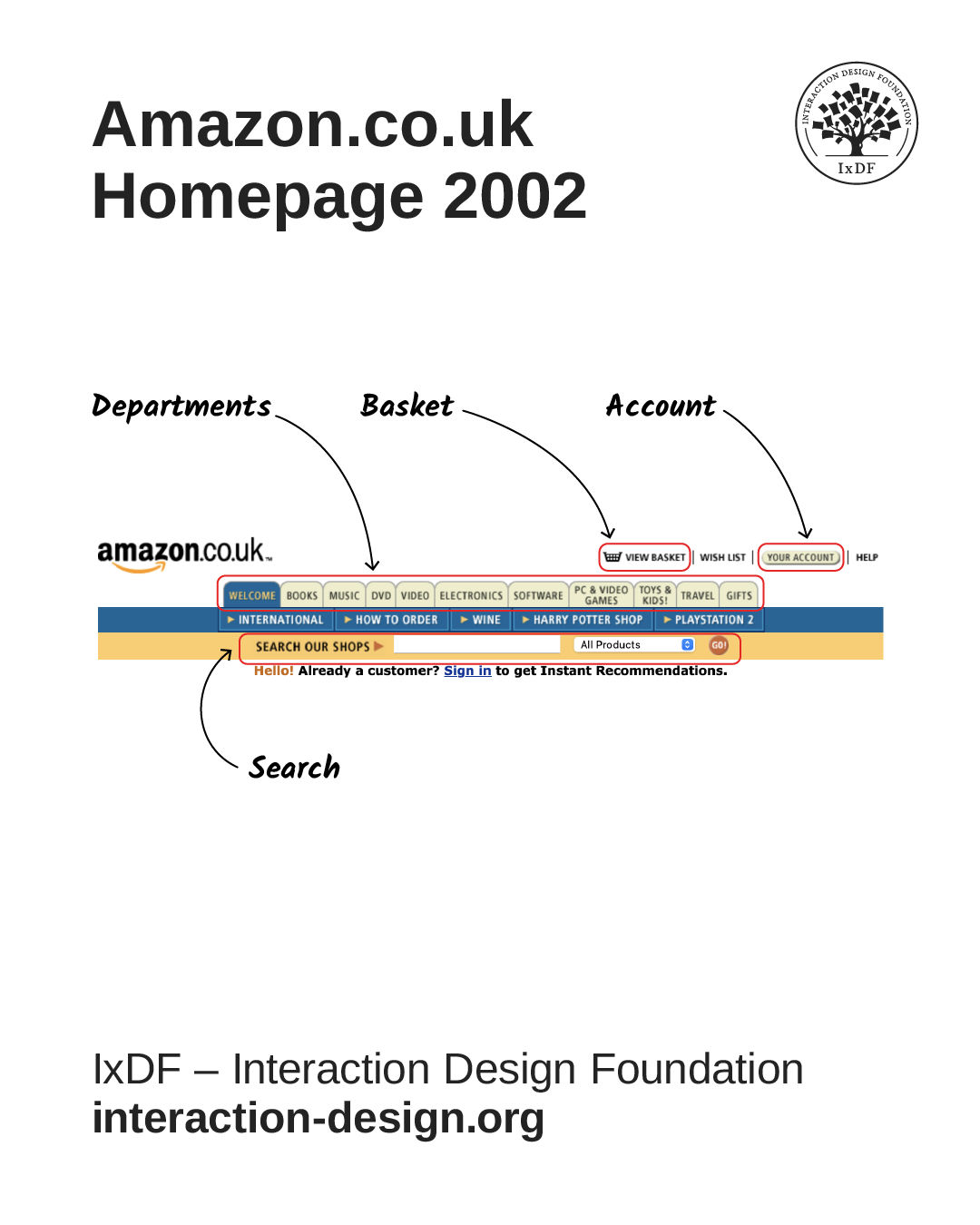
© Amazon.co.uk, Fair use
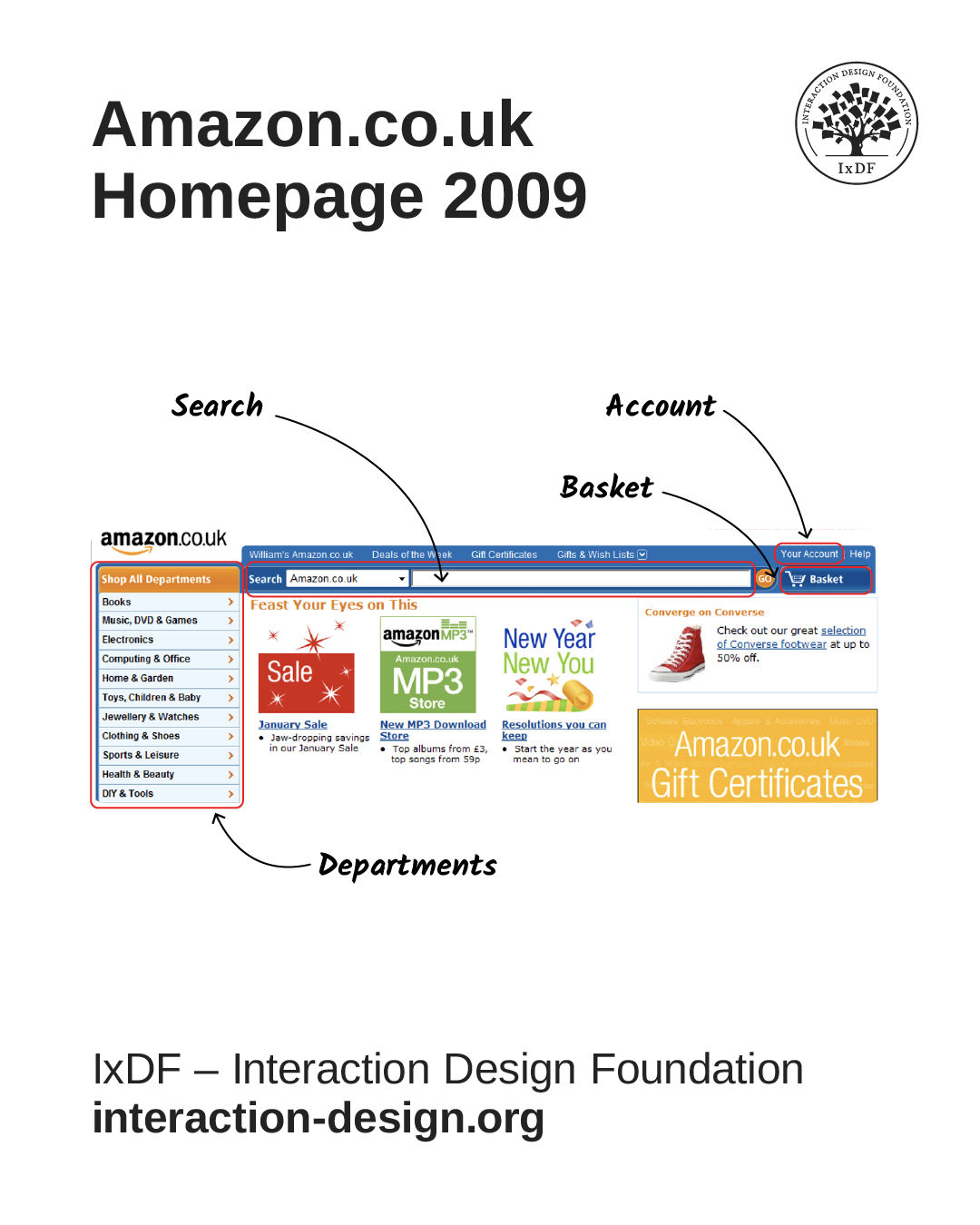
© Amazon.co.uk, Fair use
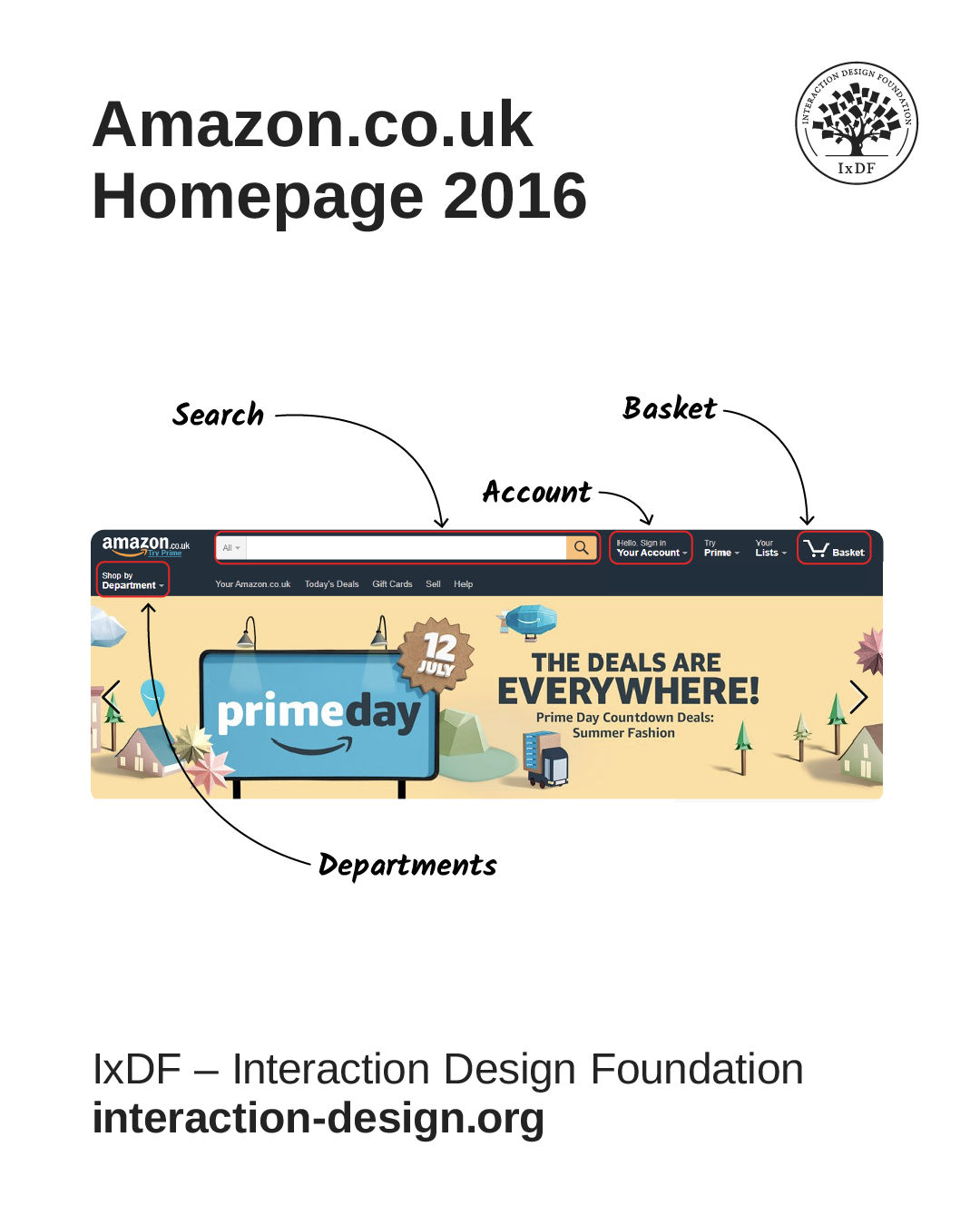
© Amazon.co.uk, Fair use

© Amazon.co.uk, Fair use
Match Your Interface to How Users Think and Make Interfaces Feel Effortless
In this video, William explains how system and user conceptual models differ, showing why designers must align technical structures with users’ mental models and everyday terminology to create intuitive interfaces.
The difference between a system model and a user’s model is quite important. Here’s an example based on a familiar system: an elevator.
User's Model
The user’s model is simple:
You request an elevator with the call button.
The external floor indicator shows where the elevator is now.
The door opens when the elevator arrives.
You enter and select your destination floor with a button inside (“floor selector” in the diagram).
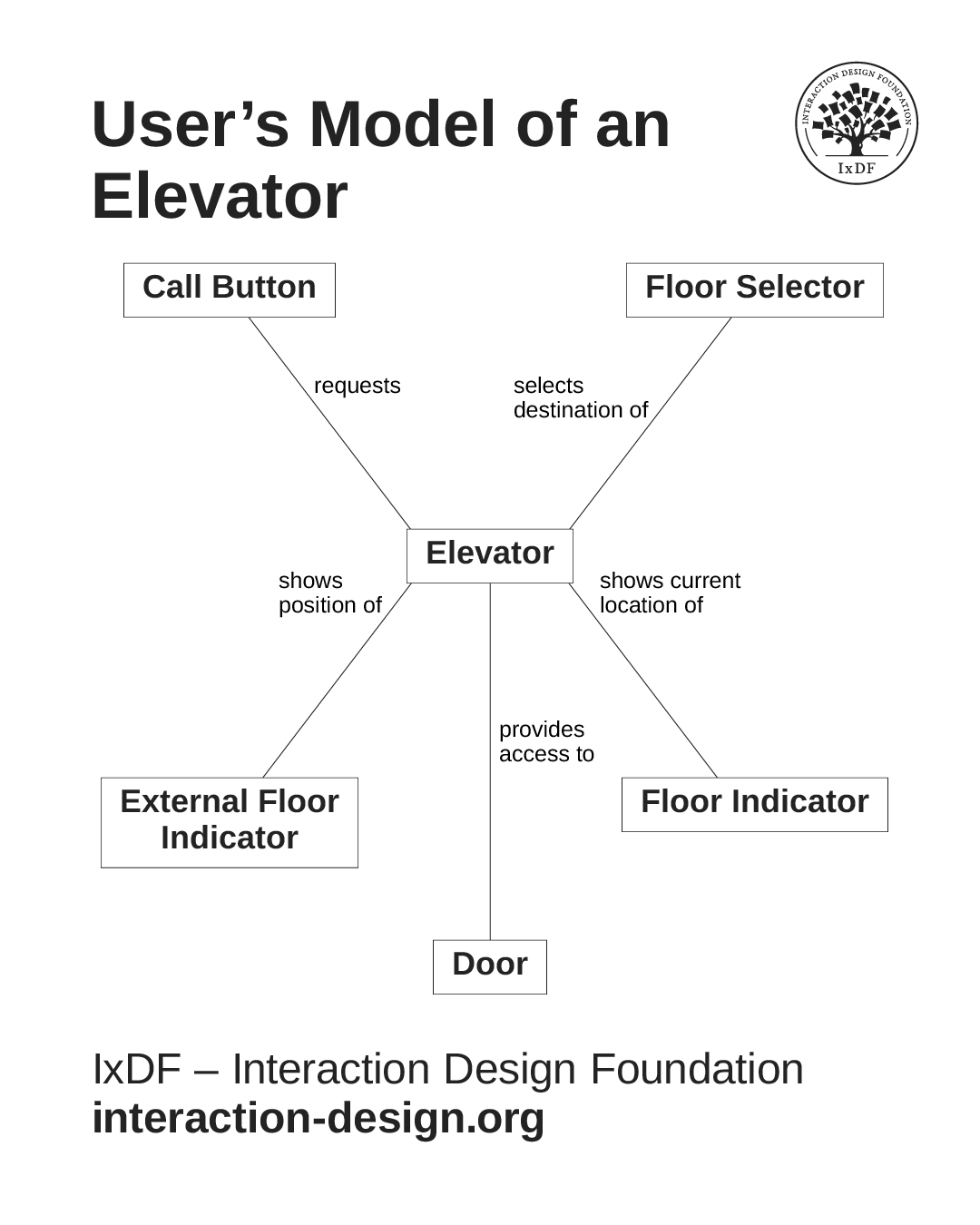
User’s model of an elevator. It's conceptually simple and familiar.
© Interaction Design Foundation, CC BY-SA 4.0
While many elevators work like the one above, larger buildings with numerous elevators now employ a substantially different model:
You select your destination floor at a communal panel in the elevator lobby and are told which elevator to use. (See image below.)
When the elevator arrives, you enter and wait for your floor to be shown.
There are no floor selection controls inside the elevators! While this approach is highly efficient, it is incredibly confusing to novice users. If you enter an elevator without selecting the floor in the lobby, you will have to hope it stops on your floor or get out at the next opportunity and start again. This is not a good example of introducing changes to a well-established system.

Smart elevators, technically known as "destination dispatch systems," have floor selectors outside the elevator cars.
© Kone Corporation, Public domain.
Engineer's Model
The more complex model below is a basic elevator from an engineering perspective. Some of the same concepts from the users’ model appear, but this model is oriented toward how the system works rather than how it should be used. This is effectively the same for software systems: our conceptual model of the user interface is from a user’s perspective, while the system model is from a developer's perspective.
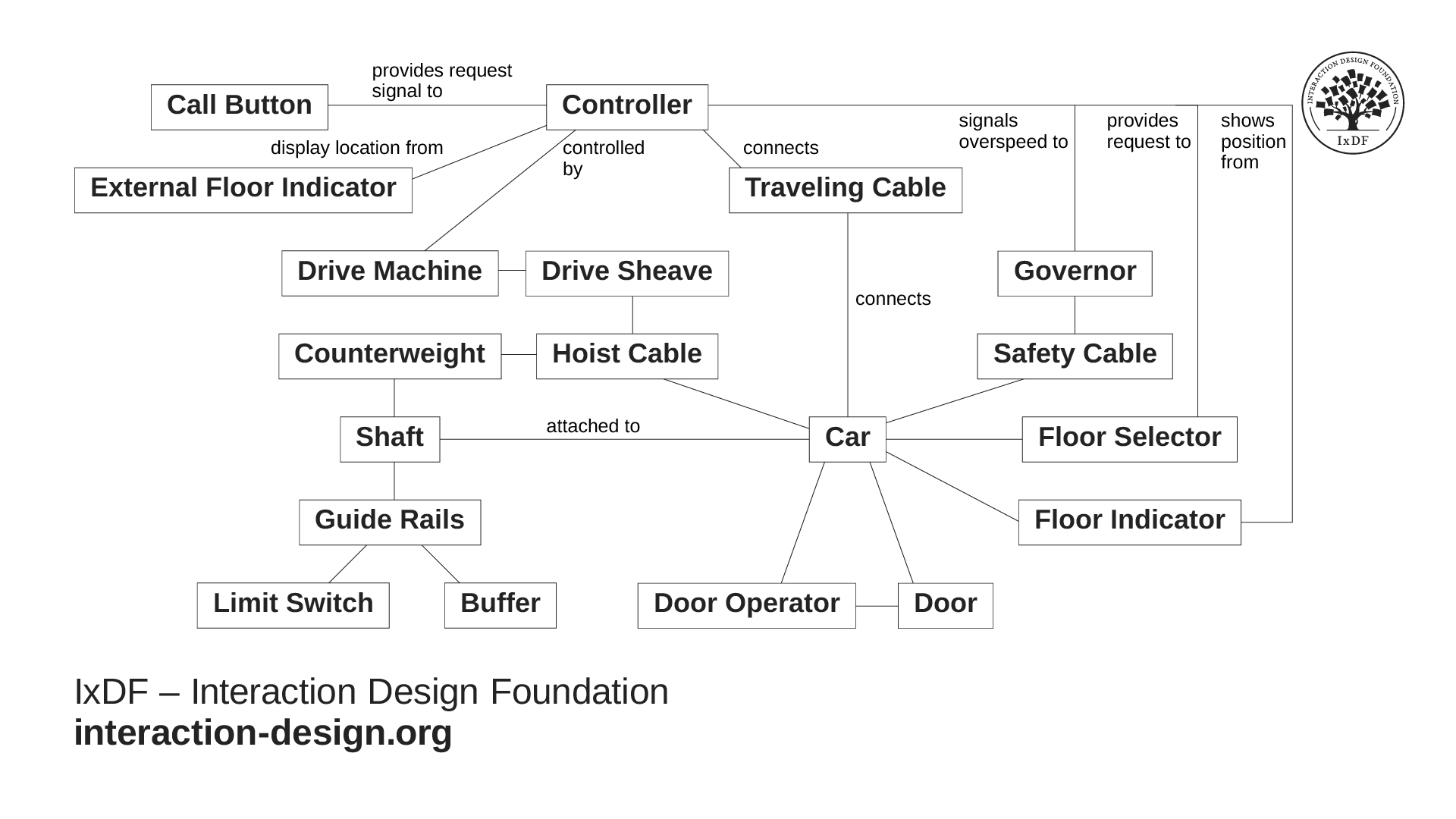
This is a basic elevator from an engineering perspective. It shows how the complex system works, not how to use it.
© Interaction Design Foundation, CC BY-SA 4.0
When you use the same maps as engineers, just viewed from different perspectives, it helps make designer-developer communication more precise. You'll foster a shared language that aligns understanding and reduces misinterpretation, ensuring your final product remains true to both user needs and technical realities.
The Take Away
Your real power as a designer lies not in visuals, but in understanding: making technology feel human and instantly clear to the people who use it. Solid conceptual models help you do that by shaping how people interpret and interact with your solution.
As the Amazon example shows, when your conceptual model is strong, it can stay consistent for years, even as your interface evolves. This kind of stability builds familiarity, trust, and comfort for your users, no matter how much your product changes on the surface.
It’s also vital to understand the difference between a user’s model (how they think the system works) and a system model (how it actually works behind the scenes). When you align the two, you create experiences that feel natural and intuitive instead of confusing or forced.
By mastering conceptual models, you'll become the designer who bridges the gap between people and technology: someone who creates clarity where others create complexity, and products that feel instantly usable from the very first click.
References and Where to Learn More
Explore how to design for your user's mental model in more detail in our article, Conceptual Models.
Hero image: © William Hudson, used with permission and redrawn by Interaction Design Foundation, CC BY-SA 4.0