Person frustrated with their phone.

How to Reduce Cognitive Friction in Mobile

• 6 min read

676 Shares

There’s nothing more annoying than when things don’t function the way we expect them to. When users interact with a UI, they make sense of its elements in relation to the “real world”—think of the trash can icon or a button: in essence, they look like their physical world counterparts. Cognitive friction occurs when the cues don’t match our users’ expectations. Here you’ll learn how to avoid cognitive friction in UI design to make the UX of your products even better.

What is Cognitive Friction?

Alan Cooper, the father of Visual Basic and UX consultant, wrote about cognitive friction in his book The Inmates are Running the Asylum. Cognitive friction occurs when a user interacts with an interface or affordance that appears intuitive but delivers unexpected results.

Imagine if you visited a mobile site and saw a button on that site that said: “Sign Up” but when you pushed the button, it took you to another website. That would be an example of cognitive friction in a digital product. You expect to go to a signup screen and not elsewhere on the internet.

The more times that cognitive friction occurs when a user interacts with a product, the more jarring the user experience is. If it occurs often enough, there is a reasonable likelihood that the user will seek an alternative means to carry out their task, resulting in so-called user churn.

Cognitive friction matters because it can damage the user experience and reduce revenue both in the short and long term.

How to Avoid Cognitive Friction

The user experience design team works in conjunction with the interaction and UI design teams to avoid cognitive friction.

Before Development

Identify where cognitive friction is likely to take place and proactively avoid it:

  • Conduct user interviews: Learn how your users expect to undertake the task with the product. Ask questions specifically related to the interface during prototyping and sketching.

  • Create task flows: If you can create the simplest possible task flow with the greatest degree of automation (where the computer, not the user, does the work), you are likely to minimize cognitive friction.

  • Create easy-to-use information architecture (IA): The simpler the IA, the less often a user will get lost or confused with the product. Use methods such as first-click and tree testing and get feedback directly from users.

  • Remove irrelevant or broken touchpoints: Touchpoints are areas where users and organizations interact to exchange value, such as a customer service conversation or important information in a mobile flow. 

Mobile user experience (UX) design provides additional challenges when it comes to cognitive friction. You can use the same techniques to identify, avoid and test for cognitive friction for mobile design. However, mobile offers far more ways to interact with a device than the traditional mouse/keyboard combination. There are gesture controls, eye movement controls, motion controls, touch screens, camera inputs, etc.

This means that it’s vital for the UX designer to examine these interactions closely; in many cases, there are no “standards” (like the floppy disk, save button or the paper file, folder combination) for these interactions. It takes great care and thought to create intuitive interactions that avoid cognitive friction.

During Development Iteration

Test for cognitive friction during the development lifecycle at each iteration of the product:

  • Conduct expert evaluations: Cognitive walkthroughs and heuristic evaluations can help you detect cognitive friction, even the one that isn’t immediately obvious to users.

  • Run usability tests on wireframes and prototypes: Nothing beats direct interaction with the product to test interaction design and examine how users will react to that design. The more user input you get, the more cognitive friction you can identify and thus you can focus on how to eliminate it in the next iteration.

What is Inclusion Friction?

You can cause friction in your experiences by not being inclusive. Ensure that you consider the diversity within your target audience, including members of any minority groups. For example, if you offer only two gender options to your users, you can cause inclusion friction because you leave out many other genders.
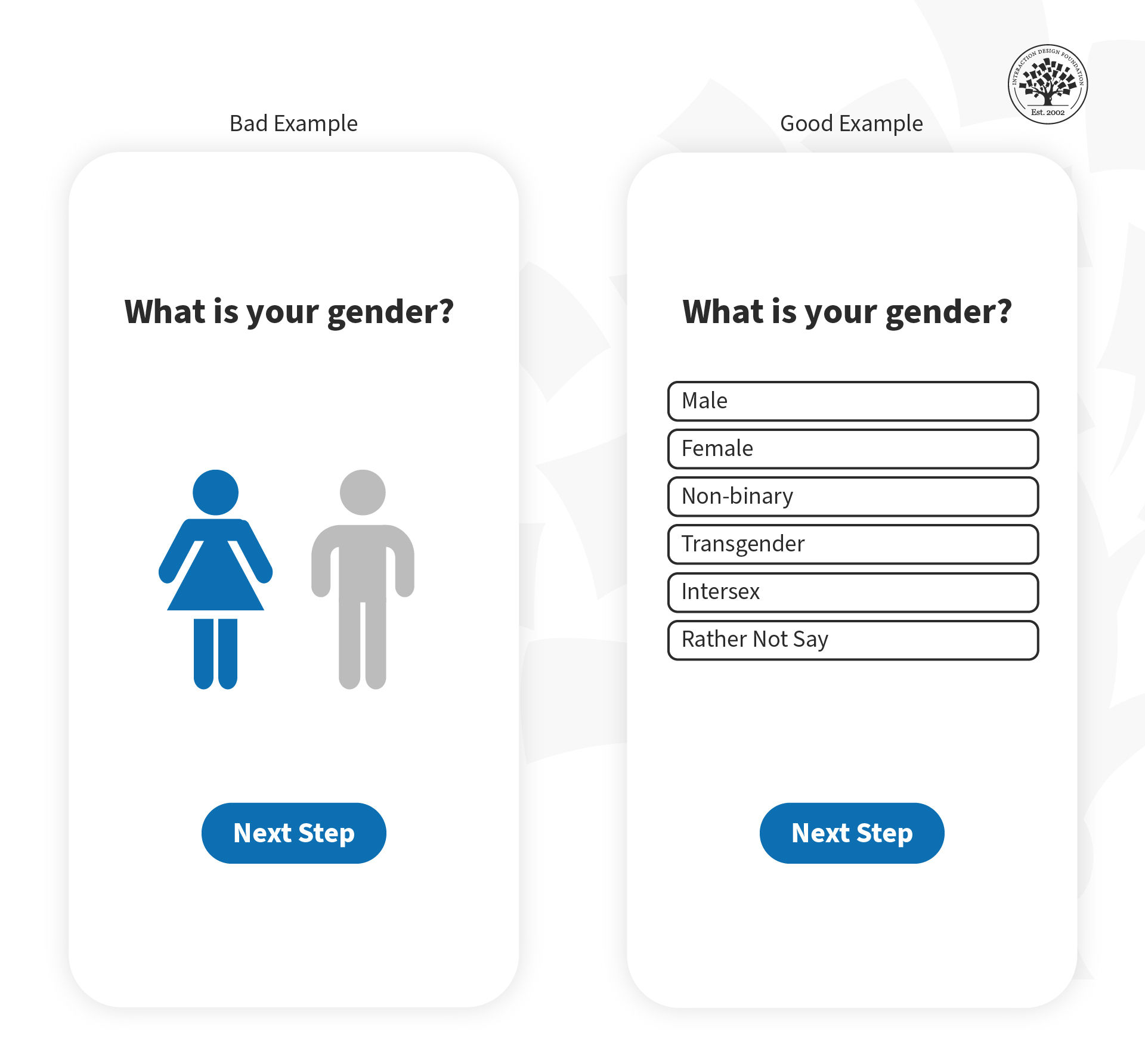
In this image, you can see how you can avoid inclusion friction (example on the right side) when asking for gender information.

© Frank Spillers, Fair Use

Below, you can see another example of how to avoid inclusion friction when asking for gender.
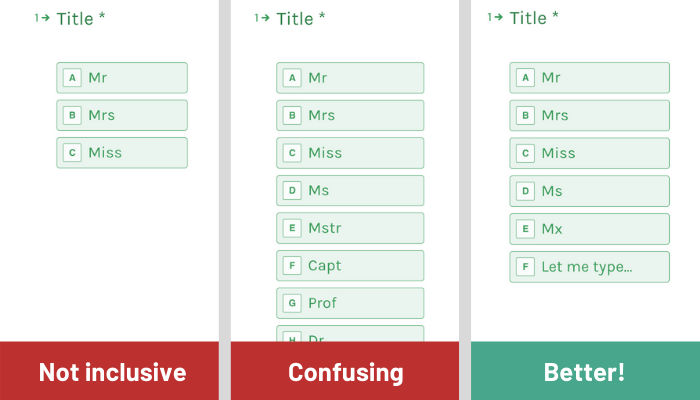
© Ruth Ng, Fair Use

Always consider inclusivity in your user experiences and research current best practices to make the best decision for your products and thus avoid friction.

You should also consider people with physical or intellectual disabilities within your target audience. Remember that when you design for accessibility, you design for all of us. As a result, you’ll deliver much better experiences.   

The Take Away

Cognitive friction occurs when something in a product doesn’t behave as we expect it to because it resembles a real-world object. It’s a source of user frustration and can potentially mar the user experience enough to create user churn. You can avoid it through user research and user testing.

References and Where to Learn More

Inmates Are Running the Asylum, The: Why High Tech Products Drive Us Crazy and How to Restore the Sanity

See Ruth’s full article on asking gender respectfully in forms.

Learn More in This Course:

UI Design Patterns for Successful Software

7 days
41 % booked
View Course

What You Should Read Next

  • Read full article
    The 5 Stages in the Design Thinking Process - Article hero image
    Interaction Design Foundation logo

    The 5 Stages in the Design Thinking Process

    Design thinking is a methodology that provides a solution-based approach to solving problems. It’s extremely useful when used to tackle complex problems that are ill-defined or unknown—because it serves to understand the human needs involved, reframe the problem in human-centric ways, create numerou

    Social shares
    2k
    Published
    Read Article
  • Read full article
    What is Design Thinking and Why Is It So Popular? - Article hero image
    Interaction Design Foundation logo

    What is Design Thinking and Why Is It So Popular?

    Design Thinking is not an exclusive property of designers—all great innovators in literature, art, music, science, engineering, and business have practiced it. So, why call it Design Thinking? What’s special about Design Thinking is that designers’ work processes can help us systematically extract,

    Social shares
    1.6k
    Published
    Read Article
  • Read full article
    What is Interaction Design? - Article hero image
    Interaction Design Foundation logo

    What is Interaction Design?

    Interaction design is an important component within the giant umbrella of user experience (UX) design. In this article, we’ll explain what interaction design is, some useful models of interaction design, as well as briefly describe what an interaction designer usually does.A simple and useful unders

    Social shares
    1.5k
    Published
    Read Article
  • Read full article
    10 Great Sites for UI Design Patterns - Article hero image
    Interaction Design Foundation logo

    10 Great Sites for UI Design Patterns

    You don’t want to spend your whole life redesigning the wheel, do you? No, neither do we. If you are looking for a design that solves a problem that has been solved with a different application before, then the template for your wheel is probably already out there. This lets you save time and make a

    Social shares
    1.4k
    Published
    Read Article
  • Read full article
    Shneiderman’s Eight Golden Rules Will Help You Design Better Interfaces - Article hero image
    Interaction Design Foundation logo

    Shneiderman’s Eight Golden Rules Will Help You Design Better Interfaces

    Follow Ben Shneiderman’s 'Eight Golden Rules of Interface Design' if you want to design great, productive and frustration-free user interfaces. Apple, Google and Microsoft are among some of the highly successful companies whose well-designed products reflect Shneiderman’s rules. The characteristics

    Social shares
    1.4k
    Published
    Read Article
  • Read full article
    User Interface Design Guidelines: 10 Rules of Thumb - Article hero image
    Interaction Design Foundation logo

    User Interface Design Guidelines: 10 Rules of Thumb

    Learn to design with your user’s needs and expectations in mind by applying Jakob Nielsen and Rolf Molich’s Ten User Interface Guidelines. These heuristics have been reflected in many of the products designed by some of the most successful companies in the world such as Apple, Google, and Adobe. Fur

    Social shares
    1.4k
    Published
    Read Article
  • Read full article
    Repetition, Pattern, and Rhythm - Article hero image
    Interaction Design Foundation logo

    Repetition, Pattern, and Rhythm

    Let’s look at three subjects that, at first glance, may strike you as being incredibly basic and self-explanatory. However, although they may seem like they should need no introduction, we should study them. By understanding these concepts, you’ll be able to apply them more effectively to captivate

    Social shares
    1.4k
    Published
    Read Article
  • Read full article
    The Grid System: Building a Solid Design Layout - Article hero image
    Interaction Design Foundation logo

    The Grid System: Building a Solid Design Layout

    Now that we’ve seen some grids at work in the Rule of Thirds article, let’s examine them a little more deeply. As a concept that deals so fundamentally with the fabric and background of our work as designers, it’s easy to overlook the power of grids and think more about the elements we want to creat

    Social shares
    1.4k
    Published
    Read Article
  • Read full article
    The Golden Ratio - Principles of form and layout - Article hero image
    Interaction Design Foundation logo

    The Golden Ratio - Principles of form and layout

    Now, we’re going to look at a subject that comes directly from mathematics and that we can also find all around us – the golden ratio. Don’t worry; we’re not going back into the classroom for long. We will examine what this concept is and exactly how much it is a fundamental part of making designs p

    Social shares
    1.3k
    Published
    Read Article
  • Read full article
    A Simple Introduction to Lean UX - Article hero image
    Interaction Design Foundation logo

    A Simple Introduction to Lean UX

    Lean UX is an incredibly useful technique when working on projects where the Agile development method is used. Traditional UX techniques often don’t work when development is conducted in rapid bursts – there’s not enough time to deliver UX in the same way. Fundamentally Lean UX and other forms of UX

    Social shares
    1.3k
    Published
    Read Article

Top Articles

Top Topic Definitions

Feel Stuck?
Want Better Job Options?

AI is replacing jobs everywhere, yet design jobs are booming with a projected 45% job growth. With design skills, you can create products and services people love. More love means more impact and greater salary potential.

At IxDF, we help you from your first course to your next job, all in one place.

See How Design Skills Turn Into Job Options
Privacy Settings
By using this site, you accept our Cookie Policy and Terms of Use.
Customize
Accept all

Be the One Who Inspires

People remember who shares great ideas.

Share on:

Academic Credibility — On Autopilot

Don't waste time googling citation formats. Just copy, paste and look legit in seconds.

Feel Stuck? Want Freedom?

Join 326,013+ designers who get one powerful email each week. Learn to design a life you love.

Next email in
1
day
17
hrs
20
mins
33
secs

Free forever. No spam. Unsubscribe anytime.