How to Design for Micro-Moments

by Muriel Domingo • 12 min read

786 Shares

Let’s look at a story from a Manhattan restaurant to understand the relevance of what Google calls “micro-moments.” Context awareness and the ability to identify micro-moments help us deliver the best user experiences. Here, you’ll learn how to design for those micro-moments.

Mobile devices have changed our lives in many more ways than we can realize. They are an integral part of us now, so we may have lost sight of how we behaved before. Therefore, as UX designers (especially ones stepping into mobile user experience (UX) design), we have to play the part of anthropologists to understand our target users’ culture.

Do You Really Need a Phone to Eat in a Restaurant?

In the early 2010s, a story appeared about a Midtown Manhattan restaurant. 

The restaurant had received complaints on Craigslist about slow service, so they compared security recordings from ten years earlier. 

From this “contextual inquiry” based on camera recordings, the restaurant discovered that an average mealtime in 2004 lasted 65 minutes. In 2014, it had increased to 115 minutes.

So who or what was to blame? The restaurant noticed that the customers’ obsessive use of mobile phones had lengthened mealtimes (the text in the table below is a summary of the rant on Craigslist):

2004

  • Customers walk in. 

  • They are seated and are given menus. 

  • On average, customers spend 8 minutes before closing the menu to show they are ready to order. 

  • A server shows up almost instantly to take the order. 

  • Appetizers arrive within 6 minutes; (the more complex the dish, the longer it takes).

  • Servers keep an eye out for their tables so they can respond quickly if the customer needs something. 

  • After guests finish eating, the checks appear on the table, and within 5 minutes, customers leave.

Average time from start to finish: 65 minutes.

2014

  • Customers walk in. 

  • They are seated and are given menus. 

  • Before even opening the menu, they take their phones out; some take photos while others do something else on their phone. 

  • Seven of the 45 customers have servers come over right away; they take on average five minutes of their server’s time asking for help connecting to the Wi-Fi. 

  • The server walks back to the table to see what the customers want to order. 

  • The majority of customers have not even opened the menu and asked the server to come back later.

  • Customers open the menus and continue on their phones. 

  • The server returns to see if they are ready to order or have any questions. 

  • The customers ask for more time. 

  • Total average time from when a customer is seated until they place an order: 21 minutes.

  • Food is served within six minutes (the more complex the dish, the longer it takes).

  • Out of 45 customers, 26 spend an average of three minutes taking photos of the food.

  • Of these 45 customers, 14 take pictures of each other with the food or as they are eating it. This takes, on average, another 4 minutes as they review and sometimes retake the photo. 

  • Out of 45 customers, 9 send their food back for reheating. 

  • Out of 45 customers, 27 ask their server to take a group photo; 14 of the 27 ask their server to retake the photo, unsatisfied with the first photo.

  • On average, this entire process adds another five minutes and prevents the server from attending to the other tables. In most cases, the customers are busy on their phones, so on average, it takes an additional 20 minutes from when they finish their meal to when they request a check.

  • Once the check appears, it takes 15 minutes longer than 10 years ago for them to pay and leave. 

  • Out of 45 customers, 8 bump into other customers, or in one case a server, as they are walking in or out of the restaurant, texting.

Average time from start to finish: 115 minutes.

Does this sound like a familiar experience? Think about the last time you went to a bar or restaurant with friends. Or, even better, the next time you go out, put on your anthropologist hat on, and check out what other people are doing. Where is their focus? What is in front of them?

How do We Chop Reality into Micro-Moments?

Early in 2015, Google released a set of articles on what they call “micro-moments.” The restaurant story is full of micro-moments where users get hold of their phones to accomplish a specific task. Most of these micro-moments fit in the “I-want-to-share”category. Let’s look at the categories of micro-moments defined by Google, even if (like we have just seen), as a product or service designer, you’ll probably be able to add new types.
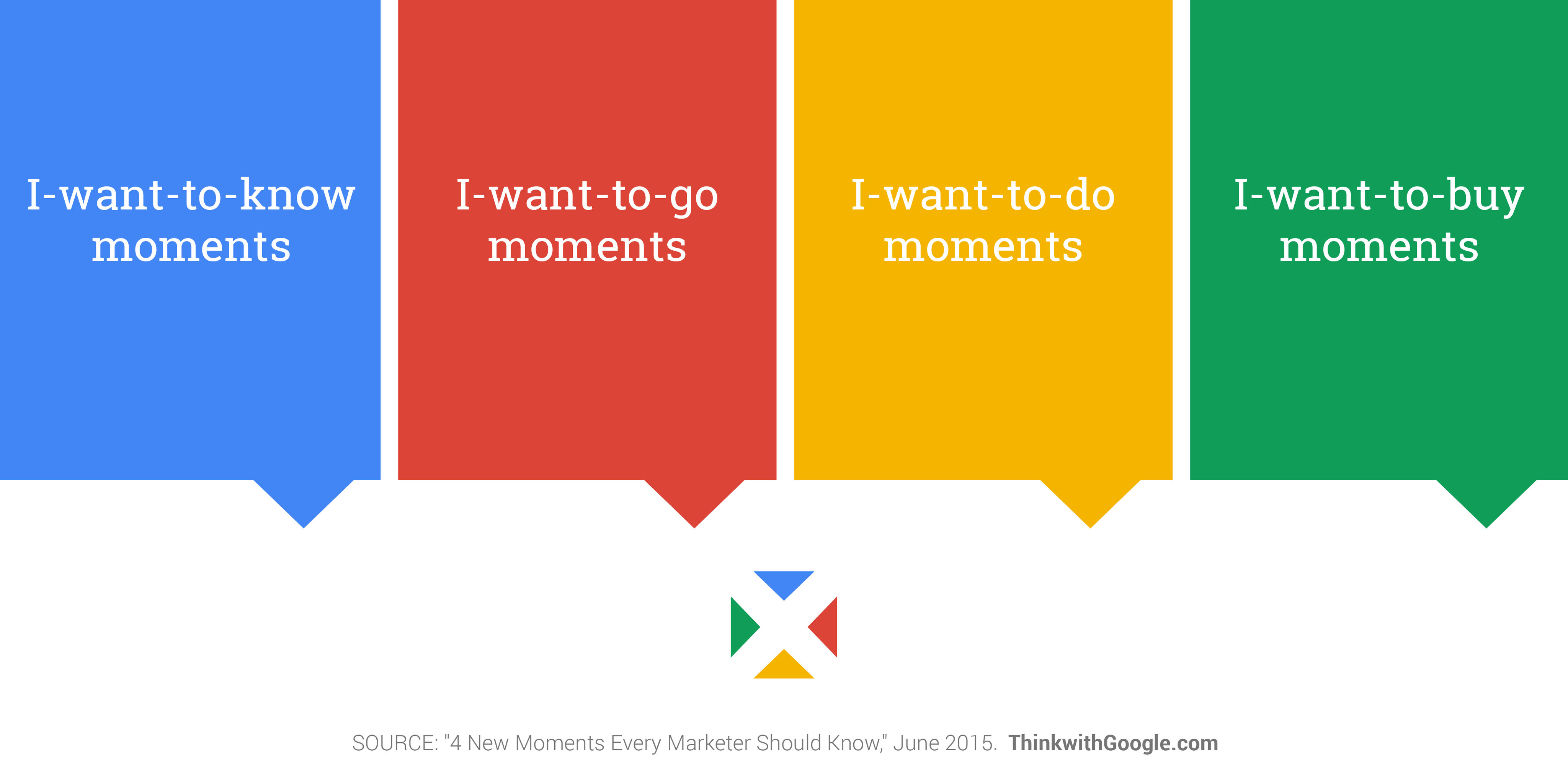
Google's micro-moments categories.

© Google, Fair Use (Link)

I-want-to-know moments

You’re at home with a nice free evening, and you feel like watching something. But first, you have to choose which movie to watch. You’re searching or browsing to find out what’s good and what’s not-so-good as you look at reviews. You want to know which movie would be the best fit tonight.

I-want-to-go moments

You’ve decided on seeing the latest action blockbuster movie, but where? This is when you want to see what’s “Near me.”

I-want-to-do moments

You may want to learn about a process, service, or product. You may go on YouTube to see what others say about products, or want to see how to do a project yourself. For example, if your motorcycle won’t start and you “sort of” know what’s wrong, a video can show you how to fix it.

I-want-to-buy moments

Your “final micro-moment” might start by watching YouTube videos to zero-in on which motorcycle part is the most reliable or has the best value before deciding. This is the instance where you decide on the product you want and start your purchase.

On a similar note, Josh Clark, the author of Tapworthy: Designing Great iPhone Apps, put forward three categories for mobile web access, which we covered separately. To refresh your memory, they are:

  1. “I’m Microtasking”: When the user interacts with their device for brief but frenzied periods of activity. 

  2. “I’m Local”: When the user wants to know what’s going on around them. 

  3. “I’m Bored”: When the user has nothing better to do and is looking to be entertained or otherwise diverted.

There is a nice overlap with both classifications, even if Google focuses more on the intent of the task and Josh Clark on the context.

When UX Becomes Even More Relevant

As UX designers, we try to connect the goals of the target users with those of the business, using technology. We need to look at both sides of the screen: at what users are doing and what the company wants to offer them. The idea of micro-moments is to consider new touchpoints and contexts of use in the customer journey. Let’s look at an example of these micro-moments in action:
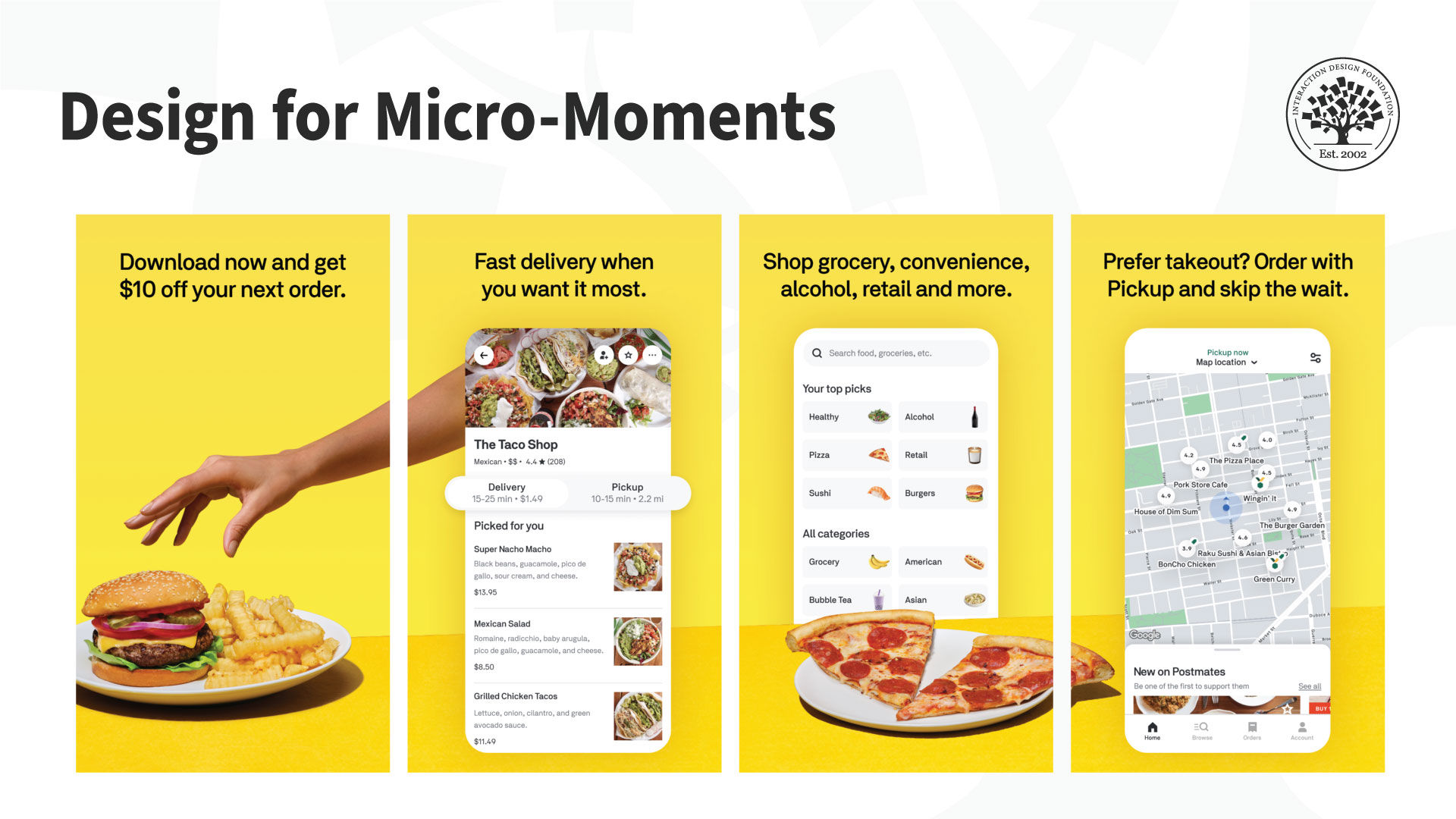
Screenshots of the Postmates App

The Postmates delivery app shows users a list of things people can buy (“I want to know” / “I’m bored”). It shows local places that people can order and pick up takeout from (“I want to go” / “I’m local”) and allows people to shop/place their order for groceries and more (“I want to buy” / “I’m microtasking”).

© Postmates, Fair Use (Link)

  • The user journey usually starts at the moment the user starts to consider a category or a product. This earliest stage determines what the user wants or needs. Perhaps they’re hungry and ask themselves if it’s a pizza night. Perhaps they’ve heard about a sale and wonder if it includes luxury scent plug-ins. 

  • Then, the users evaluate and make comparisons among the available options

  • The third stage is when users actually buy something. 

  • Last comes the after-purchase period, which some call the Ultimate Moment Of Truth. This moment is when a customer creates content based on their experience with a product or service and publishes it within their community for others to find.

Throughout this journey, there are lots of touchpoints that we can translate as micro-moments. If we as designers can identify them, we will cater for the particular types of needs of our users. It's about how we create the content or tools to enable people to accomplish whatever they want in that particular moment. To do so, Google suggests the following activities:

  1. Make a moments map.

  2. Understand customer needs in-the-moment.

  3. Use context to deliver the right experience.

  4. Optimize across the journey.

  5. Measure every moment that matters.

What do these suggestions recall for you? As always, it’s about prioritizing user experience approaches in the business strategy. We start with the users’ needs and contexts and move from there, iteratively and always with “reality checks.”

Let’s see the moments map in action with a hypothetical mobile application that people can use to learn a new language.
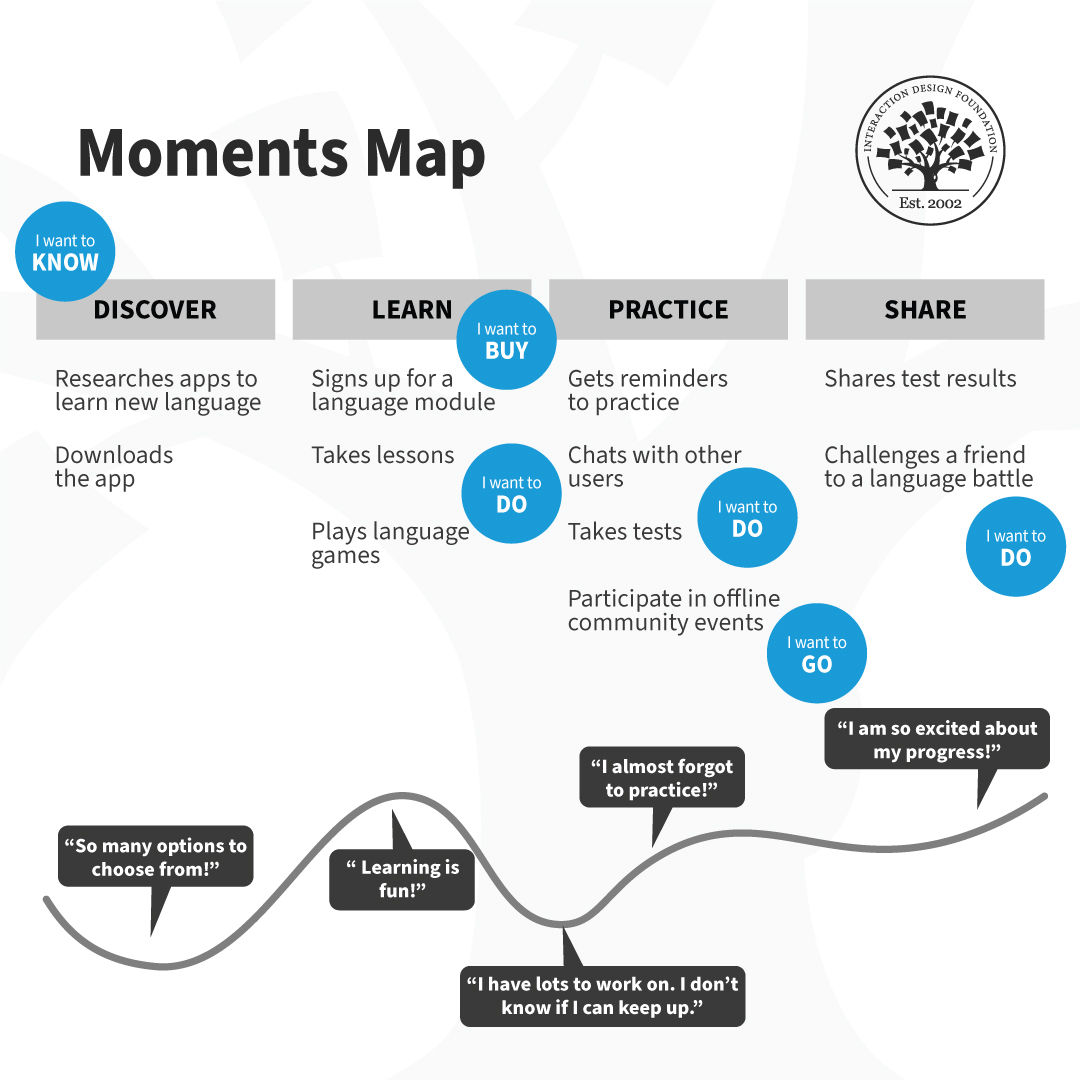
A fictitious journey map for an app. The steps include Discover, Learn, Practice and Share. Each stage has sub-tasks, some of which have annotations (know, buy, do and go).

Begin with a customer journey map and layer the moments map on top of it. Identify all the potential micro-moments and plot them on the map. Prioritize and design, measure and then iterate. Revisit the moments map regularly with your team to see what worked and how you can improve the users’ journey.

© Interaction Design Foundation, CC BY-SA 4.0

The Take Away

Smartphones have changed how we process reality. We have shorter attention spans, which we can break into micro-moments or fast, task-oriented engagements with reality.

Google identified the concept of micro-moments early in 2015. They pinpointed that smartphones are most often the “first-screen-at-hand” that users turn to. 

We need to consider how micro-moments play a role in user experiences. 

Use customer journey maps to achieve this: understand your users, their needs in each moment, and the context of use to deliver the right experience. 

The goal is to make every part of the user’s journey the best it can be, and measure every important moment.

Download the customer journey map template and start mapping these moments with your team:
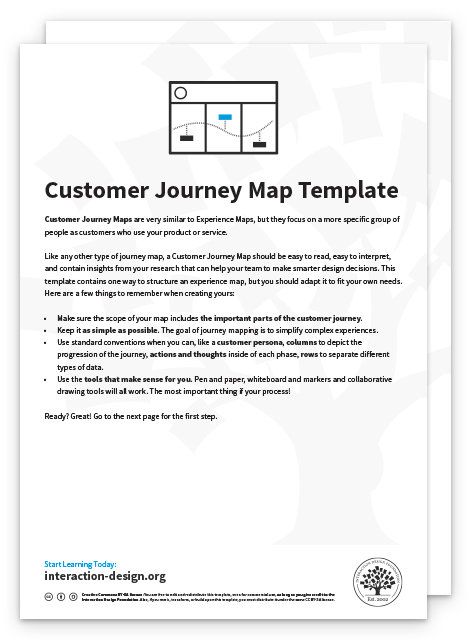
Advance Your Career With This Free Template for “Customer Journey Map”
Customer Journey Map
We respect your privacy
Get 1 powerful email each week: Design a life you love!

References and Where to Learn More

Get practical tips on how to create journey maps in the Customer Journey Mapping Course (included in the IxDF membership).

Zurcher, A. (2014). “Smartphone use in restaurants prompts Craigslist rant,” Echo Chambers Blog for BBC News.

Ramaswamy, S. (2015). “Outside Voices: Why Mobile Advertising May Be All About Micro-Targeting Moments”. CMO Blog – The Wall Street Journal

Micro-moments, according to Google.

Think with Google’s article on how to identify micro-moments in the customer journey. 

The IxDF chapter on Contextual Design.

Hero Image: © Marc Muller, CC BY-SA 3.0

Learn More in This Course:

Mobile UX Design: The Beginner's Guide

5 days
63 % booked
View Course

What You Should Read Next

  • Read full article
    What is Interaction Design? - Article hero image
    Interaction Design Foundation logo

    What is Interaction Design?

    Interaction design is an important component within the giant umbrella of user experience (UX) design. In this article, we’ll explain what interaction design is, some useful models of interaction design, as well as briefly describe what an interaction designer usually does.A simple and useful unders

    Social shares
    1.5k
    Published
    Read Article
  • Read full article
    Apple’s Product Development Process – Inside the World’s Greatest Design Organization - Article hero image
    Interaction Design Foundation logo

    Apple’s Product Development Process – Inside the World’s Greatest Design Organization

    Apple’s Product Development Process may be one of the most successful design processes ever implemented. With a valuation that exceeds $2 trillion, there’s a lot that designers can learn from Apple and introduce into their own design environments.Apple is a notoriously secretive business. In Steve J

    Social shares
    1.4k
    Published
    Read Article
  • Read full article
    Shneiderman’s Eight Golden Rules Will Help You Design Better Interfaces - Article hero image
    Interaction Design Foundation logo

    Shneiderman’s Eight Golden Rules Will Help You Design Better Interfaces

    Follow Ben Shneiderman’s 'Eight Golden Rules of Interface Design' if you want to design great, productive and frustration-free user interfaces. Apple, Google and Microsoft are among some of the highly successful companies whose well-designed products reflect Shneiderman’s rules. The characteristics

    Social shares
    1.4k
    Published
    Read Article
  • Read full article
    How to Change Your Career from Graphic Design to UX Design - Article hero image
    Interaction Design Foundation logo

    How to Change Your Career from Graphic Design to UX Design

    If there’s an occupation that is 100% linked with the public’s idea of what design is all about, it’s graphic design. From the familiar golden arches of the McDonald’s brand to the typography and colors of movie posters, graphic designers create some of the most iconic and ubiquitous designs around

    Social shares
    1.4k
    Published
    Read Article
  • Read full article
    The Grid System: Building a Solid Design Layout - Article hero image
    Interaction Design Foundation logo

    The Grid System: Building a Solid Design Layout

    Now that we’ve seen some grids at work in the Rule of Thirds article, let’s examine them a little more deeply. As a concept that deals so fundamentally with the fabric and background of our work as designers, it’s easy to overlook the power of grids and think more about the elements we want to creat

    Social shares
    1.4k
    Published
    Read Article
  • Read full article
    The Principles of Service Design Thinking - Building Better Services - Article hero image
    Interaction Design Foundation logo

    The Principles of Service Design Thinking - Building Better Services

    Service design is all about taking a service and making it meet the user’s and customer’s needs for that service. It can be used to improve an existing service or to create a new service from scratch. In order to adapt to service design, a UX designer will need to understand the basic principles of

    Social shares
    1.4k
    Published
    Read Article
  • Read full article
    A Simple Introduction to Lean UX - Article hero image
    Interaction Design Foundation logo

    A Simple Introduction to Lean UX

    Lean UX is an incredibly useful technique when working on projects where the Agile development method is used. Traditional UX techniques often don’t work when development is conducted in rapid bursts – there’s not enough time to deliver UX in the same way. Fundamentally Lean UX and other forms of UX

    Social shares
    1.3k
    Published
    Read Article
  • Read full article
    Dieter Rams: 10 Timeless Commandments for Good Design - Article hero image
    Interaction Design Foundation logo

    Dieter Rams: 10 Timeless Commandments for Good Design

    Let’s pay a virtual visit to a famous industrial designer’s workshop. By examining the principles of his winning approach, we can incorporate vital elements into our designs in the “less is more” age.As user experience practitioners, most of us have worked with Nielsen and Molich’s 10 heuristics or

    Social shares
    1.3k
    Published
    Read Article
  • Read full article
    The 7 Factors that Influence User Experience - Article hero image
    Interaction Design Foundation logo

    The 7 Factors that Influence User Experience

    User Experience (UX) is critical to the success or failure of a product in the market but what do we mean by UX? All too often UX is confused with usability which describes to some extent how easy a product is to use and it is true that UX as a discipline began with usability – however, UX has grown

    Social shares
    1.3k
    Published
    Read Article
  • Read full article
    10 Free-to-Use Wireframing Tools for UX Designers in 2026 - Article hero image
    Interaction Design Foundation logo

    10 Free-to-Use Wireframing Tools for UX Designers in 2026

    Wireframes help you quickly ideate and test your ideas. While paper wireframes are the fastest to create, digital wireframes look more polished and presentable. If you are looking for a pocket-friendly wireframing tool, look no further.Whether you prefer browser-based apps or offline desktop tools,

    Social shares
    1.3k
    Published
    Read Article

Top Articles

Top Topic Definitions

Feel Stuck?
Want Better Job Options?

AI is replacing jobs everywhere, yet design jobs are booming with a projected 45% job growth. With design skills, you can create products and services people love. More love means more impact and greater salary potential.

At IxDF, we help you from your first course to your next job, all in one place.

See How Design Skills Turn Into Job Options
Privacy Settings
By using this site, you accept our Cookie Policy and Terms of Use.
Customize
Accept all

Be the One Who Inspires

People remember who shares great ideas.

Share on:

Academic Credibility — On Autopilot

Don't waste time googling citation formats. Just copy, paste and look legit in seconds.

Feel Stuck? Want Freedom?

Join 326,029+ designers who get one powerful email each week. Learn to design a life you love.

Next email in
1
day
13
hrs
17
mins
25
secs

Free forever. No spam. Unsubscribe anytime.