How to Display Complex Network Data with Information Visualization

• 8 min read

778 Shares

A network is a collection of data where the entities within that data are related through the principles of connection and/or containment. Many simple networks can be easily represented visually – mind maps and concept maps, for example, are excellent tools for doing this.

The US presidential candidate Carly Fiorina said; “The goal is to turn data into information, and information into insight” and network visualizations do just that.

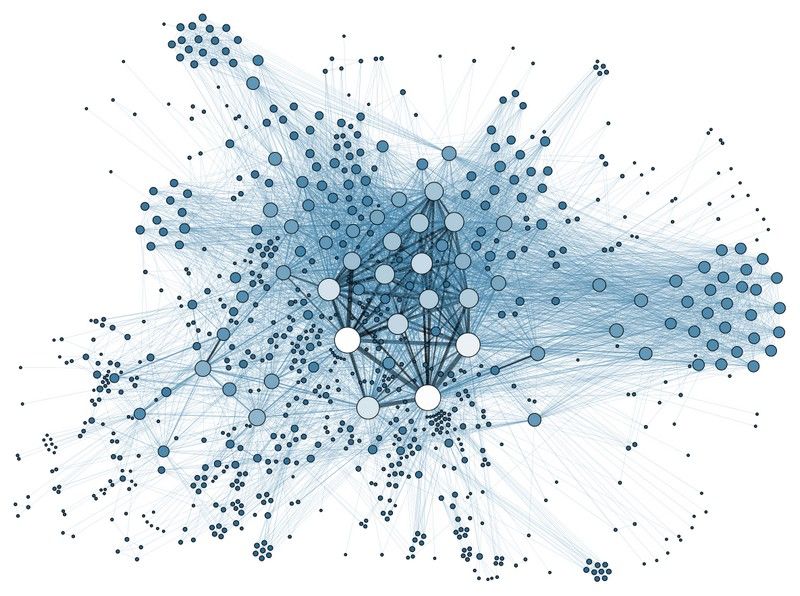
However, as the complexity of networks increases (such as in the diagram below – showing a spatial analysis of a social network) these techniques become increasingly harder to use. As you can see from the diagram below the huge levels of complexity make it difficult, at first glance, to glean useful information from the diagram.

Author/Copyright holder: Martin Grandjean. Copyright terms and licence: CC BY-SA 3.0

Each node here represents an individual within the network. The edges are used to define relationships to friends, colleagues, peers, parents, etc.

This kind of representation is useful to help us understand the relationships an individual has and how they are forged. However, the complexity of the data makes it hard to separate visual elements and difficult to understand what exactly is going on.

In his book “Introduction to Information Visualization” Riccardo Mazza offers 3 strategies for tackling complex networks when translating them into diagrammatic form.

Three Strategies for Tackling Complex Networks in Information Visualization

The field of handling complexity in graphical representations is relatively new and advances are being made regularly. It is always a good idea to conduct some research prior to tackling a complex information visualization to see if a similar problem has already been handled and to examine how a successful result was achieved.

However, these 3 strategies are good general rules for tackling complexity in network diagrams:

  1. Change the layout for the graphical design to improve the readability of the design

  2. Create an approximation of the overall structure but reduce the complexity so that it may be easier to comprehend (this can be achieved by either reducing the volumes of edges displayed on a graph or by removing relationships entirely if they are not of specific interest)

  3. Implement interactivity so that the user can manipulate the representation to match their needs

Changing the Layout

Much of the complexity found in a complex network comes from the large numbers of nodes which are then joined by edges. These edges are going to overlap and cross over each other – creating a confusing picture of what is going on in the diagram.

The ideal layout is one where the number of crossing points is kept to an absolute minimum. There are two commonly used techniques for this “force-direction” and “spring-embedder” these involve the use of complex algorithms to resolve the minimum number of crossing points.
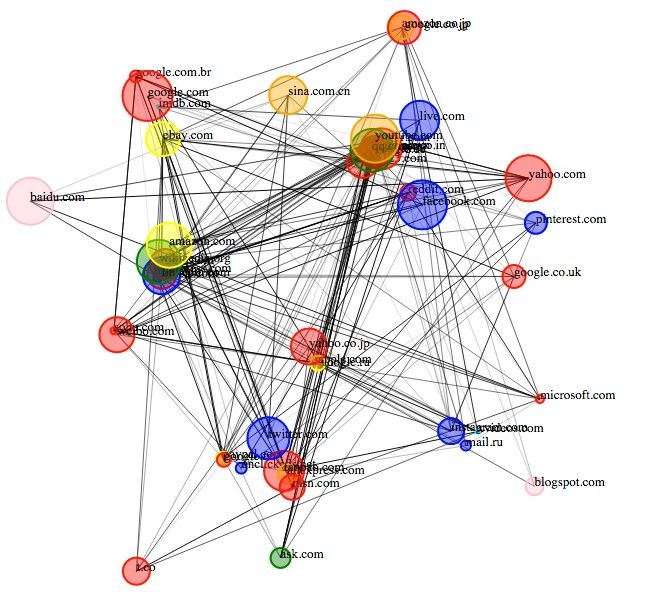

Author/Copyright holder: Deepthiyathiender. Copyright terms and licence: CC BY-SA 4.0

Above is an example of a force-directed graph which has been created to show relationship between different websites. As you can see, the technique still hasn’t eliminated all the complexity from the network diagram and there are serious problems with entities occluding the view of other entities.

Reducing Graph Complexity

Reducing graph complexity involves scaling down the level of information portrayed within a graph but maintaining the overall structure of data and still enabling analysis of whatever it is that we wished to investigate.

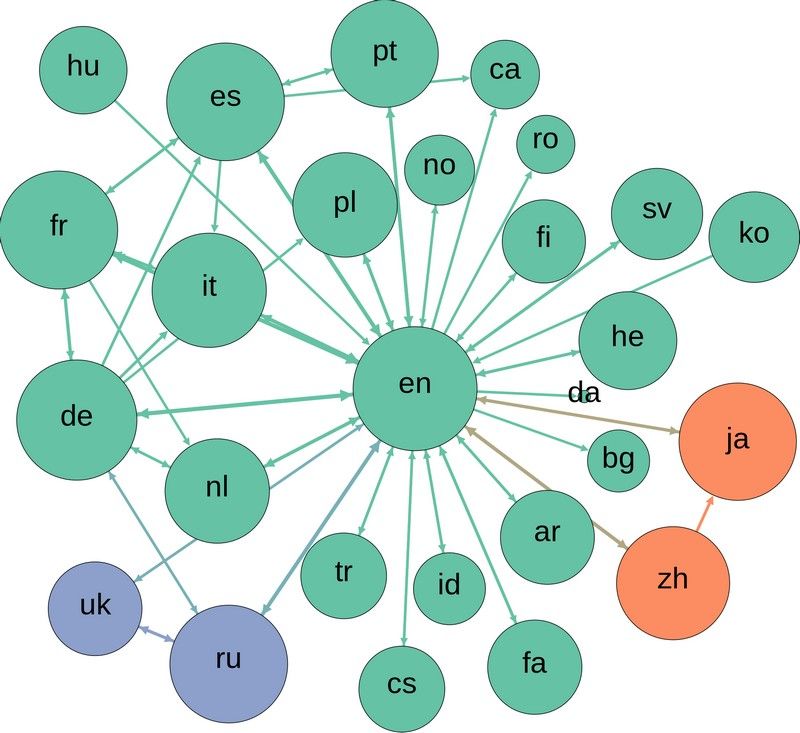
The most common technique for this is to use “link reduction” which means that you only represent edges above a certain weight or which meet certain criteria. This, in theory, means that only edges that are relevant to a reader are displayed.

Author/Copyright holder: Computermacgyver. Copyright terms and licence: CC BY-SA 3.0

Above we see how a link reduction graph might appear for relationships between languages.

There are also more advanced methods for reducing complexity in graphs such as Pathfinder Network Scaling (PNS) and Minimum Spanning Trees (MST). These techniques are extremely advanced and while software can aid their implementation it requires a background in statistics and mathematics to get the most from them.

Implementing Interactivity

This final step requires user research to determine what levels of interactivity are required within the information visualization. The focus of this research should be determining what it is that will make the information visualization useful to the individual.

It may be that they need to be able to manipulate the view, so that they can better understand a 3-dimensional representation by viewing it from different angles; or it might be that they need to be able to manipulate the data set to cluster nodes or eliminate or give weight to edges.

Interactivity requirements will vary from project-to-project and from user-to-user.

Author/Copyright holder: yaph. Copyright terms and licence: CC BY-SA 2.0

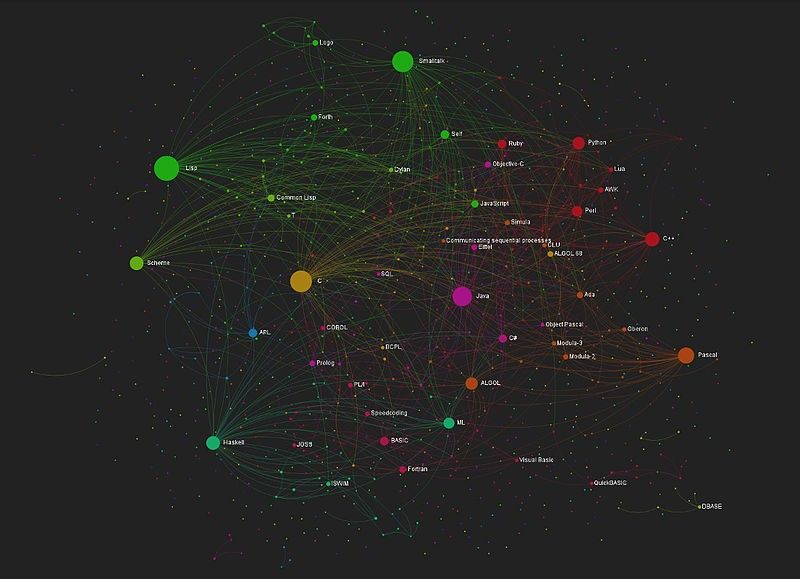
This image shows an interactive graph mapping relationships of influence within computer languages.

The Take Away

The field of complex network information visualization is evolving. There are three simple principles which the information visualization designer can apply to their complex network visualizations to try and simplify them to the point where they give the viewer the clearest picture possible. Interaction should only be implemented after conducting user research. The use of the most complex methods of information visualization for network data will require further study and a knowledge of mathematics and statistics.

References & Where to Learn More:

Spring Embedders and Force Directed Graph Drawing Algorithms

Pathfinder Associate Networks: Studies in Knowledge Organization

Minimum Spanning Trees

Hero Image: Author/Copyright holder: Zohar Manor-Abel. Copyright terms and licence: CC BY-NC 2.0

Learn More in This Course:

AI for Designers

11 days
13 % booked
View Course

What You Should Read Next

  • Read full article
    Information Overload, Why it Matters and How to Combat It - Article hero image
    Interaction Design Foundation logo

    Information Overload, Why it Matters and How to Combat It

    Designers often need to convey information to the users of their designs. Specialists in information visualization design in particular find themselves presenting data over and over again to their users. However, it’s important when developing your designs that you don’t create “information overload

    Social shares
    1.2k
    Published
    Read Article
  • Read full article
    How to Design an Information Visualization - Article hero image
    Interaction Design Foundation logo

    How to Design an Information Visualization

    Designing information visualizations offers you endless possibilities when it comes to end products, and it would be impossible to provide step-by-step instructions for all these possibilities. However, it is fair to say that while the end products may vary dramatically – the process by which we rea

    Social shares
    984
    Published
    Read Article
  • Read full article
    Preattentive Visual Properties and How to Use Them in Information Visualization - Article hero image
    Interaction Design Foundation logo

    Preattentive Visual Properties and How to Use Them in Information Visualization

    A preattentive visual property is one which is processed in spatial memory without our conscious action. In essence it takes less than 500 milliseconds for the eye and the brain to process a preattentive property of any image. This is good news for information visualization designers and graphic des

    Social shares
    978
    Published
    Read Article
  • Read full article
    How to Visualize Your Qualitative User Research Results for Maximum Impact - Article hero image
    Interaction Design Foundation logo

    How to Visualize Your Qualitative User Research Results for Maximum Impact

    When thinking about visualization of research results, many people will automatically have an image of a graph in mind. Do you have that image, too? You would be right in thinking that many research results benefit from a graph-like visualization, showing trends and anomalies. But this is mainly tru

    Social shares
    966
    Published
    Read Article
  • Read full article
    How to Conduct Focus Groups - Article hero image
    Interaction Design Foundation logo

    How to Conduct Focus Groups

    Focus groups have long been a popular tool in market research and have become more popular in user research in the recent past too. They consist of a group of between 5 and 10 users who work with a moderator/facilitator/researcher. The moderator will pose questions from a script to the group. Their

    Social shares
    926
    Published
    Read Article
  • Read full article
    Visual Mapping – The Elements of Information Visualization - Article hero image
    Interaction Design Foundation logo

    Visual Mapping – The Elements of Information Visualization

    Information visualization requires mapping data in a visual or occasionally auditory format for the user of the visualization. This can be challenging because while some data has a spatial relationship built in (for example, temperatures in cities around a country) many data sets don’t have a tradit

    Social shares
    907
    Published
    Read Article
  • Read full article
    The Properties of Human Memory and Their Importance for Information Visualization - Article hero image
    Interaction Design Foundation logo

    The Properties of Human Memory and Their Importance for Information Visualization

    It is important to know that while neuroscience has progressed dramatically over the last decades; there is no complete understanding of how human memory works. We know, for example, that data in the brain is stored in clusters of neurons but we don’t know how, precisely, it is stored or even how it

    Social shares
    903
    Published
    Read Article
  • Read full article
    Guidelines for Good Visual Information Representations - Article hero image
    Interaction Design Foundation logo

    Guidelines for Good Visual Information Representations

    Information visualization is not as easy as it might first appear, particularly when you are examining complex data sets. How do you deliver a “good” representation of the information that you bring out of the data that you are working with?While this may be a subjective area of information visualiz

    Social shares
    900
    Published
    Read Article
  • Read full article
    Information Visualization – A Brief Introduction - Article hero image
    Interaction Design Foundation logo

    Information Visualization – A Brief Introduction

    Have you ever thought about how much data flows past each of us in an ordinary day? From the newspaper you read at breakfast, to the e-mails you receive throughout the day, to the bank statements generated whenever you withdraw money or spend it, to the conversations we have, and so on?There is a ti

    Social shares
    873
    Published
    Read Article
  • Read full article
    How to Show Hierarchical Data with Information Visualization - Article hero image
    Interaction Design Foundation logo

    How to Show Hierarchical Data with Information Visualization

    Hierarchical data is essentially a specialized form of network data – in that while entities within the dataset do not have dependent relationships; they are all related to each other by the principle of containment. They, unlike standard data networks, do not use the principle of connection.A hiera

    Social shares
    846
    Published
    Read Article

Top Articles

Top Topic Definitions

Feel Stuck?
Want Better Job Options?

AI is replacing jobs everywhere, yet design jobs are booming with a projected 45% job growth. With design skills, you can create products and services people love. More love means more impact and greater salary potential.

At IxDF, we help you from your first course to your next job, all in one place.

See How Design Skills Turn Into Job Options
Privacy Settings
By using this site, you accept our Cookie Policy and Terms of Use.
Customize
Accept all

Be the One Who Inspires

People remember who shares great ideas.

Share on:

Academic Credibility — On Autopilot

Don't waste time googling citation formats. Just copy, paste and look legit in seconds.

Feel Stuck? Want Freedom?

Join 326,033+ designers who get one powerful email each week. Learn to design a life you love.

Next email in
1
day
11
hrs
48
mins
31
secs

Free forever. No spam. Unsubscribe anytime.