How to Design an Information Visualization

• 9 min read

984 Shares

Designing information visualizations offers you endless possibilities when it comes to end products, and it would be impossible to provide step-by-step instructions for all these possibilities. However, it is fair to say that while the end products may vary dramatically – the process by which we reach the best possible end product is consistently the same.
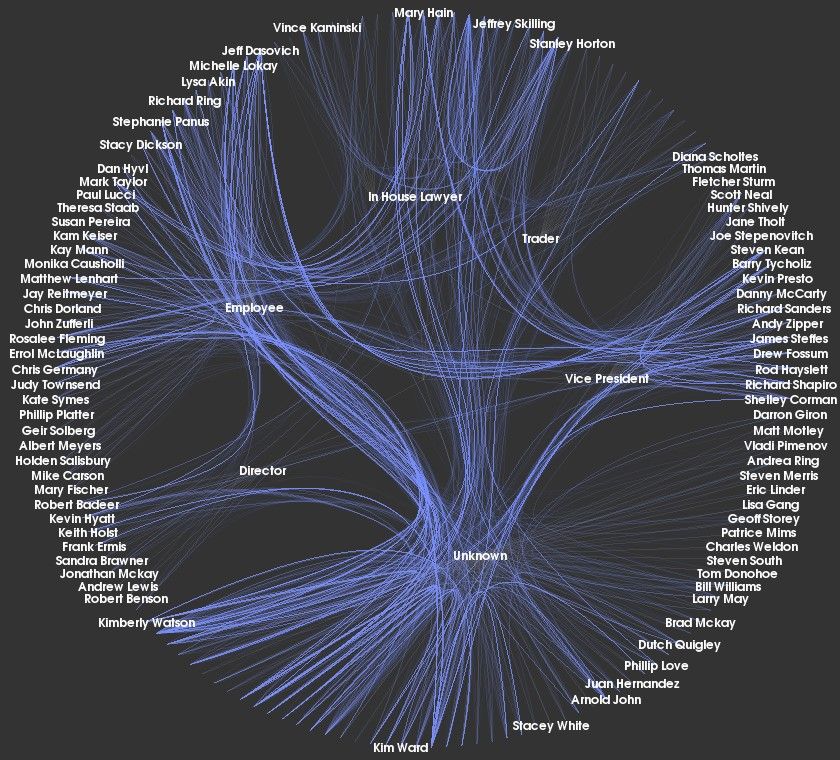

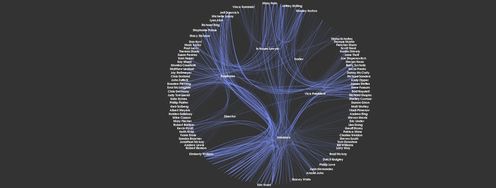
Author/Copyright holder: Kitware Inc. Copyright terms and license: CC BY-ND 2.0

As you can see, information visualization can lead to incredibly beautiful images as well as conveying information. The image above is the organization of the now-defunct Enron group’s communications.

It is important to keep in mind what Ben Shneiderman said; “The purpose of visualization is insight, not pictures.”

In his book, “Introduction to Information Visualization” Riccardo Mazza offers a simple and straightforward 5-step process to follow when designing information visualizations:

5 Steps to Designing an Information Visualization

The overall process is simple, and once you’ve reviewed the process, it should feel like common sense:

  1. Define the problem.

  2. Define the data to be represented.

  3. Define the dimensions required to represent the data.

  4. Define the structures of the data.

  5. Define the interaction required from the visualization.

1. Define the Problem

As with any user experience work, the first step is to define the problem that your information visualization will solve. This will usually require user research to answer these questions: “What does my user need from this?” and “How will they work with it?”

You may be trying to explain something to a user, or you may be trying to enable them to make new connections or observations; it might even be that the user is trying to prove a theory.

You should also take into account any specific factors that are unique to the user base during this research. What is their level of education or ability with data handling? What kind of experience do they have with the data in the past? This will guide the level of complexity of the output and clarify the overall needs of the user.

2. Define the Data to be Represented

There are three main types of data that can be represented through information visualization, and the way that they are mapped can vary dramatically – so it pays to have it clear in your mind before you start designing what data you will use.

  1. Quantitative data – data which is numerical

  2. Ordinal data – data that doesn’t have numbers but does have an intrinsic form of order (days of the week, for example)

  3. Categorical data – data which has neither numbers nor intrinsic order (such as business names or place names)

3. Define the Dimensions Required to Represent the Data

The number of dimensions or attributes of a data set must be considered carefully as it will determine, to a great extent, the possible information visualizations that can be used to represent the data.

The more dimensions represented in the data – the more confusing it can be to comprehend the information visualization. Thus, it’s worth noting that the data with large numbers of dimensions may well benefit from using a highly interactive representation rather than a static one.

Four types of analysis can be conducted based on the number of variables to be studied:

  1. Univariate analysis – where a single variable is studied

  2. Bivariate analysis – where two variables are studied

  3. Trivariate analysis – where three dependent variables are studied

  4. Multivariate analysis – a general term for more than one variable being studied

Each variable represents a dimension, which can be dependent or independent of each other. The most common example is a two-dimensional (bivariate) analysis. This is traditionally shown with the independent variable along the horizontal (X) axis and the dependent along the vertical (Y). Naturally, this gets much more complex with increasing dimensions, as the diagram below demonstrates.
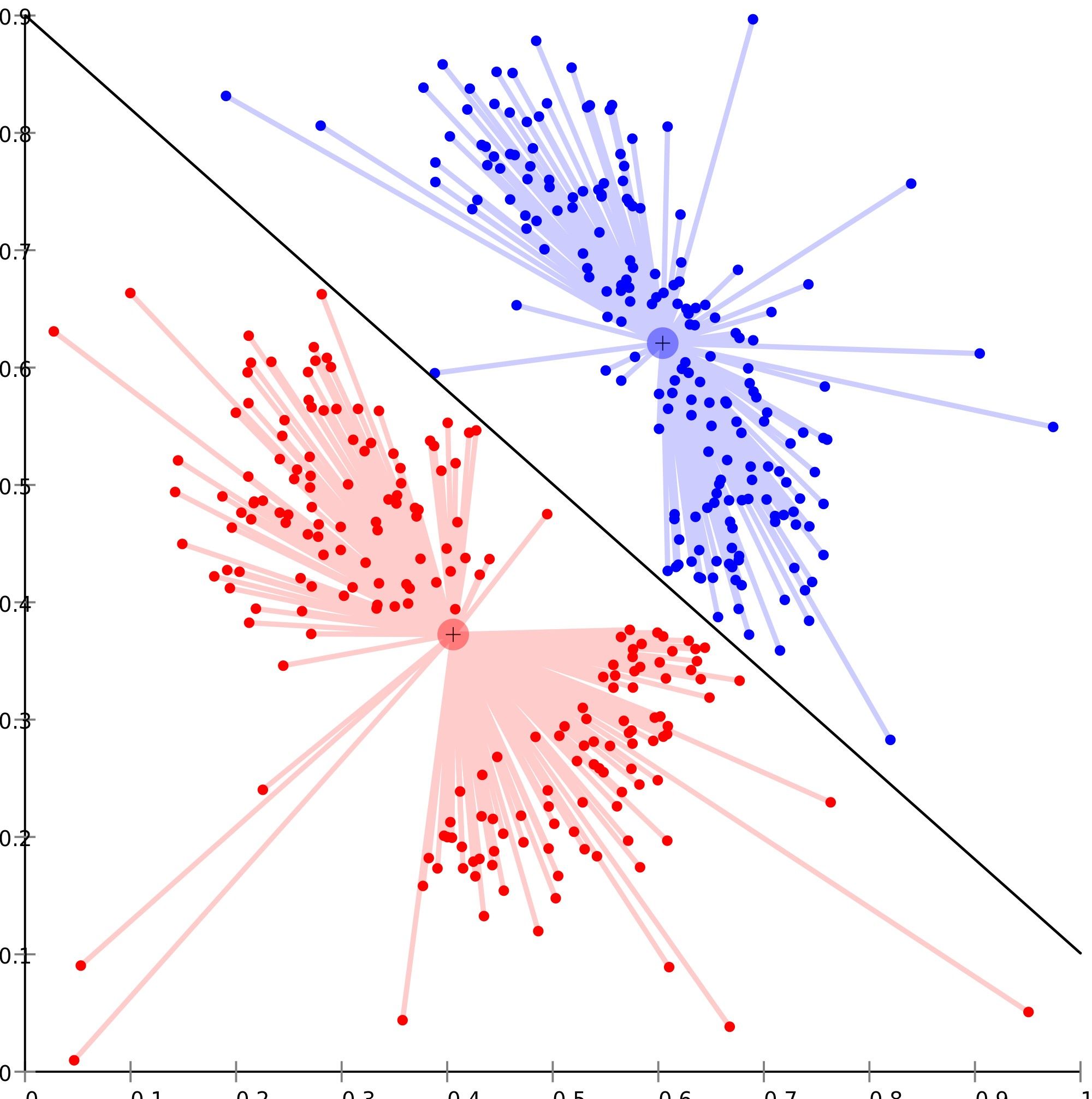

Author/Copyright holder: Chire. Copyright terms and license: CC BY-SA 3.0

An image of multivariate analysis where relationships between data points are numerous and dependent.

4. Define the Structures of the Data

This is all about examining how the data sets will relate to each other. Common relationship structures include:

  • Linear relationships – where data can be shown in linear formats such as tables, vectors, etc.

  • Temporal relationships – where data changes over the passage of time

  • Spatial relationships – data that relates to the real world (such as map data or an office floor plan); this is sometimes also known as a geographical relationship

  • Hierarchical relationships – data that relates to positions in a defined hierarchy (from an office management structure to a simple flowchart)

  • Networked relationships – where the data relates to other entities within the same data
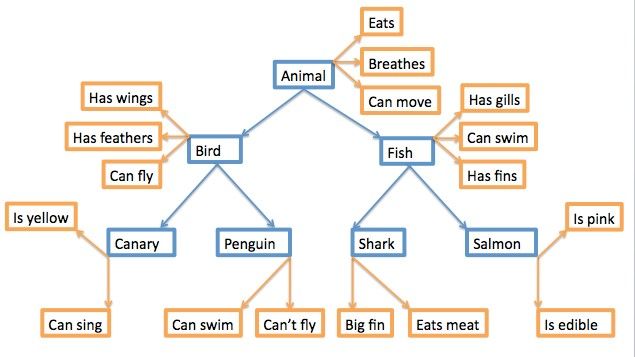

Author/Copyright holder: Nathanael Crawford. Copyright terms and license: CC BY-SA 3.0

An example of a hierarchical network model is shown above.

5. Define the Interaction Required from the Visualization

The final part of the design process requires that you understand the level of interaction required from the information visualization by the user. There are three categories of interaction:

  1. Static models – these models are presented “as is” such as maps in a Road Atlas that you keep in a car. They cannot be modified by the user.

  2. Transformable models – these models enable the user to transform or modify data. They may allow the user to vary parameters for analysis or choose a different form of visual mapping for the data set.

  3. Manipulable models – these models give the user control over the generation of views. For example, they may allow a user to zoom in or zoom out on a model or to rotate 3-dimensional models in space for viewing from other angles.

It’s worth noting that you can combine transformable and manipulable models to create the highest level of interaction in information visualization.
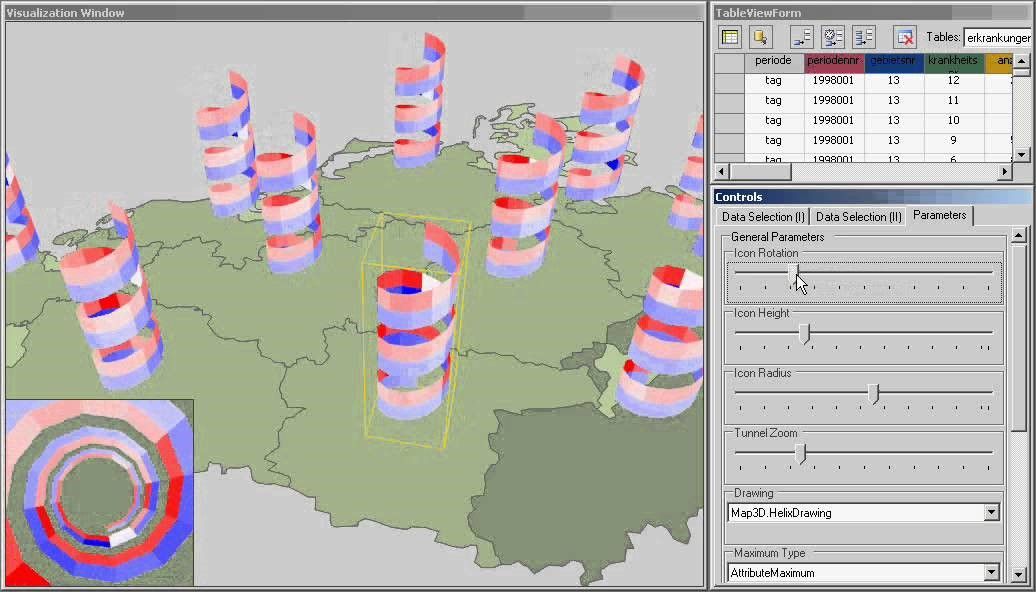

As models become more complicated, as above, it can be useful to be able to interact with those models to get to specific data.

The Take Away

This process of how to design an information visualization is not concerned with your final output but rather enabling you to make an informed decision on what forms of representation might best serve your users. By understanding a user’s needs, the data to be displayed and the relationships in that data as well as the kind of model required, the information visualization designer can deliver a model which meets those needs.

References & Where to Learn More:

Course: Information Visualization

Riccardo Mazza, Introduction to Information Visualization, Springer, ISBN 878-1-84800-219-7

Orana Velarde, These 21 Tools to Create Infographics Will Save You Tons of Time (And Your Infographics Will Be Stunning), 2019.

Shneiderman Quote: from Readings in Information Visualization: Using Vision to Think.

Hero Image: Author/Copyright holder: Christian Guthier. Copyright terms and license: CC BY-SA 2.0

Learn More in This Course:

AI for Designers

12 days
13 % booked
View Course

What You Should Read Next

  • Read full article
    Data Analysis: Techniques, Tools, and Processes - Article hero image
    Interaction Design Foundation logo

    Data Analysis: Techniques, Tools, and Processes

    Data analysis is one of those terms that “is what it sounds like,” although there’s more to it than may meet the eye. In any case, it’s a valuable skill for making better decisions—a skill that you can bring to bear on both your professional and personal life, from personal budgeting to analyzing cu

    Social shares
    1.2k
    Published
    Read Article
  • Read full article
    Information Overload, Why it Matters and How to Combat It - Article hero image
    Interaction Design Foundation logo

    Information Overload, Why it Matters and How to Combat It

    Designers often need to convey information to the users of their designs. Specialists in information visualization design in particular find themselves presenting data over and over again to their users. However, it’s important when developing your designs that you don’t create “information overload

    Social shares
    1.2k
    Published
    Read Article
  • Read full article
    Preattentive Visual Properties and How to Use Them in Information Visualization - Article hero image
    Interaction Design Foundation logo

    Preattentive Visual Properties and How to Use Them in Information Visualization

    A preattentive visual property is one which is processed in spatial memory without our conscious action. In essence it takes less than 500 milliseconds for the eye and the brain to process a preattentive property of any image. This is good news for information visualization designers and graphic des

    Social shares
    978
    Published
    Read Article
  • Read full article
    How to Visualize Your Qualitative User Research Results for Maximum Impact - Article hero image
    Interaction Design Foundation logo

    How to Visualize Your Qualitative User Research Results for Maximum Impact

    When thinking about visualization of research results, many people will automatically have an image of a graph in mind. Do you have that image, too? You would be right in thinking that many research results benefit from a graph-like visualization, showing trends and anomalies. But this is mainly tru

    Social shares
    966
    Published
    Read Article
  • Read full article
    How to Conduct Focus Groups - Article hero image
    Interaction Design Foundation logo

    How to Conduct Focus Groups

    Focus groups have long been a popular tool in market research and have become more popular in user research in the recent past too. They consist of a group of between 5 and 10 users who work with a moderator/facilitator/researcher. The moderator will pose questions from a script to the group. Their

    Social shares
    926
    Published
    Read Article
  • Read full article
    Visual Mapping – The Elements of Information Visualization - Article hero image
    Interaction Design Foundation logo

    Visual Mapping – The Elements of Information Visualization

    Information visualization requires mapping data in a visual or occasionally auditory format for the user of the visualization. This can be challenging because while some data has a spatial relationship built in (for example, temperatures in cities around a country) many data sets don’t have a tradit

    Social shares
    907
    Published
    Read Article
  • Read full article
    The Properties of Human Memory and Their Importance for Information Visualization - Article hero image
    Interaction Design Foundation logo

    The Properties of Human Memory and Their Importance for Information Visualization

    It is important to know that while neuroscience has progressed dramatically over the last decades; there is no complete understanding of how human memory works. We know, for example, that data in the brain is stored in clusters of neurons but we don’t know how, precisely, it is stored or even how it

    Social shares
    903
    Published
    Read Article
  • Read full article
    Guidelines for Good Visual Information Representations - Article hero image
    Interaction Design Foundation logo

    Guidelines for Good Visual Information Representations

    Information visualization is not as easy as it might first appear, particularly when you are examining complex data sets. How do you deliver a “good” representation of the information that you bring out of the data that you are working with?While this may be a subjective area of information visualiz

    Social shares
    900
    Published
    Read Article
  • Read full article
    Rating Scales in UX Research: The Ultimate Guide - Article hero image
    Interaction Design Foundation logo

    Rating Scales in UX Research: The Ultimate Guide

    Picture this: you’re designing a new app or website and want to know how users feel about it, but you want a good way to get actionable insights from those feelings, fast. Feedback is vital—and the sooner you get it, the better—and that’s why something as direct and visual as a rating scale comes in

    Social shares
    882
    Published
    Read Article
  • Read full article
    Information Visualization – A Brief Introduction - Article hero image
    Interaction Design Foundation logo

    Information Visualization – A Brief Introduction

    Have you ever thought about how much data flows past each of us in an ordinary day? From the newspaper you read at breakfast, to the e-mails you receive throughout the day, to the bank statements generated whenever you withdraw money or spend it, to the conversations we have, and so on?There is a ti

    Social shares
    873
    Published
    Read Article

Top Articles

Top Topic Definitions

Feel Stuck?
Want Better Job Options?

AI is replacing jobs everywhere, yet design jobs are booming with a projected 45% job growth. With design skills, you can create products and services people love. More love means more impact and greater salary potential.

At IxDF, we help you from your first course to your next job, all in one place.

See How Design Skills Turn Into Job Options
Privacy Settings
By using this site, you accept our Cookie Policy and Terms of Use.
Customize
Accept all

Be the One Who Inspires

People remember who shares great ideas.

Share on:

Academic Credibility — On Autopilot

Don't waste time googling citation formats. Just copy, paste and look legit in seconds.

Feel Stuck? Want Freedom?

Join 326,033+ designers who get one powerful email each week. Learn to design a life you love.

Next email in
1
day
12
hrs
13
mins
22
secs

Free forever. No spam. Unsubscribe anytime.