Preattentive Visual Properties and How to Use Them in Information Visualization

• 8 min read

978 Shares

A preattentive visual property is one which is processed in spatial memory without our conscious action. In essence it takes less than 500 milliseconds for the eye and the brain to process a preattentive property of any image. This is good news for information visualization designers and graphic designers in more general terms too – it means that these properties can be harnessed to make it easier for a user to understand what is presented through the design and save them from consciously processing all the data presented in short-term memory which requires more effort.

John Tukey, the American mathematician and statistician, said; “The greatest value of a picture is when it forces us to notice what we never expected to see.” By tapping into preattentive properties of visualizations you can help users find what they never expected to see.

Colin Ware, in his book “Information Visualization: Perception for Design” defines the four preattentive visual properties as follows:

  • Color

  • Form

  • Movement

  • Spatial Positioning

The Four Preattentive Visual Properties

1. Color

Color can be expressed in many different ways. From the RGB (Red, Green, Blue) scale to the CMYK (Cyan, Magenta, Yellow and Key) scale to the HSL (Hue, Saturation and Lightness) scale.

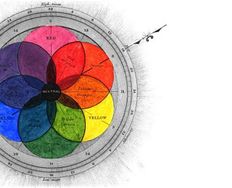
The HSL scale is useful to us when we examine color in terms of preattentiveness. Hue is a measure of the color that we normally give a name to such as “Red” or “Violet”. Saturation and lightness are a measure of the intensity of colors.

Hues and intensities are preattentively processed and can be used to separate visual elements from their surroundings. This saves the user from having to perform a visual search through data.
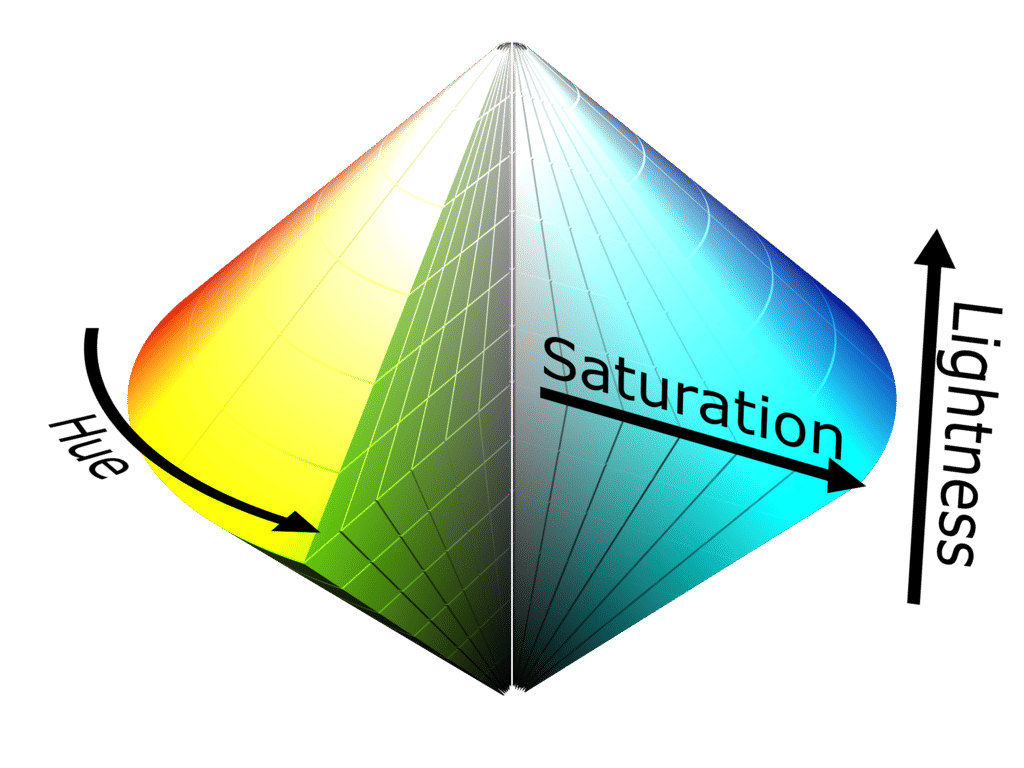
Author/Copyright holder: SharkD. Copyright terms and licence: CC BY-SA 3.0

The HSL scale can be visually represented itself in 3-dimensions – the idea is to try and demonstrate how saturation and lightness relate to intensity for each hue.

2. Form

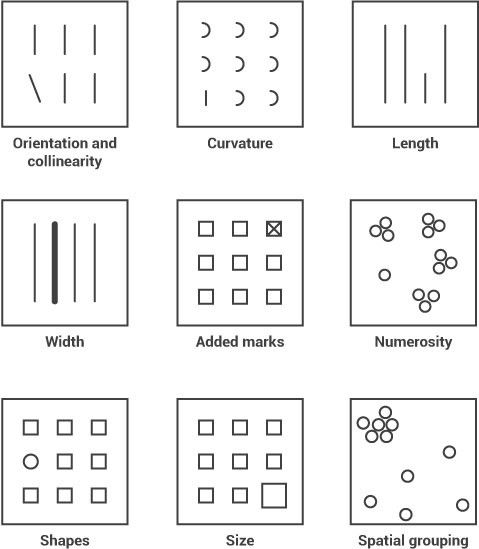
Form applies to a set of attributes (listed below) and form can be manipulated to either call attention to a member of the data set or to reduce our attention on it. For example, if you were to manipulate the size of an object you could use that size to indicate its importance in a data set by making it larger. Conversely you could make it smaller and reduce its importance.

Form attributes include:

  • Collinearity

  • Curvature

  • Length, breadth and width

  • Marks added to objects

  • Numerosity

  • Shape

  • Size

  • Spatial grouping

  • Spatial orientation

In the image above you can see how each form property can be used to call attention to a part of a visualization; you might not realize it but you didn’t even have to think to see these differences – it was all done in your sensory memory without conscious effort.

3. Movement

Movement has two sub-attributes flicker and motion. They can be used very effectively to call someone’s attention. However, care should always be taken when employing motion in information visualizations and other designs. This is because the motion can rapidly become annoying or distracting from the rest of the information that is being presented. It’s also a technique which has been over-employed in banner adverts and other forms of web advertising over the years and may be a primary reason for the rise of ad-blocking software.
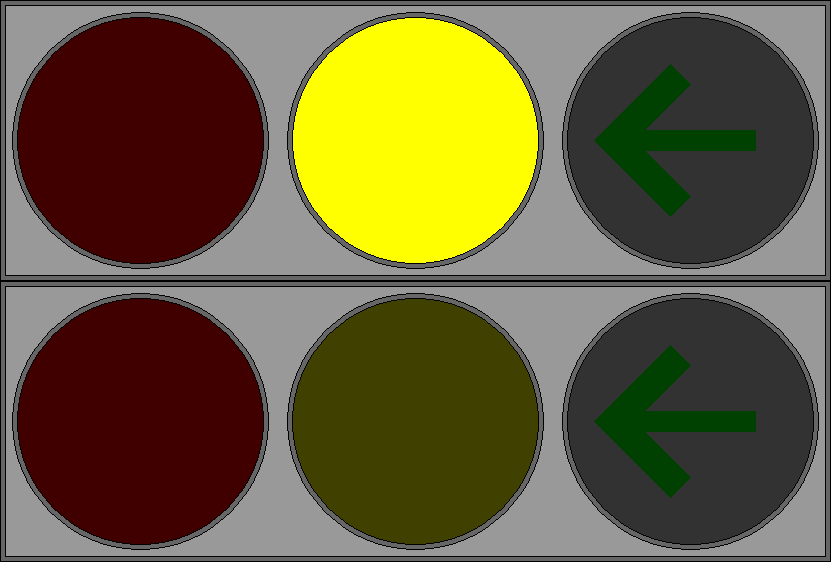
Author/Copyright holder: P.Ctnt. Copyright terms and licence: Public Domain.

The central traffic light in this GIF flickers to call the user’s attention to the yellow light rather than the red light or green arrow.

4. Spatial Positioning

There are several considerations for spatial positioning including:

  • 2D positioning – this is often the best way to deliver data that can be easily recognized and processed visually. It is particularly effective for quantitative data representations.

  • Stereoscopic depth - we perceive depth by combining the images generated by the left and right eyes in the brain. This depth is preattentively processed. It is possible to recreate stereoscopic depth using two separate cameras set at different angles to a subject and imposing the images over each other.

  • Concave and convex positioning – this can be created through the use of shading.
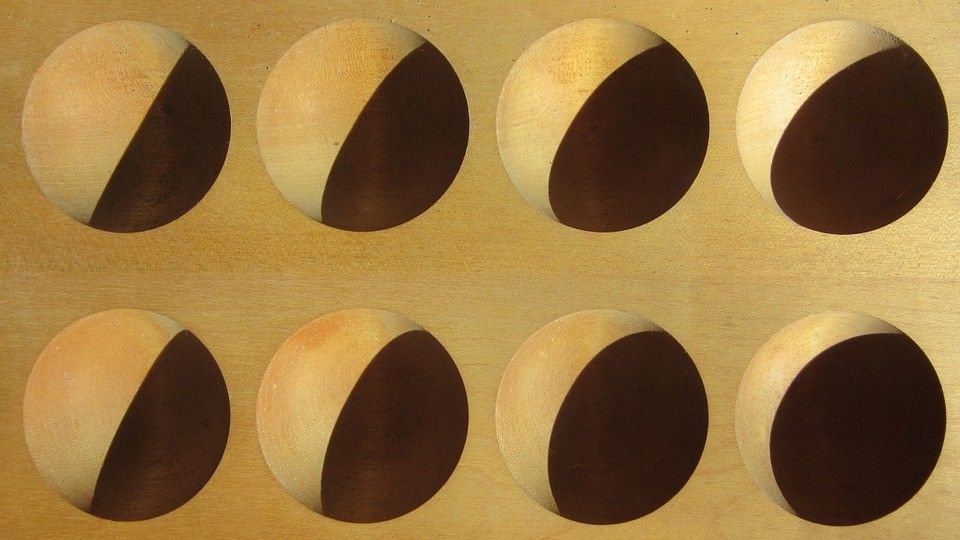
Author/Copyright holder: Pixabay. Copyright terms and licence: Free to Use

In this image we can see the use of shading to suggest convex/concave properties. These are then preattentively processed in the brain.

Using Preattentive Properties in Information Visualization Design

When you develop an information visualization you must decide which properties will be used to deliver each attribute of the data set. This process is known as visual mapping.

Colin Ware indicates that the choice of these four preattentive attributes is the most significant thing that can be done to utilize the science of vision to improve information visualization.

However, there is no universal agreement on which attributes in which combination will be most effective for any given user group. This means that if you intend to use preattentive properties in your designs – you will need to test them with your user group to see if they deliver the appropriate impact.

The Take Away

Preattentive processing takes place in sensory memory; it requires no conscious effort from the user (or viewer) to do this processing – it’s automated and takes less than 500 milliseconds to complete. This can be very useful in design and in particular in information visualization design because it allows the designer to grab the attention of the user without their input or effort. This in turn allows for increased complexity of data that must be processed in short-term memory.

References & Where to Learn More:

Course: “Information Visualization”

Colin Ware. Information Visualization: Perception for Design. Morgan Kaufmann, San Francisco, CA, 2nd edition, 2004.

Find out more about the RGB scale on Wikipedia here.

Find out more about the CMYK model on Wikipedia here.

Find out more about the HSL scale here.

Hero Image: Author/Copyright holder: Marcin Ignac. Copyright terms and licence: CC BY-NC-ND 2.0

Learn More in This Course:

AI for Designers

12 days
13 % booked
View Course

What You Should Read Next

  • Read full article
    Information Overload, Why it Matters and How to Combat It - Article hero image
    Interaction Design Foundation logo

    Information Overload, Why it Matters and How to Combat It

    Designers often need to convey information to the users of their designs. Specialists in information visualization design in particular find themselves presenting data over and over again to their users. However, it’s important when developing your designs that you don’t create “information overload

    Social shares
    1.2k
    Published
    Read Article
  • Read full article
    Recalling Color Theory Keywords: a way to refresh your memories! - Article hero image
    Interaction Design Foundation logo

    Recalling Color Theory Keywords: a way to refresh your memories!

    Choosing the best combination of colors for an interactive design layout is not, as it may appear, a guessing game. Knowing which ones to use will save you time (and headaches). Getting it right will also keep your users connected.Since the early days of art and design, the use of color has followed

    Social shares
    1.1k
    Published
    Read Article
  • Read full article
    How to Design an Information Visualization - Article hero image
    Interaction Design Foundation logo

    How to Design an Information Visualization

    Designing information visualizations offers you endless possibilities when it comes to end products, and it would be impossible to provide step-by-step instructions for all these possibilities. However, it is fair to say that while the end products may vary dramatically – the process by which we rea

    Social shares
    984
    Published
    Read Article
  • Read full article
    How to Visualize Your Qualitative User Research Results for Maximum Impact - Article hero image
    Interaction Design Foundation logo

    How to Visualize Your Qualitative User Research Results for Maximum Impact

    When thinking about visualization of research results, many people will automatically have an image of a graph in mind. Do you have that image, too? You would be right in thinking that many research results benefit from a graph-like visualization, showing trends and anomalies. But this is mainly tru

    Social shares
    966
    Published
    Read Article
  • Read full article
    How to Conduct Focus Groups - Article hero image
    Interaction Design Foundation logo

    How to Conduct Focus Groups

    Focus groups have long been a popular tool in market research and have become more popular in user research in the recent past too. They consist of a group of between 5 and 10 users who work with a moderator/facilitator/researcher. The moderator will pose questions from a script to the group. Their

    Social shares
    926
    Published
    Read Article
  • Read full article
    Visual Mapping – The Elements of Information Visualization - Article hero image
    Interaction Design Foundation logo

    Visual Mapping – The Elements of Information Visualization

    Information visualization requires mapping data in a visual or occasionally auditory format for the user of the visualization. This can be challenging because while some data has a spatial relationship built in (for example, temperatures in cities around a country) many data sets don’t have a tradit

    Social shares
    907
    Published
    Read Article
  • Read full article
    The Properties of Human Memory and Their Importance for Information Visualization - Article hero image
    Interaction Design Foundation logo

    The Properties of Human Memory and Their Importance for Information Visualization

    It is important to know that while neuroscience has progressed dramatically over the last decades; there is no complete understanding of how human memory works. We know, for example, that data in the brain is stored in clusters of neurons but we don’t know how, precisely, it is stored or even how it

    Social shares
    903
    Published
    Read Article
  • Read full article
    Guidelines for Good Visual Information Representations - Article hero image
    Interaction Design Foundation logo

    Guidelines for Good Visual Information Representations

    Information visualization is not as easy as it might first appear, particularly when you are examining complex data sets. How do you deliver a “good” representation of the information that you bring out of the data that you are working with?While this may be a subjective area of information visualiz

    Social shares
    900
    Published
    Read Article
  • Read full article
    Information Visualization – A Brief Introduction - Article hero image
    Interaction Design Foundation logo

    Information Visualization – A Brief Introduction

    Have you ever thought about how much data flows past each of us in an ordinary day? From the newspaper you read at breakfast, to the e-mails you receive throughout the day, to the bank statements generated whenever you withdraw money or spend it, to the conversations we have, and so on?There is a ti

    Social shares
    873
    Published
    Read Article
  • Read full article
    How to Show Hierarchical Data with Information Visualization - Article hero image
    Interaction Design Foundation logo

    How to Show Hierarchical Data with Information Visualization

    Hierarchical data is essentially a specialized form of network data – in that while entities within the dataset do not have dependent relationships; they are all related to each other by the principle of containment. They, unlike standard data networks, do not use the principle of connection.A hiera

    Social shares
    846
    Published
    Read Article

Top Articles

Top Topic Definitions

Feel Stuck?
Want Better Job Options?

AI is replacing jobs everywhere, yet design jobs are booming with a projected 45% job growth. With design skills, you can create products and services people love. More love means more impact and greater salary potential.

At IxDF, we help you from your first course to your next job, all in one place.

See How Design Skills Turn Into Job Options
Privacy Settings
By using this site, you accept our Cookie Policy and Terms of Use.
Customize
Accept all

Be the One Who Inspires

People remember who shares great ideas.

Share on:

Academic Credibility — On Autopilot

Don't waste time googling citation formats. Just copy, paste and look legit in seconds.

Feel Stuck? Want Freedom?

Join 326,029+ designers who get one powerful email each week. Learn to design a life you love.

Next email in
1
day
13
hrs
28
mins
4
secs

Free forever. No spam. Unsubscribe anytime.