UX resumes, or user experience resumes, are specialized resumes tailored for professionals in the field of user experience (UX) design. They are concise overviews in which designers summarize their work experience, education, skills and other relevant information and highlight their accomplishments. Depending on the country, UX resumes can also be referred to as a UX CV (or UX Curriculum Vitae).
In this video, Morgane Peng, Design Director at Societe Generale CIB, talks about what a UX resume is:
“You may be thrown out of consideration for a position before being properly evaluated as a candidate because of common usability issues with your resume.”
—Ray Sensenbach, Product designer at Inductive Automation
Beyond the Showcase: Your UX Resume as a Powerful Tool for Landing the Perfect Role
When looking for jobs in user experience (UX) design, designers should approach recruiters with three documents: UX portfolios, UX resumes and UX cover letters. A common misconception is that a UX portfolio will do the job of a UX resume—or a better job—because a portfolio should have more extensive content. UX resumes—like resumes in other industries—should serve as quick reference points that showcase what a designer has to offer. The challenge of a UX resume is to design a user-friendly document that appropriately promotes you as a valuable potential contributor to an organization. Because recruiters go through many applications, a resume should be easy on the eye, credible, usable and can distinguish a designer in moments. Therefore, designers must fine-tune the most appropriate, concise, impressive representation of:
Who you are: A personal summary or hook (similar to that in a UX portfolio).
What you do and have done: Your work experience.
Where you studied: Your education history (including online courses and bootcamps).
What you have to offer: Your unique value.
When recruiters or hiring managers look to fill UX roles, they typically base their decision to contact applicants on well-crafted portfolios. Nevertheless, a UX resume is a vital bridge between a cover letter and a portfolio—recruiters can scan it to see who’s a strong candidate. As with other materials, the resume should be adapted to match a specific role.
What to Include in a UX Resume: Tips to Entice Clients and Hiring Managers
© Interaction Design Foundation, CC BY-SA 4.0
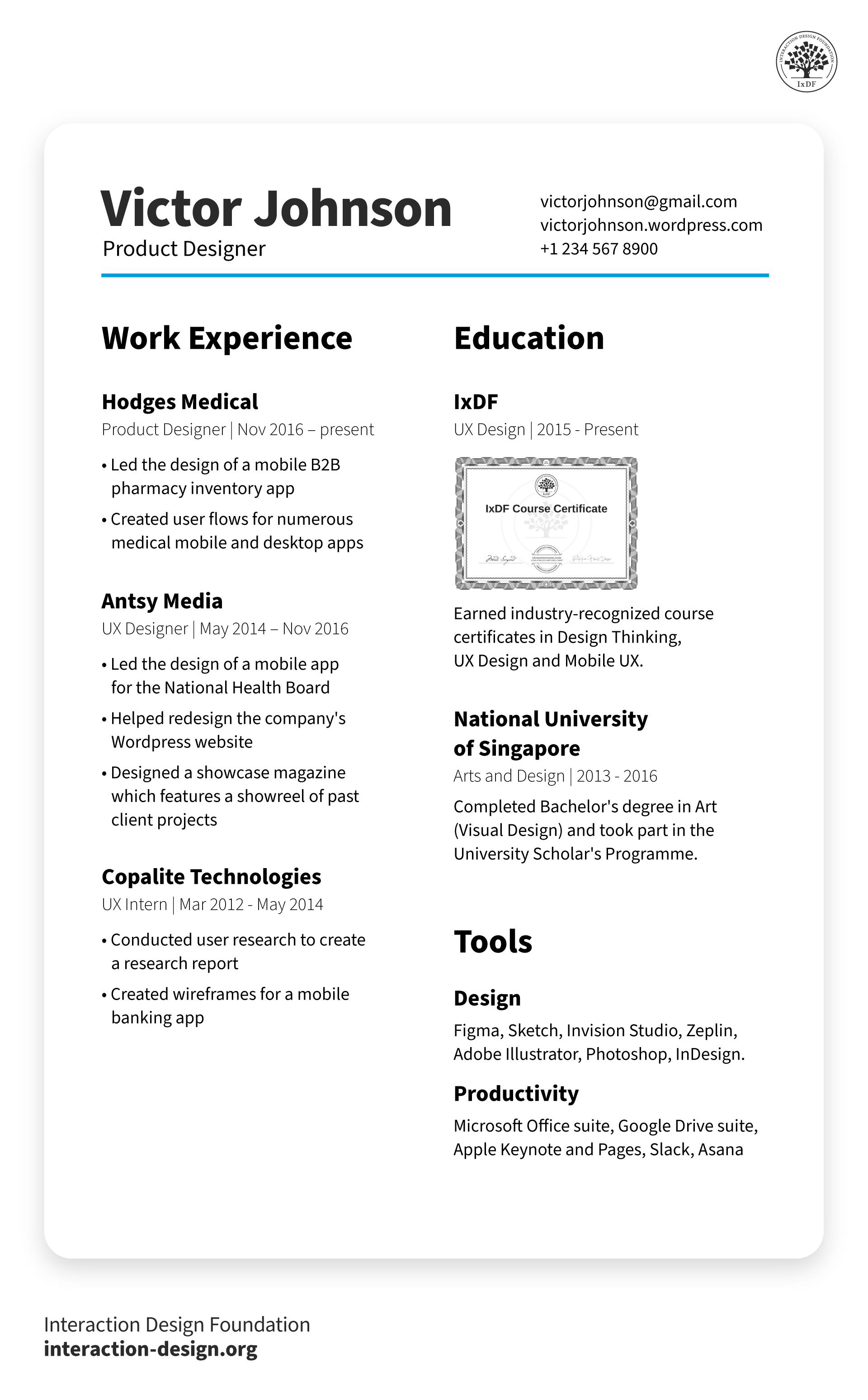
A strong UX resume includes several essential components that collectively showcase a designer's skills, experiences, and professional identity. Each section should be carefully tailored to ensure relevance and maximize impact. The point is to highlight their unique qualifications for a specific job or project.
A resume should contain the following sections:
Contact information: Full name, phone number, email address, LinkedIn profile, and a link to your portfolio.
Professional summary: A brief summary highlighting expertise, experience, and key achievements in UX design.
Tip: Tailor this section to the specific job or project. Use keywords from the job description, focus on what makes you unique and mention any specializations or standout projects.
Portfolio link: A portfolio showcases your design work in detail.
Tip: If it’s a web-based portfolio, make sure the portfolio URL is easy to read and remember. A custom domain or a professional platform like Behance or Dribbble can make a strong first impression. If you have a pdf portfolio, include a Google Drive, Dropbox or WeTransfer link so the recruiter or hiring manager can download it.
A link to a LinkedIn profile: Recruiters consult LinkedIn to learn more about applicants.
Tip: Ensure your resume is consistent with your LinkedIn presence.
Skills: List relevant skills such as wireframing, prototyping, user research, usability testing, information architecture, and design tools like Figma, etc.
Tip: Categorize skills into sections like 'Design Tools', 'Research Methods', and 'Technical Skills' to make it easier for recruiters to scan. Highlight any advanced or niche skills that are in demand.
Work experience: Detailed descriptions of previous roles with a focus on UX-related responsibilities and achievements. Include company name, job title, and dates of employment.
Tip: Use bullet points to highlight specific projects and achievements. Quantify impact where possible (e.g., "Increased user satisfaction by 20% through redesigning the onboarding process"). Start each bullet point with an action verb to convey a sense of activity and accomplishment.
Education: Educational background, including degrees, institutions, and graduation dates. Include any specialized courses or certifications in UX design.
Tip: If you have completed any notable projects or received awards during your education, mention them. If you have attended UX bootcamps or workshops, include these to show your commitment to continuous learning.
Awards: Any awards or recognitions received for your work in UX design.
Tip: Include a brief description of the context and significance of the awards. If possible, link to the project or work that earned the recognition.
8. Relevant miscellany: Mention any additional experience that can be leveraged. For example:
Teaching experience;
Fluency in another language;
Authoring of UX articles on (e.g.) Medium;
Relevant achievements as a volunteer/hobbyist.
Other Tips to Get Your Resume Noticed
Overall, a resume is a story that summarizes you and presents an impressive image of yourself—achievements should speak for themselves. The words you choose portray your attitude. So, convince recruiters that you’re a powerhouse without saying it directly. Show the value you can bring them, don’t tell. Credibility is all-important, and your resume should lead users (recruiters) to a call to action (to examine your portfolio) just like anything else you design would. How to Craft a Powerful UX Resume
After carefully reading the recruiter’s specifications, you should include everything they request in your resume. This typically includes:
Personal details: Your name, job title (if appropriate) and contact information (e.g., email).
Your photo: In a professional environment or a LinkedIn-style headshot picture.
Work experience: Your current and previous jobs listed in reverse chronological order (latest first). Only include relevant roles (though some non-UX activities can show valuable personality traits—e.g., skydiving).
Education: Only university/college/vocational-school-level achievements.
A self-write-up: A brief professional summary of yourself. Highlight achievements in a few, objectively worded sentences that tell your story.
Your skills and tools: If you have niche skills (e.g., in UX research) or are skilled in a broad range of UX tools, declare them but prioritize your skills.
Relevant miscellany: Mention any experience you can leverage – e.g.,
Teaching experience;
Fluency in another language;
Authoring of UX articles on (e.g.) Medium;
Relevant achievements as a volunteer/hobbyist.
Other Tips to Get Your Resume Noticed
Overall, a resume is a story that summarizes you and presents an impressive image of yourself—achievements should speak for themselves. The words you choose portray your attitude. So, convince recruiters that you’re a powerhouse without saying it directly. Show the value you can bring them, don’t tell. Credibility is all-important, and your resume should lead users (recruiters) to a call to action (to examine your portfolio) just like anything else you design would.
© Interaction Design Foundation, CC BY-SA 4.0
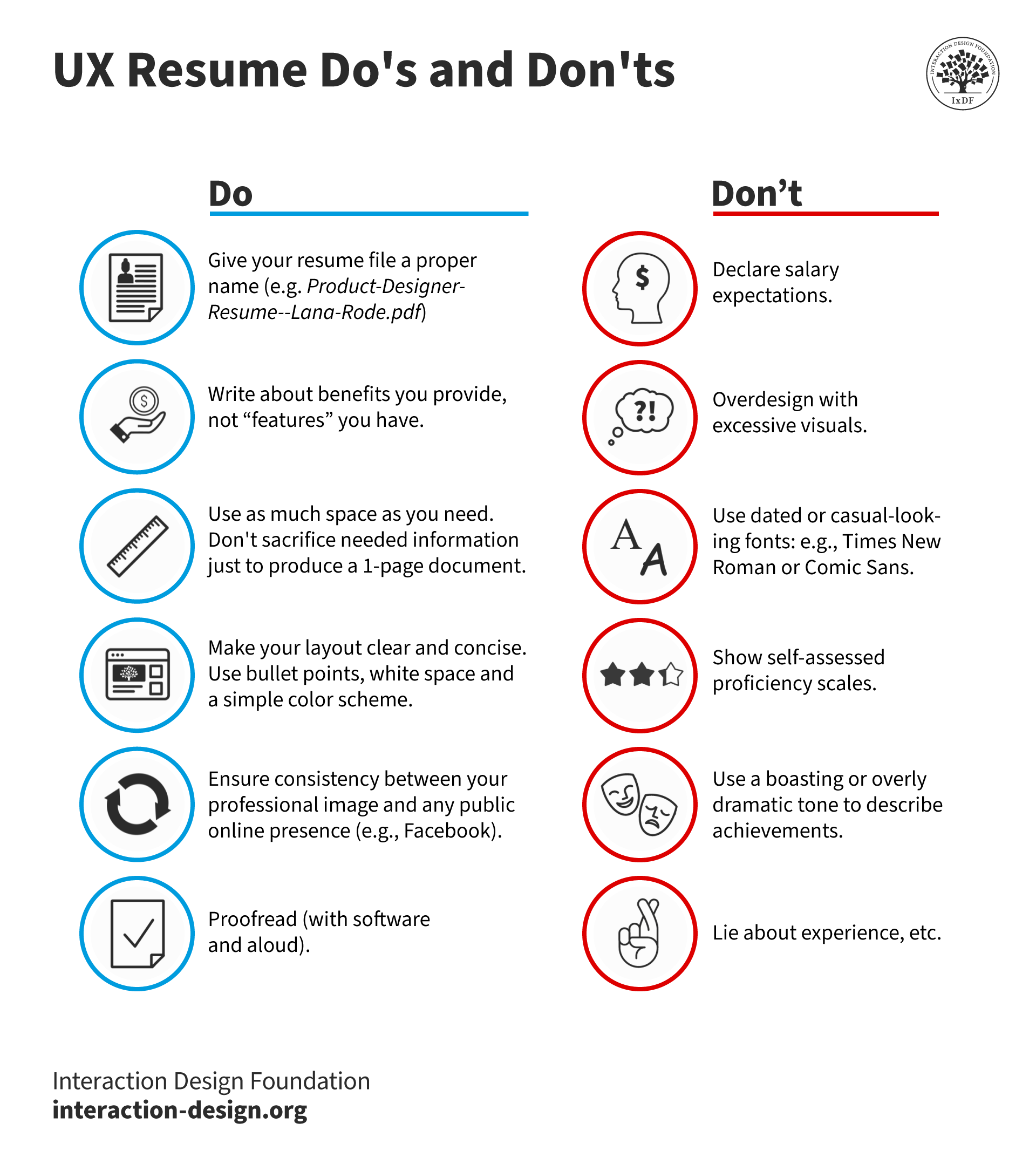
Visual design: Resumes should be visually appealing but not overly complex. Use clean, readable fonts and a logical layout. Consistency in font size, color scheme, and spacing is key.
Portfolio link: Always include a link to your online portfolio. If you have a pdf portfolio, include a Google Drive, Dropbox or WeTransfer link so the recruiter or hiring manager can download it.
Customization: This is extremely important. Resumes and portfolios should be tailored to each job application. Highlight the skills and experiences that are most relevant to the job description.
Keywords: Use keywords from the job description to pass through Applicant Tracking Systems (ATS) and to catch the recruiter's eye.
Storytelling: Much like with portfolios, use a narrative style to describe experiences and projects. Explain the problem, the approach and the results.