Design sprints are an intense 5-day process where user-centered teams tackle design problems. Working with expert insights, teams ideate, prototype and test solutions on selected users. Google’s design sprint is the framework to map out challenges, explore solutions, pick the best ones, create a prototype and test it.
“To accomplish great things, we must not only act, but also dream; not only plan, but also believe.”
— Anatole France, Poet, journalist & novelist
How to Run (or Do) a Design Sprint:
Design Sprints – How to Get Closer to Great Solutions in Just One Week
Former Google Ventures design partner Jake Knapp devised the design sprint process for Google in 2010. He drew inspiration from areas such as Google's product development culture and IDEO’s design thinking workshops. In design sprints, teams work on problems and goals differently than they do when confined to their departments in the traditional waterfall process. A carefully selected team from across an organization collaborates and will go from defining a user problem to testing a potential solution within 5 days. They use a systematic approach and efficient time management.
Sprints are also integral to agile development, where self-organized, cross-functional teams work to produce short-term deliverables and improve quality while keeping a careful watch over current user needs and any changing circumstances.
The main value of sprints is the speed at which design teams can concentrate on one or more user needs and sharply defined goals. Under time-boxed conditions, team members work first to understand these and then progressively ideate, critique, and fine-tune their way towards a testable prototype. Eliminating distractions is key to this process, and the intense focus on specific user needs and goals calls for dedicated time away from everyday business. Since the design sprint process is streamlined and enables teams to produce deliverables and confirm or discard assumptions about users quickly, it helps to keep costs down. Therefore, cash-strapped startups can especially benefit from using design sprints.
Whatever the size of your organization, you should approach a design sprint like this:
Before a sprint, it’s vital to:
Select the right members for your small team—e.g., a facilitator to track the team’s progress, a financial expert, etc.
Reserve an entire workweek for the team to dedicate to the sprint so members can conveniently work undisturbed.
Stock up on Post-It notes, whiteboards and markers to use in the chosen location.
When ready, your team should approach the sprint this way:
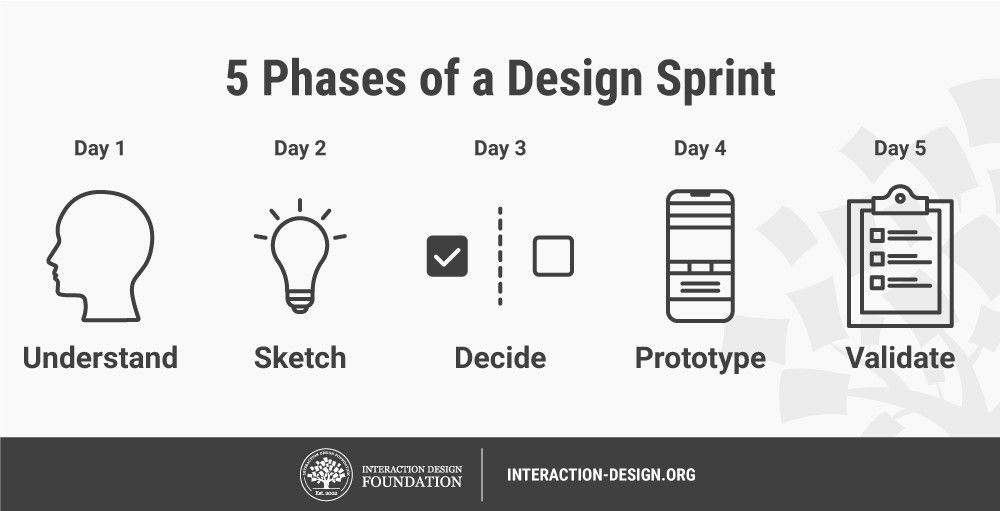
Monday: Work with experts across the organization to map out the problem and determine the sprint’s overall goal. You should proceed to understand your users and their problems via customer journey maps and empathy maps.
Tuesday: Explore potential solutions through ideation. Your team should examine sources of inspiration by seeing which existing ideas they can improve and freely sketching possible solutions.
Wednesday: Critique the team’s solutions to determine which are most likely to succeed. Adapt these ideas/sketches into storyboards.
Thursday: Construct a working prototype from the storyboards.
Friday: Conduct user testing of the prototype on a sample of at least five users.
At the end of the sprint, you can expect one of these outcomes:
A successful failure—where you learned valuable information from your prototype, and thus avoided sinking months into creating the wrong product. You should run a follow-up sprint to explore new angles.
A flawed win—where you clearly identified what works, what doesn’t and why. You should iterate to fine-tune adjustments and test again.
A resounding victory—where your prototype enabled users to solve their problems and met (if not exceeded) their expectations. You now have a clear path towards your end product.
Pros and Cons of Design Sprints
On the one hand, your team can:
Bypass lengthy debates and committee-style decision-making cycles.
Enjoy dynamic, focused collaboration.
Understand key users better.
All be clear about final deliverables.
Think creatively and experiment to explore a wider variety of ideas.
Avoid the need to compose detailed specifications.
Reduce the cost of failure of final deliverables during user testing.
Enjoy better ownership due to active collaboration.
Directly witness real users validating ideas.
On the other hand, your team should:
Consist of the right people who can commit to a 5-day sprint—potentially challenging for senior executives.
Choose the correct scope and expectations to ensure problems aren’t too complicated to solve in one week—this demands a careful eye to balance ambition with manageability.
Remember that success isn’t guaranteed.
Appreciate the intensity involved (hence “sprint”).
Collaboration, insight and ownership are key to locating the best, most viable solutions quickly and preventing your organization from pursuing costly failures. Depending on scope, some sprints can last less than five days. You should use the time-boxed, compressed structure of design sprints to explore the widest range of possible solutions and from there ideate to isolate those representing the deepest understanding of your users.