How to Show Hierarchical Data with Information Visualization

• 8 min read

846 Shares

Hierarchical data is essentially a specialized form of network data – in that while entities within the dataset do not have dependent relationships; they are all related to each other by the principle of containment. They, unlike standard data networks, do not use the principle of connection.

A hierarchy begins with a root entity. This might be the CEO of a company, the name of a book, the title of a folder, etc. and then the root entity has at least one “child node” and every further child node has zero or more children.

An entity which comes below another is a child node to the entity above. Similarly, an entity which comes above another is a parent node to the node below.

Hierarchical data is shown in tree graphs; so called because of their similarity to a tree’s structure (though a tree which has been turned upside down so that the root is at the top and the branches form below it).
Author/Copyright holder: MaEr. Copyright terms and licence: Public Domain.

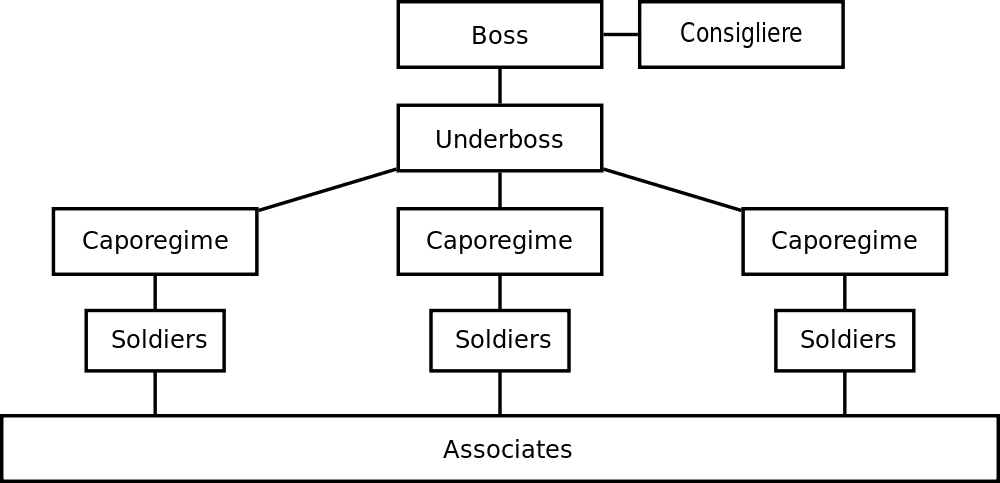
Above we see a simple tree diagram for the structure of a mafia family. The root entity is the boss of the family and the underboss is the first child entity. This is a very basic hierarchical relationship and it is possible to map much more complex hierarchies using information visualization techniques.

This diagram also includes a “sibling node” in the form of a consigliere who is not the boss of the organization but whose authority is equal to that of the boss.

The term “tree diagram” was coined by Noam Chomsky in his 1965 work; Aspects of the Theory of Syntax.

1. The File and Folder System

One of the most common hierarchies, which many of us deal with daily, is the computer file system. There is a root directory which then has a selection of child folders, which in turn have child folders, and in some or all of these folders there are files to be found.

The file tree is normally rendered in a visual format by the operating system. To provide a certain level of familiarity it uses images of the classic paper folder to connect the viewer with the property of the abstract file system used on the disc drive. This tree is interactive in nature and clicking on any given folder enables the user to determine what is inside that folder. However, it is also possible to use the command shell of an operating system to present this information textually too.
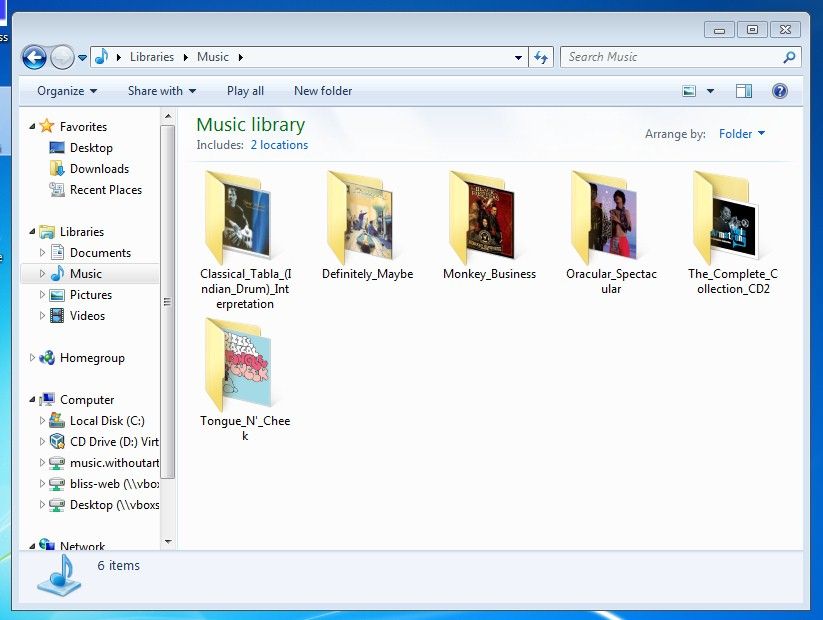
The Windows file system above is essentially a hierarchical tree and one with which many of us are already incredibly familiar with.

2. Cone Tree Diagram

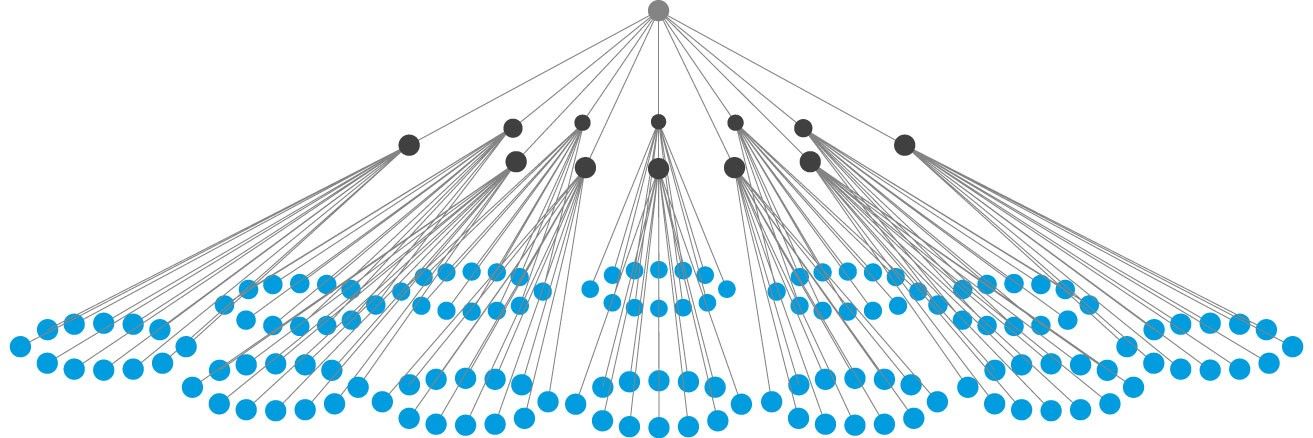
A cone tree is a 3-D hierarchy model which was developed at Xerox PARC in the 1990s. It was designed to enable the representation of hierarchies with large multiples of nodes. The 3D means that the physical limitations of displaying complexity on a flat screen can, to some extent, be overcome.

It works by beginning with a root node and then arranging all the child nodes of that root equidistant from the parent. This forms a cone with some transparency. The process is then performed again and again for each set of child nodes and the diameter of the cone is reduced at each level of the hierarchy.

In general cone tree diagrams are generated using software which enables interactivity and a useful property of these diagrams is the ability to rotate them so that a particular child is occluded (hidden) by another child.

You can also get an idea of the numbers of child entities on any parent simply by observing the density of shading on any given cone. (The edges used to define the cone are properties of the children).
3. The Botanical Tree Diagram

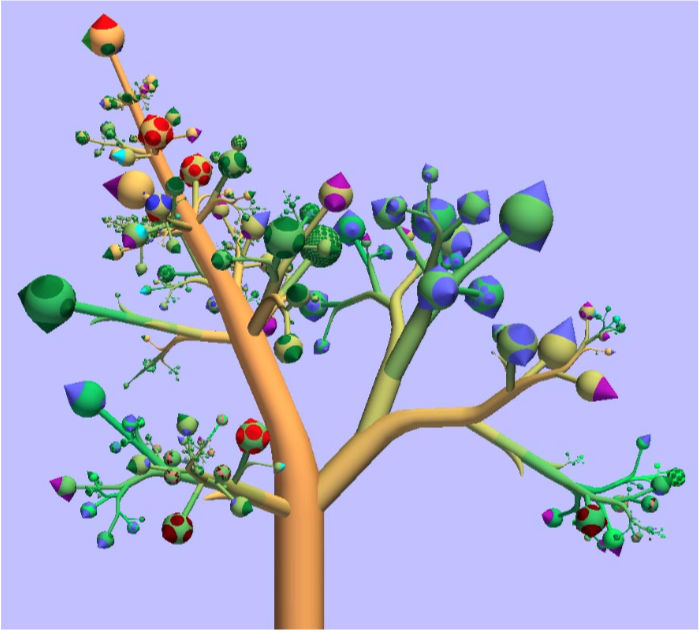
The botanical tree diagram was invented by researchers at Eindhoven University of Technology in the Netherlands. They had noticed that the limitation of tree diagrams was that they can quickly become too complex to be functional and then they noticed that real trees had leaves. They also saw that it didn’t matter how many leaves and branches there were on a tree – these were always distinct entities visually. So they extended the concept of tree diagrams by adding leaves and branches.

4. The Treemap Diagram

The treemap was invented by Ben Shneiderman of the University of Maryland in 1990. It represents hierarchies by using all the available space and in the form of nested rectangles.

The rectangles can be defined in proportion to the “space” that they take up within the data set. These information visualizations can be very useful for comparing nodes and see patterns within them.

The math involved to create a treemap is quite complex but the good news is that you don’t have to do that math; there are plenty of software packages available that can do this for you.
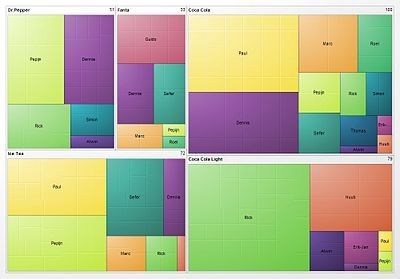
Above is a treemap of market share for different soft drinks. Comparing Coke, Coke Light, Ice Tea, Fanta and Dr. Pepper.

When Al Shalloway, the founder and CEO of Net Objectives, said; “Visualizations act as a campfire around which we gather to tell stories.” we wonder if he had envisioned such complex stories?

The Take Away

Representing hierarchical information is quite straightforward; in the majority of cases the information designer will either use a tree diagram (or a variant of a tree diagram) or a treemap to display the data in an efficient format for the user.

References & Where to Learn More:

Botanical Visualization of Huge Hierarchies

Learn about Ben Shneiderman.

Hero Image: Author/Copyright holder: Jurgen Appelo. Copyright terms and licence: CC BY 2.0

Learn More in This Course:

AI for Designers

12 days
13 % booked
View Course

What You Should Read Next

  • Read full article
    Information Overload, Why it Matters and How to Combat It - Article hero image
    Interaction Design Foundation logo

    Information Overload, Why it Matters and How to Combat It

    Designers often need to convey information to the users of their designs. Specialists in information visualization design in particular find themselves presenting data over and over again to their users. However, it’s important when developing your designs that you don’t create “information overload

    Social shares
    1.2k
    Published
    Read Article
  • Read full article
    How to Design an Information Visualization - Article hero image
    Interaction Design Foundation logo

    How to Design an Information Visualization

    Designing information visualizations offers you endless possibilities when it comes to end products, and it would be impossible to provide step-by-step instructions for all these possibilities. However, it is fair to say that while the end products may vary dramatically – the process by which we rea

    Social shares
    984
    Published
    Read Article
  • Read full article
    Preattentive Visual Properties and How to Use Them in Information Visualization - Article hero image
    Interaction Design Foundation logo

    Preattentive Visual Properties and How to Use Them in Information Visualization

    A preattentive visual property is one which is processed in spatial memory without our conscious action. In essence it takes less than 500 milliseconds for the eye and the brain to process a preattentive property of any image. This is good news for information visualization designers and graphic des

    Social shares
    978
    Published
    Read Article
  • Read full article
    How to Visualize Your Qualitative User Research Results for Maximum Impact - Article hero image
    Interaction Design Foundation logo

    How to Visualize Your Qualitative User Research Results for Maximum Impact

    When thinking about visualization of research results, many people will automatically have an image of a graph in mind. Do you have that image, too? You would be right in thinking that many research results benefit from a graph-like visualization, showing trends and anomalies. But this is mainly tru

    Social shares
    966
    Published
    Read Article
  • Read full article
    How to Conduct Focus Groups - Article hero image
    Interaction Design Foundation logo

    How to Conduct Focus Groups

    Focus groups have long been a popular tool in market research and have become more popular in user research in the recent past too. They consist of a group of between 5 and 10 users who work with a moderator/facilitator/researcher. The moderator will pose questions from a script to the group. Their

    Social shares
    926
    Published
    Read Article
  • Read full article
    Visual Mapping – The Elements of Information Visualization - Article hero image
    Interaction Design Foundation logo

    Visual Mapping – The Elements of Information Visualization

    Information visualization requires mapping data in a visual or occasionally auditory format for the user of the visualization. This can be challenging because while some data has a spatial relationship built in (for example, temperatures in cities around a country) many data sets don’t have a tradit

    Social shares
    907
    Published
    Read Article
  • Read full article
    The Properties of Human Memory and Their Importance for Information Visualization - Article hero image
    Interaction Design Foundation logo

    The Properties of Human Memory and Their Importance for Information Visualization

    It is important to know that while neuroscience has progressed dramatically over the last decades; there is no complete understanding of how human memory works. We know, for example, that data in the brain is stored in clusters of neurons but we don’t know how, precisely, it is stored or even how it

    Social shares
    903
    Published
    Read Article
  • Read full article
    Guidelines for Good Visual Information Representations - Article hero image
    Interaction Design Foundation logo

    Guidelines for Good Visual Information Representations

    Information visualization is not as easy as it might first appear, particularly when you are examining complex data sets. How do you deliver a “good” representation of the information that you bring out of the data that you are working with?While this may be a subjective area of information visualiz

    Social shares
    900
    Published
    Read Article
  • Read full article
    Information Visualization – A Brief Introduction - Article hero image
    Interaction Design Foundation logo

    Information Visualization – A Brief Introduction

    Have you ever thought about how much data flows past each of us in an ordinary day? From the newspaper you read at breakfast, to the e-mails you receive throughout the day, to the bank statements generated whenever you withdraw money or spend it, to the conversations we have, and so on?There is a ti

    Social shares
    873
    Published
    Read Article
  • Read full article
    Information Visualization – An Introduction to Multivariate Analysis - Article hero image
    Interaction Design Foundation logo

    Information Visualization – An Introduction to Multivariate Analysis

    Albert Einstein said; “If you can’t explain it simply, you don’t understand it well enough.” He could easily have been talking about the challenges of creating information visualizations for multivariate analysis.Multivariate analysis takes place when you have a data set with 4 or more dependent var

    Social shares
    816
    Published
    Read Article

Top Articles

Top Topic Definitions

Feel Stuck?
Want Better Job Options?

AI is replacing jobs everywhere, yet design jobs are booming with a projected 45% job growth. With design skills, you can create products and services people love. More love means more impact and greater salary potential.

At IxDF, we help you from your first course to your next job, all in one place.

See How Design Skills Turn Into Job Options
Privacy Settings
By using this site, you accept our Cookie Policy and Terms of Use.
Customize
Accept all

Be the One Who Inspires

People remember who shares great ideas.

Share on:

Academic Credibility — On Autopilot

Don't waste time googling citation formats. Just copy, paste and look legit in seconds.

Feel Stuck? Want Freedom?

Join 326,029+ designers who get one powerful email each week. Learn to design a life you love.

Next email in
1
day
13
hrs
30
mins
30
secs

Free forever. No spam. Unsubscribe anytime.