Cone Tree Diagrams

Your constantly-updated definition of Cone Tree Diagrams and collection of videos and articles.
Be a conversation starter: Share this page and inspire others!

98 Shares

What are Cone Tree Diagrams?

Cone tree diagrams are a form of informational visualization that are similar to tree diagrams, but typically contain more information and hierarchical data due to their 3D nature.

While a regular tree diagram shows hierarchical information directly, a cone tree diagram shows hierarchical information with nodes containing large multiples.

Standard practice involves using software to create cone tree diagrams. Software enables you to rotate the diagram and see every particular child or node that otherwise may have gone uncovered. Additionally, the added interactivity makes it more pleasant to use cone tree diagrams.

Learn More About Cone Tree Diagrams

Make learning as easy as watching Netflix: Learn more about Cone Tree Diagrams by taking the online IxDF Course Information Visualization.

Why? Because design skills make you valuable. In any job. Any industry.

In This Course, You'll

  • Get excited when you discover how to turn complex information into actionable visuals that drive people's decision-making and accelerate business results. Did you know that visuals are processed 60,000 times faster in the brain than text? That's why you can inform and persuade so quickly and effortlessly with information visualizations! With large amounts of information at the center of every company, your ability to visualize information is a highly sought-after skill and will help you excel in any job. You already visualize information every day, like highlighting important points in a presentation or sketching a diagram to explain an idea, so it's easier than you think to master Information Visualization, no matter your background.

  • Make yourself invaluable when you enlighten and motivate people with your visualization skills. Your new skills will empower you to transform the vast sea of information in journalism, marketing, research, User Experience, and User Interface design into clear, actionable insights. With easy-to-follow frameworks, you'll create visuals for apps and websites with user interfaces so easy to navigate that people will love them. More love, better business outcomes, and the kind of salary that reflects your value. As AI becomes a powerful tool for visualizing information, you stay in demand because your timeless human-centered design skills let you turn data into visuals people actually resonate with and act on. Remember those meetings overwhelmed by endless rows of data? It won't happen on your shift, as you'll transform complex information into impactful visuals that make your ideas stand out instantly.

  • Gain confidence and credibility as you learn from the best. You'll get step-by-step guidance to easily display any information type. You'll get downloadable templates to carry out user observations and conduct user interviews with empathy. This Information Visualization course will give you the practical, in-demand design skills you need to get your message across and stand out in your field!

It's Easy to Fast-Track Your Career with the World's Best Experts

Master complex skills effortlessly with proven best practices and toolkits directly from the world's top design experts. Meet your expert for this course:

  • Alan Dix: Author of the bestselling book “Human-Computer Interaction” and Director of the Computational Foundry at Swansea University.

Get an Industry-Recognized IxDF Course Certificate

Increase your credibility, salary potential and job opportunities by showing credible evidence of your skills.

IxDF Course Certificates set the industry gold standard. Add them to your LinkedIn profile, resumé, and job applications.

Course Certificate Example

Be in distinguished company, alongside industry leaders who train their teams with the IxDF and trust IxDF Course Certificates.

Our clients: IBM, HP, Adobe, GE, Accenture, Allianz, Phillips, Deezer, Capgemin, Mcafee, SAP, Telenor, Cigna, British Parliament, State of New York

All Free IxDF Articles on Cone Tree Diagrams

Read full article
How to Show Hierarchical Data with Information Visualization - Article hero image
Interaction Design Foundation logo

How to Show Hierarchical Data with Information Visualization

Hierarchical data is essentially a specialized form of network data – in that while entities within the dataset do not have dependent relationships; they are all related to each other by the principle of containment. They, unlike standard data networks, do not use the principle of connection.A hiera

Social shares
846
Published
Read Article

How to Show Hierarchical Data with Information Visualization

How to Show Hierarchical Data with Information Visualization

Hierarchical data is essentially a specialized form of network data – in that while entities within the dataset do not have dependent relationships; they are all related to each other by the principle of containment. They, unlike standard data networks, do not use the principle of connection.

A hierarchy begins with a root entity. This might be the CEO of a company, the name of a book, the title of a folder, etc. and then the root entity has at least one “child node” and every further child node has zero or more children.

An entity which comes below another is a child node to the entity above. Similarly, an entity which comes above another is a parent node to the node below.

Hierarchical data is shown in tree graphs; so called because of their similarity to a tree’s structure (though a tree which has been turned upside down so that the root is at the top and the branches form below it).
Author/Copyright holder: MaEr. Copyright terms and licence: Public Domain.

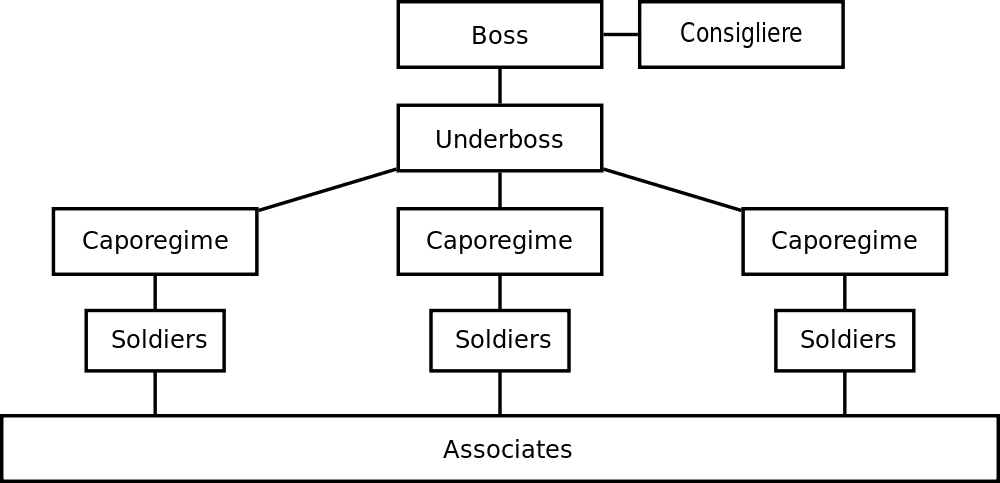
Above we see a simple tree diagram for the structure of a mafia family. The root entity is the boss of the family and the underboss is the first child entity. This is a very basic hierarchical relationship and it is possible to map much more complex hierarchies using information visualization techniques.

This diagram also includes a “sibling node” in the form of a consigliere who is not the boss of the organization but whose authority is equal to that of the boss.

The term “tree diagram” was coined by Noam Chomsky in his 1965 work; Aspects of the Theory of Syntax.

1. The File and Folder System

One of the most common hierarchies, which many of us deal with daily, is the computer file system. There is a root directory which then has a selection of child folders, which in turn have child folders, and in some or all of these folders there are files to be found.

The file tree is normally rendered in a visual format by the operating system. To provide a certain level of familiarity it uses images of the classic paper folder to connect the viewer with the property of the abstract file system used on the disc drive. This tree is interactive in nature and clicking on any given folder enables the user to determine what is inside that folder. However, it is also possible to use the command shell of an operating system to present this information textually too.

The Windows file system above is essentially a hierarchical tree and one with which many of us are already incredibly familiar with.

2. Cone Tree Diagram

A cone tree is a 3-D hierarchy model which was developed at Xerox PARC in the 1990s. It was designed to enable the representation of hierarchies with large multiples of nodes. The 3D means that the physical limitations of displaying complexity on a flat screen can, to some extent, be overcome.

It works by beginning with a root node and then arranging all the child nodes of that root equidistant from the parent. This forms a cone with some transparency. The process is then performed again and again for each set of child nodes and the diameter of the cone is reduced at each level of the hierarchy.

In general cone tree diagrams are generated using software which enables interactivity and a useful property of these diagrams is the ability to rotate them so that a particular child is occluded (hidden) by another child.

You can also get an idea of the numbers of child entities on any parent simply by observing the density of shading on any given cone. (The edges used to define the cone are properties of the children).
3. The Botanical Tree Diagram

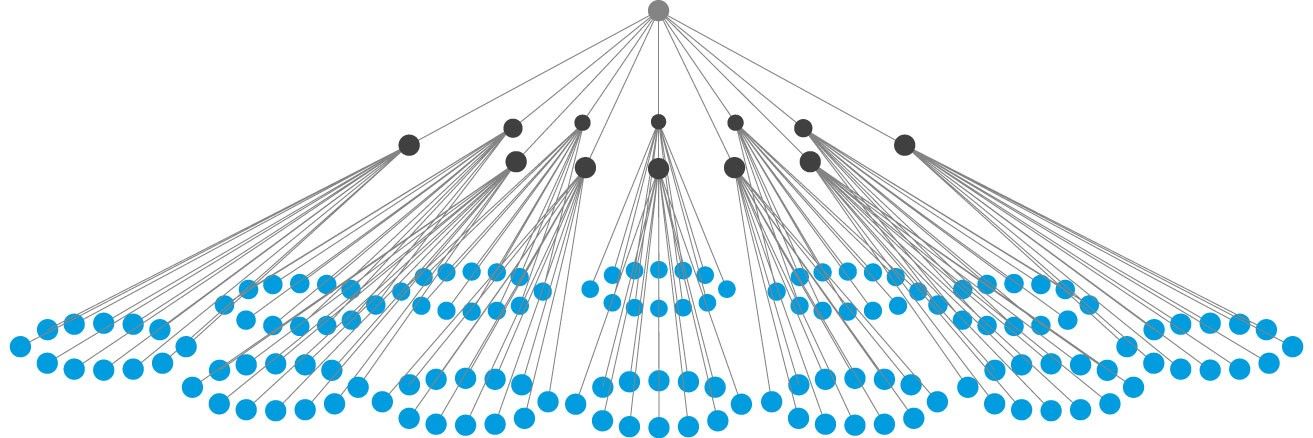
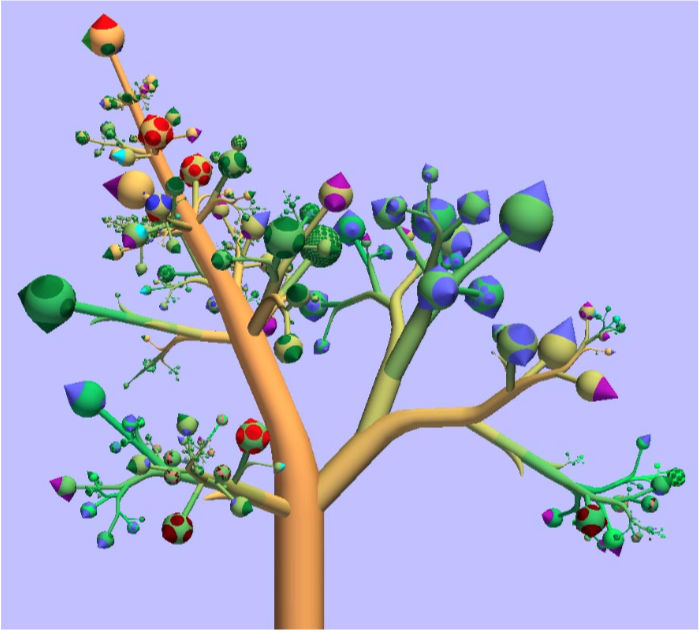
The botanical tree diagram was invented by researchers at Eindhoven University of Technology in the Netherlands. They had noticed that the limitation of tree diagrams was that they can quickly become too complex to be functional and then they noticed that real trees had leaves. They also saw that it didn’t matter how many leaves and branches there were on a tree – these were always distinct entities visually. So they extended the concept of tree diagrams by adding leaves and branches.

4. The Treemap Diagram

The treemap was invented by Ben Shneiderman of the University of Maryland in 1990. It represents hierarchies by using all the available space and in the form of nested rectangles.

The rectangles can be defined in proportion to the “space” that they take up within the data set. These information visualizations can be very useful for comparing nodes and see patterns within them.

The math involved to create a treemap is quite complex but the good news is that you don’t have to do that math; there are plenty of software packages available that can do this for you.
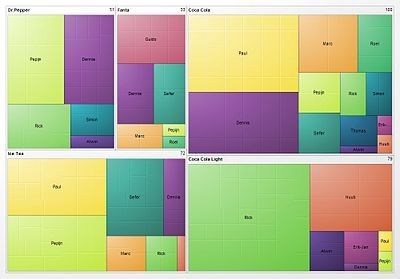
Above is a treemap of market share for different soft drinks. Comparing Coke, Coke Light, Ice Tea, Fanta and Dr. Pepper.

When Al Shalloway, the founder and CEO of Net Objectives, said; “Visualizations act as a campfire around which we gather to tell stories.” we wonder if he had envisioned such complex stories?

The Take Away

Representing hierarchical information is quite straightforward; in the majority of cases the information designer will either use a tree diagram (or a variant of a tree diagram) or a treemap to display the data in an efficient format for the user.

References & Where to Learn More:

Botanical Visualization of Huge Hierarchies

Learn about Ben Shneiderman.

Hero Image: Author/Copyright holder: Jurgen Appelo. Copyright terms and licence: CC BY 2.0

Feel Stuck?
Want Better Job Options?

AI is replacing jobs everywhere, yet design jobs are booming with a projected 45% job growth. With design skills, you can create products and services people love. More love means more impact and greater salary potential.

At IxDF, we help you from your first course to your next job, all in one place.

See How Design Skills Turn Into Job Options
Privacy Settings
By using this site, you accept our Cookie Policy and Terms of Use.
Customize
Accept all

Be the One Who Inspires

People remember who shares great ideas.

Share on:

Academic Credibility — On Autopilot

Don't waste time googling citation formats. Just copy, paste and look legit in seconds.