Blind test participant sitting at laptop next to colleague

Accessibility Testing Essentials: Get the Real, Valuable Picture by Testing in Context

• 24 min read

234 Shares
Save

In this lesson, you'll discover why accessibility testing is essential for validating your design work and how it differs from both usability testing and code-level QA. You'll examine the critical importance of testing with users' own devices and configurations in their natural environments, rather than relying on sterile lab setups.

In this video, Frank Spillers, Service Designer and Founder and CEO of Experience Dynamics, shares practical lessons from real testing sessions. You'll learn the chair-side methodology for accessibility testing, how to gather metrics such as success rates and task completion times, and why this hands-on user validation reveals insights that guidelines and automated checkers simply cannot.

Transcript

Current Testing Standards

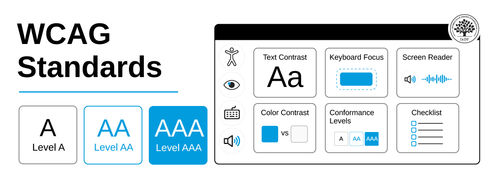
  • WCAG 2.2 Level AA is the current baseline standard (published October 2023).

  • New criteria include mobile accessibility, focus appearance, and cognitive considerations.

  • Section 508 was updated in 2018 to align with WCAG 2.0 Level AA (not an ongoing "refresh").

Modern Assistive Technology Landscape

Testing should include diverse assistive technology beyond traditional desktop screen readers:

Mobile Screen Readers

  • iOS VoiceOver.

  • Android TalkBack.

Voice Control

  • Apple Voice Control.

  • Dragon NaturallySpeaking.

Switch Access

  • Single-switch or multi-switch navigation for motor disabilities.

Screen Reader Diversity

The screen reader landscape has diversified significantly since the video was recorded:

  • NVDA (free, open-source for Windows): Widely adopted.

  • Built-in options: VoiceOver (macOS/iOS), Narrator (Windows), TalkBack (Android).

  • Institutional licensing: Better models available for JAWS and other commercial tools.

Demo version limitations remain a consideration for institutional setups.

Remote Testing Capabilities

Post-2020 developments have expanded remote accessibility testing:

  • Screen-sharing and remote-observation tools are now commonplace.

  • Remote unmoderated testing platforms are available.

  • User-controlled environments remain ideal when feasible.

Best practice: Test in the user's natural environment with their configured assistive technology, whether in person or remotely.

Mobile Accessibility Testing

Mobile testing is now essential, not optional:

  • Touch gesture alternatives (WCAG 2.2 requirement).

  • Touch target sizes (minimum 24×24 CSS pixels).

  • Mobile screen reader navigation patterns differ from desktop.

  • Screen orientation flexibility.

  • Zoom/magnification at the mobile level.

Cognitive Accessibility Testing

WCAG 2.2 strengthened cognitive accessibility requirements:

  • Test with users who have cognitive disabilities (dyslexia, ADHD, autism spectrum, memory impairments).

  • Evaluate clear language, consistent navigation, and error prevention.

  • Test accessible authentication methods (no cognitive function tests).

  • Consider situational cognitive load (stress, distraction, multitasking).

Automated Testing as a Complement

Automated tools complement (but don't replace) user testing:

  • Tools: axe-core, Lighthouse, WAVE, Pa11y.

  • Coverage: Catch 30-40% of issues automatically.

  • Integration: CI/CD pipelines enable continuous monitoring.

  • Limitation: Cannot evaluate usability, context, or user experience quality.

User testing remains essential for validating real-world accessibility.

Testing Across Disability Spectrum

Comprehensive accessibility testing includes:

  • Visual: Screen readers, magnification, high contrast, and color blindness.

  • Motor: Keyboard-only, voice control, switch access, reduced dexterity.

  • Auditory: Captions, transcripts, visual alternatives.

  • Cognitive: Clear content, consistent navigation, error prevention.

  • Temporary/situational: Bright environments, noisy contexts, one-handed use.

International Standards

Beyond US Section 508:

  • European Union: EN 301 549, European Accessibility Act (2025 implementation).

  • UK: Public Sector Bodies Accessibility Regulations 2018.

  • Canada: Accessible Canada Act.

  • Australia: Disability Discrimination Act requirements.

Most standards align with WCAG 2.1 Level AA or WCAG 2.2 Level AA.

Learn More in This Course:

New

Accessibility in Practice: Build Digital Experiences Everyone Can Use

Course Closed
Fully booked

Learn Design and AI From the Best

Get one powerful email each week, like 315,251 others.

Next email in:

What You Should Read Next

  • Read full article
    Object-Oriented UI Design: How You Can Collaborate Seamlessly with Developers and Build Better Products - Article hero image

    Object-Oriented UI Design: How You Can Collaborate Seamlessly with Developers and Build Better Products

    You’re at your routine health checkup, sipping an iced coffee on a hot day. Suddenly, you get a sharp pain in your head. The doctor looks up from her notes, a sympathetic expression on her face. “You’re experiencing sphenopalatine ganglioneuralgia.” Your heart sinks. The coffee cup drops to the floo

    Social shares
    94
    Published
    Read Article
  • Read full article
    Copy These 3 Industry-Leading Apps and Turn Object-Oriented Design into Your Secret Career Advantage - Article hero image

    Copy These 3 Industry-Leading Apps and Turn Object-Oriented Design into Your Secret Career Advantage

    Which apps do you use throughout your day? Maybe you manage your projects on Trello, use Notion as an internal docs site, and maybe, just maybe, you do some swiping on Tinder during your lunch break. Despite looking nothing alike, these three highly successful apps are organized around the same idea

    Social shares
    92
    Published
    Read Article
  • Read full article
    7 Reasons Object-Oriented UI Design Will Grow Your Career - Article hero image

    7 Reasons Object-Oriented UI Design Will Grow Your Career

    Vacation time! You book your flight. You have a reservation. It's real. You paid for it. And yet, when you open the airline's app to look at it, it's surprisingly elusive. You don't want to check in, you don't want to change it, you just want to find it and check the details. It's not on the home sc

    Social shares
    93
    Published
    Read Article
  • Read full article
    What are the Stages of Creativity? - Article hero image

    What are the Stages of Creativity?

    Let’s explore the various stages of creativity so you can get a firmer idea of its true nature as such a powerful human resource. Graham Wallas was the first to create an overview of a creative process back in 1926. As you can imagine, lots of iterations have emerged since then. Some of these theori

    Social shares
    1.1k
    Published
    Read Article
  • Read full article
    Plug, Play, Persona: Your Free Template and Step-by-Step Guide - Article hero image

    Plug, Play, Persona: Your Free Template and Step-by-Step Guide

    You've searched for the perfect persona template, downloaded dozens, yet none quite hit the mark. Here's the problem: Most templates fail you because they focus on demographics, fancy sliders, and irrelevant details. None of these things help drive decisions or create solutions that improve lives. B

    Social shares
    126
    Published
    Read Article
  • Read full article
    Keyboard Navigation and Data Entry - Article hero image

    Keyboard Navigation and Data Entry

    Forms are an essential part of many interactions, but good form layout and clear labels are only part of the picture. Forms also need to work in all the ways users interact with them. Not everyone uses a mouse. Many users rely on keyboards, whether by preference, motor impairments, or because they u

    Social shares
    156
    Published
    Read Article
  • Read full article
    Expert Evaluation: Identify Problems Before You Recruit Users - Article hero image

    Expert Evaluation: Identify Problems Before You Recruit Users

    Before you have a single real user in a testing session, you can already find a significant proportion of the usability problems in a design. Expert evaluation, also known as heuristic evaluation, is one of the most cost-effective methods available to UX practitioners. It requires no recruitment, fa

    Social shares
    157
    Published
    Read Article
  • Read full article
    Perceptual Issues in Dynamic Interfaces - Article hero image

    Perceptual Issues in Dynamic Interfaces

    In this video, William Hudson, User Experience Strategist and Founder of Syntagm Ltd, explores the psychological phenomena that affect how users perceive changes in dynamic web interfaces. While the focus is on web pages, these principles apply to any interactive technology, from desktop application

    Social shares
    190
    Published
    Read Article
  • Read full article
    Legal Aspects of Accessibility - Article hero image

    Legal Aspects of Accessibility

    Understanding the legal requirements for accessibility is essential for anyone building digital products and services. Accessibility legislation exists worldwide, and failure to comply can result in costly lawsuits and reputational damage. This lesson explores the legal landscape, compliance standar

    Social shares
    160
    Published
    Read Article
  • Read full article
    Be Afraid! The Silent Role of Fear in Decision Making - Article hero image

    Be Afraid! The Silent Role of Fear in Decision Making

    Fear plays such a dominant role in our lives that several businesses and products have succeeded on the back of this single emotion. Here’s a look at some of the fears that affect our decision making, how businesses and products exploit these tendencies to their advantage, and how, as a designer, yo

    Social shares
    723
    Published
    Read Article

Top Articles

Top Topic Definitions

39% of Today's Skills Will Change by 2030

The World Economic Forum expects 39% of today's skills to be transformed or become outdated by 2030.

The good news is that jobs in UX / UI design and AI are among the fastest-growing professions globally.

Build Skills That Keep You Relevant

Privacy Settings

By using this site, you accept our Cookie Policy and Terms of Use.
Customize
Accept all

Be the One Who Inspires

People remember who shares great ideas.

Share on:

Academic Credibility — On Autopilot

Don't waste time googling citation formats. Just copy, paste and look legit in seconds.

Learn Design and AI From the Best

Get one powerful email each week, like 315,251 others.

Next email in: