Rusty oval utility cover embossed with TEST WELL and a central upward-pointing arrow

Tools for User Testing and Gaining Feedback

• 5 min read

443 Shares
Save

There comes a point in every project when you have to start testing the ideas that you have with users and collect their feedback. Today, we’ll be taking a look at the automated tools you can use to do this with.

Verify

Author/Copyright holder: VerifyApp. Copyright terms and licence: All rights reserved Img source


Verify’s been built so that it is easy for you to test your screenshots of design work with users. It’s intended to allow you to understand your user’s expectations and their reactions before you start coding. It has a pretty good suite of reports that you can automate that should help you in your decision making processes too. It’s free for 30 days but after that you have to pony up a subscription which starts at $19 a month.

Poll Daddy

Poll Daddy is an automated survey tool; it has a free account with some restrictions on how the survey you pose looks and works and also two subscription options from $200 a year. We think the lack of a print option is a bit mean for the free account and that means if you want to use it – you’re probably going to end up paying for it. They have a pretty impressive client list so you’ll be in good company.

IntuitionHQ
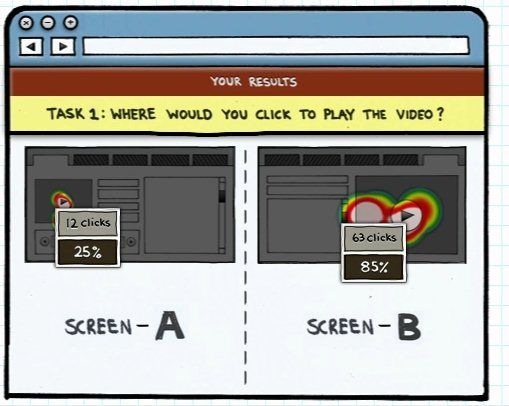

Author/Copyright holder: WhatsNew. Copyright terms and licence: All rights reserved Img source

Now with an iPad App too; Intuition HQ offers usability testing for free with some features requiring payment. IntuitionHQ’s website is not very specific about the costs involved for those additional features and the iPad readiness costs more again. It’s this lack of clarity that may put you off starting with IntuitionHQ.

PICKFU

We don’t know if these folks have noticed that FU is not the greatest of abbreviations… but PICKFU is highly versatile testing tool. You can test book covers, lean startup ideas, UI mockups and marketing copy easily with PICKFU. This functionality does come at a price… and you can expect to pay around $50 a month if you want to use it regularly.

Usability Tools

Usability Tools is also a subscription model (though it has a 14 day trial) and it focuses on both UX testing and conversion testing for your ads, forms, etc. We like the informal look and feel of their offering and think it makes for user testing that brings results.

UsabilityHub
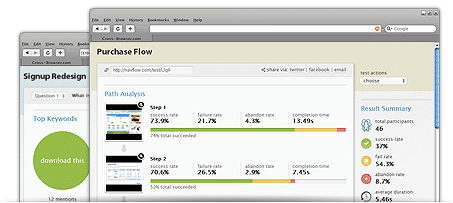

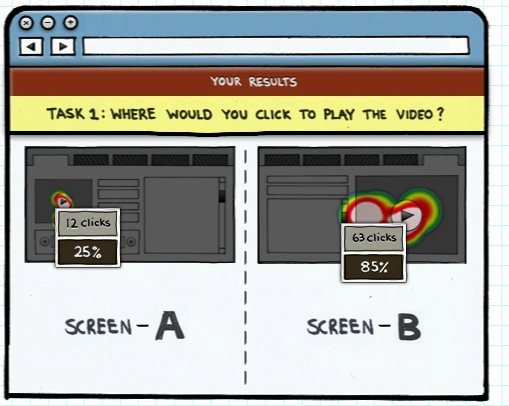
Author/Copyright holder: Five Second Test. Copyright terms and licence: All rights reserved Img source

UsabilityHub lets you test the first impression of a design; you upload your screenshots/mockups and then ask testers to complete a test in 5 seconds or less. They then offer up their impression of what they have seen. There is a free service but it is only open to your own testers – you need to pay for membership or buy individual responses if you want them to supply testers.

Disclaimer

All these tools are reputable but we don’t recommend any specific tool for any of your projects; you need to choose the right tool for your project and don’t forget there are many other tools available to you too.

Header Image: Author/Copyright holder: Doran. Copyright terms and licence: CC BY-NC-ND 2.0



Learn More in This Course:

Learn Design and AI From the Best

Get one powerful email each week, like 312,424 others.

Next email in:

What You Should Read Next

  • Read full article
    The Relationship Between Visual Design and User Experience Design - Article hero image

    The Relationship Between Visual Design and User Experience Design

    A common perception about UX designers is that we are artists who can create beautiful interfaces from a blank canvas. While the aesthetics of products are important, visual design is only one aspect of the design process – in which team members with different skillsets and expertise collaborate

    Social shares
    802
    Published
    Read Article
  • Read full article
    You’re Not Bad at Presenting; You Just Haven’t Mastered the Right Way (Yet) - Article hero image

    You’re Not Bad at Presenting; You Just Haven’t Mastered the Right Way (Yet)

    Ever walked out of a presentation thinking, “That could’ve gone so much better, maybe I’m just not a presenter”? You’re not alone. And you’re not the problem. You simply haven’t been shown an easy, clear, repeatable way to prepare, deliver and follow up.Presenting is not an innate talent; it’s a ski

    Social shares
    359
    Published
    Read Article
  • Read full article
    The Power of Mapping - Article hero image

    The Power of Mapping

    The map is one of the earliest and most important human inventions. It helps us to navigate our complex world. Maps simplify complex spaces, create shared understanding, reveal hidden insights and help us coordinate action. Around 25,000 B.C. a person carved the earliest known map into a mammoth tus

    Social shares
    588
    Published
    Read Article
  • Read full article
    The Past, Present, and Future of Virtual Reality - Article hero image

    The Past, Present, and Future of Virtual Reality

    Virtual Reality (VR) has come a long way since its humble beginnings—with stereoscopic images back in the 1800s—“astronomically” far, in fact! Twenty-first century VR catapults users into immersive and interactive 3D environments, ones that let them experience something far beyond what they find in

    Social shares
    647
    Published
    Read Article
  • Read full article
    Turn Your Non-Design Experience into Design Portfolio Gold - Article hero image

    Turn Your Non-Design Experience into Design Portfolio Gold

    Have you ever wondered how to transition into UX and product design from a different career background without feeling insecure? Let's uncover strategies to confidently bridge the gap and showcase your skills to prospective employers with confidence and clarity.In this video, Morgane Peng, Desi

    Social shares
    508
    Published
    Read Article
  • Read full article
    Structure First: The Inverted Pyramid and Visual Organization - Article hero image

    Structure First: The Inverted Pyramid and Visual Organization

    This clip examines two principles that work hand in hand to make web content readable: the inverted pyramid approach to information order and the use of visual structure to help users scan efficiently. William Hudson, UX Strategist and Founder of Syntagm Ltd, describes the theoretical basis and prac

    Social shares
    207
    Published
    Read Article
  • Read full article
    What Is Card Sorting? - Article hero image

    What Is Card Sorting?

    In this video, William Hudson, UX Strategist and Founder of Syntagm Ltd, introduces card sorting: what it is, where it comes from, and the broad range of problems it can help solve.Card sorting is a research technique in which participants organize a set of items into groups that make sense to them,

    Social shares
    174
    Published
    Read Article
  • Read full article
    Design Accessible Navigation for Keyboards and Screen Readers - Article hero image

    Design Accessible Navigation for Keyboards and Screen Readers

    Accessibility is often treated as a finishing touch, but for navigation, it belongs at the foundation. Menus are how users reach everything else on a site, so a menu that works only with a mouse quietly shuts out anyone who depends on a keyboard, a screen reader, or another form of assistive technol

    Social shares
    174
    Published
    Read Article
  • Read full article
    The Scent of Information: Give Users the Confidence to Click - Article hero image

    The Scent of Information: Give Users the Confidence to Click

    William Hudson, UX Strategist and Founder of Syntagm Ltd, introduces the scent of information as a model for understanding how users navigate toward their goals, and sets out the principles for writing navigation links that strengthen that scent.Information Foraging and the Scent of InformationThe s

    Social shares
    173
    Published
    Read Article
  • Read full article
    4 UI Design Tips Every Designer Needs to Know - Article hero image

    4 UI Design Tips Every Designer Needs to Know

    User interface (UI) design can make or break any digital product. A user often won’t even notice when they interact with a great UI. They feel the visual appeal and simply trust it. On the contrary, a bad UI design can prevent the user from interacting with a product intuitively or at all and lead t

    Social shares
    646
    Published
    Read Article

Top Articles

Top Topic Definitions

39% of Today's Skills Will Change by 2030

The World Economic Forum expects 39% of today's skills to be transformed or become outdated by 2030.

The good news is that jobs in UX / UI design and AI are among the fastest-growing professions globally.

Build Skills That Keep You Relevant

Privacy Settings

By using this site, you accept our Cookie Policy and Terms of Use.
Customize
Accept all

Be the One Who Inspires

People remember who shares great ideas.

Share on:

Academic Credibility — On Autopilot

Don't waste time googling citation formats. Just copy, paste and look legit in seconds.

Learn Design and AI From the Best

Get one powerful email each week, like 312,424 others.

Next email in: