Your cover letter helps sell you as a good fit for the company and serves to introduce your resume and portfolio. The cover letter plays a major role because this is your first chance to help the recruiter know that you’re the perfect fit for the company and job role. You need your UX design portfolio and resume to back that up. Your UX resume is a quick summary of your work experiences and educational background. Your most important asset in your job application is your UX design portfolio. Recruiters evaluate your skills through reading your UX case studies. However, a recruiter may not even look into your UX case studies if your cover letter isn’t dedicated and well-written.
Here we’ll go through how you create the perfect UX resume and cover letter that will impress your recruiter. We even have a nifty hack that allows you to create your UX resume in 5 seconds!
Are Resumes and Cover Letters Still A Thing?
Yes, you still need a cover letter. In recent times, you might not need a formal resume and old-fashioned cover letter anymore. In many cases, it’s perfectly acceptable when a candidate writes an introductory email instead of a cover letter. A cover letter and an introductory email serve the same essential purpose: they help you explain why you’re a great fit for the company and the position you’re applying for. This is your very first contact with your new employer, and it’s therefore your first chance to impress. If the cover letter or email is not dedicated and well-written, the recruiter won’t even look at your resume or portfolio.
And, yes, you also still need to craft a resume. Your resume helps you give your employer a quick overview of your previous work experience and educational background.
Here, we’ll share some tips on how to create a great resume and cover letter. Read to the end to download a sample UX resume and cover letter!
How to Create an Impressive Cover Letter
As we mentioned above, you probably don’t need a formal cover letter. A great job application email will often work better. Whether you choose to write a formal cover letter or an introductory email is up to you—you may judge how formal or informal you think each company you apply with is. That’s why we made sure our tips below apply for both formal cover letters and introduction emails.
Tip 1: Personalize It
Don’t start with “Dear Sir/Madam”. You’ll make yourself sound like a robot—and a million other job applicants! Take some time to Google the name of the person who will (hopefully) hire you—this could be the HR manager, the design team lead or the CEO in a startup—and address them directly.
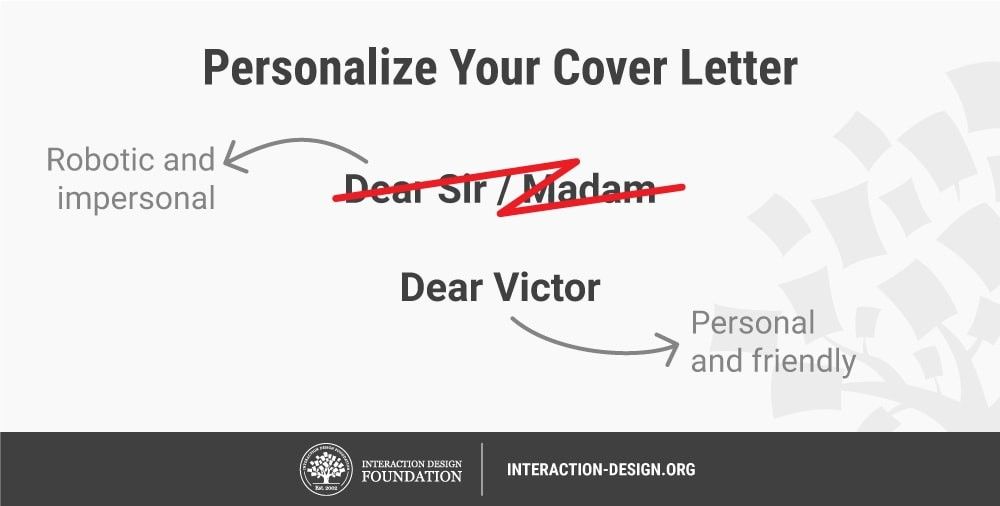
Make your cover letter / email stand out and sound friendlier when you personalize it to the person who will receive it. Author / copyright holder: Teo Yu Siang and the Interaction Design Foundation. Copyright terms and license: CC BY-NC-SA 3.0.
Match your tone of voice with the company’s personality. For instance, if you’re applying to a company known for being hip and cheerful, then your letter should reflect the same kind of cheerfulness. In this case, you would normally choose to write an introduction email. On the other hand, if you’re applying to work in the UX team of a banking corporation, perhaps your tone of voice should sound more professional, and you would normally choose to write a cover letter. Likewise—and a vital point here—address the person appropriately. Depending on the industry and factors such as the age of whoever reads what you’ve sent, a first-name approach may turn them off. Sometimes it’s better to use (e.g.) “Mr.” and let the person decide if you can call him (e.g.) “Geoff” for when you get to the interview.
Tip 2: Be Short and Sweet
Your cover letter should not exceed one page. Recruiters simply have no time to read lengthy letters. With that said, your cover letter is your chance to show that you’ve done your research well and that you know what the company and job role is all about―and how and where you fit in perfectly. That leads us right over to tip 3.
Tip 3: Tell Your Recruiter Why You’re a Good Fit
Pay close attention to this tip, and you’ll be much closer to getting invited to your dream job interview. Your cover letter should explain why you want to work for that particular company, not just a company. What do you like about the company? Their values? The way they work in their teams?
Secondly, explain why you want that particular job role. What part of the job post caught your eye?
Thirdly, explain how the company will benefit from hiring you, as opposed to how you will benefit from the new job. You’ll be surprised to see how many applicants only explain why they themselves would love to get the job. Put yourself in your recruiter’s shoes. Tell how and why you can make a difference in their team. And don’t forget to let your passion shine through while you do so. For instance, explain how you would be delighted to grow with the team as you leverage your skill set and passion for perfection.
Tip 4: Read the Job Posting Carefully!
Read the company’s job posting, and then re-read it and do so once again before you send your cover letter. Did the job posting require you to answer certain questions? Did they ask for specific documents—such as a cover letter or resume?
Some companies include questions or prompts in their job postings that they want applicants to answer or include. In most cases, recruiters do this to filter applicants—they’ll likely delete your application if you forget to answer the question or include their “magic” word or phrase. For example, we do this here at the Interaction Design Foundation to see whether a candidate has sufficient attention to detail. So, if they ask you to include, for example, “Beige banana”, do it.
Tip 5: Check for Spelling and Grammatical Errors
This is key! Spelling and grammatical errors create a bad impression. Spend a few minutes to check your cover letter—type it on a word processor with a spell checker function—and remove any errors you can find. Then, read it aloud to do a final check, at the same time listening to how you come across. Not only will you get a final idea as to how well it all flows, you’ll also have a safety net to catch anything your software may have overlooked.
How to Create Your UX Resume
What Your UX Resume Should Contain
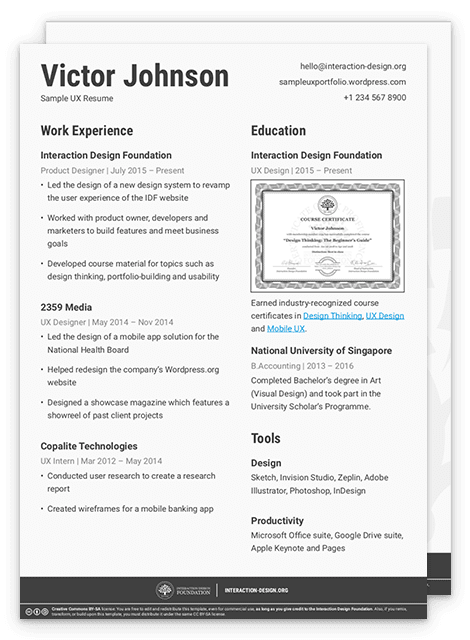
We recommend that you create your UX resume in such a way that it reflects the visual design you use in your portfolio. You should take all the opportunities you get to impress your recruiter. Likewise, if you do craft a formal cover letter, then please make sure to be consistent in your visual style.
Here’s what your UX resume should contain:
Information about you: your name, current job title (if you have one) and contact information such as your email or website.
Work experience: list your current and previous jobs in reverse chronological order, so the latest job appears first. Include only relevant work experience—your recruiter will not be impressed by your 6-month stint as a part-time waiter (as that would be irrelevant to your UX design role)! However, if you’ve worked as a professional skydiver or photographer, it’ll show something valuable about your personality, so you should always evaluate what would impress your recruiter.
Education: keep it to university-, trade school- and college-level education. You should also include design-related bootcamps and online courses—for example, if you’ve completed some courses at the Interaction Design Foundation. Remember to include the industry-recognized course certificate you get for each course you complete―and the individual link you get so recruiters can verify the authenticity.
Your picture: choose a picture where you’re in your professional work environment where your face is visible, or choose a professional headshot photo like the one you use for your LinkedIn profile.
[Optional] Write-up about yourself: if you want to, you may include a short write-up about yourself. Always consider how you would see what you write if you were a potential employer, someone who doesn’t know you.
[Optional] Your skills and tools: this is more valuable if you have niche skills (such as in user research, compared with something as broad as “UX design”) or if you are proficient in a wide range of industry-specific tools.
[Optional] Anything else: include anything else you think is going to impress your recruiter. Earned a prestigious design award? Taught design in a class before? Wrote popular articles on Medium? Speak multiple languages fluently? It’s your UX resume after all, and you have free reign to customize it to sell yourself in the best possible way. Again, remember to consider how you would come across to a complete stranger who wants to see what you can do for them.
Link to your LinkedIn profile: You should also add the link to your LinkedIn profile. Why? If recruiters are interested in inviting you for a job interview, they’ll look for your LinkedIn profile. So, do them a favor and give them the direct URL, so they don’t have to spend time on it themselves. And do yourself a favor: make sure that your resume and LinkedIn profile are consistent. You would be surprised to see how many inconsistencies we find when we look for new colleagues here at the Interaction Design Foundation. So, you’re one step ahead if you show consistency across LinkedIn and your resume. As always, honesty is the best policy. You can—and should—word who you are and what you do in a positive light, but don’t dress up a craft where you have no proficiency as something at which you’re skilled. In a professional setting, you can’t cram overnight to build up a knowledge base you claimed to have; employers can tell when people “wing it”.
Speaking about LinkedIn, let’s look into a quick hack if you’re in a hurry. We don’t recommend this, but we do recognize that sometimes you’ll discover a position you want to apply for―at the very last minute.
Quick Hack: How to Create Your UX Resume in 5 Seconds
To begin, you need to have an updated LinkedIn profile. And, by the way, you should always make sure that it’s updated. Once you do, you can make use of LinkedIn’s hidden “save to PDF” function. Go to your profile, click on the “More…” button and select “Save to PDF”. Bam, you’re done!
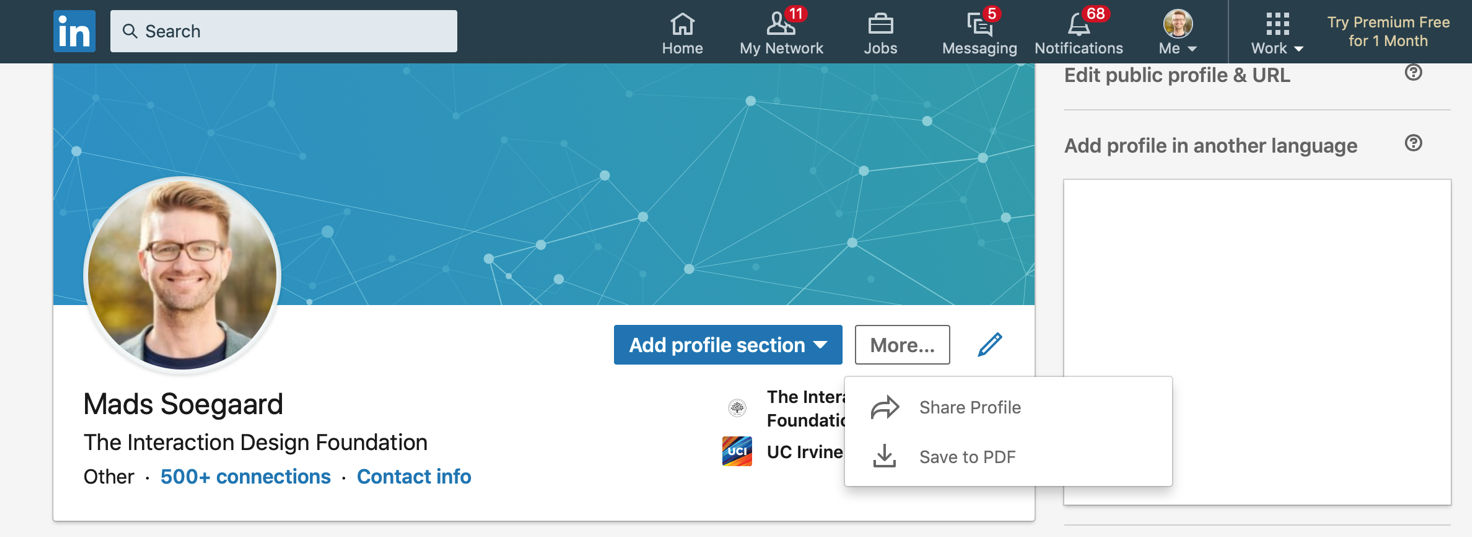
LinkedIn has a somewhat hidden feature that lets you export your profile into a PDF resume in 5 seconds! Author / copyright holder: Mads Soegaard. Copyright terms and license: Fair use.
This method is great for when you’re in a rush and need to send your UX resume to a recruiter ASAP. This is also great if you’ve got established work experience and a stellar UX portfolio—when you feel you don’t need to jazz up your UX resume to make your application stand out from the competition. But, really, are you the CEO of Uber or the lead designer at Facebook. No? Okay, then please go back and craft that amazing resume and LinkedIn profile which will thrill your recruiter. :-)
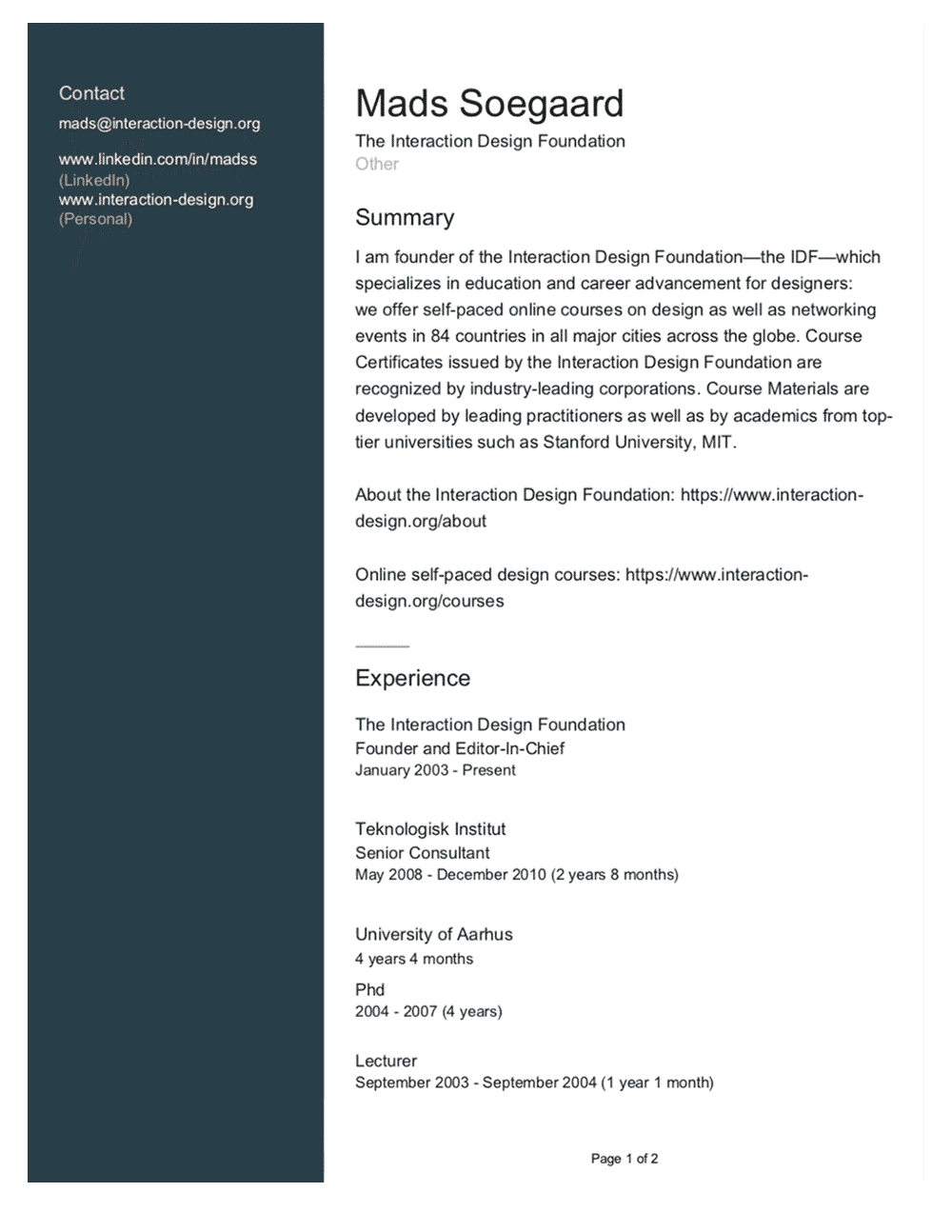
This is an example of what LinkedIn’s PDF resume looks like. Author / copyright holder: Mads Soegaard. Copyright terms and license: Fair use.
The obvious downside is that your UX resume looks generic. In view of that, we strongly recommend that you use this method only if you’re in a rush. Alternatively, you could use this method to create a rough version of your resume, which you’d then use as a reference when you create your own PDF from scratch. Remember, your resume is a wonderful opportunity to showcase your design skills.
Download Our Sample UX Resume and Cover Letter
Get a copy of our sample UX resume and cover letter as a reference:
The Take Away
Your UX resume and cover letter/information email still play a major role in your job application process. Your cover letter or email is your first chance to impress your recruiter. If you don’t craft a dedicated cover letter, it’s highly likely the recruiter won’t even open your portfolio or resume. So, make sure you explain why you’re an excellent fit for the company and how you can contribute to the team. Likewise, in your resume, build credibly when you summarize your work and educational history.
When you write your cover letter or email, keep these tips in mind:
Personalize your cover letter or email;
Be short and sweet;
Tell your recruiter why you’re a good fit: why you want that particular job role in that particular company. Tell how and why you can make a difference in their team;
Read the job posting carefully, especially to catch any screening questions or prompts (usually near the bottom); and lastly
Check for spelling and grammatical errors.
Your resume should contain:
Information about you;
Your work experience;
Your educational history;
An appropriate photo of you;
A link to your LinkedIn profile; and
Optional content such as a write-up, your skills and tools, as well as other things that might help create a good impression.
For a quick hack, you can export your LinkedIn profile into a PDF resume, but we don’t recommend this. Spend that extra time to craft your resume. Take the extra care to see how you look to an outsider who wants something from you. Overall, think: “From what I’ve put together, would I hire me?”
References and Where to Learn More
Chris Teso’s quote is taken from Smashing Magazine’s article, which contains more information on what makes a good cover letter.
If you need more inspiration on resumes, check out Case Study Club’s list of 21 great resumes.
Hero image: Author / Copyright holder: Teo Yu Siang and the Interaction Design Foundation. Copyright terms and license: CC BY-NC-SA 3.0.