Beware of Harvesting Users’ Information with Forced Registration

• 8 min read

516 Shares

If a company knows you really well, they have more of an opportunity to make money. Time was, the second you registered with any website, whether it was an online shop or a social platform, they could send you advertisements or even sell your information to other companies. Much legislation exists now to protect users from data harvesting. Still, if you’re a designer, it’s good to know about the forced registration design pattern, and understand that using it is the sort of reputation you don’t want to cultivate for a company. So, read on and learn more about how to spot and avoid it so you can keep your users friendly and keep in line with legislation.

Entering personal details can be tedious, especially when all you want to do is quickly interact with a website in some way, such as entering a competition or contacting an online support team. Worse, it can put users on their guard—and many casual users will likely balk on seeing the cue to enter such details, before they slink off to see if they can get a competitor’s version instead. Even so, if users want something badly enough, they may resign themselves to putting up with a little bit of this nonsense. In order to harvest as much information from each user as possible, many websites once used (and some still do use) forced registration, where the user must establish an account before they can interact with or use a certain part of the user interface

For example, the historical screenshot below shows how Vimeo wanted to encourage users to register after landing on their page via their Google advertisement. Only when clicking further, which took users to the registration pop-up would they find a search bar, hidden in the right-hand corner, which allowed them to browse Vimeo content without signing up. So, no one can ever claim Vimeo backed first-time users into a corner.
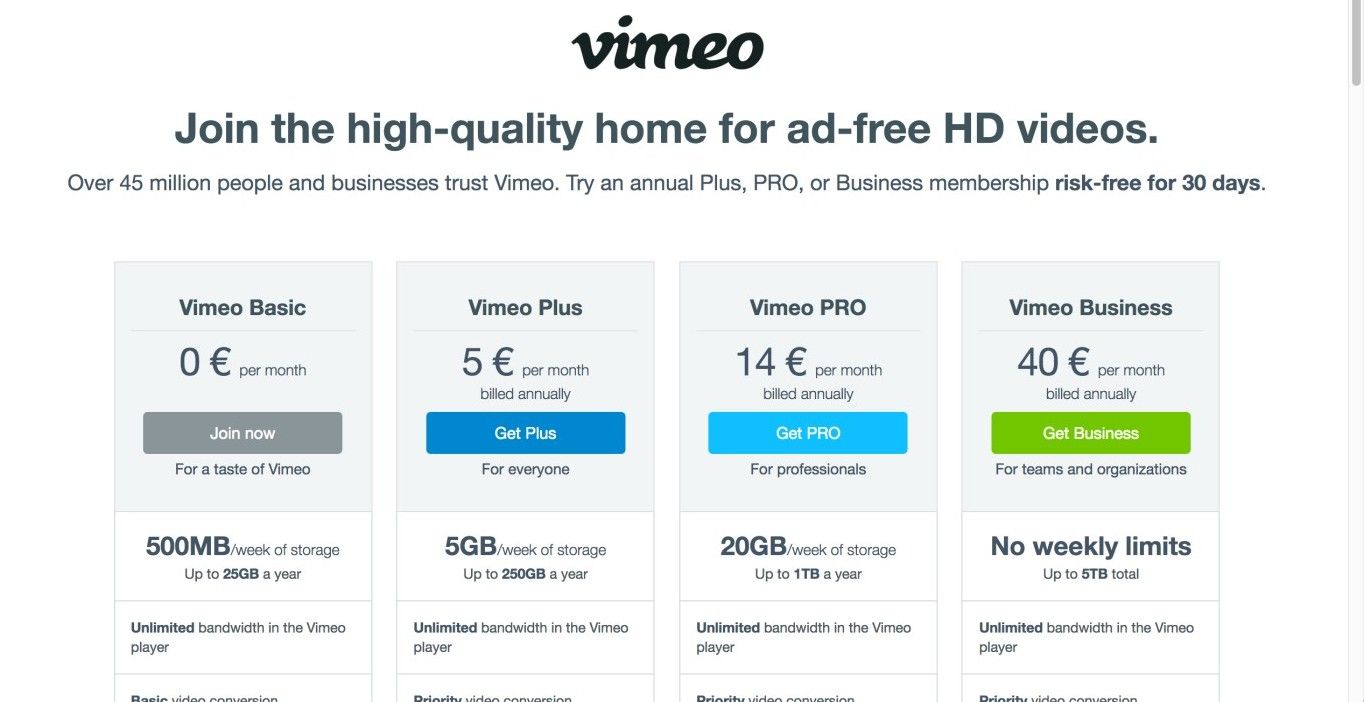
© Vimeo, Fair Use
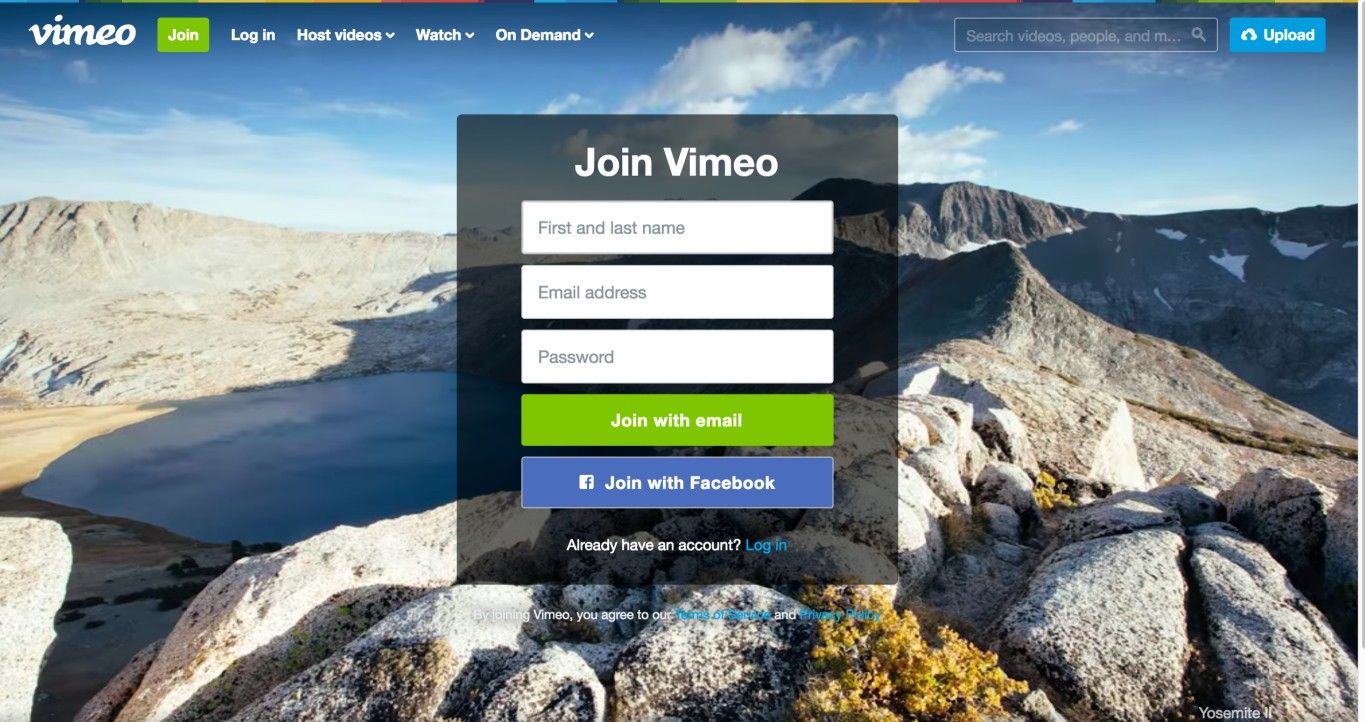
Vimeo used a softer version of the forced registration design pattern: rather than actually forcing users to register before they could use the website, they made it appear as if it were required (see the first screenshot in this example). Only when clicking the ‘Join now’ button for the Vimeo Basic membership in this screen could the user find functionalities they needed for fulfilling a task without registering. The second screen appeared; while it still had a registration cue consisting of input fields and ‘Join with’ buttons positioned at center stage, it also offered a search box in the top-right corner.

© Vimeo, Fair Use

Why is this classed as a dark pattern?

Other than in obvious circumstances (e.g., when ordering goods), there is almost never a benefit associated with providing websites with more of your personal details than your email address. By forcing you to register on their website—regardless of how simple or brief your intentions might be—an organization could gain access to a range of information about you that might be used either for their own purposes, such as choosing what spam to send you, or to decide whom to pass your details on to so they can make money from third parties. 

Instinctively, many users are wise enough to deduce that something is ‘up’ if they find themselves prompted in this way. Depending on how much they want the item they stand to gain by entering their details, most are sure to hesitate for at least a moment and wonder how much bother it will cause further down the road. After all, forced registration seeks to provoke a comfortable (for the website) surplus of information. So, we should bear in mind the definition of a related term: volunteering information, which means furnishing more information than the person asking the question need know. On that subject, let’s see just how one-sided that activity tends to be when a human and an artificial intelligence are dealing with each other:

“The computer is notorious for not volunteering information.”
—Geordi La Forge (Character from the “Star Trek – The Next Generation” TV series)

As you can see from the example—also historical—below, in order to enter a competition, the user was expected to register with the website. Within the registration forms, the user provided his or her telephone number, email address, and university details. All of these details could have been used to send you endless correspondence, filling up your mailbox, answerphone, and email account. To soften—or maybe we should say ‘lighten’—the darkness of this registration form, the organization decided to explain what they would use this information for. 

In similar situations, it would be sufficient simply to provide an email address as a means of identifying the user (e.g., in the event that user won the competition!). Indeed, it would be wonderful if matters just ended there—without any strings attached. However, the website designers had apparently produced a user interface that restricted users unless they provided more details. We hasten to add that the James Dyson Foundation is reputable and has noble intentions, explaining in full what the registrants’ details would be used for.
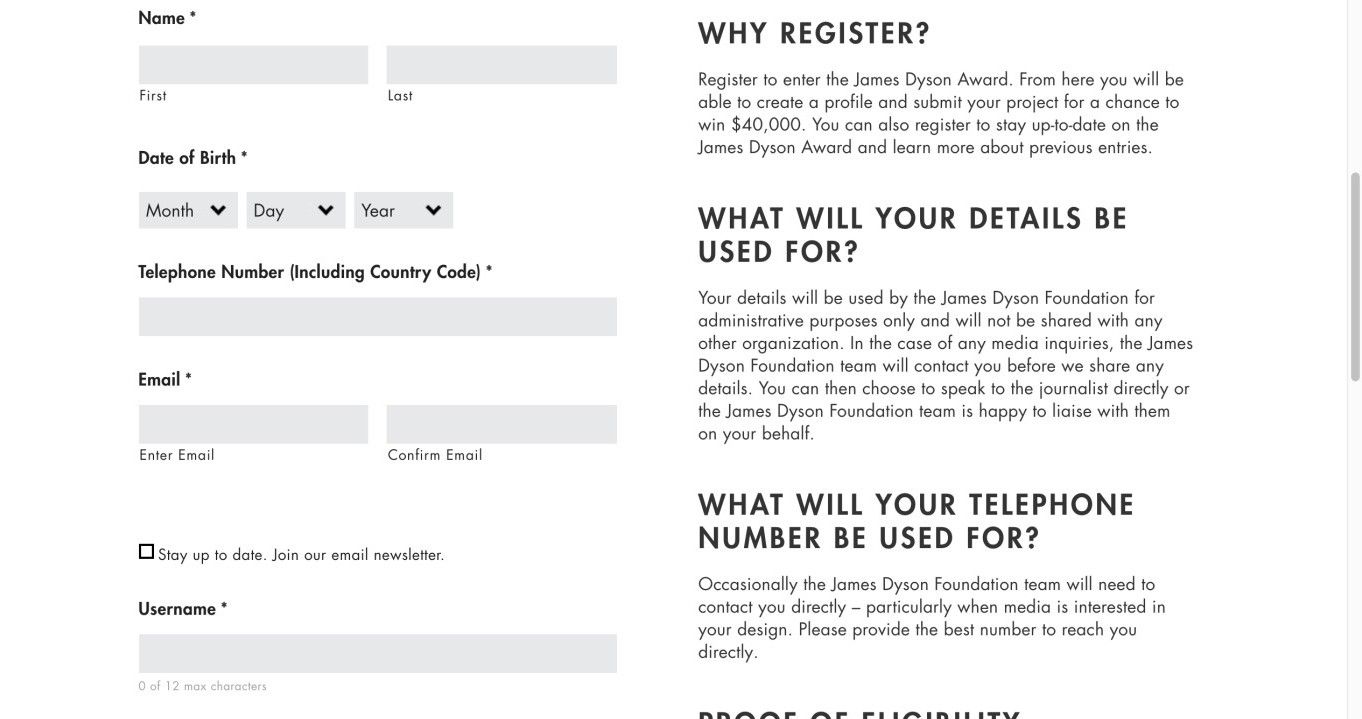
As described in the main text, the James Dyson Foundation student competition required potential participants to register, but also took the time (and quite some space on the user interface) to explain why they needed to provide the information.

© James Dyson Foundation, Fair Use

The Take Away

Many times, a company needs some information from a user to enable access to a service. When this is the case, the user will voluntarily and consciously decide to share this information by registering. However, sometimes a company will force people to give them information when they don’t actually need it for providing their main service. This is when registration becomes a dark pattern. Its purpose is to harvest information the company can use to send the user more advertisements, or to sell on to third parties. Legislation exists to safeguard users from such practices, particularly in the European Union, but it’s important to know about this dark pattern. As a responsible designer, you can—and indeed should—add clear explanations to any registration form, indicating why you need the information.

References and Where to Learn More

Hero Image: © Ryan Raffa, CC BY-SA 2.0.

Jenifer Tidwell, Designing Interfaces: Patterns for Effective Interaction Design, 2010

Martijn van Welie, Pattern Library, 2008

Some vital points about Dark Patterns

Some more points to consider about Dark Patterns and laws

Learn More in This Course:

AI for Designers

12 days
13 % booked
View Course

What You Should Read Next

  • Read full article
    10 Great Sites for UI Design Patterns - Article hero image
    Interaction Design Foundation logo

    10 Great Sites for UI Design Patterns

    You don’t want to spend your whole life redesigning the wheel, do you? No, neither do we. If you are looking for a design that solves a problem that has been solved with a different application before, then the template for your wheel is probably already out there. This lets you save time and make a

    Social shares
    1.4k
    Published
    Read Article
  • Read full article
    Implement Global Navigation to Improve Website Usability - Article hero image
    Interaction Design Foundation logo

    Implement Global Navigation to Improve Website Usability

    When you’re designing a new website, application, or other product, you always start with the global idea and structure before addressing more detailed issues. Designing the navigation on a website is no different. Getting the global navigation right is the first step in designing a great user exper

    Social shares
    826
    Published
    Read Article
  • Read full article
    Split the Contents of a Website with the Pagination Design Pattern - Article hero image
    Interaction Design Foundation logo

    Split the Contents of a Website with the Pagination Design Pattern

    The pagination design pattern is widely used in websites that open up a lot of content to users. From search engines such as Google and Firefox, to e-commerce sites such as Amazon and Asos—the use of pagination is very, very broad. And although it seems straightforward, implementing pagination in th

    Social shares
    817
    Published
    Read Article
  • Read full article
    Best Practices and UI Design Patterns for Help in Mobile - Article hero image
    Interaction Design Foundation logo

    Best Practices and UI Design Patterns for Help in Mobile

    When users start to get to grips with your mobile app, they will need a little help from time to time. The good news is that standard design patterns can reduce design time for help in mobile apps. Here are some practical guidelines that you can use to improve the UX of help in general.You should no

    Social shares
    813
    Published
    Read Article
  • Read full article
    Make it Easy on the User: Designing for Discoverability within Mobile Apps - Article hero image
    Interaction Design Foundation logo

    Make it Easy on the User: Designing for Discoverability within Mobile Apps

    Discoverability sometimes also referred to as “learnability” is the ease at which users can find new features or functions with an app and learn to use the things that they find. While this has always been an important part of user experience design – it becomes even more important in the mobile des

    Social shares
    787
    Published
    Read Article
  • Read full article
    How to Apply Search Boxes to Increase Efficiency - Article hero image
    Interaction Design Foundation logo

    How to Apply Search Boxes to Increase Efficiency

    Have you ever felt overwhelmed with information while you were searching for something specific? Have you ever been lost in the haystack, looking for that one tiny needle? If your users are anything like you, they will sometimes feel overwhelmed or lost, too, unless you minimize their efforts by pro

    Social shares
    742
    Published
    Read Article
  • Read full article
    Use Color to Prevent Confusion and Help Your Users - Article hero image
    Interaction Design Foundation logo

    Use Color to Prevent Confusion and Help Your Users

    As designers, we can use color to guide our users in the right direction to accomplish a task effectively and efficiently. But some designers who focus more on their company’s needs than their users’ can twist things so that colors turn into a bewildering nightmare, hiding buttons and information us

    Social shares
    722
    Published
    Read Article
  • Read full article
    Giving Your Users Freedom with Editable Input Fields - Article hero image
    Interaction Design Foundation logo

    Giving Your Users Freedom with Editable Input Fields

    When you want to purchase something on the internet, no matter what it is, or which e-commerce service you use, you don’t want to encounter any restrictions. Just imagine what your user experience would be like if a web shop presented you with a limited set of options to choose from when asking for

    Social shares
    717
    Published
    Read Article
  • Read full article
    Display Achievements to Encourage Website Usage - Article hero image
    Interaction Design Foundation logo

    Display Achievements to Encourage Website Usage

    You are doing so great; you’re top of the class! Don’t you just love to hear a compliment like this? We’re all human, and this is the way we are wired. We thrive on accomplishment. Whether you want to be better than everyone else or simply be better than your former self, knowing your achievements i

    Social shares
    716
    Published
    Read Article
  • Read full article
    How to Implement Sitemap Footers to Keep Users Going - Article hero image
    Interaction Design Foundation logo

    How to Implement Sitemap Footers to Keep Users Going

    In your attempts to minimize the effort your users need for performing actions on the website you’re designing, you just might be overlooking one major opportunity: sitemap footers. You might think about footers as a page section where you can dump any links or contact information you couldn’t fit a

    Social shares
    714
    Published
    Read Article

Top Articles

Top Topic Definitions

Feel Stuck?
Want Better Job Options?

AI is replacing jobs everywhere, yet design jobs are booming with a projected 45% job growth. With design skills, you can create products and services people love. More love means more impact and greater salary potential.

At IxDF, we help you from your first course to your next job, all in one place.

See How Design Skills Turn Into Job Options
Privacy Settings
By using this site, you accept our Cookie Policy and Terms of Use.
Customize
Accept all

Be the One Who Inspires

People remember who shares great ideas.

Share on:

Academic Credibility — On Autopilot

Don't waste time googling citation formats. Just copy, paste and look legit in seconds.

Feel Stuck? Want Freedom?

Join 326,020+ designers who get one powerful email each week. Learn to design a life you love.

Next email in
1
day
15
hrs
21
mins
49
secs

Free forever. No spam. Unsubscribe anytime.