Make it Easy on the User: Designing for Discoverability within Mobile Apps

• 8 min read

789 Shares

Discoverability sometimes also referred to as “learnability” is the ease at which users can find new features or functions with an app and learn to use the things that they find. While this has always been an important part of user experience design – it becomes even more important in the mobile design environment where limitations on screen real estate make discoverability a more significant challenge.

The easier your mobile application is to learn to use and the easier it is for your users to find the functionality to learn it – the more useful that application is likely to be to the user. The user experience is also likely to greater.

Discoverability and Learnability

Discoverability refers to the ease with which users can discover features within an application. Learnability refers to how easy it is for the user to learn to use the application and its features. Whilst not identical concepts they are closely related enough that you can treat them together in your designs.

A Little about Learnability

There are several factors that affect the implementation of learnability in apps:

  • Learnability must be easier the less important an app is in a user’s daily life. People will put more effort into learning when they use something regularly than they will if something will only be used once a month or once a year.

  • Learnability is easier the more frequently an app is used – familiarity with an interface, conversely to the point above, makes it easier to use.

  • Learnability might want to be delivered in proportion to cost. If someone spends $100 on an app – they’re more likely to spend more time learning to use it than they will with a $1 app.

  • Learnability can be affected by competing offerings – the more complex your competitor’s products are the more likely those users will tolerate complex learning curves in your products.

  • Learnability, to some extent, must reflect complexity. If your app only has 2 functions it really should be very easy to learn to use and execute those functions; it is clearly going to be harder to pick up 200 functions in the same time.

It is also worth noting that evidence suggests that steeper learning curves may, in direct opposition to standard UX experience practice, create more loyal users with greater capacity. (In those who persist with the application rather than giving up on it).

© Kartik Shradha, Fair Use

Areas of UI that Help with Discoverability and Learnability

When making applications (and especially mobile applications) discoverable and learnable you’ll want to focus on UI to facilitate that and in particular:

  • Action Bars – these provide the opportunity for the user to “bank” their most commonly taken actions. This is in contrast to the navigation bar more traditionally used in web applications. They remove the clutter from the screen and focus on what a user is most likely to want to do in any given circumstance.

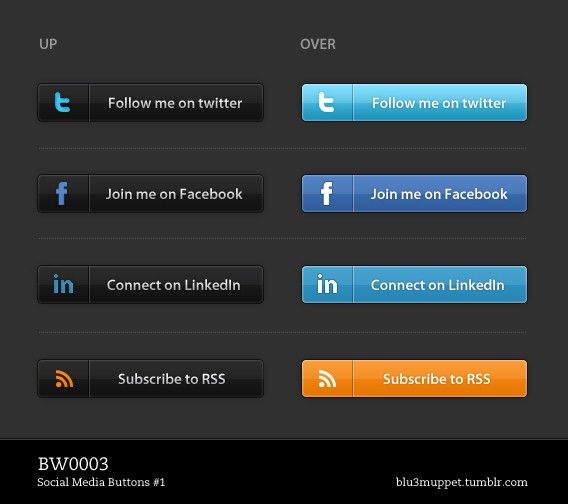
  • Social logins – it’s a good idea to first consider whether users will want to link their social profiles to your app. However, if they are going to be OK with that – logging in with a social network can save time, save account creation and still provide you with useful data for your app design team.

  • Big Buttons – the bigger the button, the clearer it should be that the user needs to take an action. Think Badoo and its’ tick/cross approach to dating, for example. Of course, big buttons are best in apps that are going to offer a limited number of options to a user at any point in time. Otherwise they’re likely to become very annoying and require a ton of scrolling to handle properly.

  • Notifications – when something changes for the user, let them know. Notifications don’t have to be dramatic and highly intrusive either. The simple digit count on message apps so that users are aware there are new messages available to them, for example, is a great way to update someone without intruding into their day.

  • Discoverable controls – mobiles offer a whole new set of interactions with a device. Touch-sensitive screens, accelerometers, GPS readings, swipe controls, gesture controls, image controls, etc. it can be incredibly useful to make these controls make themselves known as users experiment with their devices.
© bluemuppet, CC BY-SA 3.0

The good news is, of course, that many of these discoverable approaches are already available as UI patterns. You don’t always have to reinvent the wheel in order to assist your users via UI design.

Testing for Learnability and Discoverability

It can be hard to test for both of these concepts prior to implementing a design. They are a consequence of usage and as such even prototyping may not lead you to the answers that you seek when it comes to these concepts.

It may be best to agree that you need to iterate a product from an alpha or beta version to a launch version to test learnability and discoverability. They should also be revisited at a later date once your user base has become more familiar with the product and you can gain a better understanding of how these concepts played out in “real life”.

The Take Away

Discoverability and learnability are not quite the same thing – however, they both complement each other. The need for users to be able to discover functionality becomes critical on a mobile interface where limited screen real estate requires different approaches compared to the desktop. Learnability, as we have seen, should reflect the user’s needs and investment in the application – the more it is used and the more it costs – the more likely the user is to tolerate a steeper learning curve.

References

See some great examples of discoverable controls in UI Design patterns here.

UX Booth looks at learnability with an example drawn on Google Maps here.

Hero Image: © ScotXW, CC BY-SA 3.0

Learn More in This Course:

AI for Designers

1
2
17
47
97 % booked
View Course

What You Should Read Next

  • Read full article
    10 Great Sites for UI Design Patterns - Article hero image
    Interaction Design Foundation logo

    10 Great Sites for UI Design Patterns

    You don’t want to spend your whole life redesigning the wheel, do you? No, neither do we. If you are looking for a design that solves a problem that has been solved with a different application before, then the template for your wheel is probably already out there. This lets you save time and make a

    Social shares
    1.4k
    Published
    Read Article
  • Read full article
    Shneiderman’s Eight Golden Rules Will Help You Design Better Interfaces - Article hero image
    Interaction Design Foundation logo

    Shneiderman’s Eight Golden Rules Will Help You Design Better Interfaces

    Follow Ben Shneiderman’s 'Eight Golden Rules of Interface Design' if you want to design great, productive and frustration-free user interfaces. Apple, Google and Microsoft are among some of the highly successful companies whose well-designed products reflect Shneiderman’s rules. The characteristics

    Social shares
    1.4k
    Published
    Read Article
  • Read full article
    User Interface Design Guidelines: 10 Rules of Thumb - Article hero image
    Interaction Design Foundation logo

    User Interface Design Guidelines: 10 Rules of Thumb

    Learn to design with your user’s needs and expectations in mind by applying Jakob Nielsen and Rolf Molich’s Ten User Interface Guidelines. These heuristics have been reflected in many of the products designed by some of the most successful companies in the world such as Apple, Google, and Adobe. Fur

    Social shares
    1.4k
    Published
    Read Article
  • Read full article
    Repetition, Pattern, and Rhythm - Article hero image
    Interaction Design Foundation logo

    Repetition, Pattern, and Rhythm

    Let’s look at three subjects that, at first glance, may strike you as being incredibly basic and self-explanatory. However, although they may seem like they should need no introduction, we should study them. By understanding these concepts, you’ll be able to apply them more effectively to captivate

    Social shares
    1.4k
    Published
    Read Article
  • Read full article
    The Grid System: Building a Solid Design Layout - Article hero image
    Interaction Design Foundation logo

    The Grid System: Building a Solid Design Layout

    Now that we’ve seen some grids at work in the Rule of Thirds article, let’s examine them a little more deeply. As a concept that deals so fundamentally with the fabric and background of our work as designers, it’s easy to overlook the power of grids and think more about the elements we want to creat

    Social shares
    1.4k
    Published
    Read Article
  • Read full article
    The Golden Ratio - Principles of form and layout - Article hero image
    Interaction Design Foundation logo

    The Golden Ratio - Principles of form and layout

    Now, we’re going to look at a subject that comes directly from mathematics and that we can also find all around us – the golden ratio. Don’t worry; we’re not going back into the classroom for long. We will examine what this concept is and exactly how much it is a fundamental part of making designs p

    Social shares
    1.3k
    Published
    Read Article
  • Read full article
    10 Free-to-Use Wireframing Tools for UX Designers in 2026 - Article hero image
    Interaction Design Foundation logo

    10 Free-to-Use Wireframing Tools for UX Designers in 2026

    Wireframes help you quickly ideate and test your ideas. While paper wireframes are the fastest to create, digital wireframes look more polished and presentable. If you are looking for a pocket-friendly wireframing tool, look no further.Whether you prefer browser-based apps or offline desktop tools,

    Social shares
    1.3k
    Published
    Read Article
  • Read full article
    Principle of Consistency and Standards in User Interface Design - Article hero image
    Interaction Design Foundation logo

    Principle of Consistency and Standards in User Interface Design

    Learn to design with consistency and standards in mind and understand the reasons why they’re important to incorporate them into your work. Derived from Jakob Nielsen and Rolf Molich’s Ten User Interface (UI) Guidelines, ‘Consistency and Standards’ are evident in many of the widely-used produc

    Social shares
    1.3k
    Published
    Read Article
  • Read full article
    Adaptive vs. Responsive Design - Article hero image
    Interaction Design Foundation logo

    Adaptive vs. Responsive Design

    The differences between responsive and adaptive design approaches spotlight important options for us as web and app designers. Choosing with insight can empower you to plan and execute your designs with better aim, purpose and results.With the pervasiveness and diversity of mobile devices, as design

    Social shares
    1.3k
    Published
    Read Article
  • Read full article
    Visual Hierarchy: Organizing content to follow natural eye movement patterns - Article hero image
    Interaction Design Foundation logo

    Visual Hierarchy: Organizing content to follow natural eye movement patterns

    Let’s look at a topic that deals with, oddly enough, how we look at designs. Once you understand how the human eye processes these, you’ll find yourself better able to arrange your elements more effectively.Content in any digital page layout will follow a specific hierarchy. Headers appear above bod

    Social shares
    1.3k
    Published
    Read Article

Top Articles

Top Topic Definitions

39% of Today's Skills Will Change by 2030

The World Economic Forum expects 39% of today's skills to be transformed or become outdated by 2030.

The good news is that jobs in UX / UI design and AI are among the fastest-growing professions globally.

See How Design Skills Turn Into Job Options
Privacy Settings
By using this site, you accept our Cookie Policy and Terms of Use.
Customize
Accept all

Be the One Who Inspires

People remember who shares great ideas.

Share on:

Academic Credibility — On Autopilot

Don't waste time googling citation formats. Just copy, paste and look legit in seconds.

Feel stuck? Want Freedom?

Get one powerful email each week, like 321,979 others.

Learn to design a life you love.

Next email in: