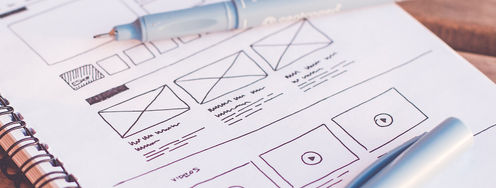
White portfolio cover with bold red lettering overlaps printed website and graphic design samples

Three Tips for Creating a Better UX Portfolio

• 5 min read

681 Shares
Save

We think that whoever, decided that UX designers should need a portfolio, should have their head read. UX design is not graphic design and the creation of a UX portfolio does not mean that would-be clients or employers are going to be wowed by the visual aspect of the content. However, despite this – for good or ill the UX portfolio is here to stay and here’s how to make yours just a little better:

What Does a Good Portfolio Do?

It’s pretty simple a good UX portfolio is going to show a prospective client or employer that there’s a process behind the design. That you have followed a considered path from research to design and that it produces results.

The Three Tips for Better UX Portfolios

1. Examine the Range of Work You Do
Author/Copyright holder: Alvaro Rubio. Copyright terms and licence: CC BY-NC-ND 2.00

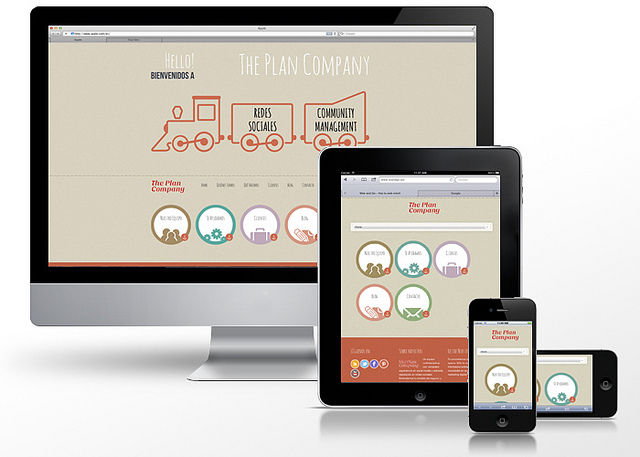
If you work on multiple platforms or multiple devices then it’s a good idea to show it off in your portfolio. The same is true if you’ve worked on everything from high-end enterprise applications to cheap and cheerful consumer projects. Your portfolio needs to tell people at a glance what you’re good at. It’s worth noting in the same breath that you need to manage the volumes of data carefully – you don’t want to overwhelm someone.

2. Visuals with Meaning

You need to lay out your process visually. You’ll want to curate images from your past projects that help you structure the process in the reader’s mind. You don’t need to go overboard. A half-dozen well selected visuals are going to be very clear about what’s been done and why; four dozen are just going to confuse rather than shine additional light on your process.

Make it easy for your visuals to carry meaning to your audience. They also don’t need to be perfect, graphic designed works of art – they just need to show the UX process.

Examples of what you might want to include:

Try to include 2 or 3 projects in sufficient detail to show your expertise but don’t try to include too many projects – it’s overkill.

3. Tell a Story
Author/Copyright holder: Mohamed Iujaz Zuhair. Copyright terms and licence: CC BY-NC 2.0

This is often the hardest part but you need to combine your visuals with a short narrative. Who are you? What do you do? What will you do to add value to the client/employer’s projects? Keep it simple but not too simple. Try to touch on the following:

  • What you set out to do
    • What you did in terms of research and design work
    • What worked well and what didn’t
    • What was the ultimate outcome for the project
    • What would you do differently if you had to do the same project all over again now

Summary

In the end a UX portfolio is going to be a very personal document but the easier you make it for others to understand your work and experience – the easier it’s going to be for that portfolio to be effective in opening new doors for you.

Header Image: Author/Copyright holder: Scott Kellum. Copyright terms and licence: CC BY-NC 2.0


Learn More in This Course:

Learn Design and AI From the Best

Get one powerful email each week, like 315,441 others.

Next email in:

What You Should Read Next

  • Read full article
    What are the Stages of Creativity? - Article hero image

    What are the Stages of Creativity?

    Let’s explore the various stages of creativity so you can get a firmer idea of its true nature as such a powerful human resource. Graham Wallas was the first to create an overview of a creative process back in 1926. As you can imagine, lots of iterations have emerged since then. Some of these theori

    Social shares
    1.1k
    Published
    Read Article
  • Read full article
    Plug, Play, Persona: Your Free Template and Step-by-Step Guide - Article hero image

    Plug, Play, Persona: Your Free Template and Step-by-Step Guide

    You've searched for the perfect persona template, downloaded dozens, yet none quite hit the mark. Here's the problem: Most templates fail you because they focus on demographics, fancy sliders, and irrelevant details. None of these things help drive decisions or create solutions that improve lives. B

    Social shares
    103
    Published
    Read Article
  • Read full article
    Keyboard Navigation and Data Entry - Article hero image

    Keyboard Navigation and Data Entry

    Forms are an essential part of many interactions, but good form layout and clear labels are only part of the picture. Forms also need to work in all the ways users interact with them. Not everyone uses a mouse. Many users rely on keyboards, whether by preference, motor impairments, or because they u

    Social shares
    145
    Published
    Read Article
  • Read full article
    Expert Evaluation: Identify Problems Before You Recruit Users - Article hero image

    Expert Evaluation: Identify Problems Before You Recruit Users

    Before you have a single real user in a testing session, you can already find a significant proportion of the usability problems in a design. Expert evaluation, also known as heuristic evaluation, is one of the most cost-effective methods available to UX practitioners. It requires no recruitment, fa

    Social shares
    145
    Published
    Read Article
  • Read full article
    Perceptual Issues in Dynamic Interfaces - Article hero image

    Perceptual Issues in Dynamic Interfaces

    In this video, William Hudson, User Experience Strategist and Founder of Syntagm Ltd, explores the psychological phenomena that affect how users perceive changes in dynamic web interfaces. While the focus is on web pages, these principles apply to any interactive technology, from desktop application

    Social shares
    179
    Published
    Read Article
  • Read full article
    Legal Aspects of Accessibility - Article hero image

    Legal Aspects of Accessibility

    Understanding the legal requirements for accessibility is essential for anyone building digital products and services. Accessibility legislation exists worldwide, and failure to comply can result in costly lawsuits and reputational damage. This lesson explores the legal landscape, compliance standar

    Social shares
    151
    Published
    Read Article
  • Read full article
    Be Afraid! The Silent Role of Fear in Decision Making - Article hero image

    Be Afraid! The Silent Role of Fear in Decision Making

    Fear plays such a dominant role in our lives that several businesses and products have succeeded on the back of this single emotion. Here’s a look at some of the fears that affect our decision making, how businesses and products exploit these tendencies to their advantage, and how, as a designer, yo

    Social shares
    723
    Published
    Read Article
  • Read full article
    Why Smart Professionals Use Personas to Get Ahead (And You Should Too) - Article hero image

    Why Smart Professionals Use Personas to Get Ahead (And You Should Too)

    Imagine your next product launch soaring beyond expectations. Your customers raving about experiences crafted just for them. Your ideas finally connecting with the people who matter most. This isn't wishful thinking—it's what happens when you master personas, user experience (UX) design's secret wea

    Social shares
    351
    Published
    Read Article
  • Read full article
    AI for Persona Research and Creation: Build Better Profiles in Less Time - Article hero image

    AI for Persona Research and Creation: Build Better Profiles in Less Time

    Personas help you get inside your users’ heads—and build things they’ll actually value. Now imagine having a tool that makes it all click faster. That’s AI. Let it handle the grind while you do what only a human can: feel, connect, and create solutions people truly love. Here are seven ways to make

    Social shares
    639
    Published
    Read Article
  • Read full article
    Healthcare UX: Design that Saves Lives - Article hero image

    Healthcare UX: Design that Saves Lives

    UX (user experience) design has the potential to improve people’s everyday lives. The stakes are even higher if you work as a UX designer in the healthcare industry. The health-tech sector is among the fastest-growing in the world, with expected revenue of USD 1,305.1 billion in 2030, according to G

    Social shares
    842
    Published
    Read Article

Top Articles

Top Topic Definitions

39% of Today's Skills Will Change by 2030

The World Economic Forum expects 39% of today's skills to be transformed or become outdated by 2030.

The good news is that jobs in UX / UI design and AI are among the fastest-growing professions globally.

Build Skills That Keep You Relevant

Privacy Settings

By using this site, you accept our Cookie Policy and Terms of Use.
Customize
Accept all

Be the One Who Inspires

People remember who shares great ideas.

Share on:

Academic Credibility — On Autopilot

Don't waste time googling citation formats. Just copy, paste and look legit in seconds.

Learn Design and AI From the Best

Get one powerful email each week, like 315,441 others.

Next email in: