A variety of electric plugs using different standards.

Get to Grips with Constraints

by William Hudson • • 10 min read

461 Shares
Save

Got constraints? Perfect. That’s where great design begins. Just as electrical standards define how a toaster safely works without shaping what it does, your software also lives within boundaries that quietly guide its behavior. Functional requirements describe what your system does: the stories of use, the features your users see. However, non-functional requirements define how it must work: securely, accessibly, and efficiently. When you treat these constraints as design allies rather than obstacles, you make smarter choices, avoid costly rework, and build products that feel solid, consistent, and ready for anything.

In this video, William Hudson, User Experience Strategist and Founder of Syntagm Ltd, explains how constraints, or non-functional requirements, define essential qualities such as accessibility, security, and device support that guide your product’s design.

Transcript

What are Constraints?

Constraints, also known as non-functional requirements, are the conditions or limits that shape how you can design or build your solution. They don’t define what a system does, but rather how it must work, such as performance targets, legal requirements, supported devices, or accessibility standards. In short, constraints set the boundaries within which design and development must operate.

As the diagram below shows, non-functional requirements are split into two kinds of constraints.
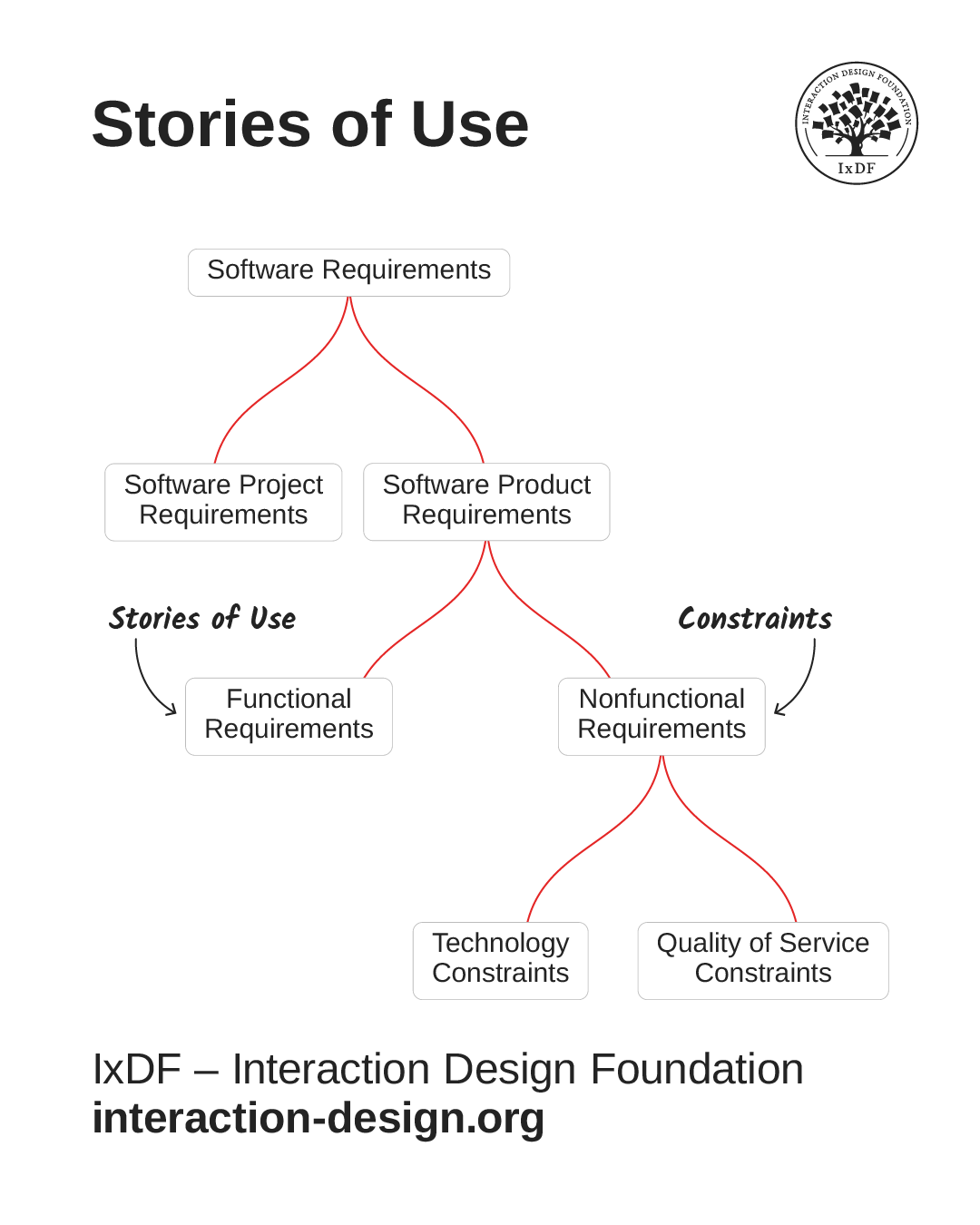
Categories of software requirements showing functional requirements associated with stories of use and nonfunctional requirements as constraints.

Stories of use, such as user stories and use cases, mostly come from functional requirements. However, non-functional requirements are still essential to good UI design. Many of the design decisions you make will be based on constraints, and they will help you avoid rework, feature bloat, and unexpected limitations during handoff.

© Adapted from the Software Engineering Book of Knowledge V4 by Interaction Design Foundation, Fair use

Technology Constraints

Technology constraints have little or no impact on a solution's functionality from a user’s perspective. They're choices about what programming language will be used, what platforms will be supported and other implementation details.

However, some technology constraints are directly relevant to UI design. For example, the decision to support mobile devices will significantly influence how you approach a solution's visual and interface design.

Quality of Service Constraints

Quality of service constraints cover a broad collection of characteristics. Here's a common categorization:

  • Performance

  • Scalability

  • Portability

  • Compatibility

  • Reliability

  • Availability

  • Maintainability

  • Security

  • Localization

  • Usability

Some of these can affect your stories of use directly. For example:

  • Security requirements may mean that your users need to log in each time they access a solution or that they must establish two-factor authentication. An example story of use for this constraint would be, "Rachel chooses her desired form of two-factor authentication."

  • Localization requirements may mean you need to create stories around users choosing the language of interaction.

Notice that the final entry in the list is usability! Since constraints must be measurable, it isn't enough to say that “the solution should be usable.” Instead, you would see a requirement like this: "90% of users must be able to complete key tasks in 60 seconds or less.”

Finally, accessibility isn't explicitly mentioned, but it typically falls under the category of usability. An example requirement would be: “Solution must comply with WAI WCAG 2.x at Level AA.”

Functional vs Non-Functional Requirements: What's the Difference?

An easy way to see the difference between functional and non-functional requirements is with an example, a little simpler than an interactive software solution: a pop-up toaster.

The number of slots in a given model is a functional requirement as it directly affects the stories of use we write about it. For example, "Javier makes toast for his whole family." How the slots are configured is also a functional requirement since that can make it possible for two people to use the toaster simultaneously.

On the other hand, the kind of electrical system a toaster is compatible with is a non-functional requirement. A toaster is either made to work in the USA or the UK, or it isn’t. Because the plugs and voltages differ, a toaster made for one country won’t work in the other. Travel adapters don’t help because the voltages are quite different, and the amount of power required is substantial.
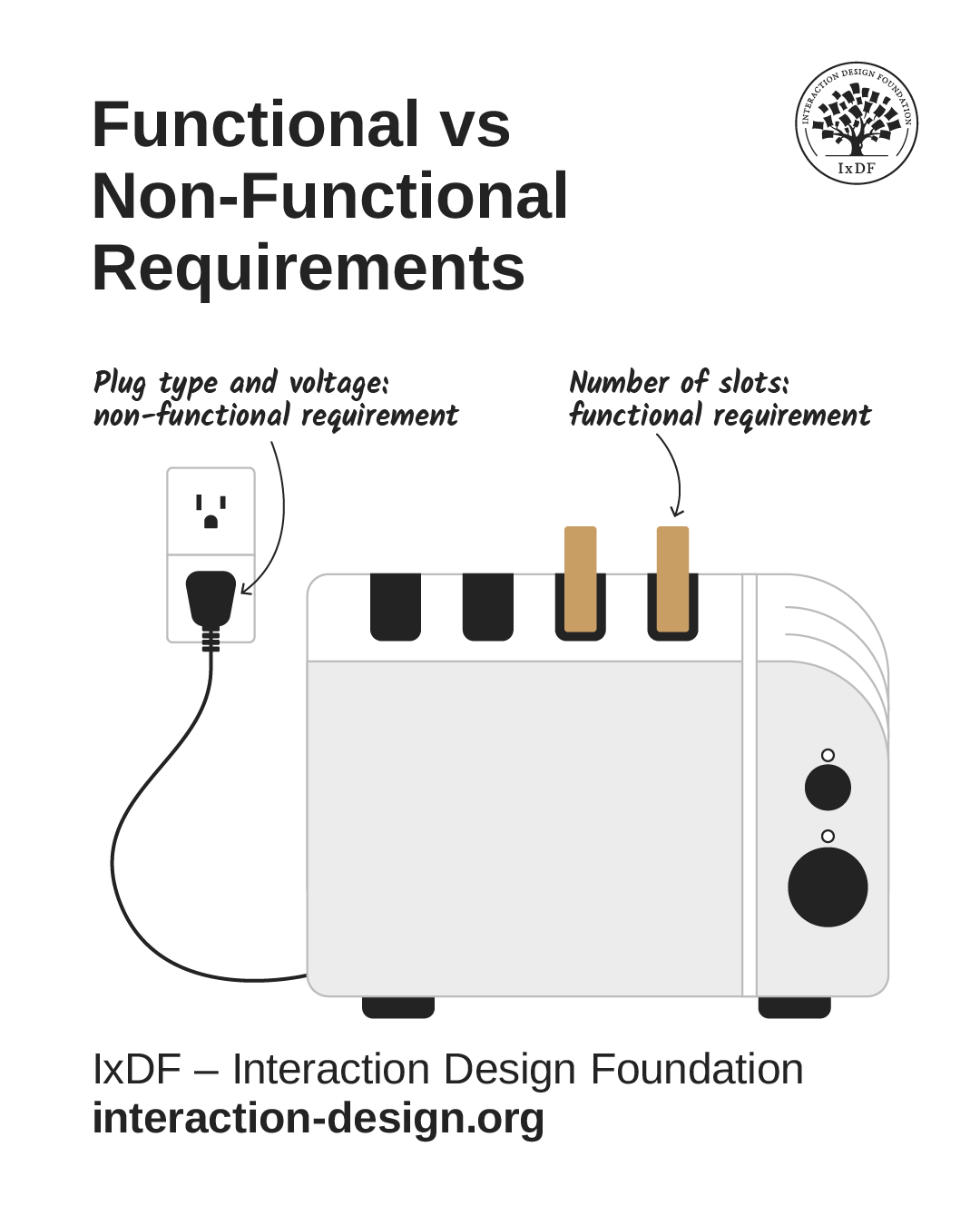
Illustration of a 4-slice toaster with a US-type electrical plug.

Just like software solutions, appliances of any type have many functional and non-functional requirements (constraints).

© Interaction Design Foundation, CC BY-SA 4.0

Many non-functional requirements affect only how a solution is implemented, which has little or no impact on how it works. For example, a social networking solution with end-to-end encryption will have little or no impact on functionality. It’s invisible to users.

The Take Away

Constraints, also known as non-functional requirements, define the essential qualities your solution must meet. They’re grouped into technology constraints and quality-of-service characteristics, such as security, localization, and usability. These aren’t just technical details; they directly shape how your product looks, feels, and performs for users.

When you understand and design with constraints in mind, you prevent surprises later, such as last-minute rework or usability gaps, and ensure your solution works smoothly in the real world. Some constraints may even reveal new or adjusted functional requirements, helping you create designs that aren't only functional but genuinely reliable and user-centered.

When you master this balance between what your system does and how it must work, you can turn limitations into direction and design decisions into lasting value for your users.

Hero image: © Interaction Design Foundation, CC BY-SA 4.0

Learn More in This Course:

Learn Design and AI From the Best

Get one powerful email each week, like 313,397 others.

Next email in:

What You Should Read Next

  • Read full article
    What Is Card Sorting? - Article hero image

    What Is Card Sorting?

    In this video, William Hudson, UX Strategist and Founder of Syntagm Ltd, introduces card sorting: what it is, where it comes from, and the broad range of problems it can help solve.Card sorting is a research technique in which participants organize a set of items into groups that make sense to them,

    Social shares
    51
    Published
    Read Article
  • Read full article
    Design Accessible Navigation for Keyboards and Screen Readers - Article hero image

    Design Accessible Navigation for Keyboards and Screen Readers

    Accessibility is often treated as a finishing touch, but for navigation, it belongs at the foundation. Menus are how users reach everything else on a site, so a menu that works only with a mouse quietly shuts out anyone who depends on a keyboard, a screen reader, or another form of assistive technol

    Social shares
    50
    Published
    Read Article
  • Read full article
    The Scent of Information: Give Users the Confidence to Click - Article hero image

    The Scent of Information: Give Users the Confidence to Click

    William Hudson, UX Strategist and Founder of Syntagm Ltd, introduces the scent of information as a model for understanding how users navigate toward their goals, and sets out the principles for writing navigation links that strengthen that scent.Information Foraging and the Scent of InformationThe s

    Social shares
    52
    Published
    Read Article
  • Read full article
    Bad UX Exposed: A Comprehensive Guide to Avoiding Pitfalls - Article hero image

    Bad UX Exposed: A Comprehensive Guide to Avoiding Pitfalls

    In today’s vibrant digital design landscape, creating meaningful connections with users goes beyond offering innovative products or services. It leads us into the world of user experience design (or UX design). This critical factor shapes our interaction with the users and plays a big role in making

    Social shares
    973
    Published
    Read Article
  • Read full article
    Understand the Various Types of Creativity - Article hero image

    Understand the Various Types of Creativity

    When you want to be more creative, you’ll want to learn the techniques for creative thinking and understand the various forms of creativity and creative processes. This video will give you an overview of some of the different forms of creativity. For example, you’ll learn that there are two types of

    Social shares
    573
    Published
    Read Article
  • Read full article
    Design Podcasts to Learn UX on the Go - Article hero image

    Design Podcasts to Learn UX on the Go

    As digital designers, we know the bulk of our day is spent looking at screens. Give your eyes some rest, and tune into podcasts instead. They are a great way to stay updated, gain insights, be inspired or experience “A-ha” moments. The best part about podcasts is that unlike reading or watching vide

    Social shares
    640
    Published
    Read Article
  • Read full article
    User Experience (UX) Surveys: The Ultimate Guide - Article hero image

    User Experience (UX) Surveys: The Ultimate Guide

    Imagine you’re a business owner who wants to know what’s working and what’s not on your website—and, oh yes, where you need improvements. Sure, there are a bunch of research methods you can try—like user interviews, usability tests, and A/B testing, but read on and see how a user experience (UX) sur

    Social shares
    1k
    Published
    Read Article
  • Read full article
    Don Norman: How You Can Rapidly Move Up by Thinking in Systems (Not Features) - Article hero image

    Don Norman: How You Can Rapidly Move Up by Thinking in Systems (Not Features)

    How can you move up in a company? Learn the fundamentals of business such as statistics, finance, accounting, marketing, supply chain and administration. How do you do that? One way to do this is to get a Master of Business Administration (MBA) degree. But Don says you can also learn them without go

    Social shares
    613
    Published
    Read Article
  • Read full article
    How to Find Your Voice: Speak with Confidence and Clarity - Article hero image

    How to Find Your Voice: Speak with Confidence and Clarity

    You’ve heard it before “It’s not what you said—it’s how you said it.” Your voice can change how people feel—even if your message doesn’t. If you vary your tone and pacing, you can make your ideas sound more trustworthy, exciting, or urgent. Harness this neuroscience-backed communication power and yo

    Social shares
    454
    Published
    Read Article
  • Read full article
    Avoid Death by PowerPoint: Structure Your Slides for Maximum Impact - Article hero image

    Avoid Death by PowerPoint: Structure Your Slides for Maximum Impact

    Your message is ready, your delivery honed. Now, how do you put that brilliance on slides? Discover how to structure your slide deck strategically so that it supports your message, whether you present live or share it for independent review.Whether you're pitching to stakeholders, leading a team mee

    Social shares
    427
    Published
    Read Article

Top Articles

Top Topic Definitions

39% of Today's Skills Will Change by 2030

The World Economic Forum expects 39% of today's skills to be transformed or become outdated by 2030.

The good news is that jobs in UX / UI design and AI are among the fastest-growing professions globally.

Build Skills That Keep You Relevant

Privacy Settings

By using this site, you accept our Cookie Policy and Terms of Use.
Customize
Accept all

Be the One Who Inspires

People remember who shares great ideas.

Share on:

Academic Credibility — On Autopilot

Don't waste time googling citation formats. Just copy, paste and look legit in seconds.

Learn Design and AI From the Best

Get one powerful email each week, like 313,397 others.

Next email in: