8 Mobile UX Issues that Can Be Easily Fixed

• 8 min read

437 Shares

There’s no denying that mobile internet access is here to stay. While the predictions of the demise of desktops and laptops appear to have been overly optimistic/pessimistic (depending on your point of view) it’s clear that roughly half of the world is going to do its shopping, gaming, etc. on smartphones.

User experience is going to make or break companies in the mobile space. The rush to deliver content on smartphones has led a lot of sites and apps that aren’t quite as functional or useful as they could be. Let’s take a look at 8 issues that could be easily fixed that would improve a lot of mobile user experiences:

Link Text Needs to Be Proportionate

With limited screen real estate, link text can often be rendered illegible. The solution to this is almost certainly not short links – we see a noticeable drop off on click through when we use short links compared to when we use full text links or buttons.

People want to know where they’re going when they click on a link. A new strategy of large buttons clearly marked with the place to go – may well fend off users who are getting frustrated with trying to enlarge text only to click on it by accident on their smaller screens.

Time to Redesign Forms

It’s often said that the shorter a form is the better. This hasn’t stopped marketing departments from tacking on an endless list of additional questions to try and better understand their audiences. This has to stop.

It’s a minor annoyance to be confronted by a 12 page form on your desktop. It’s a complete PITA to find the same on your smartphone where you’re trying to complete everything with a tiny keyboard. As for voice typing? It doesn’t work well enough to make the process pleasurable and it’s going to be impractical in many of the situations people use mobile devices in. Your fellow commuters would think you’d lost your marbles if they heard you complete a survey on the train…

Marketers will have to learn to keep forms minimal and ideally based on touch selection of options rather than input of responses.



Author/Copyright holder: brennanMKE. Copyright terms and licence: CC BY-SA 2.0

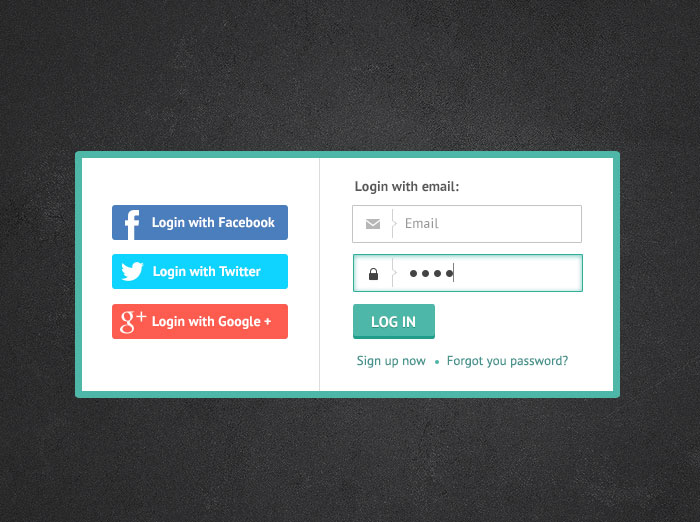
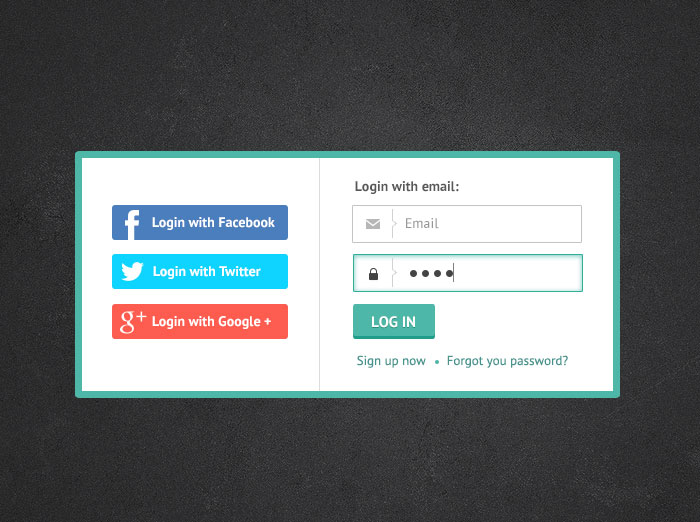
Don’t Tie Your Sign In Process to Other Sign In Processes

This isn’t completely a mobile issue. I can’t tell you of the number of sites and apps that I’ve walked away from because they insist I link my Facebook account to their sign in process. It’s not going to happen – you don’t need that data.

However, there is a tendency on Android handsets to require a Google+ log in as part of the log in process. That’s incredibly daft, particularly because Google+ is slowly dying. It didn’t take off as a social network and tying your login process to an unpopular network just isn’t common sense.

People are happy to use e-mail addresses so try and accommodate them.


Author/Copyright holder: Irina Barsukova. Copyright terms and licence: All rights reserved Img source

Ditch the Sliders

Slider navigation is awkward on a smartphone. It’s even more awkward when the slider doesn’t function properly when translated to the small screen. Then there’s the question of what that slider does to the text around it when it’s all been crunched into the same tiny piece of real estate. Images end up being separated from explanatory text. Medium length paragraphs become a wall of text and so on…

You might actually want to consider replacing slideshows as part of this process. Give people a choice, scrolling slideshow or simple list. And truthfully, this would often be welcomed by desktop users too. Why should I need to click 20 times to see 20 photos with a line of text under each?

Consider Information Walled Content Carefully

Requiring people to fill in a form just to see your content is annoying. It’s doubly annoying on a screen where the keyboard is not that easy to use. If you must continue walling off content – think about where to use that wall. People need to see something of value before they are going to waste their time filling in forms on a smartphone for you.

Ideally, to keep your marketing department happy, that means creating additional value content that increases the value of the stuff that you give away. An e-book giveaway, for example, if done right can help you get that valuable data without driving a ton of people away at first glance.

People Need Assistance

You can help people come to grips with the pain of using that tiny keyboard pretty easily. Sit down and think about the way that Google and many of the most popular sites work. They all offer auto-complete or auto-suggestion support. That’s a big plus on the desktop but it’s truly invaluable on mobile devices.

You should be able to draw on data from an existing product to work out what users want most often and then map that to an auto-complete function. The less pain that your products cause, the more likely they are to become user favourites.


Author/Copyright holder: Diana Martinez. Copyright terms and licence: All rights reserved Img source

Design Conventions Matter

There’s a reason that we still use a floppy disk for a save button even though floppy disks have long since stopped being in common usage. It’s because users recognize that convention. They know it means “save”. While there is room for improving the mobile experience, abandoning past conventions and replacing them with brand new ones is just going to force a higher learning curve than necessary. Where possible – stick to the tried and tested design conventions. If you do have to abandon them, explain them to your users, don’t rely on intuition.

Tutorials are Good But Need to Be Thought Through

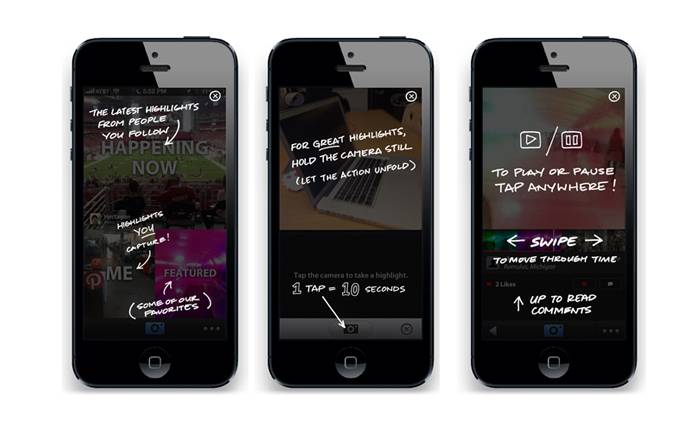
A tutorial to explain an app or a new website feature can be really useful but if you find that it’s 10 minutes long… you’ve probably got a product or feature that’s too complicated for anyone to use. If you’re explaining every button and every field… it’s because you’ve strayed too far from the world people know. You might also want to spend a little time focusing on what people can achieve in the tutorial, rather than making it a dry walkthrough of functionality.

Summary

These 8 problems are endemic to the mobile experience but the good news is that not only can they be fixed – most of them can be fixed easily and cheaply.

Header Image: Author/Copyright holder: Unknown. Copyright terms and licence: Unknown Img Source


Learn More in This Course:

AI for Designers

5 days
57 % booked
View Course

What You Should Read Next

  • Read full article
    8 Talks by Women to Inspire UX Designers - Article hero image
    Interaction Design Foundation logo

    8 Talks by Women to Inspire UX Designers

    User Experience design, like so many other disciplines, has a lower representation of women as compared to men. Things are changing now, though. Slowly, but surely. From strategy to tactics and from ideas to actionable tips, here is a curated playlist of talks by, and stories of just some of the mos

    Social shares
    655
    Published
    Read Article
  • Read full article
    UX Storyboards: Ultimate Guide - Article hero image
    Interaction Design Foundation logo

    UX Storyboards: Ultimate Guide

    In user experience design, we use techniques like workshops and interviews to understand users. We turn our research into user stories and process flows. We use personas and wireframes to share our ideas with our teams.But it’s important to remember the real people we design for. We need to know wha

    Social shares
    777
    Published
    Read Article
  • Read full article
    Stop the Generic Portfolio Trap! Design a Stand-Out Portfolio for Your UX/UI Niche: UX Writing - Article hero image
    Interaction Design Foundation logo

    Stop the Generic Portfolio Trap! Design a Stand-Out Portfolio for Your UX/UI Niche: UX Writing

    A picture may be worth a thousand words, but in UX design the right words are priceless. UX writing guides users, simplifies complex concepts, encourages desired actions, and creates a sense of delight. But how do you demonstrate you can do all of these things? How do you get noticed by hiring manag

    Social shares
    415
    Published
    Read Article
  • Read full article
    Mobile Breadcrumbs: 8 Best Practices in UX - Article hero image
    Interaction Design Foundation logo

    Mobile Breadcrumbs: 8 Best Practices in UX

    Breadcrumbs act as navigation aids—ones that simplify user journeys on websites. They highlight the path taken within a site to boost user experience, especially on mobile devices with limited screen space. Explore more about mobile breadcrumbs and understand the common design mistakes and best prac

    Social shares
    806
    Published
    Read Article
  • Read full article
    TAPT: Teasing Apart, Piecing Together - Article hero image
    Interaction Design Foundation logo

    TAPT: Teasing Apart, Piecing Together

    [[video:96]]Many experiences share the same core elements but differ in context. Photo sharing on Facebook has similar experience elements to sharing physical photos, but the actions involved and the context of the two experiences differ vastly. In creative processes, it’s valuable to analyze relate

    Social shares
    419
    Published
    Read Article
  • Read full article
    Why Care about Statistical Significance? - Article hero image
    Interaction Design Foundation logo

    Why Care about Statistical Significance?

    The categorical data depicts the success and failure rate of the low-fidelity wireframe above. There is not a large enough difference between the two to determine if the designs were successful.There is an element of error involved in measuring anything. So, when we want to compare measurements, how

    Social shares
    434
    Published
    Read Article
  • Read full article
    Web Fonts: Definition and 10 Recommendations - Article hero image
    Interaction Design Foundation logo

    Web Fonts: Definition and 10 Recommendations

    Web fonts bring digital content to life. They enhance readability, set the tone, and ensure consistency across various platforms—all vital ingredients. When you understand web fonts and their impact, it can help you with effective website creation—and greatly so. We’ll provide a comprehensive overvi

    Social shares
    782
    Published
    Read Article
  • Read full article
    How to Screen Research Participants - Article hero image
    Interaction Design Foundation logo

    How to Screen Research Participants

    Finding the right participants is crucial for gathering user research. We usually need to do research with participants having a particular set of needs or experience. In this short video, you will find out about the basic need for screening and how we make sure that we have suitably qualified parti

    Social shares
    452
    Published
    Read Article
  • Read full article
    Pitfalls in Recruiting Participants for User Research - Article hero image
    Interaction Design Foundation logo

    Pitfalls in Recruiting Participants for User Research

    The level of participant engagement is an important part of the user research results. Our results are dependent on proper engagement with our participants. In this video we look at some of the issues around participant recruitment and hear practical examples that arose in a large online study.[[vid

    Social shares
    421
    Published
    Read Article
  • Read full article
    How to Fit Quantitative Research into the Project Lifecycle - Article hero image
    Interaction Design Foundation logo

    How to Fit Quantitative Research into the Project Lifecycle

    Quantitative research methods fit into the project lifecycle at different stages of the process.In this video, we see where different quantitative research methods fit into a typical project lifecycle. Bear in mind that even with an iterative process such as Agile, the short cycles still address dif

    Social shares
    511
    Published
    Read Article

Top Articles

Top Topic Definitions

Feel Stuck?
Want Better Job Options?

AI is replacing jobs everywhere, yet design jobs are booming with a projected 45% job growth. With design skills, you can create products and services people love. More love means more impact and greater salary potential.

At IxDF, we help you from your first course to your next job, all in one place.

See How Design Skills Turn Into Job Options
Privacy Settings
By using this site, you accept our Cookie Policy and Terms of Use.
Customize
Accept all

Be the One Who Inspires

People remember who shares great ideas.

Share on:

Academic Credibility — On Autopilot

Don't waste time googling citation formats. Just copy, paste and look legit in seconds.

Feel stuck? Want Freedom?

Get one powerful email each week, like 325,441 others.

Learn to design a life you love.

Next email in:
1
day
15
hrs
23
mins
34
secs