Hand-drawn flowchart mapping user registration, verification emails, and confirmation steps on sticky notes

5 Tips for Keeping Your Mockups Simple

• 4 min read

460 Shares
Save

If you’re finding that your mockups are becoming increasingly complex and no longer serving the purpose that you intend them for; it can be a good idea to go back to basics and revisit your process with an emphasis on simplicity and usability for mockups. Here are 5 tips to bring your mockups back to a more convenient format:

Understand the Project Needs Before You Begin

You can’t keep mockups on point if you don’t really understand what purpose they have to serve. You need to get your stakeholders together as early as possible and thrash out their needs from the project and any expectations they may have at any stage of the project. You can get their input into the visual side of things but always make sure that only one person has final approval – otherwise you’ll be working to committee rule and will never get anything done.

Wireframes Still Matter
Author/Copyright holder: INPIVIC Family. Copyright terms and licence: CC BY 2.0

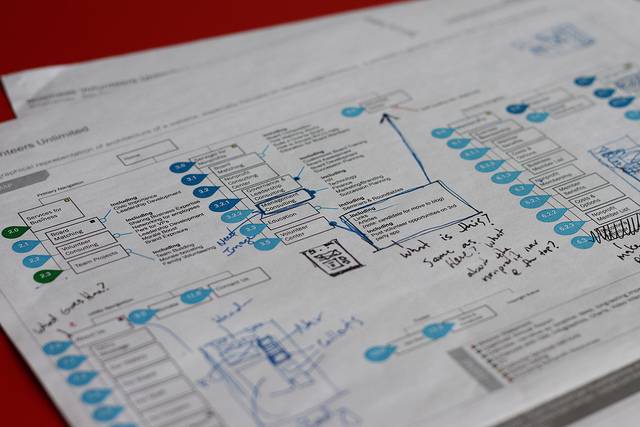
Wireframes are often neglected in the rush to deliver a more suitable mockup—this is a bad idea. Wireframes are much easier to make, test, abandon or modify than mockups. They also provide a very handy guide when you are ready to make a mockup. All the outline will be in place and you’ll just need to fill visual content.

Mockups Should Deliver a Single Concept

By the time you’re ready to put mockups together – you should have single cohesive conceptual direction in place. You don’t want to mockup dozens of ideas and let people pick from them… this is a bad idea. The place to toss ideas about is much earlier in the process; use mockups to get final feedback on an idea not to differentiate between ideas and you’ll find your mockups are much simpler to create.

Seek External Input

If you’re not sure what direction to take a mockup in – then go have a look at your competition. That doesn’t mean copy them but it does mean take some time to see what works well and you can emulate and what sucks and you can improve on. You should review competition regularly anyway but it’s a great idea during wireframing and mockups to concentrate your mind on structure and save wasted efforts.

Present Mockups Properly

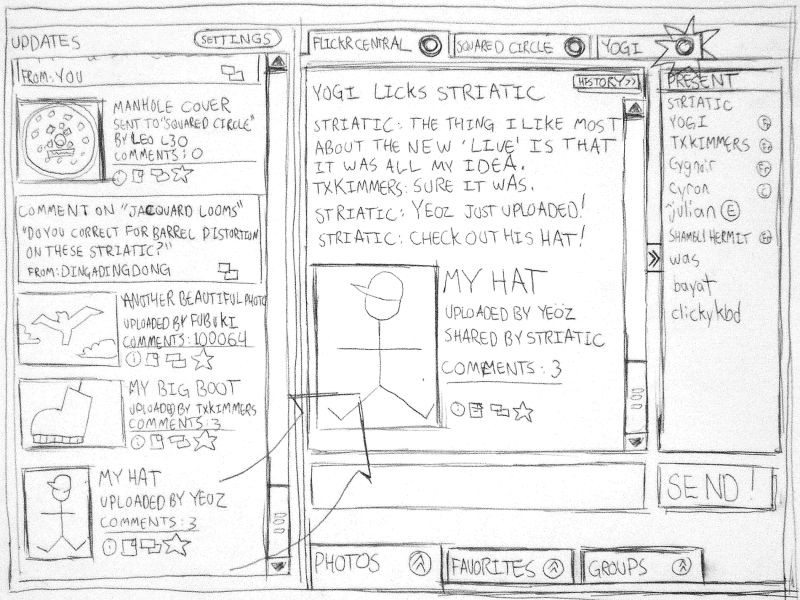
You want to ensure that your mockups are presented in a sensible order with a natural flow. If things aren’t clear on the mockup – then don’t be afraid to annotate the mockup and explain functionality or features that aren’t readily apparent.
Author/Copyright holder: hobvias sudoneighm. Copyright terms and licence: CC BY 2.0

Your mockups will be much more powerful when you put them forward to your project’s stakeholders if they’re easy to understand and tell a clear story. Focus on simplifying the story to the essentials and your stakeeholders will thank you for it.

Header Image: Author/Copyright holder: Stephen Dann. Copyright terms and licence: CC BY-SA 2.0


Topics in This Article

Learn More in This Course:

Learn Design and AI From the Best

Get one powerful email each week, like 313,392 others.

Next email in:

What You Should Read Next

  • Read full article
    What Is Card Sorting? - Article hero image

    What Is Card Sorting?

    In this video, William Hudson, UX Strategist and Founder of Syntagm Ltd, introduces card sorting: what it is, where it comes from, and the broad range of problems it can help solve.Card sorting is a research technique in which participants organize a set of items into groups that make sense to them,

    Social shares
    58
    Published
    Read Article
  • Read full article
    Design Accessible Navigation for Keyboards and Screen Readers - Article hero image

    Design Accessible Navigation for Keyboards and Screen Readers

    Accessibility is often treated as a finishing touch, but for navigation, it belongs at the foundation. Menus are how users reach everything else on a site, so a menu that works only with a mouse quietly shuts out anyone who depends on a keyboard, a screen reader, or another form of assistive technol

    Social shares
    59
    Published
    Read Article
  • Read full article
    The Scent of Information: Give Users the Confidence to Click - Article hero image

    The Scent of Information: Give Users the Confidence to Click

    William Hudson, UX Strategist and Founder of Syntagm Ltd, introduces the scent of information as a model for understanding how users navigate toward their goals, and sets out the principles for writing navigation links that strengthen that scent.Information Foraging and the Scent of InformationThe s

    Social shares
    61
    Published
    Read Article
  • Read full article
    Bad UX Exposed: A Comprehensive Guide to Avoiding Pitfalls - Article hero image

    Bad UX Exposed: A Comprehensive Guide to Avoiding Pitfalls

    In today’s vibrant digital design landscape, creating meaningful connections with users goes beyond offering innovative products or services. It leads us into the world of user experience design (or UX design). This critical factor shapes our interaction with the users and plays a big role in making

    Social shares
    973
    Published
    Read Article
  • Read full article
    Understand the Various Types of Creativity - Article hero image

    Understand the Various Types of Creativity

    When you want to be more creative, you’ll want to learn the techniques for creative thinking and understand the various forms of creativity and creative processes. This video will give you an overview of some of the different forms of creativity. For example, you’ll learn that there are two types of

    Social shares
    573
    Published
    Read Article
  • Read full article
    Design Podcasts to Learn UX on the Go - Article hero image

    Design Podcasts to Learn UX on the Go

    As digital designers, we know the bulk of our day is spent looking at screens. Give your eyes some rest, and tune into podcasts instead. They are a great way to stay updated, gain insights, be inspired or experience “A-ha” moments. The best part about podcasts is that unlike reading or watching vide

    Social shares
    640
    Published
    Read Article
  • Read full article
    User Experience (UX) Surveys: The Ultimate Guide - Article hero image

    User Experience (UX) Surveys: The Ultimate Guide

    Imagine you’re a business owner who wants to know what’s working and what’s not on your website—and, oh yes, where you need improvements. Sure, there are a bunch of research methods you can try—like user interviews, usability tests, and A/B testing, but read on and see how a user experience (UX) sur

    Social shares
    1k
    Published
    Read Article
  • Read full article
    Don Norman: How You Can Rapidly Move Up by Thinking in Systems (Not Features) - Article hero image

    Don Norman: How You Can Rapidly Move Up by Thinking in Systems (Not Features)

    How can you move up in a company? Learn the fundamentals of business such as statistics, finance, accounting, marketing, supply chain and administration. How do you do that? One way to do this is to get a Master of Business Administration (MBA) degree. But Don says you can also learn them without go

    Social shares
    613
    Published
    Read Article
  • Read full article
    How to Find Your Voice: Speak with Confidence and Clarity - Article hero image

    How to Find Your Voice: Speak with Confidence and Clarity

    You’ve heard it before “It’s not what you said—it’s how you said it.” Your voice can change how people feel—even if your message doesn’t. If you vary your tone and pacing, you can make your ideas sound more trustworthy, exciting, or urgent. Harness this neuroscience-backed communication power and yo

    Social shares
    454
    Published
    Read Article
  • Read full article
    Avoid Death by PowerPoint: Structure Your Slides for Maximum Impact - Article hero image

    Avoid Death by PowerPoint: Structure Your Slides for Maximum Impact

    Your message is ready, your delivery honed. Now, how do you put that brilliance on slides? Discover how to structure your slide deck strategically so that it supports your message, whether you present live or share it for independent review.Whether you're pitching to stakeholders, leading a team mee

    Social shares
    427
    Published
    Read Article

Top Articles

Top Topic Definitions

39% of Today's Skills Will Change by 2030

The World Economic Forum expects 39% of today's skills to be transformed or become outdated by 2030.

The good news is that jobs in UX / UI design and AI are among the fastest-growing professions globally.

Build Skills That Keep You Relevant

Privacy Settings

By using this site, you accept our Cookie Policy and Terms of Use.
Customize
Accept all

Be the One Who Inspires

People remember who shares great ideas.

Share on:

Academic Credibility — On Autopilot

Don't waste time googling citation formats. Just copy, paste and look legit in seconds.

Learn Design and AI From the Best

Get one powerful email each week, like 313,392 others.

Next email in: