People collaborate around a large circular whiteboard covered with colorful handwritten notes, diagrams, and connecting lines

UX Tools Series: Collaboration Tools

• 5 min read

433 Shares
Save

Every UX project requires that you work with other people and that means you’re going to want to work together as efficiently as possible. This is the sixth part of our UX tools series; if you have missed any of the rest of the series – they can be accessed from the UX Daily tab on our website.

Concept Inbox
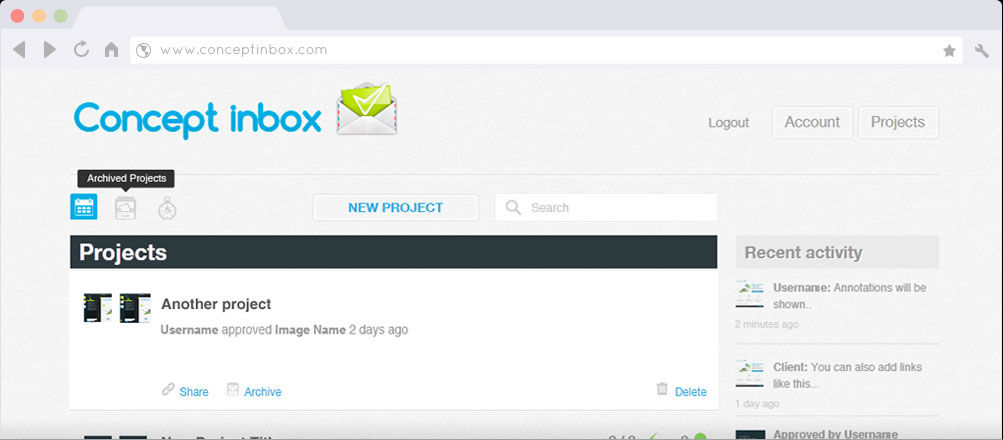

Author/Copyright holder: Adonay Creativo. Copyright terms and licence: All rights reserved Img source


Concept Inbox is an awesome collaboration tool for creative; it lets you share design and even video work and then track changes and build prototypes together. That should keep change requests to a minimum for final delivery. There’s a free account sign up but in the long run you’ll probably need to pay a subscription fee to get the most out of the product. Annoyingly, you have to sign up to get their pricing which is something we don’t like. However, feedback on the product is excellent and it’s nice to find a collaboration tool with a genuinely creative slant.

Prevue

Prevue is an image sharing site which allows you to comment and test images collaboratively; well at least if you pay $10/month it does – the free option only allows a single user and a maximum of 30 images stored. If you need a secure place to share images this is not bad value but we’d like to see a few more features for our subscription fee really.

Murally
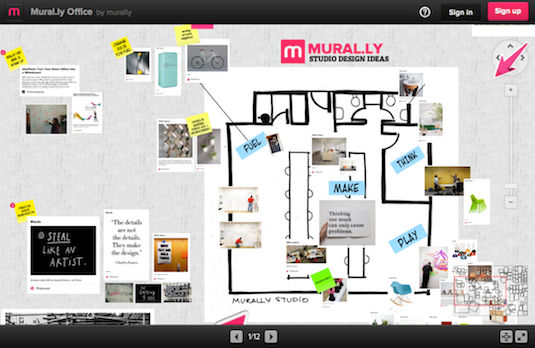

Author/Copyright holder: Creative Bloq. Copyright terms and licence: All rights reserved Img source

Murally allows you to “visually organize your thoughts” as a team and it was built with collaborative work in creative industries in mind. It is a subscription product and pricing is based on the number of users in your team. An individual account is only $8 a month but if you have 50 users… it’s going to cost $879 a month (and that’s as long as you pay annually – a discount of 20% over paying monthly). There’s a 30 day free trial option too.

MemoSort
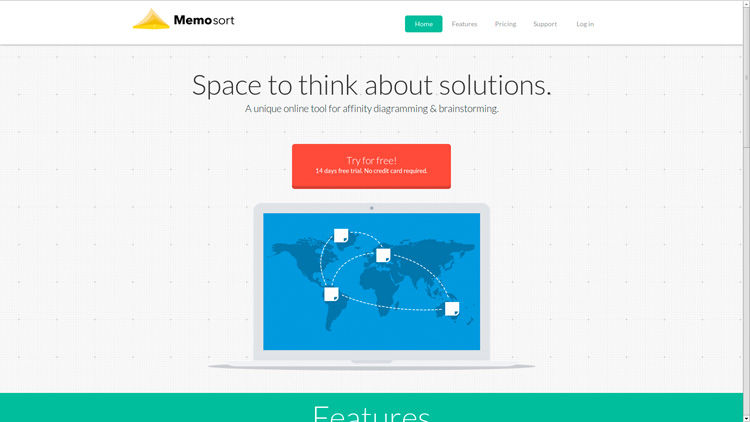

Author/Copyright holder: Crazy Leaf Design. Copyright terms and licence: All rights reserved Img source

MemoSort’s a great tool for working together on affinity diagrams and brainstorming projects. For $10 a month you can unlock all features and collaborate with as many people as you need to; that feels very fair for what’s provided. There are some neat tools involved including an anonymous voting option for breaking deadlock on heated discussions.

Red Pen

Red Pen’s all about fast team feedback on visual items. It’s a point and click interface which is very, very simple to learn to use. That’s pretty useful particularly if you work in a geographically dispersed team. They charge per project you maintain on the site and pricing ranges from $20 to $90 a month. You can take a free trial for 14 days if you’re not certain that it’s the right tool for you.

The Last Word

As always please remember that these tools may or may not be right for your needs; we recommend careful research as part of selecting tools for your UX project – there are no “one size fits all needs” options even when it comes to collaborating on projects.

Header Image: Author/Copyright holder: Jennifer Leonard. Copyright terms and licence: CC BY-NC-ND 2.0


Learn More in This Course:

Learn Design and AI From the Best

Get one powerful email each week, like 312,438 others.

Next email in:

What You Should Read Next

  • Read full article
    Turn Your Non-Design Experience into Design Portfolio Gold - Article hero image

    Turn Your Non-Design Experience into Design Portfolio Gold

    Have you ever wondered how to transition into UX and product design from a different career background without feeling insecure? Let's uncover strategies to confidently bridge the gap and showcase your skills to prospective employers with confidence and clarity.In this video, Morgane Peng, Desi

    Social shares
    507
    Published
    Read Article
  • Read full article
    Structure First: The Inverted Pyramid and Visual Organization - Article hero image

    Structure First: The Inverted Pyramid and Visual Organization

    This clip examines two principles that work hand in hand to make web content readable: the inverted pyramid approach to information order and the use of visual structure to help users scan efficiently. William Hudson, UX Strategist and Founder of Syntagm Ltd, describes the theoretical basis and prac

    Social shares
    205
    Published
    Read Article
  • Read full article
    What Is Card Sorting? - Article hero image

    What Is Card Sorting?

    In this video, William Hudson, UX Strategist and Founder of Syntagm Ltd, introduces card sorting: what it is, where it comes from, and the broad range of problems it can help solve.Card sorting is a research technique in which participants organize a set of items into groups that make sense to them,

    Social shares
    171
    Published
    Read Article
  • Read full article
    Design Accessible Navigation for Keyboards and Screen Readers - Article hero image

    Design Accessible Navigation for Keyboards and Screen Readers

    Accessibility is often treated as a finishing touch, but for navigation, it belongs at the foundation. Menus are how users reach everything else on a site, so a menu that works only with a mouse quietly shuts out anyone who depends on a keyboard, a screen reader, or another form of assistive technol

    Social shares
    172
    Published
    Read Article
  • Read full article
    The Scent of Information: Give Users the Confidence to Click - Article hero image

    The Scent of Information: Give Users the Confidence to Click

    William Hudson, UX Strategist and Founder of Syntagm Ltd, introduces the scent of information as a model for understanding how users navigate toward their goals, and sets out the principles for writing navigation links that strengthen that scent.Information Foraging and the Scent of InformationThe s

    Social shares
    171
    Published
    Read Article
  • Read full article
    4 UI Design Tips Every Designer Needs to Know - Article hero image

    4 UI Design Tips Every Designer Needs to Know

    User interface (UI) design can make or break any digital product. A user often won’t even notice when they interact with a great UI. They feel the visual appeal and simply trust it. On the contrary, a bad UI design can prevent the user from interacting with a product intuitively or at all and lead t

    Social shares
    646
    Published
    Read Article
  • Read full article
    How to Design Use Cases in UX - Article hero image

    How to Design Use Cases in UX

    Imagine a new mobile app or an e-commerce site gets launched; it looks great, sure, and it should be a hit because it at least looks like it’s got what it takes, but—drumroll—it tanks in the marketplace, all because people find it hard to complete even the simplest tasks. That’s rough, but—behind th

    Social shares
    804
    Published
    Read Article
  • Read full article
    How to Become a Product Manager: Best Career Advice - Article hero image

    How to Become a Product Manager: Best Career Advice

    Pick any product and you’ll find that product management is vital to how successful it is—and product managers are who make sure that a product’s life cycle runs smoothly, and it means they know how to align strategy, vision, and user needs. Product managers split into multiple roles that have got u

    Social shares
    603
    Published
    Read Article
  • Read full article
    Bad UX Exposed: A Comprehensive Guide to Avoiding Pitfalls - Article hero image

    Bad UX Exposed: A Comprehensive Guide to Avoiding Pitfalls

    In today’s vibrant digital design landscape, creating meaningful connections with users goes beyond offering innovative products or services. It leads us into the world of user experience design (or UX design). This critical factor shapes our interaction with the users and plays a big role in making

    Social shares
    975
    Published
    Read Article
  • Read full article
    Understand the Various Types of Creativity - Article hero image

    Understand the Various Types of Creativity

    When you want to be more creative, you’ll want to learn the techniques for creative thinking and understand the various forms of creativity and creative processes. This video will give you an overview of some of the different forms of creativity. For example, you’ll learn that there are two types of

    Social shares
    578
    Published
    Read Article

Top Articles

Top Topic Definitions

39% of Today's Skills Will Change by 2030

The World Economic Forum expects 39% of today's skills to be transformed or become outdated by 2030.

The good news is that jobs in UX / UI design and AI are among the fastest-growing professions globally.

Build Skills That Keep You Relevant

Privacy Settings

By using this site, you accept our Cookie Policy and Terms of Use.
Customize
Accept all

Be the One Who Inspires

People remember who shares great ideas.

Share on:

Academic Credibility — On Autopilot

Don't waste time googling citation formats. Just copy, paste and look legit in seconds.

Learn Design and AI From the Best

Get one powerful email each week, like 312,438 others.

Next email in: