Tips for Recycling UX Design Elements

• 8 min read

425 Shares

Reinventing the wheel sucks. Yet, all too often that’s exactly what UX designers do. They move from project to project and start from scratch each time. Yet, it doesn’t have to be like that.

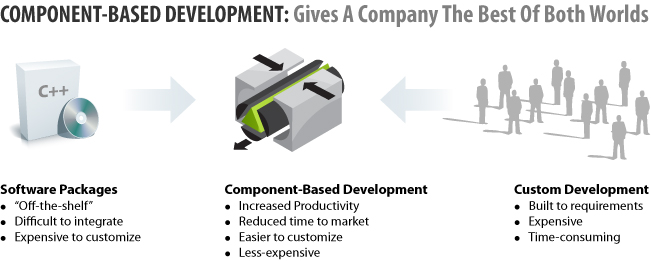
Software developers don’t do it. They build blocks of code for functionality, components, which allow them to meet a need without recoding from the start. Sure, they may tweak those components a little for the new project but the basis has already been put in place.

UX designers can do something similar. They can build their own element specifications that can be handily recycled from project to project. This cuts down on grunt work and lets the UX designer focus more on “blue sky thinking” when they need to.

Software Development and Components

It’s worth noting that there are plenty of disagreements to exactly what constitutes a component in software development. That’s true today and components were first introduced in software back in the 1960s!

However, it doesn’t matter too much how a component is built, what matters is the purpose of components – the ability to recycle ideas between projects and the considerations that are used when designing components.

In essence there’s an examination of the technical aspects of the implementation. Components are built when there’s a need for efficiencies, where the code can be developed in this manner so that developer resources may be freed up in the future, the actual language to be used and the possible future value of the component (archaic languages in legacy systems are not the best place to spend your life building components, for example).

There’s also the understanding the while a component is a black-box system (e.g. it produces inputs and outputs that are clearly understood) that it may be tweaked as necessary by a developer to make it more useful for their current needs.


Author/Copyright holder: Top Coder. Copyright terms and licence: All rights reserved Img source

Design Element Specifications For User Experience Recycling

In order to get the maximum level of recyclability from our design element specifications, we need to look at designing with recycling in mind from the outset.

Don’t forget that while these solutions are supposed to be flexible, they also need to be tangible to be of value.

It’s important to know, before we start with design element specifications:

  • What’s the design element going to do when it’s complete?
  • What context will that design element operate within?
  • How might we want to modify that element in the future?

We will have to clearly document our design element specifications if we want to be able to recycle them. That means delivering documentation that is explicitly clear about the purposes for the design element. It may not be the document’s creator that ends up recycling that design element – so ease of use and clarity are a key part of the development process here.

We being with a title. Titles should be short, catchy and enable an easy grasp of what the document is about. You can always go into more detail with an explanatory paragraph later.

The titles should, because we’re UX professionals, reflect a user need. So for example “Enter Date and Time” would be a good title. It’s clear what the user wants to do and what the design element will be dealing with.

There’s also the business to consider. You need to be certain that the design element will be fit-for-purpose and help meet organizational objectives.

That means somewhere in your documentation you want to handle:

  • The content of the element.
  • The place that the element will assume in the information hierarchy of your product.
  • The place that the element fits within the interface (UI).
  • The interaction of the user with the element.
  • Where the whole thing fits into the navigation design – though this will normally only apply if navigation is required when interacting with the element.
  • Finally, you’re going to need some sort of functional specification to enable your developers to implement these design elements.
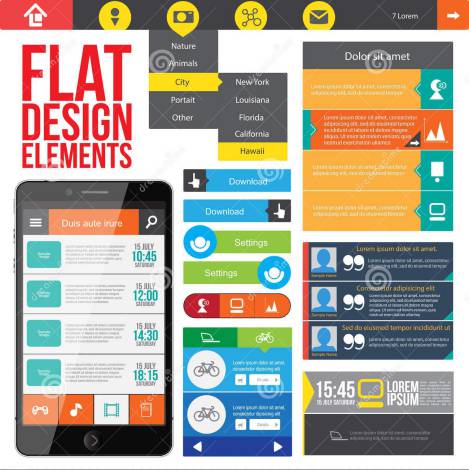

Author/Copyright holder: Alexandrpeers. Copyright terms and licence: All rights reserved Img source

Documenting Design Elements

So let’s look at a simple example of that in practice, let’s take a time capture field.

Title: Capture The Time

User Requirement: Entering time into a field, rapidly and accurately

Business Requirement: To capture the time for sales pattern analysis

Content: Time elements hours and minutes, and explanatory text

Interface Design:

INSERT CLOCK PULLDOWN HERE

Interaction Design:

User – Find the time capture component on the page

User – Select the first field

User – Enter the hour in 24 hour clock format

System – Predefined Options Made Invisible

User – Select the second field

System – Predefined Options Made Invisible

Functional Specification:

The time capture form will consist of the following

Label – Current Time (24 Hour Clock)

Two Text Fields – Populated with HH for the hour and MM for the minutes

Required Behaviour when the field is chosen, the pre-populated text should become invisible

This layout makes it very easy to compare different versions of a design element and decide which is appropriate for a given situation.

Some Things to Remember

Just because a design element can be recycled, it doesn’t mean that it should be recycled. The appropriateness of recycling a design element should be clear before it is recycled. It is very easy to introduce errors and flaws into a project by recycling an element without reviewing it first.



Author/Copyright holder: Eugene Zemlyanskiy. Copyright terms and licence: CC BY 2.0

The larger your design element library becomes – the harder it becomes to name things effectively and to be able to tell at a glance which element is right for the current situation. This library requires careful management.

You don’t have to do this for every element of every design if you don’t have the resources to do so. This is a time consuming process. You may decide just to take the most common elements that you use and give them this treatment. A process is only worthwhile if it doesn’t detract from the core of your work.

Summary

Recycling design elements is resource friendly. It frees up human resources, it reduces the need for financial resources on a project and reduces the load on your technical resources. The tips above may help you get started on a recycling approach to your UX design.

Header Image: Author/Copyright holder: LEO Learning Ltd. Copyright terms and licence: All rights reservedImg Source

Learn More in This Course:

AI for Designers

7 days
32 % booked
View Course

What You Should Read Next

  • Read full article
    Why Care about Statistical Significance? - Article hero image
    Interaction Design Foundation logo

    Why Care about Statistical Significance?

    The categorical data depicts the success and failure rate of the low-fidelity wireframe above. There is not a large enough difference between the two to determine if the designs were successful.There is an element of error involved in measuring anything. So, when we want to compare measurements, how

    Social shares
    433
    Published
    Read Article
  • Read full article
    Web Fonts: Definition and 10 Recommendations - Article hero image
    Interaction Design Foundation logo

    Web Fonts: Definition and 10 Recommendations

    Web fonts bring digital content to life. They enhance readability, set the tone, and ensure consistency across various platforms—all vital ingredients. When you understand web fonts and their impact, it can help you with effective website creation—and greatly so. We’ll provide a comprehensive overvi

    Social shares
    782
    Published
    Read Article
  • Read full article
    How to Screen Research Participants - Article hero image
    Interaction Design Foundation logo

    How to Screen Research Participants

    Finding the right participants is crucial for gathering user research. We usually need to do research with participants having a particular set of needs or experience. In this short video, you will find out about the basic need for screening and how we make sure that we have suitably qualified parti

    Social shares
    451
    Published
    Read Article
  • Read full article
    Pitfalls in Recruiting Participants for User Research - Article hero image
    Interaction Design Foundation logo

    Pitfalls in Recruiting Participants for User Research

    The level of participant engagement is an important part of the user research results. Our results are dependent on proper engagement with our participants. In this video we look at some of the issues around participant recruitment and hear practical examples that arose in a large online study.[[vid

    Social shares
    420
    Published
    Read Article
  • Read full article
    How to Fit Quantitative Research into the Project Lifecycle - Article hero image
    Interaction Design Foundation logo

    How to Fit Quantitative Research into the Project Lifecycle

    Quantitative research methods fit into the project lifecycle at different stages of the process.In this video, we see where different quantitative research methods fit into a typical project lifecycle. Bear in mind that even with an iterative process such as Agile, the short cycles still address dif

    Social shares
    510
    Published
    Read Article
  • Read full article
    How to Resolve Conflicts Between Design Thinking and Marketing - Article hero image
    Interaction Design Foundation logo

    How to Resolve Conflicts Between Design Thinking and Marketing

    In the past, designers often reported to marketing managers and were neither expected nor allowed to make business decisions. When traditionally-structured companies transition to a design-driven mindset, there can be friction between the marketing and design teams. Let’s take a closer look at this

    Social shares
    682
    Published
    Read Article
  • Read full article
    Stop the Generic Portfolio Trap! Design a Stand-Out Portfolio for Your UX/UI Niche: User Research - Article hero image
    Interaction Design Foundation logo

    Stop the Generic Portfolio Trap! Design a Stand-Out Portfolio for Your UX/UI Niche: User Research

    User research is indispensable—and without it, well... UX design is guesswork. When you’re a user researcher, you know this well—but it can be hard to communicate your work in a way that grabs the viewer and holds their attention. And that’s what a portfolio is all about—grabbing the attention of yo

    Social shares
    383
    Published
    Read Article
  • Read full article
    Top Service Blueprint Templates - Article hero image
    Interaction Design Foundation logo

    Top Service Blueprint Templates

    Service blueprint tools are vital for effective customer experience design—and for designers to make experiences that are exceptional. Here, we’ll discuss why these tools are so important. What’s more, we’ll explore templates and practical resources to create high-quality, efficient service blueprin

    Social shares
    638
    Published
    Read Article
  • Read full article
    How to Write Research Questions that Lead to Confident Design - Article hero image
    Interaction Design Foundation logo

    How to Write Research Questions that Lead to Confident Design

    Designing with Data provides an extensive background to A/B testing.As with all other research methods, we need to start with a research question. A/B testing concerns itself with changes in user behavior, meaning that our questions need to be centered on measurable goals. In many cases, these will

    Social shares
    450
    Published
    Read Article
  • Read full article
    Getting Started - Article hero image
    Interaction Design Foundation logo

    Getting Started

    We start our introduction to A/B and multivariate testing (MVT) by looking at their basic principles and their differences. Note that the video mentions Google Optimize, which has been withdrawn. Google Firebase can be used for mobile platforms. Third-party solutions are needed for A/B testing on th

    Social shares
    227
    Published
    Read Article

Top Articles

Top Topic Definitions

Feel Stuck?
Want Better Job Options?

AI is replacing jobs everywhere, yet design jobs are booming with a projected 45% job growth. With design skills, you can create products and services people love. More love means more impact and greater salary potential.

At IxDF, we help you from your first course to your next job, all in one place.

See How Design Skills Turn Into Job Options
Privacy Settings
By using this site, you accept our Cookie Policy and Terms of Use.
Customize
Accept all

Be the One Who Inspires

People remember who shares great ideas.

Share on:

Academic Credibility — On Autopilot

Don't waste time googling citation formats. Just copy, paste and look legit in seconds.

Feel stuck? Want Freedom?

Get one powerful email each week, like 325,649 others.

Learn to design a life you love.

Next email in:
4
days
3
hrs
37
mins
5
secs