Talk to Me! Feedback and Notifications in Mobile Design

• 8 min read

576 Shares

Smartphone users interact with their phones up to 150 times a day. Some of their interactions are long interactions but many are short and hurried. Because of this smartphone users may lack the patience of desktop users and without the appropriate feedback and notifications they may abandon an app or web presence quickly never to return. Mobile designers need to carefully consider incorporating feedback and notification systems and ensuring that these systems adhere to best design practices.
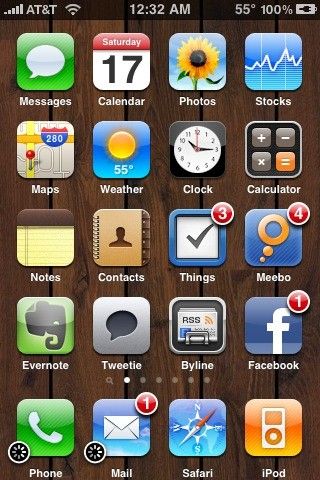

Author/Copyright holder: Geoffrey Gallaway. Copyright terms and licence: CC BY 2.0

When we interact with an app or website, we rely on feedback to inform us that we are progressing towards our desired objective. This is true on the desktop as much as it is on the smartphone. However, the immediacy of the smartphone and the short-time period interactions which users have with these devices means that feedback must be delivered faster and more regularly in order to keep users engaged.

What is Feedback?

Feedback is a process that works in a simple loop structure. With products it goes like this:

  • Step 1 – The user takes an action

  • Step 2 – That action creates an effect or effects

  • Step 3 – The effects of the action are then relayed to the user

  • Step 4 – Returns to Step 1

Every product has its own set of feedback loops; e.g. a series of actions which are repeated in sequence on a regular basis.

For example, a Gmail user might log in to Gmail, check their emails, read their emails, delete any emails they don’t need and then log out.

A Facebook user, on the other hand, may log in, create a post, like any of their friend’s posts, comment on those posts and then log out.

The first step to providing feedback to your users that offers meaningful information is to understand the feedback loop of activity that the user will undertake.

Loren Baxter, a product design team manager at ReadyForZero writing in Smashing Magazine, offers four key areas in which feedback can be provided and feedback processes improved:

  • Speed

  • Measurability

  • Context

  • Motivations

Speed of Feedback

Users are going to become frustrated if they don’t receive some feedback on their action as soon as it’s possible or relevant to do so. This is as true for long-life cycle processes (such as the progress of investment activity) as short processes (such as taking a photo).

Measurability

Feedback can assist the user in making comparisons and determining whether they are getting best value from their actions. Feedback, wherever possible, should include quantities. This allows the user to better understand how much benefit they derive from an action.

Context

Effective feedback also requires context. If, for example, a user is on a diet – presenting them with a roadmap, that shows how far they are from their eventual goal as well as their progress towards it, will be better received than feedback which only indicates current achievement.
Motivations

Feedback must also be connected to the user’s motivation for interaction with any given product. Gamification options often fail because the badges, points, etc. do not connect with the users actual motivations. Feedback must matter to the user to have value to them.

Guidelines for Providing Valuable Feedback within Mobile Designs

There are some straight forward guidelines to consider when implementing feedback systems within mobile apps. It is important to use these in conjunction with the four points above to maximize their value:

  • Notifications and alerts should be kept to a minimum and used only where they add genuine value to the user experience. They should always include valuable data and prompt meaningful actions. The exception to this rule is during mobile app installation and launch where notifications should be provided to suggest progress to the user to prevent them from aborting the process and uninstalling the app.
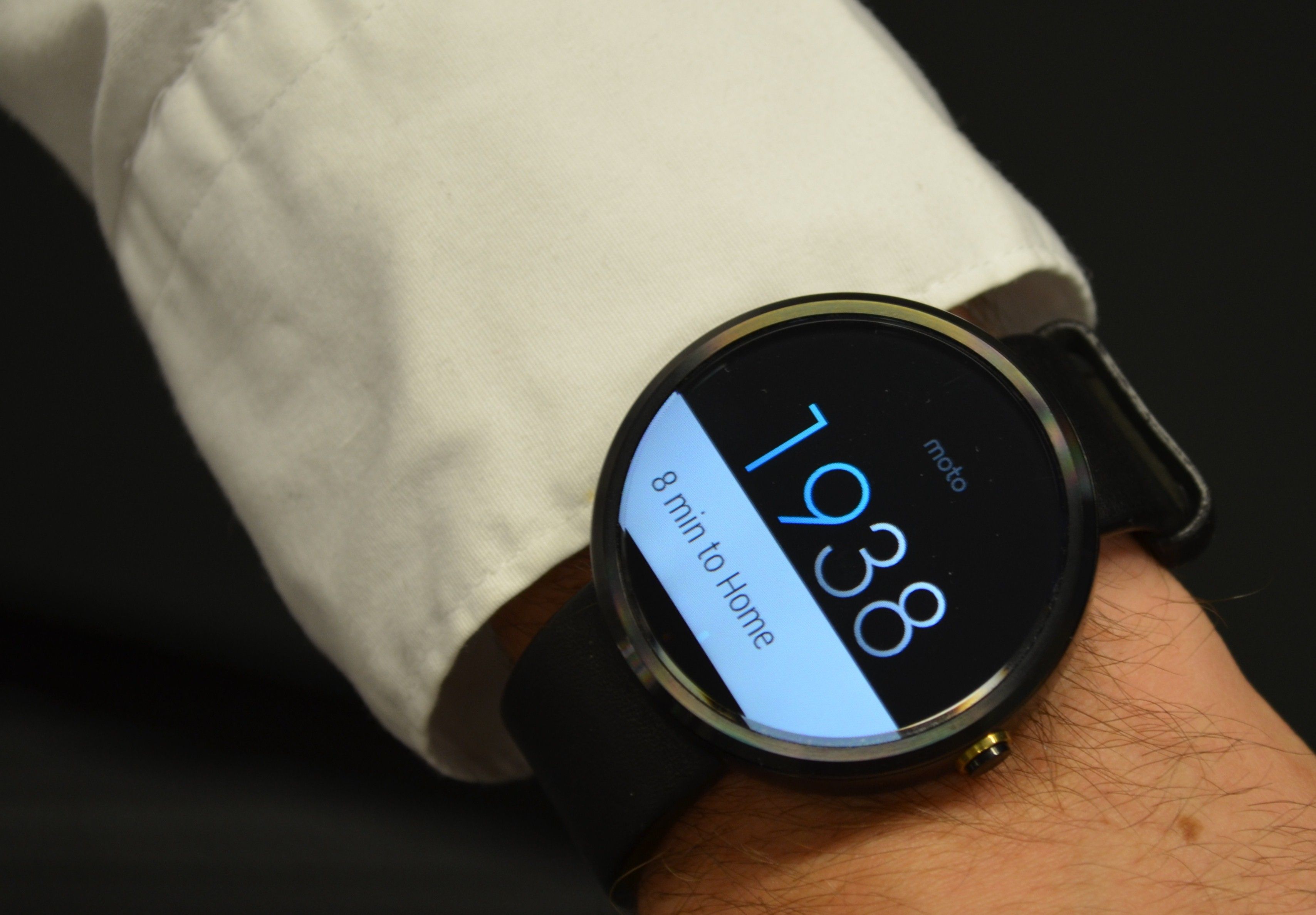
Author/Copyright holder: Raysonho. Copyright terms and licence: CC0 1.0

  • Alerts and feedback should be kept as simple as possible with clear and easy to understand choices generated from them. (Pay particular attention to button labels).

  • Notifications should not interrupt the user’s current activity unless absolutely necessary and be easy to dismiss if the user wants to ignore them.

  • Feedback should be provided in such a way that it does not interrupt the user’s current workflow.

  • Use feedback to validate and explain why an action was invalid. Telling someone an input is not correct is not a high value activity – showing them an example of a correct input is.

  • Don’t be afraid to use feedback and multiple notifications when a critical decision is being made. It is better to have a user confirm that they really want to delete data than risk the user deleting data they do want.

The Take Away

Feedback and notifications are an essential part of the user experience on the smartphone. When users interact with a device 150 times a day; it can be concluded that not every interaction will be a long and in depth one. That means making it easy for users to make decisions on the fly and ensure that they understand what it is they are doing when they make those decisions and that once they are committed they may have confidence in the outcome of their actions.

Author/Copyright holder: Pebble Technology. Copyright terms and licence: CC BY-SA 1.0

You do not want to overuse feedback and notifications in your mobile experience but neither should you underuse them. User testing will help you find the right balance for your user base.

References & Where to Learn More:

Loren Baxter explores, with some great examples, how feedback connects with users here at Smashing Magazine.

This article touches on feedback failures in Mobile UX as well as some other UX pitfalls in mobile design.

M-Way solutions examines the way that mobile feedback systems can be implemented here on their blog.

Hero Image: Author/Copyright holder: miyabi teraminato. Copyright terms and licence: CC BY-NC-ND 2.0


Learn More in This Course:

AI for Designers

7 days
32 % booked
View Course

What You Should Read Next

  • Read full article
    What is Interaction Design? - Article hero image
    Interaction Design Foundation logo

    What is Interaction Design?

    Interaction design is an important component within the giant umbrella of user experience (UX) design. In this article, we’ll explain what interaction design is, some useful models of interaction design, as well as briefly describe what an interaction designer usually does.A simple and useful unders

    Social shares
    1.5k
    Published
    Read Article
  • Read full article
    Apple’s Product Development Process – Inside the World’s Greatest Design Organization - Article hero image
    Interaction Design Foundation logo

    Apple’s Product Development Process – Inside the World’s Greatest Design Organization

    Apple’s Product Development Process may be one of the most successful design processes ever implemented. With a valuation that exceeds $2 trillion, there’s a lot that designers can learn from Apple and introduce into their own design environments.Apple is a notoriously secretive business. In Steve J

    Social shares
    1.4k
    Published
    Read Article
  • Read full article
    10 Great Sites for UI Design Patterns - Article hero image
    Interaction Design Foundation logo

    10 Great Sites for UI Design Patterns

    You don’t want to spend your whole life redesigning the wheel, do you? No, neither do we. If you are looking for a design that solves a problem that has been solved with a different application before, then the template for your wheel is probably already out there. This lets you save time and make a

    Social shares
    1.4k
    Published
    Read Article
  • Read full article
    Shneiderman’s Eight Golden Rules Will Help You Design Better Interfaces - Article hero image
    Interaction Design Foundation logo

    Shneiderman’s Eight Golden Rules Will Help You Design Better Interfaces

    Follow Ben Shneiderman’s 'Eight Golden Rules of Interface Design' if you want to design great, productive and frustration-free user interfaces. Apple, Google and Microsoft are among some of the highly successful companies whose well-designed products reflect Shneiderman’s rules. The characteristics

    Social shares
    1.4k
    Published
    Read Article
  • Read full article
    User Interface Design Guidelines: 10 Rules of Thumb - Article hero image
    Interaction Design Foundation logo

    User Interface Design Guidelines: 10 Rules of Thumb

    Learn to design with your user’s needs and expectations in mind by applying Jakob Nielsen and Rolf Molich’s Ten User Interface Guidelines. These heuristics have been reflected in many of the products designed by some of the most successful companies in the world such as Apple, Google, and Adobe. Fur

    Social shares
    1.4k
    Published
    Read Article
  • Read full article
    How to Change Your Career from Graphic Design to UX Design - Article hero image
    Interaction Design Foundation logo

    How to Change Your Career from Graphic Design to UX Design

    If there’s an occupation that is 100% linked with the public’s idea of what design is all about, it’s graphic design. From the familiar golden arches of the McDonald’s brand to the typography and colors of movie posters, graphic designers create some of the most iconic and ubiquitous designs around

    Social shares
    1.4k
    Published
    Read Article
  • Read full article
    Repetition, Pattern, and Rhythm - Article hero image
    Interaction Design Foundation logo

    Repetition, Pattern, and Rhythm

    Let’s look at three subjects that, at first glance, may strike you as being incredibly basic and self-explanatory. However, although they may seem like they should need no introduction, we should study them. By understanding these concepts, you’ll be able to apply them more effectively to captivate

    Social shares
    1.4k
    Published
    Read Article
  • Read full article
    The Grid System: Building a Solid Design Layout - Article hero image
    Interaction Design Foundation logo

    The Grid System: Building a Solid Design Layout

    Now that we’ve seen some grids at work in the Rule of Thirds article, let’s examine them a little more deeply. As a concept that deals so fundamentally with the fabric and background of our work as designers, it’s easy to overlook the power of grids and think more about the elements we want to creat

    Social shares
    1.4k
    Published
    Read Article
  • Read full article
    The Principles of Service Design Thinking - Building Better Services - Article hero image
    Interaction Design Foundation logo

    The Principles of Service Design Thinking - Building Better Services

    Service design is all about taking a service and making it meet the user’s and customer’s needs for that service. It can be used to improve an existing service or to create a new service from scratch. In order to adapt to service design, a UX designer will need to understand the basic principles of

    Social shares
    1.4k
    Published
    Read Article
  • Read full article
    The Golden Ratio - Principles of form and layout - Article hero image
    Interaction Design Foundation logo

    The Golden Ratio - Principles of form and layout

    Now, we’re going to look at a subject that comes directly from mathematics and that we can also find all around us – the golden ratio. Don’t worry; we’re not going back into the classroom for long. We will examine what this concept is and exactly how much it is a fundamental part of making designs p

    Social shares
    1.3k
    Published
    Read Article

Top Articles

Top Topic Definitions

Feel Stuck?
Want Better Job Options?

AI is replacing jobs everywhere, yet design jobs are booming with a projected 45% job growth. With design skills, you can create products and services people love. More love means more impact and greater salary potential.

At IxDF, we help you from your first course to your next job, all in one place.

See How Design Skills Turn Into Job Options
Privacy Settings
By using this site, you accept our Cookie Policy and Terms of Use.
Customize
Accept all

Be the One Who Inspires

People remember who shares great ideas.

Share on:

Academic Credibility — On Autopilot

Don't waste time googling citation formats. Just copy, paste and look legit in seconds.

Feel stuck? Want Freedom?

Get one powerful email each week, like 325,640 others.

Learn to design a life you love.

Next email in:
3
days
17
hrs
25
mins
21
secs